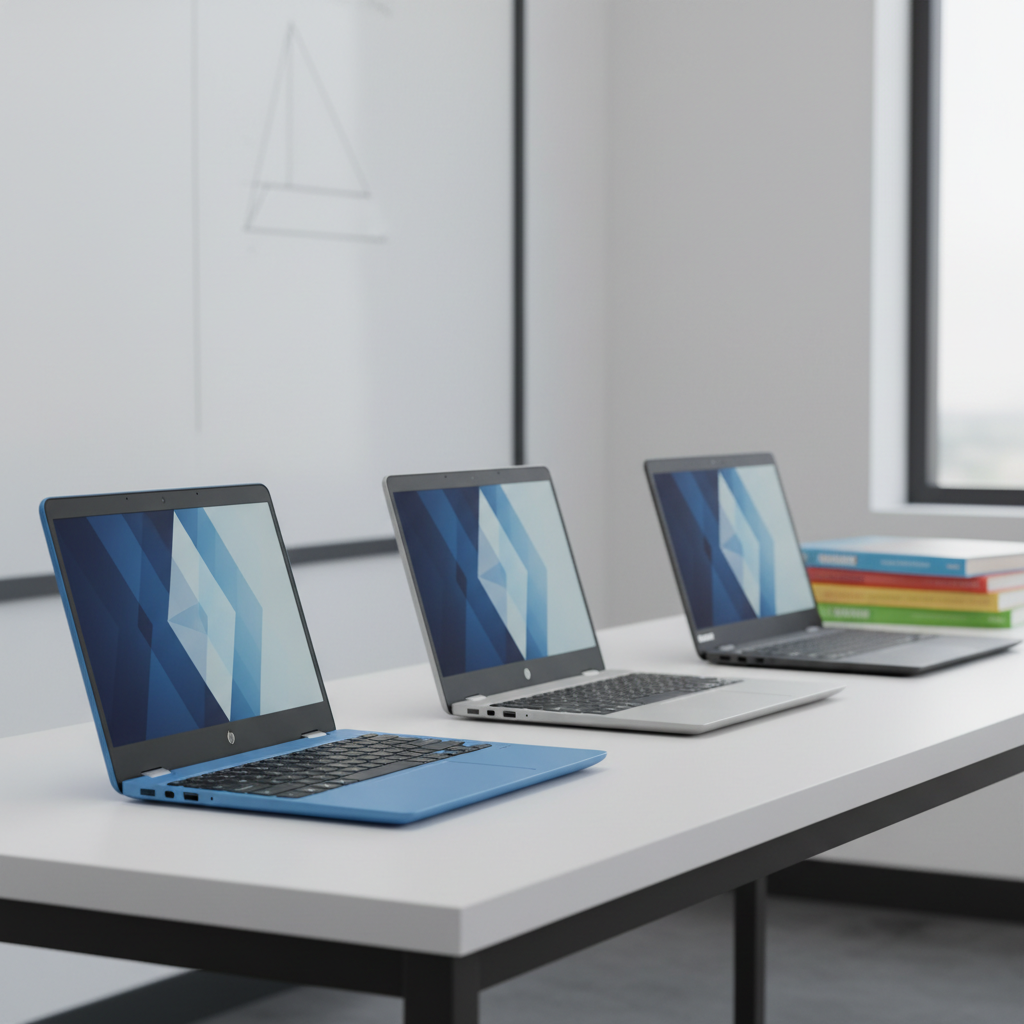
Choosing a 2‑in‑1 Chromebook that can keep up with classes, group projects, and on‑the‑go study sessions isn’t always simple, so we lined up six models to help you sort the noise. From rugged budget choices to sleek premium converters, each device was evaluated on price, rating, battery endurance and the flexibility a hinge‑to‑tablet design offers.
The price spread runs from $73.20 for the Dell Chromebook 3100—an entry‑level rugged option that claims up to 14 hours of battery life—to $369.99 for the ASUS Chromebook Flip CX1, which packs a 14‑inch FHD touchscreen and MIL‑STD‑810H durability. Our budget tier (Dell and Lenovo) offers up to 11 hours of battery life (the Lenovo 500e) at under $90, while the mid‑range HP Chromebook 14‑inch Blue ($218.49) shines with a 4.4/5 rating from 223 reviewers and Wi‑Fi 6 support. The premium tier (Samsung and ASUS) adds higher‑resolution displays and integrated stylus functionality, with the Samsung Chromebook Plus V2 retailing at $243.49 and offering a 1920×1200 screen.
Next, we explore each model’s key strengths and drawbacks so you can match the right Chromebook to your coursework, budget and lifestyle.

HP Chromebook 14-inch Blue
Its up‑to‑13.5‑hour battery life gives you all‑day use without hunting for an outlet, making it the most balanced choice for students.
Samsung Chromebook Plus V2 12-inch
Ideal for buyers who value a proven brand and premium build, it costs about $25 more than the HP, reflecting its strong reputation and higher‑end features.
Lenovo 500e Chromebook 11.6-inch
Stands out with a 42 Wh battery and an $89.99 price tag, offering solid 11‑hour runtime for budget‑conscious students who don’t need a larger screen.
Also considered
Score Analysis
Key score advantages vs. runner-up (Samsung Chromebook Plus)
Price Range
HP Chromebook 14-inch Blue
$216.00
Samsung Chromebook Plus V2 12-inch
$243.49
Lenovo 500e Chromebook 11.6-inch
$79.99
HP Chromebook x360 14b
$269.99

ASUS Chromebook Flip CX1 14-inch
$333.88
Dell Chromebook 3100
$73.20
Spec Comparison
TL;DR: The HP Chromebook 14‑inch in Serenity Blue delivers a crisp 1080p IPS touchscreen, up to 13.5 hours of battery life, and a 3.40 GHz quad‑core Intel N100 for a solid, student‑focused 2‑in‑1 at $218.49.
The standout spec is the 14‑inch Full HD (1920 × 1080) IPS touchscreen with 250 nits brightness, which gives a clear, sharp picture for both note‑taking and streaming. Under the hood sits an Intel N100 processor that can boost to 3.40 GHz across four cores, paired with 4 GB LPDDR5 RAM and 64 GB eMMC flash storage. The device also supports an active stylus, making handwritten notes and sketches feel natural on the edge‑to‑edge glass.
Compared with the other five Chromebooks in this roundup, the HP model offers the longest claimed battery life at up to 13.5 hours, outlasting the HP Chromebook x360 14b’s 10‑hour estimate and the Samsung Chromebook Plus V2’s 10‑hour claim. However, at 4.52 lbs it weighs noticeably more than the HP Chromebook x360 14b (3.32 lbs) and the Samsung model (2.98 lbs), and it carries the same 250‑nit brightness as the HP x360, so the display isn’t brighter than its peers.
Reviewers appreciate the Full HD IPS panel, noting it resolves the low‑resolution criticism of earlier HP Chromebooks, and they praise the solid build quality of the 360° hinge. Users also like the Wi‑Fi 6 (802.11ax) connectivity for reliable campus networks. On the downside, HP solders the 4 GB RAM and the 64 GB eMMC storage in place, limiting multitasking and causing large files to fill the internal drive quickly—many owners rely on the microSD slot for extra space. The glossy screen can reflect bright classroom lighting, a point often mentioned in consumer feedback.
Pros
Cons
Best for: Students (K‑12 and college) who need a reliable Chrome OS notebook for Google Classroom, note‑taking, and media consumption.
Avoid if: You require heavy multitasking, professional‑grade storage speed, or a matte screen for bright environments.
“Perfect for schoolwork and Zoom meetings.”
“Love the touch screen and flip design—great for watching videos.”
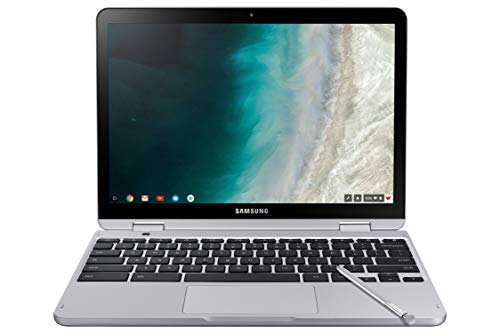
TL;DR: The Samsung Chromebook Plus V2 packs a 12.2‑inch 1920 × 1200 touchscreen, an integrated active stylus and up to 10 hours of web‑focused battery life in a lightweight 2.98‑lb fanless chassis.
The standout feature is the built‑in active stylus that sits inside the chassis and offers pressure sensitivity with palm‑rejection, making note‑taking and sketching feel natural without carrying an extra pen. Coupled with a glossy 12.2‑inch WUXGA LED display (1920 × 1200 pixels) the device delivers crisp, vibrant visuals for classroom presentations or media consumption.
At 2.98 pounds, it's lighter than the HP Chromebook x360 14b (3.32 pounds) and matches the weight of the Lenovo 500e Chromebook (both listed at 1352 g), positioning it as one of the more portable options in the six‑product lineup. Its 39 Wh battery provides an advertised 10‑hour optimal run time, though real‑world video playback drops to about 5.25 hours, a shorter endurance than the HP Chromebook x360 14b’s 47 Wh capacity. The device’s fanless design keeps it quiet, while the 360° hinge lets you switch between laptop, tent, stand or tablet modes.
Reviewers consistently praise the high‑resolution screen and the convenience of the built‑in stylus, noting that the display’s color accuracy and wide viewing angles enhance both study sessions and creative projects. Professional reviewers also highlight the sturdy build quality and the reliable Chrome OS experience. On the downside, users report that the shallow‑travel keyboard feels cramped for long typing sessions, and the touchpad’s small size can feel unresponsive. Battery life under heavy load—especially video playback—falls short of the advertised 10‑hour claim, which aligns with common user complaints.
Pros
Cons
Best for: Students and educators who want a lightweight convertible with a built‑in stylus for note‑taking and classroom use.
Avoid if: You need long‑lasting battery endurance under heavy workloads or high‑performance hardware for demanding applications.
“Still trying to figure it out—it’s a little hard to figure out, it’s not like a regular computer, a little bit of pain in the butt.”
TL;DR: The Lenovo 500e Chromebook 11.6‑inch offers MIL‑STD‑810G durability, a built‑in stylus and up to 11 hours of battery life for just $89.99, though its HD screen and speakers are modest.
What really sets this model apart is its rugged design: it meets MIL‑STD‑810G certification, can survive a 29.5‑inch drop, and resists spills up to 330 ml. A passive, battery‑free stylus tucks into the chassis, making note‑taking in the classroom painless.
At 1352 g, the 500e is lighter than the Dell Chromebook 3100 (1410 g) and noticeably lighter than the HP 14‑inch Blue (5.0 pounds). Its battery life of up to 11 hours falls short of Dell’s claimed 14‑hour endurance and HP’s 13.5‑hour claim, but matches the ASUS Flip CX1’s 11‑hour spec. The device sports two USB‑C ports and two USB‑A ports plus HDMI, while the Samsung Chromebook Plus V2 only lists a single USB‑C and older Bluetooth 4.0; Lenovo’s Bluetooth 5.1 gives it a newer wireless edge.
Reviewers consistently praise the Chromebook’s durability and the convenience of the included stylus, noting that it holds up well in busy school environments. However, reviewers describe the 1366 × 768 IPS LCD as dim and low‑resolution, call the speakers muffled, and note that both front (720p) and rear (~5 MP) cameras appear grainy in low light. The all‑plastic chassis keeps costs down but adds a bit of bulk in tablet mode.
Under the hood, the 500e runs an Intel Celeron N5100 quad‑core processor clocked up to 2.8 GHz, paired with 4 GB LPDDR4 RAM at 1600 MHz and 32 GB eMMC storage. Wi‑Fi 6 and Bluetooth 5.1 round out the connectivity suite, while the HDMI port and Kensington lock slot add flexibility for classroom setups.
Pros
Cons
Best for: K‑12 students and teachers who need a rugged, stylus‑ready device on a tight budget.
Avoid if: You need advanced features or professional‑grade performance.
TL;DR: The HP Chromebook x360 14b offers a 14‑inch FHD touchscreen, fanless silent operation and up to 10 hours of battery life, but its modest storage and lack of HDMI may limit power users.
The standout feature is its 14‑inch 1920 × 1080 IPS display paired with 250 nits brightness, delivering clear visuals for coursework and media. Under the hood, 8 GB of LPDDR5 RAM and 128 GB of UFS storage keep Chrome OS responsive, while the Intel N200 processor runs at a base 0.8 GHz and can boost to 3.4 GHz across four cores.
Compared with the other five Chromebooks in this roundup, the x360 is a bit heavier than the Samsung Chromebook Plus V2 at 2.98 pounds, yet noticeably lighter than HP’s own 14‑inch Blue model at 5.0 pounds. Its 47 Wh battery sits between the Lenovo 500e’s 42 Wh and the ASUS Flip CX1’s 50 Wh, delivering up to 10 hours—shorter than Dell’s claimed 14‑hour run‑time but matching Samsung’s advertised 10‑hour endurance. Brightness matches the HP 14‑inch Blue’s 250 nits, while most peers don’t list a brightness figure.
Professional reviewers note the fanless design makes the device virtually silent in a classroom, and the backlit keyboard offers a rare perk at this price point. Users appreciate the smooth multitasking with multiple Chrome tabs and Android apps, as well as the USI stylus support for note‑taking. However, the 720p front camera can look grainy in low light, and the 128 GB storage may fill quickly for heavy media libraries.
Pros
Cons
Best for: Students (K‑12 and college), remote learners, families, and educational institutions needing a portable, convertible Chrome OS device.
Avoid if: You need advanced performance, high‑resolution video editing, gaming, or built‑in HDMI/Ethernet connectivity.
“Perfect for schoolwork and Zoom meetings.”
“Love the touch screen and flip design—great for watching videos.”
TL;DR: The ASUS Chromebook Flip CX1 14‑inch delivers a rugged MIL‑STD‑810H build, 8 GB RAM, up to 11 hours of battery, and a 360° hinge, but its $369.99 price sits above most budget Chromebooks.
This model’s standout feature is its military‑grade durability combined with a 360‑degree hinge that lets you switch between laptop, tent, stand, and tablet modes in seconds. The chassis weighs 1630 g and measures just 17.9 mm thick, while the 14.0‑inch FHD touchscreen shines at 250 nits and supports 10‑point multi‑touch. Under the hood, an Intel Celeron N6000 runs from a 1.1 GHz base up to 3.3 GHz, backed by 8 GB LPDDR4X RAM and 128 GB eMMC storage.
Compared with the five other Chromebooks in this roundup, the CX1 is heavier than the Samsung Chromebook Plus V2 (1352 g) but lighter than the HP Chromebook 14‑inch Blue (2049 g). Its battery life of up to 11 hours exceeds Samsung’s advertised 10 hours and matches the Lenovo 500e’s 11‑hour claim, while the HP x360 tops out at 10 hours and Dell advertises up to 14 hours. Brightness aligns with HP’s 250‑nits displays, and the CX1’s 17.9 mm profile is slimmer than HP’s 21 mm thickness but a touch thicker than Samsung’s 17.0 mm.
Users consistently praise the Chromebook’s durability and the hinge’s flexibility, noting that the dual‑array microphone and 720p HD webcam hold up well for video classes. Professional reviewers highlight the smooth multitasking provided by Wi‑Fi 6, Bluetooth 5.2, and the 8 GB of RAM. On the downside, owners say the eMMC storage feels slower than an SSD, the 250‑nits screen doesn't read well in bright sunlight, and they report occasional keyboard or touchpad hiccups.
Pros
Cons
Best for: Students who need a durable, versatile 2‑in‑1 that can handle multitasking and classroom mobility.
Avoid if: You have a tight budget, require a very bright outdoor display, or need fast SSD storage for large media libraries.
“Great for school”
“it loses connection to the physical keyboard and touchpad”
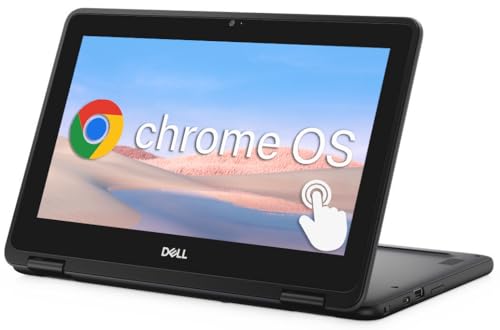
TL;DR: The Dell Chromebook 3100 2‑in‑1 offers rugged MIL‑STD‑810G durability, a claimed 14‑hour battery, and a versatile port selection at a budget‑friendly $73.20 price.
The standout feature is its durability: the chassis exceeds MIL‑STD‑810G, survives 30‑inch drops and resists up to 354 ml of spills, making it ideal for classroom mishaps. Its 11.6‑inch HD (1366 × 768) TN touchscreen runs at 60 Hz and it's powered by a dual‑core Intel Celeron N4000/N4020 with a base clock of 1.1 GHz and burst up to 2.8 GHz.
Compared with the other five Chromebooks in this roundup, the Dell sits in the middle of the weight range—lighter than the HP 14‑inch (about 5 lb) but a bit heavier than the Lenovo 500e (1352 g). Its claimed 14‑hour battery tops the Lenovo’s 11‑hour spec and matches the HP 14‑inch’s 13.5‑hour claim, though it’s rated at around 9.4 hours, similar to Samsung’s 10‑hour advertised life. The 30‑inch drop rating also exceeds the Lenovo’s 29.5‑inch protection, while its spill‑resistant keyboard gives it an edge over models that list no spill rating.
Reviewers consistently praise the rugged build and the convenience of USB‑C charging with Power Delivery, noting that the device boots quickly and stays up‑to‑date through June 2029 Auto Update Expiration. However, users flag the TN panel for washed‑out colors and narrow viewing angles, and they mention that 4 GB of soldered RAM and only 16‑32 GB of eMMC storage can feel cramped when many browser tabs are open. The front‑facing 1 MP (720p) camera's sufficient for video calls but not a highlight.
Pros
Cons
Best for: Entry‑level buyers or those on a tight budget who need a rugged, manageable Chromebook for everyday school tasks.
Avoid if: You need high‑performance graphics, extensive local storage, or a backlit keyboard for low‑light work.
Breakdown
HP Chromebook 14-inch Blue
Pros
Samsung Chromebook Plus V2 12-inch
Pros
Lenovo 500e Chromebook 11.6-inch
Pros
HP Chromebook x360 14b
Cons
Based on scoring data and product specs
Personalized picks
Best Overall Pick
HP Chromebook 14-inch Blue
Best OverallBest for: Home and office users seeking a balance of features and value
Samsung Chromebook Plus V2 12-inch
Best for: Buyers willing to invest in a proven, high-quality option
$243.49+$27.49 vs winner
Skip Dell Chromebook 3100 if…
Reliability and user satisfaction are your top concerns
The HP Chromebook 14‑inch in Serenity Blue takes the top spot thanks to its solid 4.4‑star rating from 223 reviewers, a battery that lasts up to 13.5 hours, and a crisp 14‑inch FHD IPS touchscreen that flips 360°. Its Intel N100 processor (4‑core, 3.40 GHz) and 4 GB LPDDR5 RAM keep everyday school tasks smooth, while Wi‑Fi 6 and Bluetooth 5.0 give fast, reliable connectivity—that's all for $218.49.
If you need a compact convertible, the Samsung Chromebook Plus V2 12‑inch earns runner‑up honors with its built‑in active stylus for quick note‑taking and sketching. Its 12.2‑inch 1920 × 1200 display, fanless design, and lightweight 2.98 lb chassis make it easy to carry between classes, and the integrated stylus stays tucked away for on‑the‑go use. Battery life is advertised at 10 hours, that's ample for a full school day.
Pick the HP Chromebook 14‑inch Blue now and you'll get a reliable, long‑lasting laptop that handles classwork and creativity without compromise.
The HP Chromebook 14‑inch Blue is listed with up to 13.5 hours of battery life, which tops the Samsung Chromebook Plus V2’s 10 hours (optimal) and Lenovo 500e’s 11 hours. Dell’s claim of 14 hours drops to about 9.4 hours in real‑world testing, so the HP model leads on endurance.
Please sign in to leave a review
No reviews yet. Be the first to review!
