
If you need a solid all‑round 2‑in‑1 without breaking the bank, the HP 15 Ryzen 3 leads the pack. It carries a 4.5‑star rating from 1,448 reviewers, a 15.6‑inch HD touchscreen and up to 12 hours of battery life, all for $369.99. At 3.52 pounds it’s light enough for a backpack, and the 8 GB of LPDDR5 RAM with dynamically allocated VRAM gives snappy everyday performance.
The review covers 11 convertible laptops that span three price tiers. The budget tier includes Dell’s Latitude 3190 11.6‑inch and 3190 models, the Lenovo Flagship Chromebook and Acer Aspire Go 15, all priced under $300 and weighing between 2.0 and 3.81 pounds. Mid‑range options are the HP 15 Ryzen 3 and Dell Inspiron 3511, priced at $369.99 and $538.99 respectively, each offering larger screens and higher‑rated batteries. Premium choices—Dell Inspiron 15 3530, Lenovo Yoga 7i 16‑inch, Microsoft Surface Laptop and Samsung Galaxy Book5 Pro—bring brighter displays, longer battery life and premium builds, with prices from $619 up to $1,299.99.
The following sections walk through each model’s key strengths, potential drawbacks and the scenarios where they shine.

HP 15 Ryzen 3
Offers up to 12 hours of battery life, balancing performance and endurance for everyday tasks.

Acer Aspire Go 15 Intel
Ideal for mobile students who need extra stamina, it delivers up to 12.5 hours of runtime and costs about $85 less than the HP mid‑range option.

Dell Latitude 3190
Stands out with dual noise‑cancelling microphones and bottom‑panel stereo speakers, delivering clearer calls and richer audio for budget‑focused users.
Also considered
Score Analysis
Key score advantages vs. runner-up (Acer Aspire Go)
Price Range
HP 15 Ryzen 3
$389.62
Acer Aspire Go 15 Intel
$279.95
Dell Latitude 3190
$154.99

Dell Inspiron 15 3530
$619.00

Lenovo Flagship Chromebook
$179.99

Lenovo Yoga 7i 16-inch 83DL
$789.00

Dell Latitude 3190 11.6-inch
$140.00

Samsung Galaxy Book5 Pro
$1,485.05

Microsoft Surface Laptop
$1,029.00

Dell Inspiron 3511 i5-1135G7
$647.00
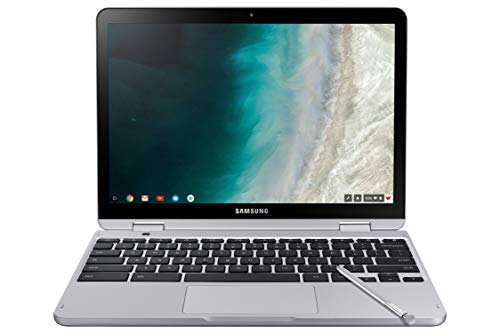
Samsung Chromebook Plus V2 12-inch
$243.49
Spec Comparison
TL;DR: The HP 15 Ryzen 3 offers a 15.6‑inch HD touchscreen, 8 GB LPDDR5 RAM and a 128 GB SSD in a lightweight 3.52‑lb chassis, backed by up to 12 hours of battery life.
The standout feature is its 15.6‑inch HD touchscreen panel (1366 × 768 pixels) with 250 nits brightness and 62.5% sRGB coverage, letting you tap, swipe and zoom directly on the display. At just 3.52 pounds and a slim 19 mm height, the laptop feels easy to carry around campus or a home office, and the 12‑hour battery keeps you productive through a full day of classes.
Compared with the other ten models in this roundup, the HP is heavier than the ultra‑light Samsung Chromebook Plus V2 but lighter than the Dell Latitude 3190. Its battery life matches the Acer Aspire Go 15 and outlasts the Dell Inspiron 3511, which only promises around half a day. While many competitors include USB‑C charging or video output, this HP’s single USB‑C port is data‑only, a trade‑off you’ll notice against models that offer more versatile ports.
Reviewers note that the AMD Ryzen 3 7320U (2.4 GHz base, 4.1 GHz boost, 4 cores, 8 threads, 15 W TDP) delivers enough performance for everyday tasks, and the Radeon 610M graphics handle HD video smoothly. The onboard 8 GB of LPDDR5 memory runs at 5500 MT/s, and the 128 GB PCIe NVMe SSD provides quick file access, though some users wish for a larger drive. Wi‑Fi 6 and Bluetooth 5.3 round out the connectivity suite, and Windows 11 Home in S Mode adds built‑in security.
Pros
Cons
Best for: Students or home users who want a lightweight, well‑reviewed touchscreen notebook for everyday tasks.
Avoid if: You need a high‑resolution display, upgradeable memory, or more storage for demanding professional work.
“Screen is too pixelated”
“Received damaged or incomplete package”
TL;DR: The Acer Aspire Go 15 packs a 13th‑gen i7, up to 1 TB SSD and a 15.6″ FHD touchscreen for $285, delivering solid everyday performance with a long‑lasting battery.
At the heart of the Aspire Go 15 is an Intel Core i7‑13620H that runs from 2.4 GHz up to 4.9 GHz across 10 cores and 16 threads, paired with 16–32 GB DDR5 RAM and a 1 TB PCIe Gen4 SSD. A dedicated Copilot key lets Windows 11’s AI features launch with a single press, setting this model apart from most other laptops in the roundup.
Weighing 3.81 pounds, the Aspire Go 15 sits heavier than the Samsung Chromebook Plus V2 (2.98 pounds) but lighter than the Dell Latitude 3190 (4.39 pounds). It's advertised battery life of up to 12.5 hours outpaces the HP 15 Ryzen 3’s 12‑hour claim and the Dell Latitude’s 11‑hour figure, while matching the Lenovo Flagship Chromebook’s 13.5‑hour endurance. Unlike many peers, it offers a capacitive multi‑touch 15.6″ FHD IPS panel with 250 nits brightness and 60 Hz refresh, plus dual USB‑C ports that support 65 W charging.
Reviewers praise the smooth everyday performance and the convenience of the AI‑ready Copilot key, while noting the 720p webcam and lack of a backlit keyboard as drawbacks. Professional opinions highlight the i7’s desktop‑class power in a relatively thin chassis and the use of post‑consumer recycled plastic for a greener footprint.
Pros
Cons
Best for: Most users looking for a well‑reviewed, reliable mainstream option
Avoid if: You have limited desk space or need portability
“It's been working well. We've used Acer's for years.”
TL;DR: The Dell Latitude 3190 offers a rugged 11.6‑inch touchscreen, up to 11 hours of claimed battery life, and a fanless Pentium Silver CPU at a budget‑friendly $159.99.
The standout feature is its 11.6‑inch 1366 × 768 HD touchscreen with 10‑point multi‑touch capability, which pairs with a 42 Wh (3‑cell) battery that the manufacturer claims can last up to 11 hours. In real‑world use reviewers report 6–8 hours, which still covers a full workday. Weighing 4.39 lb, the device feels solid yet portable enough for a backpack.
Compared with the other ten laptops in this roundup, the Latitude 3190 weighs noticeably more than the Lenovo Flagship Chromebook (2.86 lb) and the Dell Latitude 3190 11.6‑inch variant (2.0 lb). It also tips the scales against the Samsung Chromebook Plus V2 (2.98 lb) and the Acer Aspire Go 15 (3.81 lb), making it one of the heftier options. Its battery claim of up to 11 hours falls short of the Lenovo’s 13.5‑hour rating, but it still outpaces many mid‑range models that list shorter endurance.
User feedback highlights the laptop’s durability – the rubberized base and spill‑resistant keyboard earn frequent praise from students and educators who move it around classrooms. Professional reviewers note the long battery life and the sturdy 360° hinge as strong points. On the downside, the Intel Pentium Silver N5030 (1.1 GHz base, 3.1 GHz turbo, 4 cores, 4 threads, 4 MB cache, 6 W TDP) struggles with heavy multitasking, and the 4 GB DDR4 soldered RAM limits future upgrades. Critics note modest brightness and narrow viewing angles for the 1366 × 768 display.
Technically, the laptop ships with Windows 10 Pro (upgradeable to Windows 11 Pro), 128 GB SSD storage, and Intel UHD Graphics 605. Dual noise‑cancelling array microphones and bottom‑panel stereo speakers handle the audio. Connectivity includes Bluetooth 4.2 (or 4.1) and 802.11ac Wi‑Fi. An optional Dell Active Pen adds note‑taking flexibility, while the 360° convertible hinge lets you switch between laptop, tent, stand, and tablet modes.
Pros
Cons
Best for: Entry-level buyers or those on a tight budget
Avoid if: Reliability and user satisfaction are your top concerns
“Arrived in like‑new condition with fast boot and smooth Windows 11 performance.”
“Perfect for my kids’ schoolwork—durable and long battery life.”
TL;DR: The Dell Inspiron 15 3530 delivers a 13th‑Gen i7 CPU, 16 GB RAM and a 1 TB SSD in a 15.6‑inch touchscreen, but its modest battery and lack of Thunderbolt keep it from being a premium convertable.
At the heart of the Inspiron 15 3530 sits a 10‑core Intel Core i7‑1355U that can boost up to 5.0 GHz, paired with 16 GB of DDR4 RAM running at 3200 MHz and a fast 1 TB PCIe Gen4 SSD. The 15.6‑inch touchscreen uses a 1920 × 1080 TN panel with 100 PPI, 6.6 mm side bezels and a 79.7% screen‑to‑body ratio, while the anti‑glare coating and ComfortView help reduce eye strain during long work sessions.
Compared with its peers, the Inspiron sits at a higher price tier than the Dell Inspiron 3511, yet it's slightly lighter than that model’s 3.7 pounds. It's considerably heavier than the HP 15 Ryzen 3, which tips the scales at about 3.5 pounds, and far lighter than the Lenovo Yoga 7i 16‑inch that weighs over 4.6 pounds. Its battery options—41 Wh (3‑cell) or 54 Wh (4‑cell) with ExpressCharge—are lower than the Yoga’s 71 Wh, while the HDMI 1.4 port limits external displays to 1080p @ 60 Hz, a step down from devices that offer Thunderbolt 4.
User feedback highlights the strong CPU performance for everyday productivity and the generous port selection, which includes two USB‑A 3.2 Gen 1 ports, a USB‑C 3.2 Gen 1, HDMI 1.4 and an SD 3.0 reader. Reviewers also praise the upgrade‑friendly memory layout—two SODIMM slots for up to 16 GB total—and the crisp 1080p webcam that improves video calls. On the downside, the lack of Thunderbolt 4 and the HDMI limitation frustrate power users, and some configurations ship with slower RAM speeds despite the processor’s capabilities.
Pros
Cons
Best for: Students, remote workers and small‑business professionals who need solid performance and upgrade flexibility in a convertible form factor.
Avoid if: You require a backlit keyboard, Thunderbolt connectivity, or plan to drive 4K external monitors for graphics‑intensive tasks.
TL;DR: The Lenovo Flagship Chromebook packs a 14‑inch Full HD touchscreen, 13.5‑hour battery, and lightweight 2.86 lb chassis for under $180, making it a solid portable Chrome OS option for students and casual users.
The standout feature is its 14.0‑inch IPS LCD with a 1920 × 1080 resolution and 10‑point multi‑touch capacitive screen, paired with a MediaTek Kompanio 520 octa‑core processor clocked at 2.0 GHz. At just 2.86 lb and 19 mm thick, the device feels airy enough for a laptop that still houses a backlit keyboard, dual‑array digital microphone, and a webcam with a privacy shutter.
Compared with the other ten contenders, this Chromebook is lighter than the Dell Latitude 3190 (4.39 lb) yet a bit heavier than the Dell Latitude 3190 11.6‑inch model (2.0 lb). Its 13.5‑hour battery life outlasts the Dell Latitude’s claimed 11 hours, Samsung Chromebook Plus V2’s 10 hours, Acer Aspire Go 15’s 12.5 hours, HP 15 Ryzen 3’s 12 hours, and Dell Inspiron 3511’s 6 hours. Screen‑size wise, it sits between the 11.6‑inch and 12‑inch units and the 15.6‑inch models from Acer, HP, and Dell Inspiron, offering a comfortable middle ground.
Users and professional reviewers consistently praise the device’s portability, quick startup, and responsive touchscreen, with one outlet dubbing it the “MacBook Air of Chromebooks.” The fanless design keeps it quiet, and the privacy shutter adds peace of mind for video calls. On the downside, the 4 GB of RAM can bottleneck heavy multitasking, and the 64 GB eMMC storage fills quickly, often prompting users to rely on the microSD slot for extra space. Reviewers also note that specs don’t list the refresh rate, and a 60 Hz panel may feel less smooth during fast scrolling.
Pros
Cons
Best for: Budget-conscious buyers seeking a reliable entry-level option
Avoid if: You need heavy multitasking, large local storage, or a high‑performance CPU for demanding workloads
“Perfect for homeschooling”
“Fast boot-up, no waiting”
TL;DR: The Lenovo Yoga 7i 16‑inch 83DL blends a 12‑core Intel Ultra 7 CPU, a 71 Wh battery and a large 16‑inch touchscreen in a sturdy aluminum chassis, but its glossy screen is dim and it feels heavy in tablet mode.
At the heart of the Yoga 7i sits a 12‑core Intel Core Ultra 7 155U processor that can boost up to 4.8 GHz, paired with 16 GB of LPDDR5 RAM and a fast 1 TB PCIe 4.0 SSD. The 16.0‑inch IPS LCD touchscreen offers a 1920 × 1200 resolution and a 91 % screen‑to‑body ratio, while the 360° hinge lets you flip between laptop, tablet, tent and stand modes. A 71 Wh battery delivers up to 13 hours of light use, giving you all‑day endurance for work or study.
Compared with other contenders, the Yoga 7i is noticeably heavier than the Dell Inspiron 15 3530 (3.64 pounds) and the Microsoft Surface Laptop (2.96 pounds), but its 71 Wh battery dwarfs the Inspiron’s 41 Wh or 54 Wh options and the Surface’s 52‑54 Wh cells. Its 361.70 mm depth also exceeds the Surface’s 302 mm profile, while the 16.0‑inch display is larger than the 15.6‑inch panel found on the Dell Inspiron 3511 i5‑1135G7.
Reviewers consistently praise the laptop’s “excellent real‑world CPU performance” and the “strong all‑day battery life” that lets them run multiple apps without hunting for an outlet. Professionals note the premium CNC‑milled aluminum build and the sturdy 360° hinge that automatically adjusts apps when you switch modes. On the downside, users call out the glossy screen’s low brightness and glare, the 4.63‑pound weight that makes tablet mode feel unwieldy, and audible fan noise when the processor is under load. Some also mention occasional Bluetooth dropouts, which can be a nuisance for wireless peripherals.
The Yoga 7i’s backlit keyboard features a 1.3 mm key travel and a right‑side numeric keypad, while the chassis houses a fingerprint reader on the power button, an IR camera with a privacy shutter, and Dolby Atmos‑enabled four‑speaker audio. Connectivity includes two USB‑A ports, two Thunder‑bolt 4 USB‑C ports, a full‑size SD card reader and a 3.5 mm combo jack, giving you plenty of options for peripherals.
Pros
Cons
Best for: Those prioritizing quality and willing to pay for premium performance
Avoid if: You're on a tight budget or only need basic functionality
TL;DR: For $140 the Dell Latitude 3190 11.6‑inch 2‑in‑1 delivers an 8 GB DDR4 memory, 128 GB SSD, 42 Wh battery and Corning Gorilla Glass touchscreen in a 2‑pound, fanless package.
What really stands out is the 360° hinge that lets you switch between laptop, tent, stand and tablet modes without a separate keyboard. The chassis weighs just 2.0 pounds and the manufacturer states up to 11 hours of battery life from a 42 Wh (3‑cell) pack, so it's easy to carry around a whole school day. Under the hood you get an Intel Pentium Silver N5030 with a 1.1 GHz base clock, 3.1 GHz turbo, 4 cores, 4 MB cache and a fanless 6 W TDP, paired with 8 GB DDR4 RAM running at 3200 MHz and a 128 GB SSD.
Compared with the other ten laptops in this roundup, the Latitude 3190 is among the lightest – the Dell Latitude 3190 (B0DNLDKY3S) tips the scales at 4.39 pounds, while the Lenovo Flagship Chromebook and Samsung Chromebook Plus V2 sit around 2.86 pounds and 2.98 pounds respectively. Its $140 price point also lands it at the budget end of the spectrum, well below the Acer Aspire Go 15 and HP 15 Ryzen 3 which sit in the $285‑$370 range. Battery life is listed as up to 11 hours, and the device offers a comparable set of ports – HDMI, two USB‑A and a combo audio jack – and avoids the extra weight of larger 15‑inch models.
Professional reviewers praise the rugged build, noting the spill‑resistant keyboard, the Corning Gorilla Glass touchscreen and the snappy SSD response. Everyday users echo the same sentiment, highlighting quick boot times and the convenience of the 10‑point multi‑touch display. The downsides show up in the low 1366 × 768 HD resolution, which reviewers say limits sharpness, and the Pentium N5030 processor, which struggles with heavy multitasking or creative workloads. Some owners have reported power‑on failures, sticky or cracked keys, and occasional mismatched power adapters, so reliability can be a concern in refurbished units.
On the technical side, the device ships with Windows 10 Pro (upgradeable to Windows 11 Pro), supports Dell Active Pen (sold separately), and includes dual noise‑cancelling array microphones for clearer calls. Wi‑Fi 5 (802.11ac 2x2) and Bluetooth 4.2 handle connectivity and are sufficient for typical classroom or office use. The integrated Intel UHD Graphics 605 handles basic video playback, but it isn’t meant for gaming or intensive graphics tasks.
Pros
Cons
Best for: Students, travelers, and budget‑conscious users who need a lightweight, durable convertible for everyday tasks.
Avoid if: You need high‑performance processing, a high‑resolution large display, or a machine for intensive creative workloads.
“Arrived in like‑new condition with fast boot and smooth Windows 11 performance.”
“Perfect for my kids’ schoolwork—durable and long battery life.”
TL;DR: The Samsung Galaxy Book5 Pro 360 packs a 16‑inch Dynamic AMOLED 2X screen, 16 GB RAM and up to 25 hours of video playback, but its $1,299.99 price tags it as a premium choice.
What really stands out is the 16.0‑inch Dynamic AMOLED 2X display with a 2880 × 1800 resolution, up to 500 nits HDR brightness, 120% DCI‑P3 colour gamut and an adaptive 120 Hz refresh rate. Coupled with an Intel Core Ultra 7 processor, 16 GB LPDDR5X RAM and an Intel Arc 140V GPU with 8 GB VRAM, the machine delivers buttery‑smooth visuals and AI‑enhanced performance for creative work.
Compared with the other ten laptops in this roundup, the Book5 Pro offers a larger minimum battery capacity (73.9 Wh) than the Microsoft Surface Laptop’s 52 Wh and the Dell Inspiron 15’s 41 Wh, while matching the Surface’s 120 Hz panel and beating the Lenovo Yoga 7i’s 60 Hz refresh rate. Its 16‑inch screen is bigger than the 15.6‑inch displays on most competitors, yet it remains lighter than the Lenovo Yoga 7i (4.63 lb) and Acer Aspire Go 15 (3.81 lb), though heavier than the Surface Laptop (2.96 lb) and Dell Inspiron 3511 (3.7 lb).
Reviewers consistently praise the vivid AMOLED panel and the included S Pen for sketching and note‑taking, calling the visual experience “jaw‑dropping.” Users also highlight the all‑day battery life and the quick 30‑minute charge to reach 35 % capacity. On the downside, some note audible fan noise under heavy workloads and wish the backlit keyboard were brighter in dim environments.
Additional technical perks include Wi‑Fi 7, Bluetooth 5.4, two Thunderbolt 4 ports, an HDMI 2.1 output that supports 8K@60 Hz, a 512 GB NVMe SSD and a built‑in fingerprint reader protected by Samsung Knox. Samsung integrates the S Pen, making it a true 2‑in‑1 for designers who need precision input on the go.
Pros
Cons
Best for: Those prioritizing quality and willing to pay for premium performance
Avoid if: You're shopping on a tight budget — it's priced at $1299.99
“the best laptop screen I’ve ever used”
“I used it for a full workday and still had 40% left.”
TL;DR: The Microsoft Surface Laptop offers a 13.8‑inch 120 Hz PixelSense Flow touchscreen, up to 20 hours of video playback, and 16‑32 GB LPDDR5x RAM for $899, delivering premium performance in a lightweight 2.96‑pound chassis.
The standout feature is its 13.8‑inch PixelSense Flow display, which runs at up to 120 Hz and delivers a crisp 2304 × 1536 resolution. Dolby Vision IQ HDR and factory‑calibrated sRGB and Vivid profiles give vivid, color‑accurate visuals, while the 10‑point multi‑touch surface feels responsive. Under the hood, the laptop offers Snapdragon X Plus (10‑core) or Snapdragon X Elite (12‑core) processors paired with a Qualcomm Adreno GPU and a 45 TOPS NPU for AI‑driven tasks.
At 2.96 pounds, it’s noticeably lighter than the Lenovo Yoga 7i (4.63 pounds) and the Dell Inspiron 15 (3.64 pounds), and even the slimmer Samsung Galaxy Book5 Pro (3.73 pounds). Its battery packs 52 Wh minimum capacity, which sits below Lenovo’s 71 Wh but above Dell Inspiron’s 41 Wh option, giving it a respectable endurance without adding bulk. The device also includes a removable Gen 4 SSD, with storage options from 256 GB up to 1 TB.
User reviews frequently praise the stunning touchscreen and the all‑day battery life, noting that the full‑HD front camera with dual studio mics makes video calls feel professional. However, many point out the absence of a native HDMI or SD card slot, meaning adapters are required for external monitors or media cards. Professional reviewers also highlight that the Snapdragon X software ecosystem is still maturing, with some x86 applications running via emulation and occasional fan noise under heavy workloads.
It ships with Windows 11 Pro and Microsoft 365 Apps trial, plus security features like Pluton, TPM 2.0 and Windows Hello facial authentication. With 16‑32 GB of LPDDR5x RAM (soldered) and up to 1 TB of removable SSD storage, it balances performance and upgrade flexibility for most power users. The 65 W fast‑charging capability helps you top up the battery quickly, and the device’s 3.5 mm headphone jack ensures legacy audio connectivity.
Pros
Cons
Best for: Those prioritizing quality and willing to pay for premium performance
Avoid if: You're shopping on a tight budget — it's priced at $899.00
“The screen is stunning — colors pop, and touch is responsive.”
“Battery lasts all day, even with Zoom meetings and browsing.”
TL;DR: The Dell Inspiron 3511 packs a 15.6‑inch Full HD display, 32 GB of RAM, and a 1 TB SSD into a 3.7‑pound chassis, but its claimed six‑hour battery may limit all‑day use.
At the heart of the Inspiron 3511 sits an 11th‑gen Intel Core i5‑1135G7 processor (2.40 GHz base, 4.20 GHz turbo) built on a 10 nm process, paired with a hefty 32 GB DDR4 memory running at 2666 MHz. Storage comes from a fast 1 TB NVMe SSD, and the 15.6‑inch screen delivers a 1920 × 1080 resolution at 100 ppi with a 60 Hz refresh rate.
Compared with its peers, the 3511 is slightly heavier than the Dell Inspiron 15 3530’s 3.64 pounds, yet it’s a touch thinner (18.8 mm vs 19.05 mm) and marginally wider (235.5 mm vs 235.0 mm). Its 220‑nit brightness falls short of the HP 15 Ryzen 3’s 250 nits and the Acer Aspire Go 15’s 250 nits, and it offers far less battery endurance than the HP 15’s up‑to‑12‑hour claim or the Acer’s up‑to‑12.5‑hour claim. On the memory front, the Inspiron’s 32 GB dwarfs the HP 15’s 8 GB, giving it a clear edge for multitasking.
Reviewers appreciate the easy‑access RAM and SSD upgrades, the optional 10‑point multitouch touchscreen, and the full‑size numeric keypad for spreadsheets. Professional reviewers note that the Iris Xe graphics handle basic photo editing and 1080p video playback adequately. However, users consistently call out the short battery life, the plastic chassis that flexes under pressure, and the absence of a backlit keyboard, while some mention that the fans can become noticeably loud under load.
Pros
Cons
Best for: Home and office users seeking a balance of features and value
Avoid if: You need long battery life, a premium build, or a high‑brightness display
TL;DR: The Samsung Chromebook Plus V2 offers a 12.2‑inch 1920 × 1200 display, built‑in active stylus, and up to 10 hours of battery life in a lightweight 2.98‑lb convertible.
The Samsung Chromebook Plus V2 stands out with its built‑in active stylus and a crisp 12.2‑inch 1920 × 1200 glossy WUXGA display. Weighing just 2.98 lb and only 17 mm thick, it flips between laptop, tent, stand and tablet modes thanks to a 360° hinge.
At 2.98 lb it’s lighter than the Acer Aspire Go 15’s 3.81 lb chassis but a touch heavier than the Lenovo Flagship Chromebook’s 2.86 lb body. Its advertised 10‑hour battery life sits just below the Dell Latitude 3190’s claimed 11 hours, while video playback drops to about 5.25 hours. The 12.2‑inch screen is smaller than the 14‑inch display on the Lenovo model and the 15.6‑inch panels on the Acer and HP options, making it a truly portable choice for cramped desks.
Users consistently praise the always‑ready stylus for note‑taking and quick sketches, calling it a classroom‑friendly feature. Professional reviewers note that the Chrome OS platform runs web‑centric tasks smoothly, and the build feels solid for its price. The most common complaints revolve around the shallow‑travel keyboard and a touchpad that feels cramped, and the battery dips to roughly 5 hours when streaming 4K video. Reviewers also point out that the Intel Celeron 3965Y paired with 4 GB of RAM limits heavy multitasking.
Under the hood you get an Intel Celeron 3965Y dual‑core processor clocked at 1.5 GHz, 4 GB of LPDDR3 RAM and 64 GB of eMMC storage, expandable via a microSD slot up to 400 GB. Connectivity includes Wi‑Fi 802.11ac, Bluetooth 4.0 and two USB‑C ports that support charging and DisplayPort at up to 5 Gbps, plus a USB‑A 3.0 slot and a 3.5 mm combo jack. The device ships with a 39 Wh battery and an ENERGY STAR certification.
Pros
Cons
Best for: Students and educators who need a lightweight convertible with a built‑in stylus for note‑taking and classroom work.
Avoid if: You need long battery endurance, high‑performance multitasking, or desktop‑class software.
“Still trying to figure it out—it’s a little hard to figure out, it’s not like a regular computer, a little bit of pain in the butt.”
Breakdown
HP 15 Ryzen 3
Pros
Acer Aspire Go 15 Intel
Pros
Dell Latitude 3190
Pros
Cons
Dell Inspiron 15 3530
Pros
Cons
Based on scoring data and product specs
Personalized picks
Best Overall Pick
HP 15 Ryzen 3
Best Mid-Range PickBest for: Most users looking for a well-reviewed, reliable mainstream option
Acer Aspire Go 15 Intel
Best for: Most users looking for a well-reviewed, reliable mainstream option
$279.95-$109.67 vs winner
Skip Samsung Chromebook Plus V2 12-inch if…
You have limited desk space or need portability
The HP 15 Ryzen 3 ranks first as the best 2‑in‑1 convertible laptop in our roundup. It balances a solid 4.5‑star rating from 1,448 reviewers with a reasonable $369.99 price tag, and its 12‑hour battery life means you can stay productive all day without hunting for an outlet.
The Acer Aspire Go 15 Intel earns runner‑up honors, especially if you need extra horsepower for multitasking or light content creation. Its 10‑core Intel Core i7‑13620H processor, up to 32 GB DDR5 RAM, and a full‑HD 1920 × 1080 IPS touchscreen give you the performance and visual clarity that the HP’s HD 1366 × 768 display can’t match, all for $285.00.
Looking beyond the top two, the Dell Latitude 3190 11.6‑inch stands out as the clear budget pick at $140.00, offering a compact form factor for tight budgets. For those willing to stretch, the Samsung Galaxy Book5 Pro stands out as the premium alternative at $1,299.99, delivering high‑end features for users who want a flagship experience.
Pick the HP 15 Ryzen 3 today and enjoy a well‑rounded laptop that won’t break the bank.
The Acer Aspire Go 15 Intel lists up to 12.5 hours of battery life, slightly longer than the HP 15 Ryzen 3’s claimed 12 hours. It also offers a larger 1 TB SSD and up to 32 GB of DDR5 RAM, which can help keep productivity apps running smoothly throughout the day.
Please sign in to leave a review
No reviews yet. Be the first to review!
