Choosing a 2‑in‑1 laptop that can actually run Windows Copilot or other AI‑ready features feels like navigating a tech‑dense maze. In this roundup we’ve distilled the choices down to nine models, spanning three price tiers so you can spot a budget‑friendly option, a solid mid‑range contender, or a premium flagship without hunting through endless specs.
At the low end, the HP OmniBook X 16‑inch starts at $579.00 and the Dell Inspiron 14 7440 comes in at $665.99, both offering long‑lasting batteries (up to 21 hours for the OmniBook) and solid 4.x ratings. Mid‑range picks like the Lenovo Yoga 7i 16‑inch ($779.90, 3.9/5) and the ASUS Vivobook Flip 14 ($838.99, 4.3/5) give you OLED or high‑brightness displays plus integrated NPUs for on‑device AI. If you’re after the top‑tier experience, the Microsoft Surface Pro 12‑inch (priced at $849.97, 4.4/5) packs a 45 TOPS NPU and a feather‑light 2.5683853523‑pound chassis, while the Dell 16 Plus Ice Blue ($954.99) and ASUS Vivobook Flip 14‑inch OLED ($924.99) push premium build quality and higher‑end AI performance.
Below you’ll find a deeper look at each model’s strengths, so you can match the right AI‑ready 2‑in‑1 to your workflow.

Microsoft Surface Pro 12-inch
Features Dolby Atmos‑enhanced sound via 2 W stereo speakers, delivering richer audio than many rivals.

HP OmniBook X 16-inch
Ideal for entry‑level buyers or tight‑budget students, it’s priced at $579, roughly $270 less than the Surface Pro.

ASUS Vivobook Flip 14-inch
Stands out with a 70 Wh battery and up to 25‑hour claimed runtime, giving more endurance than the Surface’s 38 Wh while staying near the same price tier.
Also considered
Score Analysis
Key score advantages vs. runner-up (HP OmniBook X)
Price Range
Microsoft Surface Pro 12-inch
$849.97
HP OmniBook X 16-inch
$593.00
ASUS Vivobook Flip 14-inch
$838.99

Dell Inspiron 14 7440
$699.99
HP OmniBook X Flip
$746.99

Dell 16 Plus Ice Blue
$954.99

Lenovo Yoga 7i 16-inch 83JT
$788.00

ASUS Vivobook Flip 14-inch OLED
$924.99

Dell Inspiron 14 7445
$699.99
Spec Comparison
TL;DR: The Surface Pro 12‑inch packs a Snapdragon X Plus CPU, 45 TOPS NPU and 16 GB RAM into a 2.57‑lb tablet that delivers up to 16 hours of video playback on a 38 Wh battery.
The standout spec is the 45 TOPS neural processing unit paired with a 3.4 GHz Snapdragon X Plus processor, giving the device AI‑ready performance that most 12‑inch competitors lack. It also ships with 16 GB LPDDR5x RAM, 512 GB UFS storage and a 12.0‑inch PixelSense LCD that refreshes at 90 Hz.
At 2.57 lb (2.5683853523 pounds), the Surface Pro is dramatically lighter than the ASUS Vivobook Flip (5.21 lb) and the Lenovo Yoga 7i (5.0 lb). Its 38 Wh battery's smaller than the 70 Wh packs in the ASUS and the 71 Wh in the Lenovo, yet it still manages 16 hours of video playback and 12 hours of web use—figures that sit comfortably alongside the HP OmniBook X Flip’s 21‑hour claim. Brightness peaks at 400 nits, matching the HP Flip but falling short of the ASUS’s 500 nits. The 90 Hz refresh rate outpaces most 60 Hz panels in the lineup (Lenovo, ASUS OLED, Dell Inspiron 7440) but is lower than Dell’s 120 Hz screen.
Reviewers consistently praise the feather‑light chassis and the all‑day battery life, noting that the integrated Surface Slim Pen storage and magnetic charging feel “class‑leading” for on‑the‑go note‑taking. Common criticisms focus on the UFS storage speed, which some power users find limiting, and the lack of an OLED panel or a 120 Hz display. The device comes without a keyboard, so you’ll need to buy the Surface Pro 12‑inch Keyboard separately.
Pros
Cons
Best for: Mobile professionals who need a lightweight, long‑lasting device for presentations and video calls, and who value AI‑ready performance.
Avoid if: You require an OLED display, higher peak brightness, a 120 Hz screen, or are on a tight budget.
“Incredibly light and easy to carry”
“Battery lasts all day”
TL;DR: The HP OmniBook X 16‑inch offers a bright 400‑nit IPS touchscreen, AI‑focused Copilot key and up to 21‑hour battery life for $579, though its 7.0768386102‑pound chassis feels hefty for tablet mode.
The standout feature is the dedicated Copilot key paired with Windows 11 Home (Copilot+ PC certified), letting you summon AI assistance instantly. The 16.0‑inch IPS panel delivers 400 nits of brightness and 178° viewing angles, while the 1.5 mm key travel keeps typing comfortable on the backlit keyboard.
At 7.0768386102 pounds, the OmniBook X is heavier than the Dell Inspiron 14 7440 (3.77 pounds) and the Lenovo Yoga 7i 16‑inch (5.0 pounds), but its 65 Wh battery gives it up to 21 hours of runtime—almost double the Dell’s listed 10.2‑hour average. Its brightness matches the HP OmniBook X Flip sibling, which also lists 400 nits, and its 65 Wh capacity edges past the Dell’s optional 64 Wh battery.
Reviewers praise the up to 21‑hour battery life, the vivid touchscreen and the generous port mix, especially the Thunderbolt 4 and dual USB‑A slots. Professionals appreciate the AI‑enhanced audio/video tools, while everyday users note the fan can become audible under load and the manufacturer doesn’t always bundle the stylus.
Under the hood sits an AMD Ryzen AI 5 340 with six cores, twelve threads, a 2.0 GHz base clock and a 4.8 GHz boost, plus a 50 TOPS NPU for AI workloads. Memory comes as 16 GB LPDDR5x running at 7500 MT/s, and storage is a 512 GB PCIe Gen4 NVMe SSD capable of up to 6500 MB/s sequential reads. Connectivity includes Wi‑Fi 6E, Bluetooth 5.3 and a 5 MP IR camera with HDR for Windows Hello.
Pros
Cons
Best for: Entry-level buyers or those on a tight budget
Avoid if: You need advanced features or professional‑grade performance
“The screen is gorgeous — bright, sharp, and perfect for watching videos or taking notes.”
“Love the USB‑A ports — finally a convertible that doesn’t force me to carry dongles.”
TL;DR: The ASUS Vivobook Flip 14‑inch packs a vivid 14‑in OLED screen, 70 Wh battery and Intel Core Ultra 7 CPU into a lightweight 5.21 lb convertible, offering AI‑ready performance at $839.
The standout feature is its 14.0‑in OLED panel that reaches 500 nits peak brightness and covers 100 % of the DCI‑P3 gamut, delivering deep blacks and vivid colors on a 1920 × 1200 resolution. Coupled with a 70 Wh battery, ASUS claims up to 25 hours of use, and the 65 W USB‑C PD charger helps refill it quickly.
At 5.21 lb, it weighs considerably more than the Microsoft Surface Pro, which weighs about 2.57 lb, but it offers almost double the battery capacity (70 Wh vs 38 Wh) and a higher peak brightness (500 nits vs 400 nits). Its weight is similar to the Lenovo Yoga 7i’s 5.0 lb, while the Yoga’s battery sits at 71 Wh, essentially the same. Compared with the HP OmniBook X Flip, the Vivobook weighs more (5.21 lb vs 4.18 lb) yet matches its 68 Wh battery and exceeds its 400‑nits peak brightness.
User feedback praises the OLED display’s vividness and the long‑lasting battery, while everyday owners appreciate the 360° hinge and stylus support. Professional reviewers note the attractive design and the efficient AI‑ready Core Ultra 7 processor, but they also call out the plastic chassis as less premium and the 60 Hz panel as a limitation for fast‑moving content. An integrated NPU boosts the device’s AI capabilities, delivering up to 47 TOPS, and Intel Arc Graphics provides up to 3.3 TFLOPS.
Pros
Cons
Best for: Creative professionals, students, and mobile workers who need a portable 2‑in‑1 with strong AI capabilities.
Avoid if: You prioritize a metal build, require a high‑refresh‑rate display for gaming, need upgradable RAM, or rely on a fingerprint sensor for security.
TL;DR: The Dell Inspiron 14 7440 offers a 14‑inch 16:10 touchscreen, 360° hinge, up to 10.2 hours of battery life and fast charging for $665.99, making it a solid, lightweight convertible for budget‑focused users.
The standout feature is its 360° flip hinge that lets the 14.0 in IPS LCD become a tablet, paired with a screen‑to‑body ratio of roughly 80% and ultra‑thin 6.3 mm side bezels. At just 3.77 pounds and 0.7 in thick, it’s one of the lightest 2‑in‑1s in its class, while the 2 W per‑speaker Realtek ALC3254 audio delivers ≈ 82.5 dB loudness. Battery life reaches up to 10.2 hours in real‑world use and ExpressCharge can push the charge to about 80 % in 60 minutes.
Compared with its peers, the Inspiron matches the Dell Inspiron 14 7445 in weight (both 3.77 pounds) and battery runtime (both 10.2 hours), but it offers a slightly larger optional 64 Wh capacity versus the 54 Wh standard on the 7445. It weighs 3.77 pounds, lighter than the HP OmniBook X Flip (4.18 pounds) and far lighter than the HP OmniBook X 16‑inch (over 7 pounds). Brightness sits at 250 nits, which is lower than the 400 nits on the HP OmniBook X Flip and the 500 nits on the ASUS Vivobook Flip 14‑inch, making outdoor use less comfortable. Speaker power matches the Microsoft Surface Pro’s 2 W output, but reviewers note the bottom‑firing design muffles sound.
User feedback repeatedly praises the lightweight aluminum Ice Blue chassis, the responsive 10‑point touchscreen, and the 10.2‑hour battery. Professional reviewers highlight the upgradeable DDR5 memory—up to 32 GB at 5200 MHz—and the efficient 15 W CPU TDP that keeps everyday tasks smooth. However, the integrated Intel UHD Graphics (300 MHz base, 1.25 GHz boost) limits gaming and heavy creative workloads, and the glossy screen can produce noticeable reflections.
Pros
Cons
Best for: Entry‑level buyers or those on a tight budget
Avoid if: You need powerful performance or professional‑grade features
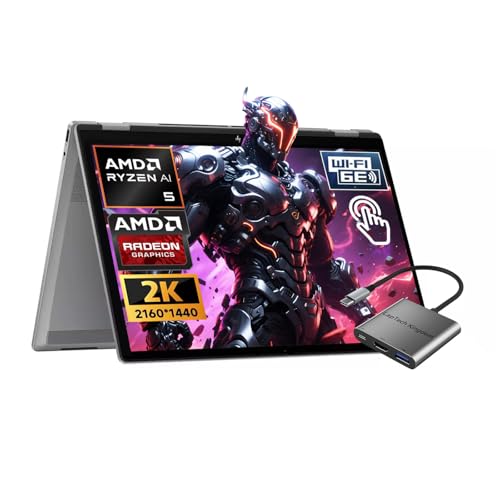
TL;DR: The HP OmniBook X Flip offers a 16‑inch 2K IPS display, 68 Wh battery lasting up to 21 hours, and a 50 TOPS AI NPU at a $746.99 price point.
The standout feature is the on‑device AI engine: a 50 TOPS NPU paired with Copilot+ tools such as Recall, Cocreate, Live Captions and Windows Studio Effects. Combined with a 16.0‑inch IPS panel that delivers 400 nits of brightness and 62.5% sRGB coverage, the laptop feels ready for AI‑enhanced productivity.
At 4.18 Pounds, the OmniBook X Flip is lighter than the Lenovo Yoga 7i (5.0 Pounds) but a bit heavier than the Dell Inspiron 14 7445 (3.77 Pounds). Its 68 Wh battery capacity exceeds the Dell Inspiron 14 7445’s 54 Wh while falling just short of the Lenovo Yoga 7i’s 71 Wh. Brightness matches the 400 nits seen on the Microsoft Surface Pro and the HP OmniBook X 16‑inch, and it outshines models that sit at 300 nits. The 60 Hz refresh rate is standard across most peers, though the Dell 16 Plus offers a faster 120 Hz panel.
Users consistently praise the long‑lasting battery, the high‑quality 5 MP IR webcam with an integrated privacy shutter, and the AI‑driven microphone array that reduces background noise. Professional reviewers highlight the extensive connectivity suite—HDMI 2.1, USB4/Thunderbolt 4, and Wi‑Fi 6E—as well as the solid aluminum chassis. The main criticisms focus on the limited 62.5% sRGB gamut, the fixed 60 Hz refresh without HDR, and the 16 GB LPDDR5x RAM comes soldered and can't be upgraded.
HP ships the OmniBook X Flip with an AMD Ryzen AI 5 340 processor that boosts to 4.8 GHz, six cores and twelve threads. It ships with 16 GB of RAM at 8,533 MT/s and a 1 TB PCIe Gen4 NVMe SSD. Connectivity includes a HDMI 2.1 port, two USB 3.2 Gen 2 Type‑A ports, a USB4/Thunderbolt 4 port, a USB 3.2 Gen 2 Type‑C port, Bluetooth 5.3, and Wi‑Fi 6E, giving you plenty of options for peripherals and external displays.
Pros
Cons
Best for: Remote professionals, AI enthusiasts, and creators who need on‑device AI processing and long battery life.
Avoid if: You need a wide‑gamut display for color‑critical work, high refresh rates for gaming, or upgradable memory.
“The screen is gorgeous — bright, sharp, and perfect for watching videos or taking notes.”
“Love the USB‑A ports — finally a convertible that doesn’t force me to carry dongles.”
TL;DR: The Dell 16 Plus Ice Blue packs a 16‑inch 120 Hz IPS display, 16 GB of 8533 MHz LPDDR5X RAM and a 40 TOPS NPU, all in a 4.52‑lb recyclable chassis for $954.99.
Dell’s 16 Plus Ice Blue stands out with its AI‑focused hardware: a 40 TOPS NPU sits alongside an Intel Core Ultra 5 226V processor, 16 GB of 8533 MHz LPDDR5X RAM, and a 1 TB PCIe NVMe SSD. The 16‑inch IPS panel delivers a 1920 × 1200 resolution at a buttery‑smooth 120 Hz, while the integrated Intel Arc 140V graphics round out the visual experience.
At 4.52 lb, the laptop lands in the middle of the weight spectrum for this group – heavier than the ultra‑light ASUS Vivobook Flip 14‑inch OLED and the Surface Pro, but lighter than the ASUS Vivobook Flip 14‑inch and the Lenovo Yoga 7i 16‑inch. Its 64 Wh battery provides a solid energy reserve; competitors like the ASUS OLED and HP OmniBook X Flip list slightly larger capacities, while the Dell Inspiron 14 models sit a bit lower. Port selection is concise: one HDMI 2.1, a Thunderbolt 4 USB‑C, a USB‑C 3.2 Gen 2, a USB‑A 3.2 Gen 1 and a headphone jack, offering fewer ports than the multi‑port layouts some peers provide.
Reviewers consistently highlight the vivid 100% sRGB display and the smooth 120 Hz refresh as major strengths, noting that the laptop feels comfortable for long study or remote‑work sessions. The recycled‑aluminum and ocean‑bound plastic chassis earns praise for its premium look and relatively light feel. On the downside, users mention the 300 nits brightness struggles in bright environments, fans can become audible under load, and the touchpad requires a firmer click. Because Dell solders the 16 GB of RAM, you can't upgrade memory.
The Ice Blue finish pairs a matte aesthetic with a fingerprint reader built into the power button, and Windows 11 Home ships with built‑in Copilot AI that uses the 40 TOPS NPU. Dolby Atmos‑enabled stereo speakers put out 5 W of sound, while a 2 MP RGB‑IR webcam with a privacy shutter rounds out the front‑facing features.
Pros
Cons
Best for: Those prioritizing quality and willing to pay for premium performance
Avoid if: You're shopping on a tight budget — it's priced at $954.99
TL;DR: The Lenovo Yoga 7i 16‑inch packs a 40+ TOPS AI NPU, 71 Wh battery and a solid aluminum 360° hinge into a 5‑pound, 16‑GB LPDDR5X machine that feels premium but shows a dim 300‑nit display.
What really stands out is the AI Copilot+ platform built around a 40+ TOPS neural processing unit and an Intel Core Ultra 5 125U. Paired with 16 GB of 5200 MHz LPDDR5X RAM, the laptop handles live captions, Windows Studio Effects and on‑device image enhancements without a hitch. Lenovo advertises the 71 Wh battery for up to 13 hours of MobileMark use, and a 15‑minute rapid charge adds roughly three hours of runtime.
Compared with the other eight entries, the Yoga 7i is heavier than the HP OmniBook X Flip (4.18 lb) and the Dell Inspiron 14 7445 (3.77 lb), but lighter than the ASUS Vivobook Flip 14‑inch (5.21 lb). Its 71 Wh battery tops Dell’s 54 Wh pack and sits just above HP’s 68 Wh, yet HP claims a longer mixed‑use life of 21 hours. The Yoga’s 300‑nit screen is dimmer than ASUS’s 500‑nit HDR panel, matching the Dell 16 Plus’s 300‑nit display but lacking the 120 Hz refresh that Dell offers.
Professional reviewers praise the long battery endurance and the sturdy aluminum chassis, noting that the 360° hinge feels solid for sketching or tablet work. Everyday users echo the battery love but frequently call out the “mushy” keyboard and the modest 300‑nit brightness, which can feel reflective in bright rooms. The non‑upgradeable soldered RAM and storage also limit future upgrades, a point often mentioned in consumer feedback.
Beyond the AI engine, the Yoga 7i delivers a 16.0‑inch IPS LCD with a 1920 × 1200 resolution, 10‑point multi‑touch and a 60 Hz refresh rate. Dolby Vision support is limited, but Dolby Atmos speakers and dual far‑field mics with noise suppression add a pleasant audio experience. Connectivity includes two Thunderbolt 4 ports, an HDMI 2.1 output, a microSD reader and a headphone/mic combo, while the included stylus and HDMI cable round out the package.
Pros
Cons
Best for: Home and office users seeking a balance of AI features, solid build quality and respectable battery life.
Avoid if: You need a bright, color‑accurate screen for photo/video work, or you prioritize a lightweight tablet experience and upgradable components.
“Handles 15 Chrome tabs, Lightroom, Teams, and Spotify with no lag.”
“Battery lasts 7-8 hours with mixed use—great for students.”
TL;DR: The ASUS Vivobook Flip 14‑inch OLED packs a 14‑inch 2K OLED touchscreen, Intel Core Ultra 7 CPU with 47 TOPS AI NPU, 16 GB RAM and 1 TB SSD in a lightweight 3.46‑pound convertible for $924.99.
The standout feature is its 14.0‑inch OLED panel that delivers a 1920 × 1200 resolution, 0.2 ms response time and 300 nits peak HDR brightness while covering 95–100 % of the DCI‑P3 gamut and being Pantone‑validated. Coupled with an integrated AI NPU rated at 47 TOPS, the laptop offers instant Windows Copilot access for AI‑assisted tasks.
At 3.46 pounds, it’s lighter than the Dell 16 Plus Ice Blue (4.52 pounds) and the HP OmniBook X Flip (4.18 pounds), yet heavier than the Microsoft Surface Pro 12‑inch (2.5683853523 pounds). Its 70 Wh battery matches the non‑OLED ASUS Vivobook Flip 14‑inch (70 Wh) and exceeds the Surface Pro’s 38 Wh, though the Dell 16 Plus carries a slightly smaller 64 Wh pack. Brightness sits at 300 nits, equal to the Dell 16 Plus and Lenovo Yoga 7i, but below the 400‑nits peaks of the Surface Pro and HP OmniBook X Flip. The 60 Hz refresh rate is lower than the Dell 16 Plus’s 120 Hz, reflecting a focus on visual fidelity rather than high‑frame‑rate gaming.
User sentiment praises the vivid OLED display and the smooth stylus experience that comes with the included ASUS Pen SA205H‑MPP2.6, while professional reviewers note the premium aesthetics, antimicrobial coating and Dolby Atmos‑enabled dual speakers. Common complaints revolve around the glossy screen’s reflections in bright rooms, faster battery drain when the OLED runs at high brightness, and the non‑upgradable 16 GB soldered RAM. The $924.99 price positions it as a premium option within the 2‑in‑1 segment.
Pros
Cons
Best for: Those prioritizing quality and willing to pay for premium performance
Avoid if: You're on a tight budget or only need basic functionality
TL;DR: The Dell Inspiron 14 7445 offers a 14‑inch 16:10 touchscreen, 6‑core Ryzen 5 CPU, 16 GB DDR5X RAM, and a 54 Wh battery in a lightweight aluminum convertible for $699.98.
What really sets this model apart is its 360° hinge combined with a 14.0‑inch IPS WVA touchscreen (1920×1200) and AI‑enhanced webcam that provides auto‑framing and eye‑contact correction. Under the hood sits an AMD Ryzen 5 8640HS with six cores, a 3.5 GHz base clock and up to 4.9 GHz boost, paired with 16 GB of DDR5X memory running at 4800 MHz and a 512 GB PCIe Gen 4.0 NVMe SSD. The 54 Wh battery is rated for 10.2 hours of runtime and can charge to 80 % in just 60 minutes.
Compared with the other eight laptops in this roundup, the Inspiron is lighter than most of the 16‑inch convertibles such as the Lenovo Yoga 7i and the ASUS Vivobook Flip, though the Microsoft Surface Pro is a bit lighter. Its 54 Wh battery capacity matches the standard configuration of the Dell 7440 but falls short of the 68 Wh found in the HP OmniBook X Flip and the 71 Wh in the Lenovo Yoga 7i. The 250‑nit display brightness is also lower than the 400‑nit panels on the HP OmniBook and Surface Pro, and the HDMI 1.4 port limits external displays to 1080p, unlike some peers that support higher resolutions. Finally, the device doesn't include Thunderbolt ports, though some competing models do.
Everyday users praise the lightweight feel—just 3.77 pounds—and the convenience of the 360° hinge for note‑taking and tablet‑mode work. The fast SSD and the presence of a dedicated Copilot key make AI‑driven tasks feel snappy. On the downside, several owners have reported audible fan noise even under light workloads, and a few have mentioned hardware reliability concerns. Professional reviewers also note the solid aluminum chassis that passed military‑grade durability testing, but they point out the modest screen brightness as a drawback for bright environments.
Pros
Cons
Best for: Entry-level buyers or those on a tight budget
Avoid if: You need advanced features or professional‑grade performance
Breakdown
HP OmniBook X 16-inch
Pros
ASUS Vivobook Flip 14-inch
Pros
Dell Inspiron 14 7440
Pros
Cons
Based on scoring data and product specs
Personalized picks
Best Overall Pick
Microsoft Surface Pro 12-inch
Best ValueBest for: Those prioritizing quality and willing to pay for premium performance
HP OmniBook X 16-inch
Best for: Entry-level buyers or those on a tight budget
$593.00-$256.97 vs winner
Skip Dell Inspiron 14 7445 if…
You need advanced features or professional-grade performance
Microsoft Surface Pro 12‑inch takes the top spot with a compelling mix of power and portability. Its Snapdragon X Plus processor delivers 45 TOPS of AI performance, while the 16‑hour video‑playback battery lets you work or stream all day. At $849.97 it balances cost and capability, and a 4.4‑star rating from 142 reviewers shows solid user satisfaction.
The HP OmniBook X 16‑inch lands as the runner‑up, ideal if you need marathon‑length battery life for remote work or travel. It offers up to 21 hours on a single charge and a dedicated Copilot key for quick AI access, all for $579.00 and a strong 4.7‑star rating from 27 reviewers.
For tighter budgets, the HP OmniBook X 16‑inch remains the best value thanks to its low price and longest battery life. If you prefer a mid‑range 14‑inch convertible, the ASUS Vivobook Flip 14‑inch at $838.99 provides a balanced feature set without stretching the budget. For a premium experience, the Dell 16 Plus Ice Blue at $954.99 delivers high‑end build quality and top‑tier specs for users ready to invest.
Pick the Surface Pro 12‑inch today and you’ll enjoy AI‑ready performance without compromise.
The Surface Pro pairs with the Surface Slim Pen that offers integrated storage and wireless charging, making it ready for instant note‑taking. The HP OmniBook X can use a stylus but only in certain bundles, so the Pro gives a more seamless pen experience.
Please sign in to leave a review
No reviews yet. Be the first to review!
