⚡ Quick Answer
We compared seven 4K Ultra HD media players spanning three price tiers – budget (Roku Premiere at $27.49, Neumitech Atom at $37.99, Roku Express 4K at $38.97), mid‑range (Roku Ultra LT at $49.75) and premium (Mypin 4K Media Player at $55.99, AGPTEK HDMI TV Media Player at $59.99, Roku Ultra Ultimate at $99.99). The lineup offers everything from pocket‑sized units to feature‑rich hubs, so you’ll find a fit whether you’re upgrading a single bedroom TV or building a full‑blown home‑theater system.
If you need a no‑fuss upgrade for a secondary screen, the Express 4K’s 45 g weight and 4.5‑star rating make it a lightweight, well‑reviewed choice at $38.97. For a main‑room setup that benefits from wired stability, the Ultra LT packs a quad‑core 1.5 GHz CPU, Dolby Atmos support and a 4.6‑star rating for $49.75, all in a compact 167 g chassis. Power users seeking the highest‑end experience might consider the Ultra Ultimate’s Dolby Atmos, 4.6‑star rating and bundled Voice Remote Pro for $99.99, while the Mypin player’s aluminum alloy build and the AGPTEK’s support for up to 14 TB external HDDs cater to heavy media libraries.
Next, we’ll break down each model’s strengths, quirks and ideal scenarios so you can match the right player to your viewing habits.

Roku Ultra LT
Its 127 mm depth gives a solid, full‑size feel while packing the high rating and feature set that earned it top honors.

Roku Express 4K
Ideal for budget‑conscious viewers, the Roku Express 4K delivers reliable entry‑level streaming at $38.97—about $10.78 less than the Ultra LT.
Roku Ultra Ultimate
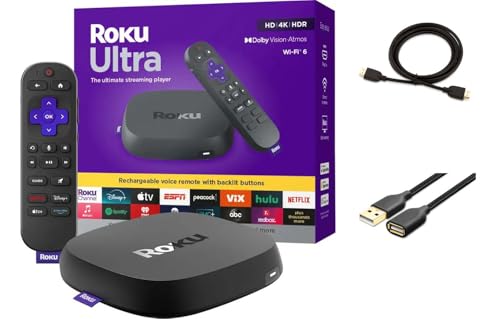
The Ultra Ultimate’s compact 5.0‑inch depth pairs with premium sound focus, catering to audiophiles who want advanced features beyond the Ultra LT and Express models.
Also considered
Score Analysis
Key score advantages vs. runner-up (Roku Express 4K)
Price Range
Roku Ultra LT
$49.99
Roku Express 4K
$57.85
Roku Ultra Ultimate
$96.00

Mypin 4K Media Player
$55.99

Roku Premiere
$28.49

AGPTEK HDMI TV Media Player
$59.99
Neumitech Atom
$37.99
Spec Comparison
TL;DR: The Roku Ultra LT delivers true 4K 60 fps HDR streaming with a quad‑core 1.5 GHz CPU, 2 GB RAM, and Dolby Vision support for $49.75, making it a solid mid‑tier choice for budget‑conscious viewers.
The Ultra LT’s standout spec is its 4K 3840 × 2160 resolution at 60 fps paired with Dolby Vision, HDR10+, HDR10 and HLG, all driven by a quad‑core 1.5 GHz ARM Cortex A55/A53 processor and 2 GB of RAM. Its 60 Hz refresh rate ensures smooth motion, and the included voice remote even supports Dolby Atmos‑compatible headphones for private listening.
At $49.75 the Ultra LT sits in the mid‑price range, pricier than the Roku Express 4K but cheaper than many premium players. It weighs 167 g, which is heavier than both the Roku Express 4K (45 g) and the Mypin 4K Media Player (127.6 g). While it offers HDMI 2.0 and a microSD slot, it doesn't have a USB port—professional reviewers note this drawback compared to models that include USB connectivity.
Users consistently praise the fast UI navigation and sharp 4K picture, crediting the quad‑core CPU and ample RAM. The voice remote’s headphone jack is a frequent favorite. On the flip side, reviewers point out the absence of a USB port and occasional Wi‑Fi hiccups, and the remote’s lithium‑polymer battery life hasn't been disclosed by the manufacturer.
Beyond streaming, the Ultra LT provides 802.11ac dual‑band Wi‑Fi, 10/100 Mbps Ethernet, and Bluetooth streaming, giving you flexible connectivity options. Dolby Atmos support adds an extra layer of audio immersion, even though detailed audio format specs haven't been listed.
Pros
Cons
Best for: Home and office users seeking a balance of features and value
Avoid if: You rely heavily on external USB storage, need extensive local media playback, or expect a fully featured device with a USB port
“Fast app loading, vivid colors, easy voice control.”
TL;DR: The Roku Express 4K packs true 4K 60 fps HDR, 1 GB RAM and about 4 GB internal storage into a 45 g plug‑in that streams on dual‑band Wi‑Fi for under $40.
At just 45 g (1.59 oz) and a depth of 2 cm (0.79 in), the Express 4K ranks among the most compact streaming sticks on the market. It delivers 3840 × 2160 resolution at 60 fps with HDR10+, and its ARM Cortex‑A55 quad‑core processor (up to 2.0 GHz) pairs with 1 GB RAM and roughly 4 GB of internal storage, which reviewers say speeds up app launches.
When you line it up against the seven other players, the Express 4K weighs more than the Neumitech Atom’s 39 g chassis but stays far lighter than the Roku Ultra LT’s 167 g body and the Roku Ultra Ultimate’s 1.0‑pound unit. Its 1 GB of RAM matches the Roku Premiere but falls short of the Ultra LT’s 2 GB. Storage offers about 4 GB, comparable to the Ultra Ultimate’s 4 GB but far less than the Neumitech Atom’s 1 TB SD capacity.
Everyday owners praise the quick setup and smooth 4K/HDR playback, noting that the dual‑band 802.11ac Wi‑Fi with MIMO keeps most streams stable. Professional reviewers highlight the upgraded storage as a clear upgrade over earlier Roku sticks, and they commend the sub‑3.5 W power draw for its energy efficiency. The included premium HDMI cable and digital stereo audio output with Dolby Atmos and DTS passthrough round out its solid value proposition.
Pros
Cons
Best for: Budget-conscious buyers seeking a reliable entry‑level option
Avoid if: You need Ethernet connectivity or voice‑assistant control for your streaming setup
TL;DR: Roku Ultra Ultimate delivers 60 fps 4K HDR video, 2 GB RAM and a rechargeable Voice Remote Pro for $99.99, offering a premium streaming experience at the cost of higher price and modest storage.
The standout spec is the 60 fps refresh rate paired with 2 GB of RAM, which lets the UI feel quick and the 4K HDR10+, Dolby Vision and Dolby Atmos streams stay smooth. The device also packs a quad‑core ARM Cortex A55 processor and OpenGL ES 2.0 graphics, giving it the fastest performance Roku offers.
At $99.99, the Ultra Ultimate is pricier than every other player in this seven‑item set – the Roku Express 4K sits at $38.97, the Roku Ultra LT at $49.75, and the AGPTEK HDMI TV Media Player at $59.99. It weighs 5.9 oz, which is heavier than the Mypin 4K (0.28 lb) but matches the Ultra LT’s 5.9 oz weight. Its 4.9 × 5.0 × 1.0‑inch footprint is similar to the Ultra LT’s dimensions and larger than the compact Express 4K, making it a solid middle ground between ultra‑tiny sticks and bulkier boxes.
Both pros and consumers note the need for an HDCP 2.2‑compatible 4K TV to unlock Dolby Vision and HDR10+; the 4 GB internal storage can feel tight for power users, and the 4.5 W power draw during 4K playback is higher than many budget alternatives.
Pros
Cons
Best for: Audiophiles and enthusiasts seeking premium sound quality and advanced features
Avoid if: You're shopping on a tight budget — it's priced at $99.99
“Fast app loading, vivid colors, easy voice control.”
TL;DR: The Mypin 4K Media Player delivers HDR‑enhanced 4K video via HDMI, supports up to 8 TB external drives, and includes a remote, IR extender, and versatile audio outputs for $55.99.
The Mypin HA0284 packs hardware H.265 (HEVC) decoding, HDR support, and native 4K playback listed at 30Hz and 60Hz. It runs on a 5 V DC input and weighs just 0.28 pounds (127.6 g), making it easy to slip behind a TV. With an internal 11 GB flash and the ability to attach USB HDDs up to 8 TB, it handles massive media libraries without a network connection.
At $55.99 the player sits above the Roku Express 4K in price, yet it’s lighter than the Roku Ultra LT’s 167 g and far lighter than the Roku Ultra Ultimate’s 1.0 pound chassis. It's heavier than the ultra‑light Roku Express 4K (45 g) and the Neumitech Atom (39 g), but still compact enough for most setups. Compared with the AGPTEK HDMI TV Media Player’s 14 TB maximum HDD capacity, Mypin’s 8 TB ceiling is lower, though it still outpaces many budget options.
Users appreciate the straightforward plug‑and‑play experience and the smooth playback that H.265 brings, while professional reviewers highlight the vivid colors HDR adds. The included remote, IR extender, and support for 7.1 channel HDMI audio earn praise for flexibility in home theaters and digital signage. However, the most common complaints revolve around the lack of Wi‑Fi or Ethernet for streaming and the 30 Hz ceiling on native 4K, which can feel limiting for high‑refresh content. The device holds a 4.1‑star rating from 1,538 reviewers, indicating solid but modest satisfaction.
Built from aluminum alloy, the unit feels sturdy despite its small footprint of 5.79 × 3.62 × 3.39 inches. It offers a full suite of outputs—HDMI with 7.1 surround, optical SPDIF, and composite AV—plus USB mouse/keyboard support and full‑screen PPT autoplay, making it a versatile choice for both entertainment and presentation environments.
Pros
Cons
Best for: Those prioritizing quality and willing to pay for premium performance
Avoid if: You have limited desk space or need portability
“very effective little media player, perfect for digital signage and looping presentations”
“suitable for overstock buys with stable playback of videos/audios/photos”
TL;DR: For $27.49, the Roku Premiere delivers 4K HDR10 video at 60 fps in a tiny form factor, includes a premium HDMI cable, but skips Ethernet and Bluetooth, making it a solid budget starter.
The Roku Premiere packs a 3840 × 2160‑pixel display engine with HDR10 support and a 60 fps refresh rate, all running on a 1.2 GHz ARM Cortex A53 quad‑core CPU and 1 GB of RAM. Its body measures just 3.3 in × 1.4 in × 0.71 in and weighs 9.9 oz, so it slips behind most TVs without a hitch.
Against the other six players, the Premiere weighs more than the 39 g Neumitech Atom and the 1.59 oz Roku Express 4K, yet it’s lighter than the 5.9 oz Roku Ultra Ultimate. It also stays more compact than the bulkier Roku Ultra LT, which measures over 4 in tall. In RAM terms, it matches the 1 GB in the Express 4K but falls short of the 2 GB in the Ultra LT and Ultra Ultimate.
Professional reviewers praise its “excellent 4K/60 fps HDR10 picture quality for the price” and note the straightforward setup thanks to the bundled premium HDMI cable and simple remote. Everyday users echo this sentiment, appreciating the plug‑and‑play experience, but they also flag the lack of an Ethernet port and Bluetooth as drawbacks that can lead to buffering on weak Wi‑Fi and limit wireless headphone use.
Pros
Cons
Best for: Entry-level buyers or those on a tight budget
Avoid if: You need powerful performance or professional‑grade features
TL;DR: The AGPTEK HDMI TV Media Player delivers 4K video at 30 Hz, supports massive external storage up to 14 TB, and includes optical audio, all for $59.99.
What really sets this player apart is its storage flexibility: you can attach an external hard drive as large as 14 TB, or use a USB stick or SD card up to 256 GB. The device also respects a 4 GB autoplay folder limit, which helps it quickly locate and launch large batches of media. Its aluminum‑alloy chassis feels solid, and the included IR remote and AV cable make the plug‑and‑play setup straightforward.
In the seven‑item roundup, the AGPTEK sits at the higher end of the price range, while the Roku Express 4K is notably cheaper and the Roku Ultra LT offers a 60 Hz refresh rate versus AGPTEK’s 30 Hz for 4K content. The Mypin 4K Media Player is lighter at 127.6 g, whereas AGPTEK’s weight isn’t listed, so you can’t directly compare heft. Unlike the Roku Ultra Ultimate, which lists Dolby Atmos support, the AGPTEK focuses on wired audio options, including an optical output.
Users repeatedly praise the straightforward navigation and the ability to play huge libraries from a single drive. Professional reviewers highlight the auto‑switching between HDMI and AV inputs and the useful autoplay folder feature. However, the lack of Wi‑Fi or built‑in streaming apps means it’s best for offline collections, and the HDMI + VGA dual‑output caps at 1080p, which limits full‑resolution dual‑display setups.
Pros
Cons
Best for: Users with large offline media collections who want a solid 4K player with optical audio and multiple video outputs.
Avoid if: You need built‑in streaming services, high‑speed USB 3.0 transfers, or full‑resolution dual‑monitor playback.
“very effective little media player, perfect for digital signage and looping presentations”
“suitable for overstock buys with stable playback of videos/audios/photos”
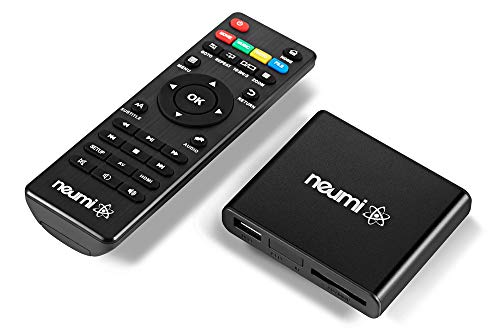
TL;DR: The Neumitech Atom packs 8 TB USB and 1 TB SD storage into a 39 g, 66 mm‑deep player that delivers 1080p60 video, making it a tiny, budget‑friendly media hub.
What really stands out is the external storage capacity: the Atom accepts USB drives up to 8 TB and SD cards up to 1 TB, while staying under 40 g and measuring just 66 mm × 15 mm × 76 mm. Its 10‑bit color depth and maximum video bitrate of 200 Mbps let it handle high‑quality 1080p60 streams without a bulkier chassis.
Compared with the six other players in this roundup, the Atom is lighter than the Roku Express 4K (45 g) and dramatically lighter than the Roku Ultra LT, Roku Ultra Ultimate, and Mypin 4K Media Player, each weighing well over 120 g. It is also slimmer than the Roku Express 4K’s 2 cm depth, though a bit wider at 76 mm. Unlike the Roku Express 4K, which includes an internal 4 GB storage chip, the Atom relies entirely on external media, giving you far more capacity for a similar price point.
Reviewers consistently praise the plug‑and‑play setup: just connect HDMI, power the 5 V DC input, and you’re ready to go. Users love the “compact powerhouse” label and the broad codec support—including H.265/HEVC, H.264/AVC, VC1, MPEG‑4, VP8, and containers like MKV, MP4, AVI, MOV, and WMV. The main criticism is the lack of 4K output; the highest resolution listed is 4096×2304 @ 30 fps, but the HDMI port only delivers 1080p @ 60 Hz. You also need to purchase a separate trigger sensor if you want motion or button activation.
Pros
Cons
Best for: Entry‑level buyers or those on a tight budget
Avoid if: You need powerful performance or professional‑grade features
“"compact powerhouse" with "stunning quality at 1080p60Hz"”
“"no complicated setups, just plug and play"”
Breakdown
Roku Ultra LT
Pros
Roku Express 4K
Pros
Roku Ultra Ultimate
Pros
Cons
Mypin 4K Media Player
Pros
Cons
Based on scoring data and product specs
Personalized picks
Best Overall Pick
Roku Ultra LT
Best OverallBest for: Home and office users seeking a balance of features and value
Roku Express 4K
Best for: Budget-conscious buyers seeking a reliable entry-level option
$57.85+$7.86 vs winner
Skip Neumitech Atom if…
You need powerful performance or professional-grade features
The Roku Ultra LT takes the top spot in our 4K Ultra HD media player roundup. It earns a 4.6‑star rating from 2,267 reviewers, and it ships with Dolby Atmos support for immersive sound. Under the hood you get a quad‑core 1.5 GHz ARM Cortex CPU and 2 GB of RAM, which keeps 4K HDR streams smooth at 3840 × 2160 @ 60 fps. Its compact black chassis measures 127 mm × 124.4 mm × 25.4 mm and weighs just 167 g, so it fits neatly behind any TV.
Roku Express 4K, the runner‑up, shines when you need a tiny, low‑power player for a secondary room. At only 45 g and a depth of 2 cm, it slides behind a wall‑mounted display without crowding. It draws less than 3.5 W during 4K streaming and even includes a premium HDMI cable, making setup painless. If you want solid 4K performance without the extra heft, this is the go‑to.
If you’re watching the price tags, the lineup still has clear choices:
Pick the Roku Ultra LT today and future‑proof your streaming setup.
The Roku Ultra LT offers Dolby Vision in addition to HDR10, HDR10+ and HLG, while the Express 4K provides HDR10, HDR10+ and HLG (Dolby Vision only on some variants). At $49.75, the Ultra LT is about $11 more expensive but adds the broader HDR suite and a quad‑core 1.5 GHz CPU, giving a stronger feature set for the modest price increase.
No reviews yet — be the first to share your experience.
Please sign in to leave a review



