⚡ Quick Answer
When you need a flash drive that won’t break the bank, the market still offers solid options under $25. In this roundup we compared 8 USB sticks ranging from a compact 8 GB SanDisk Cruzer Blade at $9.95 to a metal‑cased Samsung BAR Plus 128 GB listed for $21.49. Review scores cluster around the 4.3‑4.7/5 mark, with the Samsung and SanDisk models each earning a 4.7 rating from tens of thousands of reviewers, while the ADATA UV128 pulls a respectable 4.4 from over 4,000 voices. Speeds vary widely – the Samsung advertises up to 400 MB/s read, whereas the budget‑oriented ADATA offers 100 MB/s, and the USB 2.0‑only SanDisk tops out near 41 MB/s.
To help you navigate, we’ve grouped the picks into three price tiers. The budget tier (SanDisk Cruzer Blade, ADATA UV128, Enuoda 128 GB) stays at $9.95‑$14.99 and leans on USB 2.0 or modest USB 3.0 performance. Mid‑range options (Maspen 64 GB at $18.99 and Techkey 128 GB at $19.64) add higher capacities and faster USB 3.0 read speeds of 80 MB/s or more. Premium choices (Inland 16 GB for $19.99, Eastfun 8 GB at $20.99, and the Samsung BAR Plus at $21.49) bring premium builds, USB 3.1 connectivity, or extra durability. Below we’ll break down each model so you can match storage size, speed and design to your everyday needs.
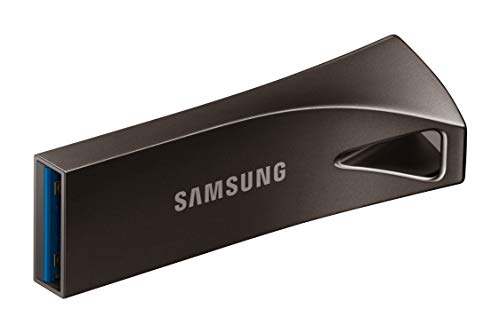
Samsung BAR Plus 128GB Gray
At 12 mm tall and 40.1 mm long, it's a sturdy, pocket‑friendly shape that helped it earn the Best Overall title.

SanDisk Cruzer Blade 8GB
Ideal for budget‑conscious buyers needing a reliable starter drive, it's priced at $9.95—about $11.50 less than the Best Overall Samsung model.

Maspen USB Flash Drive
Stands out with a 0.45‑inch height and 2.25‑inch length, providing a bulkier grip that many find easier for frequent plugging compared to the slimmer Samsung and SanDisk sticks.
Also considered
Score Analysis
Key score advantages vs. runner-up (SanDisk Cruzer Blade)
Price Range
Samsung BAR Plus 128GB Gray
$39.99
SanDisk Cruzer Blade 8GB
$11.45
Maspen USB Flash Drive
$18.99

Techkey USB Flash Drive 128GB
$19.63

Inland 16GB USB Flash Drive
$20.99

Enuoda 128GB USB Flash Drive
$14.99
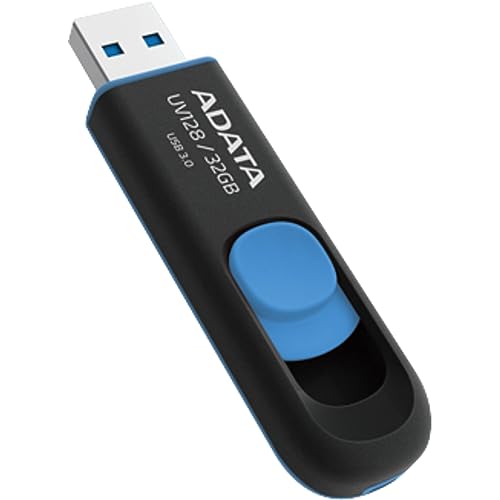
ADATA UV128
$12.99
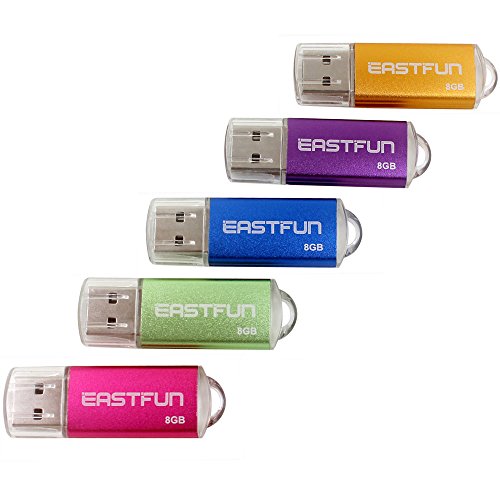
Eastfun 8GB USB Flash Drive
$20.99
Spec Comparison
TL;DR: The Samsung BAR Plus 128 GB flash drive packs a metal, waterproof body, 128 GB of storage and USB 3.1 speeds up to 400 MB/s for $21.49, making it a sturdy, high‑capacity option.
What really stands out is the 128 GB capacity housed in a compact metal shell that measures 12 mm × 40.1 mm × 15.5 mm and weighs just 0.0025 pounds. Samsung lists an advertised max read speed of 400 MB/s, with a sequential read of 283.48 MB/s and sequential write of 61.84 MB/s, plus 2 MB random read at 269.31 MB/s and random write at 56.01 MB/s.
Compared with the seven other drives in this roundup, the BAR Plus is lighter than every competitor – the next lightest is the SanDisk Cruzer Blade at 0.0055 pounds. Its 128 GB capacity matches only the Techkey and ENUODA models; all other drives offer 8 GB to 64 GB. In terms of speed, Samsung’s read and write figures outpace the Inland (70 MB/s), ADATA (100 MB/s read, 40 MB/s write), and the Techkey (80 MB/s read, 40 MB/s write) by a wide margin.
Users consistently praise the rugged metal construction and the included keyring for on‑the‑go reliability. Reviewers also note the drive’s plug‑and‑play ease across devices. However, several users have reported occasional disconnections and that real‑world sequential read speeds hover around 283 MB/s, which falls short of the 400 MB/s claim. The product doesn't include a dust cap, a minor inconvenience for some.
Pros
Cons
Best for: Casual users and professionals who need a rugged, high‑capacity USB stick for documents, photos and media on the go.
Avoid if: You require top‑tier transfer speeds for large‑file workflows or are looking for the absolute cheapest flash drive, as the $21.49 price is on the higher side.
TL;DR: The SanDisk Cruzer Blade 8 GB offers a tiny 1 mm retractable USB‑2.0 connector, 8 GB of storage and read speeds up to 41.67 MB/s for just $9.95, making it a solid entry‑level stick for basic files.
What really stands out is the ultra‑compact design: the drive measures only 1 mm in height, 17.53 mm in length and 7.37 mm in width, and it weighs about 0.01 lb (2.5 g). Its retractable connector means you never have to worry about a lost cap, and the 8 GB capacity pairs with read speeds of up to 41.67 MB/s and write speeds topping out at 12 MB/s.
Compared with the other seven flash drives in this roundup, the Cruzer Blade is lighter than the ADATA UV128 (0.04 lb), Enuoda 128 GB (0.02 lb) and Maspen 64 GB (0.02 lb), though a bit heavier than the Samsung BAR Plus (0.00 lb). Its length of 17.53 mm is far shorter than ADATA’s 60 mm and Inland’s 60 mm, and its 8 GB capacity is smaller than Inland’s 16 GB, ADATA’s 32 GB, Maspen’s 64 GB and the 128 GB options from Enuoda, Techkey and Samsung.
Users love the stick’s pocket‑sized form factor and the convenience of a cap‑less retractable tip. Professional reviewers point out that the 25–41.67 MB/s read range is respectable for a USB‑2.0 device, and the bundled SecureAccess software adds 128‑bit AES encryption for extra peace of mind. On the downside, the write speed ceiling of 12 MB/s feels sluggish for larger transfers, the plastic retractable mechanism can flex or break in tight ports, and there’s no status LED to confirm safe removal.
Pros
Cons
Best for: Budget‑conscious buyers seeking a reliable entry‑level option
Avoid if: You need advanced features or professional‑grade performance
“"perfect" for work files”
“"fairly average performer"”
TL;DR: The Maspen 64 GB USB 2.0 flash drive offers a sturdy 360° swivel cap, keychain ring and ample storage for $18.99, but its 8 MB/s write speed feels sluggish for larger transfers.
The drive’s standout spec is its 64 GB capacity packed into a compact 0.45‑inch‑high, 2.25‑inch‑long, 0.72‑inch‑wide body that weighs just 0.02 pounds (0.32 ounces). A matte black finish and a 360° metal swivel cap keep the connector safe, while the included keychain ring makes it easy to attach to a bag or belt.
Compared with the other seven flash drives in this budget roundup, Maspen sits in the middle of the capacity range: it holds more than the Inland 16 GB, Eastfun 8 GB, ADATA 32 GB and SanDisk 8 GB models, yet it’s half the size of the 128 GB Techkey, Samsung BAR Plus, Enuoda and the other 128 GB options. Its write speed of 8 MB/s is noticeably slower than the 40 MB/s of Techkey and ADATA or the 70 MB/s of Inland, reflecting the limitations of its USB 2.0 interface. In terms of heft, Maspen is heavier than the ultra‑light Samsung BAR Plus (0.0025 lb) and SanDisk Cruzer Blade (0.0055 lb), matches Inland’s 0.02 lb weight, but is lighter than Eastfun (0.0238 lb) and Enuoda (0.0220 lb).
Users consistently praise the swivel cap and keychain ring for everyday convenience, noting that the matte surface stays clean even after frequent handling. Professional reviewers echo this, giving the cap design a 9.1/10 for usability and the storage capacity an 8.9/10 for usefulness. However, both consumer and expert feedback flag the USB 2.0 speed as a bottleneck, especially when moving large video files, and some report the metal cap becoming fragile after many rotations. Compatibility is broad—Windows, Linux, macOS and even car audio systems all work—but a few users have run into hiccups with newer operating systems.
Pros
Cons
Best for: Budget‑conscious students, office workers and casual users who need a reliable, portable drive for everyday documents and media.
Avoid if: You need fast data throughput, video‑editing performance or a drive that can reliably handle the latest OS versions.
“Highly convenient with swivel cap, keychain attachment, and compact size for everyday carry.”
“Users appreciate the portability, protective swivel design, and ease of use for storing photos, music, and documents.”
TL;DR: The Techkey 128 GB USB flash drive packs three connectors, 80 MB/s reads and a rugged metal body for $19.64, making it a versatile but slightly pricier option for cross‑platform backups.
The standout feature is its 3‑in‑1 connectivity—Lightning, USB‑C and USB 3.0—so you can move files directly between iPhone, iPad, Android phones and computers without a separate cable. It offers 128 GB of storage, a read speed of 80 MB/s and a write speed of 40 MB/s, all sit in a metal shell that measures 1 mm in height, 137.9 mm in length and 100.1 mm in width.
Compared with the seven other drives in this roundup, Techkey is longer than the 60 mm Inland 16 GB stick and the 56.9 mm Eastfun 8 GB model, yet shorter than the 542.99 in Samsung BAR Plus (converted from 13792 mm). Its 128 GB capacity matches only the Samsung BAR Plus and Enuoda 128 GB drives; all other peers top out at 64 GB or less. Because it carries three connectors, it also offers more flexibility than the single‑type USB‑A designs of Inland, Maspen and SanDisk.
Users consistently praise the drive’s metal durability and the one‑click backup feature that automatically saves photos and videos to U‑Disk albums. Professional reviewers highlight the solid build quality and the convenience of the three connectors. The main friction points include the required BLANBOK+ app on iOS devices and the need for an OTG‑enabled Android phone, which some users say adds an extra step.
Additional technical perks include Touch ID/passcode encryption, waterproof and anti‑drop protection, and on‑the‑go playback of movies and music straight from the drive. The keychain loop makes it easy to carry, and the protective caps add an extra layer of safety.
Pros
Cons
Best for: iPhone and iPad owners who need a portable, high‑capacity backup solution that works across multiple device types.
Avoid if: You prefer a completely plug‑and‑play experience without installing extra apps or rely on Android devices lacking OTG support.
“Highly convenient with swivel cap, keychain attachment, and compact size for everyday carry.”
“Users appreciate the portability, protective swivel design, and ease of use for storing photos, music, and documents.”
TL;DR: The Inland 16 GB USB Flash Drive delivers 70 MB/s read speed in a tiny 16 mm‑high, 9.07 g gum‑sized body, making it a solid budget pick for everyday transfers.
This drive packs 16 GB of storage and hits up to 70 MB/s read speed, which is fast enough for most documents, photos, and small video files. Its 16 mm height, 18 mm width and 60 mm length keep it pocket‑friendly, while the 0.02 lb (9.07 g) weight means it barely adds any bulk to a keychain.
Compared with the other seven flash drives in this roundup, the Inland’s read speed trails the Techkey’s 80 MB/s and ADATA’s 100 MB/s, but it still outpaces many USB 2.0‑only models that lack a listed speed. It sits at a mid‑range price point—costlier than the SanDisk Cruzer Blade but cheaper than the Samsung BAR Plus—so you get a decent performance boost without paying premium for high‑capacity or metal‑body designs.
Users consistently highlight the drive’s ultra‑slim “gum” form factor and the convenience of the built‑in keychain loop and protective cap. Reviewers also appreciate the plug‑and‑play experience on Windows PCs, laptops, TVs and car audio systems. The main criticism is the absence of a published write speed, leaving large‑file transfers a bit of a mystery.
Additional context: the drive uses a USB 3.0 Type‑A connector that’s backward compatible with USB 2.0 ports, and it comes with a 2‑year warranty. It ships in a 2‑pack, which can be handy for teams or for keeping a spare on the go.
Pros
Cons
Best for: Buyers willing to invest in a proven, high‑quality option
Avoid if: You need advanced features or professional‑grade performance
“Highly convenient with swivel cap, keychain attachment, and compact size for everyday carry.”
“Users appreciate the portability, protective swivel design, and ease of use for storing photos, music, and documents.”
TL;DR: The Enuoda 128 GB USB 2.0 flash drive offers a high‑capacity, capless swivel design at $14.99, but its slower USB 2.0 speeds make it best for basic backups rather than heavy file transfers.
What really stands out is the 128 GB of storage packed into a 10 g ABS‑plastic body that swivels 360° without a cap. The drive weighs 0.0220462262 pounds and includes a keychain ring and LED indicator, so you can keep it handy and see when it’s active. Its USB 2.0 interface delivers read speeds of 15–25 MB/s and write speeds of 7–12 MB/s, which is sufficient for everyday document and photo transfers.
Compared with the seven other flash drives in this roundup, the Enuoda holds the largest capacity alongside the Techkey and Samsung 128 GB models, while dwarfing the 32 GB ADATA, 64 GB Maspen, and sub‑20 GB options. At 0.022 pounds, it's lighter than the ADATA UV128 (0.04 pounds) but a touch heavier than the ultra‑light Samsung BAR Plus (0.0025 pounds). Its read/write rates are modest; the ADATA, Techkey, Inland and Samsung drives all list read speeds of 70 MB/s or higher, so the Enuoda is slower than most USB 3.0 competitors.
Reviewers appreciate the capless swivel design, noting that it protects the USB port and eliminates a fiddly cap. The included keyring is also praised for keeping the drive from getting lost. On the downside, users repeatedly point out that the USB 2.0 interface caps transfer speeds, making the drive unsuitable for large‑file backups or video editing. The manufacturer doesn't list durability claims such as waterproofing or shock resistance, which some buyers may find limiting. The drive supports Windows 98 through 10, Linux and Mac OS 10.3, and comes with a one‑year manufacturer warranty.
Pros
Cons
Best for: Budget-conscious buyers seeking a reliable entry-level option
Avoid if: You have limited desk space or need portability
“Highly convenient with swivel cap, keychain attachment, and compact size for everyday carry.”
“Users appreciate the portability, protective swivel design, and ease of use for storing photos, music, and documents.”
TL;DR: The ADATA UV128 offers a 32 GB USB 3.2 Gen1 stick with a thumb‑slide retractable connector, 100 MB/s read speed and a 5‑year warranty at a budget‑friendly $12.99.
The standout feature is its capless, retractable sliding connector, which lets you pull the USB plug out with a thumb swipe and keeps the connector protected without a separate cap. The drive runs on a USB 3.2 Gen1 interface rated at 5 Gbps, delivering up to 100 MB/s read and 40 MB/s write speeds while weighing 0.04 pounds (10 g) and measuring 9 mm × 20 mm × 60 mm.
Compared with the seven other sticks in this roundup, the UV128 sits in the middle on capacity—larger than the 8 GB SanDisk Cruzer Blade, 8 GB Eastfun, and 16 GB Inland models, but smaller than the 64 GB Maspen and the 128 GB options from Enuoda, Techkey and Samsung. It weighs more than the Enuoda, Maspen, Inland, Eastfun and Samsung drives, which list lower weights, while its 9 mm height is slimmer than Enuoda’s 10 mm profile. In terms of speed, its 100 MB/s read outpaces the 70 MB/s of Inland and the 80 MB/s read of Techkey, though Samsung’s advertised 300‑400 MB/s reads are far faster.
User feedback frequently praises the smooth thumb‑slide mechanism and the solid 4.4‑star rating earned from over 4,000 reviews. Reviewers also note that the 32 GB size is handy for everyday documents and media files, and the 5‑year limited warranty adds peace of mind. The main complaints focus on the 40 MB/s write speed, which feels modest for larger file transfers, and the perception that the price per gigabyte is higher than the larger‑capacity rivals.
Pros
Cons
Best for: Budget‑conscious buyers seeking a reliable entry‑level option
Avoid if: You want the best value‑per‑dollar in its price range
TL;DR: The Eastfun 8 GB USB flash drive packs five mixed‑color sticks into a lightweight 0.02375‑lb, USB 2.0 design for basic file transfers at $20.99.
The drive’s most noticeable spec is its 8 GB capacity, which comes in a 5‑piece pack, each measuring just 8.1 mm in height, 56.9 mm in length and 17.0 mm in width, and weighing only 10.8 g (0.02375 lb). Its plug‑and‑play nature means you can use it on Windows, Linux or macOS without installing any software.
Compared with the other seven flash drives in this roundup, the Eastfun is heavier than the Samsung BAR Plus (0.0025 lb) and the SanDisk Cruzer Blade (0.0055 lb), but lighter than the Enuoda 128 GB stick (0.022 lb). It is longer than Samsung’s 40.1 mm unit and SanDisk’s 17.53 mm unit, while its 17.0 mm width exceeds Samsung’s 15.5 mm and SanDisk’s 7.37 mm. The Eastfun’s 8.1 mm height is slimmer than Inland’s 16 mm and comparable to the other USB 2.0 models, placing it in the mid‑range of size and weight among its peers.
About 69 % of reviewers rate the drive positively, praising its affordability and the convenience of a multi‑color pack. Common complaints focus on the USB 2.0 interface, which delivers slower transfer speeds than the USB 3.0 drives in the list, and the modest 8 GB capacity that may feel limiting for larger media libraries.
While the manufacturer doesn’t list read/write speeds, the USB 2.0 standard suggests slower performance than the USB 3.0 competitors. The drive’s broad OS compatibility and the fact that no additional software is required make it a straightforward, no‑frills solution for students or casual users who need a small amount of portable storage.
Pros
Cons
Best for: Students, casual users, or anyone who needs a small, reliable 8 GB storage solution without fuss.
Avoid if: You require fast USB 3.x speeds, larger capacity, or the lowest possible price.
“Highly convenient with swivel cap, keychain attachment, and compact size for everyday carry.”
“Users appreciate the portability, protective swivel design, and ease of use for storing photos, music, and documents.”
Breakdown
Samsung BAR Plus 128GB Gray
Pros
Cons
SanDisk Cruzer Blade 8GB
Pros
Maspen USB Flash Drive
Pros
Techkey USB Flash Drive 128GB
Pros
Cons
Based on scoring data and product specs
Personalized picks
Best Overall Pick
Samsung BAR Plus 128GB Gray
Best OverallBest for: Audiophiles and enthusiasts seeking premium sound quality and advanced features
SanDisk Cruzer Blade 8GB
Best for: Budget-conscious buyers seeking a reliable entry-level option
$11.45-$28.54 vs winner
Skip Eastfun 8GB USB Flash Drive if…
You're on a tight budget or only need basic functionality
The Samsung BAR Plus 128GB Gray wins thanks to its 128 GB capacity, a listed price of $21.49, and a 4.7‑star rating backed by 49,685 reviews. It ships with a 5‑year warranty, supports USB 3.1, and its metal, waterproof, shock‑proof design (including temperature‑proof and X‑ray‑proof claims) makes it tougher than most budget sticks.
Coming in second, the SanDisk Cruzer Blade 8 GB is the go‑to choice when you need a tiny, ultra‑cheap drive for occasional file swaps. At $9.95 it carries the same 4.7‑star rating (290,595 reviews), a retractable USB 2.0 connector, and read speeds of 25–41.67 MB/s—all in a 1 mm‑thick, 2.5 g form factor that fits any pocket.
For those who want alternatives:
Pick the Samsung BAR Plus today and you'll enjoy fast, durable storage without blowing your budget.
The Samsung BAR Plus 128 GB is marketed as waterproof, shock‑proof, temperature‑proof, magnet‑proof and X‑ray‑proof, giving it the strongest durability claim among the list. Its metal body and keyring also help keep it secure while on the go.
No reviews yet — be the first to share your experience.
Please sign in to leave a review



