⚡ Quick Answer
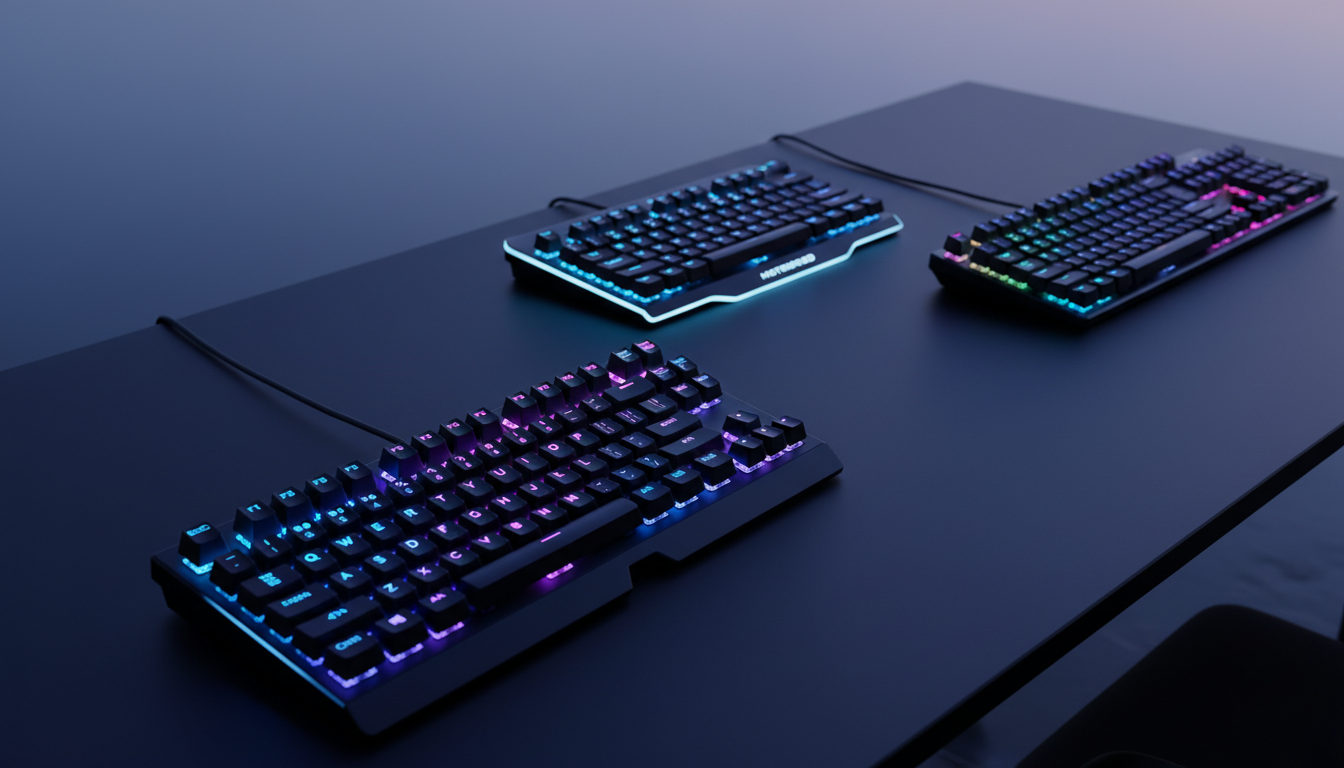
We compared 9 keyboards that sit under $50, spanning a price range from $16.99 to $46.99. All of them hit at least a 4.2‑star rating, so you’ll get decent build quality and decent key feel no matter the spend. The list covers three price tiers – a true budget segment (Motospeed Mechanical Gaming Keyboard, Langtu Membrane, Redragon K617 Fizz), a mid‑range slice (MageGee 75% Mechanical Gaming Keyboard, HK Gaming GK61, Redragon K585 DITI), and a premium corner (RK Royal Kludge RK61 Red, Aula F2088, Redragon K556 RGB).
If you want the most well‑rounded option, focus on a compact 60% board that offers hot‑swappable switches, per‑key RGB, and a 1000 Hz (1 ms) polling rate. One of the keyboards in our mid‑range tier checks all those boxes, carries a 4.5‑star rating from over 20,000 reviewers and lists at $29.99. Its lightweight ABS frame (about 1.28 lb) and 30 mm height make it ideal for tight desk setups while still delivering the fast, ghost‑free input competitive gamers crave.
Below you’ll see how each model stacks up across budget, mid‑range and premium categories, so you can match the right feature set to your gaming space and wallet.

HK Gaming GK61
Its low 30 mm height keeps your desk uncluttered while delivering solid performance.

Redragon K556 RGB
Ideal for gamers who want RGB flair and a sturdier 40 mm profile, even though it costs about $17 more than the GK61.
Motospeed Mechanical Gaming Keyboard
Stands out with a built‑in 1300 mAh battery delivering up to 500 hours of wireless play, a feature the other two keyboards lack.
Also considered
Score Analysis
Key score advantages vs. runner-up (Redragon K556 RGB)
Price Range
HK Gaming GK61
$29.99
Redragon K556 RGB
$44.99
Motospeed Mechanical Gaming Keyboard
$16.99
RK Royal Kludge RK61 Red
$39.99

Redragon K585 DITI
$32.99
Aula F2088
$44.89
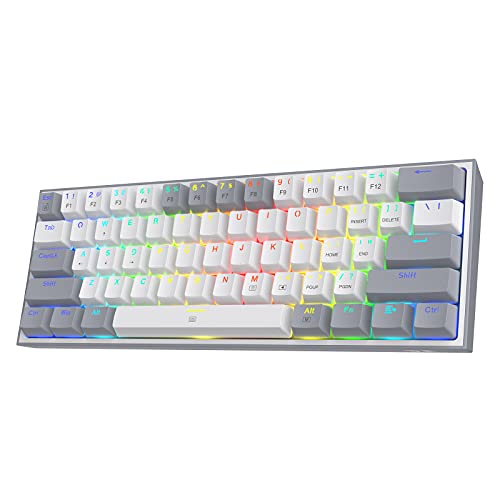
Redragon K617 Fizz
$26.99
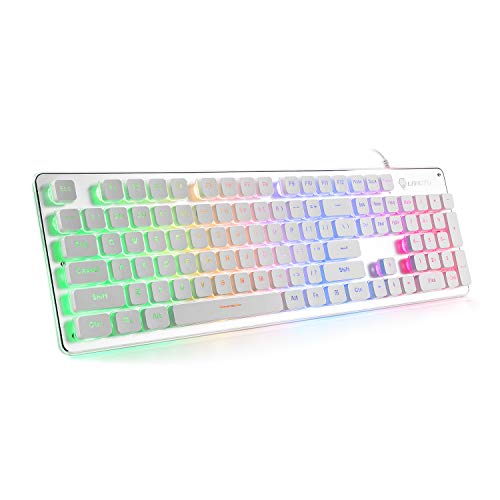
Langtu Membrane
$25.94

MageGee 75% Mechanical Gaming Keyboard
$27.89
Spec Comparison
TL;DR: The HK Gaming GK61 is a $29.99 60% mechanical keyboard with 1000 Hz polling, 61 keys, hot‑swap support and per‑key RGB, offering solid performance and strong community approval.
The standout spec is its 1000 Hz polling rate, which translates to a 1 ms response time that many gamers consider essential for fast-paced titles. Coupled with a 2 mm actuation distance and a light 50 g actuation force, the GK61 feels snappy without demanding much finger travel. Its 60% layout packs 61 keys into a compact 290 mm length, 30 mm height and 100 mm width, making it easy to fit on cramped desks.
At 1.283 pounds, the GK61 sits between the ultra‑light Redragon K617 (0.6 pounds) and the heavier MageGee 75% board (1.918 pounds). Its 1.5 m detachable Type‑C cable is just shy of MageGee’s 1.6 m lead, while several peers don’t list cable length at all. Hot‑swap capability sets it apart from most rivals; only the RK Royal Kludge RK61 offers a similar 3‑pin/5‑pin hot‑swap design, whereas keyboards like the Redragon K617 and Motospeed focus on fixed switches.
Users consistently praise the convenience of swapping switches without soldering and the vibrant per‑key RGB that can display 16.8 million colors across 20 patterns. Professional reviewers note the reliable durability of the hot‑swap PCB and the fast 1 ms response. On the downside, the compact layout omits dedicated arrow keys and a function row, which many cite as a hurdle for productivity. The Windows‑only software also draws criticism for occasional installation glitches.
Beyond the hot‑swap and lighting, the GK61 delivers full NKRO anti‑ghosting, a 4 mm total travel, and pre‑lubricated stabilizers that help keep keypresses stable. The ABS frame and doubleshot ABS OEM keycaps keep the build cost‑effective, though they're less premium than metal‑frame alternatives. With a 4.5‑star rating from over 20,000 reviewers, the keyboard's proven popular among budget‑conscious gamers.
Pros
Cons
Best for: Budget gamers who prioritize fast response, full NKRO and customizable RGB in a compact 60% package.
Avoid if: You need a full‑size layout with arrow keys or require macOS/Linux software support.
“sounds and feels pretty good”
TL;DR: The Redragon K556 RGB delivers a full‑size 104‑key layout, brushed‑aluminum build and per‑key RGB for $46.99, but its heavy chassis and chiclet caps may deter modders.
What really stands out is the brushed‑aluminum frame paired with a 40 mm height and 435 mm length, giving the keyboard a solid, tank‑like feel that reviewers praise as premium for its price. It houses tactile brown mechanical switches rated for 50 million keystrokes and supports hot‑swapping, so you can change switches without soldering.
Compared with the other eight keyboards in this roundup, the K556 is heavier at 2.20 lb than the RK Royal Kludge RK61 (≈1.23 lb) and the HK Gaming GK61 (≈1.28 lb), yet it is slightly lighter than the Aula F2088 (≈2.25 lb). Its 124 mm width matches the full‑size standard and is a millimeter wider than the Aula’s 123 mm, while its 40 mm height equals the RK61’s and exceeds the GK61’s 30 mm profile. Unlike many compact peers (61‑key or 75‑% layouts), the K556 offers a full 104‑key count and 12 dedicated multimedia keys.
Users repeatedly highlight the sturdy aluminum chassis and the responsive brown switches, calling the tactile feedback “quiet yet satisfying.” Professional reviewers note the 18 RGB modes, four brightness levels and 16.8 million color options, all configurable per key via Redragon’s software. However, the short chiclet keycaps draw criticism for limiting aftermarket keycap swaps, and a few users report a faint “ding” on forceful presses. The keyboard’s IP67 rating also adds a splash‑proof edge that few rivals mention.
Pros
Cons
Best for: Buyers willing to invest in a proven, high‑quality option
Avoid if: You're on a tight budget or only need basic functionality
“built like a tank”
“surprisingly solid, very affordable mechanical gaming keyboard”
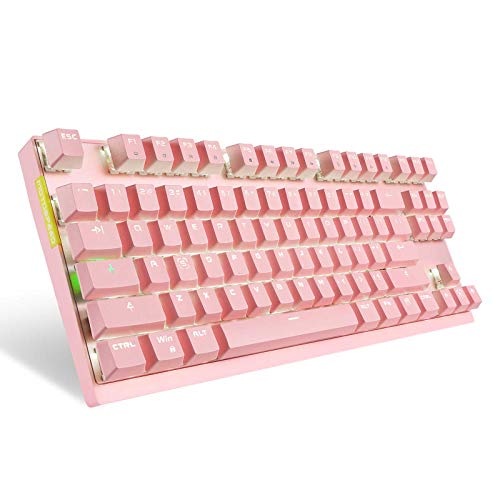
TL;DR: At $16.99, the Motospeed 87‑key mechanical keyboard offers USB‑C wired and 2.4 GHz wireless modes, a 10‑meter range, 500‑hour battery life, and a solid 4.6‑star rating.
The standout feature is its dual‑mode connectivity. You can plug into a PC with a USB‑C cable or go wireless on a 2.4 GHz link that reaches up to 10 meters, backed by a 1300 mAh battery that the manufacturer lists as lasting 500 hours. This gives you the flexibility to keep a tidy desk or game from across the room without swapping cables.
When you line it up against the other eight keyboards in this $50‑under roundup, the Motospeed is the most affordable option. It’s heavier than the Redragon K617 Fizz (0.6 lb) and the Langtu Membrane (1.54 lb), but lighter than the MageGee 75% (1.92 lb) and the Aula F2088 (2.25 lb). Its 350 mm length and 133 mm width place it squarely in the mid‑range of the group—longer than the Redragon K617’s 310 mm depth yet shorter than the Redragon K556’s 435 mm length.
Community feedback shows a 4.6‑star average from 4,160 reviewers, suggesting most owners are happy with the core experience. Reviewers appreciate the wireless freedom and the solid ABS case, while the most common criticism points to the lack of dedicated software for key remapping or RGB customization and the absence of a published charging‑time spec.
The keyboard packs 87 mechanical keys with Outemu Blue (clicky) or Red (linear) switches, full N‑key rollover and anti‑ghosting, and a simple white backlight with six lighting effects. Its ABS case measures 36 mm in height and weighs 800 g (1.76 lb), giving it a sturdy feel without being overly bulky.
Pros
Cons
Best for: Budget‑conscious buyers seeking a reliable entry‑level option
Avoid if: You need high‑speed polling rates, extensive RGB or macro software, or a ultra‑light portable board
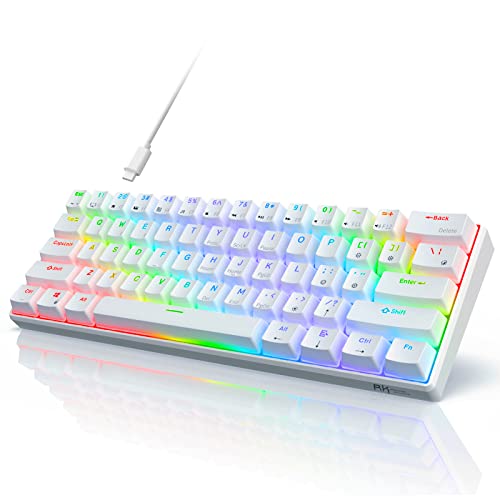
TL;DR: The RK Royal Kludge RK61 Red offers a 60% layout, hot‑swappable Red switches, and RGB lighting for $39.99, delivering solid typing and wireless flexibility in a lightweight 560 g package.
This keyboard packs a 61‑key 60% layout into a chassis that measures 40 mm high, 292 mm long and 102 mm wide. At 560 g it’s light enough to travel with, and the detachable Type‑C cable keeps your desk tidy. The linear Red switches rate at 40 g and the board supports full‑key rollover, while the RGB engine provides 18 lighting modes plus 8 monochrome options.
Compared with the other eight contenders, the RK61 is lighter than the Aula F2088 (1020 g) and the Redragon K556 (1000 g), yet only a shade heavier than the Redragon K585 DITI, which is listed at 1.3 lb. Its length of 292 mm is a touch longer than the HK Gaming GK61 (290 mm) and its height of 40 mm exceeds the GK61’s 30 mm, giving a sturdier feel without sacrificing compactness.
Everyday users rave about the keyboard’s portability and the smooth feel of the Red switches, while professional reviewers note the solid typing quality and reliable Bluetooth pairing for up to three devices. Reviewers point to the companion software’s occasional unreliability for key remapping, the absence of dedicated media keys, and occasional Bluetooth latency during fast‑paced gaming.
Pros
Cons
Best for: Budget‑conscious gamers, travelers, and anyone who wants a minimalist desk with wireless flexibility.
Avoid if: You need a full numeric keypad, dedicated media controls, extensive macro programming, or rock‑solid software reliability.
“king of budget 60%”
“solid compact 60% wireless mechanical”
TL;DR: The Redragon K585 DITI packs 42 keys, seven macro keys and full NKRO into a 1.3 lb, 9‑in‑high keypad with detachable wrist rest and 16.8 M‑color RGB for $32.99.
The standout feature is its 42‑key layout that includes seven programmable macro keys and a detachable magnetic wrist rest, all while staying under 1.3 lb. At 9.0 in tall, 11.0 in long and only 2.0 in wide, it offers a solid, portable footprint for one‑handed gaming. Full NKRO on every key ensures every press registers, and you can choose between Outemu Blue, Brown or Red switches to match your tactile preference.
Compared with the other eight keyboards in this roundup, the K585 DITI sits in the middle of the size spectrum. It’s taller than the HK Gaming GK61, which lists a height of 30 mm, yet shorter than many full‑size boards. Its 11.0 in length outpaces the RK Royal Kludge RK61’s 292 mm length, giving you a bit more real‑estate without reaching full‑size dimensions. In weight, it’s heavier than the Redragon K617 Fizz’s 0.6 lb but considerably lighter than the Redragon K556 RGB’s 2.2046 lb, striking a balance between sturdiness and portability.
User sentiment frequently praises the detachable wrist rest and the seven macro keys for simplifying complex in‑game commands. Professional reviewers highlight the tactile variety of the Outemu switches and the importance of full NKRO for competitive play. The main criticisms revolve around its wired‑only USB 2.0 connection and the lack of a height‑adjustment mechanism, which some users find limiting for long sessions. Additionally, the software is Windows‑only, so macOS users report compatibility hiccups.
Beyond the core layout, the K585 DITI offers upgraded hot‑swap sockets, allowing you to swap switches without soldering. RGB lighting spans 16.8 million colors across five modes; Redragon’s Windows software lets you control them. A built‑in USB pass‑through port lets you keep a mouse or headset plugged in without reaching for the PC.
Pros
Cons
Best for: Right‑handed gamers who need a compact left‑side keypad with macro capability and solid RGB flair.
Avoid if: You're shopping on a tight budget — it's priced at $32.99, and you require wireless freedom, height‑adjustable ergonomics, or macOS‑only compatibility.
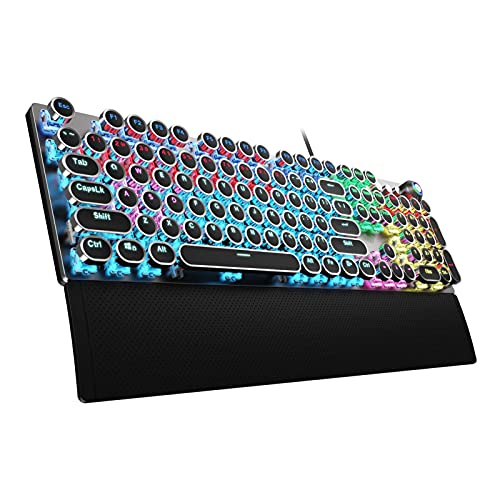
TL;DR: The Aula F2088 is a full‑size, aluminum‑alloy mechanical keyboard with 104 clicky blue switches, 1.8 m braided cable and vibrant RGB, priced at $44.89.
What really stands out is the 1.8 m braided USB‑C‑compatible cable that gives you plenty of reach without a tangled mess, plus a detachable magnetic wrist rest for extra comfort during marathon sessions. The board packs a full‑size 104‑key layout, a 38 mm low‑profile aluminum frame and a multi‑function metal knob that controls media playback and backlight modes.
At roughly 2.25 lb (1020 g), the Aula is a touch heavier than the Redragon K556 (2.20 lb) and noticeably heavier than the compact RK61 (1.23 lb) or the ultra‑light K617 (0.60 lb). Its 435 mm length matches the Redragon K556 but exceeds the RK61’s 292 mm and the GK61’s 290 mm, while staying shorter than the Langtu’s 450 mm. Unlike the RK61, the Aula’s switches aren’t hot‑swappable, and its wired‑only connection means you won’t get the detachable Type‑C convenience found on the RK61 and K617.
Users rave about the retro round double‑shot keycaps and the vivid rainbow RGB that offers 19 preset plus 3 custom zones. Professional reviewers highlight the anti‑ghosting (104‑key) and N‑key rollover via FN combos as solid for competitive play, and they appreciate the sturdy rear kickstands that keep the board steady. The main complaints revolve around the lack of hot‑swap capability and the fact that you’re stuck with a wired setup.
Pros
Cons
Best for: Buyers willing to invest in a proven, high‑quality option
Avoid if: You're shopping on a tight budget — it's priced at $44.89
“The multi‑function dial, sturdy kickstands for reliable typing without wobbling, and smooth black linear switches are ideal for gamers.”
TL;DR: The Redragon K617 Fizz offers a 60% layout, hot‑swappable Red switches and full RGB lighting for just $26.99, making it a solid budget pick for compact gaming setups.
At the core of the K617 is a 61‑key 60% layout that frees up desk space while keeping all essential gaming keys. The keyboard weighs 0.6 pounds and measures 310 mm deep, 40 mm high and 135 mm wide, delivering a lightweight, portable footprint. Its hot‑swappable linear Red switches let you change out switches without soldering, and the full‑key RGB system provides 20 preset lighting modes with adjustable brightness and speed.
Compared with other keyboards in this roundup, the K617 is notably lighter than the MageGee 75% (1.918 lb) and the HK Gaming GK61 (1.283 lb). Its depth of 310 mm is shorter than the Redragon K585 DITI’s 11 in length, and the 40 mm height sits just above the Langtu Membrane’s 30.5 mm profile, giving you a balance of compactness and typing comfort. While it lacks a wireless option, its detachable USB‑C cable ensures a reliable wired connection.
Users consistently praise the keyboard’s smooth Red switches and the space‑saving 60% layout, calling it a great starter for FPS gamers on a budget. Professional reviewers note the extensive RGB customization and the ease of swapping switches as strong points. A common complaint cites the lack of wireless connectivity, and a few reviewers mention that weight specifications vary across sources, though the listed weight is 0.6 pounds.
Beyond the basics, the K617 offers full‑key anti‑ghosting with N‑key rollover, and the Pro Driver software lets you program macros, remap keys and fine‑tune lighting effects. Adjustable feet provide 3°/8° tilt options, and the ABS plastic housing adds durability without adding bulk.
Pros
Cons
Best for: Budget‑conscious buyers seeking a reliable entry‑level option
Avoid if: You have limited desk space or need portability
“great starter budget keyboard with nice sound and great endurance”
TL;DR: For $25.94 you get a full‑size 104‑key membrane keyboard with a 1.5 m USB cable, rainbow LED backlighting and a sturdy aluminum panel, ideal for casual gaming and office work.
The Langtu L1 packs a 104‑key layout, a 30.5 mm low‑profile design and a 1.5 m wired USB connection, all for a listed price of $25.94. Its brushed‑aluminum panel adds a premium feel while keeping the net weight at 700 g (about 1.543 lb). The rainbow LED strip offers seven colors with adjustable brightness, and the manufacturer markets the membrane keys as quiet, with a rated lifespan of 5,000,000 clicks.
Compared with the eight peers, the Langtu is heavier than the Redragon K617 Fizz (0.6 lb) but lighter than the MageGee 75% Mechanical (1.918 lb) and the Aula F2088 (2.249 lb). Its 1.5 m cable matches the HK Gaming GK61 and it's a bit shorter than the MageGee’s 1.6 m cable and the Aula’s 1.8 m cable. While many competitors such as the MageGee, HK Gaming GK61 and Redragon K585 feature full‑NKRO, the Langtu’s 25‑key anti‑ghosting is more limited, positioning it as a budget‑friendly alternative rather than a high‑performance esports tool.
Professional reviewers note the sturdy aluminum panel and the vibrant rainbow lighting as standout qualities, and everyday users appreciate the quiet operation in shared spaces. However, the same reviewers point out that the 25‑key anti‑ghosting can hinder fast‑paced games, and some users mention that the bottom‑row keys sound noticeably louder than the rest, reducing the “quiet” claim.
Pros
Cons
Best for: Budget-conscious buyers seeking a reliable entry-level option
Avoid if: You want the best value‑per‑dollar in its price range
TL;DR: The MageGee 75% Mechanical Gaming Keyboard offers a solid metal frame, smooth linear yellow switches, and full anti‑ghosting for $27.89, making it a compact, budget‑friendly choice for gamers and typists.
The standout spec is its 75% layout with 87 keys housed in a solid alloy metal panel that measures about 14.02 in long, 5.04 in wide and 1.50 in tall. Linear yellow switches deliver low‑friction keystrokes, and the hot‑swappable design lets you change switches without soldering. Weighing roughly 1.92 lb and coming with a 1.6 m USB‑wired cable, it balances sturdiness with a manageable desk footprint.
Compared with the other eight keyboards in this $50‑or‑less roundup, the MageGee sits in the mid‑weight range. It’s heavier than the Redragon K617’s 0.6 lb chassis but lighter than the Aula F2088’s 2.25 lb build. Its 1.6 m cable is a touch longer than the 1.5 m cables on the Langtu and HK Gaming GK61 models, giving you a little extra reach without excess slack. The 100 % anti‑ghosting rating outclasses the Langtu’s 25‑key limit and matches the full‑key rollover found on higher‑priced rivals.
User feedback highlights the smooth, quiet feel of the linear yellow switches, with many reviewers praising the ergonomic radian design that eases long‑session fatigue. Professional reviewers note the knob’s dual role for volume and lighting mode changes as a handy shortcut. However, the same reviewers point out a hollow, reverberant typing sound that can feel less refined, and the blue‑only LED lighting limits color personalization. The USB port’s right‑side placement also draws criticism for awkward cable routing.
Beyond the basics, the keyboard features a 50 million‑stroke lifespan, 12 multimedia keys, and 18 lighting modes (blue‑only) controlled via the built‑in knob. The splash‑proof, non‑slip suspension keycaps add durability, while the double‑shot injection caps and extra orange keycaps give a modest aesthetic boost without inflating the price.
Pros
Cons
Best for: Budget‑conscious gamers and typists who want a compact mechanical keyboard with a sturdy metal build and smooth linear switches.
Avoid if: You need wireless connectivity, full RGB lighting, or a silent acoustic profile.
Breakdown
HK Gaming GK61
Pros
Redragon K556 RGB
Pros
Cons
Motospeed Mechanical Gaming Keyboard
Pros
RK Royal Kludge RK61 Red
Pros
Based on scoring data and product specs
Personalized picks
Best Overall Pick
HK Gaming GK61
Best OverallBest for: Most users looking for a well-reviewed, reliable mainstream option
Redragon K556 RGB
Best for: Buyers willing to invest in a proven, high-quality option
$44.99+$15.00 vs winner
Skip MageGee 75% Mechanical Gaming Keyboard if…
You have limited desk space or need portability
HK Gaming GK61 earns the top spot as the best budget gaming keyboard. At $29.99 it delivers a compact 60% (61‑key) layout, a 4.5/5 rating from 20,133 reviews, and full NKRO with a 1000 Hz polling rate. The hot‑swap sockets let you swap 3‑pin or 5‑pin switches, while the per‑key RGB offers 16.8 million colors across 20 patterns.
The Redragon K556 RGB is the runner‑up, perfect if you need a full‑size board with dedicated media controls. Its 104‑key layout includes 12 multimedia keys, a brushed‑aluminum frame, and an IP67 rating for spill resistance, all for $46.99.
Pick the HK Gaming GK61 today and get a feature‑rich, affordable keyboard that doesn’t compromise on performance.
The HK Gaming GK61, at just 290 mm long, 30 mm tall and 600 g, offers a 60% 61‑key layout with a detachable Type‑C cable, making it ideal for tight spaces. The Motospeed Mechanical Gaming Keyboard is wireless with a 10 m range but measures 350 mm long and weighs 800 g, so it’s less compact despite its portability.
No reviews yet — be the first to share your experience.
Please sign in to leave a review



