
If you need a rugged, commercial‑grade touch screen without breaking the bank, the ViewSonic TD2465 24‑inch Touch stands out. At $369.99 it carries a 4.2/5 rating from 281 reviewers, offers 10‑point projected capacitive touch, 7H hardened glass, and a bright 250 cd/m² display—features that make it a reliable workhorse for POS stations, classrooms, or kiosks.
The list includes 12 interactive displays covering every budget. The budget tier features the ViewSonic TD2465, Asus VT229H ($219.00, 4.5/5), Wacom One HD ($298.82, 4.5/5) and Acer UT222Q ($214.01, 4.2/5). Mid‑range options are the Elo E700813 15‑inch ($392.99, 4.5/5) and the Bsimb 27‑inch Digital Calendar ($419.99, 4.4/5). Premium choices round out the list with the Planar PCT2485 ($469.00, 4.3/5), GreenTouch GT‑TM238 ($488.88, 4.7/5), Elo E351600 22‑inch ($549.99, 4.3/5) and the LG 32U889SA‑W ($786.99, 4.0/5), each bringing higher specs and more premium builds.
Below you’ll find a closer look at each model so you can match the right screen to your space, workflow, and wallet.

ViewSonic TD2465 24-inch Touch
Its 2 × 2 W stereo speakers and 30,000‑hour backlight deliver solid audio and long‑lasting display for just $369.99.

Asus VT229H
Ideal for students or home offices needing a compact touch screen, and at $219 it’s $150 cheaper than the ViewSonic mid‑range pick.

Wacom One HD
Features a deep 15.7‑inch profile, offering a larger drawing surface that the other two lack, at $298.82.
Also considered
Score Analysis
Key score advantages vs. runner-up (Asus VT229H)
Price Range
ViewSonic TD2465 24-inch Touch
$369.99
Asus VT229H
$219.00
Wacom One HD
$389.95
Elo E700813 15-inch
$449.99

GreenTouch GT-TM238 23.8-inch
$488.88

LG 32U889SA-W
$796.99

Planar PCT2485
$469.00
Bsimb 27-inch Digital Calendar
$419.99

Acer UT222Q bmip 21.5-inch
$214.01

Elo E351600 22-inch
$549.82

Elo E829550 15-inch
$435.00

Waveshare 4-inch HDMI LCD
$38.99
Spec Comparison
TL;DR: The ViewSonic TD2465 packs a 24‑inch Full HD VA panel, 10‑point projected‑capacitive touch and rugged 7H glass into a $369.99 unit that’s solid for POS or classroom use but isn’t built for fast‑action gaming.
The standout feature is its 10‑point projected‑capacitive touch surface, supported by a 1.2 mm 7H‑hardness glass panel. With glove and wet‑hand support, the screen stays responsive even in busy retail or lab environments. At 24 inches and a native resolution of 1920 × 1080, it delivers 92 PPI and a 250 cd/m² brightness level that’s on par with many commercial displays.
Compared with peers, the TD2465 is heavier than the 10.6‑pound Elo E700813 but lighter than the 13.7‑pound Planar PCT2485. Its 250 cd/m² brightness matches the Elo’s 250‑nit spec, while its 10‑point touch matches the Planar’s simultaneous touch capability. The built‑in 2 × 2 W stereo speakers give basic audio without needing external boxes, a perk the Wacom One HD lacks.
Reviewers consistently praise the monitor’s smooth touch response and sturdy build, noting that setup feels straightforward thanks to the mix of HDMI, DisplayPort, VGA and a USB‑C PD 90 W option. The same feedback flags the VA panel’s 7 ms response as a source of motion blur for video work, and users mention the lack of HDR and the tilt‑only adjustment as ergonomic drawbacks. Professional reviewers echo the durability and connectivity strengths while warning that gamers and video editors will find the slower response and missing HDR limiting.
Pros
Cons
Best for: Value-conscious buyers seeking quality at $369.99
Avoid if: You need HDR, high‑speed gaming performance, or extensive ergonomic adjustments
TL;DR: The Asus VT229H offers a 21.5‑inch Full HD IPS touchscreen with 10‑point multi‑touch, solid 4.5‑star rating, and ergonomic tilt, making it a reliable budget interactive display for offices.
The VT229H sports a 21.5‑inch IPS panel that delivers a native resolution of 1920 × 1080 pixels and a pixel density of 102 PPI. It lists brightness at 250 cd/m² and the screen refreshes at 60 Hz with a 5 ms response time, which is adequate for typical office work. Touch interaction uses a projective‑capacitive system supporting 10 simultaneous points, protected by 7H hardness glass. The monitor tilts from +20° down to –5°, and its VESA‑mount pattern is 100 × 100 mm.
At 7.01 lb the VT229H is lighter than the Acer UT222Q (about 7.72 lb) and considerably lighter than the ViewSonic TD2465 (over 12 lb) and the Elo E700813 (around 10.6 lb). It is heavier than the Wacom One HD (4.5 lb) and dramatically heavier than the Waveshare 4‑inch HDMI LCD (0.2 lb). It provides 2 × 1.5 W speaker power, which is lower than Acer’s and ViewSonic’s 2 × 2 W setups. The stand depth measures 204.4 mm, deeper than Acer’s 50.8 mm design, giving the VT229H a sturdier footprint but a bulkier desk profile.
Reviewers consistently praise the IPS clarity and the smooth 10‑point touch response, noting the TÜV‑Rheinland flicker‑free and low‑blue‑light certifications as a relief during long sessions. Professional reviewers highlight the frameless look for dual‑monitor arrangements. Common complaints focus on the lack of height adjustment, limited port selection (no DisplayPort or USB‑C), and modest speaker output that can distort at higher volumes.
Additional technical notes include a typical power draw of 21.9 W (average) and less than 0.5 W in power‑off mode, making it energy‑efficient for 24‑hour office use. The built‑in 100 × 100 mm VESA mount and Kensington lock provide secure mounting options for kiosks or shared workspaces.
Pros
Cons
Best for: Budget-conscious buyers seeking a reliable entry-level option
Avoid if: You want the best value-per-dollar in its price range
“Users appreciate the smooth and accurate touch response, especially for use with virtual keyboards and point‑of‑sale (POS) systems.”
“The image quality is frequently described as “crisp” and “color‑accurate” for daily tasks.”
TL;DR: The Wacom One HD offers a 13.3‑inch Full HD matte display, battery‑free pen with 4,092 pressure levels, and a single‑cable setup for under $300, making it a solid entry‑level drawing tool.
The standout spec is its 13.3‑inch AHVA (IPS variant) panel that delivers a native resolution of 1920 × 1080 pixels and a measured brightness of 151.9 nits. Combined with a matte anti‑glare coating, the screen reduces eye strain while the electromagnetic resonance pen provides 4,092 pressure levels and tilt support, all without a battery.
Weighing 4.5 lb, the One HD feels noticeably lighter than most rivals in this roundup – the ViewSonic TD2465 tips the scales at over 12 lb, the Asus VT229H sits around 7 lb, and the Acer UT222Q exceeds 7 lb. It also skips multi‑touch, a feature on the ViewSonic Touch model, so touch gestures aren’t an option here. The fixed 19° tilt angle offers less flexibility than the adjustable ranges on some competitors.
Users consistently praise the device’s plug‑and‑play simplicity; the 4‑Way adapter bundles USB‑C, HDMI, USB‑A and power in a single cable, which reviewers call “easy to set up and use.” Professional outlets such as PCMag and Engadget highlight the low latency and natural pen feel, while everyday buyers commend the included 6‑month trials of Clip Studio Paint and Adobe Fresco. Common complaints revolve around the lack of an eraser button, the fixed tilt, and a one‑year warranty that feels short compared with longer terms offered elsewhere.
Pros
Cons
Best for: Budget‑conscious beginners, students, and casual creators who need a reliable pen‑display without a steep learning curve.
Avoid if: You want the best value‑per‑dollar in its price range or require multi‑touch, extensive shortcut keys, or a longer warranty for professional work.
“great, no-frills drawing tablet for budding artists”
“great starter tablet for digital art”
TL;DR: The Elo E700813 15‑inch touchscreen offers a rugged 4:3 panel with 1024×768 resolution, 8 ms response, and 10.6 lb weight, all backed by a 3‑year warranty for $392.99.
This model’s standout feature is its commercial‑grade durability: the panel seals against dirt, dust and liquids and carries a 50,000‑hour MTBF rating. It also delivers a fast 8 ms response time and a brightness of up to 250 nits from the LCD panel, which is enough for typical indoor POS lighting.
Compared with the other eleven contenders, the Elo is lighter than the ViewSonic TD2465 (12.6 lb) and the Planar PCT2485 (13.7 lb), yet noticeably heavier than the ultra‑light Wacom One HD (4.5 lb). Its 250‑nit brightness matches the ViewSonic’s 250 cd/m² rating, while the Elo’s native 1024×768 resolution is lower than the widescreen offerings of many peers.
Reviewers consistently praise the monitor’s rugged construction and sealed touch surface, noting it survives 24/7 kiosk duty without issue. However, they also point out the outdated 4:3 aspect ratio and the lack of HDMI or DisplayPort—only an analog VGA input is provided—making it less suitable for modern multimedia needs. Power draw stays modest at 9.60 W when on and drops to 0.30 W in standby, which helps keep operating costs down.
Pros
Cons
Best for: Businesses that need a durable, 15‑inch touchscreen for POS, kiosk or industrial use at a sub‑$500 price point.
Avoid if: You need a high‑resolution widescreen, multi‑touch capability, or the latest video interfaces.
TL;DR: The GreenTouch GT‑TM238 offers a 23.8‑inch 1080p PCAP touchscreen, 10‑point multi‑touch, 1000 cd/m² peak brightness, and rugged IP65/IK08 protection for under $500.
This model’s standout feature is its industrial‑grade durability: an IP65 water‑resistant seal and IK08 vandal‑proof front protect the 23.8‑inch panel while still delivering 1000 cd/m² peak brightness and a standard 250 cd/m² output. The 10‑point projected‑capacitive (PCAP) touch layer, backed by a 3 mm glass cover, registers gestures even when you wear gloves.
Compared with the other eleven displays in this roundup, the GreenTouch sits on the lighter side of the group—at 12.0372395052 pounds, it weighs less than the Planar, Elo and ViewSonic models, yet it’s still heavier than the smallest 15‑inch units, making a sturdy VESA mount essential. Its 75 Hz refresh rate and 5 ms standard response time outpace many touch‑enabled peers that list 14 ms or slower, giving it a smoother feel for everyday interaction.
Users consistently praise the monitor’s sharp 1920 × 1080 image and bright display, especially in bright retail or kiosk settings. Professional reviewers highlight the IP65 sealing and high brightness as critical for outdoor deployments, while everyday buyers note the responsive touch and the convenience of built‑in Wi‑Fi and Bluetooth on the Android variant. A recurring complaint is the variable response time—some listings report 5 ms while others note 14 ms—leading to occasional motion blur. Additionally, the need for an external 12 V DC power adapter adds a bit of cable clutter during installation.
Pros
Cons
Best for: Commercial and industrial deployments such as self‑service kiosks, POS stations, or any environment that demands a rugged, bright touchscreen.
Avoid if: You need a lightweight desktop monitor or a low‑latency display for high‑performance gaming.
“The touch responsiveness is smooth and accurate, even with gloves.”
“Average rating across platforms: 4.5 out of 5 stars.”
TL;DR: The LG 32U889SA-W offers a 31.5‑inch 4K IPS touchscreen with 95% DCI‑P3 color, 65 W USB‑C power delivery and a fully adjustable wheeled stand for $786.99.
This model’s standout feature is its 31.5‑inch 4K UHD IPS touchscreen that delivers 3840 × 2160 resolution, 10‑bit color depth (1.07 billion colors) and 350 nits brightness, all wrapped in a glossy finish. The stand pivots, swivels and tilts ±90° and lifts up to 13 inches, letting you switch between portrait and landscape modes in seconds.
At 46.74 pounds, the LG monitor's considerably heavier than the Elo E351600 (14.88 pounds) and the GreenTouch GT‑TM238 (about 12 pounds), but its sturdy build supports the rolling stand and hidden cable compartment. Its 350 nits panel outshines the Elo’s 250‑nit display and matches the GreenTouch’s standard brightness, though it falls short of the GreenTouch’s high‑brightness 1000 cd/m² mode. None of the listed peers provide a 65 W USB‑C power‑delivery port, making the LG a stronger docking solution for laptops.
Users consistently praise the monitor’s flexibility and touch responsiveness, noting that the wheeled base makes re‑configuring a home office effortless. Professional reviewers highlight the 95% DCI‑P3 gamut and HDR10 support as “professional‑grade color accuracy.” Common criticisms focus on the glossy screen’s susceptibility to reflections, the lack of a built‑in webcam or microphone, and the 60 Hz refresh rate, which some gamers find limiting.
Beyond the display, the unit runs webOS with built‑in streaming apps, AirPlay 2, and cloud PC access, allowing a PC‑free work mode. ENERGY STAR certification and a standby draw of just 0.5 W keep power use modest, while the dual 5 W speakers provide basic audio without external speakers.
Pros
Cons
Best for: Hybrid workspaces, creative professionals, educators and home‑office users who value a large 4K touchscreen and flexible mounting.
Avoid if: You need a high‑refresh‑rate display for competitive gaming or an integrated webcam/microphone for video conferencing.
“The seamless transition between PC mode and smart TV mode”
“The responsiveness of the touchscreen for navigating apps and settings”
TL;DR: The Planar PCT2485 offers a 23.6‑inch Full HD touchscreen with 10‑point projected capacitive input, built‑in 720p webcam, and solid specs for $469, though its brightness and speakers are modest.
The monitor’s 23.6 in diagonal panel delivers a native 1920 × 1080 resolution and a pixel pitch of 0.2715 mm, giving crisp images across its 178° horizontal and vertical viewing angles. A projected‑capacitive layer handles touch responsiveness, supporting 10 simultaneous touches, while the built‑in 720p webcam and microphone make video calls effortless. At $469.00 the unit also includes a cleaning cloth, stylus and cable wrap, and it runs on a typical 35 W power draw.
At 13.7 lb, the PCT2485 is a bit heavier than the GreenTouch GT‑TM238 (12.0372395052 lb) and the ViewSonic TD2465 (12.566348934 lb), but lighter than the Elo E829550 (14.9 lb). Its brightness of 250 cd/m² (no touch) drops to 220 cd/m² when touch is active, which matches ViewSonic’s 250 cd/m² rating but falls short of GreenTouch’s high‑brightness 1000 cd/m² mode. The 14 ms response time mirrors GreenTouch’s “alternative” 14 ms figure, yet it is slower than the Elo E700813’s 8 ms response. All models share a 1000:1 contrast ratio, so picture depth is comparable across the board.
Reviewers consistently praise the smooth 10‑point touch feel and the convenience of the integrated webcam for remote collaboration. Professional reviewers note the “better touch feel and picture quality” compared with similar ViewSonic models, and they appreciate the plug‑and‑play compatibility with Windows, Linux and even Raspberry Pi devices. The main complaints center on the screen’s modest brightness in well‑lit rooms and the under‑powered 2 × 1 W speakers, which some users find too quiet for group presentations.
Pros
Cons
Best for: Those prioritizing quality and willing to pay for premium performance
Avoid if: You're on a tight budget or only need basic functionality
“In my opinion, the Planar has the better touch feel and better picture”
“Absolutely stunning”
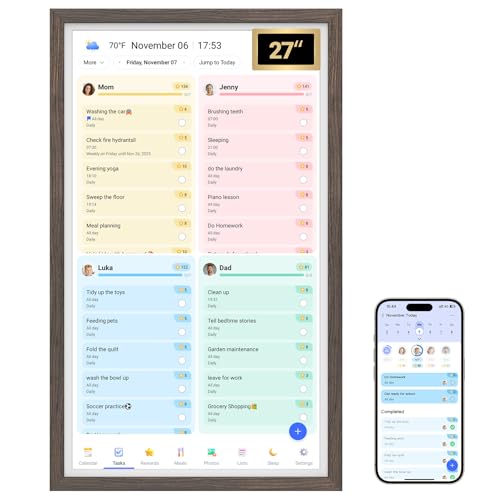
TL;DR: At $419.99, the Bsimb 27‑inch Digital Calendar offers a 27‑inch FHD touchscreen, Wi‑Fi sync with major calendars, and a 32 GB drive, earning 4.4‑star ratings from 112 reviewers.
The standout spec is the 27‑inch 1920 × 1080 full‑HD display, which sits in a slim 0.99‑inch profile, and a swivel wall mount lets you flip between portrait and landscape. Weighing 18.71 lbs, the unit feels solid, and its internal 32 GB storage gives you space for photos and short video clips without external drives.
Compared with the other eleven contenders, this model has the largest screen—far bigger than the 15‑inch panels of the Elo E829550 and Elo E700813, the 24‑inch ViewSonic TD2465, the 23.8‑inch GreenTouch GT‑TM238, and the 13.3‑inch Wacom One. It also carries the most weight, out‑matching the Elo E700813 at 10.6 pounds, the Elo E829550 at 14.9 pounds, the Planar PCT2485 at 13.7 pounds, the ViewSonic at 12.566348934 pounds, the GreenTouch at 12.0372395052 pounds, and the Wacom One at 4.5 pounds. While many rivals omit storage details, Bsimb lists a concrete 32 GB capacity, giving you a clear idea of how much media you can keep locally.
Family users praise the clear, large display for reading schedules across the room and love the smooth sync with Google Calendar, iCloud, Outlook, Cozi, and Yahoo. Reviewers call it a “digital command center” that keeps chores, meals, and photos organized, and the built‑in reward system is noted as a morale booster for kids. Some users report occasional lag in app responsiveness and occasional sync delays, and the 32 GB storage can feel tight for long‑term photo archives. The unit’s plastic body with a dark‑wood finish, 50 % recycled material content, and a 1‑year manufacturer warranty round out its eco‑friendly and support credentials.
Pros
Cons
Best for: Most users seeking a balanced, mainstream option
Avoid if: You have limited desk space or need portability
“large, clear display that’s easy for kids and elders to read”
“syncing issues with iCloud or Outlook, requiring manual refresh”
TL;DR: The Acer UT222Q bmip packs a 21.5‑inch 1920 × 1080 IPS touchscreen with 10‑point PCAP, AMD FreeSync, 75 Hz refresh and a slim ZeroFrame bezel for under $215.
At the heart of the UT222Q is a 21.5‑inch IPS LCD that delivers 1920 × 1080 pixels and a 4 ms response time. The projected‑capacitive panel supports 10‑point multi‑touch, and AMD FreeSync can push the refresh up to 75 Hz, helping keep motion smooth. The monitor weighs 7.71838379262 lb and offers a tilt range from 15° to 70°, though it lacks height or swivel adjustment.
Compared with other entries, the Acer is lighter than the ViewSonic TD2465 (which tips the scales at over 12 lb) but a shade heavier than the Asus VT229H at about 7 lb. Its 250 cd/m² brightness matches the Asus and ViewSonic models, while its 72% NTSC color gamut is on par with those same peers. The UT222Q provides fewer USB ports—only a single USB 2.0 upstream—whereas some competitors list additional downstream connections.
Users consistently praise the monitor’s smooth, accurate touch and the anti‑glare matte finish for classroom or home‑office use. Professional reviewers highlight the ZeroFrame ultra‑thin bezel and the reliable color consistency across the 178° viewing angles. However, several owners report driver instability after Windows updates and note that the built‑in 2 W speakers are modest in volume, that's a common complaint in user feedback.
Beyond the display, Acer includes eye‑care technologies like Flicker‑less and Blue Light Shield, and the unit draws a typical 27 W during operation with a standby draw of just 0.5 W. The monitor supports VESA‑mounting (100 × 100 mm) and comes with a three‑year parts‑and‑labor warranty, adding confidence for budget‑conscious buyers.
Pros
Cons
Best for: Entry‑level buyers or those on a tight budget
Avoid if: You want the best value‑per‑dollar in its price range
“Perfect for drawing and note‑taking”
“Great for kids and education”
TL;DR: The Elo E351600 offers a 21.5‑inch Full HD PCAP touchscreen with 10‑point multi‑touch, solid build quality and a 3‑year warranty, but its brightness and contrast lag behind higher‑end rivals.
The standout spec is the 10‑point projected‑capacitive touch on a 21.5‑inch panel that delivers a native resolution of 1920 x 1080 and a response time of 14 ms. Brightness is listed at 250 nits with a contrast ratio of 1000:1, and the monitor weighs 14.88 pounds.
Compared with the GreenTouch GT‑TM238, the Elo is heavier (14.88 lb vs 12.04 lb) and its depth without stand is slimmer at 42.7 mm versus 47 mm. It matches GreenTouch’s standard brightness of 250 cd/m² but falls short of the latter’s high‑brightness mode of 1000 cd/m². Against the Planar PCT2485, Elo’s 250‑nit panel is brighter than Planar’s 220‑cd/m² touch‑enabled rating, while its 42.7 mm depth is thinner than Planar’s 44.6 mm. Both competitors list similar 10‑point touch capability.
Professional reviewers praise the monitor’s high touch accuracy, IK06 impact resistance and IPX1 front protection, noting the near‑180° viewing angles make it easy to see from any side. Everyday users appreciate the reliability and quick installation, though many mention the brightness drops to roughly 225 nits once the touch layer is added and the contrast ratio of 1000:1 feels modest. The unit ships with a stand, VGA and HDMI cables, a 50 W power brick and a quick‑install guide, and it’s covered by a 3‑year manufacturer warranty.
Pros
Cons
Best for: Those prioritizing quality and willing to pay for premium performance
Avoid if: You need advanced features or professional‑grade performance, or you plan to use the display in bright outdoor or dusty environments
TL;DR: The Elo E829550 15‑inch touchscreen offers a rugged zero‑bezel design, 300 nits brightness, and 23 ms response time at $435, making it a solid mid‑range choice for high‑traffic commercial settings.
This model’s standout feature is its zero‑bezel construction, with a bezel‑free depth of just 1.73 in, while still providing a 15.0‑inch diagonal active‑matrix TFT LCD backed by LED lighting. The panel delivers 300 nits of typical brightness, an 800:1 contrast ratio, and a 23 ms typical response time at a maximum 75 Hz refresh rate. Weighing 14.9 lb, it stays put on a desk or wall mount (75 mm × 75 mm VESA).
Compared with the other eleven contenders, the Elo sits on the heavier side—heavier than the Planar PCT2485 (13.7 lb) and the ViewSonic TD2465 (≈12.6 lb). It's also priced higher than the Bsimb 27‑inch Digital Calendar, which costs less. While the GreenTouch GT‑TM238 and Elo E351600 both carry a 75 Hz refresh, they offer higher brightness levels (up to 1,000 cd/m²) and, in the case of the GreenTouch, a 1000:1 contrast ratio, making the Elo’s 300 nits and 800:1 a modest but adequate spec for most indoor environments.
Reviewers consistently praise the zero‑bezel frame for its durability and ease of cleaning in hygiene‑sensitive settings. The single‑touch SAW surface works reliably, and the unit’s low power draw—10.5 W when on, 0.3 W in standby—keeps operating costs down. However, users note that the 1024 × 768 native resolution can feel cramped for modern applications, and the lack of multi‑touch limits gesture‑based workflows.
Additional technical details include a wide AC input range of 100–240 V, DC input of 12 V ±5 %, and an MTBF of 50,000 hours, indicating solid longevity. The device operates comfortably between 0 °C and 40 °C and tolerates 20 %–80 % humidity, making it suitable for varied commercial environments.
Pros
Cons
Best for: Most users seeking a balanced, mainstream option
Avoid if: You need advanced features or professional‑grade performance
TL;DR: At $38.99 the Waveshare 5‑inch HDMI LCD delivers a crisp 800 × 480 IPS screen, HDMI plug‑and‑play, and Raspberry Pi‑ready accessories, making it the most affordable interactive display under $1,000.
The standout spec is its 5.0‑inch IPS panel delivering an 800 × 480 pixel image in a compact 40 mm × 120 mm × 90 mm footprint. Weighing just 0.2 pounds (91 g), the screen can be mounted directly onto Raspberry Pi GPIO holes, and you can even switch the backlight off to save power.
At 0.2 pounds it's dramatically lighter than the Acer UT222Q’s 7.71838379262‑pound chassis or the Asus VT229H at 7.01 pounds, and far smaller than the 13.3‑inch Wacom One HD or the 24‑inch ViewSonic TD2465, both of which tip the scales at several pounds.
Users consistently praise the clear 800 × 480 output and the fact that the HDMI cable and a four‑screw mounting kit arrive in the box, making prototype builds painless. However, several reviewers note the resistive single‑touch layer needs firm pressure and can drift, which is a common complaint for this technology. The lack of built‑in speakers also limits its use for multimedia without external audio.
Professional reviewers point out that driver support spans Raspbian, Ubuntu, Kali and RetroPie, and the SPI touch interface occupies GPIO pins but remains reliable. CE and HDMI certifications back the connectivity claims, while the optional backlight control helps extend battery life for portable projects.
Pros
Cons
Best for: Shoppers on a tight budget who want the most for their money.
Avoid if: You need advanced features or professional‑grade performance, such as multitouch, built‑in speakers, or high‑brightness outdoor use.
“Very good-quality display”
“Works exactly as it should”
Breakdown
ViewSonic TD2465 24-inch Touch
Pros
Cons
Asus VT229H
Pros
Cons
Wacom One HD
Pros
Cons
Elo E700813 15-inch
Pros
Based on scoring data and product specs
Personalized picks
Best Overall Pick
ViewSonic TD2465 24-inch Touch
Best Mid-Range PickBest for: Value-conscious buyers seeking quality at $369.99
Asus VT229H
Best for: Budget-conscious buyers seeking a reliable entry-level option
$219.00-$150.99 vs winner
Skip Waveshare 4-inch HDMI LCD if…
You need advanced features or professional-grade performance
Our top pick is the ViewSonic TD2465 24‑inch Touch. It offers a full HD 1920 × 1080 panel, 10‑point projected‑capacitive touch, and a solid 250 cd/m² brightness that keeps the image clear in most lighting. The unit ships with a 3‑Year limited warranty on parts, labor and backlight, and its backlight lasts up to 30,000 hours. At $369.99 it balances cost and capability nicely, and the 4.2‑star rating from 281 reviewers shows consistent satisfaction.
The Asus VT229H earns the runner‑up slot, especially if you need a compact, budget‑friendly touchscreen for a small office or classroom. Its 21.5‑inch IPS screen delivers 250 cd/m² brightness and a quick 5 ms response, while the 10‑point multi‑touch surface works well for collaborative tasks. With a 4.5‑star rating from 4,655 reviews and a price of $219.00, it provides excellent value for tighter spaces.
For shoppers focused on price extremes, the Waveshare 4‑inch HDMI LCD is the best budget choice at $38.99, delivering a tiny but functional touch display for hobby projects. If you want a premium experience, the LG 32U889SA‑W stands out at $786.99, offering a larger 32‑inch canvas and higher‑end features for professional presentations.
Pick the ViewSonic TD2465 now for a reliable, well‑rounded interactive display under $1,000.
The ViewSonic TD2465 24‑inch Touch, priced at $369.99, combines a 24‑inch VA panel, 10‑point projected‑capacitive touch, and a three‑year warranty, delivering more screen real‑estate and features for the price than the cheaper Asus VT229H. Its larger size and higher contrast ratio give it a clear value edge.
Please sign in to leave a review
No reviews yet. Be the first to review!
