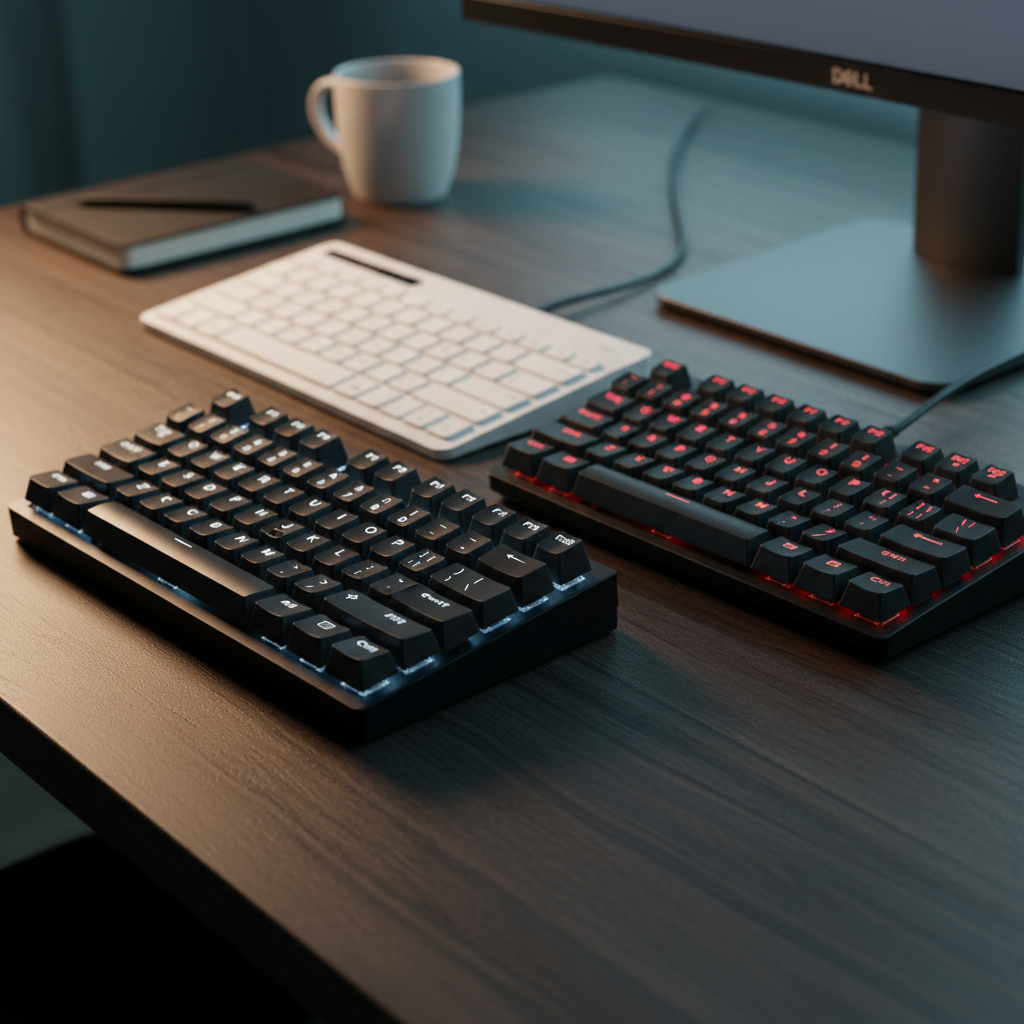
Surprisingly, the $13.95 Dell KB216 ties the highest user rating in our field, earning a 4.6‑star score from over 40,000 reviewers—exactly the same rating as the $39.99 Royal Kludge RK61, which also features a 1450 mAh battery and a 1.8 m cable length on its wired model. Both keyboards sit comfortably under the $50 ceiling while delivering the reliability that most buyers expect from a full‑size board.
The roundup of 15 keyboards spans three price tiers. The budget tier—Dell KB216, Logitech K270, MageGee MKBox and Redragon K671—covers options from $13.95 up to $27.59, all with solid build quality and essential features. Mid‑range choices include the RK Royal Kludge RK61 and the Royal Kludge RK61, priced around $39.99 and offering hot‑swappable switches and RGB lighting. The premium tier pushes the $49.99 limit with the Redragon K689, Redragon K556, Royal Kludge S108 and Corsair K55 CORE, each adding extra flair like gasket‑mounted PCBs or per‑key RGB effects. No matter your desk size or typing style, there’s a model here that fits the budget. Below is a breakdown of each keyboard’s strengths so you can pick the right match.
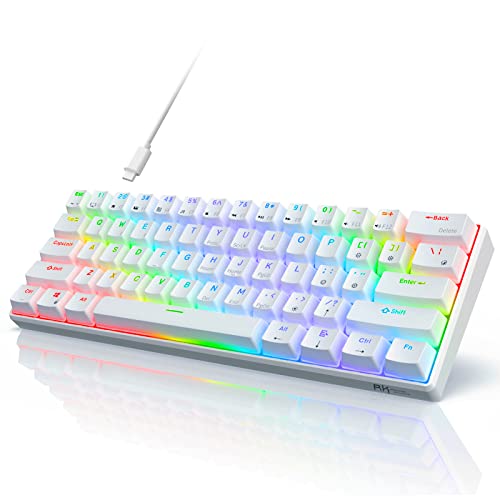
Royal Kludge RK61
Offers 18 RGB modes, giving you plenty of color customization without breaking the $39.99 budget.

Dell KB216
Ideal for budget‑conscious students or home offices, Dell KB216 delivers reliable typing at $13.95—about $26 less than the Royal Kludge RK61.

Redragon K671
Stands out with 12 dedicated multimedia shortcuts, letting you control media without leaving the keyboard, while staying comfortably priced at $27.59.
Also considered
Score Analysis
Key score advantages vs. runner-up (Dell KB216)
Price Range
Royal Kludge RK61
$39.99
Dell KB216
$12.95
Redragon K671
$27.59

Redragon K689
$39.99

MageGee MKBox
$25.49

RK Royal Kludge RK61
$39.98

Logitech K270
$19.95

Corsair K55 CORE
$49.99

Royal Kludge S108
$47.99

Redragon K556
$46.99

Arteck HA305
$35.94

Boogiio Large Print
$17.09

Tecknet TK-KB002
$29.99

Redragon K521
$15.99

Kopjippom Large Print Keyboard
$23.19
Spec Comparison
TL;DR: The RK61 delivers a hot‑swappable 60% layout, RGB lighting and solid wireless options for $39.99, making it a standout budget mechanical keyboard with strong user approval.
The RK61’s most eye‑catching spec is its hot‑swap PCB, which supports both 3‑pin and 5‑pin switches, letting you change key switches without soldering. It also packs 18 RGB modes plus 8 monochrome modes, and a 1450 mAh battery that powers its Bluetooth 5.1 and 2.4 GHz dongle connections.
Compared with the other fourteen keyboards in this roundup, the RK61 is lighter than the Redragon K689 (880 g) and slightly heavier than the Arteck HA305 (493 g). It also offers more lighting customization than many peers that only list a single‑color backlight, and its detachable USB‑C cable provides a convenience not found on several competing models.
Reviewers consistently praise the hot‑swap capability, calling it “impressive for the price” and noting that the keyboard feels solid despite its ABS case. Users love the compact 60% (61‑key) layout for small desks and portable setups. On the downside, the ABS keycaps tend to develop a shine over time, and the lack of built‑in tilt feet limits ergonomic tweaking. Some owners report wobbly stabilizers, and the battery life runs modestly when the RGB lighting is active.
Technical details round out the picture: the keyboard measures 289 mm × 103 mm × 39 mm, weighs 560 g, and features a 2.0 mm actuation distance with a 40 g operating force on the red switches. Its 1000 Hz polling rate ensures responsive input for gaming or typing, and the full‑keys anti‑ghosting guarantees every keystroke registers.
Pros
Cons
Best for: Buyers willing to invest in a proven, high-quality option
Avoid if: You're on a tight budget or only need basic functionality
“10/10 recommend”
“isn’t gorilla-proof”
TL;DR: The Dell KB216 is a full‑size wired USB keyboard priced at $13.95, offering a 5 million‑keystroke rated chiclet membrane, spill‑resistance, a 1.8 m cable, and a 4.6‑star rating from 40 k reviewers.
What really stands out is the keyboard’s 5 million‑keystroke durability claim combined with a spill‑resistant membrane, making it a solid choice for busy desks. The plunger‑style chiclet keys sit beneath a 7° tilt when the rear feet are extended (4° when retracted), and the 1.8 m (5.9 ft) USB‑2.0 cable gives you plenty of reach without crowding the workspace.
Compared with its peers, the KB216 is more affordable than the Redragon K521 and lighter than that model’s 710 g build, while still matching its 1.8 m cable length. It weighs a bit more than the Boogiio Large Print’s 0.899 lb frame, and it lacks the backlighting found on many of the other keyboards in this $50‑or‑less group. Nonetheless, its straightforward wired connection and solid construction put it ahead of wireless options like the Logitech K270, which carries a battery and a separate receiver.
Users consistently praise the keyboard’s reliable plug‑and‑play setup—you don’t need drivers on Windows, macOS, Linux, or Chrome OS—and the handy dedicated media keys for mute, volume, and playback control. Professional reviewers note the responsive key feel and enterprise‑grade durability, while some everyday users mention a hollow plastic feel and the absence of backlighting as drawbacks in dim environments. The wired design, while it limits mobility, keeps the desk tidy and eliminates the need for battery changes.
Pros
Cons
Best for: Budget‑conscious buyers seeking a reliable entry‑level option
Avoid if: You have limited desk space or need portability
“It’s not flashy, but it’s the kind of keyboard that just works — day after day.”
“Great little keyboard… until it started typing the wrong characters. No warning, no spill — just dead.”
TL;DR: At $27.59, the Redragon K671 delivers hot‑swappable linear Red switches, double‑shot PBT keycaps, full N‑key rollover, and RGB lighting in a compact full‑size layout.
The standout feature is its hot‑swappable linear Red switches, letting you change switches without soldering, paired with double‑shot PBT keycaps that resist shine. It also packs 12 multimedia shortcuts and a 1800 mm USB‑C cable for a tidy desk setup.
Compared with the MageGee MKBox, the K671 is heavier and longer, while still offering a similar price point. It’s wired, unlike the wireless Logitech K270, and provides full N‑key rollover that many budget keyboards lack. The keyboard also supplies 11 RGB backlight modes with 5 brightness levels, outpacing the limited color options of the Arteck HA305.
Users consistently praise the smooth feel of the linear Red switches and the durability of the PBT keycaps. Professional reviewers highlight the strong value with high‑end features at a sub‑$50 price. Common complaints focus on the lack of per‑key color customization, a software interface that feels dated, occasional space‑bar wobble, and limited macOS functionality.
Additional technical perks include a 24‑month warranty, macro‑editing software, and a handy accessories kit with a USB cable, keycap remover, and four spare Red switches plus two spare keycaps.
Pros
Cons
Best for: Budget‑conscious gamers and beginner mechanical‑keyboard enthusiasts who want hot‑swappable switches, durable PBT caps, and solid RGB lighting.
Avoid if: You need per‑key RGB lighting, a polished macOS experience out‑of‑the‑box, or highly refined software controls.
TL;DR: The Redragon K689 offers a full‑size, gasket‑mounted mechanical keyboard with pre‑lubed linear switches, hot‑swap capability and per‑key RGB for $39.99, delivering a smooth, quiet typing experience.
The standout feature of the K689 is its silicone‑gasket‑mounted PCB combined with a three‑layer foam stack (PO foam, IXPE switch foam, and bottom socket foam). This design, paired with the pre‑lubed Dragon Chant linear switches, creates a buttery feel while dampening noise. The keyboard measures 17.48028 in deep, 1.45669 in tall and 5.23621 in wide, and it weighs 1.9400679056 lb, giving it a solid, stable presence on any desk.
In the $50‑and‑under segment, the K689 is heavier than the Royal Kludge RK61 models (which weigh around 1.23 lb and 1.06 lb) but lighter than the Redragon K556 and Royal Kludge S108, both list at roughly 2.20 lb. It also sits above the Corsair K55 CORE’s 1.66 lb weight, making it one of the more substantial keyboards without venturing into premium‑weight territory.
Reviewers consistently praise the smooth key feel and the quiet, cushioned typing experience that the gasket and foam provide. Users also note the satisfying per‑key RGB lighting and the heavy chassis that stays put during intense gaming sessions. On the downside, the bundled Redragon software offers only basic FN‑key lighting controls, and the keycap font design has drawn criticism for looking cheap. Many who need a clutter‑free setup frequently complain about the lack of any wireless or Bluetooth option.
Beyond the core typing experience, the K689 includes a full 108‑key layout (104 standard plus four programmable keys), full 104‑key rollover with anti‑ghosting, and a removable USB‑C cable for easy transport. Redragon backs the keyboard with a one‑year warranty, reinforcing confidence in its build quality.
Pros
Cons
Best for: Buyers willing to invest in a proven, high-quality option
Avoid if: You're shopping on a tight budget — it's priced at $39.99
“Keys feel incredibly smooth and satisfying.”
“Great RGB lighting with 16 presets — makes the setup look cool.”
TL;DR: At $26.99, the MageGee MK‑Box delivers a sturdy 68‑key 60% mechanical keyboard with an all‑metal top plate, detachable cable and ~15 preset backlight modes, making it a solid budget pick for compact setups.
The MK‑Box packs a 68‑key 60% layout into a 1.5‑inch (38.1 mm) tall, 12.1‑inch (307.3 mm) long, 3.9‑inch (99.1 mm) wide chassis that weighs 1.76 lb (800 g). Its all‑metal top plate and dual‑position adjustable kickstand give it a premium feel, while the detachable USB‑A to USB‑C cable keeps it travel‑ready. Users can choose between clicky blue switches (50–60 g actuation) or smooth red switches (~45 g actuation), and the keyboard offers full 68‑key anti‑ghosting with N‑Key rollover.
Compared with other budget options in this roundup, the MK‑Box is lighter than the Redragon K671 (800 g vs 939 g) and shorter than its 435 mm length, but it is heavier than the Logitech K270 (1.76 lb vs 1.1 lb) and the Arteck HA305 (800 g vs 493 g). It also provides more backlight modes than the Redragon’s 11 preset modes, though it lacks the software‑driven RGB customization found on some higher‑priced keyboards.
Consumer feedback highlights the compact size as ideal for small desks and the clicky blue switches as satisfying for gaming, though the noise can be intrusive in quiet rooms. Professional reviewers praise the metal top plate and the adjustable kickstand for their durability and ergonomics, while noting the absence of wireless connectivity and limited lighting customization.
Pros
Cons
Best for: Budget‑conscious gamers, remote workers, or students who need a portable, well‑reviewed mechanical keyboard with a solid build.
Avoid if: You need a quiet office keyboard, wireless connectivity, or full RGB color customization.
“Perfect size for gaming and work”
“Clicky sound is satisfying”
TL;DR: The RK Royal Kludge RK61 packs Bluetooth 5.0, a 13‑hour backlit battery, hot‑swappable switches and full‑RGB lighting into a 480 g, 60% layout for $39.89.
The standout spec is its triple‑mode connectivity: Bluetooth 5.0, a 2.4 GHz dongle and a detachable USB‑C cable, all powered by a 1450 mAh battery that delivers up to 13 hours of backlit use and 360 hours on standby. At 39 mm tall, 292 mm long and 102 mm wide, the board measures a compact 480 g (1.0582188576 pounds), making it easy to move between a desk, couch or backpack.
Compared with the other 14 keyboards in this roundup, the RK61 is lighter than the Redragon K689 and the Royal Kludge RK61 (B089GN2KBT), but only marginally lighter than the Arteck HA305. Its 292 mm length is shorter than the Redragon K689’s 444 mm depth, giving it a more portable footprint than many full‑size options. While it doesn’t list a cable length, the detachable 1.5 m USB‑C cord is comparable to the 1.8 m cables found on some peers, and its RGB suite (18 dynamic + 8 monochrome modes) matches the lighting flexibility of several competitors.
Users consistently praise the RK61’s small form factor and the convenience of swapping 3‑pin or 5‑pin mechanical switches without soldering. Reviewers note the tactile click of the Blue switches and the smooth glide of the Red variants, both operating at 50‑60 g force. However, people often describe the ABS plastic chassis as “cheap‑feeling,” and the stock space‑bar stabilizers can be noisy and wobble under fast typing. Professional reviewers also flag occasional Bluetooth pairing glitches, especially when switching between multiple devices.
Pros
Cons
Best for: Most users looking for a well‑reviewed, reliable mainstream option
Avoid if: You're shopping on a tight budget — it's priced at $39.89
“10/10 recommend”
“isn’t gorilla-proof”
TL;DR: The Logitech K270 delivers a full‑size wireless typing experience with 24‑month battery life, 60 ml spill resistance, and a reliable 2.4 GHz connection, all for under $20.
The standout spec is its 24‑month battery life, with two AAA alkaline cells powering it, so you won’t be swapping batteries for years. It also survives spills up to 60 ml, and the 2.4 GHz Unifying receiver maintains a solid link out to 10 meters, giving you freedom to work away from the desk.
Compared with the other 14 keyboards in this roundup, the K270 is a bit heavier than the Boogiio Large Print’s 0.89948602896 pounds, yet lighter than the Redragon K671, which tips the scales at 939 grams. Its eight multimedia hotkeys are fewer than the Redragon K521’s 12‑key multimedia cluster, and unlike the wired Dell KB216 that comes with a 1.8 m cable, the K270 stays completely wireless.
Everyday users praise the plug‑and‑play simplicity and the long‑lasting battery, noting that the UV‑coated keycaps stay legible even after heavy use. Professional reviewers highlight the spill‑proof design and the dependable 2.4 GHz link, though they also point out the lack of Bluetooth and the occasional hiccup when the receiver sits behind a USB hub.
The keyboard offers a familiar full‑size layout with a number pad, a 19 mm thick profile, a 438 mm length and a 146 mm width, and it ships with a nano USB receiver that fits into any available port. Its eight dedicated hotkeys give quick access to the internet, email, play/pause, volume and a calculator, rounding out a solid feature set for budget‑focused users.
Pros
Cons
Best for: Budget‑conscious buyers seeking a reliable entry‑level option
Avoid if: You want the best value‑per‑dollar in its price range
“It just works”
“I’ve been using it for over 2 years on the same batteries”
TL;DR: The Corsair K55 CORE offers a full‑size membrane layout with 10‑zone RGB, spill‑resistant 300 mL construction, and dedicated media controls for $49.99, earning a 4.5‑star rating from over 12 k reviewers.
The standout feature is its 10 individually programmable RGB zones, delivering 16.8 million colors across the full‑size 104‑key board. Coupled with a 300 mL spill‑resistance rating, the keyboard can survive accidental coffee spills while still looking vibrant.
At 1.6578762 pounds, it’s lighter than the Royal Kludge S108 and the Redragon K556, both listed at 2.20462262 pounds, yet heavier than the compact Royal Kludge RK61 models (around 1.06–1.23 pounds). Its 1.82 m cable matches the 1.8 m cables of the S108 and Arteck HA305, and its 35 mm height is slimmer than the S108’s 42 mm and the Redragon K689’s 37 mm, while still deeper than the 289 mm‑long RK61.
Reviewers consistently praise the quiet membrane keys for smooth, low‑noise typing, a boon in shared spaces. Professional outlets highlight the 10‑zone lighting and the convenient volume dial as strong value adds, though they note the iCUE software can feel heavy for newcomers. Users also mention the lack of a wrist rest and the single‑stage height adjustment as ergonomic compromises.
Technical details include a 12‑key selective rollover and a 1000 Hz polling rate, ensuring responsive input for casual gaming. The keyboard runs on USB 2.0 Type‑A with a fixed, non‑braided 1.82 m cable, and it stores all lighting profiles onboard (one profile). The membrane rubber‑dome switches deliver a soft feel without the clicky noise of mechanical alternatives.
Pros
Cons
Best for: Buyers willing to invest in a proven, high-quality option
Avoid if: You're shopping on a tight budget — it's priced at $49.99
TL;DR: The Royal Kludge S108 offers a full‑size mechanical layout, 168 per‑key RGB modes, and clicky blue switches at $47.99, backed by a 4.5‑star rating from over 7,500 users.
This keyboard’s standout spec is the massive 168 per‑key RGB lighting effects, letting you colour‑code every key individually. It also features a full 108‑key rollover, so every press registers without ghosting. The mechanical blue switches deliver a 60 gf ± 5 gf actuation force with a 2.0 mm travel distance, giving the tactile click that reviewers love. A top‑grade aluminum alloy frame houses the S108, which weighs 2.20462262 pounds and feels solid on the desk, while the 1.8 m USB cable gives plenty of reach.
Compared with other keyboards in this $50‑under roundup, the S108 is heavier than the Corsair K55 CORE (which tips the scales at about 1.66 pounds) but matches the weight of the Redragon K556. It sits between the lighter RK Royal Kludge RK61 and the bulkier Redragon K689, making it a mid‑weight option for those who want a sturdy build without the heft of a full‑size gaming rig.
Users consistently praise the vintage typewriter aesthetic, the responsive blue switches, and the vivid RGB customisation. Professional reviewers note the premium feel of the aluminum chassis and the plug‑and‑play hardware customisation via FN shortcuts. Common complaints centre on the loud click of the blue switches, a firmware quirk that sometimes requires a wake‑up fix after boot, and an ABS wrist rest that feels less premium than higher‑end alternatives. The keyboard holds a solid 4.5/5‑star rating from 7,559 reviews, indicating broad satisfaction despite those trade‑offs.
Technical details include a current draw of 200 mA at 5 V, a lifespan exceeding 50 million keystrokes, and a detachable ABS ergonomic palm rest. The manufacturer offers a 12‑month warranty and lifetime support for any issues.
Pros
Cons
Best for: Buyers willing to invest in a proven, high-quality option
Avoid if: You're shopping on a tight budget — it's priced at $47.99
“10/10 recommend”
“isn’t gorilla-proof”
TL;DR: The Redragon K556 offers a full‑size metal‑frame mechanical keyboard with hot‑swappable switches, solid build quality and a $46.99 price tag, though it leans on the heavier side.
What really sets the K556 apart is its hot‑swappable Outemu switch design, letting you swap between red, blue, brown or black switches without soldering. The keyboard ships with eight spare switches—two of each type—so you can experiment right out of the box. It also features a sturdy metal chassis and double‑shot ABS keycaps, giving the unit a premium feel that many budget keyboards lack.
At 2.20462262 pounds, the K556 is heavier than the Corsair K55 CORE (about 1.66 lb) and the Royal Kludge RK61 (about 1.23 lb), but it matches the weight of the Royal Kludge S108, which also lists 2.2046 lb. This extra heft contributes to a stable typing platform, though it may be less portable than lighter rivals.
Users consistently praise the keyboard’s durability and the tactile response of its brown switches, with the 4.6/5 star rating backed by 8,014 reviews. Professional reviewers note the “meaty” metal construction and the rarity of including spare switches at this price point. Common complaints focus on the lack of per‑key RGB customization, a front metal edge that can scratch desk surfaces, and the relatively heavy build for a budget‑oriented model.
Beyond the hot‑swap feature, the K556 offers 18 RGB preset lighting modes and four brightness levels, controlled via Fn keys. The full‑size 104‑key ANSI layout includes a numpad, making it suitable for both gaming and productivity. Outemu switches can endure 50 million keystrokes, and the keyboard’s wired connection eliminates latency concerns.
Pros
Cons
Best for: Buyers willing to invest in a proven, high-quality option
Avoid if: You're shopping on a tight budget — it's priced at $46.99
“best keyboard I’ve ever owned”
TL;DR: The Arteck HA305 offers a full‑size layout, low‑profile scissors switches and 7‑color backlighting for $35.94, making it a quiet, plug‑and‑play option that feels solid but lacks tilt flexibility.
What really stands out is the 7‑color backlight paired with three brightness levels, all controlled by a dedicated Light Bulb key and an RGB key. The keyboard uses a low‑profile Scissors X mechanism, which reviewers say feels quiet and reduces finger fatigue during long typing sessions. Its dimensions—0.24 inches tall, 16.7 inches long and 4.5 inches wide—keep the footprint compact while still providing a full‑size layout with a numeric keypad.
When you line it up against other budget choices, the Arteck sits a bit heavier than the RK61’s 480 g frame but lighter than the Redragon K689’s 880 g build. Its 0.24‑inch profile is noticeably slimmer than the RK61’s 39 mm height, and the keyboard’s static 7‑color palette offers fewer colors than the RK61’s 18 RGB modes or the MageGee MKBox’s roughly 15 preset modes. Compared with the Redragon K671, which offers 11 backlight modes and five brightness levels, the Arteck’s lighting is more basic, yet its overall size is shorter than the K671’s 36 mm height.
Users consistently praise the quiet typing experience and the ease of toggling the backlight, while professional reviewers highlight the ergonomic benefit of the Scissors X structure. The most common complaints revolve around the fixed rear tilt—there are no adjustable legs—and the function‑key legends become hard to read when the backlight is dim. Additionally, the lack of software‑driven lighting effects means you won’t get dynamic RGB animations.
Beyond the keys, the Arteck comes with a 1.8‑meter USB‑wired cable that plugs in without any driver installation, making it ready out of the box for Windows 7‑11. The manufacturer guarantees more than 3 million keystrokes and backs the unit with a 24‑month warranty, adding confidence for a keyboard in this price range.
Pros
Cons
Best for: Most users looking for a well‑reviewed, reliable mainstream option
Avoid if: You're shopping on a tight budget — it's priced at $35.94
“Extremely quiet”
“Very comfortable keys”
TL;DR: The Boogiio Large Print Keyboard offers 104 full‑size keys with 3× oversized yellow legends, a lightweight 0.9 lb design and a 1.2 m USB cable, all for under $18.
This keyboard’s standout feature is its high‑contrast yellow keycaps with lettering over three times larger than standard keys, making every character easy to see. It retains a full‑size 104‑key layout, including a numeric keypad, and connects via a 1.2 m USB cable. At just 0.98 in tall, 17.5 in long, 5.7 in wide, and weighing only 0.9 lb, it’s compact enough for most desks without feeling bulky.
Compared with the Redragon K521, the Boogiio is noticeably lighter (0.9 lb vs. a heavier Redragon) and has a shorter cable (1.2 m vs. Redragon’s 1.8 m). Its height of 0.98 in is slimmer than Redragon’s 31 mm profile, while the width of 5.7 in is a bit broader than Redragon’s 5.04 in. Dell’s KB216 also tips the scales at about 1.1 lb, so Boogiio remains the lightest among these wired options. Unlike the Logitech K270, which is wireless, Boogiio’s wired USB connection guarantees instant plug‑and‑play setup with no batteries to manage.
User feedback highlights the keyboard’s readability and simple setup as major wins, especially for seniors and low‑vision users. Reviewers repeatedly note the spill‑resistant design with drain holes as a practical safety net. On the downside, the lack of backlighting makes it harder to type in dark rooms, and the membrane switches feel less crisp than mechanical alternatives. Some macOS users mention limited hotkey support, which can be a minor inconvenience for power users.
Pros
Cons
Best for: Budget-conscious buyers seeking a reliable entry-level option
Avoid if: You have limited desk space or need portability
“smooth even as a beginner”
“makes finding keys a breeze”
TL;DR: The Tecknet TK‑KB002 offers a full‑size 105‑key wired keyboard with an all‑metal top panel, 15‑zone RGB lighting and auto‑sleep backlight for $29.99, backed by a solid 4.4‑star rating from over 4,000 reviewers.
This model’s standout feature is its 15‑zone RGB illumination, which lets you pick from multiple color modes and brightness levels while the backlight automatically shuts off after 5 minutes and wakes on any key press. The all‑metal top panel and detachable wrist rest give it a premium feel that many budget keyboards lack, and the spill‑resistant construction adds a layer of durability for everyday use.
Compared with the other 14 keyboards in this roundup, the Tecknet sits at a mid‑range price point—slightly more expensive than some entry‑level options but still well under $50. While competitors like Redragon K671 list a long list of dimensions and multimedia shortcuts, the TK‑KB002 provides fewer detailed specs, focusing instead on core gaming features such as anti‑ghosting (25‑key rollover) and a high keystroke lifespan of 50 million presses.
User feedback consistently praises the keyboard’s solid, weighted feel and the quiet, smooth keystrokes that mimic a mechanical experience despite using membrane switches. Professional reviewers note the “mechanical‑feel typing” and the RGB lighting creates an immersive atmosphere. Common complaints center on the 12 multimedia keys not functioning on macOS and the lack of dedicated software for deeper RGB customization, which some users find limiting.
Pros
Cons
Best for: Budget‑conscious gamers who want RGB lighting and anti‑ghosting without the cost of mechanical switches.
Avoid if: You need fully functional multimedia keys on macOS or you’d like extensive RGB software control.
“nice weighted feel”
“solid metal base”
TL;DR: The Redragon K521 delivers a full‑size layout, rainbow RGB lighting with six modes, USB‑C plug‑and‑play and spill‑resistant ABS housing for just $15.19.
What really stands out is the six‑mode rainbow RGB backlight paired with four adjustable brightness levels, all controlled by a single on‑board button. The keyboard uses a 1800 mm USB‑C cable, so you won’t have to hunt for adapters, and its 31 mm height keeps the profile low enough for a comfortable typing angle thanks to the adjustable feet.
Compared with its peers, the K521’s cable length matches the Dell KB216’s 1.8 m lead, but it weighs in at 710 g—heavier than the Boogiio Large Print’s 408 g yet lighter than the Redragon K671’s 939 g. Its six backlight modes are fewer than MageGee MKBox’s roughly 15 preset modes and the K671’s eleven, but the K521 still offers more lighting variety than many budget wired keyboards that list no RGB at all. The 19‑key anti‑ghosting combined with a 25‑key rollover gives it a solid gaming edge, even if some competitors don’t disclose comparable figures.
Professional reviewers say the “mechanical‑feeling” membrane switches provide responsive, quiet typing, and everyday users rave about the bright lighting and sturdy construction. Common complaints focus on the “mushy” feel of the membrane switches, the lack of software for deeper lighting tweaks, and the short, non‑detachable USB‑C cable that can feel stiff during long sessions. macOS users also report limited multimedia shortcut support.
Beyond the flash, the K521 packs a full‑size 104‑key layout with laser‑engraved ABS two‑color injection‑molded keycaps that resist fading. Its rugged ABS housing repels spills, and the adjustable feet let you set a typing angle that suits you. With a two‑year warranty and plug‑and‑play compatibility across Windows and limited macOS, it’s ready to go straight out of the box.
Pros
Cons
Best for: Budget‑conscious gamers, students and office workers who want RGB flair, anti‑ghosting and console compatibility without breaking the bank.
Avoid if: You need premium mechanical switches, extensive lighting or macro software, or full macOS feature parity.
“Feels great to type on — keys are responsive and quiet.”
“Colors are bright and look amazing at night.”
TL;DR: At $23.19 the Kopjippom Large Print Keyboard earns a 4.5‑star rating, with users praising its oversized labels and backlight while noting modest build and limited macOS media support.
The Kopjippom Large Print Keyboard costs just over twenty dollars and carries a solid four‑and‑a‑half star rating from more than three thousand reviewers, placing it among the lower‑scoring entries in this fifteen‑product roundup. It offers a full‑size layout with high‑contrast, oversized key legends and adjustable backlighting, aimed at making typing easier for users who need extra visual clarity.
Reviewers consistently highlight the keyboard’s bright, adjustable backlight and the four‑times larger lettering as game‑changing for night‑time typing and for seniors or low‑vision users. The quiet membrane switches and spill‑resistant construction earn frequent praise for comfort and durability in busy workspaces. On the downside, some users find the RGB lighting overly bright for professional settings, note that media keys don’t always work on macOS, miss the inclusion of a wrist rest, and mention that the plastic build feels lightweight compared with higher‑priced alternatives.
Given its sub‑$25 price tag and strong user rating, this keyboard delivers good value for anyone who prioritises readability and ease of use over mechanical feel. While detailed specifications are scarce, the combination of affordability, positive sentiment, and accessibility‑focused features makes it a sensible entry‑level choice in a market of pricier, feature‑rich keyboards.
Pros
Cons
Best for: Budget-conscious buyers seeking a reliable entry-level option
“smooth even as a beginner”
“makes finding keys a breeze”
Breakdown
Royal Kludge RK61
Pros
Dell KB216
Pros
Redragon K671
Pros
Cons
Redragon K689
Pros
Cons
Based on scoring data and product specs
Personalized picks
Best Overall Pick
Royal Kludge RK61
Best OverallBest for: Buyers willing to invest in a proven, high-quality option
Dell KB216
Best for: Budget-conscious buyers seeking a reliable entry-level option
$12.95-$27.04 vs winner
Skip Kopjippom Large Print Keyboard if…
You want the best value-per-dollar in its price range
The Royal Kludge RK61 takes the top spot as the best overall budget keyboard. It packs a full‑size 60% layout with 61 keys, full‑key anti‑ghosting, and hot‑swap PCB support, so you can change switches without soldering. Its RGB backlighting offers 18 color modes plus 8 monochrome options, and the 1000 Hz polling rate ensures snappy response. At $39.99 it stays well under the $50 ceiling while earning a 4.6‑star rating from 6,431 reviewers.
Coming in second, the Dell KB216 offers a straightforward wired keyboard for office or study tasks. Priced at $13.95, it delivers a classic 101‑key chiclet layout, plug‑and‑play USB 2.0 connectivity, and spill‑resistant construction. With a 4.6‑star rating from 40,004 users and a lightweight 1.10875‑pound design, it’s a solid, budget‑friendly workhorse.
For specific buyer personas, the best budget option remains the Dell KB216 for its ultra‑low price and reliable wired performance. The top mid‑range pick is the Redragon K671 at $27.59, offering a compact design with dedicated media controls for casual gamers. If you’re willing to stretch to $49.99, the Corsair K55 CORE provides premium‑grade RGB lighting and dedicated macro keys for power users.
Pick the Royal Kludge RK61 today and enjoy a feature‑rich, affordable keyboard that doesn’t compromise on style or performance.
The Royal Kludge RK61 supports Bluetooth 5.1, a 2.4 GHz dongle, and a detachable USB‑C cable, allowing you to pair with up to three devices. In contrast, the Logitech K270 uses a single RF receiver and the Dell KB216 is wired‑only, so the RK61 offers the most versatile connectivity.
Please sign in to leave a review
No reviews yet. Be the first to review!
