⚡ Quick Answer
Finding a crisp LED display that fits under $200 can feel like hunting for a needle in a haystack, especially when you want reliable performance without breaking the bank. We've lined up six monitors that span the budget, mid‑range and premium segments, so you can see how each one stacks up.
On the budget side you’ll find the AOC 24B35H3 at $79.99 with a 4.5‑star rating and a 120 Hz refresh rate, and the BenQ GW2283 for $94.99 scoring 4.6 stars and offering 250 cd/m² brightness. Moving up, the ViewSonic VA2448‑MH sits at $99.99 with 4.6 stars and 300 cd/m², while the Asus VA249QG costs $109.99, also at 4.6 stars, and brings 1 ms MPRT response, Adaptive‑Sync and two built‑in speakers. The premium tier includes the HP Series 5 at $129.99 (4.5 stars) and the LG 24MK600M‑B at $159.00 with a 4.5‑star rating, both delivering 250 cd/m² brightness. All six stay under $200, with the heaviest at about 9.72 lb (AOC) and the lightest around 5.5 lb (HP).
Below we’ll break down the strengths of each tier, highlight who each model serves best, point out any trade‑offs you might run into, and compare connectivity and power draw so you can match a monitor to your desk setup.

Asus VA249QG
Its slim 7.4‑inch depth delivers a sleek look while providing strong value, solid features, and high user ratings.

BenQ GW2283
Ideal for budget‑conscious buyers who need a reliable entry‑level monitor, and it’s $15 cheaper than the Best Overall.
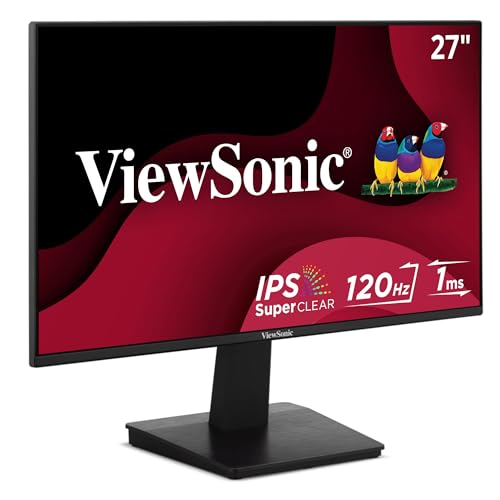
ViewSonic VA2448-MH 24-inch
A slightly taller 16.95‑inch height gives a larger viewing area, distinguishing it from the slimmer Asus and BenQ options.
Also considered
Score Analysis
Key score advantages vs. runner-up (BenQ GW2283)
Price Range
Asus VA249QG
$109.99
BenQ GW2283
$94.99
ViewSonic VA2448-MH 24-inch
$89.99

LG 24MK600M-B
$159.00

AOC 24B35H3
$79.99

HP Series 5 24-inch
$139.99
Spec Comparison
TL;DR: The Asus VA249QG delivers a 23.8‑inch IPS panel with a 120 Hz refresh rate, 1 ms MPRT response and eye‑care features at $109.99, making it a solid budget pick for casual gamers and office work.
The standout spec is the 120 Hz (max) refresh rate paired with a 1 ms MPRT response time and Adaptive‑Sync support, which together promise fluid motion for games and video. The IPS panel offers 178° viewing angles, 99% sRGB coverage and a typical brightness of 300 cd/m², while the contrast ratio sits at 1500:1 (typ.). All of this packs into a 23.8‑inch screen that weighs just 6.7 pounds.
Compared with the other five monitors in this roundup, the VA249QG is slightly lighter than the ViewSonic VA2448‑MH (6.8 pounds) and the LG 24MK600M‑B (6.8 pounds), but noticeably lighter than the AOC 24B35H3 (9.72 pounds) and the BenQ GW2283 (8.16 pounds). Its 300 cd/m² brightness matches the ViewSonic and outshines the 250 cd/m² levels listed for BenQ, HP and LG models. While most rivals stick to a 60 Hz refresh rate, only the AOC matches Asus’s 120 Hz capability, giving the VA249QG a clear edge for smooth gameplay.
Reviewers appreciate the high refresh and rapid response, but they also flag the stand’s limited tilt‑only adjustment as a drawback for ergonomics. The built‑in dual speakers sound modest, and the port lineup—HDMI, DisplayPort, VGA and a 3.5 mm earphone jack—is solid yet still leaves power users wishing for more connectivity options. The 1080p resolution on a 23.8‑inch panel's adequate for everyday tasks but may feel low for those seeking ultra‑sharp detail.
Beyond performance, the monitor carries Energy Star, EPEAT Silver and TCO Certified labels, and its packaging uses 85% post‑consumer recycled plastics (FSC Mix). ASUS backs the unit with a three‑year warranty, adding confidence for budget‑conscious buyers.
Pros
Cons
Best for: Home and office users seeking a balance of features and value
Avoid if: You have limited desk space or need portability
TL;DR: The BenQ GW2283 offers a 21.5‑inch IPS panel with eye‑care tech, low power draw and solid build quality at a sub‑$100 price, though its ergonomics and refresh rate are basic.
This monitor’s standout spec is its 21.5 in Full HD IPS display that delivers 102 PPI and 178° viewing angles, paired with Brightness Intelligence and Low Blue Light technologies for reduced eye strain. Brightness is rated at 250 cd/m² and response time sits at 5 ms, while the 60 Hz refresh rate keeps motion smooth for everyday tasks.
Compared with the five other budget contenders, the GW2283 is heavier than the ViewSonic VA2448‑MH (6.8 lb), Asus VA249QG (6.7 lb) and HP Series 5 (5.51 lb) but lighter than the AOC 24B35H3 (9.72 lb). Its 250 cd/m² brightness is lower than the 300 cd/m² found on ViewSonic, AOC and Asus, matching the HP and LG models. The 60 Hz panel is standard, yet falls short of the 120 Hz offered by AOC and Asus. Power‑consumption at 17.7 W on and 0.4 W standby is modest, sitting between ViewSonic’s 15 W eco mode and its 32 W max draw.
Reviewers consistently praise the monitor’s energy‑efficient design and the full eye‑care suite, noting that the low 0.4 W standby draw helps keep electricity bills down. The built‑in stereo speakers provide 1 W per channel, which is adequate for casual media. However, users flag the limited ergonomic adjustments – only a –5° to +20° tilt range – and the fixed brightness level as drawbacks for longer work sessions.
Pros
Cons
Best for: Budget‑conscious buyers seeking a reliable entry‑level monitor with eye‑care tech and solid build quality.
Avoid if: You need advanced ergonomics, higher brightness, or a high‑refresh‑rate display for gaming or intensive visual work.
TL;DR: The ViewSonic VA2448-MH delivers a 24‑inch IPS panel with a 120 Hz variable refresh rate, bright 300 cd/m² output and built‑in speakers, all for $99.99.
The standout spec is the 48‑120 Hz refresh‑rate range paired with VRR, which helps keep motion smooth for games and video. Its IPS panel offers 178° H / 178° V viewing angles, 300 cd/m² brightness and a dynamic contrast ratio of 50,000,000:1, while the typical static contrast sits at 1500:1. At 6.8 lbs, it's fairly lightweight for a 24‑inch unit, and the dual 2 W stereo speakers add convenience for a desk setup.
Compared with the other five monitors in this budget roundup, the ViewSonic is heavier than the Asus VA249QG (6.7 lbs) but lighter than the BenQ GW2283 (about 8.16 lbs) and the AOC 24B35H3 (around 9.72 lbs). It matches the LG 24MK600M‑B’s weight (6.8 lbs) and is a bit heavier than the HP Series 5 (5.51 lbs). Depth lists at 7.6 in, sitting comfortably between the Asus depth of 7.4 in and the other models that report depth in millimetres, making direct size comparison tricky.
Professional reviewers highlight the “strong screen performance” and appreciate the inclusion of VRR for smoother gameplay. Users repeatedly mention the bright 300 cd/m² display and the convenience of built‑in speakers, while some note that the Full HD 1920 × 1080 resolution can feel less sharp when viewed up close on a 24‑inch panel. The monitor also carries ENERGY STAR 8.0 and EPEAT Silver certifications, and its Eco Mode draws just 15 W (conserve) to 17 W (optimized), keeping power use low.
Pros
Cons
Best for: Most users seeking a balanced, mainstream option
Avoid if: You want the best value‑per‑dollar in its price range
TL;DR: The LG 24MK600M-B offers a 23.8‑inch IPS panel with 250 cd/m² brightness, 5 ms response and FreeSync for $159, making it a solid budget pick for casual work and gaming.
What really stands out is the virtually borderless 3‑side design paired with an IPS panel that delivers 72 % NTSC color coverage and 178° viewing angles. At 23.8 inches the screen packs a Full HD 1920 × 1080 resolution, a 5 ms gray‑to‑gray response and a variable refresh range of 56‑75 Hz, while AMD FreeSync helps keep motion smooth.
Compared with the other five monitors in this roundup, the LG weighs a bit more at 6.8 pounds, out‑weighing the HP Series 5 (5.51 pounds) and the ViewSonic VA2448‑MH (6.8 pounds) but lighter than the AOC 24B35H3 (9.72 pounds). Its 75 Hz top refresh beats the HP Series 5 and BenQ GW2283 (both 60 Hz) yet falls short of the Asus VA249QG and AOC, which push 120 Hz. Brightness sits at 250 cd/m², matching the HP’s 250 nits but below the 300 cd/m² typical of Asus and ViewSonic. Response time ties the HP and BenQ at 5 ms, slower than Asus’s 1 ms MPRT.
Reviewers consistently praise the IPS panel’s color accuracy and the eye‑care suite—Flicker Safe, Reader Mode and Smart Energy Saving—making long work sessions comfortable. The inclusion of FreeSync also earns kudos for reducing screen tearing in casual games. On the downside, several users note that the 75 Hz ceiling feels limiting for fast‑paced competitive titles, and the modest 250 cd/m² brightness can feel dim in bright rooms.
Pros
Cons
Best for: Budget‑conscious office workers, students, and casual gamers who value accurate colors and eye‑care features.
Avoid if: You need high‑refresh rates for competitive gaming or a lighter, ultra‑compact design.
TL;DR: The AOC 24B35H3 delivers a 23.8‑inch Full HD IPS panel with a 120 Hz refresh rate and adaptive sync for smooth gaming, all at a sub‑$80 price point.
The standout spec is the 120 Hz refresh rate over HDMI, paired with a 4 ms GtG / 1 ms MPRT response time, which gives motion‑clear gameplay on a 23.8‑inch screen. Its IPS panel covers 100% of the sRGB colour space and reaches 300 cd/m² typical brightness, so colours stay vivid even in well‑lit rooms.
At 2.21 kg (2.50 kg with stand) the monitor is noticeably lighter than the BenQ GW2283, ViewSonic VA2448‑MH, Asus VA249QG and LG 24MK600M‑B models, all of which weigh over 3 kg. The 300 cd/m² brightness matches the best‑performing peers and exceeds the 250 cd/m² that the BenQ and HP Series 5 units have. Its 120 Hz HDMI refresh also outpaces most rivals that sit at 60 Hz, with only the Asus VA249QG offering a comparable max refresh.
Consumers repeatedly praise the smooth 120 Hz experience and the IPS panel’s colour accuracy, calling the monitor “vibrant” and “easy on the eyes” thanks to flicker‑free backlighting and a low‑blue‑light mode. Professional reviewers highlight the 100% sRGB coverage and adaptive sync as strong points for the price, while noting the 4 ms GtG response is slower than high‑end gaming screens. Users also mention the lack of height adjustment and the basic 1920×1080 resolution as trade‑offs.
Additional technical details include a typical contrast ratio of 1500:1, a tilt range of –5° to +23°, and a modest 19 W power draw. The monitor supports VESA 100 × 100 mm mounting, offers a 3.5 mm audio out, and comes with one HDMI 1.4 and one VGA input, giving you flexible connectivity for a budget‑focused setup.
Pros
Cons
Best for: Budget‑conscious buyers seeking a reliable entry‑level option
Avoid if: You need higher‑resolution or professional‑esports performance, or if you have limited desk space or need portability
“smooth graphics and bright colors all for under $60”
TL;DR: The HP Series 5 24‑inch offers a 23.8‑inch IPS panel with 99% sRGB, slim 19.59 mm bezel, and lightweight 5.51‑lb design for $129.99, making it a solid budget office monitor.
The HP Series 5 24‑inch delivers a 23.8‑inch IPS panel that covers 99% sRGB and offers 178° viewing angles, a 1500:1 contrast ratio, and a 5 ms response time. At 250 nits brightness and a slim 19.59 mm three‑sided bezel, it packs a full HD 1920 × 1080 image in a lightweight 5.51‑lb chassis.
At 5.51 pounds, the HP sits noticeably lighter than the other five monitors in this roundup, which range from about 6.7 pounds up to over 9 pounds. Its 250 nits brightness matches the LG and BenQ models but falls short of the 300 cd/m² seen on Asus, ViewSonic, and AOC. Likewise, the 60 Hz refresh rate aligns with LG and BenQ, while Asus and AOC push 120 Hz, so HP's a modest performer in fast‑moving content.
Reviewers appreciate the ultra‑thin 19.59 mm bezel for tight multi‑monitor setups and the IPS panel’s consistent colors, especially for office documents and streaming. The stand only tilts from –5° to +23°, so users miss height, swivel, or pivot adjustments—a common complaint. Connectivity only includes HDMI 1.4 and VGA, which some find basic for newer laptops.
The monitor carries an EPEAT Silver rating, Eyesafe certification, and a construction that includes 85% post‑consumer recycled plastic plus 5% ocean‑bound plastic, showing HP's sustainability push. Power draw stays low at a typical 22 W and just 0.3 W in standby, helping keep energy bills down.
Pros
Cons
Best for: Office workers, students, and home users who need a reliable primary or secondary display for productivity and media consumption.
Avoid if: You need high refresh rates, extensive ergonomic adjustments, or a brighter panel for gaming, content creation, or bright ambient lighting.
Breakdown
Asus VA249QG
Pros
BenQ GW2283
Pros
ViewSonic VA2448-MH 24-inch
Pros
Cons
LG 24MK600M-B
Pros
Cons
Based on scoring data and product specs
Personalized picks
Best Overall Pick
Asus VA249QG
Best OverallBest for: Home and office users seeking a balance of features and value
BenQ GW2283
Best for: Budget-conscious buyers seeking a reliable entry-level option
$94.99-$15.00 vs winner
Skip HP Series 5 24-inch if…
Reliability and user satisfaction are your top concerns
We’re naming the Asus VA249QG the clear winner of the Best Budget LED Displays Under $200 roundup. It ships at $109.99, carries a 4.6‑star rating from 1,231 reviewers, and offers a 120 Hz refresh rate with a 1 ms MPRT response time—features you rarely see at this price point. The IPS panel covers 99 % of the sRGB colour space and the monitor comes with a three‑year warranty, making it a solid all‑rounder for work and play.
The BenQ GW2283 lands as the runner‑up, especially if you need a budget monitor that leans into eye‑care and built‑in audio. It’s priced at $94.99 and also holds a 4.6‑star rating, but from a massive 20,098‑review base, showing broad user confidence. Its 1 W per‑channel stereo speakers, Adaptive Brightness Technology and Flicker‑Free design help keep eyes comfortable during long office sessions.
For shoppers looking at other price tiers, the AOC 24B35H3 at $79.99 is the best budget pick, offering the lowest entry cost. The LG 24MK600M‑B at $159.00 serves as the premium alternative, giving you a step up in features if you’re willing to stretch the budget.
Pick the Asus VA249QG today and enjoy a fast, colour‑accurate display without breaking the bank.
The Asus VA249QG is rated for a full 120 Hz refresh rate and a 1 ms MPRT response time, which provides very fluid motion. The ViewSonic VA2448‑MH also supports up to 120 Hz but only as a variable range (48‑120 Hz) and lists a typical 4 ms response, so Asus has the clearer edge for gaming.
No reviews yet — be the first to share your experience.
Please sign in to leave a review



