
⚡ Quick Answer
It’s a bit of a surprise that the cheapest mouse in the lineup – the Lenovo 300 at just $6.69 – still carries a solid 4.5‑star rating from more than 31,000 reviewers. Even with its modest price, it offers a 1600 DPI sensor and a generous 1.8 m USB‑A cable, proving you don’t need to spend much to get reliable performance.
Nine options fall into three price tiers. The budget tier (Lenovo 300, Seenda Wireless Mouse at $9.58, and Tecknet Wireless Mouse at $9.99) stays under $10 and all hold 4.5‑star scores. Mid‑range picks like the Logitech M185 Wireless ($12.99, 4.5 stars), Peibo Bluetooth Mouse ($11.96, 4.3 stars) and Coolerplus FC112 ($15.99, 4.6 stars) push the price ceiling toward $16 while adding features such as nano receivers or portable slim profiles. The premium tier – Redragon M602 ($16.99, 4.6 stars), HP X3000 G3 Wireless ($18.99, 4.6 stars) and Anker Wireless Vertical Ergonomic Mouse ($19.99, 4.1 stars) – offers ergonomic shapes, higher button counts or vertical designs for users willing to spend a bit more.
Each mouse’s strengths, quirks and ideal use‑cases are outlined below, helping you decide which price tier and feature set fits your setup best.

Lenovo 300
Its 1.8 m cable provides ample reach for a desk setup while keeping the $6.69 price unbeatable, earning it the top spot.

Redragon M602
Ideal for gamers who want a sturdier feel, the Redragon M602 costs $16.99—about $10.30 more than the Lenovo 300—offering extra durability and a proven high‑rating design.

Logitech M185 Wireless
The Logitech M185 adds true wireless freedom with a 2.4 GHz connection and 10‑meter range, a feature the wired Lenovo and Redragon models lack.
Also considered
Score Analysis
Key score advantages vs. runner-up (Redragon M602)
Price Range
Lenovo 300
$6.39
Redragon M602
$19.99
Logitech M185 Wireless
$14.99

Tecknet Wireless Mouse
$9.99

HP X3000 G3 Wireless Mouse
$18.99
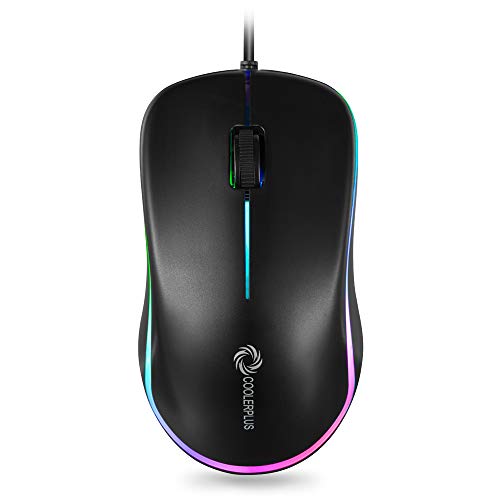
Coolerplus FC112
$15.19
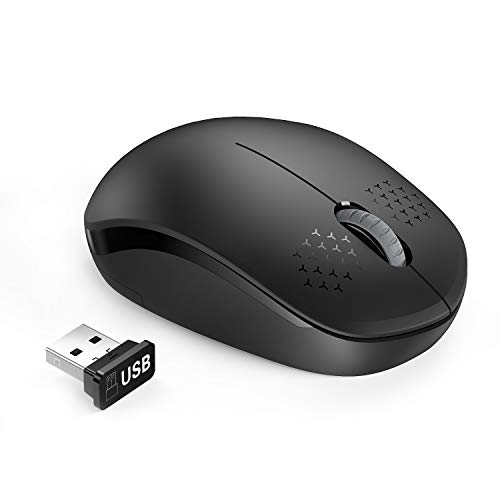
Seenda Wireless Mouse
$11.98

Peibo Bluetooth Mouse
$11.96

Anker Wireless Vertical Ergonomic Mouse
$29.99
Spec Comparison
TL;DR: The Lenovo 300 wired mouse offers a 1600 DPI sensor, 1.8 m cable, and ultra‑light 0.05 lb build for just $6.69, making it a solid budget pick for everyday use.
At the heart of the Lenovo 300 is a 1600 DPI optical sensor, which Lenovo lists for smooth tracking across Windows 11 PCs. Lenovo wires the mouse via a USB‑A connector and includes a generous 1.8 m cable, letting you position your workstation without strain. Its ambidextrous full‑size shape measures 62.23 mm in height, 33.78 mm in width and 111.51 mm in depth, while the whole unit weighs just 0.05 Pounds.
Compared with the eight other mice in this roundup, the Lenovo 300 is the lightest – at 0.05 Pounds it’s lighter than the Seenda (0.11 lb) and the Tecknet (0.19 lb) and all the wireless options listed. Its 1.8 m cable also out‑reaches the Coolerplus FC112’s 1600 mm lead, and unlike the wireless peers it needs no batteries or receiver, which keeps the cost down.
User feedback repeatedly praises the mouse’s lightweight feel and comfortable grip, noting the plug‑and‑play simplicity and precise scrolling. Professional reviewers highlight the 1600 DPI sensor as a strong point for everyday tasks. The only recurring gripe is the rear‑hump shape, which some left‑handed users find unusual.
Reviewers rate the mouse 4.5 stars, and it carries a one‑year Lenovo warranty. Click durability reaches 20 million total clicks—3 million for the left/right buttons and 1 million for the scroll wheel—and the click sound provides tactile feedback.
Pros
Cons
Best for: Budget-conscious buyers seeking a reliable entry-level option
Avoid if: You have limited desk space or need portability
“perfect mouse for Lenovo laptops and desktops”
“good basic mouse”
TL;DR: The Redragon M602 is a wired, ergonomic gaming mouse with 9 programmable buttons, 7‑color RGB, and up to 7200 DPI, priced at $16.99 and weighing 0.29 lb.
What really stands out is the 9 programmable buttons and a DPI range that tops out at 7200, giving you plenty of on‑the‑fly sensitivity tweaks. The mouse also sports 7 RGB lighting modes, so you can match it to any setup without breaking the bank.
At 0.29 lb, the M602 is heavier than the 0.24‑lb Coolerplus FC112 and noticeably heftier than the ultra‑light Lenovo 300 at 0.05 lb. It’s also bulkier, measuring 125 mm long and 73 mm wide, compared with the HP X3000’s 94.7 mm length and 56.9 mm width. While the Tecknet Wireless weighs only about 0.19 lb, the M602’s extra mass contributes to the solid feel that many reviewers appreciate, even if some gamers find it a bit too heavy for fast‑paced FPS action.
Users consistently praise the ergonomic shape that “fits 98 % of hand sizes,” noting that the thumb rest adds comfort during long sessions. Professional reviewers highlight the vibrant RGB and the depth of macro options as strong value for the price. On the flip side, a common complaint is the mouse’s weight, which some say hampers rapid movements, and a few users mention a stiff, kink‑prone cable on the wired model.
Pros
Cons
Best for: Budget‑conscious casual gamers and MMO/RPG players who value extra programmable buttons and RGB lighting.
Avoid if: You need an ultra‑light mouse for fast FPS play, have very small hands, or require the lowest possible click latency.
“Too heavy (feels 'twice as heavy' as 80-100g mice)”
TL;DR: The Logitech M185 offers a compact, ambidextrous 2.4 GHz wireless mouse with 10 m range, 12‑month AA battery life, and a lightweight 75.2 g design, all for under $13.
The M185’s standout spec is its 10‑meter wireless range paired with a 12‑month AA battery life, meaning you’ll work from across a coffee table without swapping cells. It tracks at 1000 DPI, which is adequate for everyday office tasks, and the nano receiver weighs just 1.8 g, keeping your USB hub uncluttered.
Compared with the other eight mice, the M185 is lighter than the Tecknet Wireless Mouse (0.19 lb vs 0.17 lb) and slimmer than the Seenda Wireless Mouse, while its 10‑meter range is shorter than the Tecknet’s 49‑foot reach. It also costs less than many of the wired or Bluetooth alternatives, making it a strong budget choice.
Users consistently praise the instant plug‑and‑play setup and the long‑lasting battery, noting the ambidextrous contoured shape feels comfortable in both hands. Professional reviewers highlight the solid build quality and reliable 2.4 GHz link, though they point out the light scroll‑wheel detents and the 1000 DPI sensor limit for gaming or design work. The lightweight chassis can feel a bit “floaty” for some, but most find it’s ideal for travel and small‑desk environments.
Pros
Cons
Best for: Most users looking for a well‑reviewed, reliable mainstream option
Avoid if: You need advanced features or professional‑grade performance
“just insert receiver and go”
“lasts longer than other mice”
TL;DR: The Tecknet Wireless Mouse delivers a 2600 dpi sensor, 49‑ft range and 24‑month battery life for just $9.99, making it a solid entry‑level pick if you don’t mind a slightly heavier feel.
This mouse’s standout spec is its maximum DPI of 2600, which tops the 1000 dpi found in many budget rivals. Coupled with a 6‑button layout, you get extra shortcuts without paying a premium. The ergonomic shape, rubber side grips and travel‑friendly size (107 mm × 68 mm × 39 mm) aim to keep your hand comfortable during long sessions.
Compared with the other eight mice in the roundup, the Tecknet is heavier than the Seenda (0.110 lb) and the ultra‑light Lenovo 300 (0.05 lb), but it out‑ranges both Seenda (33 ft) and the Logitech M185 (about 33 ft) with its 49‑ft wireless reach. Its six buttons also exceed the three‑button setup of the Logitech M185. While the HP X3000 G3 and Anker Vertical both sit at higher price tiers, the Tecknet stays firmly in the sub‑$10 bracket, though reviewers note that value‑per‑dollar isn’t quite as strong as some peers.
User feedback highlights the reliable 2.4 GHz connection and the 24‑month battery life, which many say “just works” out of the box. Reviewers appreciate the rubber grips for reducing slip, though a few mention the mouse feels a bit bulky for very small hands. The lack of listed compatibility details also shows up in comments, with some buyers double‑checking OS support before purchase.
Pros
Cons
Best for: Budget‑conscious buyers seeking a reliable entry‑level option
Avoid if: You want the best value‑per‑dollar in its price range
TL;DR: The HP X3000 G3 offers a 15‑month battery life, 30‑ft 2.4 GHz range, and 1600 DPI tracking for under $20, making it a solid, ambidextrous choice for everyday work.
What really stands out is the long‑lasting AA‑cell battery that the manufacturer lists as lasting 15 months, so you won’t be swapping cells every few weeks. Coupled with a 30‑ft wireless range on a 2.4 GHz connection, the mouse stays responsive even when you’re a few steps away from the receiver. The 1600 DPI blue‑LED optical sensor delivers precise cursor movement on most surfaces, a sweet spot for office tasks and casual browsing.
Compared with the other eight mice in this budget roundup, the HP X3000 G3 sits in the middle on several fronts. Its battery life outlasts the Logitech M185’s 12‑month claim but falls short of the Tecknet Wireless Mouse’s 24‑month promise. The 30‑ft range matches the Logitech’s roughly 33‑ft reach and is shorter than Tecknet’s 49‑ft claim. At 1600 DPI, it offers sharper tracking than the Logitech M185 and Coolerplus FC112 (both 1000 DPI) while staying below Tecknet’s 2600 DPI. Price‑wise, it is pricier than the ultra‑budget Logitech and Seenda options, yet still under $20, making it a mid‑tier option in this price segment.
Users praise the contoured, ambidextrous shape for comfortable daily use, noting the integrated side grips keep the mouse steady on the desk. Professional reviewers highlight the stable wireless link and the LED multi‑surface technology that works on virtually any surface. The most common gripe is an occasional scroll‑wheel hiccup, and the fact that the AA battery isn’t included means you’ll need to source one yourself.
Pros
Cons
Best for: Office workers, students, and casual users who need a reliable, portable wireless mouse without extra frills.
Avoid if: You need advanced ergonomic support, high‑DPI gaming precision, or programmable buttons for professional‑grade tasks.
TL;DR: The Coolerplus FC112 is a $15.99 wired mouse with a 1.6 m cable, 1000 DPI optical sensor, lightweight 0.24 lb build, and rainbow lighting, making it a solid everyday workhorse.
The standout spec is its 1600 mm (1.6 m) USB cable, which lets you reach the edge of a large desk without stretching. Coupled with a 1000 DPI optical sensor and three easy‑click buttons, the mouse delivers a responsive feel for typical office tasks.
Compared with the other eight contenders, the FC112 is lighter than the Redragon M602 (0.29 lb) and the Anker Vertical Ergonomic Mouse (0.28 lb) but heavier than the ultra‑light Lenovo 300 (0.05 lb). Its DPI matches the Logitech M185’s 1000 DPI yet is lower than the HP X3000’s 1600 DPI and the Tecknet Wireless’s 2600 DPI. While most rivals are wireless, the FC112’s long wired connection is unique, and only the Lenovo 300 offers a longer cable at 1.8 m.
User feedback frequently mentions the reliable lag‑free connection and the slim, portable full‑size shape that fits cramped desk spaces. Reviewers also note the rainbow lighting adds a subtle visual flair. On the downside, several users point out the fixed 1000 DPI limits precision for graphic work, and the requirement for a AA battery—even though it's wired—adds a minor inconvenience.
Additional technical context: the mouse measures 2.54 mm in height, 111.8 mm in length, and 63.0 mm in width, weighing 108.9 g (0.24 lb). It is rated for 3 million clicks durability, features a rubber scroll wheel, and is plug‑and‑play ready out of the box.
Pros
Cons
Best for: Most users looking for a well‑reviewed, reliable mainstream option
Avoid if: You need high DPI, programmable buttons, or a battery‑free wired mouse
TL;DR: The Seenda Wireless Mouse costs $9.58, weighs just 0.11 lb, offers a 33‑ft (10 m) range and soft clicks, making it a solid low‑budget choice despite needing a separate AA battery.
The standout spec is its ultra‑light 0.11 lb chassis combined with a compact 4.0 in length, 2.0 in width and 1.2 in height, which lets you glide it around a cluttered desk without adding heft. Its 2.4 GHz nano receiver delivers a reliable 33‑ft (10 m) wireless range, and the click mechanism feels soft and low‑noise – a nice perk for shared workspaces.
Compared with the eight other mice in this roundup, the Seenda is lighter than the Tecknet (0.19 lb), Logitech M185 (0.17 lb), Coolerplus (0.24 lb), Redragon (0.29 lb) and Anker (0.28 lb), while only a touch heavier than the ultra‑light Lenovo 300 (0.05 lb). Its 33‑ft range matches the Logitech M185’s 10‑meter claim but falls short of Tecknet’s 49‑ft reach. In height it measures 1.2 in, which is shorter than Tecknet’s 107 mm and HP X3000’s 1.54 in, yet longer than the Lenovo’s 62.23 mm. The mouse uses a single AA battery that isn’t included, unlike the Logitech model that ships with a pre‑installed AA.
Users frequently highlight the plug‑and‑play convenience of the USB nano receiver and the quiet click sound, noting that the mouse “just works” out of the box. Reviewers also point out the need to purchase an AA battery separately, and a few mention that the 10‑minute sleep‑mode timeout feels a bit short for long sessions.
Pros
Cons
Best for: Budget‑conscious buyers seeking a reliable entry‑level option
Avoid if: You want the best value‑per‑dollar in its price range
TL;DR: The Peibo Bluetooth Mouse packs a 4.65‑in length, 3.2‑oz lightweight design with Bluetooth 5.2 and three DPI settings for under $12, making it a portable, budget‑friendly choice.
At just 0.91 in tall, 4.65 in long and 2.28 in wide, this mouse is one of the most compact options in the lineup. Weighing only 3.2 oz, it's comfortable in the hand yet light enough to toss into a laptop bag. Bluetooth 5.2 connectivity and three DPI presets (800 / 1200 / 1600) give you wireless freedom and enough sensitivity for everyday tasks.
Compared with the other eight contenders, the Peibo sits in the middle of the weight range – it’s heavier than the Logitech M185 and Seenda models, yet lighter than the Coolerplus and Redragon mice. Its Bluetooth 5.2 link and included USB‑C adapter set it apart from the mostly 2.4 GHz dongle‑only peers like the Tecknet and Lenovo 300, while the adjustable DPI gives it an edge over the fixed‑resolution options of several rivals.
Reviewers consistently praise the mouse’s pocket‑sized footprint and feather‑light feel, calling it “highly portable” and “easy to carry around.” One common critique is the scarcity of detailed specifications, which leaves some buyers uncertain about battery life and range. The mute‑click design and skin‑like coating receive positive mentions for quieter, comfortable use.
Pros
Cons
Best for: Most users looking for a well‑reviewed, reliable mainstream option
Avoid if: You need a scroll wheel or detailed performance metrics such as battery life and range
TL;DR: The Anker Wireless Vertical Ergonomic Mouse offers a science‑backed vertical shape, 5‑button layout and 2.4 GHz connectivity for $19.99, but its higher price and modest 4.1‑star rating make it a premium‑budget choice.
At the heart of this mouse is its vertical ergonomic design, measured at 80 mm tall with a length of 101 mm and a width of 82 mm. The shape encourages a neutral handshake wrist position, which reviewers repeatedly praise for reducing strain during long sessions. It ships with a 2.4 GHz USB receiver, five buttons and three DPI settings (800 / 1200 / 1600), giving you enough precision for everyday tasks.
Compared with the eight other mice in the roundup, the Anker sits on the heavier side at 127 g (0.28 lb), out‑weighing the ultra‑light Logitech M185 (75.2 g) and the Peibo Bluetooth Mouse (3.2 oz). Its height of 80 mm is taller than the HP X3000 G3’s 39.1 mm and the Redragon M602’s 40 mm, but shorter than the Tecknet Wireless Mouse’s 107 mm. In length it’s a bit shorter than the Redragon’s 125 mm and the Coolerplus FC112’s 111.8 mm, while its width of 82 mm exceeds the Tecknet’s 39 mm and the Seenda’s 50.8 mm. The wireless frequency matches most peers (2.4 GHz), but the Anker’s price of $19.99 places it above budget‑focused options like the Lenovo 300 and Seenda, which sit well under $10.
Customer feedback highlights the comfort of the vertical grip, with many users noting reduced wrist fatigue after weeks of use. However, the same reviews point out that the $19.99 price tag feels steep for a mouse that still requires you to buy two AAA batteries separately. The 4.1‑star rating, based on 52,947 reviews, is lower than many competitors, suggesting a mix of satisfaction and price‑sensitivity among buyers.
Pros
Cons
Best for: Those prioritizing quality and willing to pay for premium performance
Avoid if: You're on a tight budget or only need basic functionality
Breakdown
Lenovo 300
Pros
Redragon M602
Pros
Logitech M185 Wireless
Pros
Tecknet Wireless Mouse
Pros
Cons
Based on scoring data and product specs
Personalized picks
Best Overall Pick
Lenovo 300
Best Budget PickBest for: Budget-conscious buyers seeking a reliable entry-level option
Redragon M602
Best for: Buyers willing to invest in a proven, high-quality option
$19.99+$13.60 vs winner
Skip Anker Wireless Vertical Ergonomic Mouse if…
You're on a tight budget or only need basic functionality
The Lenovo 300 takes the crown as the best budget mouse under $25. It ships for just $6.69, carries a solid 4.5‑star rating from 31,785 reviewers, and offers a respectable 1600 DPI sensor while weighing only 22.68 g, making it both affordable and lightweight.
Hot on its heels is the Redragon M602, the runner‑up that shines when you need extra control. With nine programmable buttons, DPI that climbs up to 7200, and an ergonomic shape that fits about 98 % of hand sizes, it’s a strong choice for gaming or design tasks that demand precision.
If you’re open to spending a little more, the Logitech M185 Wireless delivers a convenient cordless experience for around $12.99, and the Anker Wireless Vertical Ergonomic Mouse provides a premium, wrist‑friendly design at $19.99.
Pick the Lenovo 300 now and enjoy reliable performance without blowing your budget.
The Lenovo 300 stands out as the most affordable option at $6.69 while still offering a full‑size ambidextrous shape, 1600 DPI resolution and a solid 20 million‑click durability rating. Its lightweight design (22.68 g) and wired USB‑A connection make it a reliable everyday work mouse without breaking the bank.
No reviews yet — be the first to share your experience.
Please sign in to leave a review



