⚡ Quick Answer
Finding a portable hard drive that fits a tight budget without sacrificing reliability can feel like hunting for a needle in a haystack. The review compared nine options that all sit under the $100 mark, sorting them into clear budget, mid‑range and premium buckets so you can spot the right balance of price, capacity and durability at a glance.
On the budget end, the HWAYO 750 GB model starts at just $33.99, while the Seagate One Touch 2 TB and Buffalo MiniStation Stealth 500 GB sit around $70 and $53.95 respectively, offering reliable USB 3.0 or 2.0 connectivity for everyday backups. Mid‑range choices like the Toshiba Canvio Basics 1 TB at $76.96 (rated 4.7/5 by 5,103 reviewers) and the LaCie Rugged Mini 1 TB at $79.99 add extra ruggedness or a bit more speed. Premium picks such as the WD Elements 2 TB for $89.99 (weighing a feather‑light 0.29 lb) and ADATA’s HD710 Pro 1 TB at $92.55 (with a crush‑resistance claim of 1000 kg) push durability and higher capacities up to 2 TB.
Next, the guide breaks down each tier, highlighting who each drive serves best and where the trade‑offs lie.

WD Elements
It's slim 0.59‑inch profile makes it easy to slip into any bag, delivering high value and reliability.

Toshiba Canvio Basics 1TB Black
Ideal for budget‑conscious users who need a reliable 1TB drive, it comes in at $76.96—about $13 less than the WD Elements.

Toshiba Canvio Basics 2TB Black
Stands out with a 14 mm height, offering a roomy 2TB capacity while staying portable—ideal if you need double the space without exceeding the $100 cap.
Also considered
Score Analysis
Key score advantages vs. runner-up (Toshiba Canvio Basics)
Price Range
WD Elements
$109.99
Toshiba Canvio Basics 1TB Black
$76.96
Toshiba Canvio Basics 2TB Black
$99.00

ADATA HD710 Pro 1TB
$94.28

Seagate One Touch 2TB
$69.99
HWAYO 750GB Portable Hard Drive
$39.99

LaCie Rugged Mini 1TB
$89.99
Silicon Power External Hard Drive
$94.97

Buffalo MiniStation Stealth 500GB
$53.95
Spec Comparison
TL;DR: The WD Elements 2 TB portable drive offers 2 TB of storage, USB 3.2 Gen 1 speeds up to 5 Gb/s, and a feather‑light 0.29 lb design for reliable Windows backups at under $89.99.
At the heart of the WD Elements is a 2 TB 2.5‑inch hard drive that talks to your computer over a USB 3.2 Gen 1 (USB 3.0) connector, promising data rates up to 5 Gb/s. The drive weighs just 0.29 lb and measures 0.59 in × 4.35 in × 3.23 in, making it easy to slip into a laptop bag.
Compared with the other eight options, the Elements is lighter than the LaCie Rugged Mini and the ADATA HD710 Pro, and it carries more storage than the 1 TB models from ADATA, Silicon Power and Seagate One Touch. Its USB 3.2 Gen 1 interface matches the Toshiba Canvio Basics and the Seagate One Touch, while the Buffalo MiniStation still relies on USB 2.0.
Users praise the plug‑and‑play experience – the included Micro‑B to USB‑A cable and quick‑install guide let you start backing up straight out of the box. The 4.6‑star rating from over 300 k reviewers highlights reliability, though many note the need to reformat the drive that comes pre‑installed with NTFS for macOS and the slower performance you’d expect from a 5400 RPM HDD versus an SSD.
A 64 MB cache and 5400 RPM spindle keep power draw low, and the drive runs bus‑powered, so you don’t need an external brick. It operates between 5 °C and 35 °C and can survive non‑operating temperatures down to –20 °C, and comes with a 2‑year limited warranty.
Pros
Cons
Best for: Buyers willing to invest in a proven, high-quality option
Avoid if: You're a macOS user, need SSD‑level speed for heavy editing, or are looking for the cheapest possible storage
“fast loading (indistinguishable from internal HDD), ~1.8TB usable after formatting, quiet”
TL;DR: The Toshiba Canvio Basics 1TB Black offers 1 TB of plug‑and‑play USB 3.0 storage for $76.96, weighing just 0.5 lb and delivering up to 5 Gbps transfer speeds, making it a solid budget choice.
At its core, this drive packs a 1 TB capacity into a 2.5‑inch form factor measuring 15 mm × 78.7 mm × 119.4 mm. It runs on a 5,400 RPM spindle with an 8 MB cache and an average seek time of 12 ms, while the USB 3.0 interface promises up to 5 Gbps transfer rates. Weighing only 0.5 lb (227 g), it’s light enough to slip into a laptop bag without adding bulk.
Compared with its peers, the Canvio Basics is lighter than the LaCie Rugged Mini’s roughly 0.62 lb build, yet a bit heavier than the Seagate One Touch’s 0.33 lb chassis. Its cache is modest—WD Elements lists a 64 MB cache, which outpaces the 8 MB this drive has. In height, the drive stands at 15 mm, a touch taller than Seagate’s 11.7 mm profile, while its overall dimensions remain more compact than many 2 TB rivals.
Users consistently praise the drive’s plug‑and‑play simplicity and the ease of moving large photo or document libraries without installing extra software. The compact, smudge‑resistant black shell and internal shock sensor add confidence for on‑the‑go use. However, reviewers note that the 5,400 RPM motor and limited 8 MB cache can make sustained transfers feel slower than higher‑speed SSDs, and the lack of bundled backup software or encryption may require extra steps for data protection.
Beyond raw specs, the drive includes ramp loading technology to protect the read/write heads during insertion, and it’s compatible with PlayStation 4 after a simple FAT32 reformat. The USB 3.0 cable is backward‑compatible with USB 2.0 ports, ensuring flexibility across older computers.
Pros
Cons
Best for: Most users looking for a well‑reviewed, reliable mainstream option
Avoid if: You need high‑speed transfers for video editing or large database work
TL;DR: The Toshiba Canvio Basics 2TB delivers 2 TB of USB‑powered storage in a 151 g, matte‑black shell, offering solid sequential speeds around 140 MB/s while staying under $100.
The drive offers 2 TB capacity and a real‑world transfer speed of 140 MB/s, placing it squarely in the “large‑enough for media libraries” camp without breaking the bank. At just 0.33125 pounds (151 g) and a slim 14 mm height, it’s one of the lightest 2‑TB options you’ll find.
Compared with the eight other drives in this roundup, the Canvio Basics is lighter than the ADATA HD710 Pro (270 g) and the LaCie Rugged Mini (280 g), and only a gram heavier than the Seagate One Touch (148 g). Its 14 mm profile is slimmer than ADATA’s 21.5 mm and LaCie’s 18.7 mm, though a touch thicker than Seagate’s 11.7 mm. In length, 109 mm beats the ADATA (133.3 mm) and LaCie (134.6 mm) but is a bit shorter than the Seagate (114.8 mm) and HWAYO (120 mm). Capacity‑wise, it matches the WD Elements and Seagate One Touch at 2 TB, outpacing the 1‑TB and sub‑1‑TB models from Toshiba’s own line, Silicon Power, Buffalo, and HWAYO.
Users consistently praise the plug‑and‑play USB 3.0 interface and the hassle‑free setup on Windows, macOS, Xbox One and Samsung Smart TVs. Professional reviewers note a respectable PCMark 8 storage rating of 1871 and “error‑free operation” at the advertised 140 MB/s. The downside that shows up in both expert and consumer feedback is the weak random‑file write performance—only 0.27 MB/s—and noticeable warmth during long transfers. The drive also ships without extra backup utilities or password protection, which some power users miss.
Pros
Cons
Best for: Buyers willing to invest in a proven, high‑quality option
Avoid if: You're shopping on a tight budget — it's priced at $99.98
TL;DR: The ADATA HD710 Pro 1 TB portable HDD packs military‑grade shock protection, IPX8 waterproofing and a 1.5 m drop rating into a rugged 270 g drive, though its speed trails SSDs.
What really sets the HD710 Pro apart is its durability suite: a triple‑layer construction, IPX8 waterproof rating that lets you submerge the drive to 2 m for up to 60 minutes, and a drop‑protection height of 1.5 m. The manufacturer also lists a crush resistance of 1000 kg, making it one of the toughest 2.5‑inch external drives on the market.
Compared with the eight other drives in this under‑$100 roundup, the ADATA is heavier than most – the WD Elements weighs about 0.29 lb, the Seagate One Touch about 0.33 lb, and the Toshiba Canvio Basics models sit between 0.33 lb and 0.5 lb – and only the LaCie Rugged Mini (around 0.62 lb) feels bulkier. In return, ADATA offers a higher drop rating (1.5 m vs. LaCie's 1.2 m) and a waterproof rating that none of the peers advertise. Its 1 TB capacity matches the LaCie Rugged Mini but is smaller than the 2 TB options from WD and Seagate.
Reviewers consistently praise the drive’s toughness – the G‑shock vibration sensor and the included carrying strap get highlighted as practical for field work. At the same time, users note write speeds can dip to around 88 MB/s, which feels modest compared with SSDs or even some faster HDDs. The 270 g weight and 21.5 mm thickness also make it a bit bulkier for ultra‑light travel.
On the technical side, the HD710 Pro connects via USB 3.2 Gen1 (backward compatible with USB 2.0/3.1) and advertises a maximum data‑transfer rate of up to 10 Gbps. Manufacturer‑claimed sequential read/write figures sit at 152 MB/s and 160 MB/s, respectively, and the package includes ADATA’s Backup ToGo software for easy data protection.
Pros
Cons
Best for: Outdoor enthusiasts, field‑work professionals, and anyone who needs a rugged drive that can survive drops, dust and water.
Avoid if: You need SSD‑level performance for large‑file editing or a ultra‑light drive for frequent travel.
“100 MB/s expected for 2.5-inch disc”
“survives drops/water”
TL;DR: The Seagate One Touch 2TB packs 2 TB of storage, AES‑256 hardware encryption and a 457.2 mm USB‑A cable into a 148 g, 11.7 mm‑thin drive for $69.99.
What really sets this drive apart is the password‑activated AES‑256 hardware encryption, the same standard governments use to protect sensitive data. With 2 TB of capacity and a 5400 RPM spindle, it offers plenty of room for photos, videos and backups while staying bus‑powered—no external brick needed. The included 457.2 mm USB‑A cable lets you plug straight into Windows, macOS or Chromebook laptops.
Compared with the eight other contenders, the One Touch is lighter than the LaCie Rugged Mini (280 g) and ADATA HD710 Pro (270 g), and only a gram heavier than the Toshiba Canvio Basics 2TB (151 g). Its 2 TB size doubles the storage of the 1 TB Silicon Power and LaCie models, matching the WD Elements’ 2 TB offering but at a lower price point. Like the Silicon Power, Toshiba Canvio Basics and WD Elements, it uses a USB 3.2 Gen 1 interface, yet it provides a longer 457.2 mm cable than the cable‑carry design of the Silicon Power, which doesn’t list a length.
Users consistently applaud the drive’s plug‑and‑play simplicity and the peace of mind from the three‑year Rescue Data Recovery Services and the built‑in encryption. Professional reviewers highlight the encryption as a standout security feature and note the quick file transfers across OSes. On the downside, macOS users often have to reformat the drive for Time Machine, and the 5400 RPM speed can feel sluggish for heavy‑duty tasks like 4K video editing. The lack of a USB‑C connector also limits convenience for newer laptops.
Pros
Cons
Best for: Budget‑conscious buyers seeking a reliable entry‑level option
Avoid if: You want the best value‑per‑dollar in its price range
“Ease of use, Storage, Reliability, Size, USB”
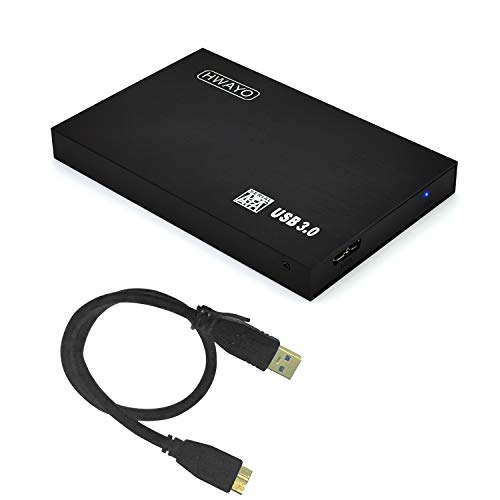
TL;DR: The HWAYO 750 GB portable hard drive packs a USB‑3.0 interface, 0.46‑lb ultra‑slim body and decent 90 MB/s speeds for just $33.99, making it a solid low‑cost backup choice.
The drive’s standout spec is its 750 GB storage capacity, built into a 2.5‑inch ultra‑slim chassis that measures just 12 mm high, 120 mm long and 76 mm wide, and weighs only 209 g (about 0.46 pounds). Coupled with a USB 3.0 interface that can reach up to 5 Gbps (advertised up to 6 Gbps) and a typical transfer speed of up to 90 MB/s, it offers more than enough bandwidth for everyday backups and console game installs.
Compared with the other eight contenders, the HWAYO sits near the lightest end of the spectrum—lighter than the Buffalo MiniStation Stealth’s 0.5 pound build and far slimmer than the LaCie Rugged Mini’s 18.7 mm height. Its 750 GB capacity outstrips Buffalo’s 500 GB but trails the 1 TB and 2 TB options from Silicon Power, Seagate, Toshiba and WD. While the Seagate One Touch and Toshiba Canvio Basics 2 TB are a touch lighter at roughly 0.33 pounds, they also carry larger capacities, so HWAYO offers a sweet spot for users who want more space than a 500 GB drive without the bulk of higher‑capacity models.
Users consistently praise the sturdy, cable‑design that stays put during transfers and the plug‑and‑play, bus‑powered operation that needs no external adapter. Professional reviewers note the convenience of the 10‑minute auto‑sleep timer, which helps conserve power when the drive sits idle. However, several owners mention that real‑world speeds sometimes fall short of the advertised 90 MB/s peak, and the 4.3‑star rating hints at occasional reliability concerns.
Additional technical notes: the drive supports a wide range of file systems—including FAT, NTFS, EXFAT, APFS and several Linux formats—so it works with PCs, Macs, Chromebooks, Xbox consoles and PS4. Its USB 3.0 port is backward compatible with USB 2.0, and the entire unit draws power directly from the host’s USB port, so it doesn’t need a separate power brick.
Pros
Cons
Best for: Budget‑conscious buyers seeking a reliable entry‑level option
Avoid if: Reliability and user satisfaction are your top concerns
TL;DR: The LaCie Rugged Mini 1TB packs a drop‑proof 1.2 m rugged bumper, USB‑3.0 speed, and 4.6‑star rating into a 280 g, rain‑resistant package for $79.99.
The standout feature is its rugged orange rubber bumper that survives drops from 1.2 m, endures up to one ton of pressure, and repels rain, making it ideal for on‑the‑go creators. It stores 1 TB of data and delivers a manufacturer‑claimed read speed of 58.9 MB/s and write speed of 38.8 MB/s via a USB 3.0 (5 Gbps) interface.
Compared with the other eight drives, the Rugged Mini is a bit heavier than the Toshiba Canvio Basics 1TB (0.617 lb vs 0.5 lb) but still compact at 18.7 mm tall, 134.6 mm long and 86.0 mm wide. Its drop protection matches or exceeds many rivals, while its price sits toward the higher end of the sub‑$100 segment. Although its 58.9 MB/s read rate trails the faster transfer claims of some competitors, it remains adequate for backing up photos and video clips.
User feedback consistently praises the drive’s durability – reviewers love that it “survives desk drops” and “handles rain”. Professional reviewers highlighted the solid performance for a rugged HDD and the built‑in password protection, while also noting the lack of an included USB cable and the modest transfer speeds. The package includes a one‑month Adobe Creative Cloud All Apps plan, adding value for creative users.
The drive runs bus‑powered, so you don’t need an external brick, and it comes with a 2‑year warranty. Compatibility spans Mac and PC (you’ll need to reformat for Mac), and the built‑in password protection offers basic data security without additional software.
Pros
Cons
Best for: Most users looking for a well‑reviewed, reliable mainstream option
Avoid if: You need the fastest possible transfers or ultra‑lightweight portability
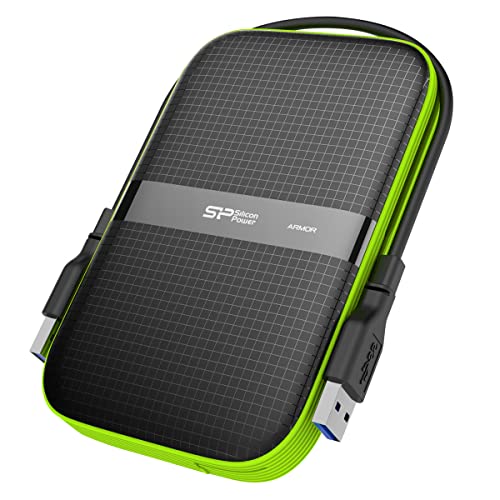
TL;DR: The Silicon Power 1 TB portable SSD packs an IPX4‑rated, military‑grade shock‑proof shell, USB 3.2 Gen 1 speeds up to 5 Gbps and a compact 5.5 × 3.4 × 0.9 in design for just $69.99.
What really stands out is the combination of an IPX4 water‑resistance rating and military‑grade shock protection, all wrapped in a sleek black‑green chassis. The drive delivers up to 5 Gbps transfer speed via USB 3.2 Gen 1 and offers a full 1 TB of storage, which is a solid capacity for a budget‑focused SSD.
Compared with the other eight contenders, this model sits at a similar price point to the Seagate One Touch 2 TB while offering a larger footprint—its 5.5 in depth exceeds Seagate’s 4.52 in length and its 3.4 in width is a touch wider than Seagate’s 3.07 in. It’s also broader than the WD Elements (3.23 in) and taller than the WD’s 0.59 in height, yet its total size remains close to the ADATA HD710 Pro’s 5.25 × 3.88 × 0.85 in dimensions. The LaCie Rugged Mini shares a comparable width (3.38 in) and a slightly lower height (0.74 in), but the Silicon Power unit adds the IPX4 rating that LaCie does not list.
User feedback repeatedly praises the drive’s portable feel and the peace of mind provided by its shock‑proof construction. Reviewers note that the USB 3.2 Gen 1 interface delivers reliable speeds for everyday backups and media transfers, though professional testers point out that the 5 Gbps ceiling can feel limiting for power users who demand >1 GB/s throughput. The lack of a disclosed weight is a minor annoyance for those who meticulously track carry‑weight.
From a technical standpoint, the SSD uses a USB 3.2 Gen 1 (backward compatible with USB 3.0/2.0) connection, making it compatible with most modern laptops and desktops. The cable‑carry design keeps the USB cable neatly tucked away when not in use, and the IPX4 rating protects against splashes—it's a useful feature for travel or on‑the‑go use.
Pros
Cons
Best for: Budget‑conscious buyers seeking a reliable entry‑level option
Avoid if: You have limited desk space or need portability
TL;DR: The Buffalo MiniStation Stealth offers a 500 GB USB‑2.0 drive in a super‑slim, bus‑powered case for $53.95, but its older interface and modest capacity keep it behind most peers.
The standout spec is its ultra‑thin profile: at just 14 mm wide, 77 mm tall and 114 mm long, the MiniStation slides easily into a laptop bag. Weighing only 227 g (0.5 lb), it’s light enough to carry around without a dedicated power brick, thanks to its bus‑powered USB 2.0 design.
When you line it up with the eight other drives in this roundup, the Buffalo lands on the low‑end of capacity – 500 GB versus 750 GB to 2 TB for the competition. Most rivals also ship with USB 3.x ports, which can move data far quicker than the 480 Mbps ceiling of USB 2.0. In terms of weight, it matches the Toshiba Canvio Basics (also 227 g) but is noticeably heavier than the Seagate One Touch (148 g) and lighter than the LaCie Rugged Mini (280 g). Its dimensions are comparable to other 2.5‑inch models, though the 14 mm width makes it one of the thinnest options.
User sentiment highlights the drive’s plug‑and‑play convenience and the built‑in TurboPC utility, which manufacturers claim can double transfer speeds on Windows by optimizing RAM usage. Professional reviewers echo the praise for its portability and the lack of an external power adapter. However, recurring complaints focus on the limited USB 2.0 bandwidth, occasional internal HDD failures, and the absence of modern features like hardware encryption.
Pros
Cons
Best for: Budget‑conscious buyers seeking a reliable entry‑level option
Avoid if: You need high‑speed transfers, larger storage, or a drive built for heavy‑duty durability
“Easy setup, portability, and effective backup tools for basic storage needs”
“Drive failures requiring disassembly (e.g., HDD or USB port issues)”
Breakdown
WD Elements
Pros
Toshiba Canvio Basics 1TB Black
Pros
Toshiba Canvio Basics 2TB Black
Pros
Cons
ADATA HD710 Pro 1TB
Pros
Based on scoring data and product specs
Personalized picks
Best Overall Pick
WD Elements
Best OverallBest for: Buyers willing to invest in a proven, high-quality option
Toshiba Canvio Basics 1TB Black
Best for: Most users looking for a well-reviewed, reliable mainstream option
$76.96-$33.03 vs winner
Skip Buffalo MiniStation Stealth 500GB if…
You have limited desk space or need portability
WD Elements takes the top spot as the best budget portable drive. It ships with a generous 2 TB capacity for $89.99, scores a solid 4.6 / 5 from over 312,000 reviewers, and weighs just 0.29 lb, making it easy to slip into a backpack. The USB 3.2 Gen 1 interface promises up to 5 Gb/s transfer speeds, while a 64 MB cache helps keep file moves brisk.
The runner‑up, Toshiba Canvio Basics 1 TB Black, shines when you need a compact, console‑friendly drive. At $76.96 it’s slightly cheaper, carries a 4.7 / 5 rating from 5,103 users, and its 15 mm‑high, 78.7 mm‑wide body fits neatly beside a PlayStation 4. A built‑in shock sensor and USB 3.0 cable add durability and plug‑and‑play convenience.
Pick the WD Elements today and enjoy reliable, high‑capacity storage without breaking the bank.
The ADATA HD710 Pro 1TB is built for extreme conditions with an IPX8 rating (submersible to 2 m for 60 min), drop protection up to 1.5 m, and crush resistance of 1000 kg. The LaCie Rugged Mini 1TB also offers ruggedness with 1.2 m drop resistance, rain‑resistance, and a built‑in password lock, but ADATA’s durability specs are higher.
No reviews yet — be the first to share your experience.
Please sign in to leave a review



