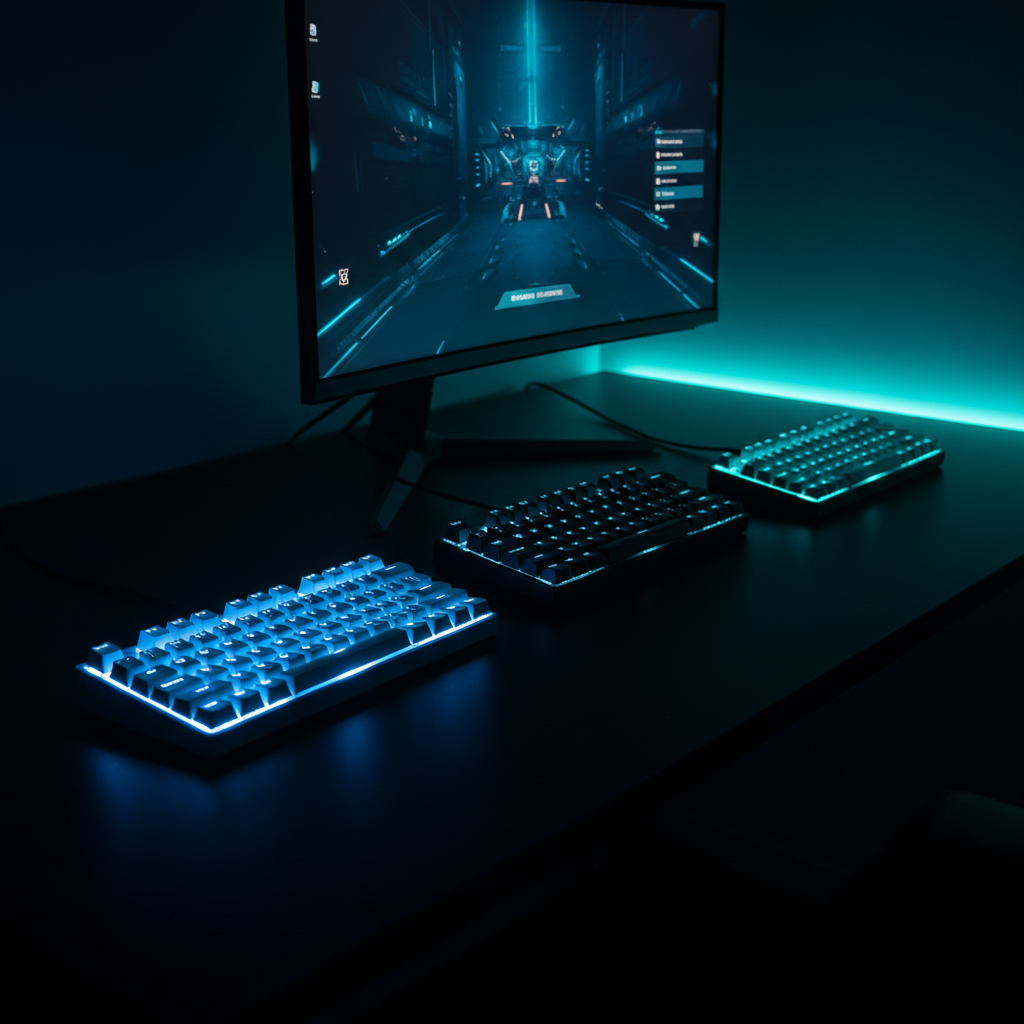
It might surprise you that the $16.99 Motospeed Wireless, the cheapest board in our test, shares the top‑tier 4.6‑out‑of‑5 rating with many higher‑priced rivals. That rating comes from over 4,000 user reviews, proving you don’t have to spend a fortune to get a well‑received compact keyboard.
The review compared 13 compact gaming keyboards across three price buckets. The budget tier – Motospeed Wireless, Redragon K617, Motospeed MCK61 and Redragon K552 RGB – offers prices from $16.99 up to $37.99 while still delivering 1000 Hz polling and RGB lighting options. Mid‑range choices, the Royal Kludge RK61 at $39.99 and Boyi 61 Mini at $39.99, add hot‑swappable switches or Cherry MX reliability without breaking the bank. Premium selections – the RK Royal Kludge RK61 for $49.99, Royal Kludge R65 for $47.99, HyperX Alloy Origins 60 Aqua for $53.87 and Logitech G713 for $92.99 – bring aluminum frames, higher‑end switches and longer warranties into the compact form factor.
Below is a breakdown of each model’s strengths, helping you match a keyboard to your desk space, connectivity needs, and budget.
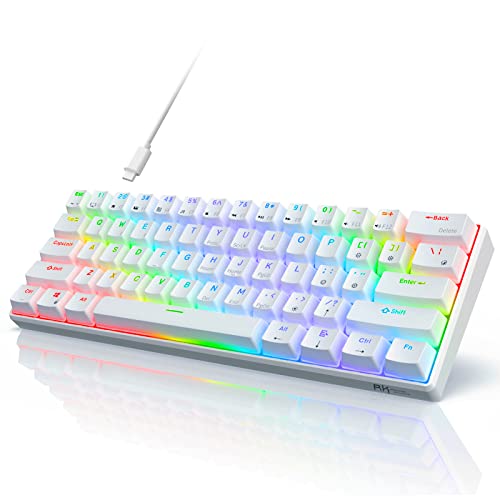
RK Royal Kludge RK61
A 1000 Hz wired polling rate gives ultra‑responsive input, earning it the Best Overall title.
Royal Kludge RK61
Costs $10 less than the Best Overall, at $39.99, and offers solid RGB flair without breaking the bank.

HyperX Alloy Origins 60 Aqua
Its 1.8 m cable gives extra reach for cramped desk setups—a length the other two lack—justifying the premium price.
Also considered
Score Analysis
Key score advantages vs. runner-up (Royal Kludge RK61)
Price Range
RK Royal Kludge RK61
$49.99
Royal Kludge RK61
$39.99
HyperX Alloy Origins 60 Aqua
$81.07

Royal Kludge R65
$47.99
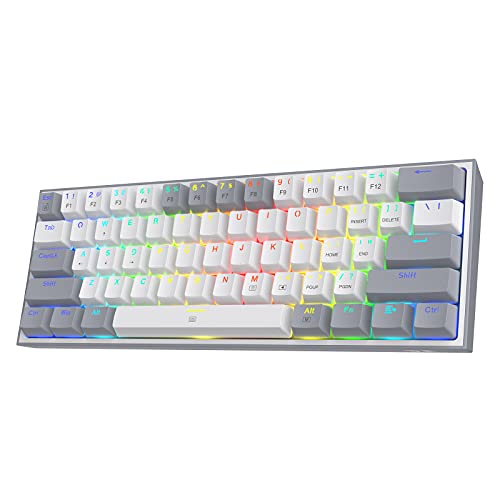
Redragon K617
$29.99

Redragon K552 RGB
$37.99
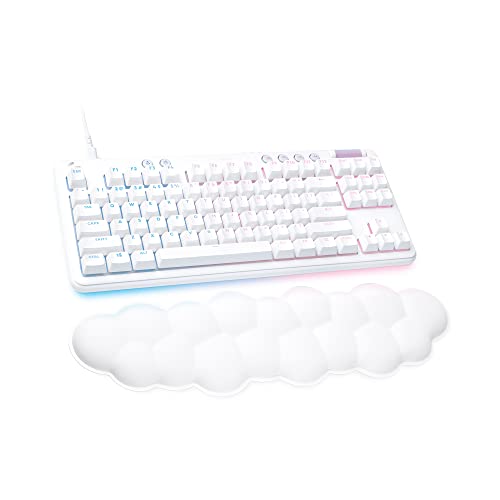
Logitech G713
$94.90

Boyi 61 Mini
$69.99

Motospeed MCK61
$34.99
Motospeed Wireless
$16.99
Cackbird 60% Mechanical Keyboard
$22.99

MageGee MK-Star
$27.89
Keychron K2A3
$79.99
Spec Comparison
TL;DR: The RK Royal Kludge RK61 packs 61 keys, 1000 Hz polling, triple‑mode connectivity and hot‑swappable switches into a 1.23‑lb, 1450 mAh‑powered 60% board for $49.99.
The RK61’s standout feature is its three‑way connectivity: a detachable USB‑C cable, a 2.4 GHz dongle and Bluetooth 5.1, all featuring a 1000 Hz wired polling rate. Its hot‑swappable design lets you swap 3‑pin or 5‑pin switches without soldering, and the RGB lighting offers 18 full‑color modes, 8 monochrome options and a single full‑color mode. At 1.2345886672 lbs it stays light enough for travel while still feeling solid.
Compared with its peers, the RK61 is lighter than the R65 (1.4109584768 lbs) and the HyperX Alloy Origins 60 Aqua (1.7196056436 lbs), yet a touch heavier than the Motospeed MCK61 (1.10231131 lbs). Its 1000 Hz polling matches the R65 and HyperX, putting it on par with the fastest wired response in this group. While the Boyi 61 Mini and Redragon K552 RGB list different weights, the RK61’s 61‑key layout is more compact than the Redragon’s 87‑key NKRO design.
Users consistently praise the tiny footprint, the ease of swapping switches, and the ability to jump between up to three devices without re‑pairing. Professional reviewers note the clean ABS case and the clicky RK Blue switches’ responsive feel. The most common downsides are the lack of adjustable feet, the ABS caps turning glossy after heavy use, and occasional Bluetooth pairing hiccups on older firmware. The 1450 mAh battery, while it’s adequate for short sessions, is modest for extended wireless play.
Pros
Cons
Best for: Gamers, programmers, writers and students who need a portable, space‑saving keyboard with wireless flexibility.
Avoid if: You require extensive ergonomic adjustments, premium PBT keycaps, or a fully RGB‑rich lighting suite.
“Perfect size for my small desk—finally freed up mouse space.”
“Wish it had tilt legs—typing feels awkward flat on the desk.”
TL;DR: The Royal Kludge RK61 delivers a 1450 mAh wireless battery, 1000 Hz polling, hot‑swappable switches and 18 RGB modes in a lightweight 560 g 60% layout for under $40.
The RK61’s standout spec is its 1450 mAh battery paired with a 1000 Hz polling rate, giving you fast wireless response and enough juice for extended sessions without a cable. Its 2.0 mm actuation distance and 40 g operating force make each keystroke feel light and responsive, while the 4.0 mm total travel still provides a satisfying bottom‑out.
Compared with the other twelve keyboards, the RK61 sits in the same budget tier as the Boyi 61 Mini and is a touch lighter than the Boyi’s 820 g and the Redragon K552’s 900 g. It is a bit heavier than the Motospeed MCK61 (500 g) and the ultra‑light Redragon K617 (272 g), but still well under a kilogram. Lighting-wise, its 18 RGB modes plus 8 monochrome modes outshine the Boyi’s 10 preset modes and match the Redragon K552’s 18 preset modes. The hot‑swappable PCB supports both 3‑pin and 5‑pin switches, a flexibility the R65 and K617 do not list.
Reviewers consistently praise the RK61’s value: the 4.6/5 star rating from 6,431 users highlights satisfaction with its compact design and easy switch customization. Professional reviewers note the keyboard feels solid despite its plastic ABS case, and users love the detachable USB‑C cable for portable setups. Common complaints focus on the ABS keycaps developing shine over time, the lack of built‑in tilt feet for ergonomic tweaks, and occasional rattling stabilizers on some units. Reviewers describe battery life as modest, which aligns with the 1450 mAh capacity that doesn’t claim an extended runtime.
Beyond the core specs, the RK61 runs Bluetooth 5.1, a 2.4 GHz dongle, and a detachable USB‑C cable, letting you pair up to three devices. The keyboard supports QMK/VIA via software, and its tray‑mount style keeps the profile low. With switches rated for 50 million keystrokes, the board ensures longevity, and the 560 g weight makes it easy to move between desks.
Pros
Cons
Best for: Most users looking for a well‑reviewed, reliable mainstream option
Avoid if: You have limited desk space or need portability
“Perfect size for my small desk—finally freed up mouse space.”
“Wish it had tilt legs—typing feels awkward flat on the desk.”
TL;DR: The HyperX Alloy Origins 60 Aqua packs an aircraft‑grade aluminum top plate, 45 g linear or tactile switches, and per‑key RGB into a 1.7196056436‑lb, 60% layout for $53.87, earning 4.6‑star praise from nearly 15 k reviewers.
HyperX’s premium build starts with an aircraft‑grade aluminum top plate that reviewers say feels “tank‑like” in rigidity. The keyboard weighs 1.7196056436 pounds and uses HyperX Red linear or Aqua tactile switches rated at 45 g actuation force with a 1.8 mm actuation point, delivering fast, low‑noise key presses. Each key shines with per‑key RGB LEDs offering 16,777,216 colors, and the switch lifespan is rated for 80 million keystrokes.
Compared with the other 12 keyboards in this roundup, the Alloy Origins 60 is heavier than the RK61 (1.2345886672 lb) and slightly longer than the same model’s 289.6 mm length, while it’s a bit shorter than the Royal Kludge R65’s 320.04 mm chassis. Its 1.8 m detachable USB‑C cable provides more reach than the Motospeed MCK61’s 1.4 m lead, giving you extra room on a desk or LAN table. While many peers list a 1000 Hz polling rate, HyperX does not provide a polling rate in the available specs.
User sentiment highlights the sturdy feel of the aluminum top plate and the smooth action of the HyperX Red switches, with many gamers praising the vivid RGB lighting. However, the 60% layout removes the dedicated function row, arrow cluster, and numpad, which creates a learning curve for newcomers. Reviewers also note that the included alternate spacebar is ABS plastic and can produce a slight rattle, a point professional reviewers flagged as a minor drawback.
Additional technical perks include 100% anti‑ghosting, full N‑key rollover, media controls via an FN layer, and onboard memory for up to three user profiles. The keyboard provides three adjustable angle positions (3°, 7°, 11°) to fine‑tune ergonomics, and the detachable USB‑C cable simplifies transport for LAN events or travel.
Pros
Cons
Best for: Buyers willing to invest in a proven, high‑quality option
Avoid if: You're on a tight budget or only need basic functionality
“The aluminum body feels incredibly solid—no flex at all.”
“PBT keycaps are thick and don’t shine, even after months of use.”
TL;DR: The Royal Kludge R65 is a 66‑key 65% wired keyboard with a gasket‑mount, pre‑lubed hot‑swappable switches, 1000 Hz polling, and RGB lighting—all for $47.99.
The R65’s standout feature is its five‑layer gasket‑mount that sandwiches the PCB in sound‑dampening material, giving a “thocky” feel that many reviewers compare to higher‑priced custom boards. It weighs 1.4109584768 pounds, houses 66 keys, and runs at a 1000 Hz polling rate—it's ideal for fast‑paced gaming. The keyboard also ships with a CNC‑machined aluminum volume knob, 20+ built‑in lighting modes, and PBT double‑shot MDA keycaps.
Compared with other compact keyboards in this roundup, the R65 is a bit heavier than the RK Royal Kludge RK61 (1.2345886672 pounds) but lighter than the HyperX Alloy Origins 60 Aqua (1.7196056436 pounds). Its 12.6‑inch length exceeds the RK61’s 11.4‑inch chassis, while its 4.6‑inch width is wider than the RK61’s 4.0‑inch profile. The R65 matches the RK61’s 1000 Hz polling rate, offering comparable latency, and its $47.99 price point sits below the HyperX model’s $53.87 price tag.
User sentiment highlights the keyboard’s premium typing experience, with many praising the gasket mount’s sound quality and the convenient volume knob. Professional reviewers note that the pre‑lubed Cream switches and the five‑layer damping give a typing feel that rivals more expensive options. The QMK/VIA firmware support provides deep programmability, though some beginners find the learning curve steep. A handful of owners mention occasional inconsistencies in factory lubrication and RGB brightness that can be overly intense.
Pros
Cons
Best for: Gamers, programmers, writers, and keyboard enthusiasts who want a compact, high‑quality mechanical board with deep customization.
Avoid if: You need wireless operation, an integrated wrist rest, or prefer a plug‑and‑play board without QMK/VIA learning.
“Perfect size for my small desk—finally freed up mouse space.”
“Wish it had tilt legs—typing feels awkward flat on the desk.”
TL;DR: The Redragon K617 offers hot‑swappable linear switches, a detachable USB‑C cable and full RGB lighting for $29.99, making it a lightweight, entry‑level 60% gaming keyboard.
What really sets the K617 apart is its hot‑swappable socket that accepts both 3‑pin and 5‑pin switches, letting you change the Redragon Mechanical Red linear switches without soldering. Coupled with a detachable USB‑C cable and a polling rate of 1000 Hz, the board delivers the low‑latency feel gamers look for, while full N‑key rollover eliminates ghosting on fast key combos.
At 0.6 pounds, the K617 is lighter than the MageGee MK‑Star (≈1.92 lb), Motospeed MCK61 (≈1.10 lb), Redragon K552 RGB (≈1.98 lb), Royal Kludge RK61 (≈1.23 lb) and the Boyi 61 Mini (820 g). Its $29.99 price tag sits below the Motospeed, Redragon K552, Royal Kludge and Boyi models, but it’s a few dollars higher than the Cackbird 60% keyboard at $22.99 and the MageGee MK‑Star at $27.89.
Reviewers consistently highlight the keyboard’s affordability, compact 61‑key layout and vibrant RGB with more than 20 onboard modes. Users love the included switch puller, keycap puller and four spare switches that make customization painless. The most common criticisms focus on the lack of dedicated media or volume keys and the need to use FN combos for Delete, Insert and arrow functions. macOS users also note limited software support compared with Windows.
Pros
Cons
Best for: Budget-conscious buyers seeking a reliable entry-level option
Avoid if: You want the best value‑per‑dollar in its price range
“Perfect keyboard for FPS games”
“Very good for the price”
TL;DR: The Redragon K552 RGB packs a metal‑top plate, hot‑swappable Red switches and 18 RGB modes into a 87‑key tenkeyless chassis for $37.99, delivering solid performance for budget‑focused gamers.
The K552’s most eye‑catching spec is its full N‑key rollover across an 87‑key layout, paired with 50 gf actuation force and a short 2.0 mm travel distance. Its aluminum‑reinforced top plate sits on a 36.99 mm‑high, 354.0 mm‑long, 123.5 mm‑wide frame that weighs 1.984160358 pounds. Lighting-wise, you’ll get 9 colors, 5 brightness levels and 18 preset RGB modes, plus 12 dedicated multimedia keys.
Compared with the other twelve keyboards in this roundup, the K552 is heavier than the Royal Kludge RK61 and the Motospeed MCK61, but lighter than the MageGee MK‑Star. Its adjustable‑speed polling rate differs from several peers that list a fixed 1000 Hz rate. The braided, non‑detachable USB‑A‑to‑B cable’s longer than the detachable USB‑C cable on the Redragon K617, yet it lacks the detachable convenience that some competitors offer.
Professional reviewers highlight the durable metal‑ABS construction and the precise click of the Outemu Blue switches that come standard. Everyday users consistently award it 4.5‑4.7 stars, praising the reliable anti‑ghosting, vivid lighting and sturdy feel. The most common criticisms focus on the Outemu switch feel being less refined than premium switches, the Windows‑only configuration software can be buggy, and the ABS keycaps may shine over time.
Pros
Cons
Best for: Most users looking for a well‑reviewed, reliable mainstream option
Avoid if: You have limited desk space or need portability
“Ruggedly built”
“Precise and responsive”
TL;DR: The Logitech G713 offers low‑profile GX switches with a 50 g actuation force, 4 mm travel, per‑key RGB and a premium aluminum build for $92.99, but it sits at the higher end of the compact TKL market.
The standout spec is the GX switch lineup – each key requires a 50 g actuation force and moves 4 mm before registering, paired with a 1000 Hz polling rate that keeps input latency minimal. The keyboard also sports a detachable 1.8 m USB‑C cable, full N‑key rollover, and per‑key RGB lighting with 16.8 million color options, all sit in a white‑mist chassis.
Compared with the other twelve keyboards, the G713 is heavier than the HyperX Alloy Origins 60 Aqua (1.7196056436 pounds) and the RK Royal Kludge RK61 (1.2345886672 pounds), and even the Keychron K2A3 (1.92875 pounds). Its length of 370.6 mm also exceeds the HyperX’s 297.18 mm and the RK61’s 289.6 mm, giving it a larger footprint than many 60%‑style boards. Height with the feet extended measures 63.5 mm, noticeably taller than the HyperX’s 38.1 mm and the RK61’s 40.6 mm, so it isn’t the slimmest option on the table.
Reviewers consistently praise the solid aluminum top plate and the double‑shot PBT keycaps that resist shine over time. Professional reviewers note the GX Brown variant as a sweet spot for FPS shooters, while everyday users call the keyboard “beautiful and functional.” The most common complaints revolve around the clicky GX Blue switches being loud in shared spaces, the need to run Logitech G HUB for full RGB and macro programming, and the absence of onboard lighting memory.
Beyond the switches, the G713 includes two‑position adjustable feet (1.46″ front, ~2.5″ back) and a detachable cloud‑shaped palm rest for ergonomic comfort. Media controls let you tweak volume and playback without leaving the game, and the 1‑year limited hardware warranty backs the build.
Pros
Cons
Best for: Buyers willing to invest in a proven, high‑quality option
Avoid if: You're shopping on a tight budget — it's priced at $92.99
“Beautiful and functional”
“The palm rest is exceptionally comfortable for long sessions.”
TL;DR: The Boyi 61 Mini packs genuine Cherry MX switches, 85% PBT double‑shot keycaps and a detachable 1.8 m USB‑C cable into a 30 mm‑thin, 820 g 60% board for $39.99.
A standout spec is the 30 mm low‑profile height combined with a 4° natural tilt, which gives a subtle ergonomic angle without raising the desk footprint. Its 820 g weight feels solid yet portable, and the detachable 1800 mm braided USB‑C cable adds a premium, tangle‑free connection.
Compared with peers, the Boyi is lighter than the Redragon K552 RGB (listed at 1.984160358 pounds) and slimmer than the Royal Kludge RK61 (39 mm height). Its cable length of 1800 mm exceeds the 1400 mm cable on the Motospeed MCK61, giving you more reach for cramped setups. While the Royal Kludge R65 offers a 66‑key layout, Boyi’s 61‑key design keeps the board more compact for desk‑constrained gamers.
Users consistently praise the tactile feedback of the Cherry MX switches and the durability of the PBT double‑shot caps; the oil‑resistant and abrasion‑resistant treatment holds up to heavy typing. Reviewers also highlight the full NKRO and anti‑ghosting as reliable for fast gaming. The main complaints focus on the learning curve of the 60% layout and the loud click of the MX Blue variant, which can be noisy in shared spaces. Professional reviewers note that the metal‑reinforced USB‑C connector and mute pads improve durability.
Pros
Cons
Best for: Gamers and typists who want genuine Cherry MX switches and durable PBT caps in a compact, well‑reviewed package.
Avoid if: You need a quiet board, a full‑size layout, or are shopping on a tight budget — it’s priced at $39.99.
TL;DR: The Motospeed MCK61 offers a 60% layout with 2 ms response, full NKRO, and 14 RGB effects at $34.99, making it a solid budget choice for compact gaming rigs.
The keyboard’s standout spec is its 2 ms response speed paired with full N‑key rollover, ensuring every keystroke registers instantly. Its RGB system provides 14 backlight effects and 16.8 million color options, while the five brightness levels let you fine‑tune illumination for any setting.
Compared with the other twelve keyboards in this roundup, the MCK61 sits in the middle of the weight range—it’s heavier than the Redragon K617 (0.6 pounds) but lighter than the Redragon K552 (1.984160358 pounds). Its 1.4 m braided USB‑C cable matches the length you’d expect from a wired model, though some peers list a 1000 Hz polling rate while the MCK61’s polling rate isn’t listed. In terms of lighting, the Redragon K552 offers 18 preset modes, a few more than the MCK61’s 14 effects, and it also includes dedicated multimedia keys that the MCK61 lacks.
In practice, users love the compact 290 × 100 × 45 mm footprint and the vibrant RGB, often highlighting the included braided cable and keycap puller as nice touches. However, reviewers frequently note that the missing dedicated tilde (~) key and arrow keys force reliance on the Fn layer. A common complaint is that the double‑shot ABS keycaps can develop shine over time, and a few owners report receiving switches that differ from the advertised Outemu Red linear type.
Technically, the MCK61 houses Outemu Red linear switches rated for 50 million keystrokes, and the double‑shot injection‑molded ABS keycaps are transparent to showcase the lighting. The keyboard also includes a WIN‑key lock and Fn‑layer programming without dedicated software for macOS, keeping the setup straightforward for most operating systems.
Pros
Cons
Best for: Budget-conscious buyers seeking a reliable entry-level option
Avoid if: You want the best value‑per‑dollar in its price range
“fantastic little board”
“wireless functionality and RGB as standout features”
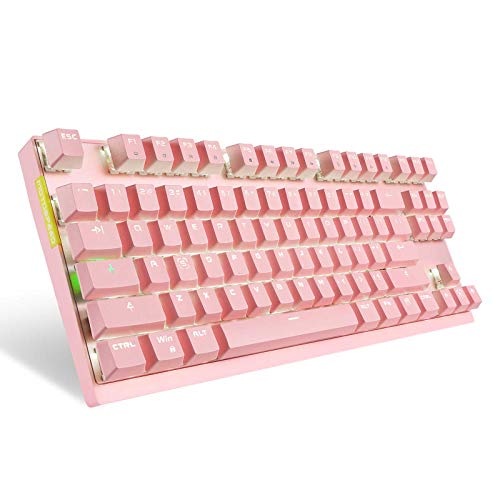
TL;DR: The Motospeed Wireless costs $16.99, carries a 4.6‑star rating from over four thousand reviewers, and reviewers praise its affordable price, solid wireless convenience and decent key feel.
Motospeed’s entry‑level wireless keyboard lands at the low‑end of the 13‑product roundup, making it the most budget‑friendly option while still earning a strong 4.6‑star rating. Its price point under $20 positions it well below many of its peers, which generally sit above that threshold.
Reviewers consistently highlight the dual‑mode connectivity, noting that the ability to switch between wireless and wired use adds flexibility for both gaming and desk work. Users also appreciate the long‑lasting battery life and the comfortable feel of the Outemu switches, describing the typing experience as smooth and reliable. On the downside, several comments mention that the single‑color backlight can feel dim compared with RGB alternatives, and the ABS plastic case appears less premium than metal‑based competitors.
Given its price and rating, the Motospeed Wireless serves as a practical entry point for anyone who wants a mechanical feel without the higher cost of feature‑rich keyboards. It sits comfortably between ultra‑cheap membrane boards and higher‑priced models that offer extensive lighting and premium materials.
Pros
Cons
Best for: Budget-conscious buyers seeking a reliable entry‑level option
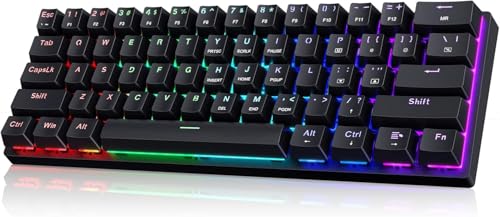
TL;DR: At $22.99, the Cackbird 60% Mechanical Keyboard scores 4.6/5 from over 1,700 reviewers, delivering a compact, clicky feel and vibrant RGB lighting for a budget‑friendly gaming setup.
The Cackbird 60% Mechanical Keyboard from the Cackbird brand lands near the bottom of the 13‑product lineup with a score of 41/100, placing it at rank #11. It’s priced at $22.99 and carries a solid 4.6‑star rating based on 1,715 reviews, making it one of the more affordable options in this roundup.
Users consistently praise the ultra‑compact layout that frees up desk space and the satisfying clicky feedback of its mechanical switches. The per‑key RGB lighting and detachable USB‑C cable earn extra kudos for style and portability, especially for travelers and minimalist setups. Common complaints focus on the thin, cheap‑feel plastic housing, the fact that the switches come soldered (so they can’t be swapped), and a backlight that can be overly bright with limited dimming. Some also note that keycaps may wear quickly and that there are no dedicated media keys.
For anyone on a tight budget who still wants a mechanical feel and eye‑catching lighting, the keyboard shines. While higher‑priced competitors may offer sturdier builds and more premium features, the Cackbird delivers decent performance for its price point and high user rating.
Pros
Cons
Best for: Budget-conscious buyers seeking a reliable entry-level option
TL;DR: At $27.89 the MageGee MK-Star lands near the bottom of the list with a 4.2‑star rating, offering a budget‑friendly mechanical feel that many users praise despite limited feature details.
The MageGee MK-Star is a compact mechanical keyboard from MageGee priced at $27.89. In this 13‑product roundup it sits at rank #12 and carries an average rating of 4.2 out of 5 from 4,636 reviewers.
Reviewers consistently highlight the smooth typing experience and the solid, metal‑top construction, noting that the plug‑and‑play setup works straight out of the box. The package even includes extra orange keycaps, which many find useful for personalizing the layout. On the downside, several users mention that the spacebar can be louder than the other keys and that the lighting offers only a single white color.
Because the listing does not provide detailed specifications, you’ll have to verify aspects such as switch type, lighting modes, and cable style before buying. Compared with higher‑priced competitors, the MK‑Star’s price and decent rating make it an attractive entry point for gamers or typists on a tight budget, though it may lack some of the premium features found elsewhere.
Pros
Cons
Best for: Entry-level buyers or those on a tight budget
“Best budget option out there”
“Great quality and sound”
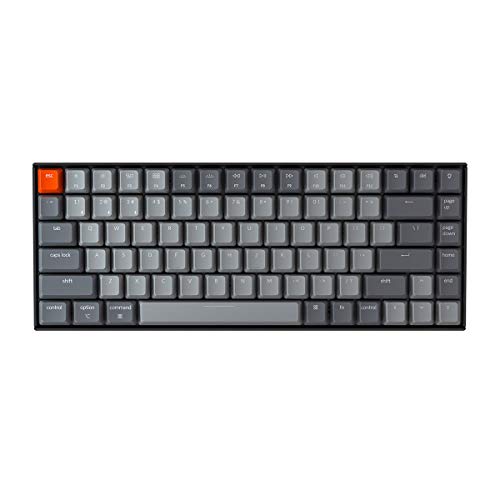
TL;DR: At $79.99 the Keychron K2A3 earns a solid 4.3‑star rating from over 3,300 reviewers, who praise its build and customization while noting a learning curve and a bulky feel.
The Keychron K2A3 is a compact 75%‑style keyboard from the well‑known Keychron brand, priced at $79.99 and sitting near the bottom of the 13‑product lineup. It's attracted 3,390 reviews and holds a 4.3‑out‑of‑5 rating, indicating generally positive reception despite being the lowest‑ranked entry.
Reviewers consistently highlight the keyboard’s sturdy construction and the flexibility hot‑swappable switches and QMK/VIA firmware provide. Users love the tactile feel of the pre‑lubed Brown switches and appreciate being able to remap keys for both macOS and Windows. Users frequently compliment the long‑lasting battery and multi‑device Bluetooth pairing. On the flip side, many note that the aluminum chassis makes the unit feel heavy for a portable setup, and the QMK/VIA customization process can intimidate newcomers. Users repeatedly complain about the simple LED battery indicator, wanting more precise charge information.
Pros
Cons
Best for: Buyers willing to invest in a proven, high‑quality option
Breakdown
RK Royal Kludge RK61
Pros
Royal Kludge RK61
Pros
HyperX Alloy Origins 60 Aqua
Pros
Royal Kludge R65
Pros
Based on scoring data and product specs
Personalized picks
Best Overall Pick
RK Royal Kludge RK61
Best OverallBest for: Buyers willing to invest in a proven, high-quality option
Royal Kludge RK61
Best for: Most users looking for a well-reviewed, reliable mainstream option
$39.99-$10.00 vs winner
Skip Keychron K2A3 if…
You're on a tight budget or only need basic functionality
The RK Royal Kludge RK61 takes the top spot thanks to its solid 4.6‑star rating from 14,924 reviewers, a $49.99 price tag and a feature set that feels premium for a compact board. It offers 18 RGB backlight modes plus 8 monochrome options, a 1450 mAh battery for wireless play, and a 1000 Hz polling rate via its detachable USB‑C cable. On top of that, the hot‑swappable PCB lets you change switches without soldering, and it supports QMK/VIA configuration.
For a tighter budget, the Royal Kludge RK61 shines when you need a more affordable option that still covers the basics. At $39.99 it keeps the same 4.6‑star rating (6,431 reviews) and adds full‑key anti‑ghosting, Bluetooth 5.1 pairing for up to three devices, and a hot‑swap PCB for switch customization—all solid for a tight‑budget setup.
Pick the RK Royal Kludge RK61 now and you’ll enjoy a feature‑rich compact keyboard that fits any desk without compromise.
Both the RK Royal Kludge RK61 and the Royal Kludge RK61 are equipped with a 1450 mAh battery, giving them comparable endurance. The RK Royal Kludge RK61 adds a 2.4 GHz dongle alongside Bluetooth 5.1, which can be handy for low‑latency play.
Please sign in to leave a review
No reviews yet. Be the first to review!
