⚡ Quick Answer
If you need a drawing surface that slides into a laptop bag, a compact graphics tablet can give you the freedom to sketch, take notes, or jam on OSU without a bulky monitor. We compared 7 ultra‑portable models, spanning a price range from $19.99 for the Huion H420X up to $28.99 for the XP‑Pen IT640.
The lineup splits into three price tiers. The budget tier features the Huion H420X, VEIKK VK430 and VEIKK VK640, all under $26 and weighing between 84 g and 279 g, with active areas around 4 × 3 in to 6 × 4 in. The Havapen Drawing Tablet occupies the mid‑range spot at $25.99. Premium choices—Huion Inspiroy H640P, XP‑Pen StarG640 and XP‑Pen IT640—cost $27.99‑$28.99 and offer heavier builds (170 g‑272 g) and larger workspaces.
All seven tablets have battery‑free pens with 8192 pressure levels, and most sit at a solid 4.3/5 rating; the H640P edges ahead with 4.4/5 from more than 13,000 users. Below we’ll break down each model’s size, key shortcuts and ideal use‑cases so you can pick the right companion for your portable workflow.
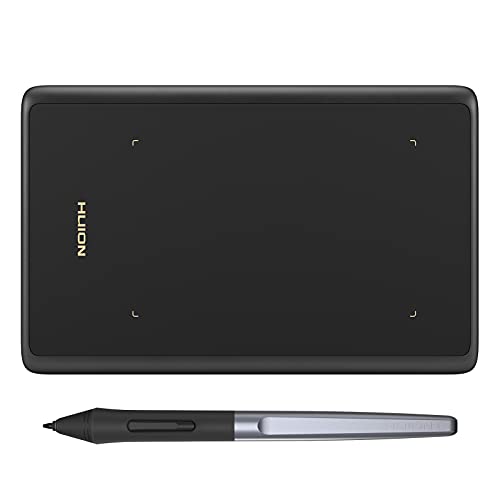
Huion H420X
Its 106 mm × 66 mm active area gives ample drawing space while staying compact, delivering strong value and features for entry‑level users.

VEIKK VK640
Ideal for creators who need an ultra‑thin 8.3 mm tablet, though it costs about $5.27 more than the Huion H420X.

Huion Inspiroy H640P
Features a 254 mm length, offering a larger workspace while maintaining a thin 8 mm profile, appealing to users willing to invest in a proven high‑quality tablet.
Also considered
Score Analysis
Key score advantages vs. runner-up (VEIKK VK640)
Price Range
Huion H420X
$19.99
VEIKK VK640
$25.26
Huion Inspiroy H640P
$27.99

XP-Pen StarG640
$29.99

Havapen Drawing Tablet
$25.99

XP-Pen IT640
$29.99

VEIKK VK430
$17.99
Spec Comparison
TL;DR: The Huion H420X packs an 8192‑level pen, >300 PPS report rate and a 7 mm, 105 g chassis into a 106 × 66 mm active area, making it one of the most portable entry‑level tablets available.
The standout spec is its ultra‑thin 7 mm profile combined with a feather‑light 105 g weight, letting you slip it into a laptop bag or even a large pocket. Its 106 mm × 66 mm active area may feel modest, but the tablet delivers 8192 pressure levels, 5080 LPI pen resolution and a >300 PPS report rate, providing smooth line work.
Compared with the six other tablets in this roundup, the H420X sits in the middle of the thickness range—thicker than the VEIKK VK430’s 2 mm but slimmer than the VEIKK VK640’s 8.3 mm and the XP‑Pen IT640’s 7.7 mm. It’s lighter than the VK640, StarG640, H640P and IT640 (all 170 g or more) yet a bit heavier than the VK430’s 84 g. Its active area is smaller than the VK430’s 101 × 76 mm, the Havapen’s 130 × 218.6 mm, and the larger StarG640, H640P and IT640 workspaces, which explains why reviewers note it feels cramped for detailed art.
User feedback praises the tablet’s portability and the natural matte paper‑like surface that mimics real drawing paper. Reviewers also highlight the fast >300 PPS report rate as noticeably quicker than competing models with lower rates. On the downside, several users mention the limited drawing surface and the absence of tilt detection or an eraser function, which can hinder more advanced techniques.
Pros
Cons
Best for: Beginners, travelers, OSU rhythm gamers, note‑takers, and casual sketchers who need a highly portable, budget‑friendly tablet.
Avoid if: You require a larger drawing surface, tilt detection, or professional‑grade features for intricate illustration work.
TL;DR: The VEIKK VK640 is a lightweight, battery‑free tablet with a 6 × 4 in active area, 8192 pressure levels and ±60° tilt, ideal for sketching on the go.
The standout spec is its 290 PPS report rate, which delivers smooth cursor movement when you draw. Combined with 8192 pressure levels and ±60° tilt, the P05 stylus feels responsive enough for quick sketches and basic illustration work.
At $25.26 it sits in the same budget tier as the Havapen and XP‑Pen StarG640, but its 279 g weight (≈0.62 lb) is heavier than the ultra‑thin StarG640 at 0.37 lb and the VEIKK VK430 at 0.19 lb, yet still light enough to slip into a backpack. Its 152 × 101 mm working area matches the Havapen’s 130 × 218.6 mm footprint in width but is shorter in height, so you’ll have less vertical space than some larger tablets.
Users frequently praise the battery‑free P05 pen for eliminating charging hassles and note the six customizable shortcut keys as handy for workflow shortcuts. Reviewers also note the 10 mm reading height keeps the pen tip close to the surface, feeling natural for hand‑drawn lines. Critics point out the modest active area can feel cramped for detailed artwork, and they perceive the tablet doesn’t offer the best price‑to‑feature ratio compared with other entry‑level options.
Pros
Cons
Best for: Beginners, travelers, and casual users who need a lightweight, portable tablet for digital sketching.
Avoid if: You want the best value‑per‑dollar in its price range.
TL;DR: The Huion Inspiroy H640P packs 8192‑level pressure sensitivity, a six‑key shortcut panel, and a feather‑light 0.6‑lb chassis into an 8 mm‑thin tablet that’s perfect for on‑the‑go creators.
The standout spec is its 8192 pressure‑sensitivity levels paired with a 5080 LPI pen resolution, delivering fine line control for sketching and note‑taking. Its report rate of 233 PPS and ±0.3 mm accuracy further ensure a responsive feel despite the tablet’s compact 254 mm × 152 mm footprint.
Compared with the six other tablets in this roundup, the H640P weighs more than the XP‑Pen StarG640 (0.37 lb) and the VEIKK VK430 (0.19 lb), but weighs less than the VEIKK VK640 (0.62 lb). It’s also slightly thicker than the StarG640’s 2 mm profile and the H420X’s 7 mm thickness, while matching the VK640’s eight‑millimeter thickness. The six programmable express keys match the VK640’s six keys, yet they’re fewer than the IT640’s eight‑key layout. Unlike the IT640’s USB‑C port, the H640P uses a Micro‑USB connection, which reviewers note feels dated.
Users consistently praise the tablet’s ultra‑portable design—its 0.6‑lb weight and slim chassis slide easily into a laptop bag. Professional reviewers highlight the battery‑free PW100 stylus as a strong value for beginners, and they praise the six express keys for speeding up shortcuts in note‑taking or quick‑access workflows. However, everyday users flag the relatively small active drawing area as a limitation for detailed artwork, and they note the lack of tilt support as a drawback for those seeking more natural brush dynamics. Android phone mode stands out as a unique perk that few competitors offer.
Pros
Cons
Best for: Beginners, students, travelers and casual creators who need a lightweight, budget‑friendly tablet with solid pressure sensitivity.
Avoid if: You’re a professional illustrator or concept artist who requires a larger active area, tilt support, or the newest USB‑C connectivity.
“thinner than a cellphone, lighter than a magazine”
TL;DR: The XP‑Pen StarG640 packs a 6 × 4 in active area, 8192‑level battery‑free pen and a feather‑light 170 g, 2 mm‑thin body for ultra‑portable sketching and OSU! gaming.
The tablet’s most eye‑catching spec is its 2 mm thickness combined with a weight of just 170 g (≈0.37 lb), making it one of the slimmest and lightest options in this lineup. Its 6 × 4 in active area gives you a decent canvas while still fitting easily into a backpack.
Compared with the other six contenders, the StarG640 is lighter than the Huion Inspiroy H640P (≈0.6 lb) and the VEIKK VK640 (≈0.62 lb), and it’s noticeably thinner than those models’ 8 mm‑plus profiles. Only the VEIKK VK430 shares the same 2 mm thickness, but that tablet weighs just 84 g, so the StarG640 is a bit heavier while still far lighter than the 272 g H640P. Its active area matches the Havapen Drawing Tablet (6 × 4 in) and exceeds the smaller 4 × 3 in area of the VEIKK VK430 and the 66 × 106 mm area of the Huion H420X.
Users consistently praise the tablet’s portability – they call the ultra‑slim chassis and battery‑free stylus (11 g) “perfect for travel” and “great for on‑the‑go sketches”. The 266 RPS report rate also earns kudos from OSU! rhythm gamers who notice smoother cursor movement. On the flip side, several reviewers flag the 6 × 4 in surface as “cramped for detailed illustration”, and the lack of tilt support or programmable express keys limits advanced drawing techniques. Users frequently comment on the wired USB connection, noting it can get in the way of hand placement during long sessions.
Technical details back up the positive feedback: the pen delivers 8192 pressure levels, the tablet resolves lines at 5080 LPI, and the 266 RPS report rate provides fast data transmission. Compatibility spans Windows 7+, macOS 10.10+, Linux (Ubuntu 19.04/20.04) and Chromebook, and the package includes a stylus, 20 spare nibs, a pen clipper and a USB cable – everything you need to start drawing right out of the box.
Pros
Cons
Best for: Beginners, casual digital artists, OSU! rhythm gamers, students and anyone who needs a highly portable drawing tablet.
Avoid if: You require a large active area, tilt sensitivity, programmable shortcuts or a fully wireless setup for professional illustration work.
TL;DR: The Havapen YZ08 offers a 6 × 4‑inch drawing surface, 8192 pressure levels and a battery‑free stylus for $25.99, making it a portable, entry‑level tablet with solid performance but a modest 4‑star rating.
The tablet’s standout spec is its 8192‑level pressure sensitivity paired with a 266 RPS report rate, delivering smooth strokes on a 6 × 4‑inch (130 × 218.6 mm) active area. Its battery‑free PN01 stylus means you’ll never have to charge the pen, and the ultrathin form factor keeps the pad light enough for on‑the‑go use.
Compared with the six other tablets in this roundup, Havapen’s drawing area is larger than the Huion H420X (106 × 66 mm) and the VEIKK VK430 (4 × 3 inches), while matching the VEIKK VK640’s 152 × 101 mm workspace. Its 266 RPS report rate outpaces the Huion Inspiroy H640P’s 233 PPS, and the pressure sensitivity ties with the H640P’s 8192 levels. Like the VK640 and VK430, Havapen uses a battery‑free pen, but it offers a slightly larger surface than those models. In terms of weight, it's heavier than the 84 g VK430 but lighter than the 279 g VK640 and comparable to the 170 g XP‑Pen StarG640 and IT640.
User feedback highlights the fine‑grained control from the 8192 pressure steps and the convenience of a stylus that never needs charging. Beginners, OSU gamers and remote workers appreciate the tablet’s cross‑platform compatibility (Windows, macOS, ChromeOS, Android). However, the 4.0‑star rating from only two reviews suggests some users have reservations, and the lack of pen tilt support makes it less suitable for professional illustrators who need advanced features.
Pros
Cons
Best for: Beginners, OSU gamers, online educators, remote workers and students who want a portable, battery‑free tablet.
Avoid if: You require a large active area, pen tilt functionality, or a tablet with a higher user rating for professional work.
TL;DR: The XP‑Pen IT640 offers a 16 × 9 cm drawing area, 16,384 pressure levels, and 8 soft keys in an ultra‑thin 7.7 mm frame, but its small surface and wired‑only connection keep it aimed at beginners and portable setups.
The tablet’s standout spec is its 16,384 pressure levels combined with a 60° tilt range, giving you fine‑grained control on a compact 16 × 9 cm (6.3 × 3.5 in) active area. It also reports at ≥220 RPS and delivers 5080 LPI resolution, so strokes feel instantly responsive. At just 7.7 mm thick, the IT640 slips into a laptop bag without adding bulk, and the eight soft‑key shortcuts let you keep frequently used commands at your fingertips.
Compared with the other six tablets in this roundup, the IT640 sits in the middle of the size‑and‑weight spectrum. Its 170 g weight matches the XP‑Pen StarG640, yet it's noticeably thicker than the StarG640’s 2 mm profile. It's a hair slimmer than the Huion Inspiroy H640P’s 8 mm thickness, and thinner than the VEIKK VK640’s 8.3 mm build. However, it's heavier than the ultra‑light VEIKK VK430 and Huion H420X, which weigh well under 100 g. The active area measures smaller than larger‑format tablets such as the H640P, making the IT640 best suited for sketching and quick tasks rather than full‑canvas work.
User feedback frequently praises the lag‑free drawing experience that the ≥220 RPS report rate and high resolution provide, especially for OSU! rhythm‑gaming and detailed illustration. Reviewers also like the battery‑free P01 stylus and the eight customizable keys that streamline workflow. The most common criticism points to the modest 16 × 9 cm surface, which can feel cramped for detailed projects, and the fact that the tablet must stay tethered to a computer via USB‑C, as there's no wireless option.
Beyond performance, the IT640 runs on a 5 V 1 A USB‑C power input and supports Windows 7+, macOS 10.13+, Android 10+, Chrome OS 88+, and Linux, covering the major creative platforms. The tablet comes with a stylus, ten replacement nibs, and a one‑year warranty, giving you a ready‑to‑go package right out of the box.
Pros
Cons
Best for: Beginners, students, OSU! gamers, and casual digital creators who need a portable, affordable tablet with solid pressure sensitivity.
Avoid if: You need a large drawing surface, wireless connectivity, or professional‑grade performance for extensive illustration work.
TL;DR: The VEIKK VK430 is an ultra‑light 84 g tablet with a 4 × 3‑inch active area, 8192 pressure levels and a 290 PPS report rate, ideal for on‑the‑go creators who value portability above a large drawing surface.
The VK430’s most eye‑catching spec is its featherweight construction – the tablet weighs just 84 g and measures a slim 2 mm in thickness, making it easy to slip into a laptop bag or backpack. Its 4 × 3‑inch (101 × 76 mm) active area pairs with 8192 pressure‑sensitivity levels and a 5080 LPI resolution, while the 290 PPS report rate keeps pen strokes smooth enough for rhythm‑gaming.
Compared with the six other tablets in this roundup, the VK430 is lighter than the Huion H420X (0.231 lb) and far lighter than the VEIKK VK640 (0.615 lb) or the XP‑Pen StarG640 (0.375 lb). Its active area is smaller than the Huion H420X’s 66 × 106 mm surface and the Havapen tablet’s 130 × 218.6 mm drawing zone, so you’ll have less room to sketch than those models. The tablet offers four express keys, fewer than the VK640’s six shortcut keys and the XP‑Pen IT640’s eight soft keys. Its 290 PPS report rate also tops the Havapen’s 266 RPS, giving it an edge for fast‑response tasks.
Professional reviewers highlight its 84 g weight as a key advantage, noting that the battery‑free P05 stylus removes any charging hassle. Users consistently praise the 290 PPS rate for improving OSU rhythm‑game performance, while the 8192 pressure levels earn praise for matching more expensive tablets. On the downside, many mention that the 4 × 3‑inch drawing surface feels restrictive for detailed artwork, and some note that the report rate, though high, isn’t the fastest available. The tablet’s 4.0‑star rating from 375 reviews sits a notch below the higher‑rated competitors in the set.
Pros
Cons
Best for: OSU rhythm‑game players, mobile digital artists, students or professionals who need a compact note‑taking tablet.
Avoid if: You need a larger drawing workspace, tilt sensitivity, or professional‑grade features such as a built‑in display.
Breakdown
Huion H420X
Pros
VEIKK VK640
Pros
Cons
Huion Inspiroy H640P
Pros
XP-Pen StarG640
Pros
Based on scoring data and product specs
Personalized picks
Best Overall Pick
Huion H420X
Best OverallBest for: Budget-conscious buyers seeking a reliable entry-level option
VEIKK VK640
Best for: Budget-conscious buyers seeking a reliable entry-level option
$25.26+$5.27 vs winner
Skip VEIKK VK430 if…
You need powerful performance or professional-grade features
The Huion H420X earns the top spot thanks to its feather‑light 0.23‑lb (105 g) chassis and a slim 7 mm profile that slides easily into any laptop bag. Its 106 mm × 66 mm active area still delivers professional‑grade 8192 pressure levels and a fast >300 PPS report rate, so lines stay smooth even at high speed. You also get eight programmable shortcut keys, two‑button battery‑free pen, and a rotatable working area that locks at 0°, 90°, 180° or 270°, giving you flexible ergonomics. A 4.3‑star rating from more than 2,300 reviewers confirms the strong user approval.
The VEIKK VK640 comes in second, perfect if you need a noticeably larger drawing surface for detailed illustrations. Its 152 mm × 101 mm active area is roughly 50 % bigger than the H420X, while still keeping the tablet thin at 8.3 mm and weighing only 0.62 lb (279 g). It offers tilt support of ±60°, six dedicated shortcut keys, a battery‑free pen and a reliable 290 PPS report rate. USB‑C connectivity and compatibility with Windows, macOS, Chrome OS, Linux and Android make it a versatile travel companion.
For those watching the budget, the Havapen Drawing Tablet offers the lowest price at $25.99 and still provides a functional size for casual sketching. If you prefer a step up in brand reputation and a slightly larger board, the XP‑Pen IT640 sits at $28.99 and receives praise for its solid build quality and reliable driver support.
Grab the Huion H420X now for the best blend of portability, performance, and value.
The Huion H420X is extremely lightweight at 105 g and only 7 mm thick, making it easy to slip into a bag. Its active area of 66 × 106 mm is large enough for most quick sketches, while the VEIKK VK430 is even lighter at 84 g but has a smaller 4 × 3‑inch drawing surface. Overall, the H420X offers the best balance of portability and usable space.
No reviews yet — be the first to share your experience.
Please sign in to leave a review



