Eleven curved desktop displays, ranging from $109.97 for the Sceptre C248W-FW100T up to $799.99 for the Alienware AW3425DW, were compared. The Sceptre leads the pack with a 4.6/5 rating from 23,542 reviews, a 100 Hz refresh rate and 1500R curvature, all for $109.97. On the other end, the Alienware premium models boast ultra‑wide panels, high‑refresh rates and premium build quality, but carry a premium price relative to the budget picks.
The roundup is organized by the three price tiers defined by the data. Budget‑friendly choices include the Sceptre, KOORUI 24E6CA, Samsung LS27D366GANXZA and MSI MAG 274CXF, each offering solid sRGB coverage and 100 Hz‑plus refresh rates. Mid‑range options like the Gigabyte GS27FC and LG 32MR50C-B add larger screens and decent brightness without breaking the bank. Premium selections—LG 34WR55QK‑B, LG 34SR60QC‑W, Alienware AW3425DWM and Alienware AW3425DW—bring ultra‑wide formats, USB‑C power delivery, HDR and higher color gamuts. Below you’ll find a closer look at how each model stacks up for gaming, work and entertainment.

Sceptre C248W-FW100T
Its shallow 193 mm depth lets you fit the 24‑inch screen into tighter desks without sacrificing viewing area.

MSI MAG 274CXF 27-inch Curved
Ideal for gamers who value brighter visuals, with 300 cd/m² brightness, and it costs about $32 more than the Best Overall.
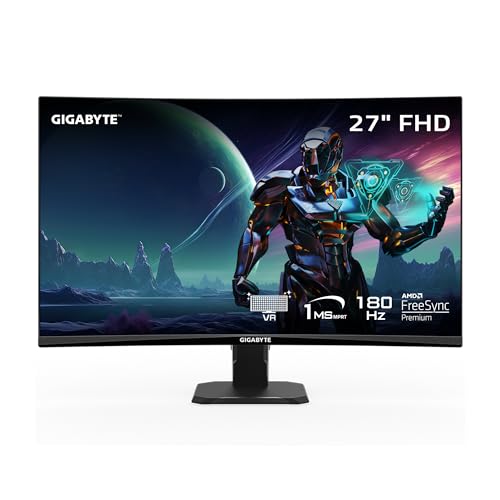
Gigabyte GS27FC
Stands out with a slimmer 148 mm box depth and taller 448 mm height, giving a sleek profile for tighter workspaces.
Also considered
Score Analysis
Key score advantages vs. runner-up (MSI MAG 274CXF)
Price Range
Sceptre C248W-FW100T
$78.97
MSI MAG 274CXF 27-inch Curved
$141.95
Gigabyte GS27FC
$159.99

LG 34WR55QK-B
$349.99

Alienware AW3425DWM
$299.99

KOORUI 24E6CA
$115.99

LG 32MR50C-B
$179.99

LG 34SR60QC-W
$348.04

Samsung LS27D366GANXZA
$161.49

Alienware AW3425DW
$799.99

Xiaomi P27FBB-RGGL-01
$275.99
Spec Comparison
TL;DR: The Sceptre C248W-FW100T delivers a 24‑inch 1500R curved VA panel with 100 Hz refresh, 1 ms blur‑reduction response and full 100% sRGB coverage at a budget‑friendly $109.97.
This monitor’s standout feature is its 1500R curvature, which wraps the 24‑inch screen enough to create an immersive feel without overwhelming a typical desk. Coupled with a 100 Hz refresh rate and a 1 ms blur‑reduction response, fast‑moving games feel smoother than the standard 60 Hz panels you’ll see in many entry‑level displays.
Compared with the other ten contenders, the Sceptre sits at the lower end of the price spectrum while still offering two HDMI ports and a DisplayPort—connectivity that some larger or heavier peers don’t list. It’s lighter than the MSI MAG 274CXF and heavier than the KOORUI 24E6CA, placing it in a comfortable middle ground for most desk setups.
Users consistently praise the buttery‑smooth 100 Hz gameplay and the subtle curve that makes long sessions less tiring. Professional reviewers highlight the full 100% sRGB color gamut and AMD FreeSync support as strong value‑adds for the price. However, many note that the stand lacks height and swivel adjustment, and the built‑in stereo speakers have low volume, so external audio works better. A recurring complaint is that achieving 100 Hz over HDMI can require a bit of tweaking.
Pros
Cons
Best for: Budget-conscious buyers seeking a reliable entry-level option
Avoid if: You have limited desk space or need portability
“Great beginner gaming monitor for gamers on a budget... easy setup, even comes with a decent screwdriver.”
“The curve is subtle, but the 100Hz is buttery smooth. Just wish the stand was more adjustable.”
TL;DR: The MSI MAG 274CXF delivers a 27‑inch 1500R curved VA panel with a blistering 280 Hz refresh rate and 0.5 ms gray‑to‑gray response, making fast‑paced gaming feel ultra‑smooth.
This monitor’s headline spec is the 280 Hz maximum refresh rate over DisplayPort, paired with a 0.5 ms GtG response time. Those numbers sit at the top of the 1080p gaming segment, letting you chase high frame rates without the blur that slows down competitive shooters. The 27‑inch screen size and 1500R curvature also create a more immersive field of view, while the 300 cd/m² brightness and 92.2% DCI‑P3 coverage give a vivid picture for an HDR‑Ready panel.
Compared with the other ten displays in this roundup, the MAG 274CXF leans toward the premium side of the price band and tips the scales heavier than ultra‑slim options like the Sceptre 24‑inch model. It also outpaces many peers on refresh speed—most competitors sit at 100 Hz or 144 Hz—so you’ll notice a smoother experience than the Samsung or KOORUI units, which lack the ultra‑high refresh capability.
Reviewers consistently rave about the monitor’s speed, calling it “the best monitor ever” for its fluid gameplay and the way the curved panel pulls you into fast‑paced titles. Professional reviewers highlight the 0.5 ms response and FreeSync Premium as key strengths for esports. On the flip side, users note the lack of height or swivel adjustment, and the HDR‑Ready label falls short of true HDR10 performance, a point critics echo, noting the modest 300 cd/m² peak brightness.
Beyond raw speed, the display packs a 10‑bit (8‑bit + FRC) color depth, 81.59 PPI pixel density, and a 4000:1 static contrast ratio that helps dark scenes retain detail. The monitor’s weight of 13.4 lb (overall) and VESA‑compatible 100 × 100 mm mount give you flexibility for desk or wall setups, while the included DisplayPort and HDMI 2.0b inputs cover most gaming rigs and consoles.
Pros
Cons
Best for: Competitive esports gamers and fast‑paced FPS/RTS players who prioritize ultra‑high refresh rates and low response times.
Avoid if: You need extensive ergonomic adjustments, true HDR10 performance, or NVIDIA G‑Sync compatibility.
“Best monitor ever even for a crumbed one”
TL;DR: The Gigabyte GS27FC delivers a 27‑inch 1500R VA panel with a native 180 Hz refresh, 1 ms MPRT response and deep 4000:1 contrast at a budget‑friendly $159.99.
What really stands out is the 180 Hz refresh rate paired with a 1 ms MPRT response time, which the manufacturer lists as “fast” for a 27‑inch curved display. The panel’s 250 cd/m² brightness and 4000:1 real‑world contrast ratio give you deep blacks and vivid colors, and it doesn't require an over‑clocked mode.
Compared with the other ten monitors in this roundup, the GS27FC is lighter than the MSI MAG 274CXF (13.4 lb) and the LG 32MR50C‑B (11.3 lb) but a bit heavier than the KOORUI 24E6CA (6.8 lb) and Samsung LS27D366GANXZA (8.4 lb). Its 250 cd/m² brightness matches the LG’s typical output and exceeds Samsung’s listed minimum of 200 cd/m², while its contrast of 4000:1 outperforms the MSI’s unspecified contrast and rivals the LG’s typical 3000:1.
Professional reviewers praise the monitor’s “excellent contrast ratio delivering deep blacks” and “super quick 1 ms response and low input lag.” Everyday users echo this, noting the plug‑and‑play setup and immersive curve for competitive FPS titles. The main trade‑off is the weak overdrive that can cause minor white trailing, and the Aim Stabilizer backlight strobe reduces overall brightness by about 20 %.
Pros
Cons
Best for: Budget‑focused gamers and competitive FPS players who want high refresh rates and low input lag without breaking the bank.
Avoid if: You need extensive ergonomic adjustments, professional‑grade color gamut coverage, or a monitor for very bright rooms.
“Plug and play”
“Great price for a person on a budget with great features”
TL;DR: The LG 34WR55QK-B delivers a 34‑inch 21:9 UltraWide VA panel with 100 Hz refresh, HDR10 and 65 W USB‑C power delivery, making it a solid choice for productivity‑focused setups.
This monitor’s standout spec is its 34‑inch diagonal screen that packs a 3440 × 1440 pixel WQHD panel, a 100 Hz refresh rate and HDR10 support. The VA panel reaches a typical brightness of 300 cd/m² and covers 99% of the sRGB color gamut, while the 1800R curvature helps keep the whole field of view comfortable. A 5 ms response time and built‑in eye‑comfort features like Flicker Safe and Reader Mode round out the core visual experience.
Compared with its peers, the LG 34WR55QK‑B is heavier than the LG 34SR60QC‑W (which weighs 13.45 pounds) but considerably lighter than the Alienware AW3425DWM that tops out at 20.97 pounds. Its brightness and color‑gamut numbers match the LG 34SR60QC‑W’s 240 cd/m² minimum and 99% sRGB typical values, while it offers more connectivity than the Xiaomi P27FBB‑RGGL‑01, which lists fewer ports. Unlike some rivals, the stand provides up to 110 mm of height adjustment, giving you more ergonomic flexibility.
Users consistently praise the monitor for its expansive real‑estate, noting that the USB‑C port with 65 W power delivery simplifies a single‑cable desk setup. Reviewers also highlight the LG Switch app’s screen‑zoning and hotkey mapping as productivity boosters. On the downside, the VA panel’s 5 ms response time can introduce motion blur in fast‑paced games, and the lack of swivel or pivot limits positioning options. People view HDR performance as modest, with peak brightness capped at 300 cd/m².
Pros
Cons
Best for: Buyers willing to invest in a proven, high-quality option
Avoid if: You need advanced features or professional‑grade performance
“Perfect for coding and video editing — I can have my IDE, browser, and terminal open side by side.”
“USB‑C charging my MacBook Pro while displaying full resolution is a game‑changer.”
TL;DR: The Alienware AW3425DWM delivers a 34‑inch 180 Hz curved VA panel with 1 ms GTG response, 95% DCI‑P3 coverage and a sturdy ergonomic stand, but its 500 nits peak brightness and lack of speakers don't meet HDR and audio needs.
This monitor’s headline spec is the 180 Hz variable refresh rate paired with a 1 ms GTG response time, a 10‑bit VA panel and 95% DCI‑P3 color gamut. The panel reaches a peak brightness of 500 cd/m² and a static contrast ratio of 3000:1, giving deep blacks and vivid colors across its 34‑inch viewable diagonal.
At 20.97 pounds, the AW3425DWM is noticeably heavier than the LG 34SR60QC‑W (13.45 pounds) and the LG 34WR55QK‑B (15.2 pounds). Its 34‑inch screen matches the LG ultrawides but outpaces the 31.5‑inch LG 32MR50C‑B and the 27‑inch MSI MAG 274CXF. The 180 Hz refresh outstrips the 100 Hz of the LG 34SR60QC‑W, and the inclusion of two HDMI 2.1 ports gives it an edge over the HDMI 2.0 ports on the LG 34WR55QK‑B. Connectivity is solid with one DisplayPort 1.4, two HDMI 2.1, two USB‑A and a USB‑B upstream, while the VESA‑mount size (100 × 100 mm) matches the MSI’s mount.
Professional reviewers praise the monitor’s near‑perfect color accuracy and the immersive 1500R curvature, noting that the high contrast ratio makes dark scenes pop. Everyday users echo the sentiment, highlighting the smooth gameplay experience in RPGs and simulators. The main criticisms focus on slight black smearing during fast dark motion, the modest 500 nits peak brightness compared with premium HDR panels, and the absence of built‑in speakers, which forces reliance on external audio.
Beyond performance, the AW3425DWM offers a fully adjustable stand (height, swivel, tilt, pivot) and a Kensington lock slot for security. Features like AlienFX RGB lighting, ComfortView Plus low‑blue‑light technology, console‑mode presets and a joystick OSD control round out a package aimed at gamers who want both visual fidelity and ergonomic flexibility.
Pros
Cons
Best for: Gamers seeking an immersive ultrawide experience, especially for RPGs, simulators and open‑world titles.
Avoid if: You need professional‑grade color accuracy for 100% DCI‑P3 or Adobe RGB work, or you demand higher HDR peak brightness.
TL;DR: The KOORUI 24E6CA delivers a 24‑inch 1500R VA panel with a blistering 180 Hz refresh and 1 ms MPRT response, making fast‑paced gaming feel smooth without breaking the bank.
The headline spec is the 180 Hz refresh rate, paired with a 1 ms MPRT response time, which keeps motion blur to a minimum on fast‑action titles. Its 24‑inch screen size and 1500R curvature create a more immersive field of view than flat panels, while the VA technology provides a static contrast ratio of 3000:1 for deep blacks.
Compared with the other ten monitors in this roundup, the KOORUI’s refresh rate outstrips the 100 Hz of the Sceptre C248W-FW100T and sits above the typical 144 Hz found in many mid‑range models. At 6.8 lb, it’s lighter than the MSI MAG 274CXF’s 13.4 lb stand but heavier than the Sceptre’s 3963 g chassis, offering a solid yet manageable desktop presence.
Users consistently praise the buttery‑smooth gameplay and the curve’s ability to reduce eye strain during long sessions. Professional reviewers note the 99% sRGB coverage and FreeSync Premium/G‑Sync compatibility as strong points for gamers on a budget. Common complaints focus on the VA panel’s occasional ghosting in dark, fast‑moving scenes and HDR10’s modest brightness, which falls short of true HDR performance.
Beyond speed, the monitor packs a 250 cd/m² brightness level, a 90% DCI‑P3 gamut, and HDR10 support, delivering decent color fidelity for most games and media. The lack of built‑in speakers and limited ergonomic tweaks—only tilt from –5° to +15°—mean you’ll need external audio and a stable desk setup.
Pros
Cons
Best for: Competitive and casual gamers who need a high refresh rate and low motion blur without spending a fortune.
Avoid if: You require professional‑grade color accuracy, extensive ergonomic adjustments, or a monitor primarily for HDR‑intensive content.
“incredibly smooth gameplay”
“engaging”
TL;DR: The LG 32MR50C-B offers a 31.5‑inch 1500R curved VA panel with a 100 Hz refresh rate and AMD FreeSync at a $179.99 price point, but its 1080p resolution and limited ergonomics may disappoint power users.
The standout feature's the 1500R curvature on a 31.5‑inch screen, paired with a 100 Hz maximum refresh rate and 5 ms response time. Combined with AMD FreeSync, the monitor promises smoother motion for casual gaming and media consumption.
Compared with the other ten displays in this roundup, the LG's heavier than the Samsung LS27D366GANXZA (8.4 lb) but lighter than the MSI MAG 274CXF (13.4 lb). Its typical brightness of 250 cd/m² matches the Gigabyte GS27FC, yet it's below the MSI’s 300 cd/m². Unlike the KOORUI 24E6CA, the LG provides no DisplayPort or USB ports, and it offers fewer connectivity options overall.
Everyday users consistently praise the immersive curve and the anti‑glare finish, noting that the 100 Hz panel feels fluid for most games. However, several reviewers call out the visible pixelation that comes from a 1080p resolution on a 32‑inch panel and the absence of built‑in speakers. The tilt‑only stand (‑5° to +20°) also limits ergonomic flexibility, a point frequently mentioned in consumer feedback.
Technically, the VA LCD panel delivers 16.7 million colors and a typical contrast ratio of 3000:1, which helps produce deep blacks in dim lighting. The pixel pitch of 0.3637 mm translates to roughly 69 PPI, and the anti‑glare coating reduces reflections in bright rooms. The monitor ships with an HDMI‑1.4 cable, power adapter, and includes OnScreen Control software for easy adjustments.
Pros
Cons
Best for: Most users looking for a well‑reviewed, mainstream curved monitor that balances smooth gameplay with an immersive design.
Avoid if: You need professional‑grade color accuracy, HDR support, or extensive ergonomic adjustments for intensive work.
“help to reduce motion blur”
“awesome image quality”
TL;DR: The LG 34SR60QC‑W delivers a 34‑inch 1800R curved UltraWide VA panel with 100 Hz refresh, 5 ms GTG response, 99% sRGB and built‑in webOS for streaming, but lacks height adjustment and USB‑C docking.
This monitor’s standout spec is its 34‑inch 1800R curved display paired with a 100 Hz refresh rate and a 5 ms GTG response time, while covering 99% of the sRGB color gamut. The VA panel also offers a typical brightness of 300 cd/m² and HDR10 support, making movies and work content look vivid.
At 13.45 pounds, it’s lighter than the LG 34WR55QK‑B (15.2 pounds) and far lighter than the Alienware AW3425DWM (20.97 pounds). However, the LG 34WR55QK‑B adds a USB‑C Power Delivery port that the 34SR60QC‑W lacks, and the Alienware model includes height adjustment, which this monitor doesn't offer. Its typical brightness of 300 cd/m² is also a shade lower than the Xiaomi P27FBB‑RGGL‑01’s 350 cd/m².
Users love the immersive 21:9 screen for multitasking and the convenience of webOS 23 with over 300 streaming apps plus AirPlay 2 integration. Professional reviewers praise the “Hybrid monitor/TV” feel, but note the VA panel can show motion blur in fast‑paced games and the lack of height or swivel adjustment limits ergonomic setup. Some owners mention the external power adapter feels bulky and Bluetooth pairing can be finicky.
Beyond the screen, the monitor includes two HDMI 2.0 ports, two USB‑A downstream ports, a 3.5 mm headphone jack and an RJ‑5 Ethernet port, plus 2 × 7 W built‑in speakers. The 1800R curvature and anti‑glare coating help reduce eye strain during long work sessions, and the 100 × 100 mm VESA mount adds mounting flexibility.
Pros
Cons
Best for: Those who need a wide, smart workspace with built‑in streaming and are comfortable with a VA panel’s trade‑offs.
Avoid if: You are a competitive gamer or color‑critical designer who requires ultra‑fast response times, height adjustment, or a USB‑C docking solution.
TL;DR: The Samsung LS27D366GANXZA offers a 27‑inch 1800R curved VA panel with 100 Hz refresh, AMD FreeSync and 95% sRGB coverage at a budget‑friendly $132.38, though ergonomics are limited.
This monitor’s standout spec is its 1800R curvature combined with a 27‑inch Full HD VA screen. The panel delivers a typical brightness of 250 cd/m², a 3000:1 contrast ratio and a fast 4 ms GTG response time, which together create deep blacks and smooth motion. AMD FreeSync and a maximum 100 Hz refresh rate further reduce stutter during casual gaming sessions.
At 8.4 pounds, the Samsung is lighter than the MSI MAG 274CXF’s 13.4 pounds but heavier than the KOORUI 24E6CA’s 6.8 pounds. Its stand‑only tilt adjustment means it lacks the height‑adjustability some rivals offer. The depth with stand measures 233.68 mm, a touch deeper than KOORUI’s 229.1 mm but shallower than the Sceptre C248W‑FW100T’s 193 mm footprint. Brightness sits at 250 cd/m², matching KOORUI and falling short of MSI’s 300 cd/m², while its 95% sRGB gamut is just below Sceptre’s 100% sRGB coverage. The monitor supports a 75 × 75 mm VESA mount, smaller than MSI’s 100 × 100 mm pattern.
Users repeatedly praise the immersive curve and the eye‑comfort suite—TÜV‑certified blue‑light reduction and flicker‑free operation keep fatigue at bay during long work or gaming sessions. Professional reviewers highlight the curvature’s ability to add depth to everyday content and note its 95% sRGB color reproduction for the price point. Common complaints focus on the lack of height, swivel or pivot adjustments, the single HDMI 1.4 and VGA ports, and the absence of built‑in speakers, meaning you’ll need external audio.
Under the hood, the VA panel’s 16.7 million‑color depth and 3000:1 contrast ratio provide image richness for movies and casual titles. The 100 Hz refresh rate, paired with FreeSync, smooths fast‑moving scenes without the cost of a high‑end gaming display. Power draw tops out at 35 W, keeping energy use modest for a 27‑inch screen.
Pros
Cons
Best for: Budget‑conscious buyers seeking a reliable entry‑level option
Avoid if: You need advanced features or professional‑grade performance
TL;DR: The Alienware AW3425DW offers a 34.2‑inch QD‑OLED panel with 240 Hz refresh, 0.03 ms response, and 108% DCI‑P3 coverage, but its premium price and lack of built‑in audio may limit appeal.
This monitor’s standout feature is its QD‑OLED screen that delivers a 34.2‑inch diagonal view with a 0.03 ms gray‑to‑gray response time and a blazing 240 Hz refresh rate, making fast‑paced games feel buttery smooth.
Compared with the other ten displays in the roundup, the AW3425DW weighs noticeably more than the LG 34WR55QK‑B and LG 34SR60QC‑W, and it sits at the higher end of the price spectrum. It also packs more premium specs—such as a 1000‑nit HDR peak and 108% DCI‑P3 color gamut—than many of its peers, which often top out at 250‑300 nits and lower color coverage.
Reviewers consistently praise the monitor’s eye‑catching colors and ultra‑smooth gameplay, noting that the factory‑calibrated color accuracy (ΔE < 2) is “near‑perfect out of the box.” However, users also flag the absence of any built‑in speakers or headphone jack, occasional wobble on the stand, and concerns about OLED burn‑in with static UI elements.
Additional technical highlights include NVIDIA G‑Sync Compatible and AMD FreeSync Premium Pro support, a 1800R curvature for immersive ultrawide viewing, and VESA DisplayHDR TrueBlack 400 certification with a 400‑nit HDR peak mode for HDR10 content.
Pros
Cons
Best for: Those prioritizing quality and willing to pay for premium performance
Avoid if: You're on a tight budget or only need basic functionality
“The colors pop like nothing I’ve seen before”
“Perfect for both gaming and photo editing—no need to switch monitors”
TL;DR: The Xiaomi P27FBB‑RGGL‑01 is a 34‑inch ultrawide VA monitor with a 1500R curve, 180 Hz native refresh, 1 ms response and factory‑calibrated <2 ΔE color accuracy at $275.99.
What really sets this display apart is its 180 Hz native refresh rate paired with a 1 ms GTG (and 1 ms MPRT) response time, delivering ultra‑smooth motion for fast‑paced games. The panel also reaches a peak brightness of 400 nits and a typical 350 nits, while offering a measured contrast ratio of 3330:1 for deep blacks.
At 6.9 kg (15.2 lb), the Xiaomi is lighter than most of the other contenders in the roundup, matching only the LG 34WR55QK‑B in weight. Its 1500R curvature and 34‑inch 21:9 screen give a more immersive feel than the flatter 27‑inch options, and the 180 Hz refresh outpaces models like the LG 34SR60QC‑W, which tops out at 100 Hz. However, the monitor provides fewer connectivity choices—no USB ports—whereas the LG 34WR55QK‑B includes both USB‑A and USB‑C.
Reviewers consistently praise the factory‑calibrated color accuracy (ΔE < 2) and the 95% DCI‑P3 plus 100% sRGB coverage, noting that creators appreciate the out‑of‑the‑box vibrancy. Users also like the measured contrast ratio of 3330:1 and the immersive curve, but several mention a wobbly stand on uneven surfaces and the lack of true HDR certification, which limits bright‑scene performance.
Pros
Cons
Best for: Gamers and creators who want a high‑refresh ultrawide display with strong color accuracy without paying premium prices.
Avoid if: You need true HDR performance, extensive USB connectivity, or a rock‑solid stand for heavy daily use.
“Colors pop right out of the box—no calibration needed.”
“The curve makes gaming feel more immersive, especially in racing and flight sims.”
Breakdown
Sceptre C248W-FW100T
Pros
MSI MAG 274CXF 27-inch Curved
Pros
Cons
Gigabyte GS27FC
Pros
LG 34WR55QK-B
Pros
Based on scoring data and product specs
Personalized picks
Best Overall Pick
Sceptre C248W-FW100T
Best OverallBest for: Budget-conscious buyers seeking a reliable entry-level option
MSI MAG 274CXF 27-inch Curved
Best for: Budget-conscious buyers seeking a reliable entry-level option
$141.95+$62.98 vs winner
Skip Xiaomi P27FBB-RGGL-01 if…
Reliability and user satisfaction are your top concerns
We crown the Sceptre C248W‑FW100T as the best overall curved desktop display. It comes in at $109.97, carries a strong 4.6 / 5 rating from 23,542 reviewers, and offers a smooth 100 Hz refresh rate paired with a 1 ms blur‑reduction response time—features that keep motion clear without breaking the bank.
The MSI MAG 274CXF 27‑inch Curved earns the runner‑up spot, especially if you need ultra‑high refresh performance for fast‑paced shooters or competitive esports. Its 280 Hz maximum refresh and 0.5 ms GtG response deliver razor‑sharp motion, while a 2‑year manufacturer warranty adds peace of mind.
For shoppers looking beyond the winner, the Gigabyte GS27FC at $159.99 provides a solid mid‑range upgrade with a larger screen footprint, and the Alienware AW3425DW at $799.99 offers a premium, ultra‑wide experience for those who want top‑tier immersion.
Choose the Sceptre C248W‑FW100T today for the most balanced curved desktop monitor on the market.
Yes, the Sceptre costs $109.97, about $31.98 less than the MSI’s $141.95, and still provides built‑in stereo speakers, a 100 Hz refresh rate and 1 ms blur‑reduction VA panel. While the MSI offers a 280 Hz refresh and 10‑bit color, the lower price gives Sceptre a clear value advantage for most users.
Please sign in to leave a review
No reviews yet. Be the first to review!
