⚡ Quick Answer
A comparison of 9 curved gaming monitors reveals a counter‑intuitive surprise: the cheapest model, the Sceptre 24‑inch Curved Gaming Monitor at $89.97, carries a 4.6‑star rating from 5,865 reviewers—tied for the highest score in the set. The lineup spans three clear price tiers. Budget‑friendly picks include the Sceptre 24‑inch, the Asus TUF VG24VQER ($109.00) and the Samsung CF396 ($116.99). Mid‑range options cover the Acer Nitro 27‑inch ($134.99) with a 165 Hz refresh rate, the Sceptre 27‑inch ($137.97) pushing 240 Hz, and the ViewSonic VX2718‑PC‑MHD ($159.99). Premium choices are the LG 32GS60QC ($244.58), Samsung Odyssey G55C ($279.49) and the heavyweight Samsung Odyssey G9 ($1,124.75).
Beyond price, the monitors vary dramatically in size—from a compact 23.5‑inch panel to the massive 49‑inch G9—and in performance specs such as refresh rates ranging from 60 Hz up to 240 Hz and response times as low as 1 ms. Ratings cluster between 4.2 and 4.6 stars, indicating user satisfaction across the board. Below is a breakdown of each tier and the specs that matter most, helping you find the curved monitor that fits your play style.
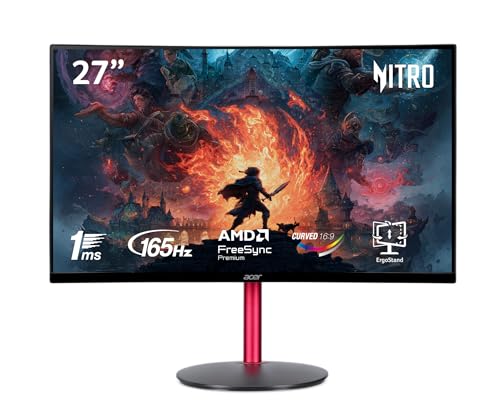
Acer Nitro 27-inch
Its slim 7.72 in depth keeps your desk tidy while delivering the performance you expect from a top‑rated monitor.

Sceptre 27-inch Curved Gaming Monitor
Ideal for budget‑conscious gamers who want solid performance, it costs just $2.98 more than the Acer Nitro, offering bright 280 cd/m² output and 99% sRGB coverage.

LG 32GS60QC Ultragear
The 32‑inch screen and 13 lb weight with stand give a more immersive, stable setup that the smaller 27‑inch rivals can’t match.
Also considered
Score Analysis
Key score advantages vs. runner-up (Sceptre 27-inch Curved)
Price Range
Acer Nitro 27-inch
$149.99
Sceptre 27-inch Curved Gaming Monitor
$119.97
LG 32GS60QC Ultragear
$199.99
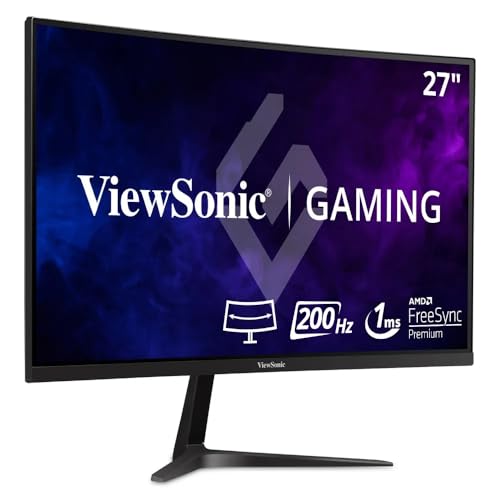
ViewSonic VX2718-PC-MHD
$159.99
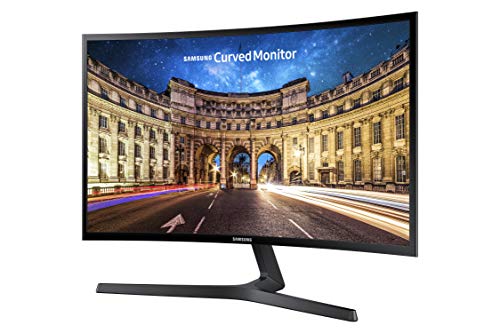
Samsung CF396
$116.99
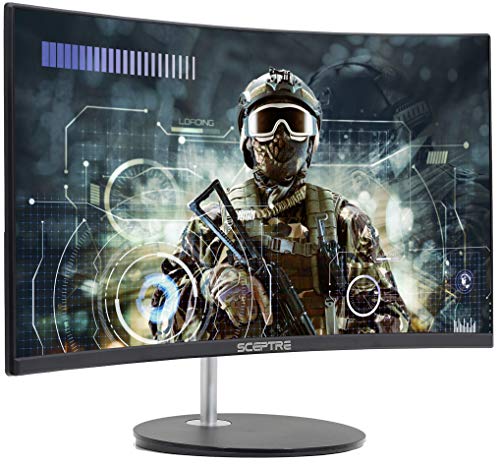
Sceptre 24-inch Curved Gaming Monitor
$89.97

Samsung Odyssey G55C
$259.99

Samsung Odyssey G9
$1,119.72

Asus TUF Gaming VG24VQER
$109.00
Spec Comparison
TL;DR: The Acer Nitro 27‑inch curved monitor packs a 165 Hz VA panel, 1 ms response and AMD FreeSync into a budget‑friendly package, though its Full HD resolution can look soft on a large screen.
What really stands out is the 165 Hz refresh rate paired with a 1 ms response time, delivering ultra‑smooth motion for fast‑paced titles. The 1500R curvature and anti‑glare coating help keep the image immersive while reducing reflections on a 27 in screen.
Compared with the other eight monitors, the Nitro is lighter than the 14.6‑lb Sceptre 27‑inch model but heavier than the 6.83‑lb Samsung CF396. Its 165 Hz panel sits between Sceptre’s 240 Hz and Samsung’s 60 Hz refresh rates, giving it a solid middle ground. The monitor also offers AMD FreeSync Premium, a feature not listed for every competitor.
Users consistently applaud the fluid gameplay and the affordable price, while many note that the 1920 × 1080 resolution on a 27‑in panel results in a lower pixel density that can appear less sharp than higher‑resolution rivals. Reviewers describe the 250‑nit (cd/m²) brightness as modest, and they call the built‑in 2 W speakers weak, which aligns with reviewer comments about limited audio power.
Additional technical perks include a zero‑frame design that minimizes bezel distraction, a swivel stand with up to 4.7 in of height adjustment, and Acer VisionCare features like blue‑light filtering. The monitor also supports VESA 75 × 75 mm mounting and draws up to 59 W.
Pros
Cons
Best for: Budget‑focused gamers who want a 27‑inch curved display with high refresh rates.
Avoid if: You need color‑critical accuracy, bright‑room visibility, or higher resolution than Full HD.
“upgraded from older 1080p 60 Hz feels transformative”
“Value for the price, curve immersion and smooth FreeSync”
TL;DR: The Sceptre 27‑inch Curved Gaming Monitor delivers a rapid 240 Hz refresh rate, 1 ms response time, and 99 % sRGB coverage for $137.97, making it a solid budget esports choice.
This monitor’s standout spec is its 240 Hz refresh rate paired with a 1 ms response time, which promises ultra‑smooth motion on a 27‑inch VA panel. The 1500R curvature and 99 % sRGB colour gamut aim to create an immersive, colour‑accurate experience, while the 280 cd/m² brightness and 0.2716 mm pixel pitch define its visual fidelity.
At 14.59901098964 pounds, it’s heavier than every other model in this nine‑item roundup, which range from about 6.8 to 13 pounds. Its 240 Hz refresh rate also outpaces the Acer Nitro’s 165 Hz, Samsung CF396’s 60 Hz, ViewSonic’s 180 Hz, and Asus TUF’s 180 Hz, giving it a clear edge for fast‑paced competitive titles.
Users praise the monitor’s buttery‑smooth gameplay and the convenience of built‑in speakers plus three HDMI ports. Professional reviewers note the strong price‑to‑performance ratio and the solid 99 % sRGB coverage. The most common complaints focus on the 1920 × 1080 resolution on a 27‑inch screen, which can look pixelated for productivity, and the modest 280 cd/m² brightness that may struggle in very bright rooms.
Additional technical highlights include AMD FreeSync Premium, edge‑lit LED backlighting, a matte screen surface, a 3.5 mm headphone jack, and a tilt range of –5° to +15°. The monitor supports VESA‑mount and ships with an external power adapter.
Pros
Cons
Best for: Budget‑conscious PC gamers focused on competitive esports titles such as Valorant, CS:GO, or RTS games.
Avoid if: You need 4K resolution for content creation or extensive ergonomic adjustments like height and swivel.
TL;DR: LG’s 31.5‑inch 1000R curved QHD monitor delivers 180 Hz refresh, 1 ms response and HDR10, offering immersive gaming at a solid price for serious players.
The standout feature is the 1000R curvature that wraps around a 31.5‑inch VA panel and pairs with a native 2560 × 1440 resolution. A 180 Hz refresh rate and 1 ms GtG response time give fluid motion, while HDR10 and a 300 cd/m² typical brightness keep colors vivid. With a contrast ratio of 3000:1 and sRGB 99% coverage, the screen balances deep blacks and accurate hues.
Compared with the eight rivals in this roundup, the LG’s 180 Hz sits above the Samsung Odyssey G55C’s 165 Hz and the Samsung CF396’s 60 Hz, yet it trails the Sceptre 27‑inch model’s 240 Hz. Its typical brightness of 300 cd/m² matches the Odyssey G55C and outshines the CF396’s 200 cd/m² minimum. At 13 lb with the stand, the monitor is heavier than the 11.5‑lb Odyssey G55C and most 24‑inch competitors, but far lighter than the massive Samsung Odyssey G9.
Professional reviewers note the “impeccable visuals, lightning‑quick speed, and optimized ergonomics,” and users praise the immersive curve and rapid refresh for fast‑paced titles. A recurring comment is that the VA panel can exhibit slower pixel response in dark scenes, leading to slight ghosting, and that HDR10 is basic without advanced metadata.
The unit consumes about 24 W during typical use and less than 0.3 W in sleep mode, keeping power draw modest. AMD FreeSync helps eliminate tearing, and the three‑side virtually borderless design reduces distractions. The stand offers tilt adjustment, though the monitor doesn’t provide height or swivel controls.
Pros
Cons
Best for: Buyers willing to invest in a proven, high‑quality option
Avoid if: You need advanced features or professional‑grade performance
TL;DR: The ViewSonic VX2718‑PC‑MHD offers a 27‑inch 1500R VA panel with a 180 Hz refresh rate, 1 ms MPRT, and FreeSync Premium at a $159.99 price point.
The standout spec is the 180 Hz refresh rate available through its DisplayPort connection, paired with a 1 ms motion‑picture response time (MPRT) that keeps fast‑action games looking fluid. Its 27‑inch VA panel delivers 102% sRGB coverage, HDR10 support, and a massive 80,000,000:1 dynamic contrast ratio, giving deep blacks and bright highlights on a 250 cd/m² screen.
Compared with the other eight monitors in this roundup, the VX2718‑PC‑MHD sits in the middle of the weight range at 8.6 pounds—lighter than the Sceptre 27‑inch (about 14.6 pounds) and the LG 32GS60QC (13 pounds), but a bit heavier than the Samsung CF396 (6.83 pounds) and the Sceptre 24‑inch (6.37 pounds). Its 180 Hz refresh rate matches the Asus TUF VG24VQER, LG 32GS60QC, Samsung Odyssey G55C, and Samsung Odyssey G9, while the Sceptre 27‑inch pushes a higher 240 Hz and the Samsung CF396 lags at 60 Hz. Brightness at 250 cd/m² lines up with the Acer Nitro’s 250‑unit rating, but falls short of the Sceptre 27‑inch’s 280 cd/m².
User reviews consistently highlight the monitor’s smooth gameplay and the usefulness of FreeSync Premium, noting that the 1 ms MPRT and 5 ms GtG response keep motion blur minimal. However, many reviewers point out that the Full HD 1920×1080 resolution on a 27‑inch screen feels soft compared with higher‑resolution panels. The built‑in 2 W speakers provide useful audio for casual play, and Eco Mode’s 15‑17 W power draw helps keep electricity costs low during marathon sessions.
Pros
Cons
Best for: Competitive gamers who need high refresh rates and low response times, especially AMD GPU owners who use FreeSync Premium.
Avoid if: You're shopping on a tight budget — it's priced at $159.99
TL;DR: The Samsung CF396 is a 23.5‑inch curved VA monitor with 3000:1 contrast, AMD FreeSync and eye‑comfort features, priced under $120 and earning a strong 4.6‑star rating.
The standout feature is its 1800R curvature paired with a VA panel that delivers a static contrast ratio of 3000:1, giving deep blacks and vivid colors on a 23.5‑inch screen. At just 6.83 lbs, it’s lighter than the Acer Nitro (8.6 lbs) and the Asus TUF (7.1 lbs) while only a touch heavier than the Sceptre 24‑inch (6.37 lbs). Its 60 Hz refresh rate is modest compared with the 180 Hz of the Asus or the 165 Hz of the Acer, and the typical brightness of 250 cd/m² matches the Asus and ViewSonic models.
Reviewers consistently praise the monitor’s deep blacks and the tear‑free experience provided by AMD FreeSync’s 48‑72 Hz range. Eye‑comfort technologies like Flicker‑Free and Eye Saver Mode highlight reduced fatigue during long gaming or work sessions. On the downside, users note the fixed 60 Hz panel limits high‑speed competitive play, and the stand only offers tilt adjustment (‑2° to +22°) with no height or swivel options.
Beyond the curve, the CF396 packs useful extras: a 4 ms response time, 16.7‑million‑color support, and MagicUpscale for sharper low‑resolution content. Connectivity includes HDMI, VGA and a headphone jack, and the 75 × 75 mm VESA mount adds flexibility for wall‑mount setups. Power draw stays modest at 25 W typical and ≤0.3 W standby, fitting well into a budget‑friendly desktop.
Pros
Cons
Best for: Budget-conscious buyers seeking a reliable entry-level option
Avoid if: You need advanced features or professional‑grade performance
TL;DR: The Sceptre 24‑inch Curved Gaming Monitor delivers a 23.6″ VA panel, 75 Hz refresh and 1500R curvature at a lightweight 6.37 lb price point, making it a solid entry‑level choice for casual gamers.
What really stands out is the 1500R curvature paired with a 0.27156 mm pixel pitch, giving the 23.6‑inch screen a noticeably immersive feel without the distortion some tighter curves introduce. The VA panel covers 98% of the sRGB gamut and has a dynamic contrast ratio of 1,000,000:1, so colors pop and blacks stay deep even in darker game scenes.
Compared with the eight other monitors in this roundup, the Sceptre is lighter than the Samsung CF396 (6.83 lb) and the Asus TUF Gaming VG24VQER (7.1 lb), yet its depth of 21.61 inches is considerably larger than the sub‑10‑inch depths of those same rivals. Its 75 Hz refresh rate sits between the 60 Hz of the Samsung model and the 180 Hz of the Asus, offering smoother motion than basic 60 Hz panels but not the ultra‑high rates found on the higher‑priced options. The dual HDMI ports and VGA input also give it broader compatibility than many peers that list fewer connectivity choices.
Professional reviewers praise the narrow bezels and sleek machine‑black finish, noting that the built‑in speakers are convenient for a quick setup but often sound modest, so many users add external audio. The stand provides a tilt range of –5° to +20° but lacks height or swivel adjustments, a point frequently mentioned in consumer feedback. The monitor’s 5 ms response time delivers acceptable gaming performance, though a few users report occasional ghosting during very fast action.
Pros
Cons
Best for: Budget‑conscious buyers seeking a reliable entry‑level option
Avoid if: You need advanced features or professional‑grade performance
TL;DR: The Samsung Odyssey G55C packs a 32‑inch 1000R curved VA panel, QHD resolution and a 165 Hz refresh rate into a $279.49 package, delivering immersive, fluid gaming with solid contrast but a modest stand and brightness.
Its 1000R curvature on a 32‑inch VA panel delivers a 2560 × 1440 resolution, 2500:1 static contrast and HDR10 support. Combined with a 165 Hz refresh rate and a 1 ms MPRT response time, the monitor promises ultra‑smooth motion and deep blacks for gaming sessions.
Compared with the other eight monitors in this roundup, the G55C sits in the middle of the weight range at 11.5 pounds, lighter than the LG 32GS60QC (13.0 pounds) and the Sceptre 27‑inch Curved (14.6 pounds) but heavier than the ViewSonic VX2718‑PC‑MHD (8.6 pounds) and the Acer Nitro 27‑inch (8.6 pounds). Its 165 Hz refresh rate matches the ViewSonic and Acer models, while the LG and Asus TUF units push slightly higher rates (180 Hz). It offers typical brightness of 300 cd/m², matching the LG’s output, beating the ViewSonic’s 250 cd/m² and the Asus TUF’s 250 cd/m², yet falling short of the Sceptre 27‑inch’s 280 cd/m². At 32 inches, its screen size tops the 31.5‑inch LG and all sub‑30‑inch competitors; only the massive Samsung Odyssey G9 exceeds it.
User sentiment highlights the immersive feel of the 1000R curve and the fluid gameplay from the high refresh rate and low input lag. Professional reviewers praise the deep blacks from the VA panel and the broad VRR support (AMD FreeSync and Nvidia G‑Sync compatible). Common complaints focus on the tilt‑only stand, which lacks height, swivel or pivot adjustments, and the external power brick that forces rear‑facing ports, making cable management a bit awkward. The modest 300 cd/m² typical brightness also limits HDR performance in well‑lit rooms.
Pros
Cons
Best for: Buyers willing to invest in a proven, high-quality option
Avoid if: You're on a tight budget or only need basic functionality
TL;DR: The Samsung Odyssey G9 packs a 49‑inch 1000R curved VA panel with 240 Hz refresh, 1 ms response and HDR1000, but its premium $1,124 price and hefty 34‑lb build make it a serious investment.
The standout feature of the Odyssey G9 is its massive 49‑inch 32:9 display that runs at a native 5120 × 1440 resolution. Samsung pairs the DQHD panel with a 240 Hz refresh rate, 1 ms response time, and HDR1000 support, while the 1000R curvature keeps the whole screen comfortably within your field of view. The panel delivers 450 cd/m² typical brightness and a dynamic contrast ratio of 1,000,000:1, offering vivid colors across the 92% DCI‑P3 gamut.
Compared to the other monitors, the G9 is considerably larger than the 32‑inch Samsung Odyssey G55C and the 31.5‑inch LG 32GS60QC, and it also outweighs the G55C’s roughly 11.5‑lb stand‑included mass. Its 240 Hz refresh outpaces the 165‑Hz G55C, the 180‑Hz LG model, and most other contenders, matching only the 240‑Hz Sceptre 27‑inch. Typical brightness of 450 cd/m² exceeds the 300 cd/m² of the G55C and the 250‑cd/m² range of many peers, though it draws 180 W of power—far above the 59‑W draw of the G55C and Acer Nitro.
Reviewers praise the ultra‑smooth motion from the high refresh rate and the crisp, low‑latency feel of the 1 ms response. Users also note the immersive experience created by the ultra‑wide aspect ratio and deep curve. However, the community points out that the $1,124 price tag places it well above the sub‑$300 price points of most other monitors in this list, and the 4.2‑star rating from 728 reviews sits lower than many competitors.
Pros
Cons
Best for: Those prioritizing quality and willing to pay for premium performance
Avoid if: Reliability and user satisfaction are your top concerns
TL;DR: The ASUS TUF Gaming VG24VQER delivers a 180 Hz refresh rate and 1 ms motion‑blur reduction on a 23.6‑inch curved VA panel, making fast‑paced gaming smooth and immersive at a budget‑friendly price.
This monitor’s standout spec is its 180 Hz refresh rate combined with a 1 ms MPRT response time, which ASUS markets as ELMB Sync for ultra‑smooth motion. The 23.6‑inch 1500R curvature and VA panel give a 3000:1 contrast ratio and 90% DCI‑P3 color coverage, so dark scenes stay deep while colors stay vibrant.
Compared with the other eight monitors in the roundup, it's a bit heavier than the Samsung CF396’s 6.83 lb but far lighter than the Sceptre 27‑inch model that tips over 14 lb. Its 180 Hz panel outpaces the 60 Hz of the Samsung CF396 and the 75 Hz of the Sceptre 24‑inch, and it matches the ViewSonic and LG 180 Hz offerings while sitting below the Sceptre 27‑inch’s 240 Hz. Brightness sits at 250 cd/m², which is higher than the Samsung CF396’s 200 cd/m² minimum and on par with ViewSonic and LG, though the Sceptre 27‑inch pushes 280 cd/m².
Reviewers consistently praise the ultra‑fast refresh and the vivid visuals the VA panel delivers, especially for FPS and racing titles. However, many note the low pixel density of a Full HD (1920 × 1080) image on a 23.6‑inch screen, and they describe the tilt‑only stand as less sturdy than those on premium rivals. Professional editors also point out the eye‑care suite—Flicker‑Free, Low Blue Light with four filter levels, and FreeSync Premium—as useful for long gaming sessions.
Pros
Cons
Best for: Budget‑conscious gamers who want high refresh rates and low motion blur without breaking the bank.
Avoid if: You need a higher‑resolution display, extensive ergonomic adjustments, or professional‑grade color accuracy.
Breakdown
Acer Nitro 27-inch
Pros
Sceptre 27-inch Curved Gaming Monitor
Pros
LG 32GS60QC Ultragear
Pros
ViewSonic VX2718-PC-MHD
Pros
Cons
Based on scoring data and product specs
Personalized picks
Best Overall Pick
Acer Nitro 27-inch
Best OverallBest for: Home and office users seeking a balance of features and value
Sceptre 27-inch Curved Gaming Monitor
Best for: Most users looking for a well-reviewed, reliable mainstream option
$119.97-$30.02 vs winner
Skip Asus TUF Gaming VG24VQER if…
You need advanced features or professional-grade performance
The Acer Nitro 27‑inch takes the top spot thanks to its solid 4.6/5 rating from 2,630 reviewers, a rapid 165 Hz refresh rate and a 1 ms response time that keep motion smooth and input lag low. Its VA panel delivers HDR‑Ready (HDR10) visuals and AMD FreeSync Premium to reduce tearing, all while staying under the $135 price point.
The Sceptre 27‑inch Curved Gaming Monitor lands as the runner‑up, especially if you crave the fastest possible frame pacing for competitive shooters. It pushes a 240 Hz refresh rate and 1 ms response time, paired with AMD FreeSync Premium, giving you an edge in fast‑paced titles, and it costs $137.97.
For tighter budgets, the Sceptre 24‑inch Curved Gaming Monitor shines at $89.97, offering a compact curved experience without breaking the bank. If you’re ready to splurge for an immersive flagship, the Samsung Odyssey G9 stands out at $1,124.75, delivering its massive screen and premium features for a truly cinematic setup.
Pick the Acer Nitro 27‑inch now and enjoy a balanced, high‑performance monitor that fits most gaming rigs.
The Samsung CF396 is the smallest at 23.5 inches with a thin‑profile design (depth 8.61 in, thickness <0.5 in) and a modest 6.83 lb weight, making it easy to fit on tight workspaces.
No reviews yet — be the first to share your experience.
Please sign in to leave a review



