Surprisingly, the Dell OptiPlex 7450, priced at $760.87, earned the highest user rating in the set – a solid 4.7 / 5 from three reviewers – even though it sits in the mid‑range tier rather than the premium flagship. The top‑priced Inspiron 7730 AIO at $1268.57 still impresses with a 27‑inch Full HD touchscreen, 32 GB of RAM and a 99% sRGB color gamut, but its 4.5 / 5 rating shows that higher price doesn’t always translate to higher praise.
The review compared eight Dell all‑in‑one models across three price tiers. The budget corner includes the OptiPlex 3280 AIO ($429.99), the OptiPlex 7450 i7 ($477.99) and the 24‑inch Core i3 AIO ($599.99). Mid‑range options are the OptiPlex 7450 ($760.87) and the 24‑inch Touch AIO ($854.88). Premium picks round out the list: the Inspiron 7730 AIO ($1268.57), the Inspiron 5430 ($859.99) and the Inspiron 24‑inch ($875.99), each offering larger screens, stronger processors and more memory.
Below you’ll find a closer look at each model’s strengths, so you can match the right Dell all‑in‑one to your workspace and budget.

Dell Inspiron 7730 AIO
Its pop‑up 5 MP (2592 × 1944) webcam delivers crisp video, a standout feature for a premium all‑in‑one.

Dell OptiPlex 7450
Ideal for office workers who need a reliable workstation; it costs about $508 less than the Inspiron 7730, making it a balanced, mainstream choice.

Dell 24-inch Touch AIO
Stands out with Bluetooth 5.3 and 1 Gbps Ethernet, catering to users who need fast wireless connectivity and wired networking without the higher price of the Inspiron 7730.
Also considered
Score Analysis
Key score advantages vs. runner-up (Dell OptiPlex 7450)
Price Range
Dell Inspiron 7730 AIO
$1,237.58
Dell OptiPlex 7450
$760.87
Dell 24-inch Touch AIO
$809.00

Dell OptiPlex 3280 AIO
$459.00
Dell Inspiron 24-inch
$935.00

Dell Inspiron 5430
$859.99

Dell 24-inch Core i3 AIO
$769.99

Dell OptiPlex 7450 i7
$476.99
Spec Comparison
TL;DR: The Dell Inspiron 7730 AIO blends a 27‑inch 99% sRGB touchscreen, 32 GB RAM and a pop‑up 5 MP webcam into a premium‑priced all‑in‑one that excels for productivity and light creative work.
The standout feature is its 27 in Full HD touchscreen with 99% sRGB coverage, ComfortView Plus and Dolby Vision, paired with a pop‑up 5 MP (2592 × 1944) webcam that adds privacy and high‑resolution video. Under the hood sits a 10‑core Intel Core 7‑150U (1.8 GHz base, 5.4 GHz turbo) and a dedicated NVIDIA GeForce MX570A with 2 GB GDDR6 VRAM, while 32 GB of DDR4 memory runs at 3200 MT/s for smooth multitasking.
Compared with the other Dell all‑in‑ones in this roundup, the 7730 carries the largest screen, a higher‑tier Core 7 CPU and the most upgradeable memory capacity, which also places it at the top of the price tier. It offers more ports—including HDMI‑in, USB‑C 10 Gbps and a full‑size SD reader—than many of its peers, though it's heavier at 15.4 pounds.
Everyday users highlight the bright, responsive touchscreen and the convenience of the pop‑up camera, noting that upgrading RAM or adding a secondary M.2 SSD is straightforward. Professional reviewers point out the accurate colors and the Dolby Atmos‑enabled dual 5 W speakers as strong media‑consumption features, while also noting the lack of a 4K panel as a missed opportunity.
Pros
Cons
Best for: Professionals, home‑office users and creative hobbyists who want a large, touch‑enabled display and are willing to invest in premium performance.
Avoid if: You need high‑end gaming graphics, a 4K screen, or a lower‑cost all‑in‑one solution.
“Love the touchscreen and how bright the display is.”
“The pop-up camera gives me peace of mind—no more tape over the lens.”
TL;DR: At $760.87, the Dell OptiPlex 7450 offers a 604.5 mm 4K IPS display, i5‑7500 CPU, and enterprise‑grade features, but its 31.75‑lb chassis makes it one of the heavier all‑in‑ones.
The standout feature is the 604.5 mm 4K IPS panel that delivers Ultra HD (3840 × 2160) clarity and optional 10‑point capacitive touch, paired with a 2 MP HD webcam that includes a privacy shutter and dual digital‑array microphones. Dual 4 W stereo speakers powered by Waves MaxxVoice Pro round out the media experience.
At 31.75 lb, this model is considerably heavier than the Dell 24‑inch Touch AIO (11.39 lb) and the Dell 24‑inch Core i3 AIO (10.91 lb). Its 63.5 mm depth also exceeds the 40.2 mm depth of those same competitors, so it's bulkier on a desk. Memory-wise, it ships with 8 GB DDR4 at 2400 MHz, whereas the Dell 24‑inch Touch AIO provides 16 GB at 5200 MHz and the Dell 24‑inch Core i3 AIO lists a 5200 MHz speed, indicating a higher‑performance memory configuration in those alternatives.
Users consistently praise the crystal‑clear 4K screen and the convenience of the built‑in webcam and microphones for video calls. Professional reviewers highlight the rich connectivity suite—including HDMI‑in, USB‑C PowerShare, and support for up to three displays—as a strong point for multitasking environments. Common complaints focus on the rear ports being vertically oriented and hard to reach, the optical drive being limited to DVD‑plus‑RW, and the entry‑level 8 GB RAM feeling modest for power users.
Under the hood sits a 7th‑Gen Intel Core i5‑7500 (3.4 GHz base, 3.8 GHz turbo, 4 cores, 4 threads, 6 MB cache, 65 W TDP) paired with Intel HD Graphics 630. Storage combines a 500 GB 7200 RPM HDD with a 256 GB PCIe M.2 NVMe SSD, and the system supports up to 32 GB of DDR4 RAM across two slots. Connectivity includes Wi‑Fi 802.11ac, Bluetooth 4.2, dual HDMI, DisplayPort, multiple USB‑A and USB‑C ports, and an SD card reader, while security features such as vPro, Intel Identity Protection, and BitLocker support cater to business environments.
Pros
Cons
Best for: Most users seeking a balanced, mainstream option
Avoid if: You want the best value‑per‑dollar in its price range
“Crystal-clear 4K display”
“Easy to upgrade”
TL;DR: The Dell 24‑inch Touch AIO packs a 23.8‑inch FHD IPS touchscreen, 16 GB DDR5 RAM and a 512 GB SSD for $854.88, delivering a crisp, color‑accurate display in a slim, space‑saving chassis.
This model’s standout feature is its 23.8‑inch Full HD IPS panel that covers 99% of the sRGB gamut and adds HDR support, all behind an anti‑reflective coating. Paired with 16 GB of DDR5 memory running at 5200 MHz and a 512 GB NVMe SSD, it offers fast responsiveness for everyday tasks. The pop‑up 5 MP IR camera with Windows Hello, dual Bluetooth speakers with Dolby Atmos, and built‑in 5.3 Bluetooth plus Wi‑Fi 6E round out a well‑equipped all‑in‑one.
At 11.39 pounds, the unit is lighter than the Dell Inspiron 5430 (12.03 pounds) and considerably lighter than the Dell OptiPlex 7450 (31.75 pounds). Its 40.2 mm depth makes it far slimmer than the Inspiron 5430’s 200.7 mm depth, yet it shares the same 40.2 mm depth as the Dell Inspiron 24‑inch. Compared with the Dell 24‑inch Core i3 AIO, it is a touch‑enabled step up in RAM and storage while being only slightly heavier (10.91 pounds for the Core i3). It also undercuts the weight of the larger Inspiron 7730 AIO (15.4 pounds) and the OptiPlex 3280 AIO (18.0 pounds), keeping the footprint tight for small workspaces.
Reviewers consistently praise the vivid screen and the straightforward Windows 11 Home setup, noting the narrow bezels and Y‑stand as attractive design touches. Professional reviewers highlight the extensive connectivity—Wi‑Fi 6E, 1 Gbps Ethernet, multiple USB‑C and USB‑A ports—and the accurate color coverage. The same sources flag the low‑power Intel Core 5 120U processor as a bottleneck for demanding workloads, and users mention that the Dolby Atmos speakers lack bass depth. Upgrading RAM or adding storage also proves difficult, and the lack of a VESA mount limits mounting options.
Beyond the display, the machine offers a pop‑up spring‑loaded camera with IR for facial recognition, dual Bluetooth speakers, and an SD card reader. Power comes from a 90 W supply, and the unit meets 80PLUS Bronze or Platinum efficiency standards depending on configuration. The chassis uses ≥20% post‑consumer recycled plastics and 15% recycled steel, adding an eco‑friendly angle to its sleek white finish.
Pros
Cons
Best for: Value‑conscious buyers seeking quality at $854.88
Avoid if: You need advanced features or professional‑grade performance
TL;DR: The Dell OptiPlex 3280 AIO packs a 21.5‑inch Full HD IPS display, 16 GB DDR4 RAM, and a 512 GB NVMe SSD into a compact, $429.99 all‑in‑one that’s built for office work and remote learning.
The standout feature is its 21.5‑inch IPS LCD with anti‑glare coating and a native 1920 × 1080 resolution, delivering clear visuals at a 60 Hz refresh rate. Under the hood, an Intel Core i3‑10105T runs at 3.0 GHz base and 3.9 GHz turbo, paired with 16 GB DDR4 memory that can reach up to 3200 MHz, and a fast 512 GB NVMe SSD for quick file access.
In size, the unit measures 2.14 in deep, 12.96 in tall and 19.6 in wide, making its footprint slimmer than the Dell OptiPlex 7450 i7’s 2.5 in depth, 15.47 in height and 22.65 in width. At 9.57–10.31 lb it’s also lighter than the Dell 24‑inch Core i3 AIO’s 10.91 lb and dramatically lighter than the OptiPlex 7450’s 31.75 pounds, which helps keep desks uncluttered.
Users appreciate the clean, space‑saving design and the privacy‑focused pop‑up IR webcam with Windows Hello, noting the fast NVMe storage and smooth multitasking. Common complaints include fan noise under load, modest 2 × 2 W speakers, and the lack of a height‑adjustable stand, which can affect long‑term ergonomics.
From a technical standpoint, the system uses Intel UHD Graphics 630, so it isn’t suited for gaming or heavy graphics work. Security features such as TPM 2.0, BIOS password protection, and a Kensington lock slot add enterprise‑grade protection, while the 130 W AC adapter supplies ample power for the components.
Pros
Cons
Best for: Entry-level buyers or those on a tight budget
Avoid if: Reliability and user satisfaction are your top concerns
“Crystal-clear 4K display”
“Easy to upgrade”
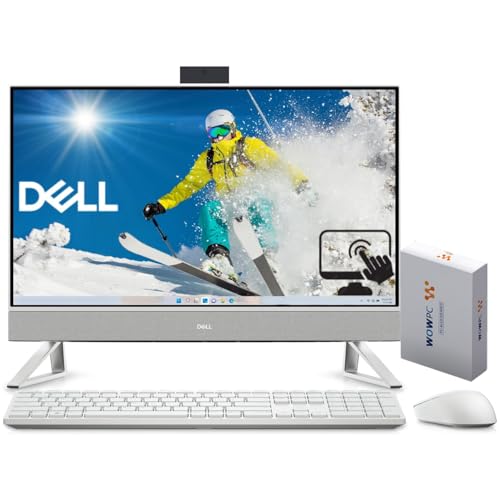
TL;DR: The Dell Inspiron 24‑inch All‑In‑One packs a 10‑core 14th‑gen i7, 16 GB DDR4, and a 23.8″ touchscreen for $875.99, delivering solid multitasking in a compact chassis.
This model’s standout is the Intel Core i7‑150U processor with 10 cores, 12 threads, and a turbo boost up to 5.5 GHz, paired with 16 GB DDR4‑3200 MT/s memory and a 512 GB PCIe NVMe SSD. The 23.8‑inch IPS touchscreen offers 99 % sRGB coverage, an anti‑glare coating and 250 nits brightness, while the integrated 2560 × 1440 IR webcam supports Windows Hello.
Dimensionally it mirrors the Dell Inspiron 5430: both share a depth of 200.7 mm, height of 414.3 mm and width of 531.5 mm. At 5.64 kg it's comparable in heft to the Inspiron 5430’s listed 12.03 pounds. Its 40.2 mm depth without the stand matches the Dell 24‑inch Touch AIO and the Dell 24‑inch Core i3 AIO, though its 3200 MT/s memory speed is lower than the 5200 MHz reported for those rivals.
Reviewers consistently praise the crisp 1440p webcam and the generous port selection—three USB‑A 3.2 Gen 1, one USB‑A 3.2 Gen 2, a USB‑C PowerShare, HDMI‑in/out, an Ethernet gigabit port and an SD card reader. However, users note the Full HD (1920 × 1080) panel feels modest on a 23.8″ screen, and a few have reported the bundled wireless mouse as unresponsive. Professional reviewers highlight the webcam and connectivity as strong points, while calling the display resolution a drawback for visual‑intensive tasks.
Connectivity includes Wi‑Fi 6E at 2400 Mbps and Bluetooth 5.3, and the chassis incorporates 35 % post‑consumer recycled plastic. Dell backs the machine with a 1‑year warranty, and the package arrives with a white wireless full‑size keyboard and ambidextrous mouse.
Pros
Cons
Best for: Those who want a sleek all‑in‑one with strong multitasking performance, a high‑quality webcam, and plenty of ports.
Avoid if: You need a high‑resolution display, top‑tier graphics, or are on a tight budget.
“Love the touchscreen and how bright the display is.”
“The pop-up camera gives me peace of mind—no more tape over the lens.”
TL;DR: The Dell Inspiron 5430 packs a 23.8‑inch anti‑glare screen, 5 MP pop‑up webcam and Dolby Atmos speakers into a 12.03‑pound all‑in‑one for $859.99, delivering solid everyday performance.
The standout feature is the 23.8‑inch WVA IPS‑level display with 250 nits brightness and an anti‑glare surface, paired with a pop‑up 5 MP webcam that includes a privacy shutter. Dual 5 W speakers boost audio with Dolby Atmos, making video calls and media playback sound richer than many integrated laptop speakers.
At 12.03 pounds, the 5430 weighs more than the Dell 24‑inch Touch AIO and the Dell 24‑inch Core i3 AIO, but it’s considerably lighter than the Dell OptiPlex 7450 and the Dell Inspiron 7730 AIO. Its 23.8‑inch screen matches the size of those two Dell 24‑inch models, and its 250‑nit brightness also lines up with the Dell Inspiron 24‑inch. Memory runs at 3200 MHz, which is slower than the 5200 MHz found in the Touch AIO, yet still adequate for typical office tasks.
Reviewers consistently praise the compact footprint, the clear pop‑up webcam and the immersive Dolby Atmos sound. However, many note that the entry‑level configuration ships with a low‑power Core i3 CPU and only 8 GB of RAM, which can feel limiting under heavier multitasking. Users also report fan noise under load and a plastic chassis that feels less premium. Professional reviewers highlight the high‑quality screen and audio as strong points for remote work.
Under the hood, the 5430 offers an Intel Core i5‑120U processor (1.4 GHz base, 5.0 GHz turbo) with 10 cores and 12 MB cache, 8 GB DDR4 3200 MHz RAM (expandable to 32 GB), and a 512 GB PCIe NVMe SSD that can be upgraded to 1 TB. Connectivity includes Wi‑Fi 6E, Bluetooth 5.3, gigabit Ethernet, three USB 3.2 Gen 1 ports, one USB 3.2 Gen 2 port, a side‑mounted USB 3.2 Type‑C Gen 2, HDMI input and output, and a 5‑in‑1 SD card reader.
Pros
Cons
Best for: Home offices, remote workers, students and families who want a tidy desktop with strong video‑call capabilities and good audio.
Avoid if: You need advanced features or professional‑grade performance such as a high‑end CPU, dedicated graphics, or extensive multitasking power.
“Love the touchscreen and how bright the display is.”
“The pop-up camera gives me peace of mind—no more tape over the lens.”
TL;DR: The Dell 24‑inch Core i3 All‑in‑One retails for $599.99, packs a 23.8‑in FHD IPS screen, 512 GB SSD and 5200 MHz DDR5 memory into a 1.58‑in‑deep, 10.91‑lb chassis.
This model’s most eye‑catching spec is the 23.8‑inch IPS display that covers 99% of the sRGB gamut, adds an anti‑reflective coating and HDR support, all while sitting behind a slim 1.58‑in (40.2 mm) depth frame. Under the hood you’ll find a 512 GB NVMe SSD and DDR5 memory that runs at 5200 MHz, giving the system quick boot‑up and snappy everyday tasks.
Compared with the other seven Dell AIOs in the roundup, the Core i3 AIO is among the lightest at 10.91 lb, noticeably lighter than the OptiPlex 7450 (31.75 lb), OptiPlex 3280 (18 lb) and Inspiron 7730 (15.4 lb). Its 1.58‑in depth matches the 24‑inch Touch AIO and the non‑touch Inspiron 24‑inch, making it thinner than the OptiPlex 7450 i7 (2.5 in) and OptiPlex 3280 (2.14 in). The Bluetooth 5.3 and 1 Gbps Ethernet match the connectivity of the higher‑priced Touch AIO, while its screen size equals the OptiPlex 7450 i7 and exceeds the 21.5‑in OptiPlex 3280. Price‑wise it sits above the budget‑oriented OptiPlex 3280 but below the premium Touch AIO and Inspiron 24‑inch models.
Everyday users appreciate the crisp, vibrant panel and the straightforward Windows 11 out‑of‑the‑box setup. Reviewers note the built‑in dual‑array microphones and 5 MP IR pop‑up webcam make video calls clear, and the dual Bluetooth speakers with Dolby Atmos add a pleasant audio backdrop for casual media. The trade‑offs show up in the limited upgrade path – RAM and storage aren’t user‑replaceable – and the speakers lack bass depth, which can be a drawback for music lovers. Professional reviewers also point out that the Core i3 processor can feel under‑powered when juggling many demanding apps.
Pros
Cons
Best for: Entry-level buyers or those on a tight budget
Avoid if: You want the best value‑per‑dollar in its price range
TL;DR: The Dell OptiPlex 7450 i7 packs a 23.8‑inch Full‑HD IPS screen, 16 GB DDR4 RAM and a 512 GB NVMe SSD for $477.99, offering solid office performance in a compact all‑in‑one chassis.
This model’s standout is its 23.8‑inch IPS display with 1920 × 1080 resolution, 250 cd/m² brightness and pivot support, driven by a 7th‑gen Intel Core i7‑7700 that runs from 3.6 GHz up to 4.2 GHz. Memory comes as 16 GB DDR4 at 2400 MHz, and storage is a fast 512 GB PCIe NVMe M.2 SSD. The chassis measures 2.5 in depth, 15.47 in height and 22.65 in width, weighing 15.64 lbs.
Compared with the other seven AIOs in this roundup, the OptiPlex 7450 i7 is lighter than the Dell OptiPlex 3280 AIO (18.0 lb) and the Dell OptiPlex 7450 non‑i7 model (31.75 lb), but heavier than the Dell 24‑inch Core i3 AIO (10.91 lb) and the Dell 24‑inch Touch AIO (11.39 lb). Its depth of 2.5 in is deeper than the 2.14 in depth of the OptiPlex 3280 AIO and the 1.58 in depth of the Core i3 AIO, while its width of 22.65 in is wider than the 19.6 in width of the OptiPlex 3280 AIO and the 21.86 in width of the Core i3 AIO. Port‑wise it outpaces many peers, offering a USB‑C data port, HDMI in and out, a DisplayPort, four USB 3.1 Gen 1 ports and two USB 2.0 ports.
Everyday users appreciate the reliable performance, tidy appearance and the ease of upgrading the tool‑less interior. Professional reviewers highlight the bright, pivoting screen and the abundance of ports as strong points for office and light‑creative work. The most common complaints focus on the rear‑only port placement, the lack of a touchscreen despite marketing images, and the DVD‑only optical drive. As a refurbished unit, it ships with a 90‑day warranty, which some buyers find shorter than expected.
Technical details round out the package: integrated Intel HD Graphics 630 (with an optional AMD Radeon R7 M465X), Wi‑Fi up to 867 Mbps, Bluetooth 4.2 and a gigabit Ethernet port. A 90 W external adapter supplies power, and the system includes a dual‑array microphone, stereo front‑facing speakers and a 2 MP webcam with a privacy shutter.
Pros
Cons
Best for: Entry-level buyers or those on a tight budget
Avoid if: You need advanced features or professional‑grade performance
“Crystal-clear 4K display”
“Easy to upgrade”
Breakdown
Dell Inspiron 7730 AIO
Pros
Cons
Dell OptiPlex 7450
Pros
Cons
Dell 24-inch Touch AIO
Pros
Dell OptiPlex 3280 AIO
Cons
Based on scoring data and product specs
Personalized picks
Best Overall Pick
Dell Inspiron 7730 AIO
Best ValueBest for: Those prioritizing quality and willing to pay for premium performance
Dell OptiPlex 7450
Best for: Most users seeking a balanced, mainstream option
$760.87-$476.71 vs winner
Skip Dell OptiPlex 7450 i7 if…
You need advanced features or professional-grade performance
The Dell Inspiron 7730 AIO earns the top spot with a 27‑inch 1920 × 1080 pixel InfinityEdge display that supports Dolby Vision HDR and 10‑point multi‑touch. It packs 32 GB of DDR4 RAM, a fast 1 TB M.2 PCIe NVMe SSD, and a dedicated NVIDIA GeForce MX570A GPU with 2 GB GDDR6 memory, giving it the most horsepower in the group. Its 4.5‑star rating from 276 reviews and a list price of $1268.57 round out a compelling value proposition.
The Dell OptiPlex 7450 comes in second, perfect for a small‑office or home‑office environment where reliability and connectivity matter most. It offers a 7th‑gen Intel Core i5‑7500 processor, 8 GB DDR4 RAM, and optional AMD Radeon R7 M465X graphics, while supporting up to three displays. A three‑year warranty, a solid 500 GB 7200 RPM HDD paired with a 256 GB PCIe NVMe SSD, and a price of $760.87 make it a practical, business‑focused runner‑up.
Choose the Inspiron 7730 AIO if you’re after the most capable all‑in‑one for home or creative work.
The Inspiron 7730 costs about $1,269 versus $761 for the OptiPlex 7450, so it’s roughly $500 more expensive. It justifies the premium with a larger 27‑inch touch display, a dedicated NVIDIA GeForce MX570 GPU, 32 GB of RAM and Dolby Vision HDR, while the OptiPlex 7450 offers a smaller 24‑inch screen, integrated graphics and 8 GB of RAM. If you need top‑tier performance and premium media features, the higher price makes sense; otherwise the OptiPlex 7450 provides solid value.
Please sign in to leave a review
No reviews yet. Be the first to review!
