⚡ Quick Answer
HDR‑enabled desktop displays are finally hitting a sweet spot between vivid color, strong contrast and reasonable pricing. In this roundup we compared eight monitors that all support HDR10 or higher, spanning ultra‑wide gaming panels to compact 27‑inch workstations. Prices range from a budget‑friendly $104 for the LG 27U411A‑B up to $1,049 for the premium Asus PA32QCV Thunderbolt, while user ratings sit between 3.4 and 4.5 stars.
If you’re chasing buttery‑smooth competitive play, the premium tier offers the Alienware AW3425DW at $749.99 with a 240 Hz refresh rate and a lightning‑fast 0.03 ms response time, plus a 4.4‑star rating from 200 reviewers. For a solid productivity boost without breaking the bank, the mid‑range Samsung ViewFinity S50GC delivers a 34‑inch VA panel at $299.99 and a respectable 4.4‑star rating from 892 users. Creators on a tighter budget can look at the Xiaomi G27i‑US, a 27‑inch IPS model that earned a 4.5‑star rating from 248 reviewers and offers 165 Hz refresh for just $149.99.
The next section breaks down each tier, explores the strengths of each model, and helps you decide which HDR display aligns with your needs.

Alienware AW3425DW
Its 805.43 mm depth provides a spacious stand footprint, supporting the premium HDR10 experience that drives its strong value rating.

Samsung ViewFinity S50GC
Ideal for mainstream HDR gamers, it's $299.99—about $450 less than the Alienware—delivering solid performance without breaking the bank.

LG 27U411A-B
At $104, this entry-level panel offers a compact 221 mm depth, making it a space‑saving choice for tight desks where the pricier models feel oversized.
Also considered
Score Analysis
Key score advantages vs. runner-up (Samsung ViewFinity S50GC)
Price Range
Alienware AW3425DW
$729.99
Samsung ViewFinity S50GC
$289.99
LG 27U411A-B
$104.00

Xiaomi G27i-US 27-inch
$149.99

Asus PA27JCV USB-C
$788.02

LG 32UR550K-B
$294.99

LG 34U530A
$229.99
Asus PA32QCV Thunderbolt
$1,289.99
Spec Comparison
TL;DR: The Alienware AW3425DW delivers a 34.2‑inch curved QD‑OLED display with 240 Hz refresh, 0.03 ms response, and 1000 cd/m² HDR peak, but its weight and lack of speakers may limit some setups.
At the heart of the AW3425DW is a 34.2‑inch QD‑OLED Gen 2 panel that offers a 1,500,000:1 contrast ratio, 99.3% DCI‑P3 coverage and a peak HDR brightness of 1000 cd/m². Combined with a variable refresh range up to 240 Hz and an ultra‑fast 0.03 ms response time, the monitor targets the most demanding competitive gaming sessions.
Weighing in at 20.04 lb, the Alienware sits heavier than the Samsung ViewFinity S50GC (10.8 lb) and the Xiaomi G27i‑US (7.94 lb), yet it’s only a shade lighter than the Asus PA32QCV (20.5 lb). Its 240 Hz top refresh dwarfs the 60 Hz of the Asus PA27JCV and the 100 Hz of the Samsung S50GC, while its typical brightness of 250 cd/m² matches the LG 32UR550K‑B but falls short of the LG 34U530A’s 400 cd/m². The 34‑inch ultrawide format also out‑sizes most peers, offering a broader field of view for immersive play.
Reviewers consistently praise the monitor’s near‑infinite contrast and color accuracy, noting the self‑emissive OLED panel eliminates the need for local dimming. Professionals highlight the 0.03 ms response and 240 Hz refresh as top‑tier gaming features, while users point out the absence of built‑in speakers and the class F energy rating as downsides. The anti‑reflection coating and full‑range adaptive sync (FreeSync Premium Pro and G‑SYNC compatible) add extra comfort during long sessions.
Pros
Cons
Best for: Competitive PC gamers and esports enthusiasts who need ultra‑fast 240 Hz refresh, 0.03 ms response, and high‑contrast OLED visuals.
Avoid if: You need built‑in audio, prioritize low power draw, or require a lightweight monitor for limited desk space.
TL;DR: The Samsung ViewFinity S50GC delivers a 34‑inch flat VA panel with 3000:1 contrast, 100 Hz refresh and HDR10 at a modest $299.99, making it a solid mid‑range ultrawide for productivity and casual gaming.
The standout spec is the 34‑inch 21:9 VA screen that packs a 3000:1 static contrast ratio and a 100 Hz refresh rate, while maintaining a 5 ms response time. At 10.8 pounds (4899 g) it’s considerably lighter than the LG 32UR550K‑B’s 15.4 pounds and the LG 34U530A’s 19.4 pounds, which helps keep a desk setup agile.
Compared with its peers, the S50GC offers a higher refresh rate than the LG 32UR550K‑B’s 60 Hz and matches the 100 Hz of the LG 34U530A, yet it provides a larger 34‑inch workspace than the LG 32UR550K‑B’s 31.5‑inch panel. It falls short on built‑in audio, as the LG 32UR550K‑B includes Waves MaxxAudio speakers while the S50GC only has a 3.5 mm headphone jack. Connectivity is modest with one DisplayPort 1.2 and two HDMI 2.0 inputs, lacking a USB hub that some competitors list.
Reviewers note the deep blacks from the 3000:1 contrast and the crisp 109.68 PPI pixel density, which makes text and UI elements feel sharp without scaling artifacts. Users appreciate the immersive 21:9 real‑estate for multitasking and the fluid FreeSync range (48‑100 Hz) that keeps gaming smooth. However, the HDR10 implementation is basic—no local dimming and a peak brightness of 300 cd/m²—so HDR impact is modest. The tilt‑only stand limits ergonomic tweaks, and the absence of speakers means you’ll need external audio for media consumption.
Pros
Cons
Best for: Most users looking for a well‑reviewed, reliable mainstream option
Avoid if: You need advanced features or professional‑grade performance
TL;DR: The LG 27U411A-B offers a 27‑inch IPS panel with HDR10, 120 Hz refresh and 99% sRGB coverage at a budget‑friendly $104, but its Full HD resolution and modest ergonomics may limit detail‑heavy work.
It stands out with a 120 Hz refresh rate combined with a 5 ms response time on a 27‑inch Full HD IPS screen. With a brightness of 250 cd/m² (typical) and a contrast ratio of 3000:1, the monitor also supports HDR10 and delivers 99% sRGB color gamut, which is useful for color‑critical tasks.
The LG 27U411A‑B weighs more than the Xiaomi G27i‑US (7.94 lb vs 9.3 lb) but less than the LG 34U530A (19.4 lb) and all the larger‑screen models. Its 120 Hz panel outpaces the Samsung ViewFinity S50GC (100 Hz) and the LG 32UR550K‑B (60 Hz), yet it falls short of the Xiaomi’s 165 Hz. Brightness matches the Xiaomi’s 250 nits but sits below the Samsung’s 300 cd/m² and the LG 34U530A’s 320 cd/m² minimum.
Reviewers consistently praise the accurate 99% sRGB coverage and the smooth motion from the high refresh rate, noting that the ultra‑slim bezel and floating stand keep the desk tidy. However, users also point out that the 1920 × 1080 resolution on a 27‑inch panel results in a pixel density of only 81 ppi, which can look less sharp for detailed design work. The stand provides only tilt adjustment (‑5° to 20°), so those who need height, swivel, or pivot find it limiting.
Beyond the core specs, the monitor includes Adaptive Sync, Black Stabilizer, Dynamic Action Sync, and a 1 ms Motion Blur Reduction mode, which aim to reduce blur in fast‑moving scenes. Eye‑comfort features such as Flicker Safe and Reader Mode help reduce strain during long sessions.
Pros
Cons
Best for: Entry‑level buyers or those on a tight budget
Avoid if: You need ultra‑high resolution (QHD or 4K) for detailed design work, those who need extensive ergonomic adjustments
TL;DR: The Xiaomi G27i‑US delivers a blistering 165 Hz refresh and 1 ms response on a 27‑inch IPS panel with HDR10, all for under $150, making it a solid budget gaming monitor.
What really stands out is the 165 Hz refresh rate paired with a 1 ms GTG response time, which the specs say keeps motion blur to a minimum. The panel also supports HDR10 with a peak brightness of 400 nits, while its standard brightness is 250 nits. Color coverage is strong at 95% DCI‑P3 and 99% sRGB, and the Fast IPS LCD offers 178° viewing angles.
Compared with the other seven monitors in this roundup, the G27i is noticeably lighter at about 7.94 lb, whereas the LG 27U411A‑B tips the scales at 9.3 lb and the others range from roughly 10.8 lb to over 20 lb. Its depth of 170 mm is also shallower than the LG 27U’s 221 mm and the Samsung ViewFinity’s 220.98 mm, giving it a slimmer desk profile. Most importantly, its 165 Hz refresh outpaces the 120 Hz of the LG 27U, the 100 Hz of the LG 34U530A and Samsung ViewFinity, and the 60 Hz of the larger LG 32UR550K‑B, Asus PA27JCV, Alienware AW3425DW, and Asus PA32QCV models.
User feedback repeatedly praises the smooth gameplay that the 165 Hz refresh and 1 ms response provide, as well as the accurate colors and eye‑care features like low‑blue‑light and flicker‑free operation. However, several owners note that the 1920 × 1080 resolution on a 27‑inch screen can look less sharp than higher‑resolution rivals, and the HDR performance feels modest in bright environments. The monitor also lacks height adjustment and swivel, which some reviewers cite as a drawback for longer sessions.
Pros
Cons
Best for: Entry-level buyers or those on a tight budget
Avoid if: You need higher resolution, professional‑grade color accuracy, or extensive ergonomic adjustments
“silky-smooth 165 Hz gameplay”
“high refresh rate of 165Hz and rapid 1ms response”
TL;DR: The Asus PA27JCV USB‑C delivers a 27‑inch 5K IPS panel with 218 ppi, HDR10 and factory‑calibrated < 2 ΔE color accuracy, but its 60 Hz refresh and 13 lb weight keep it in the premium creator niche.
The standout feature is its 5K resolution of 5120 × 2880, giving a pixel density of 218 ppi on a 27‑inch IPS screen. With 99 % DCI‑P3 coverage, 100 % sRGB and a ΔE < 2, the display calibrates for color‑critical work, and HDR10 adds extra dynamic range. Brightness peaks at 500 cd/m² while the typical output is 400 cd/m², and the panel offers a contrast ratio of 1500:1.
Compared with the other seven monitors in this roundup, the PA27JCV weighs less than the LG 32UR550K‑B (15.4 lb) but more than the Samsung ViewFinity S50GC (10.8 lb). Its 60 Hz refresh rate runs lower than the 100 Hz on the Samsung and LG 34‑inch models, and falls far below the 165 Hz of the Xiaomi G27i‑US. The USB‑C port supplies up to 96 W Power Delivery, a capability the peer models don’t all share.
Professional reviewers label it a “premium 27‑inch 5K editing monitor,” noting the inclusion of ProArt tools like Chroma Tune, ProArt Preset and a built‑in KVM switch that lets you control two PCs with one keyboard and mouse. Users love the razor‑sharp detail and accurate colors, but several mention the 13 lb weight as a desk‑mount challenge and wish for a higher refresh rate for smoother motion in video work or gaming.
Pros
Cons
Best for: Professional creators who need 5K resolution, precise color accuracy and integrated workflow tools.
Avoid if: You prioritize high refresh rates for gaming or need a lightweight monitor for frequent repositioning.
TL;DR: The LG 32UR550K‑B offers a crisp 31.5‑inch 4K VA panel with HDR10, ergonomic adjustments and built‑in Waves MaxxAudio, but its 60 Hz refresh and modest brightness keep it in the mid‑range.
At the heart of the monitor is a 31.5‑inch VA panel that delivers a 3840 × 2160 resolution and a 4 ms (GtG) response time. HDR10 support combined with 90% DCI‑P3 coverage and 1.07 billion colors gives vivid media playback, while the static contrast ratio of 3000:1 adds depth to darker scenes.
Compared with the seven other displays in this roundup, the LG sits in the middle on size—larger than the 27‑inch models but smaller than the 34‑inch ultra‑wide options. Its typical brightness of 250 cd/m² is lower than Samsung’s 300 cd/m² and far below the 600 cd/m² listed for the Asus PA32QCV, and the 60 Hz refresh rate trails the 100 Hz of Samsung and LG 34U530A, the 120 Hz of LG 27U411A‑B, and the 165 Hz of Xiaomi G27i‑US. Weighing 15.4 lb with the stand, it's heavier than Samsung’s 10.8 lb model but lighter than Alienware’s 20.04 lb unit.
Reviewers consistently highlight the monitor’s sharp 4K image and the convenience of the LG Switch app for split‑screen multitasking, noting that the built‑in Waves MaxxAudio speakers add decent sound for a desk setup. However, users also point out that the 60 Hz panel can feel limiting for fast‑paced competitive games, and the lower brightness of 250 cd/m² makes bright‑room use tougher.
Pros
Cons
Best for: Most users seeking a balanced, mainstream option
Avoid if: You need advanced features or professional‑grade performance
TL;DR: The LG 34U530A offers a 34‑inch curved ultrawide IPS panel with 100 Hz refresh, HDR 400 and built‑in Waves MaxxAudio speakers, making it a solid budget choice for productivity‑focused users.
This monitor features a 34‑inch curved screen with a 21:9 aspect ratio and a 2560 × 1080 resolution. The IPS panel delivers 99% sRGB coverage, a contrast ratio of 1000:1, and VESA DisplayHDR 400 for basic HDR enhancement. A 100 Hz refresh rate paired with a 5 ms (GtG) response time keeps motion smooth for casual gaming and scrolling.
Compared with the other seven displays in the roundup, the LG 34U530A weighs more than the Samsung ViewFinity S50GC (19.4 lb vs 10.8 lb) but delivers a brighter typical output (400 cd/m² vs Samsung’s 300 cd/m²). It out‑shines the LG 32UR550K‑B in both brightness (400 cd/m² vs 250 cd/m²) and refresh rate (100 Hz vs 60 Hz). The Xiaomi G27i‑US and LG 27U411A‑B are noticeably lighter (under 9 lb) and refresh faster (165 Hz and 120 Hz respectively), but they also sit at lower brightness levels. The Asus PA27JCV and Alienware AW3425DW both weigh more than 13 lb, making the LG unit relatively compact in depth (230 mm with stand) though still on the heavier side for a desk‑top monitor.
Reviewers consistently highlight the expansive horizontal workspace as a productivity boost, noting that the curvature and 21:9 layout simplify multitasking with multiple windows. The built‑in Waves MaxxAudio stereo speakers receive praise for delivering decent sound without external gear. Some users point out the 1080p vertical resolution limits sharpness, especially when compared to higher‑pixel‑density ultrawides, and mention the monitor’s weight as a consideration for smaller desks.
Pros
Cons
Best for: Entry-level buyers or those on a tight budget
Avoid if: You need powerful performance or professional‑grade features
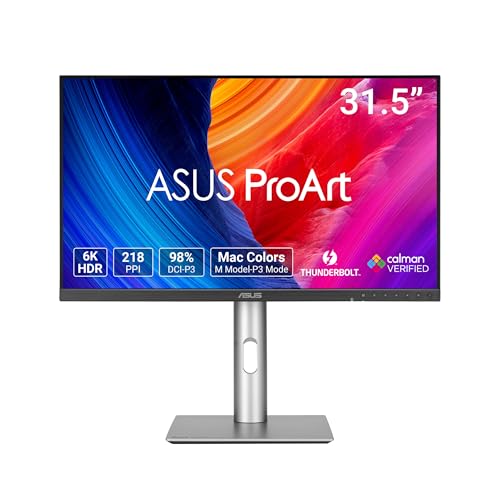
TL;DR: The Asus PA32QCV Thunderbolt offers a 31.5‑inch 6K IPS panel with 600 cd/m² brightness, 10‑bit color and HDR10 support, but its premium $1,049 price and matte coating may deter casual users.
The standout spec is the native 6K resolution of 6016 × 3384 at 60 Hz, delivering 218 PPI on a 31.5‑inch IPS screen. Coupled with a 10‑bit panel, 600 cd/m² peak brightness and VESA DisplayHDR 600 certification, the monitor hits a Delta E < 2, making color work feel precise.
At $1,049 it sits at the high end of the eight‑product lineup, making it pricier than the 27‑inch and 34‑inch alternatives. It weighs about 20.5 pounds (9.3 kg), which is comparable to the Alienware’s 20.04 pounds but heavier than the Xiaomi’s 7.94 pounds. Its 31.5‑inch size slots between the 27‑inch models and the larger 34‑inch ultrawides, giving you more screen real‑estate than the compact options without the footprint of the biggest panels.
Professional reviewers praise the razor‑sharp 6K detail and the factory‑calibrated color gamut—100 % sRGB, 98 % DCI‑P3 and <2 ΔE—making it a solid choice for photo and video editing. Everyday users echo the sharpness but note the aggressive matte coating can make text look hazy, and the default sRGB mode feels a bit cool, often needing a user calibration. The lack of local dimming means HDR contrast won’t match OLED or mini‑LED rivals.
Beyond the panel, the PA32QCV packs two Thunderbolt 4 ports delivering 96 W power delivery, a built‑in KVM switch and an ambient‑light sensor that adjusts brightness automatically. Ergonomics are generous with tilt, swivel, pivot and a 130 mm height range, while a USB hub and speakers round out the workstation‑ready feature set.
Pros
Cons
Best for: Professional creators who need 6K detail, precise color and strong connectivity.
Avoid if: You’re a casual gamer or need deep black levels from local dimming.
Breakdown
Alienware AW3425DW
Pros
Samsung ViewFinity S50GC
Pros
LG 27U411A-B
Pros
Xiaomi G27i-US 27-inch
Pros
Based on scoring data and product specs
Personalized picks
Best Overall Pick
Alienware AW3425DW
Best ValueBest for: Audiophiles and enthusiasts seeking premium sound quality and advanced features
Samsung ViewFinity S50GC
Best for: Most users looking for a well-reviewed, reliable mainstream option
$289.99-$440.00 vs winner
Skip Asus PA32QCV Thunderbolt if…
Reliability and user satisfaction are your top concerns
The Alienware AW3425DW is the clear winner. Its QD‑OLED Gen 2 panel delivers a VESA DisplayHDR TrueBlack 400 rating with a 1000 cd/m² HDR peak brightness, a staggering 1,500,000:1 contrast ratio, and a refresh‑rate range that tops out at 240 Hz—features that give HDR content far more punch than the competition.
The Samsung ViewFinity S50GC lands as the runner‑up, perfect if you want a 34‑inch ultrawide with HDR10 support on a tighter budget. It offers 100 Hz refresh, 300 cd/m² brightness, and a solid 3000:1 contrast ratio for $299.99, has a 4.4‑star rating from 892 reviewers.
For other buying personas you might consider:
Pick the Alienware AW3425DW today and enjoy the most immersive HDR experience available in our roundup.
The Alienware AW3425DW lists an HDR peak brightness of 1000 cd/m², which outshines the other models that top out at 600 cd/m² (Asus PA32QCV) or 500 cd/m² (Asus PA27JCV). This makes it the brightest HDR‑capable display in the selection.
No reviews yet — be the first to share your experience.
Please sign in to leave a review



