Finding a mouse that eases wrist strain while still delivering the features you need can feel like hunting for a needle in a haystack. In this roundup we sifted through 15 options, from ultra‑light wireless sticks to heavyweight RGB rigs. For example, the Redragon M602‑KS packs a 4.6/5 rating from 33,564 reviewers and retails for $29.99, while the Tecknet M003 has a 700‑hour battery life on a single set of AA cells.
Our selection spans three clear price tiers. The budget corner includes the $8.99 Tecknet TK‑EMS014 and other sub‑$10 wireless mice, offering basic ergonomics and long‑lasting power. Mid‑range picks like the $12.97 Logitech M185 and $29.99 Redragon M602 give you a mix of comfort, solid build quality, and extra buttons without breaking the bank. Premium choices such as the $42.99 Razer DeathAdder V2 X and the $29.99 Redragon M602‑KS deliver high‑DPI sensors, extensive programmability, and premium materials for power users.
Below we break each model down by comfort, features, and value so you can pinpoint the ergonomic mouse that fits your desk and your budget.
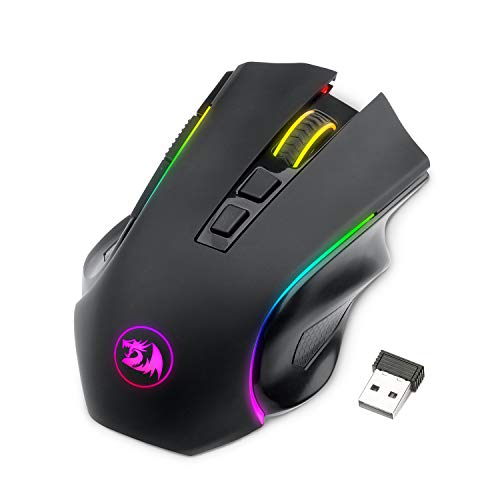
Redragon M602-KS
It's auto‑sleep after just 1 minute conserves power, delivering 70 hours of battery life with RGB off, giving strong value for the price.

Tecknet M003
Ideal for budget‑conscious users who need a reliable entry‑level mouse, it’s priced at $9.99—about $20 less than the Redragon M602‑KS.

Tecknet FBA_841263
Stands out with six programmable buttons and a battery life rated at 24 months, offering extended control that the other picks don’t specify.
Also considered
Score Analysis
Key score advantages vs. runner-up (Tecknet M003)
Price Range
Redragon M602-KS
$29.99
Tecknet M003
$9.99
Tecknet FBA_841263
$9.99

Redragon M602
$16.99

Tecknet M003 Small
$9.99

Logitech M185 Grey
$12.99

Tecknet TK-EMS014
$8.99

Redragon M908
$24.29

Razer DeathAdder V2 X
$42.99

Redragon M910-KS
$30.99

Redragon M690 PRO
$24.99

Logitech Lift Vertical Graphite
$59.99

Logitech Lift Vertical Rose
$59.99

Anker AK-98ANWVM
$25.99
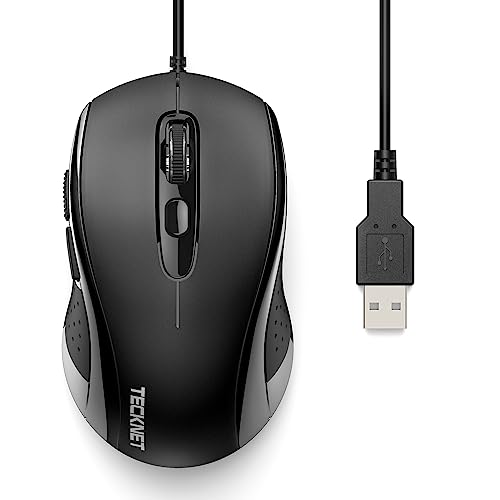
Tecknet TK-1888 Mouse
$10.99
Spec Comparison
TL;DR: The Redragon M602‑KS delivers a right‑handed ergonomic shape, 9 RGB lighting modes, 7 programmable buttons and up to 7200 DPI, all backed by a 70‑hour battery life for just $29.99.
What really stands out is the combination of 9 RGB lighting modes and 7 programmable side buttons, letting you customize both looks and macros without reaching for the software. The optical sensor can be set to five hardware DPI steps—800, 1200, 1600, 2400 and 7200—while the software range stretches to 8000 DPI, giving plenty of precision for FPS or MMO titles. Battery life is another highlight: the mouse stays on for 70 hours with the lighting off and still manages 35 hours when the RGB is active, then slips into a 1‑minute auto‑sleep to conserve power.
At $29.99, it's a touch cheaper than the Redragon M910‑KS, yet it weighs a bit more at 0.4409 lb compared with the M910‑KS’s 0.2976 lb. It does share the same 70‑hour off‑RGB battery endurance as the M910‑KS, and its 1800 mm cable gives you plenty of reach while staying wireless. Compared with the heavier Redragon M908 (0.3858 lb), the M602‑KS feels solid without being overly bulky.
Users consistently praise the contoured right‑handed shape for long‑session comfort, and the vibrant RGB transitions are frequently called “vivid” in reviews. Professional reviewers note the feature‑rich Redragon driver that lets you tweak DPI, polling rate and lighting, though they also point out that the hardware DPI steps limit you to five levels. The mouse is right‑handed only, which some left‑handed gamers find restrictive, and the software download requires manual extraction of a RAR file—a small hurdle for less tech‑savvy users. Build quality feels sturdy, but reviewers describe the plastic chassis as less premium than higher‑end models.
The M602‑KS also packs a 10 million‑click switch endurance, 10 G acceleration, and a max frame rate of 4000 FPS, ensuring responsive tracking for fast‑paced games. An adjustable weight kit adds 15 g of tuning mass if you prefer a heavier feel, while the PTFE feet and anti‑skid rubber scroll wheel help it glide smoothly across most desk surfaces.
Pros
Cons
Best for: Buyers willing to invest in a proven, high-quality option
Avoid if: You need advanced features or professional‑grade performance
“An ideal gaming mouse for those who want a cheaper mouse with ergonomic design and customizable settings.”
“comfortable for long sessions”
TL;DR: The Tecknet M003 offers a right‑handed ergonomic shape, 6 programmable buttons, 24‑month battery life and a 15 m 2.4 GHz wireless range for just $9.99.
This mouse’s standout spec is its 24 months (≈700 hours) of battery life on two AAA cells, letting you forget about replacements for two years. It also provides a 15 m wireless range and 5 DPI levels up to 2600 DPI, which is plenty for everyday office work and casual browsing.
Compared with other budget options in the roundup, the M003 is considerably heavier than the Logitech M185’s 30 g, but matches the 85 g weight of the Tecknet FBA_841263. Its battery longevity mirrors the Tecknet M003 Small, while its 15 m range is on par with most peers. The 125 Hz polling rate is modest, so it won’t match the higher‑speed demands of gaming‑focused mice that list faster rates.
Users consistently praise the rubber side grips for reducing hand fatigue during long work sessions, and the soft‑click mechanism sounds quiet, though not completely silent. Professional reviewers note the plug‑and‑play ease of the USB‑A nano receiver and the on/off switch that helps conserve power. Common complaints focus on the red battery‑indicator LED sometimes staying lit after a fresh battery and the optical sensor’s difficulty on glass or dark glossy surfaces.
The mouse uses a 2.4 GHz wireless link with a nano receiver stored inside the body, and its six programmable buttons let you assign shortcuts for productivity. An auto‑sleep mode further extends the already long battery life.
Pros
Cons
Best for: Right‑handed office workers, students and travelers who want an affordable, low‑maintenance wireless mouse.
Avoid if: You need Bluetooth connectivity, left‑handed ergonomics, or a high‑polling‑rate device for competitive gaming.
“Extremely comfortable for long work sessions.”
“Battery lasted over a year with daily use.”
TL;DR: The Tecknet FBA_841263 offers a right‑handed ergonomic shape, 24‑month battery life, and 5 DPI levels at a budget price, making it a solid everyday wireless mouse.
This mouse packs a 24‑month (≈1,036,800 minutes) battery life and five DPI settings up to 2600 DPI, all while staying under 85 g. Its right‑handed contour includes rubber side grips and six programmable buttons, which give you comfort and customization without extra software.
At 0.187 pounds, it’s lighter than the Redragon M602 but heavier than the Logitech M185, placing it comfortably in the mid‑weight range for budget mice. At 39.6 mm tall, it stands noticeably taller than the Tecknet M003 Small, while the 15 m wireless range matches other Tecknet models, so you won’t feel any drop‑off in connectivity.
Users consistently praise the comfort of the ergonomic shape and the hassle‑free plug‑and‑play setup, noting that the long‑lasting battery lets them forget about replacements for months. The most common gripe is the flashing red LED after battery swaps and the lack of silent‑click technology, which can be noisy in quiet environments.
Technically, the mouse operates on a 2.4 GHz USB‑A nano receiver, supports auto‑sleep mode, and includes an on/off switch to help preserve battery life. The optical sensor delivers reliable tracking for everyday tasks, and the five DPI levels let you fine‑tune cursor speed without needing software.
Pros
Cons
Best for: Budget‑conscious buyers seeking a reliable entry‑level option
Avoid if: You need advanced features or professional‑grade performance
“just works”
“The red LED indicator flashing after battery replacement confuses users”
TL;DR: The Redragon M602 offers a comfortable ergonomic shape, 7‑RGB lighting, and up to 8000 DPI on a 1.8 m braided cable for $16.99, and it's backed by a solid 4.6‑star rating from over 33 k reviewers.
The mouse’s most eye‑catching spec is its 1.8 m braided fiber cable with a gold‑plated USB connector, ensuring a sturdy link without tugging. It also packs 7 RGB lighting modes, 7 programmable buttons, and a DPI range that tops out at 8000 DPI, all while weighing 0.29 pounds.
Compared with the other 14 entries, the M602 is on the heavier side—heavier than several ultra‑light alternatives—and its cable’s longer than many competitors that use shorter 1.5 m leads. It also offers more programmable buttons than three‑button basics and more lighting options than models with single‑color LEDs.
Users consistently praise the right‑hand ergonomic contour and thumb rest, noting the smooth glide from the PTFE feet. Professional reviewers highlight the value of the built‑in weight‑tuning mechanism, though they’ve flagged the software’s auto‑launch on boot and the mouse’s heft as trade‑offs. A handful of owners report occasional durability hiccups after months of use.
Under the hood, an optical sensor delivers up to 8000 DPI with acceleration of 10 G, and you can pick polling rates from 125 Hz up to 1000 Hz. The onboard memory holds 5 profiles, letting you switch settings without the software, while the weight‑tuning knob lets you fine‑tune the feel.
Pros
Cons
Best for: Budget gamers, office workers, and users with medium to large hands who want a well‑reviewed, feature‑rich wired mouse.
Avoid if: You need an ultra‑lightweight mouse under 100 g, rely heavily on macOS compatibility, or require the fastest competitive FPS performance.
“very comfortable”
“fantastic”
TL;DR: The Tecknet M003 Small delivers a 24‑month battery life, 15 m wireless range and six ergonomic buttons for just $9.99, making it a solid budget pick for everyday comfort.
The standout spec is the advertised 24 months (≈700 hours) of battery life, meaning you’ll replace the two AAA cells far less often than with many competing mice. Its auto‑sleep timer kicks in after only 10 seconds of inactivity, helping preserve that long life.
Compared with the other 14 entries in this roundup, the M003 Small matches the battery longevity of the larger Tecknet M003 sibling and the Tecknet FBA_841263, while offering a longer 15 m (49 ft) 2.4 GHz range than the Logitech M185’s 10 m range. It is heavier than the ultra‑light Logitech M185 (30 g) but lighter than the Tecknet TK‑EMS014 (109 g). Its six‑button layout and 85 g weight sit comfortably between the heavier, feature‑rich Redragon M602 and the slimmer, three‑button Logitech option.
Users consistently praise the contoured shape with rubber side grips for day‑long comfort, and the plug‑and‑play USB‑A nano receiver for hassle‑free setup. Professional reviewers highlight the reliable 2.4 GHz connection and the long battery span. On the downside, the mouse relies on disposable AAA batteries that aren’t included, and some users report the side buttons don’t work on macOS. The lack of a USB‑C receiver also limits use with newer laptops that lack USB‑A ports.
Technically, the mouse offers five DPI steps up to a maximum of 2600 DPI and a typical polling rate of 125 Hz, which is adequate for office work and light gaming. Its compact dimensions—68.1 mm length, 38.6 mm width and a surprisingly thin 1 mm height—make it easy to slip into a laptop bag, and the 85 g weight keeps it light enough for extended use without feeling flimsy.
Pros
Cons
Best for: Budget-conscious buyers seeking a reliable entry-level option
Avoid if: You need advanced features or professional‑grade performance
“Extremely comfortable for long work sessions.”
“Battery lasted over a year with daily use.”
TL;DR: The Logitech M185 Grey is a lightweight, ambidextrous 2.4 GHz wireless mouse with a 10 m range, 12‑month battery life and a solid 3‑year warranty, all for under $13.
The standout spec is its ultra‑compact form: it measures 60.0 mm wide, 38.8 mm high and 99.25 mm deep, and weighs just 30 g (0.066 lb). A built‑in on/off switch and a nano USB receiver give you plug‑and‑play connectivity, while the fixed 1000 DPI optical sensor delivers reliable cursor control for everyday tasks.
Compared with other contenders in this roundup, the M185 is significantly lighter than the wired Tecknet TK‑1888 (which tips the scales at about 0.14 lb) and also lighter than the wireless Tecknet M003 and Redragon M602, both of which weigh well over 0.18 lb. It also offers fewer buttons—three versus the six or eight that many peers have—making it a simpler choice for users who don’t need extra programmable inputs.
Reviewers consistently praise the mouse’s long‑lasting AA battery (up to 12 months) and its reliable 2.4 GHz link that stays steady up to 10 m away. Reviewers note the ambidextrous shape is comfortable for both left‑ and right‑handed users, and the plastic housing incorporates recycled material, contributing to a product carbon footprint of 3.97 kg CO₂e. Professional reviewers point out the lack of a battery‑low LED and the scroll wheel’s smooth feel, which some find less tactile than desired.
Pros
Cons
Best for: Most users looking for a well‑reviewed, reliable mainstream option
Avoid if: You need advanced features or professional‑grade performance
“The mouse feels more solid than previous budget models and offers a tactile button experience.”
“Ideal for HTPC or notebook use thanks to the physical power switch and receiver storage.”
TL;DR: The Tecknet TK‑EMS014 is a $8.99 wired mouse that packs a 6400 DPI optical sensor, silent‑click switches and an ergonomic rubber‑grip design into a lightweight 109 g package.
This mouse’s standout spec is its four DPI levels—1000, 1600, 3200 and a maximum of 6400 DPI—paired with a Tru‑Wave optical sensor that delivers up to 635 mm/s tracking speed and 15 G acceleration. Six buttons give you left‑click, right‑click, scroll and forward/back navigation, while the 6 million‑click lifespan ensures long‑term durability. The silent‑click mechanism reduces click noise by about 90 %, which reviewers love for quiet office environments.
At 109 g, the TK‑EMS014 is heavier than the Tecknet M003’s 85 g chassis, but still lighter than many bulkier gaming mice. Its 1524 mm cable matches the 1.52 m lead of the Tecknet TK‑1888, offering plenty of reach without the hassle of a detachable cord. Compared with the wireless‑only peers like the M003 Small, this model forgoes a battery and wireless range, but that trade‑off keeps the price firmly at $8.99—one of the cheapest options in the 15‑product lineup.
Users repeatedly praise the plug‑and‑play simplicity: just plug the USB connector and you’re ready to go, no driver install required. The ergonomic shape and soft rubber grips earn consistent kudos for comfort during long work sessions. Professional reviewers note the sensor tracks well even on glossy surfaces, and the silent‑click switches are a boon for shared workspaces. The main complaints revolve around the side buttons not working on macOS, a stiff non‑detachable cable that can tangle, and a plastic housing that feels less premium than higher‑priced alternatives.
Additional technical context: the mouse draws a modest 50 mA operating current and comes with a solid 3‑year warranty, underscoring Tecknet’s confidence in build quality. While it lacks onboard memory or programmable macros, the straightforward feature set makes it a reliable workhorse for everyday computing.
Pros
Cons
Best for: Budget‑conscious buyers seeking a reliable entry‑level option
Avoid if: You need macOS side‑button support, a wireless mouse, or a premium‑grade plastic feel
“Comfortable for long work sessions”
“Just works”
TL;DR: The Redragon M908 packs 18 programmable buttons, an adjustable weight system and up to 12,400 DPI into a right‑handed, palm‑grip design that suits MMO fans with larger hands.
The standout spec is the 18 total programmable buttons—7 main/top plus 12 side buttons—paired with eight removable 2.4 g weights, letting you fine‑tune the mouse up to a maximum of 196.2 g. Its Pixart PMW3327 optical sensor reaches a DPI range of 100–12,400 with ±100 DPI increments, and the 30 G acceleration plus 200 IPS tracking speed keep cursor movement smooth even in fast‑paced scenes.
Compared with other Redragon entries in this roundup, the M908 is heavier than the M690 PRO (0.330693393 lb) and the M602‑KS (0.440924524 lb) when fully weighted, and considerably heavier than the ultra‑light Logitech M185 (0.0661386786 lb). It also offers more programmable buttons than the M690 PRO’s eight and the M602‑KS’s seven, giving it a clear advantage for users who need a dense button layout.
Users consistently praise the 18‑button array and the vibrant 16.8 million‑color RGB lighting, noting the sturdy braided‑fiber cable as a durability win. However, the aggressive right‑handed shape and the 196.2 g top weight draw criticism from players with smaller hands or those who favor fingertip grips. Professional reviewers also note that the Redragon Zone software sometimes drops macro saves or misrepresents color choices.
Pros
Cons
Best for: MMO and RPG gamers with medium to large hands who need a dense button layout and customizable weight.
Avoid if: You prioritize ultra‑light weight, flawless software, or a neutral ergonomic shape for FPS or small‑hand use.
TL;DR: The Razer DeathAdder V2 X costs $42.99, holds a 4.7‑star rating from over 18,000 reviewers, and reviewers praise its comfort, long battery life, and dual‑mode wireless.
The Razer DeathAdder V2 X is Razer’s ergonomic right‑handed wireless mouse, priced at $42.99 and ranks in the middle of our fifteen‑product lineup with a strong 4.7‑out of 5 rating based on 18,169 reviews. Its reputation benefits from Razer’s long‑standing brand credibility in gaming peripherals.
Reviewers consistently highlight the mouse’s comfortable shape, noting that it reduces hand fatigue during long sessions. The dual wireless options—high‑speed and Bluetooth—receive frequent praise for flexibility, while users repeatedly commend the exceptionally long battery life that lets the mouse run for weeks without a recharge. The high‑precision sensor and smooth PTFE feet also deliver accurate tracking and buttery glide.
In context, the DeathAdder V2 X stands out for delivering a well‑rounded experience at a modest price point, especially when compared to other options that may be cheaper but lack Razer’s ergonomic pedigree, or higher‑priced models that add RGB lighting or ultra‑light construction.
Pros
Cons
Best for: Buyers willing to invest in a proven, high-quality option
“Perfect shape for palm grip—no hand fatigue even after hours.”
“Battery lasts forever, especially in Bluetooth mode.”
TL;DR: The Redragon M910‑KS offers tri‑mode (2.4 GHz, Bluetooth, wired) connectivity, up to 8000 DPI, and 70 hours of battery life at a sub‑$40 price, making it a solid ergonomic choice for gamers who value flexibility.
What really sets this mouse apart is its three connectivity options—2.4 GHz wireless via a nano receiver, Bluetooth, and a wired USB‑C link—plus a high‑precision optical sensor that reaches 8000 DPI across five selectable levels. The built‑in lithium‑polymer battery delivers 70 hours of use with RGB lighting off and 35 hours when the lighting is on, so you won’t be tethered to a charger during long sessions.
Compared with other contenders in the roundup, the M910‑KS is lighter than the Redragon M602‑KS (which tips the scales at 0.440924524 pounds) but still heavier than the Razer DeathAdder V2 X (0.23 pounds). Its 1.8 m USB‑C cable matches the length of the M602‑KS and the M908, while its 10 m wireless range mirrors the Redragon M690 PRO. Battery longevity matches the M602‑KS, which also lists 70 hours of life when RGB is off.
Users consistently applaud the mouse’s ergonomic right‑handed shape and the rapid‑fire button that registers one click as three, a feature highlighted in many consumer reviews. Professional reviewers note the low‑latency 2.4 GHz mode rivals wired performance at this price point. On the flip side, several owners report RGB lighting flickers in video recordings, and the software limits itself to Windows, leaving macOS users without macro or lighting customization. Owners also describe the USB‑C cable as a bit stiff when used in wired mode.
Beyond the connectivity and battery, the M910‑KS packs a Pixart‑type optical sensor with a 20 G acceleration ceiling and a tracking speed of up to 40 IPS. You can choose polling rates from 125 Hz up to 1000 Hz, and the mouse supports up to nine RGB lighting effects across 16.8 million colors. The switch rates for 20 million clicks, and the rapid‑fire button adds a tactical edge for FPS or MOBA titles.
Pros
Cons
Best for: Buyers willing to invest in a proven, high‑quality option
Avoid if: You need advanced features or professional‑grade performance
“Best gaming mouse for the price — smooth, responsive, and the RGB looks amazing.”
“Love the Bluetooth mode for work and 2.4G for gaming — seamless switching.”
TL;DR: The Redragon M690 PRO offers 8 programmable buttons, 1000 Hz polling and up to 87 hours of eco‑mode battery life in a comfortable, mid‑weight design for gamers who want wireless flexibility without breaking the bank.
The mouse’s standout spec is its 1000 Hz polling rate, which stays consistent in both wired USB‑C and 2.4 GHz wireless modes. Coupled with a PAW3104 optical sensor that reaches a maximum of 8000 DPI across five DPI levels, the M690 PRO delivers the precision many FPS and MOBA players look for. Its 8 programmable buttons—including a dedicated rapid‑fire button and two side macro keys—give plenty of customization without overwhelming the layout.
Compared with the other 14 entries, the M690 PRO sits in the middle of the weight spectrum: it’s heavier than the ultra‑light Anker AK‑98ANWVM (0.21 lb) and the Logitech M185 (0.07 lb), but lighter than the Redragon M602‑KS (0.44 lb) and the M908 (0.39 lb). Battery endurance also stands out; the 87‑hour eco‑mode runtime outlasts the M602‑KS’s 70‑hour figure, giving you more playtime before you need to recharge. Its 10‑meter wireless range matches the M910‑KS and exceeds the Logitech’s 10‑meter claim, ensuring a reliable connection across a typical desk setup.
Reviewers consistently praise the mouse’s 87‑hour eco‑mode battery life and the solid, ergonomic feel that makes marathon sessions comfortable. They also give particular shout‑outs to the rapid‑fire button for an edge in fast‑paced shooters. On the flip side, professional reviewers note that Redragon’s proprietary software feels clunky and can be frustrating when assigning macros, while many users report that the side macro buttons don’t always work on macOS. Weigh these points if you rely heavily on custom macros across platforms.
Pros
Cons
Best for: Most users looking for a well‑reviewed, reliable mainstream option
Avoid if: You need advanced features or professional‑grade performance
“smooth and responsive experience”
“pro‑grade features at a budget price”
TL;DR: The Logitech Lift Vertical Graphite delivers a 57° ergonomic tilt, up to 24 months of AA‑battery life, and low‑latency dual‑wireless connectivity for comfortable, all‑day right‑hand use.
This mouse’s standout spec is its battery longevity – a single AA cell powers it for up to 24 months, meaning you won’t be swapping batteries every few weeks. At 125 g (0.2755778275 lb) it feels light enough for extended sessions, while the 10 m (33 ft) wireless range and 1 ms USB report rate keep cursor response snappy.
Compared with its peers, the Lift Vertical Graphite is lighter than the Logitech Lift Vertical Rose (0.45 lb) but a touch heavier than the Razer DeathAdder V2 X (0.23 lb). It shares the Rose’s 24‑month battery claim, dwarfing the hour‑based runtimes listed for the Redragon models. Its multi‑device pairing supports up to four devices, one more than the Rose’s three‑device limit, giving you a little extra flexibility on a crowded desk.
Users consistently praise the 57° angle for easing wrist fatigue, noting the soft‑textured rubber grip and whisper‑quiet clicks as daily comforts. Professional reviewers highlight the Pluto One sensor’s 400–4,000 DPI range and the SmartWheel’s adaptive scrolling as thoughtful touches. The most common complaints revolve around occasional Bluetooth drops and you’ll need to replace the non‑rechargeable AA battery after its long life, while larger hands sometimes find the compact chassis a bit snug.
Pros
Cons
Best for: Office workers, remote professionals, and anyone dealing with wrist discomfort who value a proven ergonomic mouse.
Avoid if: You need high‑DPI gaming performance or a larger mouse that accommodates big hands.
“Life-changing for wrist pain”
TL;DR: The Logitech Lift Vertical Rose offers a 57° vertical grip, 24‑month AA battery life and dual Bluetooth/Logi Bolt connectivity for $69.99, making it a solid ergonomic choice for desk‑bound work.
This mouse tilts your hand into a natural 57° posture while staying lightweight at 0.45 pounds (204 g) and compact with a height of 76.2 mm, length of 147.32 mm and width of 86.36 mm. It runs on a single AA cell that the manufacturer claims lasts 24 months, and it communicates up to 10 m away via either Bluetooth Low Energy or the Logi Bolt 2.4 GHz receiver. With five buttons—including a dedicated connectivity button—and a SmartWheel that offers magnetic resistance, the Lift Vertical Rose packs ergonomic features into a small package.
Compared with its sibling the Logitech Lift Vertical Graphite, the Rose is heavier (0.45 pounds vs. 0.2755778275 pounds) but shares the same 24‑month battery expectancy and 10 m wireless range. It also matches the Redragon M602‑KS in weight (0.440924524 pounds) while offering more ergonomic shaping than that budget‑oriented model. At $69.99 it sits in the premium tier of the 15‑mouse roundup, so it’s pricier than many entry‑level options but justified by its ergonomic focus and build quality.
Professional reviewers highlight the mouse’s “ergo‑certified” design, noting that the vertical grip can ease wrist and forearm strain during long office sessions. Everyday users echo this sentiment, praising the silent clicks and smooth SmartWheel, but several mention that the compact size feels cramped for larger hands and that the non‑rechargeable AA battery adds a maintenance step. A handful of reviewers also report occasional Bluetooth drop‑outs, though the Logi Bolt receiver remains consistently stable.
Under the hood, the Lift Vertical Rose uses Logitech’s Pluto One optical sensor with a DPI range of 400–4000, paired with a 32‑bit ARM processor for precise tracking. Logi Options+ manages the mouse, and its construction incorporates 54% post‑consumer recycled plastic. Logitech backs the device with a two‑year limited warranty, underscoring the brand’s confidence in durability.
Pros
Cons
Best for: Office and remote workers who need ergonomic comfort for long sessions and appreciate a premium, well‑built mouse.
Avoid if: You have large hands, prefer a rechargeable battery, or need ultra‑stable Bluetooth without occasional drops.
“Life-changing for wrist pain”
TL;DR: The Anker AK-98ANWVM vertical mouse costs $16.99, weighs 0.21 pounds, and offers a 5‑button handshake grip that many users say eases wrist strain during long work sessions.
What really stands out is the ergonomic “handshake” shape combined with a dual‑DPI optical sensor that switches between 1000 DPI and 1600 DPI. The mouse measures 120 mm × 62.8 mm × 74.8 mm and comes with a 1500 mm (4.9 ft) wired USB cable, so you never have to worry about battery changes.
Compared with the other 14 entries, the Anker is lighter than the Redragon M602 (0.21 lb vs 0.29 lb) and has a shorter cable than the Redragon’s 1.8 m lead. Its five‑button layout is fewer than the Redragon’s eight total buttons, but it still includes forward and backward thumb clicks that many of the wireless alternatives lack. In the weight department, it sits between the ultra‑light Logitech M185 (about 0.066 lb) and the bulkier Tecknet models, making it a comfortable middle ground for desk‑bound use.
User sentiment repeatedly praises the vertical grip for reducing wrist fatigue, especially for office workers, CAD designers, and engineers who log six or more hours at a desk. Professional reviewers call the build solid and note that the plastic matte finish feels sturdy, though they warn that the scroll wheel may start to act erratically after years of use. The same issue shows up in consumer comments, with several users mentioning the wheel becoming glossy or reverse‑scrolling over time. The mouse also requires third‑party software for thumb‑button support on macOS, which left‑handed users and Mac‑only setups find inconvenient.
Pros
Cons
Best for: Office workers, CAD designers, engineers, and anyone who spends 6+ hours daily at a computer and wants a well‑reviewed, comfortable wired mouse.
Avoid if: You’re left‑handed, have very large hands, or need native Mac thumb‑button support without extra software.
“incredible comfort”
“not plasticky, with a "techie" matte finish”
TL;DR: The Tecknet TK-1888 is a $10.99 wired mouse with a right‑handed ergonomic shape, four DPI steps up to 3600, and six buttons, offering solid comfort for budget‑focused office work.
This mouse’s most standout spec is its adjustable DPI range: four preset levels of 1200, 1800, 2400 and 3600 DPI give you enough precision for everyday tasks without any software. The 1.52‑meter USB‑A cable supplies power directly, so you’ll never need to replace batteries, and the device weighs 0.14125 pounds (64 grams), a comfortable middle ground for desk use.
Compared with the other fourteen entries, the TK‑1888 sits between the ultra‑light Logitech M185 (30 g) and the heftier Redragon M602 (131.5 g). Its six‑button layout outnumbers the three‑button Logitech model but falls short of the eight‑button Redragon. The cable is shorter than the Redragon’s 1.8 m lead, making it a bit tidier on cramped workstations, while the Tecknet M003 Small shares the same six‑button count but is a wireless device, so the TK‑1888’s wired reliability can be a plus.
User feedback repeatedly praises the curved palm rest and rubberized side grips, noting that they reduce wrist strain during long typing sessions. Reviewers also like the built‑in DPI button for quick sensitivity tweaks. However, several commenters point out that the side navigation buttons don’t function on macOS and that the low‑profile shape can feel cramped for larger hands. Professional reviewers have highlighted the ergonomic curvature as a step up from flat ambidextrous mice, while also noting the lack of programmable side buttons as a minor drawback.
Pros
Cons
Best for: Budget-conscious buyers seeking a reliable entry-level option
Avoid if: You've limited desk space or need portability
“Perfect for long workdays—my wrist doesn’t hurt anymore.”
Breakdown
Redragon M602-KS
Pros
Redragon M602
Pros
Based on scoring data and product specs
Personalized picks
Best Overall Pick
Redragon M602-KS
Best ValueBest for: Buyers willing to invest in a proven, high-quality option
Tecknet M003
Best for: Budget-conscious buyers seeking a reliable entry-level option
$9.99-$20.00 vs winner
Skip Tecknet TK-1888 Mouse if…
You have limited desk space or need portability
Redragon’s M602‑KS wins top spot because of its 4.6‑star rating from 33,564 reviewers, a solid 0.440924524‑pound build, and a versatile button layout with seven programmable keys plus a rapid‑fire button. Its 250–8000 DPI range and up to 70 hours of battery life with the RGB off give you both precision and endurance without the need for frequent charging.
The runner‑up, Tecknet’s M003, delivers ultra‑long battery life on a shoestring budget. It provides 700 hours on two AAA cells, carries a 4.5‑star rating from 76,274 users, and stays comfortably in your hand with a right‑handed ergonomic shape and rubber side grips—all for just $9.99.
Here are the other price tiers:
Pick the Redragon M602‑KS now and you’ll enjoy ergonomic comfort without breaking the bank.
The Redragon M602‑KS provides up to eight total buttons with seven fully programmable ones and a rapid‑fire button, while the Tecknet M003 offers six programmable buttons. This larger button count, combined with onboard memory profiles, gives the Redragon a clear edge for users who need many shortcuts.
Please sign in to leave a review
No reviews yet. Be the first to review!
