⚡ Quick Answer
It might surprise you, but the $9.99 Daybetter RGB Light Bar carries the highest user rating in the set – a solid 4.4 / 5 from 48 reviewers – even though it’s the most budget‑friendly option. By contrast, the premium Philips Hue Play Gradient 65, priced at $149.99, matches the 4.3 / 5 score of the $49.99 Govee Gaming Light G1, showing that a higher price tag doesn’t automatically translate to higher praise.
Six lighting solutions span three price tiers. The budget tier features the Daybetter bar and the Svfishkk Gaming PC Backlight ($25.99). Mid‑range contenders include the Govee G1 and Nanoleaf PC Screen Mirror Lightstrip, both cost $49.99 and offering features like 1800 mm strip length (Govee) and 2.5 m cable (Nanoleaf). Premium choices are the Philips Hue Play Gradient 65, with a 24 V DC output, and the ASUS ROG Aura Monitor Light Bar at $214.92, each targeting high‑end TV or monitor setups.
Next, the guide breaks down how each model performs in real‑world gaming environments, so you can decide which backlight fits your setup best.
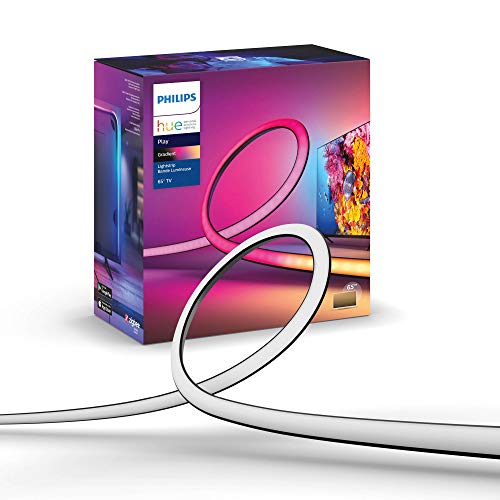
Philips Hue Play Gradient 65"
Its slim 1.6 cm height lets it sit discreetly behind any screen, delivering proven Hue quality.

Govee Gaming Light G1
Ideal for gamers who want solid lighting without splurging—at $49.99 it’s about $100 cheaper than the Philips Hue Play Gradient 65.

Daybetter RGB Light Bar
The compact 16.73 in length fits tight desk setups where longer strips would be cumbersome, giving entry-level users a simple ambient boost.
Also considered
Score Analysis
Key score advantages vs. runner-up (Govee Gaming Light)
Price Range
Philips Hue Play Gradient 65"
$153.99
Govee Gaming Light G1
$49.99
Daybetter RGB Light Bar
$9.99

ASUS ROG Aura Monitor Light Bar
$223.52
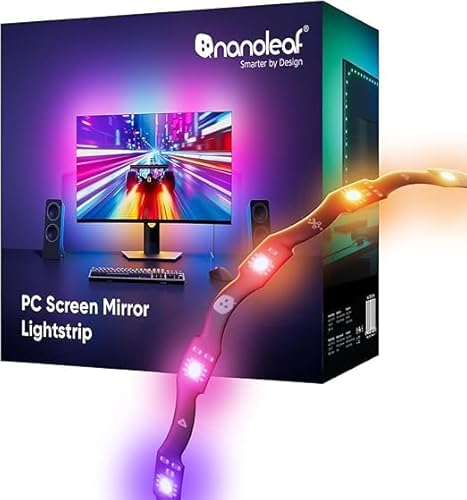
Nanoleaf PC Screen Mirror Lightstrip
$39.99

Svfishkk Gaming PC Backlight
$25.99
Spec Comparison
TL;DR: The Philips Hue Play Gradient 65 delivers 7‑zone, 16‑million‑color backlighting across a 254 cm strip for 65‑inch TVs, but it needs a Hue Bridge and Sync Box and sits at a premium price.
The strip’s standout spec is its 254 cm length, designed to span a 65‑inch screen in one continuous gradient. It creates up to seven simultaneous colors and pushes 1100‑1230 lm of light while drawing a maximum of 20 W, with only 0.5 W on standby. The silicone‑covered strip measures 1.6 cm high and 1.7 cm wide, and it lasts for 25,000 hours.
Compared with the five other lights in this roundup, the Hue Gradient is the longest—far exceeding the 1800 mm strip of the Govee G1 and the 2500 mm Nanoleaf strip, and it out‑reaches the 424.9 mm Daybetter bar. At roughly 1.90 lb it is heavier than the Govee (1.0 lb), Nanoleaf (0.34 lb) and Daybetter (0.64 lb) options, but only a bit heavier than the ASUS ROG Aura (1.46 lb). Its 20 W draw also tops the 5 W ASUS bar and sits just above the Govee’s 18 W consumption, indicating a brighter output potential.
User reviews repeatedly praise the “dramatic visual immersion” and the “clean, clip‑based installation,” which feels straightforward. Professional reviewers note the precise HDMI‑based sync via the Hue Sync Box and the durability of the silicone sleeve. Users mainly complain about the extra cost of a required Hue Bridge and Sync Box, occasional sync lag, and the strip’s inability to be cut or extended, which limits flexibility for non‑standard TV sizes or brighter rooms.
Additional technical context includes a color temperature range of 2000‑6500 K and a 16‑million‑color palette, both controllable via Wi‑Fi or ZigBee. The product includes adhesive‑backed mounting clips, a 20 W AC adapter, and a Wi‑Fi controller, and the manufacturer offers a two‑year warranty.
Pros
Cons
Best for: Buyers willing to invest in a proven, high‑quality option
Avoid if: You're on a tight budget or only need basic functionality
“transforms movie nights,”
“colors flow beautifully across the room”
TL;DR: The Govee Gaming Light G1 delivers a 1800 mm 360° RGBIC strip with 60 LEDs, 18 W power draw and 123 preset scenes, providing solid ambient glow for 27‑34‑inch monitors at a mid‑range price.
The strip measures 1800 mm and wraps around all four sides of a monitor, offering 360° coverage that smooths color transitions across screens sized 27‑34 inches. With 60 RGBIC LEDs the unit can render per‑LED effects, while the 18 W consumption and 12 V supply keep power needs modest. Users can choose from 123 preset scenes and 11 music‑sync modes, and the VibraMatch PC Color‑Match feature lets the software align the backlight to on‑screen colors.
At 1.0 pound, the Govee is noticeably heavier than the Nanoleaf PC Screen Mirror Lightstrip, which weighs 0.34 pound, but its 1800 mm strip outpaces the Daybetter RGB Light Bar’s 424.9 mm length. Compared with the Svfishkk Gaming PC Backlight, the Govee offers more connectivity options—Bluetooth, 2.4 GHz Wi‑Fi and Razer Chroma—while the Svfishkk lists only an adhesive‑back installation. The Govee also supplies a control box and voice‑assistant integration, features that many peers either omit or list as “fewer specs”.
Professional reviewers praise the smoother RGBIC distribution and the ease of installing the strip on a 27‑inch monitor. Consumers repeatedly mention the vivid, immersive glow and the intuitive Govee Home app, but they also flag the need for an optional Govee camera to achieve full‑screen color capture and note occasional hiccups with the 2.4 GHz Wi‑Fi connection. In practice, the combination of music sync and Razer Chroma integration makes the G1 a strong choice for gamers who already use Razer peripherals.
Pros
Cons
Best for: Most users looking for a well‑reviewed, reliable mainstream option
Avoid if: You need advanced features or professional‑grade performance
TL;DR: The Daybetter RGB Light Bar delivers 360° ambient glow with 16 million colors, music sync, and voice control for just $9.99, making it a compact, budget‑friendly option for gamers.
The standout spec is its 360° omni‑directional coverage combined with 16 million RGB colors and over 300 customizable effects, all housed in a 16.73 in (424.9 mm) long, 3.43 in (87.1 mm) wide, and 2.13 in (54.1 mm) deep bar that weighs only 10.2 oz (289.2 g). Its brightness is fully dimmable from 0 % to 100 % and the color temperature can be shifted between 2700 K and 6000 K, giving you everything from warm couch lighting to cool, high‑contrast backlighting.
Compared with the other five contenders, the Daybetter bar is noticeably more compact than the long strips from Govee and Nanoleaf, which run well over 70 in in length. It also tips the scale as lighter than Govee’s 450 g unit and the ASUS ROG Aura’s 662 g model, yet it’s heavier than Nanoleaf’s 154 g strip. While the Svfishkk PC Backlight shares the same 16 million‑color claim, it lacks the 360° coverage and voice‑assistant integration that Daybetter offers. The Philips Hue Play Gradient and ASUS Aura both come with larger form factors and higher weight, positioning Daybetter as the most space‑savvy and portable choice.
Users appreciate the seamless music sync and the ability to control the bar via the Tuya Smart app, physical buttons, a supplied remote, or Alexa/Google Assistant. Review comments note that the 16.73 in length can feel bulky in tight corners, and some buyers of other Daybetter lighting products have mentioned occasional app‑pairing hiccups, suggesting you might run into similar connectivity quirks. On the technical side, the bar powers itself via a Type‑C connector and the manufacturer claims an 80 % efficiency boost over traditional bulbs, while a highly sensitive sound sensor drives the music‑responsive modes.
Pros
Cons
Best for: Entry-level buyers or those on a tight budget
Avoid if: You need powerful performance or professional‑grade features
TL;DR: The ASUS ROG Aura Monitor Light Bar delivers over 800 lux of high‑CRI illumination, clamps to a wide range of monitors, and syncs with Aura RGB, but its $214.92 price and USB‑C‑only power may limit budget‑conscious setups.
The standout spec is its center illuminance of >800 lux at a 45 cm viewing distance, paired with a color‑rendering index of ≥95, which gives you desk lighting that’s both bright and true‑to‑color. Its physical footprint measures 106.68 mm × 497.84 mm × 116.84 mm, and the unit itself weighs 662 g (1.46 lb), so it's a solid‑feel accessory that sits flush behind most monitors.
Compared with the five other options in this roundup, the Aura Bar sits at the premium end of the price spectrum and weighs more than the Daybetter RGB Light Bar (289 g) and the Govee Gaming Light G1 (450 g). While many rivals rely on simple strip designs, this model offers three distinct lighting modes—Screen Light, Aura RGB, and Combined—giving it more functional depth than the basic single‑mode strips.
Users consistently praise the bright, uniform lighting of >500 lux that eases eye strain during long gaming sessions, and they like the sturdy clamp that accepts flat monitors 9–55 mm thick and curved screens 6–30 mm thick. Professional reviewers note that the precise dial lets you fine‑tune brightness and color temperature (2700 K–6500 K) for comfort. On the flip side, several owners report that the USB‑C power (5 V / 1 A, max 5 W) limits placement options and that the DisplayWidget Center software can be glitchy on non‑ASUS displays.
Technical details include an average brightness of >500 lux, uniformity of ≥60 % across a 60 × 40 cm area, and a maximum power draw of 5 W. ASUS certifies the bar to IEC 62471 and IEEE Std 1789 standards, and ships it with a three‑year warranty, underscoring its confidence in build quality.
Pros
Cons
Best for: ROG/Aura Sync enthusiasts, gamers, and professionals who need high‑CRI, high‑brightness backlighting and are willing to invest in premium performance.
Avoid if: You have a tight budget, need a standalone power adapter, or primarily use non‑ASUS displays where software compatibility could be an issue.
TL;DR: Nanoleaf’s 2.5 m PC Screen Mirror Lightstrip offers 75 addressable zones and USB‑C plug‑and‑play syncing for a single monitor up to 32 in, but its premium subscription and single‑monitor limit may deter power users.
The strip’s standout spec is its 75 individually addressable zones delivering real‑time color mirroring of on‑screen content. At a length of 2500 mm and a width of 10 mm, it can span most 32‑inch monitors, while the 300 lm brightness and 16 million‑color range provide vivid immersion. The unit runs off a 5 V USB‑C connection, drawing 10 W, and the adhesive backing makes installation a quick peel‑and‑stick job.
Compared with the other five contenders, Nanoleaf’s strip is longer than the Govee Gaming Light G1’s 1800 mm length yet slightly shorter than the Philips Hue Play Gradient’s 254 cm design. It also weighs just 0.34 pounds, making it lighter than Govee’s 1.0‑pound model. Power‑wise, its 10 W draw is lower than Govee’s 18 W consumption, which could matter for energy‑conscious setups. Svfishkk’s backlight supports screens up to 34 inches, but Nanoleaf caps at 32 inches, so larger displays need a different solution. Daybetter’s RGB Light Bar is far shorter at 424.9 mm, and ASUS’s ROG Aura Light Bar is also more compact at 497.84 mm, positioning Nanoleaf as the longest strip among the group.
User feedback highlights the ease of adhesive mounting and the striking immersion created by the real‑time screen mirroring. Reviewers repeatedly praise the reliable USB‑C sync because it eliminates the latency seen in camera‑based alternatives. Music sync via direct PC audio capture also earns positive remarks for its responsive visualizations. On the downside, customers point out the lack of mobile or smart‑home integration, meaning control stays within the desktop app. The premium subscription that unlocks Orchestrator Mode draws another frequent complaint, and the 1.5 m USB‑C cable can feel short for larger desk layouts.
Additional technical notes: the strip’s 2.3 mm thickness and 13.2 mm controller height keep the profile low, while its IP20 rating means it’s intended for indoor use only. The LEDs, rated for 25,000 hours, should last many years under normal conditions. The device also supports a dimmable range from 1 % to 100 % and a color temperature span of 2700 K to 6500 K, giving you full control over mood and brightness.
Pros
Cons
Best for: Single‑monitor PC gamers, streamers, and music enthusiasts using Windows or Mac setups with monitors up to 32 inches.
Avoid if: You need dual‑monitor support, a larger than 32‑inch display, or smart‑home/voice‑assistant integration.
TL;DR: The Svfishkk Gaming PC Backlight offers USB‑powered, adhesive‑back installation with 16 million colors and IP65 protection for monitors up to 34 inches, but its modest 3.8‑star rating and limited feature set keep it in the budget tier.
The standout spec is the 16 million‑color RGB IC LED array, which the included software syncs to whatever hues your monitor displays. It fits screens up to 34 inches and plugs straight into a USB port, so you won’t need a separate power adapter. The black housing carries an IP65 rating, meaning it’s dust‑tight and can handle occasional splashes.
Compared with the other five lights in this roundup, the Svfishkk unit sits in the middle of the price range—more expensive than the Daybetter bar but far cheaper than Philips Hue Play or the ASUS ROG Aura. It also lists fewer physical dimensions and weight details than the Govee or Nanoleaf strips, and it lacks the extra controls (app, voice, remote) that those competitors provide. In short, it’s a simpler, more stripped‑down option.
User sentiment shows a 3.8‑star average from 12 reviews. Reviewers appreciate the stick‑on adhesive method and the way the software mirrors screen colors without extra cables. However, several comments note the limited compatibility beyond 34 inches and wish for more customization options, which explains its 3.8‑star rating.
From a technical standpoint, the backlight draws power directly from USB, avoiding a wall outlet and keeping cable clutter low. Its IP65 rating adds a level of durability not always seen in budget lights, and the one‑year warranty offers basic peace of mind despite the sparse spec sheet.
Pros
Cons
Best for: Entry-level buyers or those on a tight budget
Avoid if: You need powerful performance or professional‑grade features
Breakdown
Philips Hue Play Gradient 65"
Pros
Govee Gaming Light G1
Pros
Daybetter RGB Light Bar
Pros
ASUS ROG Aura Monitor Light Bar
Pros
Cons
Based on scoring data and product specs
Personalized picks
Best Overall Pick
Philips Hue Play Gradient 65"
Best ValueBest for: Buyers willing to invest in a proven, high-quality option
Govee Gaming Light G1
Best for: Most users looking for a well-reviewed, reliable mainstream option
$49.99-$104.00 vs winner
Skip Svfishkk Gaming PC Backlight if…
You need powerful performance or professional-grade features
Philips Hue Play Gradient 65 takes the top spot as the best gaming lighting for TV or monitor backlighting. It ships for $149.99, comes with a 4.3‑star rating from 2,214 reviews, and delivers 16 million colors plus 1100‑1230 lm of indirect light across its 254 cm length. A 2‑year manufacturer warranty and ZigBee Wi‑Fi connectivity round out a value package.
The runner‑up, Govee Gaming Light G1, shines when you need full‑room immersion on a tighter budget. Priced at $49.99 with a matching 4.3‑star rating from 667 reviewers, it offers 360° four‑sided coverage, an 1800 mm RGBIC strip and 18 W power draw, plus Bluetooth, Razer Chroma and voice‑control options for smooth PC sync.
For tighter wallets, the Daybetter RGB Light Bar at $9.99 delivers an ultra‑affordable glow for casual setups. If you’re after a premium, feature‑rich experience, the ASUS ROG Aura Monitor Light Bar at $214.92 provides a high‑end option with advanced lighting effects.
Pick the Philips Hue Play Gradient 65 today and upgrade your gaming ambience with confidence.
The Philips Hue Play Gradient 65 is marketed for 65‑inch screens, so it may not fully cover larger TVs. Most of the other kits, such as the Govee Gaming Light G1 (1800 mm strip) and the Daybetter RGB Light Bar (424.9 mm), are designed for monitors up to about 34 inches and would require multiple units or custom mounting for a bigger TV.
No reviews yet — be the first to share your experience.
Please sign in to leave a review



