⚡ Quick Answer
If you want the most versatile, ecosystem‑friendly lighting that can turn a wall into a dynamic backdrop, the Nanoleaf Shapes Triangles are hard to ignore. At $44.99 they carry a 4.3‑star rating from 1,457 reviewers, and each triangular panel measures 206 mm high by 229 mm wide with a 2.5 m cable, giving you plenty of flexibility for custom layouts and music‑responsive effects.
Our roundup compares 11 products spanning every price tier. On the budget end, the BTF‑LIGHTING PC RGB Strip costs just $8.99 and earns a 4.4‑star rating, while the NZXT Hue 2 sits at $13.97 with a similar 4.4‑star score. Mid‑range choices include the Nanoleaf set itself and the Corsair iCUE ARGB PSU Cable Strips at $59.99. Premium options such as the Govee Gaming Light Bars Pro ($84.99, 4.8‑star) and Philips Hue Play Gradient 65 ($149.99, 4.3‑star) deliver higher‑end smart‑home integration and larger form factors.
Below you’ll see how each option stacks up on sync capabilities, installation ease, and ecosystem compatibility, so you can pick the lighting that fits your setup best.

Nanoleaf Shapes Triangles
Its 2.5 m cable length gives you plenty of reach for most rooms, supporting the well‑reviewed, reliable mainstream experience most users expect.

BTF-LIGHTING PC RGB Strip
Ideal for budget‑conscious gamers, it delivers entry‑level sync at just $8.99—roughly $36 cheaper than the Nanoleaf Shapes Triangles.

Govee Gaming Light Bars Pro
Stands out with an 80 mm depth, creating a fuller light‑bar profile that delivers richer immersion than strip‑based options.
Also considered
Score Analysis
Key score advantages vs. runner-up (BTF-LIGHTING PC RGB)
Price Range
Nanoleaf Shapes Triangles
$44.99
BTF-LIGHTING PC RGB Strip
$8.99
Govee Gaming Light Bars Pro
$79.99
Philips Hue Play Gradient 65"
$153.99

Govee Gaming Lights
$79.99

NZXT Control Hub
$44.99

NZXT Hue 2
$12.97

Philips Hue Large
$241.99

Thermaltake TT Sync
$24.99

Corsair iCUE ARGB PSU Cable Strips
$59.99

ASUS ROG Aura Monitor Light Bar
$221.00
Spec Comparison
TL;DR: Nanoleaf Shapes Triangles deliver modular RGBW lighting with 2.5 m of cable, 25 000‑hour lifespan and Wi‑Fi sync, but they need a 2.4 GHz network and cap at 28 panels per power supply.
The standout feature is Connect+ technology, which lets you link up to 500 triangles under a single controller while the included 2.5 m cable gives plenty of reach for most wall setups. Each panel draws just 1.5 W and lasts 25 000 hours, so the system stays bright for years without frequent replacements.
In the broader lighting lineup, the Shapes Triangles are heavier than the NZXT Control Hub’s 0.33 lb frame, yet they're still lighter than the Govee Gaming Lights at 2.1 lb. Their 40 mm width is narrower than the Control Hub’s 70 mm width, and the 2.5 m cable outstretches the 90 mm length listed for the Thermaltake TT Sync, giving you more flexibility than many strip‑style options.
Reviewers love the on‑panel touch control and the way music sync and screen‑mirror features react instantly to game audio and visuals. A common gripe is the reliance on 2.4 GHz Wi‑Fi, which can be a problem in homes that run 5 GHz networks exclusively. Users also note the 28‑panel limit per included 42 W power supply, meaning larger installations require an extra PSU.
Technically, the panels support an RGBW color channel, over 16 million colors, and a CRI of 80. White output peaks at 80 lm per panel, while the ultra‑black mode offers 8 lm, suitable for ambient accents rather than primary illumination.
Pros
Cons
Best for: Ideal for smart‑home enthusiasts, interior designers, and creators who want customizable ambient lighting that syncs with games and music.
Avoid if: You need high‑brightness primary lighting, rely on 5 GHz Wi‑Fi, or plan installations larger than 28 panels without additional power supplies.
TL;DR: The BTF‑LIGHTING PC RGB Strip offers two 500 mm 12 V RGB ribbons with plug‑and‑play 4‑pin connectors at a budget‑friendly $8.99, but its short length and non‑addressable LEDs limit advanced lighting setups.
The strip delivers two 500 mm RGB ribbons that snap directly into any 12 V 4‑pin motherboard header, and each ribbon includes a 520 mm connector cable for tidy routing inside the case. At a compact 30 mm height and a lightweight 0.13 lb (60 g), it fits easily behind drives or under panels.
Weighing in at about 0.13 lb, it’s heavier than the ultra‑light NZXT Hue 2 but lighter than the Thermaltake TT Sync and far lighter than the bulkier Nanoleaf Shapes Triangles. Its $8.99 price point makes it the most affordable option among the eleven contenders, while still earning a solid 4.4‑star rating from 968 reviewers.
Users consistently praise the straightforward plug‑and‑play installation and the unobtrusive black PCB, noting that professional reviewers highlight its reliable 12 V performance across Aura Sync, RGB Fusion and Mystic Light ecosystems. However, many mention the 500 mm length often falls short of full‑case coverage, and the standard RGB (non‑addressable) design can’t produce the granular effects found in ARGB strips. The IP30 rating also means it doesn’t suit liquid‑cooling environments.
Technically, the strip offers 24‑bit color depth with 256 gray levels, a 120° view angle, and distinct wavelengths of 460 nm (blue), 520 nm (green) and 650 nm (red). Each LED draws 0.3 W and the unit operates from –20 °C to +85 °C, giving you a reliable lighting source for typical indoor builds.
Pros
Cons
Best for: Budget-conscious buyers seeking a reliable entry-level option
Avoid if: You need individually addressable lighting, waterproof strips, or longer coverage without adding extra packs
TL;DR: The Govee Gaming Light Bars Pro deliver triple‑sided RGBIC lighting across a 406 mm bar, sync to Windows PCs, and support voice control, but cost $84.99 and work only on Windows.
At 406 mm long, 400 mm tall and 80 mm deep, the Light Bars Pro pack triple‑sided RGBIC LEDs that can display 16 million hues. The bars mount magnetically, need no hub, and connect via Wi‑Fi for app control. With 60+ scene presets, 8 music‑sync modes, and AI voice control through Matter, Google Assistant, Alexa, Razer and Corsair, they aim to turn a 24‑32 in monitor into an immersive light show.
Priced at $84.99, the Light Bars Pro sit above the $74.99 Govee Gaming Lights, which stretch 10 ft (≈3048 mm) and use softer neon silicone. Compared with the Corsair iCUE ARGB PSU Cable Strips (240 mm length) and Nanoleaf Shapes Triangles (249 mm length), the Pro bars are longer and offer more surface area for wall‑washing effects while still fitting a typical desk setup.
Users praise the quick magnetic installation and the vibrant, responsive lighting that reacts to games and music. Professional reviewers note the enhanced brightness and smooth RGB transitions, calling the triple‑sided design “industry‑first.” The main complaints focus on the Windows‑only screen sync, occasional app glitches during color changes, and background noise sometimes confusing the built‑in microphone during music modes.
Technical highlights include built‑in microphone‑driven music sync, one‑tap preset activation, and a desktop app that runs on Windows. The bars don't require an external hub, and the one‑year warranty adds peace of mind for a premium‑tier product.
Pros
Cons
Best for: Those prioritizing quality and willing to pay for premium performance
Avoid if: You're on a tight budget or only need basic functionality
“enhanced brightness, smooth RGB transitions, and immersive sync”
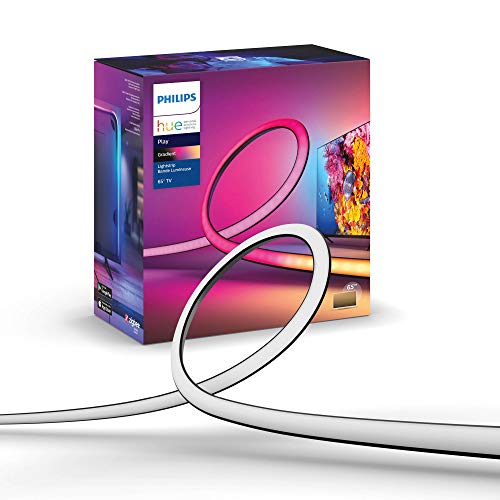
TL;DR: The Philips Hue Play Gradient 65 delivers 7‑zone, 16‑million‑color backlighting for 65‑70″ TVs, but you’ll need a Hue Bridge and Sync Box to unlock its full sync potential.
At 254 cm long, the Gradient 65 is the longest strip in this lineup, dwarfing the Philips Hue Large’s 1,377 mm length. It weighs about 1.90 lb, putting it just above the Philips Hue Large (1.87 lb) and ASUS ROG Aura (1.46 lb) but lighter than the Govee Gaming Lights (2.1 lb). The strip packs 16 million colors, 7 simultaneous zones, and a lumen output of 1,100‑1,230 lm, all powered by a 20 W driver that draws 0.83 A at 24 V.
Compared with the other ten contenders, the Hue Play Gradient sits in the premium tier. It’s pricier than budget‑friendly options like the Govee Gaming Lights and Nanoleaf Shapes, yet it offers deeper integration with the Hue ecosystem than the ASUS Aura or Corsair iCUE strips, which lack Hue’s dedicated sync capabilities. Its silicone sleeve and adhesive‑backed clips make installation cleaner than the magnetic mounts of the Govee Pro bars.
Reviewers love how the gradient “flows beautifully across the room” and praise the precise HDMI‑based sync via the Hue Sync Box, noting a more immersive experience than single‑color strips. The LEDs are rated at a 25,000‑hour lifespan and a low 0.5 W standby draw, indicating long‑term reliability. The main complaints focus on the extra cost of a required Hue Bridge and Sync Box, plus the fact the strip can’t be cut or extended for unconventional TV sizes, and some users find the brightness modest in very bright living rooms.
Pros
Cons
Best for: Hue ecosystem owners with 65‑70″ TVs who want premium, screen‑synced ambient lighting.
Avoid if: You’re on a tight budget, lack a Hue Bridge, or need a bright‑room solution without additional hardware.
“transforms movie nights,”
“colors flow beautifully across the room”
TL;DR: The Govee Gaming Lights offer a 10‑ft IP67‑rated neon silicone strip with 42 controllable segments, 16.8 million colors, and Razer Chroma sync for immersive desk lighting at $74.99.
At 10 ft (3 m) long and 1.1 in wide, the strip delivers continuous illumination thanks to 252 LEDs arranged at 84 LEDs per meter. Its 42 controllable segments let you assign different hues to each zone, while the 16.8 million‑color palette ensures vibrant effects. An IP67 rating protects the rope from dust and water, and the softer neon silicone material adds flexibility for desk‑edge installations.
Compared with the other contenders, this model runs significantly longer than the Govee Gaming Light Bars Pro, which measures under a foot, and it weighs 2.1 lbs—considerably more than the Corsair iCUE ARGB PSU Cable Strips at 0.123 lbs and the Nanoleaf Shapes Triangles at 0.992 lbs. While some rivals like the Thermaltake TT Sync list fewer lighting features, the Govee strip packs more zones, music modes, and voice‑assistant support.
Reviewers praise the segmented RGBIC design for creating dynamic, per‑zone effects that sync with game action, and they like the glare‑free diffusion that reduces eye strain. Professional reviewers note the high LED density for gap‑free lighting and the reliable Razer Chroma integration. Some users question whether the strip can produce warm, soothing tones alongside its neon vibe.
Beyond the basics, the strip supports AI Dreamview Sync for automatic game‑based lighting, works with Alexa and Google Assistant for hands‑free control, and offers 11 music modes that react to ambient sound. You can cut the rope at 12 predefined points to fit custom lengths, and the built‑in dimming lets you fine‑tune brightness for any setting.
Pros
Cons
Best for: Most users looking for a well‑reviewed, reliable mainstream option
Avoid if: You have limited desk space or need portability
“enhanced brightness, smooth RGB transitions, and immersive sync”
TL;DR: The NZXT Control Hub packs PWM fan and RGB control for up to five devices into a 15.9 mm‑high, 0.33 lb hub for $42.49, but its proprietary connectors keep you locked into the NZXT ecosystem.
The standout spec is its ultra‑compact chassis – just 15.9 mm tall, 100 mm deep and 70 mm wide – while still offering three NZXT 8‑pin PWM‑only fan channels, one combo DC+PWM channel and four RGB 8‑pin outputs. It can drive five PWM fans and five NZXT RGB devices, with up to 96 LEDs per fan channel and 40 LEDs on the dedicated RGB channel, all powered from a single 8‑pin PCIe connector.
Compared with the other ten entries, the hub is lighter than the Nanoleaf Shapes Triangles (0.99 lb) and far lighter than the Govee Gaming Lights (2.1 lb), but heavier than the Thermaltake TT Sync (0.19 lb) and the Corsair iCUE ARGB PSU Cable Strips (0.12 lb). Its 15.9 mm height is taller than Thermaltake’s 7.5 mm profile, yet still slimmer than many strip‑style solutions that list no height at all. In price, it sits between the budget‑focused Thermaltake TT Sync and the higher‑priced Govee lights, offering a middle‑ground value proposition.
Reviewers consistently praise the hub’s plug‑and‑play feel: professional reviewers note the easy PCIe‑powered setup and the smooth USB 2.0 link to NZXT CAM, which auto‑detects connected devices. Users love the Zero RPM mode that stops fans completely under low load for silent operation. However, the same sources flag the proprietary NZXT connectors as a drawback, limiting compatibility with standard 5 V ARGB strips or non‑NZXT fans. Needing both a PCIe power cable and a motherboard USB header also makes it a tight fit in very small cases.
On the technical side, each channel can draw up to 12 W, with a total ceiling of 36 W across all outputs. The hub supports fine‑tuned fan curves and automatic device detection within the CAM software, and it includes four 4‑pin PWM and RGB splitter cables to help tidy up cable routing.
Pros
Cons
Best for: NZXT‑centric builders who want a budget‑friendly way to manage up to five fans and five RGB devices with synchronized lighting.
Avoid if: You rely on mixed‑brand fans or standard 5 V ARGB lighting strips, or need the ability to mix PWM and DC fans on a single channel.
TL;DR: For $13.97 you get two 250 mm addressable RGB strips that mount with magnets, sync via NZXT CAM, and deliver vivid colors, though the short length may need multiple strips for larger builds.
Weighing just 0.04 lb (20 g) per strip and a compact 75.8 mm height, the hardware fits easily into tight case interiors. Users also appreciate the magnetic mounting and double‑sided tape that make installation a snap.
Compared with other options in this roundup, the Hue 2 is significantly lighter than the BTF‑LIGHTING PC RGB Strip (0.13 lb) and the Thermaltake TT Sync (0.19 lb). It also lands at the lower end of the price spectrum, making it a budget‑friendly alternative to pricier controllers like the NZXT Control Hub. While it offers fewer accessories per channel than some competitors, the ability to daisy‑chain up to four devices per channel keeps wiring tidy.
Professional reviewers note the strip’s bright output and smooth color diffusion, and everyday users repeatedly praise the hassle‑free magnetic mounting. The main trade‑offs are the 250 mm length, which many say is short for full‑case coverage, and the plastic feel of the controller, which some find cheap. The ecosystem lock‑in means you’ll need a compatible NZXT HUE 2 controller and the Windows‑only NZXT CAM software to unlock synchronized lighting effects. NZXT backs the kit with a two‑year manufacturer warranty.
Pros
Cons
Best for: Budget‑friendly builders already using the NZXT ecosystem who want vibrant interior lighting.
Avoid if: You need long continuous strips, run a non‑Windows OS, or don’t have a HUE 2 controller.
“Bright, customizable RGB effects with vivid colors and good diffusion”
TL;DR: The Philips Hue Large delivers up to 1,800 lumens, 16 million colors and 340° of rotation for immersive gaming sync, but it costs $181.49 and needs a Hue Bridge and Sync Box.
What really stands out is the 1,800 lumens output at 4,000 K and the 340° rotation angle, giving you a broad wash of light that can hug the back of a 60‑inch+ TV. The strip also supports 16 million colors and a 2,000 mm cable, so you can place the power source conveniently while keeping the tube hidden.
Compared with the other ten entries, the Hue Large is slightly lighter than the Philips Hue Play Gradient 65 (about 1.90 lb) but heavier than the ASUS ROG Aura Monitor Light Bar (1.46 lb). Its 1,377 mm length is shorter than the Play Gradient 65’s 2,540 mm tube and the Govee Gaming Lights’ 3 m strip, yet longer than the ASUS ROG’s 498 mm bar and the Govee Gaming Light Bars Pro’s 406 mm bar. In weight terms, it’s lighter than the Govee Gaming Lights at 2.1 lb and heavier than the ASUS ROG bar.
Users love the way the light syncs with TV, music and gaming via the Hue Sync Box, calling it a “great compliment” to the Hue ecosystem. Professional reviewers note that it “delivers exactly what it is supposed to” and adds a sleek modern look to a living‑room setup. The main complaints focus on the need for a separate Hue Bridge and Sync Box, the non‑replaceable LEDs, and the IP20 rating that keeps it out of humid spaces.
On the technical side, the unit runs on 20 watts, falls into Energy Class G and carries a Class III – Safe Extra Low Voltage rating. With a lifespan of 25,000 hours, the LEDs last, and you can control the tube via the Hue app or voice assistants. The aluminum‑plastic construction and 31 mm width keep the profile slim while the 34 mm height makes it unobtrusive.
Pros
Cons
Best for: Those prioritizing quality and willing to pay for premium performance
Avoid if: You're shopping on a tight budget — it's priced at $181.49
“transforms movie nights,”
“colors flow beautifully across the room”
TL;DR: The Thermaltake TT Sync is a 9‑port addressable RGB hub with a slim 7.5 mm profile, SATA power input and native Aura Sync support, ideal for modest‑size builds on a modest budget.
The standout spec is its nine‑port layout packed into a 7.5 mm‑high, 90 mm‑long chassis that weighs just 0.19 lb. It draws power directly from a SATA connector, delivering both 12 V and 5 V without extra adapters, and can handle up to five fans per supported Thermaltake series while powering up to nine LED devices.
Compared with the other ten contenders, the TT Sync is heavier than the ultra‑light NZXT Hue 2 (about 0.04 lb) but lighter than the bulkier NZXT Control Hub (around 0.33 lb). Its 7.5 mm height makes it much slimmer than the Hue 2’s 75.8 mm profile, and its 90 mm length sits just under the Hue 2’s 100.1 mm strip, giving it a compact footprint while still offering more ports than most strip‑based options.
Users appreciate the clean cable management that the SATA power input provides, noting that it eliminates the need for external adapters and reduces stray currents. Reviewers also praise the smooth integration with ASUS Aura, Gigabyte Digital Pin, MSI JRAINBOW and ASRock addressable RGB headers, which lets you control Thermaltake fans and strips from your motherboard software. Professional reviewers, however, point out that the controller only works with 5 V addressable headers—12 V headers won’t function— and that the 5 A SATA current limit can become a bottleneck for larger fan arrays. The 4.0‑star rating from 594 reviews sits below the higher scores of some rivals, reflecting mixed feelings about its value versus price.
Pros
Cons
Best for: RGB system builders who use Thermaltake addressable fans, LED strips, or water‑cooling components and want a tidy, motherboard‑driven lighting solution.
Avoid if: You need 12 V addressable headers or plan to power a large number of high‑power RGB fans beyond the 5 A SATA limit.
TL;DR: Corsair iCUE ARGB PSU Cable Strips add two 200 mm, 100‑LED addressable strips to your power cables for vivid sync across major RGB ecosystems, but they demand SATA power and carry a $59.99 price tag.
Each kit contains two 200 mm LED strips, each packed with 100 individually addressable RGB LEDs, and they hook up to a 5 V ARGB header. The flexible silicone backing and included single‑ and dual‑size clips let you peel‑and‑stick the strips onto any 24‑pin or SATA PSU cable, while the whole package weighs just 0.123pounds.
Compared with the other ten entries, this model sits at the higher end of the price spectrum, making it pricier than the budget‑focused Thermaltake TT Sync. It’s also notably lighter than the Nanoleaf Shapes Triangles, which tip the scales at roughly a pound. In length it’s shorter than the 10‑ft Govee Gaming Lights, so it won’t cover long cable runs the way some competitors do.
Reviewers consistently praise the straightforward adhesive installation and the vibrant colors that instantly brighten an otherwise hidden part of the build. Professionals note the broad sync support—ASUS Aura Sync, Gigabyte RGB Fusion, MSI Mystic Light, Corsair iCUE, and ASRock Polychrome—making it a solid fit for mixed‑brand rigs. The main complaints focus on the need for SATA power when using three or more strips, which can cause glitching, and the 200 mm length that may feel short for larger power supplies. The kit also leans heavily toward the Corsair ecosystem, so non‑Corsair users might need adapters.
Pros
Cons
Best for: PC enthusiasts with ARGB‑compatible motherboards or Corsair setups who want to illuminate PSU cables.
Avoid if: You lack ARGB support, need longer continuous lighting, or cannot provide SATA power for multiple strips.
“fantastic addition”
“polished, pro finish”
TL;DR: The ASUS ROG Aura Monitor Light Bar delivers >800 lux of high‑CRI illumination, clamps to a wide range of monitors, and syncs with Aura gear, but its $214.92 price and USB‑C‑only power may limit budget‑focused setups.
What really stands out is the light output: the center illuminance exceeds 800 lux at a typical desk distance, while the average brightness stays above 500 lux and the Color Rendering Index hits ≥95, so colors look natural on any work or gaming surface. The bar measures 106.68 mm high, 497.84 mm long and 116.84 mm wide, and weighs just 1.46 pounds, making it a compact addition to a monitor‑centric desk.
Compared with the other ten contenders, this unit sits at the higher end of the price spectrum and is lighter than the 2.1‑pound Govee Gaming Lights, yet heavier than the ultra‑light Nanoleaf Shapes Triangles. Its three lighting modes—Screen Light, Aura RGB, and Combined—offer more on‑device flexibility than the Philips Hue Play Gradient 65, which lists fewer modes, and the clamp’s 6–30 mm (curved) and 9–55 mm (flat) range covers more monitor thicknesses than many of the magnetic or adhesive‑mounted peers.
Users repeatedly praise the bright, uniform wash that eases eye strain during long sessions, and they like the straightforward clamp that clicks onto both flat and curved screens. Professional reviewers note the precise dial for fine‑tuning brightness and color temperature, while some owners mention occasional glitches in the DisplayWidget Center software on non‑ASUS monitors and the limitation of a single USB‑C power source (5 V / 1 A, max 5 W) with no optional adapter.
Additional technical details include IEC 62471 and IEEE Std 1789 certifications, dual LED + RGB light source, and software support via Armoury Crate and ASUS DisplayWidget Center. The bar’s power draw of 5 W is modest, but the lack of a separate power brick means placement's tied to a USB‑C port.
Pros
Cons
Best for: Those prioritizing quality and willing to pay for premium performance
Avoid if: Reliability and user satisfaction are your top concerns
Breakdown
Nanoleaf Shapes Triangles
Pros
BTF-LIGHTING PC RGB Strip
Pros
Govee Gaming Light Bars Pro
Pros
Philips Hue Play Gradient 65"
Pros
Based on scoring data and product specs
Personalized picks
Best Overall Pick
Nanoleaf Shapes Triangles
Best OverallBest for: Most users looking for a well-reviewed, reliable mainstream option
BTF-LIGHTING PC RGB Strip
Best for: Budget-conscious buyers seeking a reliable entry-level option
$8.99-$36.00 vs winner
Skip ASUS ROG Aura Monitor Light Bar if…
Reliability and user satisfaction are your top concerns
Nanoleaf Shapes Triangles take the top spot thanks to a strong 4.3 / 5 rating from 1,457 reviewers, over 16 million color choices and built‑in Wi‑Fi (2.4 GHz) that powers the Connect+ sync platform. The panels deliver 80 lm of white light and include music‑sync and screen‑mirror features, making them the most versatile lighting hub for a gaming setup.
The BTF‑LIGHTING PC RGB Strip earns runner‑up honors when you need a compact, budget‑friendly add‑on for a tight PC case. At just $8.99 it offers a 500 mm strip, 10 mm width and a 4‑pin RGB (GRB) connector that works with major motherboard ecosystems. Its 4.4 / 5 rating from 968 reviews shows users appreciate the 24‑bit color depth and 120° view angle for subtle case lighting.
Pick Nanoleaf Shapes Triangles for the most flexible, feature‑rich gaming lighting you can sync across your whole ecosystem.
The BTF‑LIGHTING PC RGB Strip is rated IP30, so it isn’t protected against moisture and should stay dry. In contrast, the Govee Gaming Lights have an IP67 rating, making them water‑resistant and a safer choice for humid rooms or near windows.
No reviews yet — be the first to share your experience.
Please sign in to leave a review



