⚡ Quick Answer
Finding the right smart lighting for a gaming setup can feel like a side quest, especially when you want app control, voice integration, and a look that matches your rig. We compared 9 products that promise everything from strip‑light ambience to monitor‑sized backlighting. The lineup stretches from the $9.99 Daybetter LED Strip Lights – the cheapest option – up to the $181.49 Philips Hue Large, the most premium entry. Our tier map groups them into budget, mid‑range, and premium categories so you can spot the price bracket that fits your build.
If you want a modular wall setup, the Govee Glide Wall Lights cost $49.99, have a 4.5‑star rating and draw 36 W, letting you snap seven 12‑inch segments together without tools. For monitor‑side immersion, the Govee Gaming Light Bars Pro cost $84.99 and earned a 4.8‑star rating, while the Logitech Litra Glow sits at $49.99 with a 4.5‑star score and 250 lumens for desk streaming. Budget‑friendly Daybetter strips deliver 130 ft of 16 million‑color light for $9.99 and weigh just 0.68 lb. Premium‑tier Philips Hue Play Gradient 65 adds 16 million colors at $149.99 for TV‑size ambience. Below we’ll explore each model’s strengths, control options, and best use‑cases.

Govee Glide Wall Lights
Its 0.98‑in thin profile lets it hug walls without taking up space, delivering strong value and brand confidence.

Govee Gaming Light Bars Pro
Ideal for gamers who want premium performance, the Govee Gaming Light Bars Pro costs $84.99—about $35 more than the Best Overall model—but offers higher rating and deeper 400‑mm height.

Logitech Litra Glow
The Logitech Litra Glow’s compact 1.71‑in depth and 3.56‑in light‑head height make it perfect for tight desk spaces, offering a well‑reviewed alternative at the same $49.99 price as the Best Overall.
Also considered
Score Analysis
Key score advantages vs. runner-up (Govee Gaming Light)
Price Range
Govee Glide Wall Lights
$49.99
Govee Gaming Light Bars Pro
$79.99
Logitech Litra Glow
$49.99

NZXT Control Hub
$44.99
Philips Hue Play Gradient 65"
$153.99

Philips Hue Large
$241.99

Nanoleaf Shapes Triangles
$44.99

Govee Gaming Lights
$79.99

Daybetter LED Strip Lights
$9.99
Spec Comparison
TL;DR: The Govee Glide Wall Lights deliver 57‑color RGBIC effects, 40+ scene modes, and voice/app control for $49.99, though they’re dimmer than higher‑output strips and lack a physical power switch.
What really sets the Glide apart is its patented RGBIC technology, which can show up to 57 colors at once from a 16‑million‑color palette. The kit comes with seven click‑together pieces (six straight 12‑inch segments and one corner) that span a total length of 11.81 in, stand 0.98 in tall, and are 1.38 in wide. Power draw sits at 36 W, drawing from a 36 V source, and the unit houses 252 LEDs that drive six‑to‑eight music‑reactive modes plus over 40 preset scenes.
Compared with the other eight lights in this roundup, the Glide is heavier than the Nanoleaf Shapes Triangles (about 0.99 lb) and the Logitech Litra Glow (roughly 0.39 lb), but it’s a shade lighter than the Govee Gaming Lights (around 2.1 lb). Its 11.81 in length is far shorter than the 10‑ft strip of the Govee Gaming Lights and more compact than the long Philips Hue Play Gradient 65 panels. While its $49.99 price point sits below premium offerings like the Philips Hue line, it still offers a richer feature set than basic LED strips that lack voice integration.
Users consistently praise the tool‑free, velcro‑and‑adhesive installation and the ability to sync lighting to music via the built‑in microphone. Professional reviewers note the smooth, diffuser‑cased glow and the fluid gradients that RGBIC creates across the modular segments. The main trade‑off is brightness: the Glide’s output feels lower than lumen‑rated competitors, and the lack of a physical on/off switch means you’ll rely on the Govee Home app or voice commands to power it.
Pros
Cons
Best for: Gamers, streamers, and party hosts who want affordable, customizable wall lighting with smart app and voice control.
Avoid if: You need bright task lighting, a physical on/off switch, or more versatile shape configurations for complex installations.
“Group control for multiple units works well for expanded setups.”
TL;DR: The Govee Gaming Light Bars Pro deliver triple‑sided RGBIC lighting, 16 million colors and AI voice control for 24‑32‑inch monitors, but full screen sync works only on Windows.
What really sets these bars apart is the triple‑sided RGBIC illumination across a 406 mm length, offering 16 million hues and 60+ scene presets. The bars also include a built‑in microphone for eight music‑sync modes and support AI voice commands through Matter, Google Assistant, Alexa, Razer and Corsair. With a magnetic mount, you snap the bars onto the monitor frame for quick installation.
Compared with the other eight contenders, the Light Bars Pro are more compact than the 10 ft Govee Gaming Lights and shorter than the 11.81 in length of the Govee Glide Wall Lights. They stand taller than the 0.98‑in height of the Glide Wall Lights, yet they're slightly taller than the 14.41‑in mounted height of the Logitech Litra Glow. While many peers rely on hubs or additional accessories, the Pro bars need no hub and run directly over Wi‑Fi.
Users consistently praise the immersive ambience created by the triple‑sided lighting and the ease of magnetic attachment. Reviewers also note the smooth color transitions and the convenience of voice control. Professional reviewers highlight the enhanced brightness and precise RGB effects as a step up from single‑sided strips. The main complaints focus on the Windows‑only desktop sync, occasional app glitches during color changes, and the built‑in microphone picking up background noise in music mode.
The bars support 8 music sync modes, one‑tap preset activation, and a desktop app that works on Windows. They come with a one‑year warranty and are offered in a gray, cyber‑punk‑styled housing made from high‑quality PC plastic with a metal texture coating. The manufacturer doesn't list weight, voltage or power consumption.
Pros
Cons
Best for: PC gamers with 24‑32‑inch monitors who want immersive, real‑time screen‑sync lighting and smart‑home voice control.
Avoid if: You rely on macOS or Linux for screen sync, need a lower‑cost basic light strip, or have a monitor outside the 24‑32‑inch range.
“enhanced brightness, smooth RGB transitions, and immersive sync”
TL;DR: The Logitech Litra Glow offers a 2700‑6500 K bi‑color LED, 250 lumens output, and a 4‑inch telescoping mount in a lightweight 6.24 oz design, making it a solid mid‑range streaming light.
The standout spec is its adjustable 4‑inch vertical telescoping extension, letting you raise the light from a compact 3.56 in head height up to a full 14.41 in with the monitor mount. Coupled with a 2700 K – 6500 K color temperature range and a default 6500 K setting, it covers warm to cool lighting for skin‑tone‑accurate video.
At 6.24 oz, the Litra Glow is lighter than the Govee Glide Wall Lights (2.0 lb) and heavier than the Nanoleaf Shapes Triangles (≈0.99 lb). Its 1.71‑in depth also makes it shallower than the NZXT Control Hub’s 100 mm (≈3.94 in) depth, so it occupies less desk real‑estate than many competitors.
Users repeatedly praise the plug‑and‑play USB power via the 4.92‑foot cable and the frameless diffuser that delivers “cinematic” illumination. Professional reviewers note the quick setup with manual +/- buttons or the Logitech G HUB app, while several users flag the 250‑lumen ceiling as a limitation in larger rooms and the mount height as a potential obstacle for dual‑monitor rigs.
Pros
Cons
Best for: Most users looking for a well‑reviewed, reliable mainstream option
Avoid if: You have limited desk space or need portability
“"easy" to use—simply plug it into USB, and it can be controlled via manual buttons or the G HUB app.”
TL;DR: The NZXT Control Hub manages up to five PWM fans and five NZXT RGB devices from a compact 15.9 mm‑high hub for $42.49, but its proprietary connectors limit mixed‑brand upgrades.
This hub’s standout spec is its ability to control five PWM fans and five NZXT RGB devices, with up to 96 LEDs per 8‑pin channel and 40 LEDs on the dedicated RGB channel. Zero RPM mode lets fans stop completely under low load, and the CAM software automatically detects connected devices.
At $42.49 it sits just below the Nanoleaf Shapes Triangles price of $44.99 and well under the Govee Gaming Light Bars Pro at $84.99, making it one of the more affordable options in the lineup. It’s also lighter than the Nanoleaf set’s 0.992080179 pounds, weighing only 150 g (0.330693393 Pounds), and its 100 mm depth is deeper than the 80 mm depth of the Govee Gaming Light Bars Pro, which may matter in cramped cases.
Professional reviewers highlight the hub’s easy PCIe‑powered setup and seamless CAM integration, noting that the included splitters simplify wiring for NZXT Core and Aer fans. Users appreciate that Zero RPM enables silent operation, but many flag the proprietary NZXT connectors as a barrier if you plan to mix in non‑NZXT ARGB strips or standard 5 V lighting.
Pros
Cons
Best for: Entry-level buyers or those on a tight budget
Avoid if: You want the best value-per-dollar in its price range
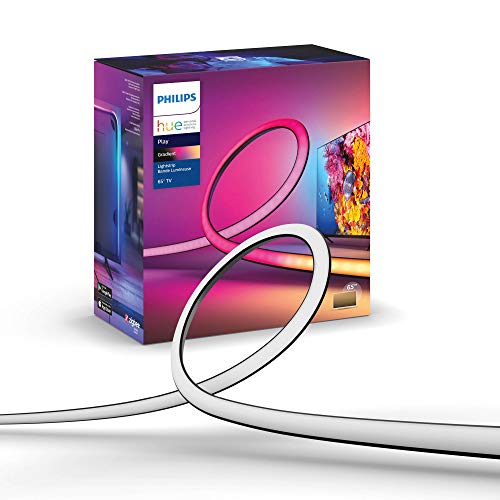
TL;DR: The Philips Hue Play Gradient 65 delivers a 254 cm, 16‑million‑color, Wi‑Fi‑controlled lightstrip with seven zones and 20 W power draw, ideal for immersive TV backlighting but requires a Hue Bridge and Sync Box.
At 254 cm long, this strip spans the full width of a 65‑inch TV and offers seven independent color zones, each capable of displaying any of the 16 million colors in the 2000‑6500 K temperature range. It draws 20 W of power, produces 1100‑1230 lm, and weighs about 1.90 lb (gross 1.43 kg, net 0.87 kg), making it a substantial yet manageable addition to a home‑theater setup.
Compared with the other eight lights in the roundup, the Hue Play Gradient is longer than the bar‑style options like the Govee Gaming Light Bars Pro and Logitech Litra Glow, and its length rivals the full‑strip competitors. Its 20 W consumption matches the Philips Hue Large strip, while its lumen output sits below that larger Hue model but well above the 250‑lm output of the Logitech Litra Glow. In weight, it is heavier than the Nanoleaf Shapes Triangles and NZXT Control Hub, yet lighter than the Govee Gaming Lights and Govee Glide Wall Lights.
Users consistently praise the dramatic, screen‑synced ambience that the seven‑zone gradient creates, noting that the adhesive‑backed clips make installation quick and tidy. Professional reviewers highlight the precise HDMI‑based sync via the Hue Sync Box, while everyday owners love how the lights “transform movie nights.” The main complaints revolve around the extra cost of a required Hue Bridge and Sync Box, the inability to cut or extend the strip, and occasional dimness in very bright rooms.
Technical details add confidence: the strip has a standby draw of only 0.5 W, a rated lifetime of 25,000 hours, and an IP20 rating for finger protection. Philips backs it with a two‑year manufacturer warranty, reinforcing its premium positioning within the Hue ecosystem.
Pros
Cons
Best for: Buyers willing to invest in a proven, high‑quality option
Avoid if: You need a budget‑friendly solution, lack a Hue Bridge, or plan to use the strip in extremely bright environments
“transforms movie nights,”
“colors flow beautifully across the room”
TL;DR: The Philips Hue Large delivers up to 1,800 lumens of brightness, 16 million colors and 340° of rotation, but you’ll need a Hue Bridge and Sync Box to unlock its full gaming‑room potential.
The standout spec delivers 1,800 lumens at 4000 K, paired with a 2,000 mm cable that lets you reach the back of a 60‑inch‑plus TV while staying slim at just 34 mm tall. It draws only 20 watts, making it one of the most power‑efficient options in this lineup, and the 340° rotation angle lets you fine‑tune the spill to match any screen size.
At 1.87 pounds, the Hue Large is a touch lighter than the Philips Hue Play Gradient 65 (about 1.90 pounds) but heavier than the Nanoleaf Shapes Triangles (0.99 pounds). Its 1,377 mm length outpaces the Govee Gaming Light Bars Pro’s 406 mm strip, yet it’s shorter than the Hue Play Gradient 65’s 2,540 mm run. Power‑draw wise, it sips 20 watts compared with the 48 watts of Govee Gaming Lights, giving you bright ambience without a hefty energy bill.
Reviewers love how the light syncs to TV, music and gaming via the Hue Sync Box, calling it a “great compliment” to the Hue Play ecosystem and praising the sleek aluminium finish. Users repeatedly mention the immersive vibe it adds to movie nights and fast‑paced games. Feedback highlights downsides: the need for a separate Hue Bridge and Sync Box, the non‑replaceable LED design, and the IP20 rating that keeps it out of damp environments.
Pros
Cons
Best for: Gamers with 60"+ TVs and home‑theater enthusiasts who want synchronized, high‑brightness lighting that reacts to on‑screen action.
Avoid if: You’re on a tight budget or have a smaller TV, since the $181.49 price and extra Hue hardware requirements can quickly add up.
“transforms movie nights,”
“colors flow beautifully across the room”
TL;DR: Nanoleaf Shapes Triangles deliver modular RGBW lighting with 2.5 m cables, 6.1 mm slim panels, and smart‑app control, making them a solid budget pick for gamers who want customizable ambience.
Each triangle panel is only 6.1 mm thick, yet it houses an RGBW LED that can output 80 lm in white mode and 8 lm in ultra‑black mode. The panels link via Connect+ technology, allowing up to 500 triangles to be controlled from a single controller, while the built‑in touch surface lets you adjust brightness without opening an app. At 0.99 lb per panel and with a 2.5 m cable, you can easily mount and route the kit behind a gaming desk.
Compared with the other eight contenders, the Shapes are heavier than the NZXT Control Hub (0.33 lb) and the Daybetter LED Strip Lights (0.68 lb), but lighter than the Govee Glide Wall Lights (2.0 lb) and the Philips Hue Play Gradient (1.90 lb). Its 2.5 m cable outpaces the Logitech Litra Glow’s 1.5 m cable, though it’s shorter than the Govee Gaming Lights’ 3 m length. At 6.1 mm thickness, the panels are slimmer than the Philips Hue Play Gradient’s 16 mm height, giving them a low‑profile look on a wall.
Reviewers consistently praise the smooth Connect+ linking and the responsive touch control, noting that the panels sync well with game audio and can mirror on‑screen action. The most common complaints focus on the exclusive 2.4 GHz Wi‑Fi support, which can be a hassle in homes that rely on 5 GHz networks, and the limitation that the included 42 W power supply can only run up to 28 panels, restricting very large installations. The product’s 25 000‑hour rated lifetime and 1.5 W energy draw per panel help keep operating costs low.
Pros
Cons
Best for: Gamers who want customizable ambient lighting with smart‑app control on a budget.
Avoid if: You need high‑brightness primary lighting, a 5 GHz Wi‑Fi environment, or large‑scale installations exceeding 28 panels.
TL;DR: The Govee Gaming Lights provide 10 ft of IP67‑rated, 16.8 million‑color RGBIC lighting with 42 controllable segments and app control for $74.99, backed by a 4.5‑star rating from 951 reviewers.
At 10 ft (3 m) long, the strip offers a generous coverage area for a gaming desk, and its 42 controllable segments let you assign colors to each zone for dynamic, per‑segment effects. The softer neon silicone material, combined with a 1.1 in width, makes the rope easy to bend around monitors or desk edges while staying durable.
Compared with the other eight entries, the Govee Gaming Lights sit in the mid‑price range—more expensive than the Daybetter LED Strip Lights but cheaper than the Philips Hue Play Gradient 65. They weigh 2.1 lb, a touch heavier than the 2.0 lb Govee Glide Wall Lights, and are longer than the 406 mm Govee Gaming Light Bars Pro. While the Glide Wall Lights and Nanoleaf Shapes focus on wall mounting, this product’s flexible rope design targets desk‑level immersion.
User feedback highlights the segmented RGBIC lighting as a major plus, with reviewers praising the 16.8 million‑color palette and the glare‑free diffusion that reduces eye strain during marathon sessions. Professional reviewers note the high LED density of 84 LEDs per meter for smooth illumination, but a recurring comment is uncertainty about the strip’s ability to emit warm, soothing tones alongside its neon vibe.
Technical details reinforce its gaming focus: the strip draws 48 W at 24 V, supports 64+ preset scene modes, 11 music‑sync modes, and integrates with Razer Chroma and voice assistants like Alexa and Google Assistant. The Govee Home app provides full control, and you can cut the rope at 12 preset points for custom lengths.
Pros
Cons
Best for: Most users looking for a well‑reviewed, reliable mainstream option
Avoid if: You're shopping on a tight budget — it's priced at $74.99
“enhanced brightness, smooth RGB transitions, and immersive sync”
TL;DR: Daybetter’s 130‑ft RGB LED strip lights deliver 16 million colors, music sync and app control for just $9.99, so they're a budget‑friendly way to light up a gaming room.
The kit’s standout spec is its total length: two 65.6‑ft rolls give you 130 ft of continuous lighting, enough to line a full‑size bedroom or gaming setup without buying extra pieces. With eight brightness levels and a 24‑key IR remote plus a dedicated DAYBETTER smartphone app, you can switch between static, breathing, fading and music‑sync modes on the fly.
Compared with the other eight contenders, Daybetter is the most affordable option and also the lightest, weighing just 0.68 lb versus the Nanoleaf Shapes Triangles at roughly 0.99 lb and the Govee Gaming Lights at about 2.1 lb. Its 130‑ft reach dwarfs the 10‑ft strip of the Govee Gaming Lights and the 406‑mm bars of the Govee Gaming Light Bars Pro, though it lacks the Wi‑Fi and voice‑assistant integration those models offer. Professional reviewers note that the inclusion of a 24 V power adapter ensures stable voltage across the entire length.
User sentiment highlights the bright, room‑filling glow and the fun of syncing lights to music, especially for teenage gamers setting up a bedroom arena. Reviewers frequently praise the quick self‑adhesive installation and the extensive 16 million‑color palette, while a few mention occasional hiccups with the app’s Bluetooth connection. The indoor‑only adhesive and the fact that the strips can't be linked to additional kits are common caveats.
Pros
Cons
Best for: Budget‑conscious gamers and bedroom decorators who want extensive indoor RGB lighting with music sync.
Avoid if: You need outdoor lighting, extensibility beyond 130 ft, or the most robust smart‑home integration.
“The 130ft kit is ideal for bedroom or living room decoration with easy setup via self‑adhesive strips.”
Breakdown
Govee Glide Wall Lights
Pros
Govee Gaming Light Bars Pro
Pros
Logitech Litra Glow
Pros
NZXT Control Hub
Pros
Cons
Based on scoring data and product specs
Personalized picks
Best Overall Pick
Govee Glide Wall Lights
Best OverallBest for: Most users looking for a well-reviewed, reliable mainstream option
Govee Gaming Light Bars Pro
Best for: Those prioritizing quality and willing to pay for premium performance
$79.99+$30.00 vs winner
Skip Daybetter LED Strip Lights if…
Reliability and user satisfaction are your top concerns
We’re naming the Govee Glide Wall Lights the clear winner for gaming lighting with smart app control. They pack 16 million colors, a 252‑LED array, and Wi‑Fi connectivity, and you manage them through an intuitive app and voice assistants like Alexa and Google Assistant. The modular 7‑piece design (six 12‑inch straight segments plus a corner piece) lets you install it without tools, and the unit weighs just 2.0 lb. With a solid 4.5‑star rating from 3,248 reviews at $49.99, they deliver the best blend of flexibility, feature set, and value.
The runner‑up, Govee Gaming Light Bars Pro, shines when you need immersive lighting that hugs a 24‑ to 32‑inch monitor. Its triple‑sided RGBIC strips span 406 mm and offer 16 million hues plus 60+ scene presets, and you control them via Wi‑Fi and AI voice commands. Magnetic mounting makes setup a snap, and the built‑in microphone powers eight music‑sync modes for reactive effects. At $84.99 and a 4.8‑star rating from 185 reviewers, it’s the go‑to choice for a dedicated desk‑side glow.
For tighter budgets, the Daybetter LED Strip Lights deliver basic ambient lighting at just $9.99, making them the best value entry point. If you’re willing to splurge, the Philips Hue Large stands out as the premium alternative at $181.49, offering the high‑end ecosystem many smart‑home enthusiasts crave.
Pick the Govee Glide Wall Lights today and upgrade your gaming vibe instantly.
Yes. The Glide comes in six 12‑inch straight segments plus a 3‑inch corner piece, and it mounts with velcro and adhesive, so you can arrange a custom layout without drilling. At just 0.98 in tall and 1.38 in wide, it stays low‑profile on tight spaces.
No reviews yet — be the first to share your experience.
Please sign in to leave a review



