⚡ Quick Answer
Choosing a monitor that can keep up with 240 Hz‑plus refresh rates can feel overwhelming, especially when you’ve got seven strong contenders to weigh. Our roundup spans the full price spectrum – budget picks like the Sceptre 27‑inch Curved Gaming Monitor at $137.97 and MSI’s MAG 32C6X at $185.95, a mid‑range LG 27G640A‑B for $296.99, and premium powerhouses such as the Asus ROG Strix XG27ACDNG at $669.00, the Alienware AW2725DF at $599.99, and the massive Samsung Odyssey G9 at $1 124.75.
If you crave the fastest possible motion, the Asus ROG Strix XG27ACDNG pushes a 360 Hz refresh rate and a 0.03 ms response time, while the Alienware AW2725DF matches that 360 Hz cadence with OLED brilliance. The Samsung Odyssey G9 features a 49‑inch ultrawide panel and 240 Hz, and the LG 27G640A‑B offers a 300 Hz refresh rate on a 27‑inch IPS screen. Even the budget‑friendly Sceptre still delivers a 240 Hz refresh rate and a 4.4/5 rating from over 5 500 reviewers.
Next, we’ll break down each model’s strengths, potential drawbacks, and who they’re best suited for, so you can pinpoint the monitor that fits your gaming rig and budget.

Asus ROG Strix XG27ACDNG
Its compact depth of 218.8 mm delivers premium performance in a smaller footprint, reinforcing the brand’s confidence and quality at this tier.

MSI MAG 32C6X
A good fit for entry‑level gamers or tight budgets, it’s about $483 cheaper than the Best Value pick.

Sceptre 27-inch Curved Gaming Monitor
Offers 99 % sRGB color gamut and 280 cd/m² brightness, delivering vivid visuals at a $48 lower price than the Runner‑Up.
Also considered
Score Analysis
Key score advantages vs. runner-up (MSI MAG 32C6X)
Price Range
Asus ROG Strix XG27ACDNG
$719.99
MSI MAG 32C6X
$185.95
Sceptre 27-inch Curved Gaming Monitor
$129.97
LG 27G640A-B
$276.50

Samsung Odyssey G9
$899.99

MSI G32C4X
$243.69

Alienware AW2725DF
$632.17
Spec Comparison
TL;DR: The Asus ROG Strix XG27ACDNG delivers a blistering 360 Hz QD‑OLED panel with a 0.03 ms response time, but its premium price and OLED burn‑in concerns make it a specialist’s choice.
This 26.5‑inch monitor packs a QD‑OLED panel that peaks at 1000 cd/m² brightness and a contrast ratio of 1,500,000:1. At a native 2560×1440 resolution it runs at an eye‑watering 360 Hz refresh rate and a 0.03 ms (GtG) response time, which professional reviewers call “standout” for competitive esports.
At $669.00 it sits above the Alienware AW2725DF in price, yet it’s lighter than the massive Samsung Odyssey G9 (23.4 lb) and it's heavier than the feather‑light MSI G32C4X (1.0 lb). Its 360 Hz refresh outpaces the LG 27G640A‑B’s 300 Hz and the Sceptre’s 240 Hz, putting it at the top of the speed tier in this seven‑monitor roundup.
Reviewers love the ultra‑fast motion and the OLED anti‑flicker tech, but they flag the lingering OLED burn‑in risk despite the custom heatsink and OLED Care+ features. Power draw can climb to <75 W during active use, which is higher than many LCD alternatives, and independent performance scores remain scarce.
Pros
Cons
Best for: Competitive esports gamers who demand the fastest possible refresh rates and premium color performance.
Avoid if: You’re sensitive to OLED burn‑in risk, need a low‑power solution, or are on a tight budget.
TL;DR: The MSI MAG 32C6X delivers a 31.5‑inch curved VA panel with a 250 Hz over‑clocked refresh rate and 1 ms MPRT response, all at a budget‑friendly $185.95 price.
What really stands out is the 250 Hz over‑clocked refresh rate paired with a 1 ms MPRT response time, giving ultra‑smooth motion on a large 31.5‑inch VA screen that curves at 1500R. The panel shines with a 3000:1 contrast ratio and 101 % sRGB coverage, making dark scenes pop while still handling bright colors.
Compared with the other six monitors in this roundup, the MAG 32C6X is heavier than the ultra‑light MSI G32C4X at 1.0 pounds but lighter than the Samsung Odyssey G9, which tips the scales at 23.4 pounds. Its 27.93‑inch width and 19.97‑inch height also exceed the Sceptre 27‑inch model, whose dimensions are listed as 635 mm wide and 436.5 mm tall. In depth, the MSI sits at 9.84 inches, a bit deeper than the Sceptre’s 203.2 mm but shallower than the Samsung’s 421 mm depth with stand. The monitor’s weight of 5.4 kg places it between the LG 27G640A‑B at 12.1 pounds and the Asus ROG Strix XG27ACDNG at 16.4 pounds, offering a solid but manageable desktop presence.
User sentiment highlights the high refresh rate and rapid response as major wins for competitive gamers, while reviewers note the low pixel density of 69 ppi on a 31.5‑inch screen can make individual pixels visible up close. HDR support appears but manufacturers describe it as “basic,” so it won’t satisfy those chasing premium HDR performance. The adaptive‑sync support helps keep tearing at the high refresh rates, and the stand offers height adjustment with a tilt range of –5° to 20°.
Additional technical context includes a typical brightness of 250 nits, a dynamic contrast ratio of 100,000,000:1, and a VA panel that delivers 178° viewing angles both horizontally and vertically. The monitor also features anti‑glare surface treatment and a 100 × 100 mm VESA mount for flexible mounting options.
Pros
Cons
Best for: Entry‑level buyers or those on a tight budget
Avoid if: You want the best value‑per‑dollar in its price range
TL;DR: The Sceptre C275B‑FWT240 delivers a 27‑inch VA panel with a 1500R curve, 240 Hz refresh and 1 ms response at a budget‑friendly $137.97, making it a solid entry‑level esports monitor.
Sceptre’s C275B‑FWT240 packs a 27‑inch VA panel with a 1500R curvature, 1920×1080 resolution, 240 Hz refresh rate and 1 ms response time. The edge‑lit LED backlight pushes 280 cd/m² brightness and the panel covers 99% sRGB, while the pixel pitch of 0.27 mm gives a fairly crisp image for Full HD.
At 27 inches it sits between the 31.5‑inch MSI models and the 26.7‑inch Alienware, making it a compact choice for desk‑bound gamers. Its 240 Hz refresh falls a notch below the 250‑Hz ceiling of the MSI MAG and MSI G32C4X and well under the LG’s 300 Hz, yet it still outpaces many 144 Hz panels. The 1 ms response matches the MSI and LG units and trails the high‑end Asus’s 0.03 ms by only a fraction.
User reviews applaud the ultra‑smooth motion and the immersive curve, especially for fast‑paced shooters and RTS titles. Built‑in speakers and a 3.5 mm headphone jack add convenience for casual setups. However, several buyers note that the 1080p resolution on a 27‑inch screen can look pixelated when working on documents, and the 280 cd/m² brightness may feel modest in bright rooms.
The monitor includes AMD FreeSync Premium, three HDMI ports (one 2.0, two 1.4) and a DisplayPort 1.2, so you can hook up a PC or console without sacrificing the 240 Hz rate. With a tilt range of –5° to +15° and VESA‑mount compatibility, you have basic ergonomic flexibility, though height adjustment isn’t provided.
Pros
Cons
Best for: Budget‑conscious gamers who want high refresh rates for competitive titles.
Avoid if: You need higher resolution, extensive ergonomics, or professional‑grade performance.
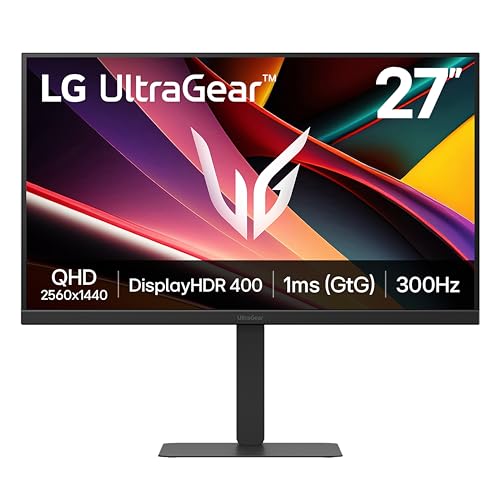
TL;DR: The LG 27G640A‑B delivers a blistering 300 Hz refresh on a 27‑inch QHD IPS panel with 1 ms GtG response, making it a solid mid‑range choice for competitive gamers.
The headline feature offers a 300 Hz refresh rate paired with a 1 ms gray‑to‑gray response time. This combo lets fast‑paced shooters and esports titles appear ultra‑smooth, while the IPS panel keeps colors consistent across the 16:9, 2560×1440 display.
Compared with the other six monitors in this roundup, the LG sits heavier than the ultra‑light MSI G32C4X (1.0 lb) but lighter than the Alienware AW2725DF (13.89 lb). Its 27‑inch screen is more compact than the 31.5‑inch MSI G32C4X and MSI MAG 32C6X, yet it still offers a higher refresh than the Sceptre 27‑inch Curved Gaming Monitor’s 240 Hz and the MSI G32C4X’s 250 Hz.
Reviewers repeatedly praise the monitor’s “ultra‑smooth motion” and “minimal ghosting,” attributing those qualities to the 300 Hz panel and 1 ms response. The DCI‑P3 95 % color gamut and VESA DisplayHDR 400 earn nods for richer visuals, though users note that brightness details aren’t listed in the spec sheet.
Additional technical notes include AMD FreeSync Premium and NVIDIA G‑Sync compatibility, a height‑tilt‑swivel‑pivot stand, and a 15 W USB‑C Power Delivery port for convenient cable management. The hexagon lighting adds a subtle aesthetic touch without overwhelming the workspace.
Pros
Cons
Best for: Competitive gamers and esports enthusiasts who need ultra‑high refresh rates on a QHD display.
Avoid if: You have a mid‑range graphics card that can’t sustain 300 Hz or you prioritize built‑in audio solutions.
TL;DR: The Samsung Odyssey G9 delivers a 49‑inch 32:9 VA panel with 240 Hz refresh, 1 ms response and 1000 nits HDR, but its premium price and size suit only dedicated gamers.
The standout spec features a massive 49‑inch screen with a 5120×1440 resolution and a 32:9 aspect ratio, paired with a 240 Hz refresh rate and a 1 ms (GtG) response time. Its VA panel reaches a peak brightness of 1000 nits and supports DisplayHDR 1000 plus HDR10+, giving bright, punchy colors across a 92% DCI‑P3 gamut.
Compared with the six other monitors in this roundup, the Odyssey G9 is pricier than the Asus ROG Strix XG27ACDNG and heavier than that model’s 16.4 lb weight. Its 240 Hz refresh outpaces the MSI G32C4X’s 250 Hz and the Sceptre 27‑inch’s 240 Hz, while its screen size dwarfs the 27‑inch and 31.5‑inch options. The monitor weighs 34.4 lb with the stand, compared to the lighter MSI G32C4X at just 1.0 lb.
User feedback highlights the ultra‑smooth motion and immersive curvature (1000R) as major wins for competitive shooters and expansive creative workflows. Reviewers praise the combination of fast response and high HDR brightness, yet several note the $1124.75 price tag and a 4.2‑star rating as deterrents for budget‑conscious buyers. The unit draws 180 W at maximum power and includes AMD FreeSync Premium Pro, CoreSync lighting and swivel/tilt adjustments for flexible setups.
Pros
Cons
Best for: Those prioritizing quality and willing to pay for premium performance
Avoid if: Reliability and user satisfaction are your top concerns
TL;DR: The MSI G32C4X offers a 31.5‑inch 1500R curved VA panel with a 250 Hz refresh rate and 1 ms response, delivering ultra‑smooth gameplay at a budget‑friendly $243.71 price.
The standout feature is its 1500R curvature, which wraps a 31.5‑inch screen around your field of view, while the 250 Hz refresh rate and 1 ms response time keep motion buttery smooth for fast‑paced shooters. Its VA panel delivers 300 cd/m² brightness and a 3000:1 contrast ratio, making dark scenes pop without sacrificing speed.
Compared with the other six monitors in this roundup, the G32C4X sits between the LG 27G640A‑B’s 300 Hz panel and the Sceptre 27‑inch’s 240 Hz offering. It's markedly lighter at 1.0 lb, whereas the LG weighs 12.1 pounds and the Alienware AW2725DF tips 13.89 lb. Height‑wise, it stands at 20.0 in, taller than the Alienware’s 15.99 in but shorter than the LG’s 21.2 in. Its depth of 9.8 in is comparable to the LG’s 9.4 in and the Alienware’s 9.59 in, keeping desk space reasonable.
Reviewers consistently praise the monitor’s “mind‑blowing” smoothness and the immersive feel of the 1500R curve, noting that competitive gamers feel an edge in reaction time. Everyday users echo that the monitor “works like a charm” for fast action, though many point out the lack of built‑in speakers and that the Full HD 1920×1080 resolution can look less sharp on a 31.5‑inch panel when used for productivity or media playback.
Beyond speed, the G32C4X includes AMD FreeSync Premium to eliminate tearing, a frameless design for a sleek desk look, and eye‑care features like anti‑flicker and low blue light. HDR Ready with dynamic contrast enhancement adds extra punch to bright scenes, while the 3.5 mm headphone jack gives you a simple audio hookup.
Pros
Cons
Best for: Competitive gamers who need ultra‑high refresh rates and low response times while staying on a tight budget.
Avoid if: You need built‑in audio, high‑resolution (QHD/4K) detail for professional work, or extensive stand adjustments.
TL;DR: The Alienware AW2725DF delivers a blister‑fast 360 Hz QD‑OLED panel with 0.03 ms response and 1000 cd/m² HDR, but its HDMI port caps console gaming at 144 Hz.
What really sets the AW2725DF apart is its 360 Hz refresh rate over DisplayPort and an industry‑leading 0.03 ms gray‑to‑gray response time. Coupled with a QD‑OLED panel that hits a 1000 cd/m² peak brightness and 99.3 % DCI‑P3 color gamut, the monitor delivers smooth motion at 360 Hz and vivid, deep‑black imagery on a 26.7‑in screen.
In the seven‑monitor lineup, its 13.89 lb chassis weighs less than the Asus ROG Strix XG27ACDNG’s 16.4 lb frame, yet considerably outweighs the 1.0 lb MSI G32C4X. The 26.7 in screen is just shy of the LG 27G640A‑B’s 27 in panel, but it matches the Asus model’s 360 Hz refresh rate, outpacing the LG’s 300 Hz and the MSI G32C4X’s 250 Hz. Even the Sceptre 27‑inch curved option lags at 240 Hz, making the Alienware the clear leader for raw frame‑rate performance.
Early owners rave about the “instant” feel of the 0.03 ms response and the punchy HDR that pushes 1000 cd/m² peaks, echoing professional notes from RTINGS.com and TFTCentral. However, many users flag the HDMI 2.1 limitation that restricts console output to 144 Hz at QHD, and a few report noticeable VRR flicker when frame rates dip. OLED‑specific concerns such as burn‑in risk also surface, especially among long‑session streamers.
The monitor supports AMD FreeSync Premium Pro and VESA AdaptiveSync, with backlight strobing enabled for reduced motion blur. It's VESA DisplayHDR True Black 400 certified, offers <2 ΔE color accuracy, and a 1.5 million:1 contrast ratio that further reinforce its premium visual credentials.
Pros
Cons
Best for: Competitive PC gamers seeking the highest frame rates and premium visual fidelity.
Avoid if: You primarily game on next‑gen consoles and need 4K @ 120 Hz, or you’re highly concerned about OLED burn‑in.
Breakdown
Asus ROG Strix XG27ACDNG
Pros
MSI MAG 32C6X
Pros
Cons
Sceptre 27-inch Curved Gaming Monitor
Pros
LG 27G640A-B
Pros
Cons
Based on scoring data and product specs
Personalized picks
Best Overall Pick
Asus ROG Strix XG27ACDNG
Best ValueBest for: Those prioritizing quality and willing to pay for premium performance
MSI MAG 32C6X
Best for: Entry-level buyers or those on a tight budget
$185.95-$534.04 vs winner
Skip Alienware AW2725DF if…
You're on a tight budget or only need basic functionality
We’re naming the Asus ROG Strix XG27ACDNG the clear winner. Its 360 Hz refresh rate and ultra‑fast 0.03 ms response time give you buttery‑smooth motion, while the QD‑OLED panel delivers a 1000 cd/m² HDR peak brightness and a 1,500,000:1 contrast ratio for vivid, punchy images.
The MSI MAG 32C6X lands as the runner‑up, ideal if you need a larger, curved display for immersive solo gaming on a tighter budget. Its 31.5‑inch VA panel curves at 1500R, supports an over‑clocked 250 Hz refresh, and offers a 1 ms response time, giving you a wide field of view without sacrificing speed.
For tighter wallets, the Sceptre 27‑inch Curved Gaming Monitor is the most affordable entry at $137.97. If you want a balanced choice, the LG 27G640A‑B sits nicely in the middle at $296.99, offering solid performance for its price. For those chasing the ultimate premium experience, the Samsung Odyssey G9 delivers the most expansive setup at $1124.75.
Pick the Asus ROG Strix XG27ACDNG now and enjoy top‑tier performance without compromise.
The Asus ROG Strix XG27ACDNG, priced at $669, combines a 360 Hz QD‑OLED panel, 0.03 ms response, 90 W USB‑C power delivery and built‑in KVM, giving a dominant value despite its higher cost. For tighter budgets the MSI MAG 32C6X at $185.95 still offers a solid 250 Hz refresh on a larger 31.5‑inch VA screen.
No reviews yet — be the first to share your experience.
Please sign in to leave a review



