If you’re hunting for a monitor that can keep up with fast‑paced shooters or fluid RPG combat, you’ve come to the right place. We’ve sifted through 12 high‑refresh‑rate displays, from budget‑friendly 27‑inch curves that push 240 Hz for just $149.97 to premium 27‑inch panels that top out at 380 Hz and cost $329.00. Ratings range from 4.4/5 on the Sceptre C275B-FWT240 to 4.7/5 on the BenQ EX240N, so you’ll see how reviewers feel about each model’s performance and value.
We organized the roundup into three price tiers so you can quickly spot the right fit. The budget bucket includes the Sceptre C275B-FWT240, Sceptre E255B-1658A, Acer KG241Y ($99.99) and Acer ED270R, all offering 144 Hz‑plus refresh rates without breaking the bank. Mid‑range options like the BenQ EX240N and Asus VG24VQER give you extra features such as HDR10 and ergonomic stands. Premium picks—ViewSonic VX2718‑PC‑MHD, LG 32GS60QC‑B, KTC H32S25E and Asus XG279CNS—deliver higher resolutions, faster refresh caps and richer connectivity. Keep reading to see which monitor earns the top spot for your gaming setup.

Sceptre C275B-FWT240
Features built‑in dual speakers delivering 2 W power, so you get audio without extra peripherals.
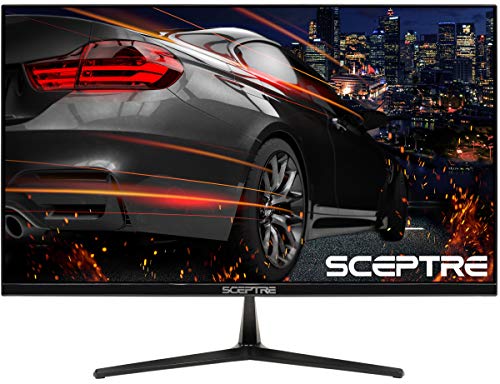
Sceptre E255B-1658A
Ideal for budget‑conscious gamers, it comes in at $99.98—about $50 cheaper than the Best Overall at $149.97.

LG 32GS60QC-B
Stands out with a 32‑inch panel and tilt‑only adjustment from -5° to +15°, offering a different ergonomics focus than the Sceptre models.
Also considered
Score Analysis
Key score advantages vs. runner-up (Sceptre E255B-1658A)
Price Range
Sceptre C275B-FWT240
$137.97
Sceptre E255B-1658A
$99.98
LG 32GS60QC-B
$248.31

BenQ EX240N
$149.99

Asus XG279CNS
$329.00

Asus VG24VQER
$109.00
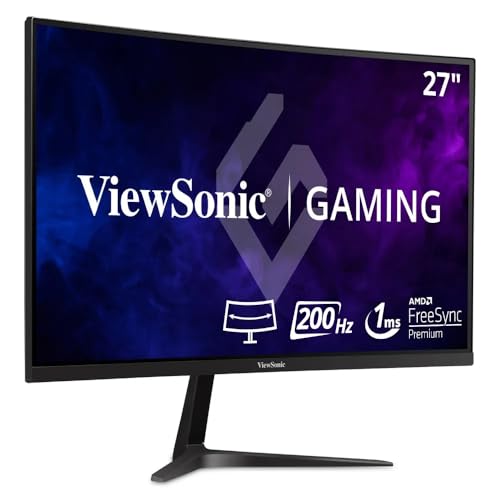
ViewSonic VX2718-PC-MHD
$159.99

Acer KG241Y
$99.99
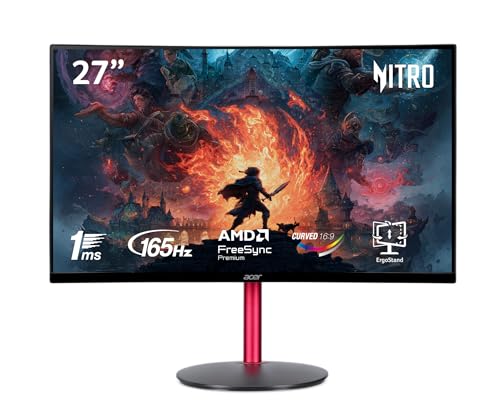
Acer ED270R
$134.99

KTC H32S25E
$309.99

Sansui ES-G24F4L
$89.99

Samsung Odyssey G55C
$286.00
Spec Comparison
TL;DR: The Sceptre C275B-FWT240 delivers a 27‑inch VA panel with a 240 Hz refresh rate, 1 ms response and 1500R curvature for under $150, but its 1080p resolution can look soft on a large screen.
The headline feature is the ultra‑high 240 Hz refresh rate, paired with a 1 ms (MPRT/GtG) response time. On a 27‑inch VA display, this combination offers ultra‑smooth motion and low input lag, which competitive gamers’ll notice instantly. The panel also supports AMD FreeSync™ Premium, helping to eliminate tearing without extra cost.
At a listed price of $149.97, the monitor lands in the lower‑mid price tier of this 12‑product lineup. Its weight of 14.599 lb makes it noticeably heavier than the Asus VG24VQER (7.1 lb) and BenQ EX240N (12.2 lb), and it also outweighs the ViewSonic VX2718‑PC‑MHD (8.6 lb) and Acer ED270R (8.6 lb). The bulkier build may require a sturdier desk, but the detachable stand and 100 mm × 100 mm VESA pattern give flexibility for wall mounting.
Reviewers consistently praise the monitor’s “ultra‑smooth gameplay” and the immersive feel created by the 1500R curvature. Professional reviewers highlight the deep blacks from the VA panel’s 1,000,000:1 dynamic contrast ratio and the vibrant 99 % sRGB color gamut. However, many users flag the 1080p resolution on a 27‑inch screen as a downside, noting visible pixelation when sitting close. Reviewers also note the edge‑lit LED backlight can cause uneven brightness or clouding, and the external AC adapter adds to desk clutter.
Pros
Cons
Best for: Competitive gamers who prioritize ultra‑high refresh rates and low input lag while staying on a budget.
Avoid if: You need high‑resolution detail for content creation, require a lightweight desk setup, or demand top‑tier color accuracy.
“The 240Hz refresh rate is described as "incredibly fluid" and a noticeable upgrade from 60Hz or 144Hz displays.”
TL;DR: The Sceptre E255B-1658A offers a 25‑inch Full HD TN panel with a native 165 Hz refresh rate, 1 ms response, and AMD FreeSync, all at a budget‑friendly $99.98 price.
What really stands out is the monitor’s 165 Hz native refresh rate combined with a 1 ms gray‑to‑gray response time. On a TN panel this translates to ultra‑smooth motion and virtually no ghosting, which is why competitive gamers often gravitate toward it.
Weighing in at 7.5 Pounds, the E255B‑1658A is lighter than most of the other twelve contenders, with only the Asus VG24VQER edging it out by a fraction.
Reviewers consistently praise the plug‑and‑play setup, noting the monitor’s flicker‑free LED backlight and the immediate feel of high‑speed gameplay. Many users frequently mention the value proposition, calling it a solid bargain for fast‑paced shooters, given its $99.98 price. On the downside, several owners report dead or stuck pixels out of the box and describe the built‑in 2 × 2 W speakers as thin, while the tilt‑only stand limits ergonomic comfort.
The panel supports AMD FreeSync across a 60‑165 Hz range and delivers 300 cd/m² brightness, a 5,000,000:1 dynamic contrast ratio, and 16.7 million colors via a 6‑bit + FRC matrix. Connectivity includes one DisplayPort 1.2, two HDMI 2.0 inputs, and a 3.5 mm headphone jack, all powered by a maximum 30 W draw.
Pros
Cons
Best for: Budget-conscious buyers seeking a reliable entry-level option
Avoid if: You need advanced features or professional-grade performance
“incredibly smooth gameplay”
“perfect for competitive gaming”
TL;DR: The LG 32GS60QC‑B delivers a 31.5‑inch VA panel with a steep 1000R curve, 180 Hz refresh and 1 ms response, offering deep blacks and smooth gameplay at a competitive price.
What really sets this monitor apart is its 180 Hz maximum refresh rate combined with AMD FreeSync Premium and a 1 ms (GtG) response time. The 1000R curvature matches the natural field of view, making the 31.5‑inch screen feel enveloping for RPGs and open‑world adventures. Brightness peaks at a typical 300 cd/m², while the 3000:1 typical contrast ratio pushes dark scenes deeper than many IPS rivals.
Compared with the other eleven monitors in the roundup, the LG sits toward the heavier end at 13.0 pounds, which is heavier than the Samsung Odyssey G55C (11.5 pounds) but lighter than the Asus XG279CNS (14.3 pounds). Its depth with stand measures 226.5 mm, making it slimmer than the Samsung’s 271.8 mm stand depth, yet the stand height of 508.1 mm is taller than the ViewSonic VX2718‑PC‑MHD’s 475 mm profile. The stand only tilts (‑5° to +15°), so you’ll miss the height‑adjustability that the Asus XG279CNS provides.
Professional reviewers praise the monitor’s 99% sRGB coverage and the suite of gaming‑focused features—Black Stabilizer, Crosshair Overlay, Dynamic Action Sync, and an on‑screen FPS counter. Everyday owners love the immersive curve and the deep blacks that the VA panel provides. The trade‑off includes visible ghosting in fast‑moving scenes and an aggressive “Faster” overdrive mode that can cause overshoot, which competitive players find distracting. Some users also notice VRR flicker during variable‑refresh gameplay, and the lack of height adjustment limits ergonomic fine‑tuning.
Pros
Cons
Best for: Buyers willing to invest in a proven, high‑quality option
Avoid if: You need advanced features or professional‑grade performance
TL;DR: The BenQ EX240N delivers a 165 Hz VA panel with FreeSync Premium, deep 3000:1 contrast and built‑in 2.5 W speakers for $149.99, but its 250‑nit brightness limits HDR impact.
The monitor’s headline spec is a 165 Hz refresh rate paired with a 4 ms GTG response time and 1 ms MPRT, which keeps fast‑paced shooters looking fluid. Its VA panel offers 3000:1 native contrast and 72% NTSC color gamut, while HDR10 and HDRi support add a touch of HDR without demanding a premium price. At 23.8 inches and 12.20038157908 pounds, the unit feels solid on a desk.
Compared with the round‑up peers, the EX240N weighs more than the Asus VG24VQER (7.1 pounds) and has a deeper 206 mm chassis. It also outweighs the Sceptre C275B‑FWT240 (14.6 pounds) while providing louder built‑in speakers—2.5 W per driver versus Sceptre’s 2 W. On the connectivity side it offers a single DisplayPort 1.2, two HDMI 2.0 ports and a 3.5 mm headphone jack, but no USB hub, so it has fewer ports than some competitors.
Reviewers consistently praise the smooth 165 Hz gameplay and the deep blacks that a VA panel delivers. The built‑in treVolo speakers earn a nod for decent sound without extra hardware. However, users note that the 250‑nit peak brightness makes HDR look muted, and the VA panel’s 4 ms GTG response can feel a touch slower than IPS alternatives, leading to fuzzy text in desktop apps. The on‑screen menu feels cluttered, which can be a minor annoyance.
Pros
Cons
Best for: Most users looking for a well‑reviewed, reliable mainstream option
Avoid if: You're shopping on a tight budget — it's priced at $149.99
“Perfect for CS2 and Valorant—super smooth at 165 Hz.”
“Love the deep blacks and contrast; great for night gaming.”
TL;DR: The Asus XG279CNS packs a blistering 380 Hz refresh rate, 0.3 ms response, and robust ergonomic stand, but its 27‑inch 1080p panel and $329.00 price place it in the premium esports niche.
The standout figure is the 380 Hz maximum refresh rate, paired with a 0.3 ms minimum GTG response time. This combination promises ultra‑smooth motion and virtually no ghosting on fast‑paced shooters. The panel is a 27 in Fast IPS display delivering 400 cd/m² brightness and 110% sRGB coverage, while the VESA DisplayHDR 400 badge adds a modest HDR boost.
Against the other eleven monitors, the XG279CNS sits on the heavier side at 14.3Pounds, making it heavier than the KTC H32S25E. Its refresh ceiling of 380 Hz far outstrips the Samsung Odyssey G55C’s 165 Hz, giving competitive gamers a clear edge. However, it offers only a single HDMI 2.1 port, whereas the KTC model provides two HDMI 2.0 connections, so HDMI flexibility is limited.
Users consistently highlight the buttery‑smooth gameplay, especially noting how the ELMB SYNC feature works with FreeSync Premium and G‑SYNC Compatibility to keep tearing at bay. Reviewers praise the USB‑C port’s 7.5 W Power Delivery for laptop users who need a single‑cable hookup. On the downside, reviewers point out that the 27‑inch 1080p screen shows visible pixelation, and the DisplayHDR 400 implementation falls short of true HDR expectations.
Beyond the headline specs, the monitor offers a fully adjustable stand: you can raise the height 0–120 mm, tilt ranges from +20° to -5°, swivel swings ±45°, and pivot pivots ±90°. It mounts to any VESA‑compatible arm via a 100 x 100 mm bracket. Power draw stays modest at 20 W typical, with standby under 0.5 W.
Pros
Cons
Best for: Buyers willing to invest in a proven, high‑quality option
Avoid if: You're shopping on a tight budget — it's priced at $329.00
“Incredibly smooth gameplay—perfect for CS2 and Valorant”
“The 380 Hz makes a noticeable difference in fast‑paced games”
TL;DR: The ASUS VG24VQER delivers a 23.6‑inch 1500R curved VA panel with up to 180 Hz refresh, FreeSync Premium and 90% DCI‑P3 coverage, all in a lightweight 7.1‑lb chassis for $149.99.
The headline spec delivers a variable 48–180 Hz refresh rate, paired with a 1 ms MPRT response time that keeps fast‑paced shooters buttery smooth. Its VA panel offers a 3000:1 static contrast ratio and 90% DCI‑P3 color gamut, giving deep blacks and vivid colors that many budget‑oriented rivals lack.
At 7.1 pounds, the VG24VQER weighs noticeably less than the BenQ EX240N (over 12 pounds) and the Sceptre C275B‑FWT240 (about 14.6 pounds), making desk mounting easier. However, the stand provides only tilt (+23° to -5°) and no height, swivel or pivot adjustments, a trade‑off you won’t find on the heavier ViewSonic VX2718‑PC‑MHD or Acer ED270R, both of which include more ergonomic motion.
Consumers repeatedly praise the monitor’s “sharp, colorful image” and the “buttery‑smooth gameplay” that the high refresh and FreeSync Premium deliver, especially when paired with AMD GPUs. Professional reviewers highlight the rare combination of 180 Hz refresh and VA contrast in this price bracket, while also noting the lack of built‑in speakers and occasional stand‑feel issues. The included 1.8 m DisplayPort and HDMI cables, anti‑glare coating, and ELMB motion‑blur reduction round out a solid gaming package.
Pros
Cons
Best for: Competitive and esports gamers who prioritize high refresh rates, deep contrast and vibrant colors on a budget, especially AMD GPU owners.
Avoid if: You need extensive ergonomic adjustments, built‑in audio, or G‑Sync certification for NVIDIA graphics, or you require professional‑grade color accuracy.
“Great picture quality for the price”
“Smooth gaming experience”
TL;DR: The ViewSonic VX2718‑PC‑MHD delivers a 27‑inch 1500R curved VA panel with a 180 Hz refresh rate, FreeSync Premium and solid contrast at a budget‑friendly $159.99 price.
At the heart of the VX2718‑PC‑MHD is a 27‑inch VA panel with a 1500R curvature that wraps the display around your field of view. The monitor pushes a 180 Hz refresh rate over DisplayPort and still reaches 165 Hz via its two HDMI 1.4 ports, while the MPRT response time sits at 1 ms and GTG at 5 ms. Brightness measures 250 cd/m² and the static contrast ratio hits 4000:1, giving deep blacks that VA panels are known for.
Compared with other contenders in this roundup, the ViewSonic is heavier than the Asus VG24VQER’s 7.1 pounds but matches the weight of the Acer ED270R at 8.6 pounds. Its 27‑inch screen also outsizes the 23.6‑inch Asus and the 23.8‑inch Acer KG241Y, giving you more real‑estate for immersive gaming. While the Sceptre C275B‑FWT240 can hit 240 Hz via DisplayPort, the VX2718‑PC‑MHD’s 180 Hz is still well above the 165 Hz ceiling of many peers and the 144 Hz baseline most budget monitors target.
Professional reviewers point out that the 180 Hz refresh and deep 1500R curve are rare at this price point, and everyday users echo the smooth, responsive feel during fast‑paced titles. A recurring complaint is the 6‑bit + FRC color depth, which some gamers notice as slight banding or fuzzy text in static UI elements. The HDMI 1.4 limitation, capping the refresh at 165 Hz, forces you to use DisplayPort for the full 180 Hz experience. Ergonomically, the stand only tilts from –5° to +20° and doesn't have height, swivel or pivot adjustments.
Beyond the core display, the monitor supports HDR10, AMD FreeSync Premium and includes two 2 W built‑in speakers plus a 3.5 mm headphone jack. Eye‑care technologies such as Flicker‑Free and Low Blue Light aim to reduce fatigue during long sessions. Power draw stays modest at 15–17 W in Eco mode and peaks at 30 W.
Pros
Cons
Best for: Budget‑focused competitive gamers and esports enthusiasts who prioritize high refresh rates and immersive curvature.
Avoid if: You need professional‑grade color accuracy or extensive ergonomic adjustments.
“Smooth gameplay”
“Immersive curve”
TL;DR: The Acer KG241Y delivers a 165 Hz refresh rate, 1 ms VRB response, and FreeSync Premium on a 23.8‑inch VA panel for under $100, making it a solid budget gaming monitor.
The standout spec is the 165 Hz refresh rate paired with a 1 ms VRB response time, which promises smooth motion and low input lag for fast‑paced titles. It also supports AMD FreeSync Premium across its 2 × HDMI 2.0 and 1 × DisplayPort 1.2 inputs, letting compatible GPUs eliminate tearing without extra cost.
At $99.99, the KG241Y sits in the same price bracket as the Sceptre E255B‑1658A but is slightly heavier at 8.38 lbs versus the Sceptre’s 7.5 lbs. Its tilt range of –5° to +15° matches the Sceptre’s, while the Sansui ES‑G24F4L is noticeably heavier at about 9 lbs. The monitor’s VESA‑mount pattern (100 × 100 mm) is larger than the Sansui’s 75 × 75 mm, giving you more mounting flexibility.
Users consistently praise the monitor’s affordability and the deep blacks produced by its VA panel, which provides a 3000:1 static contrast ratio. However, reviewers note that the HDR10 implementation is modest and that the VA technology can produce smearing in very fast scenes, a point that competitive esports players often mention. The lack of built‑in speakers or a headphone jack also shows up in many complaints.
In practice, the 23.8‑inch screen (1920 × 1080) offers a 72% NTSC color gamut and 250 cd/m² brightness, sufficient for most indoor gaming environments. The CineCrystal™ glossy coating enhances perceived vibrancy, while the 6‑bit + Hi‑FRC panel simulates 16.7 million colors. A three‑year warranty rounds out the value proposition.
Pros
Cons
Best for: Budget-conscious buyers seeking a reliable entry-level option
Avoid if: You need advanced features or professional‑grade performance
“Great value for the price”
“Colors pop in HDR”
TL;DR: The Acer ED270R delivers a 27‑inch 165 Hz VA panel with 1 ms response time and a 1500R curve for smooth, immersive gaming at a budget‑friendly $134.99.
The standout spec is its 165 Hz refresh rate paired with a 1 ms response time, which promises fluid motion and minimal blur in fast‑paced titles. Its 27‑inch screen wraps a 1500R curvature, giving you a more enveloping field of view without the distortion often found in flatter panels. The monitor also includes AMD FreeSync Premium, 250 nits brightness, and a 72% NTSC color gamut, and it features a sleek ZeroFrame design.
Compared with the other eleven monitors in this roundup, the ED270R sits in the middle of the weight range at 8.6 pounds—heavier than the 7.5‑pound Sceptre E255B‑1658A but lighter than the 14.6‑pound Sceptre C275B‑FWT240. It offers two HDMI 2.0 ports, which is fewer than the three HDMI ports on the Sceptre C275B‑FWT240, yet it matches the BenQ EX240N’s 250 nits brightness and the ViewSonic VX2718‑PC‑MHD’s 1500R curvature. Its built‑in stereo speakers deliver 2 W per driver, the same power level listed for the Sceptre C275B‑FWT240’s dual speakers.
Users consistently praise the monitor’s “buttery‑smooth” gameplay and the immersive feel of the curve, noting that the adjustable stand—height up to 119 mm, tilt from –5° to 20°, and swivel ±15°—offers surprisingly flexible adjustment for the price. Common criticisms focus on the modest 250 nits brightness, which can feel dim in brightly lit rooms, and the 72% NTSC gamut, which falls short for color‑critical work. Some reviewers also mention that HDR10 performance is limited, reflecting the HDR support but lower peak brightness.
Pros
Cons
Best for: Budget-conscious buyers seeking a reliable entry-level option
Avoid if: You want the best value-per-dollar in its price range
TL;DR: The KTC H32S25E delivers a 32‑inch 1000R curved VA panel with 240 Hz refresh, 1 ms response and strong contrast, making it a solid high‑speed PC gaming monitor at $309.99.
The standout feature is its 240 Hz refresh rate paired with a 1 ms (GTG) response time, delivering ultra‑smooth motion on a 32‑inch screen. The panel uses a VA LCD with a 1000 mm curvature radius, giving the display an immersive wrap‑around feel while maintaining a measured brightness of 385 nits and a static contrast ratio of 4000:1.
Compared with other monitors in this roundup, the H32S25E is lighter than the Asus XG279C’s 14.3‑pound build but heavier than the ViewSonic VX2718‑PC‑MHD’s 8.6‑pound frame. It also offers twice as many HDMI 2.0 ports as the Asus XG279C, which has only one HDMI connection. Its 240 Hz refresh outpaces the Samsung Odyssey G55C’s 165 Hz panel, giving it a clear advantage for fast‑paced PC titles.
Users consistently praise the monitor’s buttery‑smooth gameplay and vibrant colors, noting the 91 % Adobe RGB and 93 % DCI‑P3 coverage as a plus for colorful titles. Professional reviewers highlight the high contrast and minimal ghosting, but they also point out noticeable backlight bleed and VA glow in dark scenes, as well as a lack of HDMI 2.1 that limits next‑gen console support. Ergonomically, the stand only tilts from –5° to +20°, offering fewer adjustments than some competitors.
Additional technical notes include flicker‑free LED backlighting, four levels of blue‑light reduction, and a 3‑year warranty for peace of mind. The monitor’s 2560 × 1440 QHD resolution and 93.24 PPI pixel density provide crisp detail without sacrificing performance.
Pros
Cons
Best for: Competitive PC gamers who need ultra‑high refresh rates, low input lag and an immersive curved experience.
Avoid if: You rely on HDMI 2.1 for console gaming or are sensitive to backlight bleed in dark environments.
“Incredibly smooth gameplay at 240Hz”
“Colors pop, and the curve makes games feel immersive”
TL;DR: The Sansui ES‑G24F4L delivers a 200 Hz DisplayPort refresh rate, 1 ms MPRT response, and 110% sRGB coverage at a budget‑friendly $89.99, though its stand offers only tilt.
This 24‑inch monitor’s headline spec is the 200 Hz refresh rate available over its DisplayPort 1.4 input, paired with a 1 ms MPRT response time that keeps motion blur to a minimum. Its VA‑type panel reaches 300 cd/m² brightness and a 4000:1 contrast ratio, giving deep blacks for a Full HD 1920 × 1080 image. The screen also claims HDR10‑equivalent support and 110% sRGB coverage, which is unusually generous for the price point.
When you line it up against the other eleven monitors in this roundup, the ES‑G24F4L sits near the top for raw refresh speed—only the Sceptre C275B‑FWT240 advertises a higher 240 Hz DP rate, but that model is significantly heavier. Acer’s KG241Y offers a 165 Hz refresh, so the Sansui pushes the envelope further without demanding a premium. In terms of ergonomics, the Sansui provides a tilt range of –5° to +15° but lacks height, swivel, or pivot adjustment, a limitation also found in several peers such as the Sceptre E255B‑1658A, which only tilts.
Customer sentiment consistently highlights the monitor’s “buttery‑smooth” gameplay and the usefulness of its built‑in eye‑care suite—flicker‑free, low blue‑light, and anti‑glare coating. Reviewers also note the integrated cable‑management routing as a tidy touch for cramped desks. However, users report that the HDMI 2.1 port may not sustain the full 200 Hz, and the stand can feel a bit wobbly during intense sessions. The lack of built‑in speakers means you’ll need external audio, which aligns with the experience of the Acer ED270R that also relies on separate sound sources.
Pros
Cons
Best for: Competitive FPS, RTS and racing gamers who need a high refresh rate without breaking the bank.
Avoid if: You require extensive ergonomic adjustments, built‑in audio, or a panel calibrated for professional color‑critical work.
“great budget 200Hz monitor”
“no noticeable input lag”
TL;DR: The Samsung Odyssey G55C is a 32‑inch curved VA gaming monitor with a 165 Hz refresh rate, 1 ms MPRT, 300 cd/m² brightness and a solid 4.4‑star rating from 1,559 reviewers.
The standout spec is the 165 Hz refresh rate paired with a 1 ms MPRT, which promises fluid motion on its 32‑inch 1000R curved screen. Samsung also lists a typical brightness of 300 cd/m² and a static contrast ratio of 2,500:1, giving the display deep blacks and vivid details in darker scenes.
Compared with the other eleven monitors in this roundup, the Odyssey G55C weighs less than the LG 32GS60QC‑B (13.0 pounds) and sits slimmer than the KTC H32S25E’s depth with stand. Its tilt range of –2° to +18° narrows compared with the Asus XG279CNS, which offers a full‑height adjustment and swivel, making the stand less flexible than some rivals.
Users consistently praise the immersive 1000R curve and the deep blacks the VA panel produces, noting that the monitor feels “cinematic” for single‑player RPGs and story‑driven titles. However, several reviewers point out noticeable motion blur and ghosting in fast‑paced shooters, and a few mention flickering when AMD FreeSync is active. The lack of built‑in speakers and the relatively high price also appear in consumer feedback.
The monitor uses a VA panel with ~99% sRGB coverage and HDR10 support, which helps retain color accuracy while reducing eye strain thanks to a low‑blue‑light mode. AMD FreeSync compatibility adds variable refresh‑rate smoothing, and front‑LED RGB accents let you customize the look of your setup.
Pros
Cons
Best for: Buyers willing to invest in a proven, high‑quality option
Avoid if: You need advanced features or professional‑grade performance
“cinematic”
“engaging”
Breakdown
Sceptre C275B-FWT240
Pros
Cons
Sceptre E255B-1658A
Pros
LG 32GS60QC-B
Pros
BenQ EX240N
Pros
Cons
Based on scoring data and product specs
Personalized picks
Best Overall Pick
Sceptre C275B-FWT240
Best OverallBest for: Most users looking for a well-reviewed, reliable mainstream option
Sceptre E255B-1658A
Best for: Budget-conscious buyers seeking a reliable entry-level option
$99.98-$37.99 vs winner
Skip Samsung Odyssey G55C if…
You need advanced features or professional-grade performance
The Sceptre C275B‑FWT240 takes the top spot thanks to its 27‑inch VA panel, a native resolution of 1920 × 1080 and a blistering refresh rate of up to 240 Hz. It pairs that speed with a 1 ms (MPRT/GtG) response time and a 99 % sRGB colour gamut, delivering smooth, vibrant gameplay. With a 4.4‑star rating from 5,487 reviewers and a list price of $149.97, it offers premium performance without a premium price tag.
If space is at a premium, the Sceptre E255B‑1658A shines for those who need a high‑refresh monitor on a tighter budget. Its 25‑inch TN screen reaches a native 165 Hz refresh and 1 ms response, and it carries a 4.6‑star rating from 6,643 users. Priced at $99.98, it’s an excellent choice for a compact desk or a first‑time competitive gamer.
For the most cost‑conscious shoppers, the Sansui ES‑G24F4L delivers basic 144 Hz performance at $89.99, making it the best budget pick. If you’re after a premium experience, the Asus XG279CNS offers a larger panel and advanced features for $329.00, and it positions it as the top premium contender.
Choose the Sceptre C275B‑FWT240 and give your gaming setup the high‑refresh edge it deserves.
The Acer KG241Y and Asus VG24VQER have the shallowest footprints, with the KG241Y measuring just 7.44 in deep and the VG24VQER about 8.11 in deep, and both lack height‑adjustment mechanisms. Their compact 23.8‑inch and 23.6‑inch screens make them ideal for tight workstations.
Please sign in to leave a review
No reviews yet. Be the first to review!
