⚡ Quick Answer
HDR gaming monitors are finally hitting a sweet spot between eye‑catching brightness and buttery‑smooth motion, and this roundup pits seven contenders against each other. Prices stretch from $99.99 for the LG 24G411A‑B up to $407.73 for the Gigabyte M32U Black, while user ratings hover between 4.2/5 and 4.6/5. The MSI G32C4X stands out with a 250 Hz refresh rate and a 4.6/5 score from 257 reviewers, making it a strong candidate for fast‑action play.
The picks fall into three clear tiers. The budget corner holds the LG 24G411A‑B, Acer Nitro 23.8‑inch and Xiaomi G27i‑US, all priced under $150 and offering respectable refresh rates from 165 Hz to 180 Hz. The mid‑range slot is occupied by the MSI G32C4X at $243.71, delivering a 250 Hz panel that outpaces most rivals. Premium options include the Samsung Odyssey G55C ($279.49, 165 Hz), Samsung Odyssey G50D ($291.44, 180 Hz) and the Gigabyte M32U Black ($407.73, 144 Hz), each adding extra features like higher brightness or 4K resolution.
Below you’ll find a detailed look at each model’s strengths, weaknesses, and the scenarios where they shine, so you can match the right HDR monitor to your gaming setup.

MSI G32C4X
Its 1500R curvature (1500 mm radius) delivers immersive HDR gaming while keeping a compact 9.8‑inch depth.

Samsung Odyssey G55C
Ideal for gamers who value proven performance, the Samsung Odyssey G55C suits buyers willing to spend about $35 more than the MSI G32C4X for its reputable brand and solid brightness.

Samsung Odyssey G50D 32-inch
The Odyssey G50D stands out with a deeper 10.4‑inch chassis and 22.9‑inch height, giving premium setups a larger visual canvas that the MSI and Samsung G55C lack.
Also considered
Score Analysis
Key score advantages vs. runner-up (Samsung Odyssey G55C)
Price Range
MSI G32C4X
$243.67
Samsung Odyssey G55C
$270.00
Samsung Odyssey G50D 32-inch
$329.99
Acer Nitro 23.8-inch
$93.49

LG 24G411A-B
$99.99

Xiaomi G27i-US 27-inch
$149.99

Gigabyte M32U Black
$407.73
Spec Comparison
TL;DR: The MSI G32C4X delivers a 31.5‑inch 1500R curved VA panel with a blistering 250 Hz refresh rate, 1 ms response and AMD FreeSync Premium, all in a feather‑light 1‑lb chassis.
The monitor’s standout spec is its 250 Hz refresh rate paired with a 1 ms response time, which far exceeds the 165–180 Hz range most of the other six contenders offer. Its 1500R curvature (1500 mm radius) wraps the 31.5‑inch screen around your field of view, creating an immersive experience that reviewers describe as “encompassing”.
At just 1 lb, the G32C4X is dramatically lighter than the Samsung Odyssey G55C (11.5 lb) and Samsung Odyssey G50D (16.3 lb), making desk adjustments effortless. While the Gigabyte M32U tops out at 144 Hz, the MSI’s 250 Hz puts it well ahead of the competition’s refresh capabilities. Brightness sits at 300 cd/m² and the contrast ratio hits 3000:1, delivering deep blacks that complement the VA panel’s 1.07 billion colors.
Everyday users praise the monitor for buttery‑smooth, responsive gameplay and the “mind‑blowing” feel of its high refresh rate, especially in fast‑paced shooters. The curve and frameless design earn consistent kudos for immersion and aesthetics. On the flip side, the Full HD 1920 × 1080 resolution on a 31.5‑inch panel can look less crisp for non‑gaming content, and the lack of built‑in speakers forces you to rely on external audio. Reviewers also note the stand offers only tilt adjustment, with no height or swivel options.
Pros
Cons
Best for: Competitive gamers who need ultra‑high refresh rates, low response times, and an immersive curved experience without breaking the bank.
Avoid if: You’ll need integrated audio or a high‑resolution panel for detailed work and media editing.
TL;DR: Samsung Odyssey G55C delivers a 32‑inch 1000R curved QHD panel with 165 Hz refresh, 1 ms MPRT and HDR10, offering immersive gaming at a solid $279 price point.
The standout feature is the 1000R curvature on a 32‑inch VA panel, paired with a native QHD resolution (2560 × 1440) and a 165 Hz refresh rate. Samsung lists a 1 ms MPRT response time and HDR10 support, while the panel’s static contrast ratio of 2500:1 promises deep blacks for dark‑room titles.
Compared with the six other monitors in this roundup, the G55C sits in the middle of the pack on several fronts. It’s lighter than the Samsung Odyssey G50D (16.3 lb) and far lighter than the Gigabyte M32U (30.91 lb), yet heavier than the ultra‑light MSI G32C4X (1.0 lb). Its 165 Hz refresh outpaces the Gigabyte’s 144 Hz and matches the Xiaomi G27i‑US, but falls short of the MSI’s 250 Hz and the G50D’s 180 Hz. Brightness at a typical 300 cd/m² equals the MSI’s level, exceeds the Xiaomi’s 250 nits and LG’s 220 cd/m², but is lower than the G50D’s 350 nits and the Gigabyte’s 350 cd/m² SDR rating.
Professional reviewers praise the immersive curve and the ultra‑smooth 165 Hz experience, noting low input lag and broad VRR support (FreeSync and G‑Sync Compatible). Everyday users echo these points, calling the gameplay “fluid” and the screen “truly immersive.” The most common drawbacks include the tilt‑only stand, which lacks height, swivel or pivot adjustments, and the external power brick that forces rear‑facing ports, making cable management a bit awkward. The modest 300 cd/m² brightness also limits HDR punch in bright rooms.
Pros
Cons
Best for: Buyers willing to invest in a proven, high‑quality option
Avoid if: You're on a tight budget or only need basic functionality
TL;DR: The Samsung Odyssey G50D offers a 32‑inch IPS panel with 180 Hz refresh, 1 ms response, 350 nits brightness, and ergonomic adjustments, delivering smooth gaming at a mid‑range price.
The standout spec is its 180 Hz refresh rate paired with a 1 ms (GtG) response time, which Samsung markets for ultra‑smooth, low‑lag gameplay. The Fast IPS panel also reaches 350 nits of brightness and covers 99% of the sRGB gamut, giving vibrant colors on a 32‑inch screen.
Compared with the six other monitors in this roundup, the G50D weighs 16.3 lbs, heavier than the 11.5‑lb Samsung G55C and the ultra‑light 1‑lb MSI G32C4X. Its 180 Hz panel out‑rates the G55C’s 165 Hz and the Xiaomi G27i‑US’s 165 Hz, though the MSI G32C4X pushes 250 Hz. Brightness sits at 350 nits, higher than the G55C’s 200‑300 cd/m² range and the Xiaomi’s 250 nits, while matching the Gigabyte M32U’s 350 cd/m² SDR level. The screen size matches the G55C and Gigabyte models at 32 in, but is larger than the 27‑in Xiaomi, 23.8‑in Acer, and 24‑in LG units. Depth‑wise, the G50D’s 10.4 in chassis is deeper than the MSI’s 9.8 in and Gigabyte’s 9.62 in, yet comparable to the Acer and LG designs that sit around 9 in.
Professional reviewers praise the high refresh rate and fast IPS colors, noting the ergonomic stand with swivel, tilt, and height adjustment as a comfort win. Everyday users love the smooth performance and vivid visuals, but many point out the static 1000:1 contrast ratio, which leads to grayish blacks, and the modest DisplayHDR 400 that falls short of premium HDR experiences. It offers only DisplayPort 1.2, HDMI 2.0, and a 3.5 mm headphone jack, which some users find restrictive.
Pros
Cons
Best for: Budget‑conscious competitive gamers and esports enthusiasts who prioritize high refresh rates and fast response times.
Avoid if: You need deep black levels, premium HDR performance, 4K gaming, or extensive peripheral connectivity.
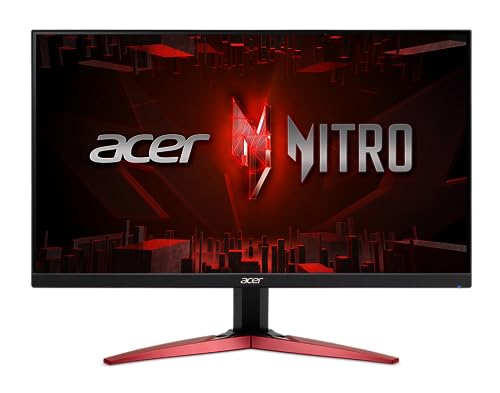
TL;DR: The Acer Nitro 23.8‑inch monitor packs a 180 Hz refresh rate, 0.5 ms response time, HDR10 support and an adjustable stand for just $109.99, making it a solid budget‑friendly gaming choice.
The standout spec is the 180 Hz refresh rate paired with a 0.5 ms gray‑to‑gray response time, which Acer advertises as ideal for fast‑paced titles. Its 23.8‑inch IPS panel delivers 99% sRGB coverage and a native 1000:1 contrast ratio, while HDR10 support adds a bit of punch to compatible games.
Compared with the other six monitors in this roundup, the Nitro is deeper than the LG 24G411A‑B’s 220 mm depth and the Xiaomi G27i‑US’s 170 mm depth, yet its height of 405.6 mm is slightly shorter than LG’s 412 mm. Brightness sits at 250 cd/m², matching Xiaomi’s 250‑nit rating but falling behind MSI’s 300 cd/m² and Samsung’s 350‑nit models. The 180 Hz panel outpaces Xiaomi’s 165 Hz and Samsung G55C’s 165 Hz, ties Samsung G50D’s 180 Hz, and is slower than MSI’s 250 Hz. Its 0.5 ms response time is quicker than the 1 ms response times listed for all peers.
Users consistently praise the ultra‑smooth gameplay that the high refresh rate and low response time deliver, noting that the included HDMI cable makes setup painless. Professional reviewers highlight the AMD FreeSync Premium implementation and the ComfyView anti‑glare coating, which together reduce tearing and eye strain during long sessions. However, many mention the modest 250‑cd/m² brightness as a limitation in bright rooms, and the 1080p resolution on a 23.8‑inch screen can look less crisp up close. The built‑in 2 W speakers work but are low‑volume, and many complain about the lack of a USB hub.
Pros
Cons
Best for: Entry‑level buyers or those on a tight budget
Avoid if: You need high brightness for bright rooms or a 4K resolution for detailed content creation
“Smooth 200Hz/165Hz performance in competitive play”
“silky smooth visuals”
TL;DR: The LG 24G411A-B offers a 23.8‑inch IPS panel with a native 120 Hz refresh (up to 144 Hz), HDR10 support and solid ergonomics for under $100.
The standout spec is its over‑clockable 144 Hz refresh rate on a 23.8‑inch IPS screen, paired with a 1 ms Motion Blur Reduction mode and a 5 ms GtG response. Combined with HDR10 and 99 % sRGB coverage, the monitor can deliver smooth, colorful gameplay without breaking the bank.
Compared with the six other monitors in this roundup, the LG sits at the lower end of the price spectrum, while the Acer Nitro and Xiaomi G27i‑US carry higher price tags. Its 144 Hz ceiling is below the Acer’s 180 Hz and the MSI’s 250 Hz, but matches the Gigabyte M32U’s 144 Hz. At 7.3 lb, it’s heavier than the ultra‑light MSI G32C4X (1 lb) yet lighter than the Samsung Odyssey G55C (11.5 lb) and far lighter than the Gigabyte M32U (30.9 lb). Depth‑wise, the LG’s 220 mm stand depth is shallower than the Acer’s 231.9 mm but deeper than the Xiaomi’s 170 mm.
User feedback repeatedly praises the fluid motion from the high refresh rate and the added HDR10 boost, noting that the 178° viewing angles of the IPS panel keep colors consistent from the side. Critics point out the Full HD (1920 × 1080) resolution on a 24‑inch screen, which reduces pixel density compared with higher‑resolution rivals, and they mention that the typical brightness of 250 cd/m² can feel modest in very bright rooms. The monitor only offers tilt adjustment, so users seeking height or swivel controls might look elsewhere.
Pros
Cons
Best for: Shoppers on a tight budget who want the most for their money
Avoid if: You need advanced features or professional‑grade performance
TL;DR: The Xiaomi G27i‑US delivers a 27‑inch Fast IPS panel with 165 Hz refresh, 1 ms response and HDR10 support at a $149 price, making it a solid budget HDR gaming monitor.
The monitor sports a 27‑inch Fast IPS LCD with a native 1920 × 1080 resolution, a 165 Hz refresh rate (up to 200 Hz) and a 1 ms GTG response time, delivering fluid motion in fast‑paced games. It covers 95% DCI‑P3 and 99% sRGB for color accuracy, while typical brightness sits at 250 nits and HDR peaks at 400 nits. The panel is flicker‑free, includes DC dimming and TÜV‑certified low‑blue‑light technology.
Compared with the Acer Nitro 23.8‑inch, the G27i‑US is wider (612.3 mm vs 540.3 mm) and taller (451.7 mm vs 405.6 mm) but considerably shallower (170 mm vs 231.9 mm). Its 165 Hz refresh is a touch slower than Acer’s 180 Hz, yet still faster than many peers. At 7.94 lb the Xiaomi sits just above LG’s 7.3 lb unit, while remaining far lighter than the Samsung Odyssey G55C (11.5 lb) and the Gigabyte M32U (30.91 lb). It also carries a 75 mm × 75 mm VESA mount and a tilt range of –5° to +15°, features not listed for the other monitors.
Users consistently praise the monitor’s buttery‑smooth 165 Hz gameplay and the vibrant, accurate colors that make long sessions comfortable. Reviewers highlight the combination of FreeSync Premium, joystick control and eye‑care features as strong value points. Common complaints focus on the 1080p resolution on a 27‑inch panel, which can appear less sharp than higher‑resolution rivals, and the modest 250‑nit brightness that limits HDR impact in bright rooms. Ergonomics‑focused gamers also criticize the lack of height or swivel adjustment.
Power comes from a 12 V ⎓ 3.0 A input with a rated consumption of 36 W, and the monitor supports a 75 mm × 75 mm VESA mount for flexible mounting options. The tilt adjustment of –5° to +15° offers basic angle tweaking, while the built‑in 3.5 mm audio jack provides a simple sound solution.
Pros
Cons
Best for: Entry‑level buyers or those on a tight budget
Avoid if: You want the best value‑per‑dollar in its price range
“silky-smooth 165 Hz gameplay”
“high refresh rate of 165Hz and rapid 1ms response”
TL;DR: The Gigabyte M32U Black delivers a crisp 32‑inch 4K IPS panel at 144 Hz with 1 ms response, but its modest HDR brightness and premium price make it a niche choice for serious gamers.
The monitor’s standout spec is its 32‑inch 4K (3840 × 2160) IPS panel that supports a 144 Hz refresh rate and a 1 ms response time, backed by a 10‑bit colour depth and 124.6% sRGB coverage. It also carries VESA DisplayHDR 400 certification with peak brightness in the 400‑480 nits range and 16‑zone local dimming.
Weighing 30.91 lbs, the M32U is considerably heavier than the Samsung Odyssey G50D (16.3 lbs) and the Xiaomi G27i‑US (7.936641432 lbs). Its 32‑inch screen matches the size of the Samsung Odyssey G50D and G55C, yet exceeds the Acer Nitro’s 23.8‑inch panel and the LG 24G411A‑B’s 24‑inch display. The 144 Hz refresh rate sits below the 180 Hz of the Samsung Odyssey G50D and the 250 Hz of the MSI G32C4X, but it outpaces the 165 Hz of the Xiaomi G27i‑US.
Users consistently praise the monitor’s razor‑sharp 4K detail and fluid motion, especially when paired with consoles via its two HDMI 2.1 ports. Reviewers note the colour accuracy out‑of‑the‑box and appreciate the eye‑care suite—Flicker‑Free, Low Blue Light Eyesafe, and Aim Stabilizer. However, the HDR implementation appears underwhelming due to limited peak brightness and only 16 dimming zones, and the lack of a pivot adjustment frustrates those who need portrait orientation.
The M32U also includes a built‑in KVM switch for multi‑device control, a USB‑C port with DP Alt Mode for modern laptops, and a comprehensive overdrive suite. Its 1000:1 native contrast ratio and 90% DCI‑P3 coverage further enhance colour richness for both gaming and creative work.
Pros
Cons
Best for: PC and console gamers who want 4K resolution at 144 Hz and value colour accuracy.
Avoid if: You need strong HDR performance for movies or require a monitor that pivots for portrait work.
Breakdown
MSI G32C4X
Pros
Samsung Odyssey G55C
Pros
Samsung Odyssey G50D 32-inch
Pros
Acer Nitro 23.8-inch
Pros
Cons
Based on scoring data and product specs
Personalized picks
Best Overall Pick
MSI G32C4X
Best OverallBest for: Home and office users seeking a balance of features and value
Samsung Odyssey G55C
Best for: Buyers willing to invest in a proven, high-quality option
$270.00+$26.33 vs winner
Skip Gigabyte M32U Black if…
Reliability and user satisfaction are your top concerns
The MSI G32C4X takes the top spot with a 31.5‑inch VA panel that delivers 250 Hz refresh and a 1 ms response time, giving you buttery‑smooth motion in fast‑paced titles. Its HDR Ready mode and 300 cd/m² brightness help brighten dark scenes, while a 4.6‑star rating from 257 reviewers backs up its overall appeal—all for $243.71.
Samsung’s Odyssey G55C lands as the runner‑up, especially if you crave sharper 1440p visuals. Its 32‑inch 1000R curve, 165 Hz refresh rate and HDR10 support make high‑resolution gaming feel immersive, and the 4.4‑star rating from 1,589 reviews shows strong user satisfaction at $279.49.
Looking for alternatives? The LG 24G411A‑B offers the most affordable entry point at $99.99, delivering a compact 24‑inch screen for budget‑conscious gamers. For those willing to splurge, the Gigabyte M32U Black provides premium‑grade features at $407.73, catering to enthusiasts who want top‑tier performance.
Pick the MSI G32C4X for the best all‑around HDR gaming experience and start gaming without compromise.
The MSI G32C4X is HDR Ready with dynamic contrast enhancement and a brightness of 300 cd/m², but the Samsung Odyssey G55C supports true HDR10 and also reaches 300 cd/m² while offering a higher 2560×1440 resolution, making it a stronger HDR performer despite a slightly higher price.
No reviews yet — be the first to share your experience.
Please sign in to leave a review



