
The research examined 11 options and logged 12,268 reviews for the Flexispot EN1 48×24 model alone. All contenders earned at least a 4.5‑star rating out of five, with the top‑ranked Eureka Ergonomic Aero 55‑inch Walnut pulling a solid 4.5/5 from 182 reviewers while weighing in at 93.0 pounds. The lineup spans everything from compact 48‑inch workspaces to full‑size 60‑inch gaming rigs, so you’ll find a size and style that fits any room.
The desks are grouped into three price tiers. The budget tier offers the Flexispot EN1 at $109.99, the EN2 40×24 at $209.99, and the EN2 55×28 at $219.99. Mid‑range picks include the Vivo 60‑inch Gaming Standing Desk for $329.99 and the Flexispot E6 Pro models at $359.99 and $379.99. Premium options feature the Flexispot Z8 Luxe at $499.99, the Eureka Aero at $519.99, and the high‑end Secretlab Magnus Pro at $1269.00, delivering extra features like dual‑motor lifts and integrated power hubs.
Below is a breakdown of each desk’s strengths, key specs, and who will benefit most, so you can match a desk to your gaming setup and budget.

Eureka Ergonomic Aero 55-inch Walnut
Offers up to 3 memory presets, letting you instantly switch between three height settings for seamless gaming sessions.
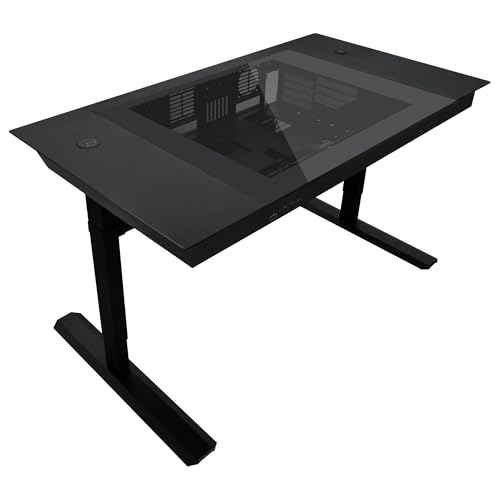
Lian Li DK07X
Ideal for PC builders who've needed robust cable management with four dual‑layer clips and space for up to 17 fans.
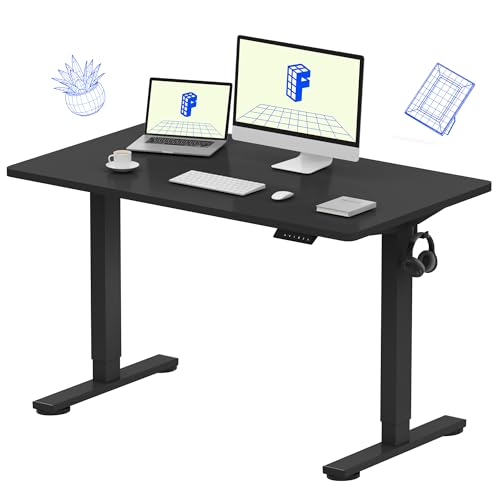
Flexispot EN1 48x24
Ships in two separate packages and recommends two‑person assembly, it's a straightforward, entry‑level setup for budget‑focused gamers.
Also considered
Score Analysis
Key score advantages vs. runner-up (Lian Li DK07X)
Price Range
Eureka Ergonomic Aero 55-inch Walnut
$519.99
Lian Li DK07X
-$0.01
Flexispot EN1 48x24
$109.99

Flexispot EN2 55x28
$219.99

Flexispot EN2 40x24
$209.99
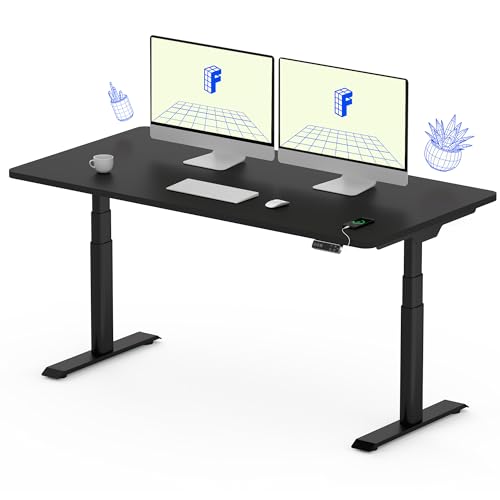
Flexispot E6 Pro 55x28
$399.99

Flexispot E6 Pro 48x30
$379.99

Flexispot Z8 Luxe 60x27
$499.99
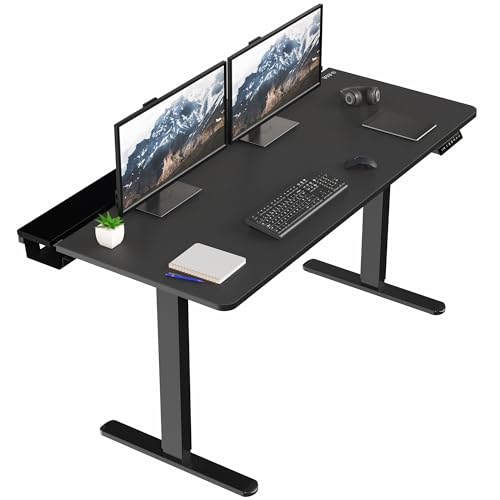
Vivo 60-inch Gaming Standing Desk
$329.99
Secretlab Magnus Pro
$1,099.00

Flycity 55-inch Gaming Standing Desk
$248.99
Spec Comparison
TL;DR: The Eureka Ergonomic Aero 55‑inch Walnut offers a dual‑motor lift up to 52.75 in, 1.5 in/s speed, 6‑color RGB, and a 4.5‑star rating for $519.99.
The desk’s standout feature is its dual‑motor height adjustment that reaches a maximum of 52.75 in and a minimum of 29.5 in, moving at up to 1.5 in per second and completing a sit‑to‑stand transition in just 17 seconds. It also supplies built‑in power with 2 AC outlets, up to 4 USB ports and wireless charging, plus a cup holder, full‑desk mouse pad and rotatable headphone hook for a clutter‑free gaming setup.
Compared with the other ten desks in this roundup, the Aero provides a higher maximum height than the Flexispot Z8 Luxe, Flexispot E6 Pro and Vivo models, while its minimum height is similar to those competitors. Its memory presets (2‑3 positions) are fewer than the four offered by Flexispot Z8 Luxe and Flexispot E6 Pro, and its 24.0‑inch desktop depth matches the Flycity 55‑inch desk but is shallower than the 60‑inch depth of the Flexispot Z8 Luxe and Vivo desks. Load capacity tops out at 220 lb, which is lower than the 352 lb capacity of the Flexispot Z8 Luxe and the 330 lb capacity of the Flexispot E6 Pro, but matches the Vivo’s 220 lb rating. Noise levels of 50‑55 dB are louder than the sub‑45 dB figures listed for the Flexispot models, yet comparable to the ≤50 dB rating of the Flycity desk.
Reviewers consistently praise the Aero’s rock‑solid alloy‑steel frame, the quiet and swift dual‑motor lift, and the convenience of the integrated power hub. The sintered‑stone desktop offers scratch and heat resistance, and the 6‑color RGB lighting adds a gamer‑friendly vibe. On the downside, many users describe the 93.0‑lb unit as difficult to relocate and the assembly as a two‑person job with detailed instructions. A few report intermittent Bluetooth app connectivity, which professional reviewers say isn’t as polished as higher‑priced brands.
Pros
Cons
Best for: Those prioritizing quality and willing to pay for premium performance
Avoid if: You're on a tight budget or only need basic functionality
“The desk feels rock-solid—no wobble even at full height.”
“Love the built-in outlets and USB ports—no more reaching behind the desk.”
TL;DR: The Lian Li DK07X is a motorized standing desk with a 6 mm tempered‑glass top, dual‑system PC chassis support, and a height range of 676 mm to 1162 mm, earning 4.5‑star reviews.
The DK07X houses two full E‑ATX rigs under a single desk and includes 17 fan slots plus four dual‑layer cable clips for tidy airflow management. A built‑in wireless charging pad and three height‑memory presets let you switch between seated and standing positions with a tap on the tempered‑glass control panel.
Compared with the Flexispot EN1, which lists a 48 in desktop width, the DK07X’s 1480 mm (about 58 in) surface gives you considerably more real‑estate for dual‑system components. Its height range of 676 mm to 1162 mm matches the Flexispot EN2’s maximum of 45.7 in (1160.78 mm) while offering a slightly higher top‑out. However, at 114760 g the chassis it's far heavier than the EN1’s 49.0 Pounds or the EN2’s 80.0 Pounds, so relocating the desk requires serious effort.
Reviewers praise the desk’s “zero wobble” stability even at full height and love the convenience of wireless charging and spacious drawers. The hefty 114760 g weight and the complexity of assembling a dual‑system layout repeatedly surface as downsides; many users say they require multiple people and careful cable routing.
The DK07X can accommodate a GPU up to 383 mm long, a PSU up to 220 mm, ten 3.5″ HDDs and up to six 2.5″ SSDs, and it supports an additional load of 100000 g, giving you plenty of room for high‑performance hardware.
Pros
Cons
Best for: PC enthusiasts or content creators who need to run two high‑performance rigs in a single ergonomic workstation.
Avoid if: You have limited desk space or need portability.
“Finally, a desk that fits two full gaming rigs without clutter.”
“The tempered glass top looks stunning, and the hardware visibility is a showstopper.”
TL;DR: The Flexispot EN1 48×24 offers a solid 48 in × 24 in one‑piece desktop, quiet sub‑50 dB motor, and four memory presets for just $109.99, making it a strong entry‑level standing desk.
This model’s standout feature is its seamless 48 in × 24 in desktop that’s 1 in thick, giving a clean look and sturdy feel. The electric single‑motor lifts between 28.1 in and 45.7 in, supports up to 176 lb, and operates at <50 dB, which professional reviewers cite as “excellent for quiet environments.” Powder‑coated alloy steel forms the frame, and the digital keypad stores four height presets.
Compared with its Flexispot siblings, the EN1 is cheaper than the EN2 40×24 and lighter than that same model’s 80.0 lb weight, yet it’s only marginally heavier than the EN2 55×28, which tips the scales at 48.72 lb. It also ships in two packages and recommends two people for assembly, a similar setup to the EN2 line. While the EN1’s 4‑preset keypad matches the EN2 55×28’s feature set, it lacks built‑in USB ports that some higher‑priced desks provide.
User feedback repeatedly praises the desk’s clean aesthetic and the stability that comes from the one‑piece surface. Reviewers note reduced back pain after switching to a sit‑stand routine, and many appreciate the silent lift during gaming sessions. The most common complaints involve a time‑consuming assembly with misaligned holes, occasional powder‑coat scratches during setup, and a slight wobble when the desk is fully extended—both everyday users and expert reviewers highlight these issues.
Pros
Cons
Best for: Budget‑conscious buyers seeking a reliable entry‑level option
Avoid if: You have limited desk space or need portability
“The seamless desktop looks so much cleaner than my old spliced desk.”
“I love being able to save my exact sitting and standing heights. Switching is effortless.”
TL;DR: The Flexispot EN2 55x28 offers a solid 1‑inch whole‑piece desktop, 20,000‑cycle motor and 176 lb load capacity for $219.99, making it a sturdy entry‑level standing desk for home setups.
The desk’s standout feature is its 1‑inch thick whole‑piece eco‑friendly chipboard top, which reviewers say adds noticeable stability compared with thinner laminate options. Coupled with an industrial‑grade steel frame, the EN2 endures 20,000 lift cycles and supports up to 176 lb, so you’ll comfortably load dual monitors and accessories.
Compared with its peers, the EN2 is lighter than the Flexispot EN2 40x24, yet it offers a larger 55‑inch surface. Its 0.6 in/s lifting speed matches the EN2 40x24 but is slower than the Flycity 55‑inch desk’s 25 mm/s rate, which some users note when raising heavier loads. The desk also includes four programmable height presets, a built‑in clamp‑on power strip with three AC outlets and two USB ports—features that out‑shine the single‑outlet setups of several competitors.
User feedback consistently praises the desk’s solid feel and the convenience of the integrated power strip, while the most common complaint is the time‑consuming assembly that often requires two people and an electric drill. Professional reviewers highlight the anti‑collision detection and child lock as safety bonuses, and the five‑year motor, mechanical and frame warranties add peace of mind for budget‑conscious buyers.
Pros
Cons
Best for: Budget‑conscious buyers seeking a reliable entry‑level option
Avoid if: You’ve limited desk space or need portability
“Very stable even at full height”
“Love the power strip”
TL;DR: For $209.99, the Flexispot EN2 40×24 in desk delivers a sturdy 1‑in thick desktop, quiet < 50 dB motor, 176 lb capacity, and built‑in power strip, though it’s heavier and lifts a bit slower than some larger rivals.
The Flexispot EN2 40×24 in desk stands out with a whole‑piece maple desktop that’s 1 in thick and a sturdy steel frame, giving it a solid feel right out of the box. It lifts from a low 28.1 in minimum to a generous 45.7 in maximum at a steady 0.6 in/s, and can hold up to 176 lb of equipment while keeping motor noise under < 50 dB.
At 80 lb, the EN2 is noticeably heavier than the Flexispot EN2 55×28 model (48.72 lb) and the Flexispot EN1 48×24 (49 lb), though its load capacity matches the Vivo 60‑inch desk’s 176 lb support (Vivo also lists a higher 220 lb maximum). Its lift speed of 0.6 in/s is slower than the Flycity 55‑inch desk’s 25 mm/sec, which many reviewers note feels quicker.
Users consistently rate the desk 4.5 stars, praising the spacious surface for gaming rigs and the built‑in clamp‑on power strip with three AC outlets and two USB ports that cuts cable clutter. Professional reviewers highlight the engineering rigor and note that the manufacturer lists a 20,000‑cycle lift rating as a durability marker. Common complaints mention a time‑consuming assembly that benefits from an electric drill and occasional wobble at full height under very heavy setups.
The EN2 includes four memory presets accessible via a six‑button digital keypad with an LED display, and a dedicated cable‑management tray keeps cords tidy. It ships in two packages and comes with a two‑year warranty on the controller and electronics plus a five‑year warranty on the frame and motor, offering solid peace of mind for a budget‑friendly standing desk.
Pros
Cons
Best for: Budget-conscious buyers seeking a reliable entry-level option
Avoid if: You have limited desk space or need portability
“Very stable even at full height”
“Love the power strip”
TL;DR: The Flexispot E6 Pro 55x28 offers a dual‑motor 3‑stage oval‑leg frame, 0.1 cm height increments, 330 lb capacity and quiet <45 dB operation for $359.99.
The desk’s standout feature is its ultra‑fine height increment of 0.1 cm (1 mm) across a 23.6 in (599 mm)‑to‑48.8 in (1240 mm) range, with four memory presets and an integrated LED display back it. Dual motors deliver a lift speed of 38 mm/s, while the anti‑collision system helps prevent accidental bumps.
Compared with the other ten entries, the E6 Pro sits at the higher end of the price spectrum, costing more than the Flexispot EN2 55x28 but offering a substantially larger load capacity than the Vivo 60‑inch desk’s 176 lb limit. Its height range matches the Flexispot Z8 Luxe, and its lift speed equals the 38 mm/s speed listed for the Flexispot E6 Pro 48x30, while staying quieter than the Flycity model that lists a ≤50 dB noise level.
Everyday users rave about the desk’s smooth, stable motion and the handy built‑in cable‑management rail, noting that the USB charging port adds convenience for gaming rigs. Professional reviewers also highlight the effective anti‑collision system, though they point out that it can miss very soft obstacles. Users frequently describe the plastic control panel as flimsy and visually gaudy, and some users find the sit/stand reminder alarm a bit intrusive.
Technical context: The frame measures 23.6 in (599 mm) in both width and depth, with a desktop width of 55 in (1397 mm) and depth of 28 in (711 mm). The base can expand from 110 cm to 180 cm, accommodating a wide range of room layouts. Noise stays under <45 dB, making it suitable for shared spaces.
Pros
Cons
Best for: Most users seeking a balanced, mainstream option
Avoid if: You're shopping on a tight budget — it's priced at $359.99
“Smooth and stable movement: Users report no shaking, even at full height.”
“No spills during adjustment: Tea, water, and equipment remain stable during height changes.”
TL;DR: The Flexispot E6 Pro 48x30 delivers a 48.8‑in max height, 330‑lb capacity and whisper‑quiet <45 dB dual‑motor lift, but its plastic control panel feels cheap.
This desk’s standout spec is its height range of 23.6 in to 48.8 in, giving you a full‑sit‑stand spectrum while staying under a desktop thickness of just 0.75 in. The dual‑motor, 3‑stage oval‑leg design also supports a hefty 330 lb load, so even a multi‑monitor setup stays rock‑solid at the highest setting.
Compared with the other ten desks in the roundup, the E6 Pro sits in the premium price tier and offers a faster lift speed of 38 mm/s—noticeably quicker than the 25 mm/s found on several rivals. Its four programmable memory presets match the higher‑end models, while many budget options list fewer or no presets at all. The built‑in cable tray under the crossbeam also gives it a tidy edge over desks that lack integrated management.
Professional reviewers praise the desk’s stability at full height and its sub‑45 dB motor noise, calling the lift “whisper‑quiet.” Everyday users echo this, noting smooth, quiet adjustments and appreciating the USB charging port. The anti‑collision system stops and reverses after about 1–2 cm of resistance, and users generally consider it reliable, though some note it can be triggered by loud noises or soft objects like plants. The control panel, however, users frequently describe as flimsy plastic, and its design has drawn comments about being an “eyesore.”
Pros
Cons
Best for: Remote workers, gamers, and content creators who value a high load capacity, quiet operation and extensive height adjustability.
Avoid if: You need a low‑cost entry‑level desk or prioritize a premium‑look control panel over raw performance.
“Smooth and stable movement: Users report no shaking, even at full height.”
“No spills during adjustment: Tea, water, and equipment remain stable during height changes.”
TL;DR: The Flexispot Z8 Luxe 60×27 offers a dual‑motor lift, 352 lb load capacity and a gaming‑optimized surface, but its size and weight make it a premium‑only choice.
The Z8 Luxe stands out with a dual‑motor mechanism that pushes the desk up to a maximum height of 48.8 in and down to 23.6 in, moving at ≈1.5 in/s (38 mm/s). It can hold up to 352 lb, far exceeding many rivals, and includes four programmable memory presets plus a power‑only USB port. The integrated cable management and anti‑collision function add a tidy, safe experience, while the black wood‑based board sports an infinite hard mouse‑pad surface with reflective dots for precise mouse tracking.
Compared with the other ten desks, the Z8 Luxe is pricier than the Flycity 55‑inch Gaming Standing Desk and sits above the EN2 55×28 in price tier. Its 352 lb load capacity outmatches the Vivo 60‑inch Gaming Standing Desk’s 220 lb limit and the EN2’s unspecified capacity. Lift speed is quicker than the EN2’s 0.6 in/s (15.24 mm/s) and quieter than both the EN2 (<50 dB) and Flycity (≤50 dB), thanks to a noise level of <45 dB. The 60‑in depth and 27.5‑in width give a larger working surface than the 55‑in width of the Eureka Aero, though the Z8 Luxe’s footprint is bulkier.
Users consistently praise the desk’s rock‑solid stability even at full height and the whisper‑quiet operation that professional reviewers highlight as “uncommon in gaming desks.” Reviewers repeatedly mention the reflective‑dot tabletop improves optical‑mouse accuracy. On the downside, owners note that the black finish shows fingerprints and smudges, the USB ports lack data capability, and the desk’s weight makes relocation difficult—owners recommend two people assemble it.
Additional technical details include a 1‑in tabletop thickness, integrated cable management, and a 2‑year warranty on the control panel and electronics paired with a 15‑year frame and motor warranty. The anti‑collision feature helps protect both the desk and your gear during rapid height changes.
Pros
Cons
Best for: Competitive gamers, home‑office professionals with heavy equipment, and tall users who need a full‑range height of up to 48.8 in.
Avoid if: You live in a small apartment, move frequently, need data‑capable USB ports, or are looking for a budget‑friendly standing desk.
TL;DR: The VIVO 60‑inch Gaming Standing Desk offers a spacious 59‑inch‑wide, 30‑inch‑deep steel‑framed work surface with quiet 25 mm/s lift, four memory presets and hidden cable trays for $329.99.
This desk’s standout spec is its 59.0 in desktop width and 30.0 in depth, giving you enough room for dual monitors, a keyboard and a mouse pad—all on a scratch‑resistant particle‑board top that’s up to 1.1 in thick. The push‑button controller stores four height presets, and the motor lifts at 25 mm/s between a low of 28.6 in and a high of 48.4 in.
Compared with the other ten desks in the roundup, the VIVO is wider than the Flexispot EN2 55x28’s 28‑inch width and deeper than the Flexispot EN2 40x24’s 24‑inch depth. Its lift speed sits between the Flexispot E6 Pro 55x28’s 38 mm/s (faster) and the EN2’s 15.24 mm/s (slower). Noise stays under <50 dB, matching most peers, though Flexispot models that list <45 dB are a touch quieter. The maximum load of 220 lb is solid for most gaming setups but falls short of the Flexispot E6 Pro’s 330 lb and the Z8 Luxe’s 352 lb capacity. At 52 lb, the VIVO is a bit heavier than the Flexispot EN2 55x28 (48.72 lb) yet lighter than the Flycity 55‑inch desk (64 lb).
Reviewers consistently praise the all‑steel frame for its stability and the concealed cable trays for a clean look. Users also like the easy programming of height presets and the quiet operation below <50 dB. On the flip side, some note that the particle‑board surface may scratch over time and that assembly might take an hour or two, with instructions that may confuse. Professional reviewers highlight the dual‑motor option for smoother, balanced lifting, while pointing out limited color choices.
Pros
Cons
Best for: Most users seeking a balanced, mainstream option
Avoid if: You have limited desk space or need portability
“Solid and stable”
“Great for dual monitors”
TL;DR: The Secretlab Magnus Pro offers a 178 mm full‑length cable tray, dual‑motor lift from 650 mm to 1 250 mm, and a magnetic bamboo‑laminate desktop, but its premium price may limit budget‑focused buyers.
You can fine‑tune the height in 2 mm increments across a range of 650 mm–1 250 mm, and store three custom presets for quick switches. The standout feature is the integrated power‑supply column that routes a single concealed cable through the left leg and provides a built‑in AC outlet, while a full‑length cable tray of 178 mm depth hides all wiring.
Compared with the other ten desks in this roundup, the Magnus Pro sits at the higher end of the price spectrum and carries a heavier overall product weight of 125.7 lb. Its dual‑motor system and magnetic desktop surface give it more premium‑grade features than many entry‑level models, which list fewer programmable presets and simpler cable‑management solutions.
Professional reviewers praise the desk’s cable management and build quality that rivals high‑end office furniture. Everyday users love the clutter‑free look created by the magnetic accessories, but several mention a slight wobble when the desk is fully extended and note that the included MAGPAD mat is thin and can flake over time. The desk’s gross load capacity of 120 kg (26 455 lb) and net usable load of 87.1 kg (19 202 lb) in the XL version show it can handle a hefty multi‑monitor rig.
Pros
Cons
Best for: Those prioritizing quality and willing to pay for premium performance
Avoid if: Reliability and user satisfaction are your top concerns
“Easy assembly — most users report 10/10 experience with clear instructions and included tools”
“thin, prone to flaking, and leaves marks”
TL;DR: The Flycity 55‑inch Gaming Standing Desk offers a 1‑inch carbon‑fiber top, 7‑color RGB lighting with 210 dynamic and 255 voice‑activated modes, and a quiet ≤50 dB lift for $248.99.
This desk’s standout feature is its immersive lighting system: users can pick from 7 colors, cycle through 210 dynamic patterns, or trigger 255 voice‑ and music‑activated modes via the Bluetooth app or remote. The surface itself is a 1‑inch (25.4 mm) 3D Black Carbon Fiber panel, and the frame uses high‑carbon, cold‑rolled steel, giving it a sleek gamer look while staying sturdy.
At 64 pounds, the Flycity desk is heavier than the Flexispot EN2 55×28 (48.72 pounds) but lighter than the Vivo 60‑inch (52 pounds) when you consider its larger width of 55 inches. Its height range spans 28.3 inches to 47.2 inches, topping the Flexispot EN2’s 45.7‑inch maximum while staying just shy of the Vivo’s 48.4‑inch ceiling. The lift motor runs at 25 mm/sec and stays under ≤50 dB, matching Flexispot EN2’s “<50 dB” noise claim. Load‑capacity wise, it handles a dynamic 176 lb and a static 330 lb, aligning with Vivo’s 176‑lb frame support and matching the 330‑lb rating of Flexispot’s higher‑end models.
Reviewers love the desk’s lighting depth and the built‑in cable‑management tray plus an enclosed host shelf that keeps power bricks tidy. They also note the smooth, quiet lift and the anti‑collision sensor that stops movement if something blocks the frame. The most common gripe concerns the assembly process: instructions are vague and no tools come with it, leading to a frustrating build. A few users report occasional Bluetooth hiccups with the lighting app, and a handful have seen surface scratches on the carbon‑fiber top after moving the desk.
Technically, the desk uses an 8 mm lift rod rated for over 50,000 cycles, which suggests long‑term durability. A remote and a Bluetooth‑enabled mobile app control the single‑motor system, and the panels are CARB‑compliant, meaning they meet strict emissions standards. With a working‑surface diagonal of 63 inches, the desk offers ample room for dual monitors and a full‑size keyboard.
Pros
Cons
Best for: Gamers, streamers, and content creators who want a large, carbon‑fiber surface with dynamic RGB lighting and built‑in cable management.
Avoid if: You need dual‑motor stability at the highest height, have an oversized PC tower that won’t fit the host shelf, or prefer a completely tool‑free assembly.
“Solid and stable”
“Great for dual monitors”
Breakdown
Eureka Ergonomic Aero 55-inch Walnut
Pros
Lian Li DK07X
Pros
Flexispot EN1 48x24
Pros
Flexispot EN2 55x28
Pros
Cons
Based on scoring data and product specs
Personalized picks
Best Overall Pick
Eureka Ergonomic Aero 55-inch Walnut
Best OverallBest for: Those prioritizing quality and willing to pay for premium performance
Skip Flycity 55-inch Gaming Standing Desk if…
You need powerful performance or professional-grade features
The Eureka Ergonomic Aero 55‑inch Walnut ranks first thanks to its solid 4.5‑star rating from 182 reviewers, a spacious 55.0‑inch desktop, and a dual‑motor lift that reaches 52.75 inches. It also packs four USB ports, a built‑in wireless charger, and six‑color RGB lighting, providing connectivity and style for the $519.99 price.
Lian Li’s DK07X earns runner‑up honors if you need a desk built around heavy‑duty cable management and high‑performance rigs. It features four dual‑layer cable clips, an internal cable shield, and a rear tray with tie points, plus three height‑memory presets and a tempered‑glass control panel. The frame supports up to two E‑ATX boards and a maximum GPU length of 383 mm, making it a strong option for demanding builds—check the current price.
For tighter budgets, the Flexispot EN1 48×24 at $109.99 delivers a reliable entry‑level standing solution. If you want more space without breaking the bank, the Flexispot E6 Pro 55×28 at $359.99 offers a larger surface and stronger load capacity. For a premium experience, the Secretlab Magnus Pro at $1269.00 provides high‑end materials and a sleek aesthetic.
Choosing the Eureka Ergonomic Aero gives you the best all‑round gaming desk and a smooth, feature‑rich setup today.
The Aero uses an alloy‑steel frame and a solid walnut top that’s up to 2.76 in thick, giving it a sturdy feel and an expected lifespan of eight years. Its dual‑motor lift reaches 52.75 in at the top and can hold up to 220 lb, which is higher than many competitors at its $519.99 price point.
Please sign in to leave a review
No reviews yet. Be the first to review!
