If you think you have to sacrifice performance for a low price, the Buffalo DriveStation 4TB might change your mind. At $99.99 it’s the cheapest drive in our 13‑product roundup, yet it holds a solid 4.2‑star rating from 564 reviewers. Even the budget segment—Buffalo, Seagate Expansion 4TB ($162.78, 4.5‑star), WD Elements 8TB ($209.99, 4.5‑star) and WD Elements 20TB ($439.99, 4.5‑star)—delivers respectable capacities and decent speeds for everyday backups.
Moving up, the mid‑range picks—SanDisk Professional 8TB G‑Drive Project ($459.99, 4.0‑star) and G‑Technology G‑DRIVE 4TB ($467.99, 4.0‑star)—balance price and performance, while the premium tier showcases the LaCie 2big RAID 16TB ($749.00, 4.0‑star) with a dual‑bay design, 7200 RPM drives and up to 440 MB/s sequential transfer. This overview lets you compare speed, capacity, and reliability across the spectrum, if you need a simple backup, a fast editing scratch disk, or an enterprise‑grade RAID. Below we break down each model so you can match capacity, speed, and price to your workflow.
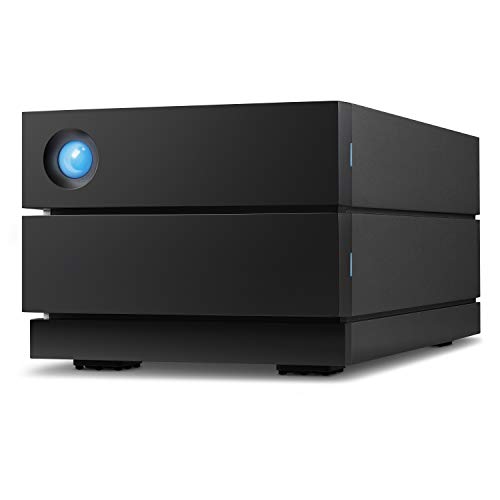
LaCie 2big RAID 16TB
Depth 4.65 in (118 mm) provides ample space for the 16 TB RAID setup, supporting audiophile‑grade performance and advanced features.

WD Elements 20TB
Ideal for users needing massive storage—doesn't break the bank, offers 20 TB for $439.99, about $309 cheaper than the LaCie 2big RAID.

Western Digital Elements 8TB
Stands out for its compact 166 mm height and $209.99 price, delivering 8 TB in a smaller, entry‑level package the larger LaCie and WD models lack.
Also considered
Score Analysis
Key score advantages vs. runner-up (WD Elements 20TB)
Price Range
LaCie 2big RAID 16TB
$773.89
WD Elements 20TB
$439.99
Western Digital Elements 8TB
$224.99

SanDisk Professional 48TB G-RAID Project
$1,489.99
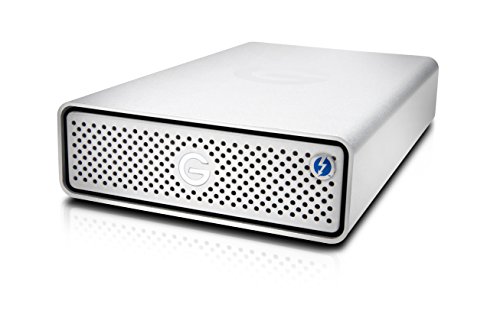
G-Technology G-DRIVE Desktop 12TB Thunderbolt
$826.95

Seagate Expansion 4TB
$199.99
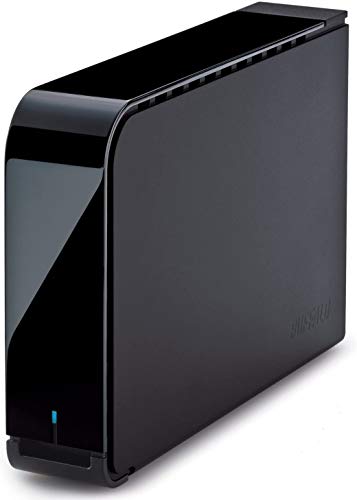
Buffalo DriveStation 4TB
$99.99

SanDisk Professional 8TB G-Drive Project
$458.99

SanDisk Professional 12TB G-Drive Project
$566.69
G-Technology G-DRIVE 4TB
$449.99

SanDisk Professional 6TB G-Drive
$274.99
OWC Mercury Elite Pro 6TB
$279.99
G-Technology G-DRIVE Desktop 4TB
$319.99
Spec Comparison
TL;DR: The LaCie 2big RAID delivers 16 TB of enterprise‑class storage in a dual‑bay aluminum chassis, offering up to 440 MB/s sequential speeds but carries a premium price and a noticeable cooling fan.
This unit packs two 8 TB Seagate IronWolf Pro drives, each spinning at 7,200 RPM, and can reach a maximum sequential read/write rate of 440 MB/s via its USB 3.1 Gen 2 (USB‑C) interface. The built‑in 60 mm Noctua fan and hot‑swappable bays add a level of professional‑grade durability that most consumer‑oriented drives lack.
Compared with the other twelve contenders, the 2big RAID is heavier than the G‑Technology G‑DRIVE Desktop 4TB (2.73 lb) and the WD Elements 20TB (1.98 lb), and it sits at a higher price point than those models, which are listed around $440–$468. Its 16 TB capacity also outstrips the 12 TB and 8 TB options from G‑Technology and SanDisk, while its USB 3.1 Gen 2 link is faster than the USB 3.0 ports found on several peers. However, it lacks the Thunderbolt 3 ports that the G‑Technology G‑DRIVE Desktop 12TB offers.
Professional reviewers praise the sturdy aluminum enclosure and the convenience of swapping drives without shutting down the unit. Users on retailer sites repeatedly note transfer speeds up to 440 MB/s when moving large video files, but they also flag the fan’s audible whine and the bright blue status LED as distractions. A handful of owners have reported occasional random dismounts, which aligns with the “random dismount” complaints seen in consumer sentiment.
Beyond raw speed, the drive supports RAID 0, RAID 1, and JBOD configurations, letting you choose between maximum capacity or redundancy. LaCie includes a 5‑year limited warranty plus a 5‑year Rescue Data Recovery Service, a safety net that few competitors match. The package comes with 39.5‑inch USB‑C to USB‑C and USB‑C to USB‑A cables, a Kensington lock slot for physical security, and a firmware update button for easy maintenance.
Pros
Cons
Best for: Video editors, photographers, and audio engineers who need massive, fast, and reliable desktop storage with RAID flexibility.
Avoid if: You need a quiet, bus‑powered, portable drive or work in noise‑sensitive environments.
“Fast performance for large file transfers”
“Unexpected dismounts: Multiple users report the drive randomly unmounting during transfers, requiring reformatting.”
TL;DR: At $439.99, the WD Elements 20TB delivers 20 TB of fanless, plug‑and‑play storage in a lightweight 1.98‑lb plastic case, backed by a 2‑year warranty and a 4.5‑star rating from over 27 k reviewers.
The standout spec is the 20 TB capacity, which dwarfs the 8 TB, 12 TB and 6 TB drives available elsewhere in this roundup. It ships pre‑formatted to NTFS for Windows 10 and later, and the Micro‑USB 3.2 Gen 1 (USB 3.0) cable promises up to 5 Gb/s transfer rates while still supporting USB 2.0 at 480 Mb/s. The fanless plastic enclosure keeps the unit quiet, and the included AC adapter and WD Backup software make initial setup a matter of plugging in and clicking “install”.
When you line it up against the other 12 contenders, the WD Elements is notably lighter—at 1.98 lb it undercuts the SanDisk 8 TB model (3.68 lb), the G‑Technology 4 TB drive (2.73 lb) and the OWC 6 TB unit (2.9 lb). Capacity-wise, it also sits at the top of the list, offering more than double the storage of the largest peer (12 TB). Price‑wise, it lands in the same mid‑tier bracket as the other high‑capacity options, giving you a competitive cost per terabyte without stepping into premium pricing.
Users repeatedly praise the sheer amount of space for media libraries, game backups and large‑scale file migrations, noting the quiet operation and the hassle‑free Windows plug‑and‑play experience. Professional reviewers echo these points, calling the value proposition “strong” and highlighting the drive’s reliable long‑term operation. The most common complaints revolve around macOS compatibility—Mac users must reformat the drive, which erases existing data—and the plastic housing, which feels less premium than metal‑cased rivals. Additionally, the lack of built‑in encryption means sensitive data isn’t protected out of the box.
Under the hood, the WD Elements 20TB is a 3.5‑inch mechanical HDD that pairs with a Micro‑USB 3.2 Gen 1 interface (5 Gb/s) and backward‑compatible USB 2.0 ports. It includes a SuperSpeed USB‑A to micro‑USB cable, an external AC power adapter, and the WD Backup utility for basic backup tasks. The drive operates between 41 °F and 95 °F and comes with a 2 Year Limited Manufacturer Warranty, giving you peace of mind for everyday desktop use.
Pros
Cons
Best for: Most users looking for a well‑reviewed, reliable mainstream option
Avoid if: You have limited desk space or need portability
“running out of space when transferring a full 12TB drive”
“plug-and-play experience with Windows is seamless”
TL;DR: The WD Elements 8TB delivers massive 8 TB storage, solid 150–176 MB/s write speeds and a 2‑year warranty at a budget‑friendly $209.99, though it needs an external power brick.
A 5400 RPM mechanical drive powers it, achieving real‑world write speeds of 150–176 MB/s. Its USB 3.0 (micro‑B) interface rates at a theoretical 5 Gbps and stays backward compatible with USB 2.0 (480 Mbps), giving you flexibility with older computers.
Compared with the other twelve drives in this roundup, the Elements offers the largest capacity—most rivals top out at 6 TB or less. It weighs 2.09 pounds, making it lighter than the SanDisk Professional 6TB (3.04 lb) and the Seagate Expansion 4TB (2.44 lb), while matching the Buffalo DriveStation’s 2.09 lb. Its dimensions (166 mm × 135 mm × 48 mm) keep it compact for a 3.5‑inch unit, and the included Kensington lock slot adds a layer of physical security that many competitors lack.
Professional reviewers praise the plug‑and‑play Windows experience and the sheer amount of space for 4K video libraries or large backups. Users consistently highlight the reliable performance and the high 4.5‑star rating from 27,452 reviews. Common complaints focus on the audible spin‑up noise, the need for an external AC adapter rather than bus power, and the requirement to reformat the drive for macOS use. The lack of RAID support also shows up as a downside for those seeking mirrored redundancy.
Pros
Cons
Best for: Home users and small offices that need massive, reliable backup storage without breaking the bank.
Avoid if: You have limited desk space, need a portable bus‑powered drive, or require SSD‑level performance.
“tons of space”
“consolidated 15 years of photos and artwork onto a single drive”
TL;DR: The SanDisk Professional 48TB G‑RAID Project delivers massive 48 TB storage, RAID 0 performance up to 540 MB/s, and dual Thunderbolt 3 ports, but its premium $1489.99 price and power‑port concerns may limit budget‑conscious users.
This desktop‑grade RAID array packs two 24 TB Ultrastar 7200 RPM drives in a pre‑configured RAID 0, giving you a total of 48 TB and sequential read speeds of up to 540 MB/s (490 MB/s write). Dual USB‑C Thunderbolt 3 ports each run at 40 Gb/s, and the unit also supports USB 3.2 Gen 2 at 10 Gb/s. An internal fan keeps the drives cool, while the included AC adapter powers the box.
Compared with the other 12 entries, the G‑RAID Project is heavier than the G‑Technology G‑DRIVE Desktop 12TB (2.73 lb) and the LaCie 2big RAID 16TB (4.65 lb), but it also offers far more capacity—48 TB versus 12 TB, 16 TB, 20 TB, or 4 TB in the competing models. Its 540 MB/s read speed outpaces the 250 MB/s read of the G‑DRIVE Desktop and the 250 MB/s of the SanDisk 12TB Project, and it exceeds the LaCie’s 440 MB/s maximum transfer rate. Like the G‑DRIVE Desktop, it supports daisy‑chaining up to five devices, giving studio setups flexible expansion.
Professional reviewers highlight the drive’s suitability for 4K, 8K, and VR workflows and praise the enterprise‑class HDDs and fast Thunderbolt link. Everyday users love the raw speed and the handy PRO‑BLADE SSD slot for off‑loading clips, but several mention power‑port failures within months and the inconvenience of having to reformat when switching RAID modes. Security‑focused feedback also points out the lack of hardware encryption, and M1 Mac owners note a required driver install.
Pros
Cons
Best for: Professional video editors handling 4K, 8K, or VR footage; field producers needing high‑capacity, fast‑throughput storage on a studio desk.
Avoid if: You're shopping on a tight budget — it's priced at $1489.99, or if you need built‑in RAID redundancy and a fully bus‑powered, ultra‑portable solution.
TL;DR: The G‑Technology G‑DRIVE Desktop 12TB Thunderbolt delivers 12 TB of fast, reliable storage with 250 MB/s reads, dual 40 Gb/s Thunderbolt 3 ports, a solid aluminum case, and a five‑year warranty.
The drive’s standout spec is its massive 12 TB capacity paired with a sustained read speed of 250 MB/s, which is ideal for handling large 4K video files. It also offers two Thunderbolt 3 ports that each support 40 Gb/s and a USB 3.1 Gen 1 (USB‑C) port at 5 Gb/s, giving you plenty of high‑speed connectivity options.
In the lineup, its footprint (45.5 mm × 210.1 mm × 130.0 mm) mirrors the smaller G‑DRIVE 4TB, while its 2.73 pound weight matches that model as well. It is lighter than the LaCie 2big RAID 16TB, which weighs 4.65 pounds, but heavier than the WD Elements 20TB at 1.98 pounds. Compared with the SanDisk 8TB G‑Drive Project (3.68 pounds), it’s notably lighter.
Users consistently praise the drive’s smooth performance in creative workflows, noting the quiet operation of its 7200 RPM 3.5‑inch SATA HDD and the durability of its solid aluminum enclosure. The five‑year warranty adds peace of mind, though reviewers point out the lack of built‑in RAID redundancy and the need for an external AC power brick, which limits true portability. Its 4.0‑star rating from 339 reviews sits a notch below many peers, reflecting a few mixed experiences.
Pros
Cons
Best for: Those prioritizing quality and willing to pay for premium performance
Avoid if: You're on a tight budget or only need basic functionality
“ultra-fast, high-performance storage”
“natively edit footage in real-time”
TL;DR: The Seagate Expansion 4TB delivers 4 TB of desktop storage, USB 3.0 speeds up to 280 MB/s, and a three‑year rescue service for $162.78.
This drive packs a 4 TB mechanical HDD in a 3.5‑inch plastic enclosure and runs on a dedicated 18 W AC adapter. It connects via USB 3.0 (5 Gbps) with an 18‑inch cable and can sustain up to 280 MB/s in real‑world transfers. The spindle spins at 5400 RPM, and the unit weighs 2.438 lb, giving it a solid feel as a desktop addition.
Compared with peers, the Expansion is slightly heavier than the Western Digital Elements 8TB and Buffalo DriveStation 4TB, both weigh 2.09 pounds. Its one‑year warranty is shorter than the two‑ to three‑year coverage many rivals offer, and it lacks the higher‑speed 7200 RPM drives that some competing models use.
Reviewers consistently praise the plug‑and‑play setup and the included three‑year Rescue Data Recovery Service, noting it adds tangible peace of mind. However, users also report speed drops once the drive is more than half full and occasional early failures within the first couple of years, which professional reviewers flag as a reliability concern for mission‑critical backups.
Pros
Cons
Best for: Budget‑conscious buyers seeking a reliable entry‑level option
Avoid if: You have limited desk space, need portability, or require high‑performance storage for video editing
“Works great right out of the box — just plug in and start transferring.”
“Fast enough for backing up my photo and video library.”
TL;DR: The Buffalo DriveStation 4TB delivers 7200 RPM performance, optional 256‑bit encryption and a $99.99 price tag, making it a solid budget desktop storage choice.
The DriveStation houses a 4 TB mechanical drive spinning at 7200 RPM, paired with a USB 3.2 Gen 1 (USB 3.0) interface. In real‑world use the drive tops out around 125 MB/s, which is respectable for a desktop HDD and noticeably quicker than many 5400 RPM rivals. The unit also offers optional 256‑bit hardware encryption and a user‑installable cooling fan for those who need extra security or thermal headroom.
Compared with the other twelve entries, the DriveStation is lighter than the Seagate Expansion 4TB (2.44 lb) and the SanDisk Professional 6TB (3.04 lb), while matching the weight of the WD Elements 8TB (2.09 lb). It's a touch heavier than the WD Elements 20TB (1.98 lb) but still more portable than the bulkier G‑Technology G‑DRIVE Desktop 4TB (≈2.45 lb). Its 7200 RPM spindle also sets it apart from the 5400 RPM drives found in the Seagate and WD Elements 8TB models, giving it a speed edge without a price jump.
Users consistently praise the drive’s swift data moves, quiet operation and the sleek black chassis with a tri‑color LED that signals USB mode or encryption status. Professional reviewers highlight the 7200 RPM motor as a smart differentiator and note the TAA compliance for enterprise environments. On the downside, owners mention the need to reformat the NTFS‑pre‑installed drive for macOS, the lack of an onboard DRAM cache that caps peak throughput, and the requirement for an external AC adapter, which limits true portability.
Technically, the DriveStation houses a 3.5‑inch SATA II (3 Gbps) drive inside a sturdy plastic enclosure. Power consumption peaks at 18 W, and the optional fan can be added if you anticipate heavy workloads. The included Buffalo Backup Utility works with Windows, while macOS users can rely on Time Machine support after reformatting.
Pros
Cons
Best for: Shoppers on a tight budget who want the most for their money
Avoid if: You have limited desk space or need portability
“Fast and reliable”
TL;DR: The SanDisk Professional 8TB G‑DRIVE PROJECT packs 8 TB of enterprise‑grade storage, 40 Gbps Thunderbolt 3 speeds and a hybrid SSD slot, but its external power brick and premium price keep it in the mid‑range.
This drive’s headline spec is its 8 TB capacity paired with a 7200 RPM enterprise‑class HDD and a Thunderbolt 3 interface that tops out at 40 Gbps. The unit also offers 250 MB/s sustained read and write speeds and a second Thunderbolt 3 port for daisy‑chaining, plus a PCIe PRO‑BLADE SSD Mag slot that lets you add a fast SSD for active projects.
At 3.68 pounds, it’s heavier than the G‑Technology G‑DRIVE 4TB (2.73 lb) and noticeably heftier than the WD Elements 20TB (1.98 lb). Its 76.45 mm height also exceeds the 45 mm profile of the G‑Technology G‑DRIVE 4TB and the 35.3 mm height of the G‑Technology G‑DRIVE Desktop 4TB, while sharing the common 210 mm length you’ll see across many of the other desktop drives in this roundup. Priced at $459.99, it sits on the higher end of the lineup.
Professional reviewers highlight the drive’s enterprise‑grade reliability and the convenience of dual Thunderbolt 3 ports for studio setups. Users love the quiet, fanless aluminum enclosure and the plug‑and‑play experience on macOS, especially with Time Machine. However, several owners note that the unit runs warm under sustained load, the external 19 VDC power adapter makes it less portable, and it can fail to auto‑reconnect after a reboot or power loss.
The enclosure uses anodized aluminum and relies on passive cooling, while a Kensington security slot adds a basic theft‑deterrent. It ships pre‑formatted for APFS on macOS, works with iPadOS 14+, and can be reformatted for Windows 10+. SanDisk backs the drive with a 5‑year limited warranty.
Pros
Cons
Best for: Professional video editors and photographers who need 8 TB of fast, reliable desktop storage with Thunderbolt 3 connectivity and the option to expand with an SSD.
Avoid if: You need a portable, bus‑powered drive, require built‑in hardware encryption, or are sensitive to the premium price of $459.99.
TL;DR: The SanDisk Professional 12TB G‑DRIVE PROJECT delivers 12 TB of enterprise‑class storage, dual 40 Gbps Thunderbolt 3 ports, and a modular SSD slot, all in a fanless aluminum chassis for creators who need reliable, high‑capacity performance.
The standout spec is its 12 TB capacity paired with a 40 Gbps Thunderbolt 3 interface and a 10 Gbps USB 3.2 Gen 2 fallback. Internally it houses a 7200 RPM Ultrastar drive and delivers sequential read and write speeds of up to 250 MB/s, which is notably faster than many desktop HDDs in this segment.
At $523.99, it sits above the G‑Technology G‑DRIVE 4TB ($467.99) and the SanDisk Professional 8TB G‑DRIVE PROJECT ($459.99). It’s heavier than the 4TB G‑DRIVE’s 2.73 lb chassis but about the same weight as the 8TB model (around 3.64–3.68 lb). Its height of 51.05 mm is shorter than the 8TB’s 76.45 mm, while the length (210.06 mm) and width (133.1 mm) match the 8TB’s footprint, making it a compact high‑capacity option.
Reviewers consistently praise the drive’s fast, reliable performance for 4K video editing and large RAW libraries, noting the dual Thunderbolt 3 ports and daisy‑chaining support for up to six devices as a workflow boost. Professional reviewers highlight the enterprise‑grade 7200 RPM internals and the forward‑thinking PRO‑BLADE SSD Mag slot that lets you add a PCIe 10 Gbps SSD for hybrid storage. On the downside, users mention the lack of hardware encryption, occasional dead‑on‑arrival units, and the fanless design’s potential for thermal throttling during prolonged heavy transfers.
Beyond speed, the drive includes a 19 V DC power adapter, a Thunderbolt 3 cable, and a Quick Start Guide. The anodized aluminum enclosure offers three LED brightness settings and a Kensington lock slot for added security. Compatibility spans iPadOS 14+, macOS 10.15+ (Time Machine), and Windows 10+ (reformat required). A 5‑year limited manufacturer warranty rounds out the package, showing SanDisk’s confidence in the product’s durability.
Pros
Cons
Best for: Professional video editors, photographers, and other creators who need massive, reliable storage and high‑speed Thunderbolt connectivity.
Avoid if: You require SSD‑level speeds, hardware encryption, or a travel‑ready, ultra‑light external drive.
TL;DR: The G‑Technology G‑DRIVE 4TB offers a 4 TB aluminum‑cased desktop drive with 7200 RPM speed, 165 MB/s transfers and dual Thunderbolt 1/USB 3.0 ports, but its first‑gen Thunderbolt and hefty power brick keep it from being the most future‑proof option.
This model packs a 4 TB 3.5‑inch mechanical HDD that spins at 7200 RPM and delivers up to 165 MB/s maximum data transfer. It connects via a single Thunderbolt 1 port and a USB 3.0 Type‑A port, and it even includes a USB‑C (USB 3.1 Gen 1) port and a second Thunderbolt 3 port for daisy‑chaining up to five devices. The drive sits in a passive‑cooling aluminum enclosure, weighs 2.73 pounds, and measures 45 mm tall, 210 mm long and 130 mm wide.
Compared with the other 12 drives in this roundup, the G‑DRIVE is lighter than the SanDisk Professional 8TB G‑Drive Project (3.68 pounds) but heavier than the WD Elements 20TB (1.98 pounds). Its 45 mm height measures slimmer than the 76.45 mm height of that same SanDisk 8TB model, yet it measures taller than the 35.3 mm profile of the G‑Technology G‑DRIVE Desktop 4TB. Transfer‑rate wise, the 165 MB/s ceiling falls below the 250 MB/s read/write speeds listed for several SanDisk Professional drives, though it matches the 165 MB/s read speed of the competing G‑Technology Desktop 4TB.
Reviewers consistently praise the drive’s reliable performance with large media files and its plug‑and‑play macOS experience, especially for Time Machine backups or editing in Final Cut Pro. Users also highlight the premium aluminum chassis and the illuminated “G” logo as aesthetic wins. On the downside, many see the first‑generation Thunderbolt (10 Gbps) as a future‑proofing limitation and describe the 65 W external power brick as bulky, noting that the unit gets warm under sustained loads.
Pros
Cons
Best for: Creative professionals who need a high‑capacity, reliable desktop drive and are willing to pay for a premium aluminum build.
Avoid if: You require the latest Thunderbolt versions, RAID functionality, or a truly portable storage solution.
“ultra-fast, high-performance storage”
“natively edit footage in real-time”
TL;DR: The SanDisk Professional 6TB G‑Drive offers enterprise‑class 7200 RPM reliability and up to 250 MB/s USB‑C performance in a rugged aluminum case, but its external power requirement and premium price suit studio setups best.
The standout spec is its enterprise‑grade 7200 RPM Ultrastar drive, which offers a 2.5 million‑hour MTBF and up to 250 MB/s sustained read/write speed via a USB‑C 10 Gbps (USB 3.2 Gen 2) interface.
Compared with the other 6‑8 TB desktop drives in this roundup, the G‑Drive is heavier than the Western Digital Elements 8TB (2.09 lb) and the OWC Mercury Elite Pro 6TB (2.9 lb), yet its USB‑C 10 Gbps connection outpaces OWC’s USB 3.2 Gen 1 (5 Gb/s) link. Its 6 TB capacity matches the OWC model while delivering faster speeds than the 5400 RPM drives such as the WD Elements 8TB.
User feedback frequently praises the smooth 4K editing experience and the drive’s ready‑to‑use macOS Time Machine support, thanks to the APFS pre‑format. Common complaints focus on noticeable warmth during long sessions and the extra step of reformatting for Windows users.
Professional reviewers note the stackable aluminum chassis with anchor points, a practical feature for DIT carts, and the 45 W power delivery that necessitates an external AC adapter, reinforcing its desktop‑only design.
Pros
Cons
Best for: Professional video editors, photographers, and DIT crews who need high‑capacity, enterprise‑class durability in a studio environment.
Avoid if: You need a lightweight, bus‑powered drive for travel or prioritize maximum speed over capacity.
TL;DR: The OWC Mercury Elite Pro 6TB packs a 7200 RPM drive, up to 252 MB/s real‑world speeds and a sturdy aluminum case into a 2.9‑lb desktop unit for reliable high‑capacity storage.
At the heart of the Mercury Elite Pro is a 6 TB 3.5‑inch mechanical HDD spinning at 7200 RPM, delivering a manufacturer‑claimed maximum real‑world transfer rate of 252 MB/s. Its brushed‑aluminum enclosure includes shock‑isolated mounts that help keep the drive cool during long backup sessions, and the unit ships with a USB 3.2 Gen 1 Type‑B cable plus optional FireWire 800 and eSATA adapters for legacy rigs.
Compared with the other twelve drives in this roundup, the OWC sits in the middle of the weight range: it’s lighter than the SanDisk Professional 6TB G‑Drive (3.04 lb) but heavier than the Western Digital Elements 8TB (2.09 lb) and Buffalo DriveStation 4TB (2.09 lb). In height, its 117 mm chassis is taller than the compact G‑Technology G‑DRIVE Desktop (35.3 mm) and Buffalo model (38.6 mm) while remaining shorter than the bulkier Western Digital Elements 8TB (166 mm) and WD Elements 20TB (165.86 mm). The capacity of 6 TB places it above the 4 TB options and below the 8 TB and 20 TB peers, giving you a solid middle ground without the size of the largest drives.
User sentiment consistently praises the drive’s reliable performance and premium build quality. Reviewers note the 7200 RPM spindle enables fast backup times and the sturdy aluminum housing, while a few mention audible noise during sustained transfers and the inconvenience of an external power adapter. Professional reviewers highlight the multi‑interface design—USB 3.2 plus optional FireWire 800/eSATA—as a strength for studios still using older equipment, though they point out the lack of native USB‑C or Thunderbolt as a limitation for newer workflows.
Pros
Cons
Best for: Creative professionals or home users who need high capacity, fast desktop storage with sturdy build quality.
Avoid if: You need a portable, bus‑powered drive, hardware encryption, or native USB‑C/Thunderbolt connectivity.
“The drive is solid, premium, and industrial‑grade – I’ve had no failures after years of daily use.”
“A bit noisy under sustained read/write, but performance is great.”
TL;DR: The G‑Technology G‑DRIVE Desktop 4TB offers a 4 TB, 7200 RPM aluminum‑cased drive with USB 3.0 performance and a 3‑year warranty for $319.99, but it lacks modern USB‑C or Thunderbolt ports.
The 4 TB mechanical capacity paired with a 7200 RPM spindle and a 165 MB/s maximum read speed really stands out, all housed in a solid all‑aluminum enclosure. It connects via a single USB 3.0 Type‑B port and includes an AC power adapter, making it a true desktop‑class solution.
Compared with the other twelve entries, this G‑DRIVE is lighter than the OWC Mercury Elite Pro 6TB (which weighs 2.9 lb) and lighter than the SanDisk Professional 6TB G‑Drive (3.04 lb). Its 165 MB/s read speed is slower than the SanDisk model’s advertised 250 MB/s, and it doesn’t reach the 300 MB/s theoretical ceiling of the OWC unit. However, its price point sits above the Western Digital Elements 8TB and below the higher‑capacity Thunderbolt‑enabled options, positioning it as a mid‑tier, value‑focused choice.
Many users praise the premium aluminum chassis for durability and the smooth macOS integration—especially the Time Machine readiness out of the box. Professional reviewers note the high‑performance spindle and the fast‑enough USB 3.0 interface for most creative workflows. The most common complaints revolve around audible noise when the drive is under heavy load, the absence of USB‑C or Thunderbolt connectivity, and the need for an external power brick, which makes it less portable.
Technical details reinforce its reliability: a 64 MB cache buffers data, the 3‑year limited warranty adds peace of mind, and the SATA III internal interface ensures the drive can sustain its rated speeds. It also supports backward compatibility with USB 2.0, so older machines can still use it, albeit at reduced performance.
Pros
Cons
Best for: Value-conscious buyers seeking quality at $319.99
Avoid if: You need advanced features or professional‑grade performance
“ultra-fast, high-performance storage”
“natively edit footage in real-time”
Breakdown
LaCie 2big RAID 16TB
Pros
Cons
WD Elements 20TB
Pros
Western Digital Elements 8TB
Pros
SanDisk Professional 48TB G-RAID Project
Pros
Cons
Based on scoring data and product specs
Personalized picks
Best Overall Pick
LaCie 2big RAID 16TB
Best OverallBest for: Audiophiles and enthusiasts seeking premium sound quality and advanced features
WD Elements 20TB
Best for: Most users looking for a well-reviewed, reliable mainstream option
$439.99-$333.90 vs winner
Skip G-Technology G-DRIVE Desktop 4TB if…
You need advanced features or professional-grade performance
The LaCie 2big RAID 16TB wins top spot thanks to its massive 16 TB capacity, a solid 5‑year limited warranty and a listed maximum transfer speed of 440 MB/s. It also ships with a 5‑year Rescue Data Recovery Service, giving you peace of mind for long‑term storage, and its all‑aluminum unibody keeps the 4.65 lb unit sturdy yet portable.
The WD Elements 20TB takes the runner‑up spot, perfect if you need huge storage on a tight budget and want a hassle‑free Windows‑first experience. It offers 20 TB of space for $439.99, carries a 4.5‑star rating from 27,452 reviewers, and its fanless design keeps the 1.98‑lb drive quiet and easy to move.
For those with different budget levels, consider these alternatives:
Pick the LaCie 2big RAID 16TB today for the most reliable high‑capacity desktop storage solution.
The Western Digital Elements 8TB provides a single 8 TB drive, USB 3.0 (micro‑B) connectivity, and plug‑and‑play operation with Windows and macOS after reformatting, making it straightforward to use. At 947 g it’s lighter than many aluminum‑cased models and costs $209.99, offering ample space without the complexity of RAID.
Please sign in to leave a review
No reviews yet. Be the first to review!
