⚡ Quick Answer
When you need 8 TB or more of portable storage, the market offers a wide range of options. We compared 10 external hard drives, with prices spanning from $224.99 for the WD Elements 8TB up to $826.95 for the G‑Technology G‑DRIVE 12TB Thunderbolt. The lineup splits into three price tiers: budget picks like the $224.99 WD Elements, mid‑range choices such as the $310.00 Seagate Starfield Game Hub, and premium models including the $786.52 Crucial X10.
The Seagate One Touch Hub 16TB stands out with a massive 16 TB capacity and built‑in USB‑C and USB‑A charging ports, priced at $426.99 and carrying a 4.1‑star rating from 2,779 reviewers. If size matters, the Crucial X10 delivers 8 TB in a pocket‑sized 32 g chassis and has sequential read speeds of 2100 MB/s, earning the highest rating of 4.6 stars among the group. On the budget side, the WD Elements 8TB offers plug‑and‑play USB 3.0 connectivity for $224.99 and a solid 4.4‑star rating from over 27,000 users.
Below we’ll break down each tier, highlight the strengths and compromises of every model, and help you match the right drive to your storage needs.

Seagate One Touch Hub 16TB
Its shallow 45.30 mm depth makes it easy to fit on any desk while offering good features and value.

Crucial X10 8TB
Power users who need ultra‑fast USB 3.2 Gen 2x2 (20 Gbps) transfers will appreciate it, though it costs about $360 more than the Best Overall.
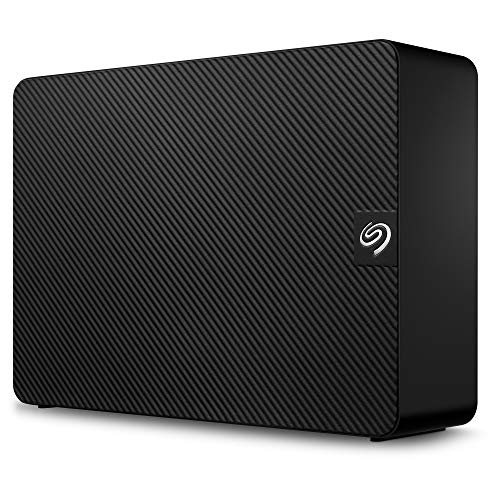
Seagate Expansion 10TB
It features a generous 457 mm cable and deeper 218 mm chassis, delivering plug‑and‑play simplicity at a lower price point.
Also considered
Score Analysis
Key score advantages vs. runner-up (Crucial X10 8TB)
Price Range
Seagate One Touch Hub 16TB
$489.00
Crucial X10 8TB
$845.99
Seagate Expansion 10TB
Out of Stock

Seagate Starfield Game Hub 8TB
$414.99

Western Digital Elements 8TB
$279.99
WD_BLACK D10 Game Drive 8TB
$269.99
Seagate Game Drive Hub 8TB
$286.14
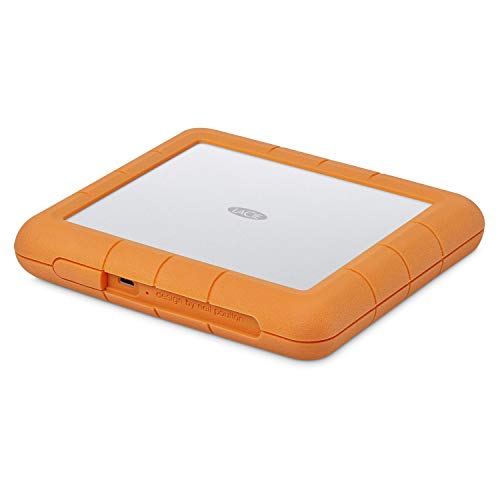
LaCie Rugged Raid Shuttle 8TB
$499.99
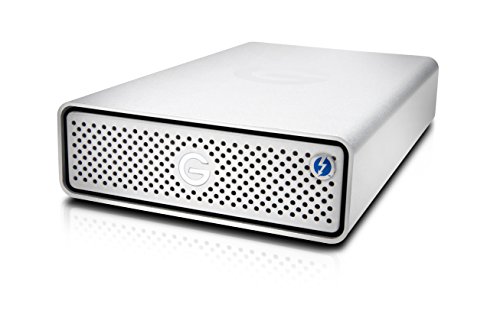
G-Technology G-DRIVE 12TB Thunderbolt Silver
$799.00

SanDisk Professional G-Drive Project 12TB Thunderbolt
$679.99
Spec Comparison
TL;DR: The Seagate One Touch Hub packs a massive 16 TB of desktop storage, 7200 rpm performance and a built‑in USB hub, but its $426.99 price and non‑portable 3.5‑inch form factor keep it in the office rather than the bag.
What really stands out is the 16 TB capacity paired with 7200 rpm spindle speed, giving you room for huge media libraries while still delivering the “very, very good” transfer speeds professional reviewers note over USB 3.0. The drive also offers 256‑bit AES hardware encryption and front‑facing USB‑C and USB‑3.0 charging ports, so you can charge phones or tablets without reaching for another adapter. At 2.73 lb (1240 g) it’s solid enough to sit steadily on a desk.
Compared with the other nine entries, this model is the most capacious – every other listed drive tops out at 12 TB – and it carries a higher price tag than the mid‑range 8 TB and 10 TB options. It’s also a bit heavier than the LaCie Rugged Raid Shuttle (around 2.12 lb) but similar in weight to the Seagate Starfield Game Hub (about 2.74 lb). The built‑in USB hub adds connectivity that many of the competitors lack, giving it an edge for users who juggle several peripherals.
User feedback repeatedly praises the sheer storage space and the convenience of the integrated hub, while noting that the drive runs quietly for a 7200 rpm unit. Reviewers point out the need for external power – the 3.5‑inch chassis isn’t meant for on‑the‑go use – and some buyers wish the warranty were longer in regions where it defaults to two years. The Seagate Toolkit backup software and Rescue³ data‑recovery service round out the feature set for peace‑of‑mind backups.
Seagate released it in early 2022; it ships with a 3‑year limited warranty and supports both Windows and Mac out of the box. The interface lineup includes SATA/600 for the internal drive, a USB 3.0 Micro‑B primary connection and USB 3.2 Type‑A and Type‑C ports for the hub.
Pros
Cons
Best for: Home and office users seeking a balance of features and value
Avoid if: You're shopping on a tight budget — it's priced at $426.99
TL;DR: The Crucial X10 8TB delivers 8 TB of storage in a 49.8 mm‑deep, 32 g SSD with up to 2100 MB/s reads, IP65 protection and a 3 m drop rating, but needs a USB 3.2 Gen 2x2 host to hit peak speeds.
What really sets this drive apart is its ultra‑compact chassis – just 49.8 mm deep, 9.9 mm high and 64.8 mm wide – while packing a full 8 TB (7.27 TB usable) of flash memory. The USB 3.2 Gen 2x2 (20 Gbps) interface promises sequential read speeds up to 2100 MB/s and writes up to 2000 MB/s, making it among the fastest portable SSDs, matching its 2100 MB/s read speed.
Compared with the other nine contenders, the X10 weighs dramatically less at 32 g versus the G‑Technology G‑DRIVE 12TB’s 2.73 lb, the LaCie Rugged Raid Shuttle’s 2.12 lb, and the Seagate One Touch Hub’s roughly 2.73 lb. Capacity-wise it falls below the 12 TB models from G‑Technology and SanDisk, yet matches the 8 TB offerings from LaCie, Seagate Starfield, Seagate Game Drive Hub and WD_BLACK D10. Its IP65 rating and 3 m drop protection also outpace many of the HDD‑based rivals that lack any formal ingress protection.
Reviewers love the pocket‑sized footprint – users repeatedly mention the “tiny chassis” as perfect for travel and field shoots. Professional reviewers highlight the “record‑breaking compactness” and the hardware‑based 256‑bit AES encryption for secure on‑the‑go editing. The main complaints focus on the need for a rare 20 Gbps host; most users see speeds fall back to around 10 Gbps (≈1 GB/s). Sustained transfer rates also tend to lag behind the headline 2100 MB/s peak, especially on very large data sets.
Pros
Cons
Best for: Content creators, photographers, videographers, travelers and gamers who need massive, portable storage with top‑tier speed and rugged protection.
Avoid if: You lack a USB 3.2 Gen 2x2 (20 Gbps) host, prioritize sustained raw transfer speeds over portability, or need a lower‑cost, higher‑capacity HDD solution.
“the smallest 8TB drive imaginable”
“overhyped for non-20 Gbps hosts”
TL;DR: The Seagate Expansion 10TB offers massive 10 TB storage, USB 3.0 plug‑and‑play, and built‑in rescue services, but its 3.5‑inch desktop size and external power brick keep it stationary.
The standout spec is its 10 TB capacity, giving you enough room for a huge photo library, 4K video archive, or full‑system backups. It spins at 7200 RPM and connects via USB 3.0, with the manufacturer listing transfer speeds at about 300 MB/s. An 18 W power adapter powers the drive, and the supplied USB‑3.0 cable measures 457 mm.
Compared with the other nine drives in this roundup, the Expansion’s 10 TB beats the 8 TB and 12 TB models on sheer capacity. At roughly 2.59 lb (1176 g), it weighs more than the Seagate Game Drive Hub 8TB (≈1.96 lb) and WD_BLACK D10 (≈2.16 lb) but weighs less than the SanDisk Professional G‑Drive 12TB (≈3.64 lb). Its 457 mm cable is shorter than the 1.2 m cable on the Game Drive Hub 8TB, while the Starfield Game Hub’s 45.72 cm cable is almost the same length.
Users consistently praise the hassle‑free plug‑and‑play setup and the included Rescue Data Recovery Services, noting that the drive works straight out of the box on both Windows 10+ and macOS 10.12+. The most common downside is the bulky 3.5‑inch form factor and the need for an external power brick, making it unsuitable for on‑the‑go laptop use. Professional reviewers also point out that, as an HDD, its speed and reliability fall short of SSD alternatives.
Pros
Cons
Best for: Budget-conscious buyers seeking a reliable entry-level option
Avoid if: You need portable, bus‑powered storage for laptops, tablets, or on‑the‑go use, as well as those seeking SSD‑level performance
“Works seamlessly on laptops/desktops without slowing systems”
“Fast transfers (~250 MB/s) and reliable for large backups”
TL;DR: The Seagate Starfield Game Hub packs 8 TB of storage, customizable RGB lighting, and front USB‑C/A ports into a desktop hub that weighs 2.74 lb and costs $310.00.
Its massive 8 TB capacity stands out, letting you keep an extensive library of Xbox and PC games without juggling files. It connects via USB 3.2 Gen 1 and adds a customizable RGB light strip plus built‑in USB‑C and USB‑A ports, all housed in a compact 48 mm‑high desktop hub that weighs 2.74 lb.
Compared with the nine other drives in this roundup, the Starfield hub is heavier than the Seagate Expansion 10TB (2.59 lb) and noticeably heftier than the Seagate Game Drive Hub 8TB (1.96 lb). Its 205 mm depth matches the Game Drive Hub but is shallower than the Expansion’s 218 mm depth. At 127 mm wide, it is narrower than the Expansion’s 212 mm width yet wider than the WD Elements 8TB’s 48.01 mm width. The included 45.72 cm cable is shorter than the Game Drive Hub’s 1.2 m cable, giving a tidier setup on a desk.
Reviewers love the sheer storage space and the eye‑catching RGB lighting that brightens a gaming rig. Everyday users note the drive runs cooler than many rivals, and professional reviewers highlight the three‑year Rescue Data Recovery Service as a solid safety net. The downside is the USB 3.2 Gen 1 interface, which isn’t fast enough for playing Xbox Series X|S‑optimized titles directly from the drive, and the Xbox‑only pre‑formatting means you’ll need to reformat for other consoles or platforms. No SSD variant is offered, so performance‑focused gamers may look elsewhere.
The hub ships with a USB 3.2 Gen 1 (SuperSpeed USB 3.0) interface that’s backward compatible with USB 2.0, and it’s ready out‑of‑the‑box for Xbox Series X|S, Xbox One X, Xbox One S, and PC. The 45.72 cm cable and the front ports make it convenient for connecting controllers or headsets without reaching behind the console. A three‑year manufacturer warranty rounds out the package.
Pros
Cons
Best for: Value-conscious buyers seeking quality at $310.00
Avoid if: You need advanced features or professional-grade performance
“Works great for Steam games”
“Worth it right now for the price. Cools down better than the WD Black”
TL;DR: The WD Elements 8TB delivers 8 TB of plug‑and‑play storage in a compact 6.53‑in tall, 2.09‑lb desktop drive with USB 3.0 speed and a solid 4.4‑star rating.
The standout spec is the massive 8 TB capacity paired with a 5 Gb/s data transfer rate over a USB 3.0 interface, giving you quick backups without needing a separate power brick for the cable. The drive measures 6.53 in (height) × 5.31 in (length) × 1.89 in (width), so it fits easily on a crowded desk while staying under 2.1 lb.
Compared with the nine other drives in this roundup, the Elements is lighter than most: the WD_BLACK D10, Seagate Expansion, Seagate Starfield, Seagate One Touch Hub, LaCie Rugged Raid Shuttle and SanDisk G‑Drive all weigh more than 2.1 lb. Only the Seagate Game Drive Hub (about 1.96 lb) and the ultra‑light Crucial X10 (0.07 lb) are lighter, but the latter targets a very different market. In terms of interface, the Elements’ USB 3.0 matches the Seagate Expansion and One Touch Hub, but it lacks the newer USB 3.2 Gen 1 or USB‑C ports that the WD_BLACK D10, Seagate Game Drive Hub, and LaCie Rugged Raid Shuttle include.
User feedback repeatedly highlights the drive’s “compact high‑capacity” design and the hassle‑free plug‑and‑play experience on Windows PCs. Reviewers appreciate the included SuperSpeed USB‑A cable (rated 5 Gbps) and external AC adapter, noting that the drive “just works” out of the box. Some mention the backward‑compatible USB 2.0 (480 Mb/s) port as a useful fallback for older machines, though they also note that it can limit transfer speeds when used.
Pros
Cons
Best for: Budget-conscious buyers seeking a reliable entry‑level option
Avoid if: You need advanced features or professional‑grade performance
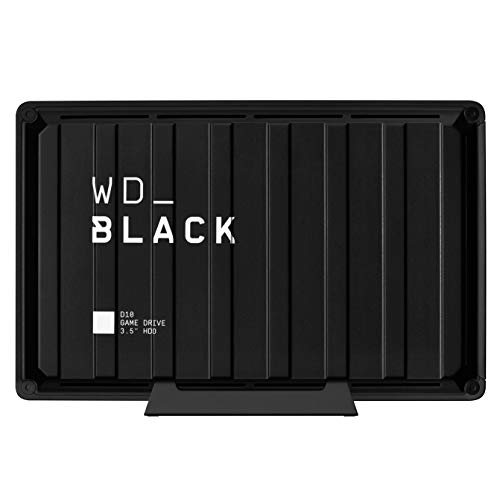
TL;DR: The WD_BLACK D10 Game Drive packs 8 TB of storage, 7200 RPM performance and active cooling into a 3.5‑inch chassis, but its 250 MB/s read speed and 2.16‑lb weight keep it best suited for stationary gaming rigs.
The standout spec is the massive 8 TB capacity, which the manufacturer says can hold roughly 200 games and large video libraries. It spins at 7200 RPM and delivers a listed read speed of 250 MB/s, while active cooling helps keep temperatures in check during marathon sessions. The drive connects via USB 3.2 Gen 1 and includes two 7.5 W USB‑A charging ports for controllers and other accessories.
Compared with the other nine drives in this roundup, the D10 is slightly heavier than the Western Digital Elements 8 TB (2.09 lb) and the Seagate Game Drive Hub 8 TB (1.96 lb). Its 44 mm height is a touch shorter than the Seagate hub’s 48 mm, and the 125 mm width is marginally narrower than that hub’s 127 mm. While it carries a similar 3‑year warranty to its peers, it offers fewer built‑in USB‑C ports than some competitors, relying on a micro‑B connector for data.
Reviewers consistently praise the drive’s 8 TB capacity and the convenience of the dual charging ports, noting that it “simplifies managing large game libraries and keeps controllers powered.” Professional reviewers highlight the active cooling and 7200 RPM spindle as delivering smooth game loading, but they also point out the 250 MB/s ceiling as a bottleneck for video editing or other high‑throughput tasks. Users frequently mention the 2.16‑lb weight as a drawback for anyone who needs to move the drive often.
Pros
Cons
Best for: Console and PC gamers who need a stationary, high‑capacity storage solution with built‑in charging ports.
Avoid if: You need frequent portability, SSD‑level speeds for video editing, or a USB‑C data interface.
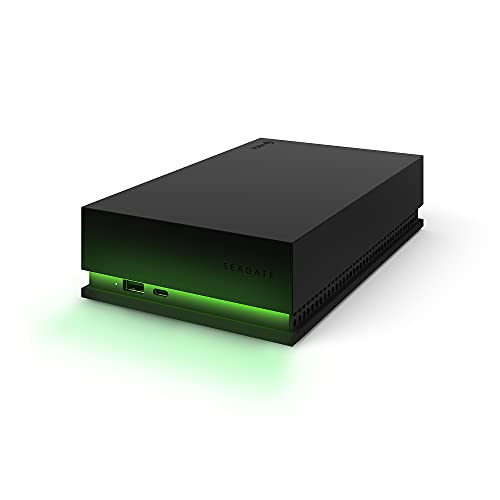
TL;DR: The Seagate Game Drive Hub 8TB packs 8 TB of Xbox‑certified storage, a built‑in USB hub and green LED styling, but its 7,200 rpm HDD can be noisy and slower than SSD rivals.
The standout spec is the massive 8 TB capacity, which Seagate markets as enough space for over 200 Xbox titles. Under the hood sits a 7,200 rpm Barracuda Pro drive, delivering the classic HDD performance you’d expect from an external hard disk.
At 1.962 lb (890 g), this drive is lighter than the Seagate Expansion 10TB (2.593 lb) and the WD_BLACK D10 Game Drive 8TB (2.161 lb), though the ultra‑light Crucial X10 (0.071 lb) is dramatically lighter. Its 1.2 m USB‑3.0 cable is longer than the 457 mm cable on the Expansion and the 45.72 cm cable on the Starfield hub, giving you more reach behind a console.
Users love the sheer storage volume and the convenience of the front‑facing USB‑C and USB‑A ports for charging controllers. Professional reviewers note the solid Barracuda Pro spindle and the Xbox‑green LED that blends with a console setup. The most common complaints focus on audible spin‑up noise and slower load times compared with SSD options, and many view the one‑year limited warranty as modest.
Beyond the specs, the drive is Xbox Certified, includes Rescue Data Recovery Services, and can sit vertically or horizontally to suit your entertainment centre. The package ships with a power adapter, a 1.2 m USB‑3.0 cable and a quick‑install guide, so you’re ready to plug in and expand right away.
Pros
Cons
Best for: Entry-level buyers or those on a tight budget
Avoid if: You need advanced features or professional‑grade performance
“Works great for Steam games”
“Worth it right now for the price. Cools down better than the WD Black”
TL;DR: The LaCie Rugged RAID Shuttle packs 8 TB of storage, 250 MB/s USB 3.1 Gen 2 speeds, and military‑grade drop and crush protection in a 2.12‑lb, IP54‑rated enclosure.
At the heart of this drive is an 8 TB total capacity that uses two 4 TB 2.5‑inch HDDs, offering hardware RAID 0 for speed or RAID 1 for mirroring. The unit delivers up to 250 MB/s read/write performance over a USB 3.1 Gen 2 Type‑C (10 Gb/s) interface, and it runs on a 5.4 V, 2 A bus‑powered supply. Weighing 2.12 lb and measuring just 0.7 in high × 3.9 in long × 2.6 in wide, it’s compact enough for a field‑ready bag while still providing a solid 3‑year warranty.
Compared with the nine other drives in this roundup, the LaCie sits in the middle of the capacity range—larger than the 8 TB WD_BLACK D10 and Western Digital Elements, but smaller than the 16 TB Seagate One Touch Hub and 12 TB SanDisk G‑Drive. Its 250 MB/s speed matches the Seagate Expansion and WD_BLACK D10, yet falls short of the 2 100 MB/s delivered by the Crucial X10 SSD. In terms of heft, it’s heavier than the Seagate Game Drive Hub (≈1.96 lb) and the ultra‑light Crucial X10 (≈0.07 lb), but lighter than the SanDisk G‑Drive (≈3.64 lb) and comparable to the Western Digital Elements (≈2.09 lb).
Everyday users consistently applaud the drive’s rugged construction—its IP54 rating, 4‑ft drop resistance, and 1‑ton crush resistance inspire confidence when traveling in harsh environments. Professional reviewers echo this sentiment, highlighting the built‑in AES‑256 encryption and the included Rescue Data Recovery service as valuable safeguards for critical media. However, reviewers also note the typical HDD drawbacks: noticeable noise, vibration during mobile use, and the fact that RAID 1 cuts usable space in half, leaving only 4 TB for those who prioritize redundancy.
Pros
Cons
Best for: Creative pros who need a rugged, high‑capacity drive with built‑in encryption and RAID flexibility.
Avoid if: You prioritize maximum transfer speed, prefer SSD performance, or need the full 8 TB without redundancy.
TL;DR: The G‑Technology G‑DRIVE 12TB Thunderbolt offers a solid‑aluminum 12 TB drive with Thunderbolt 3 and USB‑C, delivering up to 250 MB/s transfers, though it carries a premium $826.95 price tag.
The drive packs a massive 12TB of storage inside a brushed‑silver aluminum chassis. It connects via Thunderbolt 3 (40 Gb/s) and USB 3.1 Gen 1 Type‑C (5 Gb/s), and the manufacturer lists data‑transfer speeds of up to 250 MB/s. At 2.73 lbs, it measures 1.79 in tall, 5.12 in wide and 8.27 in long, so it's a fairly compact desktop‑oriented unit.
Compared with the nine other drives in this roundup, the G‑DRIVE sits in the middle of the weight range: it’s heavier than the ultra‑light Crucial X10 (under 0.1 lb) but lighter than the SanDisk Project 12TB (about 3.64 lb). Its 8.27 in length matches the SanDisk model and exceeds the compact LaCie Rugged Raid Shuttle, while its 5.12 in width is a touch narrower than SanDisk’s 5.24 in. In terms of capacity, it offers the highest storage at 12TB, outpacing all 8‑10TB peers.
Professional reviewers highlight the solid aluminum enclosure and the dual Thunderbolt 3 ports that let you daisy‑chain up to five devices without sacrificing a USB slot. Users appreciate the fast 250 MB/s throughput for large video files, but several reviews note the lack of independent benchmark data and limited information on noise or heat. The 4.0‑star rating from 339 reviewers reflects solid satisfaction, though the premium $826.95 price is a frequent point of criticism.
Under the hood sits a 7200 RPM enterprise‑class HDD, and the package includes a power adapter, Thunderbolt cable, USB‑C to Type‑A adapter and a quick‑start guide. G‑Technology backs the unit with a five‑year manufacturer‑limited warranty, underscoring its target market of creative professionals who need reliable, high‑capacity storage.
Pros
Cons
Best for: Those prioritizing quality and willing to pay for premium performance
Avoid if: Reliability and user satisfaction are your top concerns
TL;DR: The SanDisk Professional G‑DRIVE PROJECT 12TB offers a massive 12 TB of enterprise‑class storage, 40 Gbps Thunderbolt 3 connectivity, and a rugged aluminum build for $566.69, but its size and price keep it in the studio‑oriented tier.
The standout spec is the 40 Gbps Thunderbolt 3 interface, paired with a 12 TB 7200 RPM Ultrastar enterprise‑class HDD that delivers sequential read and write speeds of up to 260 MB/s. At 3.01 in high, 8.27 in long, and 5.24 in wide, the drive packs a professional‑grade aluminum chassis while weighing 3.64 lb, making it a solid desktop‑oriented unit.
Compared with the nine other drives in this roundup, the G‑DRIVE PROJECT is heavier than the LaCie Rugged Raid Shuttle (2.12 lb) and the G‑Technology G‑DRIVE 12TB Thunderbolt Silver (2.73 lb). Its dimensions also exceed the compact 0.7 in height of the LaCie model and the slimmer profiles of the Seagate Game Drive Hub and WD_BLACK D10. On the connectivity side, its Thunderbolt 3 speed outpaces the USB‑C/USB‑A options that dominate most peers, and the 10 Gbps USB 3.2 Gen 2 fallback still tops the 250 MB/s USB‑3.0 rates listed for several competitors.
User feedback frequently praises the 12 TB capacity for archiving 4K/8K footage and the reliable performance of the Ultrastar drive. Reviewers also highlight the color‑coded cable indicators that simplify hookup in busy studio rigs. On the downside, customers note the bulkier footprint and the need for an external AC power adapter, which reduces true portability and adds to setup complexity.
Pros
Cons
Best for: Professional video editors, filmmakers, and creative studios that need massive, reliable storage and premium connectivity.
Avoid if: You prioritize lightweight, bus‑powered portability or have a tight budget that favors lower‑priced consumer drives.
Breakdown
Seagate One Touch Hub 16TB
Pros
Cons
Crucial X10 8TB
Pros
Seagate Expansion 10TB
Pros
Seagate Starfield Game Hub 8TB
Pros
Based on scoring data and product specs
Personalized picks
Best Overall Pick
Seagate One Touch Hub 16TB
Best OverallBest for: Home and office users seeking a balance of features and value
Crucial X10 8TB
Best for: Buyers willing to invest in a proven, high-quality option
$845.99+$356.99 vs winner
Skip SanDisk Professional G-Drive Project 12TB Thunderbolt if…
Reliability and user satisfaction are your top concerns
The Seagate One Touch Hub 16TB earns the top spot thanks to its massive 16 TB capacity, 7200 rpm drive speed, and built‑in USB hub that adds USB‑C and USB‑3.0 charging ports. It also provides 256‑bit AES hardware encryption, a 3‑year limited warranty, and a solid 4.1‑star rating from 2,779 reviewers, all for $426.99.
The Crucial X10 8TB comes in as runner‑up and suits creators who need SSD‑class performance for 4K video editing or large‑file transfers. It delivers 2100 MB/s sequential reads and 2000 MB/s sequential writes over a USB 3.2 Gen 2x2 (20 Gbps) USB‑C connection, weighs just 0.07 lb, and holds a 4.6‑star rating from 1,810 reviews, priced at $786.52.
For tighter budgets, the Western Digital Elements 8TB offers the most affordable high‑capacity storage at $224.99. If you’d like a mid‑range option with a gaming‑focused hub, the Seagate Starfield Game Hub 8TB balances price and features at $310.00. For premium performance, the G‑Technology G‑DRIVE 12TB Thunderbolt Silver provides Thunderbolt speed and a rugged build for $826.95.
Pick the Seagate One Touch Hub 16TB for the best blend of capacity, security, and value.
The LaCie Rugged Raid Shuttle 8TB is designed for tough environments, offering an IP54 rating, 1‑ton crush resistance, and a 4‑ft drop rating. Its aluminum case and built‑in AES‑256 encryption make it a solid choice for field work.
No reviews yet — be the first to share your experience.
Please sign in to leave a review



