Ink‑tank printers have become the go‑to choice for anyone who wants low per‑page costs without the hassle of constantly swapping cartridges. In this roundup we’ve sifted through 14 models—from entry‑level all‑in‑ones to wide‑format powerhouses—so you can spot the unit that fits your desk space, volume needs, and budget. Prices span from $159.00 for the Canon MegaTank G3270 up to $519.00 for the Epson EcoTank ET‑15000, and most models sit comfortably in the 4‑star range, with the Epson ET‑4950 even pulling a 4.5‑star rating from 100 reviewers.
To make the decision easier, we’ve grouped the printers into three price tiers that the data supports. The budget tier includes the Canon G3270 ($159.00), Epson ET‑2400 ($159.99), HP Smart Tank 5000 ($179.99) and HP Smart Tank Plus 651 ($229.89), all offering ink yields. Mid‑range options like the HP Smart Tank 5101 ($259.89) and Epson ET‑2980 ($269.99) sit between $259.89 and $269.99, adding features such as automatic duplex. The premium tier covers the workhorses—Epson ET‑15000 ($519.00), ET‑4950 ($480.00), ET‑8550 ($499.99) and Canon MAXIFY GX2020 ($322.12)—designed for larger formats, faster speeds, and higher monthly duty cycles.
Below you’ll find a side‑by‑side look at each model’s key specs, so you can match the printer to your everyday printing scenarios.

Epson EcoTank ET-2400
Offers solid copy speed of 7.7 cpm in monochrome, delivering reliable performance at a low $159.99 price, making it a great value for entry‑level buyers.

Epson EcoTank ET-15000
Ideal for home offices needing larger formats, this model serves power users, but at $519.00 it’s about $359 more than the ET‑2400.
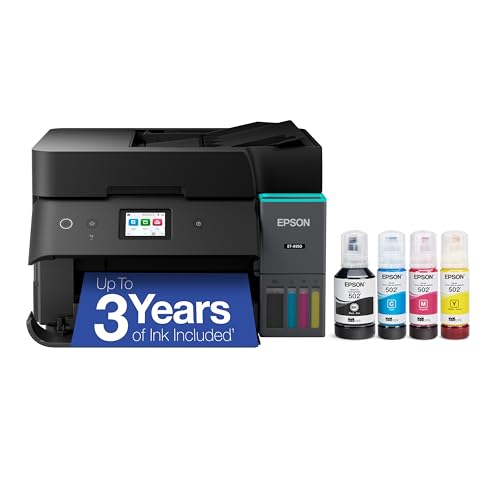
Epson EcoTank ET-4950
Stands out with a color copy speed of 5.7 cpm—the quickest among the three—giving sharper color output, though it sits at a $480 price point.
Also considered
Score Analysis
Key score advantages vs. runner-up (Epson EcoTank ET-15000)
Price Range
Epson EcoTank ET-2400
$159.00
Epson EcoTank ET-15000
$499.99
Epson EcoTank ET-4950
$349.99

Canon MegaTank G3270
$159.00

Epson EcoTank ET-2980
$269.99

HP Smart Tank 5101
$179.89

Epson EcoTank Photo ET-8550
$598.00

HP Smart Tank 5000
$179.99

Canon MegaTank MAXIFY GX2020
$329.00

HP Smart Tank Plus 651
$329.89
Epson EcoTank ET-3950
$362.99

Canon Megatank G3290
$229.00

Canon PIXMA G6020
$214.00

Epson EcoTank ET-4800
$219.99
Spec Comparison
TL;DR: The Epson EcoTank ET-2400 delivers cartridge‑free printing with up to 7,500 color pages, fast first‑page output and wireless convenience at a budget‑friendly $159.99.
What really sets this model apart is the supertank ink system that ships with four bottles and promises 4,500 black and 7,500 color pages—enough for up to two years of average home use. The first page prints in just 7 seconds, and the printer can handle legal‑size (8.5 × 14 in) paper on its 100‑sheet top‑loader.
At 8.6 lb, the ET‑2400 is noticeably lighter than the Canon MegaTank G3270 (13.2 lb), HP Smart Tank 5000 (11.09 lb), Canon PIXMA G6020 (17.8 lb), HP Smart Tank Plus 651 (10.27 lb) and Canon MegaTank G3290 (14.2 lb). It also exceeds the G3270’s 21.9 in depth, though the HP Smart Tank 5000 lists a shallower 435 mm depth. In copy speed, the ET‑2400 manages 3.8 cpm in color, which is slower than the G3270’s 6 cpm but quicker than the HP Smart Tank Plus 651’s 2 cpm. Monochrome copying runs at 7.7 cpm, matching the G3270’s 7.7 cpm.
Everyday users praise the hassle‑free ink refills and the ease of printing from smartphones via the Epson Smart Panel app or AirPrint. Professional reviewers note excellent text and photo quality for an entry‑level model, and the ENERGY STAR label underscores its eco‑friendly design. Some owners report occasional Wi‑Fi drops and app instability, and not having an automatic document feeder means multi‑page scanning or copying requires manual handling.
Technically, the printer offers a maximum resolution of 5760 × 1440 dpi, a 2400 × 1200 dpi flatbed scanner, and print speeds of 5 ppm in color and 10 ppm in monochrome. Duplex printing requires manual setup, and the output tray holds 30 sheets.
Pros
Cons
Best for: Entry-level buyers or those on a tight budget
Avoid if: You need powerful performance or professional‑grade features
“Easy setup and great print quality for documents and photos.”
“Ink lasts forever — haven’t refilled in months.”
TL;DR: The Epson EcoTank ET-15000 prints up to 13 × 19 in with 17 ppm black speed, delivers 7,500‑page black yields, but its 26.46pounds footprint demands a roomy desk.
The standout capability of the ET-15000 is its wide‑format printing – it handles media up to 13 × 19 in and even a 12.95 × 47.24 in banner via the rear feed. Coupled with a black‑and‑white print speed of 17 pages per minute and a dye‑based ink droplet size of 3.8 pL, it can churn out high‑resolution 4800 × 1200 dpi output quickly. The four built‑in refillable tanks provide an approximate black page yield of 7,500 pages, which translates to an ultra‑low cost per page.
At 26.46pounds, the ET-15000 is heavier than the ET-4950 (16.1pounds) and the ET-3950 (15.9pounds) but lighter than the ET-8550 (24.5pounds). Its depth of 752 mm is just shy of the ET-8550’s 757 mm, while its height of 363 mm is noticeably shorter than the ET-8550’s 429 mm, and its width of 498 mm is narrower than the ET-8550’s 523 mm. Copy speed (11.5 cpm black, 5.5 cpm color) matches the ET-4950 and ET-3950, yet it lags behind the ET-8550’s 16 cpm black and 12 cpm color rates. The 2.7‑inch color touchscreen is larger than the ET-3950’s 2.4‑inch display and matches the Canon MAXIFY GX2020’s 2.7‑inch screen.
Users consistently praise the ET-15000 for its cheap ink costs and ability to print large spreadsheets, posters, and banners without a hitch. Professional reviewers highlight the excellent text quality and solid build. The downsides that surface in reviews are the printer’s bulky chassis, a refill process that can take 15–20 minutes and be a bit messy, and an ADF that doesn't support duplex scanning, limiting double‑sided document handling.
Beyond printing, the ET-15000 packs Ethernet, Wi‑Fi (802.11b/g/n) and Wi‑Fi Direct, plus mobile printing via Apple AirPrint, Google Cloud Print, Mopria, Epson iPrint, and Epson Connect Email Print. ENERGY STAR certification and a 1‑year limited warranty round out its feature set, so it serves as a reliable workhorse for a home office or small business.
Pros
Cons
Best for: Home offices, small businesses, and freelancers who need wide‑format prints and high monthly volumes.
Avoid if: You have limited desk space, require professional‑grade photo quality, or need automatic duplex scanning.
“Easy setup and great print quality for documents and photos.”
“Ink lasts forever — haven’t refilled in months.”
TL;DR: The Epson EcoTank ET-4950 delivers fast 18 ppm black printing, massive ink yields of up to 6,600 pages, and a compact footprint, but its $480 price and small touchscreen may deter budget‑focused buyers.
What really sets the ET‑4950 apart is its supertank ink system: one included bottle set prints roughly 6,600 black pages and 5,500 color pages before needing a refill. Coupled with a 2.4‑inch color touchscreen, the printer can handle 18 pages per minute in black and 9 pages per minute in color, while offering a maximum print resolution of 4,800 × 1,200 dpi for crisp text and vibrant photos.
In a lineup that includes the bulkier Epson EcoTank ET‑8550 (weighing 24.5 lb) and the larger ET‑15000 (26.46 lb), the ET‑4950’s 16.1 lb weight and 348 mm depth make it one of the more compact all‑in‑ones. Its copy speed of 11.5 cpm black and 5.7 cpm color matches the ET‑3950 and beats the slower 11 cpm black of the ET‑2980, while still staying lighter than most of its peers.
Reviewers consistently praise the low operating cost, noting that the included ink lasts thousands of pages and that the printer runs quietly thanks to Epson’s PrecisionCore heat‑free technology. Reviewers give particular kudos to photo quality for the 4,800 × 1,200 dpi output. On the downside, users mention the 2.4‑inch screen can feel cramped for navigation, and the lack of legal‑size (8.5 × 14) scanning or automatic duplex scanning limits its utility for heavy document workflows.
Pros
Cons
Best for: Those prioritizing quality and willing to pay for premium performance
Avoid if: You're shopping on a tight budget — it's priced at $480.00
“Easy setup and great print quality for documents and photos.”
“Ink lasts forever — haven’t refilled in months.”
TL;DR: The Canon MegaTank G3270 costs $159, prints up to 7,700 color pages on its four refillable tanks, and offers solid wireless printing, though its manual duplex and modest speed suit light home use.
The standout feature is the high‑yield ink system: four built‑in refillable tanks deliver roughly 6,000 black and 7,700 color pages before you need to top them up. At a list price of $159.00, the cost per page drops to well under a cent, making it one of the most economical options for families or students who print frequently.
Compared with the other 13 models, the G3270 weighs more than the Epson EcoTank ET‑2400 (8.6 lb) and HP Smart Tank Plus 651 (10.27 lb), but less than the Canon PIXMA G6020 (17.8 lb). Its black copy speed of 11 copies/min outpaces the Epson’s 7.7 cpm and the HP Smart Tank Plus 651’s 10 cpm, while its color copy speed of 6 cpm exceeds Epson’s 3.8 cpm and HP’s 2 cpm. The maximum copy volume of 99 copies matches the Canon G6020 and HP Plus 651, and exceeds the Epson’s 20‑copy limit.
Reviewers consistently praise the ultra‑low running cost and the ease of wireless setup via AirPrint, Mopria, and Canon’s own apps. Professional outlets note the solid text quality and good photo results on glossy media, but they also point out the slower 11 ipm black and 6 ipm color print speeds and the lack of an automatic duplexer or document feeder. Everyday users echo these points, calling the printer “worth every penny” for home use while flagging the manual duplex and 100‑sheet paper tray as minor annoyances.
Technically, the G3270 offers a maximum print resolution of 4800 × 1200 dpi and a 53‑second per 4 × 6 in photo print time, which's respectable for a budget model. The 1.35‑inch monochrome LCD provides basic status feedback, and the unit runs at a max acoustic noise of 48.5 dBA. Power consumption peaks at 16 W, dropping to 0.6 W in standby and 0.1 W when off, helps keep energy costs low.
Pros
Cons
Best for: Home users, students, and small home offices that need low per‑page costs and solid wireless printing.
Avoid if: You need automatic duplex, an automatic document feeder, or high‑speed output for a busy office.
“a touch above entry-level”
“worth every penny”
TL;DR: The Epson EcoTank ET-2980 costs $269.99, prints at 15 ppm black, holds 6,600‑page black ink yields, and offers wireless all‑in‑one functionality for home and small‑office use.
The standout feature is its high‑capacity ink tanks: a single black bottle delivers up to 6,600 pages and each color bottle up to 5,500 pages, which translates into an extremely low cost per page. The printer ships with those refill bottles, so you’re ready to print right out of the box without buying cartridges.
At 11.5 pounds, the ET-2980 is a bit heavier than the HP Smart Tank Plus 651 (around 10.3 lb) but lighter than the Canon MegaTank G3290, which tips the scales at 14.2 lb. Its depth of 579 mm also makes it deeper than the HP Smart Tank 5101’s 361 mm chassis, meaning it needs a little more floor space than some of the slimmer competitors.
Users consistently praise the printer’s low operating cost and sharp 4800 × 1200 dpi output, while professional reviewers note the reliable PrecisionCore printhead and seamless Wi‑Fi setup. Common complaints focus on the lack of an automatic document feeder and the small non‑touch 1.44‑inch LCD that can feel fiddly when navigating menus.
The ET‑2980 prints black pages at 15.0 ppm and color at 8.0 ppm, with automatic duplex printing that runs at 6.5 ppm black and 4.5 ppm color. Its monthly duty cycle tops out at 5,000 pages, and it supports a range of mobile printing options including Epson Smart Panel, AirPrint, and Google Cloud Print.
Pros
Cons
Best for: Most users seeking a balanced, mainstream option
Avoid if: You need advanced features or professional‑grade performance
“Easy setup and great print quality for documents and photos.”
“Ink lasts forever — haven’t refilled in months.”
TL;DR: The HP Smart Tank 5101 delivers ultra‑low ink costs at 0.3¢ per black page, includes enough ink for up to 6,000 pages, and offers compact all‑in‑one functionality for home use.
The standout feature is its refillable ink system that ships with enough black and color ink for roughly 6,000 pages each, translating to a cost of just 0.3¢ per black page and 0.9¢ per color page. Print speed reaches 12 ppm in black and 5 ppm in color, while the 1.2‑inch LCD lets you navigate settings without a computer.
Compared with its peers, the 5101 is lighter than the Canon MegaTank G3290 (14.2 lb) but a bit heavier than the HP Smart Tank Plus 651 (10.27 lb). Its 1.2‑inch display is smaller than the Plus 651’s 2.2‑inch touchscreen, yet the printer still packs a full‑size input tray of 100 sheets. Copy speed sits at 10 ppm, which is slower than Epson EcoTank ET‑2980’s 11 cpm black copy speed but faster than the Canon PIXMA G6020’s 20 cpm overall rate.
Users consistently praise the near‑zero cost per page and the convenience of having years‑worth of ink right out of the box. Professional reviewers note the text comes out dark and readable even at small sizes, though they also point out the modest 12 ppm black speed and the lack of an automatic document feeder. Connectivity gets a thumbs‑up thanks to Wi‑Fi, Bluetooth, and the HP Smart app, while power draw stays low at 0.11 W when it's off.
Pros
Cons
Best for: Home users and families who need low‑cost, high‑volume printing without the hassle of cartridge swaps.
Avoid if: You need fast, high‑volume office output, automatic duplexing, or an automatic document feeder for frequent multi‑page scans.
TL;DR: The Epson EcoTank ET-8550 delivers gallery‑quality 13 × 19 in prints with low‑cost SuperTank ink, but its lack of an automatic document feeder keeps it photo‑focused.
The standout spec is the 5760 x 1440 dpi maximum print resolution, which lets you produce gallery‑grade photos up to 13 x 19 inches. Epson’s 552 (T522) SuperTank system supplies six refillable bottles, including a dedicated gray ink that improves grayscale rendering on thick media up to 1.3 mm.
At 24.5pounds, the ET‑8550 is heavier than the lighter‑weight ET‑4950, yet its depth of 757 mm is comparable to the similarly sized ET‑15000. This places it in the premium‑tier segment where size and ink‑tank capacity matter more than compactness.
Reviewers consistently praise the superb photo quality and the very low cost per page that the refillable bottles provide. Users also like the easy wireless setup via Wi‑Fi Direct and the 4.3" full‑color LCD. The main drawbacks include occasional black‑ink smudging on certain paper settings and the absence of an automatic document feeder, which limits multi‑page scanning and copying.
Additionally, the device offers practical office features: automatic duplex printing, copy speeds of 12 copies/min (color) and 16 copies/min (monochrome), and a total input capacity of 170 sheets across front and rear trays. The flatbed scanner delivers 4800 x 1200 dpi optical resolution for detailed photo and document scans.
Pros
Cons
Best for: Photographers, artists, and small businesses that need high‑quality, wide‑format photo output.
Avoid if: You need a budget‑friendly printer or heavy office functionality such as frequent multi‑page scanning.
“Easy setup and great print quality for documents and photos.”
“Ink lasts forever — haven’t refilled in months.”
TL;DR: The HP Smart Tank 5000 delivers up to 6,000 pages from its refillable ink tanks, offers a 55.9 mm touchscreen, and provides solid wireless connectivity, though its 11 ppm black print speed is modest.
The standout figure is the ink yield – HP rates the Smart Tank 5000 at up to 6,000 pages before a refill, which translates into a very low cost per page, given the up‑to‑6,000‑page yield, for home or small‑office use. The printer also sports a 55.9 mm monochrome touchscreen that lets you navigate the all‑in‑one functions without a separate computer.
At 11.09 pounds, the Smart Tank 5000 sits between the lighter Epson EcoTank ET‑2400 (8.6 lb) and the heavier Canon MegaTank G3270 (13.2 lb). Its touchscreen is comparable in size to the HP Smart Tank Plus 651’s 2.2‑inch display and noticeably larger than the 1.2‑inch LCD on the HP Smart Tank 5101. Ink‑tank capacity also outpaces the Epson model’s 4,500‑page estimate, matching the Canon MegaTank G3290’s 6,000‑page claim.
Users consistently praise the mess‑free refill system and the reliable Wi‑Fi that includes a self‑healing feature. The HP Smart App and AirPrint support make mobile printing straightforward. However, reviewers note the printer’s 11 ppm black and 8 ppm color speeds feel slow, especially when compared with faster laser alternatives. The manual duplex option and a modest output tray that holds only 30–50 sheets also mean you’ll be reloading paper more often than with larger trays.
Technically, the Smart Tank 5000 uses thermal inkjet technology, prints at up to 1200 × 1200 dpi in black and 4800 × 1200 dpi in color, and supports paper up to 300 gsm. Connectivity includes Bluetooth, Ethernet, Wi‑Fi (802.11b/g) and Wi‑Fi Direct, while the 64 MB RAM and 980 MHz processor handle basic print, scan, and copy jobs.
Pros
Cons
Best for: Home users, families, and small businesses that need high‑volume text printing with low running costs.
Avoid if: You require fast, high‑volume output, automatic double‑sided printing, or an automatic document feeder for multi‑page scans.
TL;DR: The Canon MAXIFY GX2020 is a 2.7‑inch touchscreen all‑in‑one MegaTank printer that delivers low $0.25 mono cost per page, 27,000‑page monthly duty cycle, and fast 15 ipm black printing for home offices and small businesses.
The standout feature is its MegaTank refillable ink system, which the manufacturer lists at $0.25 per monochrome page and $1.25 per color page. Coupled with a monthly duty cycle of 27,000 pages, the GX2020 handles high‑volume document work while keeping operating costs down.
At 17.8 pounds, the GX2020 is heavier than the Epson EcoTank ET‑3950 (15.9 pounds) and the HP Smart Tank 5101 (11.09 pounds), but its 2.7‑inch color LCD touchscreen is larger than Epson’s 2.4‑inch display and HP’s 1.2‑inch screen. Its 250‑sheet input tray matches the Epson’s capacity and exceeds the HP’s 100‑sheet tray, while the 35‑sheet ADF edges out Epson’s 30‑sheet feeder.
Reviewers consistently praise the printer’s sharp text and vivid color output, noting the fast 15 ipm black and 10 ipm color speeds. Professional outlets highlight the quick setup and the high 27,000‑page duty cycle. On the downside, users report that borderless photo prints aren’t supported, envelope feeding can jam, and the ADF requires manual loading for each side.
Technical details include a 3,136‑nozzle print head, 600 × 1200 dpi optical resolution, automatic duplex printing, and support for a wide range of media from plain paper to glossy photo stock. Connectivity covers dual‑band Wi‑Fi, Ethernet, Apple AirPrint, Google Cloud Print, and a Hi‑Speed USB 2.0 port, backed by a three‑year warranty.
Pros
Cons
Best for: Home‑office professionals, small businesses, and students/educators who need high‑volume document printing with low running costs.
Avoid if: You need borderless photo prints, reliable envelope printing, or NFC/media‑card direct printing capabilities.
TL;DR: The HP Smart Tank Plus 651 delivers low‑cost, high‑volume printing with refillable ink tanks, a 2.2‑inch touchscreen, and wireless connectivity, though it lacks automatic duplex and has modest paper capacity.
What really sets this model apart is the ink system: each set of HP 32XL black and HP 31 color bottles can produce up to 6,000 black and 8,000 color pages, which translates to a very low cost per page. Print speeds reach up to 11 ppm in black and 5 ppm in color, while copy speeds top out at 10 cpm (black) and 2 cpm (color). The unit weighs 10.27 lb and fits into a footprint of 14.7 in × 7.8 in × 17.7 in, making it compact for a home office.
Compared with peers, the Smart Tank Plus 651 copies slower than the Canon PIXMA G6020’s 20 cpm but matches the Epson EcoTank ET-2980’s 11 cpm black copy speed. It is lighter than the Canon MegaTank G3290 (14.2 lb) and only a shade under the HP Smart Tank 5101’s 11.09 lb, yet it offers a larger 2.2‑inch touchscreen versus the 1.2‑inch LCD on the 5101. Its 35‑sheet ADF is modest, and the 100‑sheet input tray is comparable to many rivals, but the overall paper handling stays on the smaller side.
Users repeatedly praise the long‑lasting ink and the ease of mobile printing via the HP Smart app, AirPrint, and Bluetooth LE. Professional reviewers note the good text quality and that the box includes two years of ink. On the downside, many cite the absence of automatic duplex printing and occasional hiccups when setting up Wi‑Fi scanning, which can frustrate users of a home and small‑office device.
Technical details that matter include a monthly duty cycle of up to 1,000 pages and a recommended volume of 200‑500 pages, ensuring the tank system can handle regular workloads without strain. The printer also supports a variety of media up to 110 lb cardstock, and its power draw stays low at 0.71 W in sleep mode.
Pros
Cons
Best for: Entry-level buyers or those on a tight budget
Avoid if: You need advanced features or professional‑grade performance
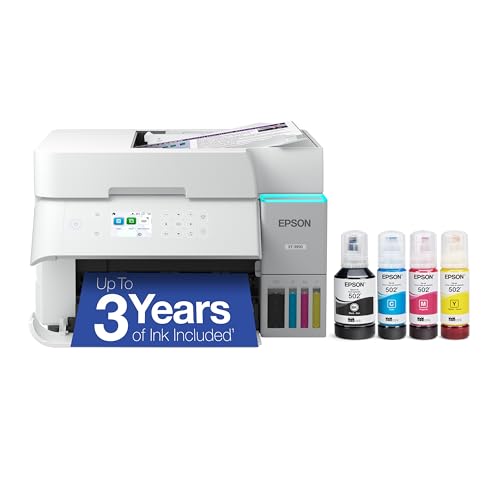
TL;DR: The Epson EcoTank ET‑3950 delivers cartridge‑free, high‑volume printing with up to 6,600 black pages per ink set, fast 18 ppm black speed, and reliable Wi‑Fi/Ethernet connectivity, though it carries a premium $329.99 price tag.
Its massive ink capacity stands out: one black bottle yields an estimated 6,600 pages and each color bottle about 5,500 pages, which translates into an extremely low cost per page for families or small offices. Print performance delivers solid results, with 18 ppm black and 9 ppm color speeds, and the heat‑free PrecisionCore printhead prints the first page instantly.
At 15.9 lb, the ET‑3950 is heavier than the Epson EcoTank ET‑2980 and HP Smart Tank 5101, but lighter than the Canon MAXIFY GX2020’s 17.8 lb chassis. It's priced at $329.99, which sits at the higher end of the lineup, making it pricier than many of the other ink‑tank models while offering a premium build and feature set.
Users praise the low per‑page cost and quiet, fast operation, but they also note occasional hiccups when pairing the printer to Wi‑Fi and the lack of automatic duplex scanning for scans. Professional reviewers highlight the durable heat‑free printhead and the three‑year ink supply that comes with the box.
Pros
Cons
Best for: Families, home offices, and small businesses that need high‑volume, low‑cost color printing and appreciate reliable connectivity options.
Avoid if: You’re on a tight budget or require automatic duplex scanning, as the $329.99 price and lack of that feature may be limiting.
“Easy setup and great print quality for documents and photos.”
“Ink lasts forever — haven’t refilled in months.”
TL;DR: The Canon MegaTank G3290 delivers high‑volume printing with a 6,000‑page black ink yield, automatic duplex, and a 2.7‑inch color touchscreen, all for $249.99.
What really sets this printer apart is its integrated 4‑tank MegaTank system that promises up to 6,000 black and 7,700 color pages per set of ink bottles. At 11 ipm for black and 6 ipm for color, it can handle everyday document jobs without frequent refills, and the 49 dBA maximum acoustic noise keeps the office quiet.
In the 14‑product lineup, the G3290 is heavier than the HP Smart Tank 5000 (11.09 lb) but lighter than the Canon PIXMA G6020 (17.8 lb). Its 2.7‑inch color touchscreen features a noticeably larger display than the 1.2‑inch LCD on the HP Smart Tank 5101, while matching the 2.2–2.3‑inch display on the HP Smart Tank Plus 651. Compared with the HP Smart Tank Plus 651, the G3290 also offers a larger input tray (100 sheets) and a higher monthly duty cycle of 3,000 pages.
Users consistently praise the low cost per page and the sharpness of text prints, noting the pigment‑based black ink holds up well over time. Photo enthusiasts appreciate borderless printing up to 8.5 × 11 inches. On the downside, reviewers point out the lack of an automatic document feeder, slower color speed at 6 ipm, and occasional Wi‑Fi configuration quirks. Professional reviewers highlight the printer’s reliable wireless connectivity and praise the MegaTank refill system’s convenience.
Technical snapshot: Dimensions are 14.3 in × 16.4 in × 7.0 in, weight 14.2 lb, power draw peaks at 18 W with standby at 0.9 W, and it supports automatic two‑sided printing on media up to 8.5 × 14 in.
Pros
Cons
Best for: Most users seeking a balanced, mainstream option
Avoid if: You need advanced features or professional‑grade performance
“a touch above entry-level”
“worth every penny”
TL;DR: The Canon PIXMA G6020 delivers ultra‑low ink costs at 0.3 ¢ per black page, a 6,000‑page black yield plus bonus ink, and reliable wireless all‑in‑one functionality for home offices.
What really sets the G6020 apart is its running cost: each black page costs just 0.3 ¢ and color pages 0.7 ¢, thanks to the built‑in 4‑tank system that supplies 6,000 black pages, 7,700 color pages, and an extra 12,000 black pages from the bonus bottles (18,000 total black pages). The copier runs at 20 copies per minute and can produce the first copy in 20 seconds, which is brisk for a home‑office all‑in‑one.
In size and heft the G6020 is on the larger side. At 17.8 pounds it’s heavier than the HP Smart Tank Plus 651 (10.27 lb) and the HP Smart Tank 5000 (11.09 lb), and also heavier than the Epson EcoTank ET‑2400 (8.6 lb). Its depth of 371 mm is a touch shorter than the HP Smart Tank Plus 651’s 373 mm, but the overall footprint remains comparable to other ink‑tank models in this roundup.
Users consistently praise the printer’s ink savings and the convenience of Alexa‑enabled ink reordering, while professional reviewers highlight the solid 5,000‑page monthly duty cycle and the reliable text quality. The most common complaints revolve around the lack of an automatic document feeder and a non‑backlit LCD that can be hard to read in dim lighting; color print speed (6.8 ipm) also runs slower than many rivals.
On the technical side, the G6020 prints black at 13 ipm and color at 6.8 ipm, with the first black page out in 9 seconds and the first color page in 14 seconds. It supports automatic duplex printing, Wi‑Fi (2.4 GHz, 802.11b/g/n), Ethernet, AirPrint, and Google Cloud Print, and it carries ENERGY STAR and EPEAT Silver certifications. The 2.1‑inch monochrome LCD shows two lines of information, and the printer can handle media up to 300# basis weight, making it versatile for cardstock and envelopes.
Pros
Cons
Best for: Entry-level buyers or those on a tight budget
Avoid if: Reliability and user satisfaction are your top concerns
“3rd G6020 due to longevity”
“does a terrific job on hundreds of label pages per month”
TL;DR: At $285.00, Epson’s EcoTank ET‑4800 scores a 4.0/5 from over 5,300 reviewers, offering cartridge‑free printing with high‑yield ink and all‑in‑one convenience for home offices.
Epson’s EcoTank ET‑4800 lands in the lower tier of our fourteen‑product ink‑tank roundup, priced at $285.00 and carrying a solid 4.0‑star rating. The brand’s reputation for reliable home‑office gear adds confidence despite its modest standing among peers.
Reviewers consistently praise the cartridge‑free EcoTank system, noting the long‑lasting ink bottles that keep running costs down. The built‑in automatic document feeder and flatbed scanner handle batches of documents without fuss, and the wide range of mobile and cloud printing options makes it easy to print from phones or tablets. On the downside, users point out the lack of automatic two‑sided printing, slower print and copy speeds, a rear tray that fills quickly, and a footprint that can feel bulky on a small desk. The printer also skips a dedicated high‑resolution photo mode beyond basic borderless prints.
In context, the ET‑4800 offers a budget‑friendly entry into the EcoTank ecosystem, but its feature set trails the higher‑ranked models that provide faster output and more compact designs. If low ink cost and versatile all‑in‑one functions outweigh speed and size concerns, it's a viable choice.
Pros
Cons
Best for: Value-conscious buyers seeking quality at $285.00
“Easy setup and great print quality for documents and photos.”
“Ink lasts forever — haven’t refilled in months.”
Breakdown
Epson EcoTank ET-2400
Pros
Epson EcoTank ET-4950
Pros
Cons
Canon MegaTank G3270
Pros
Based on scoring data and product specs
Personalized picks
Best Overall Pick
Epson EcoTank ET-2400
Best OverallBest for: Entry-level buyers or those on a tight budget
Epson EcoTank ET-15000
Best for: Those prioritizing quality and willing to pay for premium performance
$499.99+$340.99 vs winner
Skip Epson EcoTank ET-4800 if…
You have limited desk space or need portability
The Epson EcoTank ET‑2400 earns the top spot as the best overall ink‑tank printer. It costs $159.99, comes with a 4.1/5 rating from 3,958 reviews, and includes enough ink for up to 4,500 black and 7,500 color pages. Even the first page pops out in just 7 seconds, and it prints at 5 ppm in colour and 10 ppm in monochrome, making everyday jobs fast and economical.
The runner‑up, Epson EcoTank ET‑15000, shines when you need wide‑format output. It handles borderless prints up to 13 × 19 inches, offers two input trays (250 sheets in the front and 20 sheets rear), and even supports Ethernet for a wired office network. With a black‑page yield of 7,500 pages and a speed of 17 pages per minute, it handles high‑volume, large‑size projects like posters or architectural plans.
For shoppers with a tighter budget, the Canon MegaTank G3270 at $159.00 delivers the best value in the entry‑level tier. The Epson EcoTank ET‑2980 at $269.99 offers a solid mid‑range choice with reliable performance and larger paper capacity. If you want a premium, high‑volume workhorse, the Epson EcoTank ET‑15000 remains the go‑to option at $519.00, providing wide‑format capability and robust ink capacity.
Pick the Epson EcoTank ET‑2400 now and enjoy hassle‑free, low‑cost printing from day one.
The ET‑15000 costs about $359 more than the ET‑2400, but it adds large‑format capability (borderless up to 13 × 19 in), a 35‑sheet automatic document feeder, and Ethernet networking. If you need those features for a home office or small business, the higher price can be justified; otherwise the ET‑2400 offers better value for everyday printing.
Please sign in to leave a review
No reviews yet. Be the first to review!
