⚡ Quick Answer
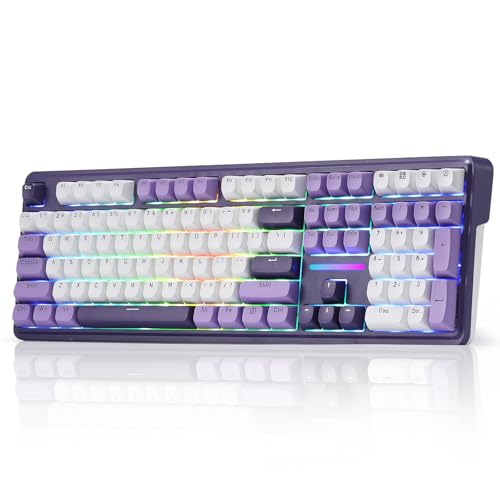
If you’re hunting for a keyboard that blends wireless freedom, solid build quality, and a decent price, the Redragon K745 PRO lands as our top pick. It ships at $59.99, carries a strong 4.6/5 rating from 2,146 reviews, and weighs just 1.94 lb. The board’s gasket‑mounted design, 4000 mAh battery and Mint Mambo linear switches (40 g actuation) give a cushioned, fast feel without the clatter of typical gaming keyboards.
Seven options span three price tiers. The budget camp includes the MSI Gaming Keyboard at $39.99, the Corsair K55 RGB PRO at $49.99, and the HP 400 at $54.99, each offering basic macro support. The mid‑range slot features only the Redragon K745 PRO. Premium choices—Razer BlackWidow V4 X ($99.99), Razer BlackWidow V4 ($169.99) and Corsair K100 OPX ($289.99)—bring higher‑end switches, aluminum frames and faster polling rates.
Below is a breakdown of each model’s key specs, strengths and potential drawbacks to help match a keyboard to your workflow and budget.
Redragon K745 PRO
A 4000 mAh battery lets you type all day without recharging, supporting home and office use.

Corsair K100
Audiophiles and high‑end enthusiasts appreciate the K100 OPX's premium sound, but at $289.99 it’s about $230 more than the Best Overall model.

MSI Vigor GK30
Its low‑profile 1.5‑inch height keeps your desk uncluttered, offering a compact entry‑level experience that the larger, pricier rivals lack.
Also considered
Score Analysis
Key score advantages vs. runner-up (Corsair K100)
Price Range
Redragon K745 PRO
$59.99
Corsair K100
$199.99
MSI Vigor GK30
$39.99

Razer BlackWidow V4 X
$109.99

Corsair K55 RGB PRO
$59.99

HP 400
$54.99

Razer BlackWidow V4
$169.99
Spec Comparison
TL;DR: The Redragon K745 PRO offers a full‑size, gasket‑mounted mechanical keyboard with 40 g linear switches, 4000 mAh battery and tri‑mode wireless for $59.99, earning a 4.6‑star rating.
The Redragon K745 PRO weighs 1.94 lb and measures 44.5 × 14.2 × 3.8 cm, giving it a solid but still desk‑friendly footprint. It uses Mint Mambo linear switches with a 40 g actuation force, a figure reviewers praise for its silky feel. A 4000 mAh battery powers the tri‑mode wireless setup, so you'll game or type unplugged for many hours. The gasket‑mounted chassis and five‑layer foam stack dampen keystroke noise, delivering a quiet, cushiony typing experience.
At 1.94 lb the keyboard is heavier than the Corsair K55 RGB PRO (1.79 lb) but lighter than the MSI Gaming Keyboard (3.0 lb) and the Razer BlackWidow V4 X (2.51 lb). While the HP 400 offers 12 programmable keys, the K745 PRO adds four extra hotkeys to its full‑size 108‑key layout, giving you more on‑board shortcuts than the Corsair K55’s six macro keys. All six competitors list fewer sound‑dampening features, making the K745 PRO’s five‑layer system stand out in this group.
Everyday users rave about the creamy keystroke and the vivid south‑facing RGB that spills around the case, noting that the lighting software makes color tweaks effortless. The same reviewers point out that the flip feet can slip or fold under heavy typing, and a few mention a slightly hollow tone from the spacebar despite the foam layers. The 1.94 lb weight also shows up in comments from people who move their setup often, who say the board feels a bit hefty to carry.
Hot‑swap compatibility with 3‑ and 5‑pin switches means you'll swap the included eight extra switches without soldering, and the OS toggle lets you switch between Mac and Windows instantly. South‑facing RGB LEDs and full software support let you customize lighting per key, while the 2‑stage adjustable flip feet let you set a modest tilt.
Pros
Cons
Best for: Gaming enthusiasts and mechanical‑keyboard beginners who want a full‑size board with wireless freedom
Avoid if: You have limited desk space or need portability
“"silky creamy" typing sound”
TL;DR: The Corsair K100 OPX packs 6 dedicated macro keys, a 1.0 mm actuation distance, and a 4,000 Hz polling rate into a 2.9‑pound, full‑size wired keyboard, but its premium $289.99 price may limit budget‑conscious buyers.
The standout spec is the ultra‑fast 1.0 mm actuation distance of the OPX optical‑mechanical switches, paired with a 45 g actuation force and a 3.2 mm total travel. This combination, together with a polling rate of up to 4,000 Hz, gives the keyboard near‑instant key registration, which professional reviewers repeatedly highlight.
At 2.9 pounds, the K100 OPX is lighter than the Razer BlackWidow V4 (3.27 pounds) yet a touch heavier than the HP 400 (2.05 pounds). Its 1.82 m cable is slightly shorter than the 1,981 mm cable on the BlackWidow V4, but longer than the 1.82 m cable on the Corsair K55 RGB PRO, which shares the same length. The K100’s six macro keys match the count on the Razer BlackWidow V4 X, giving it a clear edge over models like the MSI Gaming Keyboard that list only “Dedicated Hotkeys” without a specific number.
Consumers consistently praise the keyboard’s build quality – the aluminum chassis and double‑shot PBT keycaps feel solid – and love the depth of RGB customization via 44‑zone LightEdge lighting and 16.8 million colors. However, many note the lack of wireless connectivity as a drawback for clean‑desk setups, and the linear switch feel can be a steep adjustment for users accustomed to tactile or clicky switches. Professional reviewers also point out that the $289.99 price places it in a premium tier, making it less accessible for casual users.
Pros
Cons
Best for: Competitive FPS and MOBA gamers, esports athletes, and high‑performance typists who need ultra‑fast response and extensive macro support.
Avoid if: You're shopping on a tight budget — it's priced at $289.99, and you prefer a wireless or budget‑friendly keyboard.
TL;DR: The MSI Gaming Keyboard offers water‑resistant floating keys, dedicated hotkeys and anti‑ghosting at a $39.99 price, but its 3.0‑pound weight and 17.2‑inch length make it a bulkier budget choice.
What really stands out is the keyboard’s water‑resistant floating key design paired with a Mecha‑Membrane switch that promises up to 12 million clicks. At 1.5 inches tall, 6.2 inches wide and 17.2 inches long, the board provides a solid feel without being overly tall, and the six RGB zones let you add color without needing external software.
Compared with the six other keyboards in this roundup, the MSI unit is heavier than the Corsair K55 (1.79 lb), HP 400 (2.05 lb), Redragon K745 PRO (≈1.94 lb) and Razer BlackWidow V4 X (2.51 lb), while still lighter than the Razer BlackWidow V4 (3.27 lb). Its length of 17.2 inches is shorter than the Corsair’s 19.0 inches but similar to the Redragon’s roughly 17.5‑inch chassis, giving it a middle‑ground footprint.
Reviewers frequently praise the dedicated hotkeys for quick game‑control tweaks and the anti‑ghosting feature that lets multiple keys register simultaneously. Users also note the sturdy feel from the 3.0‑pound build, though a few mention the size can dominate smaller desks. The 4.5‑star rating from 967 reviewers reflects broad satisfaction, especially at this price point.
Pros
Cons
Best for: Budget‑conscious buyers seeking a reliable entry‑level option
Avoid if: You have limited desk space or need portability
TL;DR: The Razer BlackWidow V4 X offers silent 45 g Razer Yellow linear switches, six macro keys, per‑key RGB and a sturdy aluminum build for $99.99, though it lacks hot‑swap and USB passthrough.
At the core of the BlackWidow V4 X are Razer Yellow Linear Silent switches with a 1.2 mm actuation distance and a 45 g actuation force, delivering quick, quiet keystrokes on a full‑size 104‑key layout. The keyboard also packs six dedicated macro keys, four media keys and a roller, all backed by per‑key Razer Chroma RGB lighting and dual‑side underglow.
Weighing 2.51 pounds, the V4 X is lighter than the MSI Gaming Keyboard (3.0 pounds) but a bit heavier than the HP 400 (2.05 pounds). Its 466.3 mm length outpaces the Corsair K55 RGB PRO, which measures 19.0 in, and it carries the same six‑macro‑key count as that Corsair model. Price‑wise, it’s above the Redragon K745 PRO, which is priced lower, positioning the V4 X as a premium‑tier option in the lineup.
Professional reviewers highlight the silent linear switches for fast 1.2 mm actuation, and everyday users praise the rich RGB customization and the convenience of the macro and media controls. The most common criticisms focus on the absence of a USB passthrough and the extra knob on the V4 Pro, as well as the full‑height 43.4 mm profile that can feel bulkier on tighter desks. The keyboard’s aluminum top plate, foam sound‑dampening on the PCB and bottom plate, and replaceable North‑facing Cherry stabilizers add durability and quieter operation.
Pros
Cons
Best for: Competitive gamers and streamers who want silent linear switches, extensive macro support and vibrant RGB lighting.
Avoid if: You need a compact low‑profile keyboard, hot‑swap capability, or additional connectivity features like a USB passthrough.
TL;DR: The Corsair K55 RGB PRO offers six programmable macro keys, IP42 spill resistance and a detachable palm rest at a modest 1.79 lb weight, making it a solid budget‑friendly choice for casual gamers.
What really stands out is the combination of six dedicated macro keys and a 1.82 m (6 ft) detachable cable, backed by a 1000 Hz polling rate that enables quick key registration. The keyboard’s full‑size layout measures 19.0 in long, 6.58 in wide and 1.42 in tall, and it weighs just 1.79 lb (812 g), which is lighter than the 2.05 lb HP 400 and far lighter than the 3.0 lb MSI Gaming Keyboard.
Compared with its peers, the K55 matches the Razer BlackWidow V4 X’s six macro keys while offering a longer cable than the Razer BlackWidow V4’s 1,981 mm (about 2 m) lead. It also provides a spill‑resistant IP42 rating that many competitors lack, and its RGB lighting spans five zones for vibrant customization. However, it carries a 12‑key rollover, which is lower than the full NKRO some gamers expect.
Professional reviewers highlight the IP42 dust and spill protection as a durability win, and users consistently praise the detachable soft‑rubber palm rest and adjustable tilt for comfort during long sessions. The most common complaint is the rubber‑dome membrane switches, which lack the tactile feedback of mechanical keys, and the limited 12‑key rollover can feel restrictive in fast‑paced competitive play. The manufacturer doesn't list actuation force in grams.
Pros
Cons
Best for: Entry-level buyers or those on a tight budget
Avoid if: You want the best value-per-dollar in its price range
TL;DR: The HP 400 offers a slim 30.5 mm profile, 12 programmable keys and warm‑white backlighting at $54.99, but its wired‑only design and occasional connectivity hiccups may limit power users.
The HP 400’s most eye‑catching spec is its 12 programmable keys, letting you assign shortcuts without extra software layers. It sits just 30.5 mm tall, making it one of the slimmest full‑size keyboards, and its warm‑white LED can be set to three brightness levels. At 2.05 pounds (930 g) it feels solid yet portable enough to slip into a commuter bag.
Compared with the other six keyboards in this roundup, the HP 400 provides more programmable keys than the Corsair K55 (6 keys) and the Razer BlackWidow V4 X (6 keys). Its weight places it in the middle of the pack: lighter than the MSI Gaming Keyboard (3.0 lb) and the Razer BlackWidow V4 (3.27 lb), but heavier than the Redragon K745 PRO (≈1.94 lb) and the Corsair K55 (≈1.79 lb). The lack of a wireless option also sets it apart from the Redragon, which offers Bluetooth and 2.4 GHz wireless modes.
Reviewers highlight the keyboard’s quiet, low‑travel plunger keys and the warm backlighting that eases typing in dim spaces. Everyday users echo this, noting the soft‑touch feel is especially friendly to small hands. Some users report the keyboard sometimes fails to connect after the first plug‑in, so they reinstall the HP Accessory Center software. The unit also sanitizes easily, resists spills, and supports a 0‑6 degree tilt via foldable feet.
Pros
Cons
Best for: Entry‑level buyers or those on a tight budget
Avoid if: You need powerful performance or professional‑grade features
“The feel of the keys is soft and very easy to press... easier to type if you have small hands.”
TL;DR: The Razer BlackWidow V4 delivers clicky Razer Green switches, per‑key RGB with dual‑side underglow, and six macro keys, but its premium $169.99 price and wired‑only design may limit budget‑conscious or wireless‑seeking gamers.
The standout hardware element is the Razer Green mechanical switch, which actuates at 1.9 mm with a 50 g force and a total travel of 4.0 mm. Professional reviewers note that this combination offers a “perfect pairing of pressure and response time,” making fast, clicky input reliable for competitive play. Razer builds the chassis from 5052 aluminum alloy, and lines the PCB and bottom plate with foam to dampen vibration, and reviewers praise this detail for improving typing feel.
Compared with the six other keyboards in this roundup, the BlackWidow V4 sits at the heavier end of the spectrum at 3.27 pounds, outweighing the Redragon K745 PRO (≈1.94 pounds) and the Corsair K55 RGB PRO (≈1.79 pounds). It matches the Corsair K100 OPX’s heft (≈2.9 pounds) and exceeds the Razer BlackWidow V4 X (2.51 pounds). Its detachable USB‑C cable measures 1,981 mm, longer than the Corsair K100 OPX’s 1.82 m cable. Feature‑wise, it offers six dedicated macro keys and a multi‑function roller, matching the macro count of the V4 X and the Corsair K55, but it lacks the USB passthrough ports that higher‑end models include.
Feedback from users highlights the tactile click and vibrant lighting as major pluses, while the lack of wireless connectivity and the 75% layout without a numeric keypad draw criticism. Consumers also mention the solid aluminum build as both a durability win and a source of desk‑weight. Users frequently call the per‑key RGB Chroma lighting with two‑side underglow a visual standout, and the magnetic plush leatherette wrist rest adds comfort for long sessions.
Pros
Cons
Best for: Competitive gamers and FPS/MOBA players who need fast, clicky actuation and programmable macro keys.
Avoid if: You prioritize wireless connectivity, a lighter chassis, or a full numeric keypad for spreadsheet work.
Breakdown
Redragon K745 PRO
Pros
Corsair K100
Pros
Cons
MSI Vigor GK30
Pros
Razer BlackWidow V4 X
Pros
Based on scoring data and product specs
Personalized picks
Best Overall Pick
Redragon K745 PRO
Best OverallBest for: Home and office users seeking a balance of features and value
Corsair K100
Best for: Audiophiles and enthusiasts seeking premium sound quality and advanced features
$199.99+$140.00 vs winner
Skip Razer BlackWidow V4 if…
Reliability and user satisfaction are your top concerns
Redragon’s K745 PRO takes the top spot thanks to a solid blend of features and value. It ships for $59.99, carries a 4.6‑out‑of‑5 rating from 2,146 reviewers, and weighs just 1.94 lb, making it easy to fit on any desk. The keyboard offers a 4000 mAh battery, Bluetooth 5.0, 2.4 GHz wireless and wired USB‑C connectivity, plus hot‑swappable Mint Mambo linear switches with 116 total harvestable keys.
The runner‑up, Corsair’s K100 OPX, shines when you need premium customization for demanding workflows like streaming or pro‑gaming. It provides six dedicated macro keys, full NKRO, a detachable magnetic cushioned palm rest, and a 2‑year warranty—all for $289.99. Its extensive iCUE integration and on‑board storage make it a powerhouse for users who crave deep programmability.
For tighter budgets, the MSI Gaming Keyboard delivers basic macro functionality at $39.99, giving entry‑level gamers a functional option without breaking the bank. If you’re willing to splurge, the K100 OPX remains the premium pick, offering the most advanced macro and lighting suite among the contenders.
Pick the Redragon K745 PRO today for a well‑rounded, affordable macro‑ready keyboard.
The Redragon K745 PRO stands out for portable gaming because it offers both Bluetooth 5.0 and 2.4 GHz wireless connectivity and packs a 4000 mAh battery, letting you play without a cable. Its lightweight 880 g chassis and hot‑swappable switches also make it easy to carry and customize in the field.
No reviews yet — be the first to share your experience.
Please sign in to leave a review



