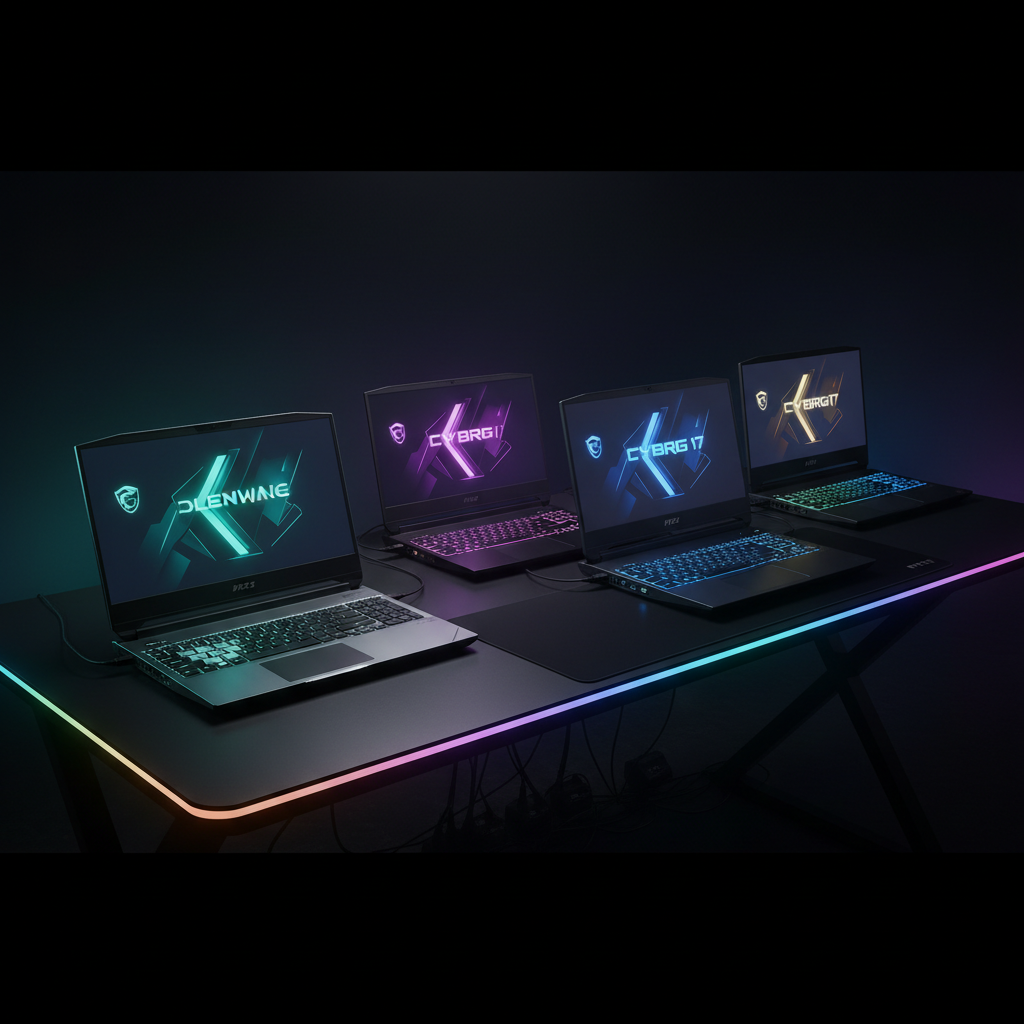
Scanning the 14 models we compared, the $1,399.99 MSI Cyborg 17 actually out‑rates the $3,615.30 Alienware Area‑51 18 – 4.3 versus 4.2 stars. That flip‑flop between price and user sentiment sets the tone for a segment where raw cost isn’t the only story.
To help you navigate, we’ve grouped the lineup into three price buckets. The budget corner holds the $439.99 Kaigerr 17.3‑inch, the $1,399.99 MSI Cyborg 17, the $1,438.99 ASUS ROG Strix G18 RTX 5050 and the $1,677.95 MSI Crosshair 18 HX AI, all under $1,700 and light enough for a backpack. Mid‑range options – the $1,734.99 ASUS ROG Strix G18 RTX 5060 and the $1,886.99 IST Computers m17 R5 – add higher refresh rates and extra ports. Premium picks, from the $1,929.00 MSI Crosshair 18 HX AI (Base) up to the $3,615.30 Alienware Area‑51 18, push desktop‑class CPUs, RTX 5080/5090 GPUs and 500‑nit brightness, but they tip the scales at 9.56 Pounds or more.
Next, we break down each model’s strengths, weaknesses and ideal use‑cases so you can pick the perfect giant for your desk.

Alienware Area-51 18
Its 96 Wh (6‑cell) battery delivers 145 minutes of PCMag‑rated life, giving strong value for premium performance.

MSI Crosshair 18 HX AI
Ideal for mid‑range gamers who want high‑quality performance without splurging; it costs about $1,937 less than the Best Value Alienware, making premium specs more accessible.
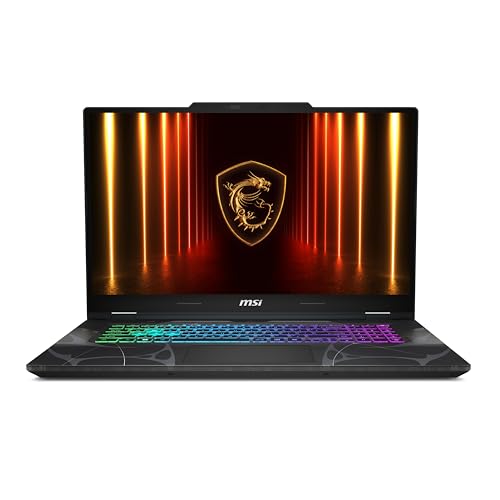
MSI Cyborg 17
Stands out with a 2 × 2 W speaker array, delivering richer in‑game audio on a $1,399.99 budget, a trade‑off that favors sound immersion over the higher‑priced power of the other picks.
Also considered
Score Analysis
Key score advantages vs. runner-up (MSI Crosshair 18)
Price Range
Alienware Area-51 18
$3,642.44
MSI Crosshair 18 HX AI
$1,684.98
MSI Cyborg 17
$1,399.99
MSI Crosshair 18 HX AI (2TB)
$1,969.00

ASUS ROG Strix G18 RTX 5050
$1,399.00
MSI Crosshair 18 HX AI (Base)
$1,929.00

ASUS ROG Strix G18 RTX 5060
$1,734.99
IST Computers m17 R5 360Hz
$1,899.99
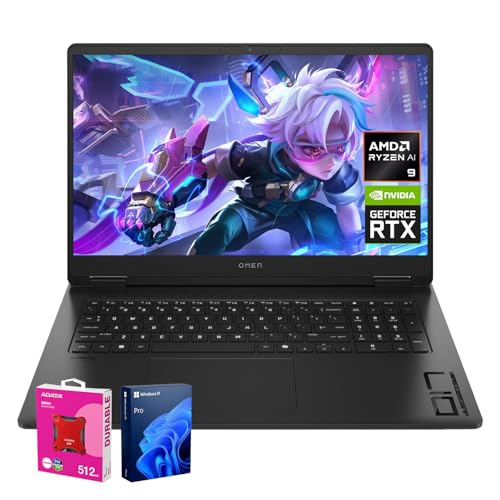
HP OMEN 17.3 RTX 5070
$2,122.99
Kaigerr 17.3-inch Gaming Laptop
$413.99
HP Omen 17
$1,499.00
ASUS TUF A18
$1,499.99
Dell Area-51 18
$4,049.99
Thunderobot Storm 17
$1,299.00
Spec Comparison
TL;DR: The Alienware Area‑51 18 delivers desktop‑level power with an RTX 5080 GPU, 32 GB DDR5 RAM at 6400 MHz, and an 18‑inch 300 Hz display, but its 9.56‑lb chassis and short 145‑minute battery limit portability.
What truly sets this machine apart is the combination of an RTX 5080 laptop GPU and a 24‑core Intel Core Ultra 9 275HX processor, backed by 32 GB DDR5 memory running at 6400 MHz. The 18.0‑inch IPS panel pushes a 300 Hz refresh rate, 500 nits brightness, and 100% DCI‑P3 color gamut, making fast‑paced titles look smooth and vibrant.
Compared with the other 13 large‑screen contenders, the Area‑51 18 sits at the high end of the premium tier, making it pricier than most peers and heavier than the majority of the lineup. Its feature set is richer than many rivals, yet the bulkier chassis and larger footprint keep it from being the most portable option.
Professional reviewers praise the desktop‑class performance and the CherryMX ultra‑low‑profile mechanical keyboard, while users consistently note the short 145‑minute battery life, rated at that duration, and the loud fans when the Cryo‑Chamber cooling system is under load. The display’s IPS technology delivers good brightness, but some comment that it lacks the deep blacks of OLED alternatives.
Beyond the screen and CPU/GPU, the laptop offers a wide connectivity suite: 5 GbE Ethernet, two Thunderbolt 5 ports (40 Gbps each), Wi‑Fi 7, and Bluetooth 5.4. Storage allows expansion, supporting up to 12 TB in RAID 0 across three 4 TB PCIe Gen4 SSDs, while the base model ships with a 2 TB PCIe Gen5 NVMe SSD.
Pros
Cons
Best for: Enthusiast gamers, content creators, and power users who need maximum performance and large‑screen immersion.
Avoid if: You need a lightweight, long‑battery laptop, or you have a tight budget.
TL;DR: The MSI Crosshair 18 HX AI packs a 240 Hz 18‑inch QHD+ IPS panel, Intel Core Ultra 9 275HX CPU and RTX 5070 GPU at $1677.95, delivering high‑refresh gaming in a large, upgrade‑friendly chassis.
The standout feature is its 18.0‑inch QHD+ IPS display that runs at 240 Hz, reaches 500 nits of peak brightness and covers 100% of the sRGB gamut (86.1% Adobe RGB, 98% DCI‑P3). A 7 ms response time and an ≈83% screen‑to‑body ratio make fast action look smooth and immersive.
Compared with the other 13 laptops in this roundup, the Crosshair shares the same 500‑nit brightness as the ASUS ROG Strix G18 RTX 5060, but its 240 Hz panel outpaces that model’s 144 Hz screen. It matches the ASUS TUF A18’s 240 Hz refresh in its 2.5K mode, while many peers sit at 144 Hz. Its 90 Wh battery capacity equals the ASUS TUF A18 and exceeds the HP Omen 17’s 83 Wh pack. However, the cooling system can hit 58.6 dB under full load, noticeably louder than the ASUS TUF A18’s 32.5 dB. At 6.83 pounds, it's lighter than the ASUS ROG Strix G18 RTX 5060’s 11.2‑pound chassis.
Reviewers praise the combination of a Core Ultra 9 275HX processor (2.7 GHz base, 5.4 GHz turbo, 24 cores/threads) and an RTX 5070 GPU with 8 GB GDDR7 memory, noting strong frame rates for modern titles and AI‑enhanced workloads. Professional outlets note the up‑to‑96 GB DDR5 memory ceiling, 6400 MHz RAM speed and two NVMe slots as future‑proof upgrades. The lack of HDR support and adaptive sync, plus a roughly six‑hour battery life on light use, draws common criticism, as does the audible fan noise during intensive sessions.
Pros
Cons
Best for: Buyers in the mid price range seeking the best quality at that price point
Avoid if: You need advanced features or professional‑grade performance
TL;DR: The MSI Cyborg 17 delivers a 17.3‑inch 144 Hz/240 Hz display, i7‑240H CPU and RTX 5060 GPU in a 5.29‑lb chassis for $1,399, but its single‑fan cooling and modest 55.2 Wh battery keep it from being a premium choice.
The standout spec is the 17.3‑inch IPS‑Level LCD that can run at 144 Hz in FHD or 240 Hz in QHD, paired with 127 PPI density and 300 nits brightness. Under the hood sits a 13th‑Gen Intel Core i7‑240H and an NVIDIA RTX 5060 laptop GPU with 8 GB GDDR7 memory, delivering 572 AI TOPS of AI performance.
Compared with the other 13 laptops in this roundup, the Cyborg 17 is lighter than many rivals such as the ASUS ROG Strix G18 RTX 5060 (11.2 lb) and the MSI Crosshair 18 HX AI (6.83 lb). Its 55.2 Wh battery is smaller than the 90 Wh packs that the Thunderobot Storm 17, ASUS TUF A18 and HP Omen 17 use, which translates to a shorter runtime than those models.
Users appreciate the strong CPU‑GPU pairing and the ability to expand RAM up to 96 GB DDR5 and storage up to 4 TB, but professional reviewers flag the single‑fan cooling as a bottleneck that can cause thermal throttling and loud fan noise during extended sessions. The pre‑installed Norton 360 suite also draws criticism because it’s hard to fully remove, and the 6‑hour estimated battery life limits on‑the‑go gaming.
Pros
Cons
Best for: Entry-level buyers or those on a tight budget
Avoid if: You want the best value‑per‑dollar in its price range
“Plays every game at amazing quality”
“Easy to upgrade RAM and SSD”
TL;DR: The MSI Crosshair 18 HX AI packs an 18‑inch 240 Hz IPS display, a 90 Wh battery and a 24‑core Intel Core Ultra 9, but its 3.1 kg weight and noisy fans make it a desktop‑replaceable beast.
The standout feature of the Crosshair 18 HX AI is its 18‑inch IPS panel that refreshes at 240 Hz, delivering ultra‑smooth motion on a matte surface that reaches 500 nits of peak brightness. Under the hood sits a 24‑core Intel Core Ultra 9 275HX built on a 3 nm process, paired with an RTX 5060 or RTX 5070 GPU that offers 18.4 TFLOPS of FP32 performance and 8 GB of GDDR7 memory.
Weighing 3.1 kg, it matches the weight of the MSI Crosshair 18 HX AI Base (6.83 pounds) and is heavier than the IST Computers m17 R5 (5.49 pounds) and the HP Omen 17 (2.95 kg). Its 90 Wh battery capacity equals that of the MSI Base model and exceeds the 86 Wh in the IST m17 R5, though the IST claims longer average battery life. The 500‑nit brightness mirrors the ASUS ROG Strix G18, while the HP Omen 17 tops out at 300 nits. Refresh‑rate wise, the Crosshair’s 240 Hz outpaces the ASUS 144 Hz panel but sits below the IST’s 360 Hz offering.
User feedback repeatedly notes the laptop’s thin 8.2 mm side bezels and an 83 % screen‑to‑body ratio as visual strengths, while professional reviewers praise the 100 % sRGB and 98 % DCI‑P3 color coverage. The same reviewers call out the fans as noticeably noisy under load and point out the lack of adaptive sync, HDR support, Dolby Atmos and a fingerprint sensor as drawbacks for users seeking those premium features.
Pros
Cons
Best for: Those prioritizing quality and willing to pay for premium performance
Avoid if: You prefer products with extensive real-world feedback and proven track records
TL;DR: The ASUS ROG Strix G18 RTX 5050 packs an 18‑inch 144 Hz display, Ryzen 9 CPU and RTX 5050 GPU into a $1,438.99 desktop‑replacement that’s powerful but heavy and short‑lived on battery.
At the heart of the G18 is an 18‑inch IPS‑level ROG Nebula panel that delivers a smooth 144 Hz refresh rate and 300 nits of brightness, ideal for fast‑paced shooters. Under the hood you get a Ryzen 9 8940HX paired with an RTX 5050 Laptop GPU and 16 GB DDR5‑5200 MHz RAM, while a 1 TB PCIe Gen4 NVMe SSD gives you plenty of fast storage. The laptop carries a 90 Wh battery and can charge from 0‑50 % in just 30 minutes, which is generous for a gaming machine of this size.
Compared with the other 13 contenders, the G18 is priced lower than the ASUS ROG Strix G18 RTX 5060 while offering a similar 18‑inch chassis. It's heavier than the MSI Cyborg 17 (5.29 lb) but lighter than the MSI Crosshair 18 HX AI (6.83 lb). Its 90 Wh battery tops the 55.2 Wh cell found in the Cyborg, matching the Crosshair’s capacity, yet reviewers still note the limited 1–2 hour gaming runtime. The device’s 88 dB speaker loudness and 2 × 2 W Dolby Atmos speakers give clear audio, though the 46 dB fan noise under load can be noticeable.
User sentiment praises the massive, fluid screen and raw processing power, especially for 1440p gaming and content creation. However, the short battery life, loud fans and the 6.61‑pound chassis are frequent complaints, and the preinstalled bloatware adds a minor annoyance. Professional reviewers also highlight the tool‑less upgradeability and the high‑quality mechanical‑feel trackpad.
Pros
Cons
Best for: Enthusiast gamers and content creators who want a large, high‑refresh screen and desktop‑grade performance without a premium price tag.
Avoid if: You need long battery life, lightweight portability, or a quiet chassis for quiet environments.
TL;DR: The MSI Crosshair 18 HX AI packs an 18‑inch 240 Hz QHD+ screen, a 24‑core Core Ultra 9 CPU and RTX 5070 GPU, delivering high‑refresh performance at a $1,929 price, though its battery lasts only about six hours.
The standout feature is its 18‑inch IPS LCD panel with a 240 Hz refresh rate, 500 nits peak brightness, 100% sRGB, 98% DCI‑P3 coverage and a 7 ms response time. This combination gives smooth, vibrant visuals for fast‑paced games and color‑critical work.
Compared with the other 13 laptops in this roundup, the Crosshair’s 240 Hz panel sits between the 360 Hz of the IST Computers m17 R5 and the 144 Hz of the ASUS ROG Strix G18, while matching the ASUS’s 500‑nit brightness and beating the HP Omen 17’s 300‑nit panel. At 6.83 lbs it’s heavier than the IST’s 5.49 lb model but lighter than the ASUS (11.2 lb) and far lighter than the HP OMEN 17.3 (13.14 lb). Its 90 Wh battery capacity equals the MSI Crosshair 18 HX AI (2TB) and exceeds the HP Omen 17’s 83 Wh, though the IST’s 86 Wh is slightly lower.
Professional reviewers note the laptop’s “balanced specs for an 18‑inch machine at sub‑$2,000” and praise the AI‑ready hardware – the Intel Core Ultra 9 275HX (2.7 GHz base, 5.4 GHz turbo, 24 cores) paired with up to 798 AI TOPS and an RTX 5070 GPU with 115 W TGP. Memory expands to 96 GB DDR5‑6400 MHz across two channels, and storage options go up to 4 TB NVMe. Connectivity includes Wi‑Fi 6E, Bluetooth v5.3, an RJ45 gigabit LAN port, HDMI 2.1, Thunderbolt 4 and three USB‑A 3.2 ports. Users love the buttery‑smooth display and raw performance, while common complaints focus on the modest ~6‑hour battery life, lack of HDR and adaptive sync, and a 720p webcam with a privacy shutter.
Pros
Cons
Best for: Enthusiast gamers and content creators who need high‑refresh QHD+ visuals and AI‑accelerated performance.
Avoid if: You prioritize ultra‑long battery life, HDR or adaptive‑sync display features, or a premium metal chassis.
TL;DR: The ASUS ROG Strix G18 RTX 5060 packs an 18‑inch 144 Hz Nebula IPS display, RTX 5060 GPU with 16 GB GDDR7, and an effective cooling system, but its bulk makes it a desktop‑replacement rather than a travel companion.
What really stands out is the 18‑inch IPS‑level Nebula panel that delivers a 144 Hz refresh rate, 500 nits of brightness and 100 % DCI‑P3 color coverage, all driven by an RTX 5060 GPU equipped with 16 GB of GDDR7 memory. The machine also ships with 16 GB of DDR5 RAM running at 5600 MT/s and a spacious 2 TB PCIe Gen 4.0 NVMe SSD, giving you plenty of headroom for AAA titles and large media libraries.
In a lineup that includes the MSI Crosshair 18 HX AI and the HP Omen 17, the G18 is noticeably heavier and bulkier than the MSI and HP offerings, while still offering a larger screen and more ports. It also offers a richer port selection than the IST Computers m17 R5 360Hz, featuring two Thunderbolt 5 ports, three USB 3.2 Gen 2 Type‑A ports, a 2.5G LAN port and an HDMI 2.1 FRL connector.
Users have given the laptop a strong 4.8/5 rating across 11 reviews, praising its desktop‑class performance, the effectiveness of the Tri‑Fan cooling with Conductotron liquid metal, and the ease of upgrading RAM and storage thanks to tool‑less access. Common complaints focus on the 720p webcam, the lack of an SD card reader, and the machine’s size, which makes frequent travel inconvenient.
Pros
Cons
Best for: Enthusiast gamers and content creators who want desktop‑class performance on a spacious 18‑inch screen.
Avoid if: You need a lightweight travel laptop or an OLED/mini‑LED display for the highest visual fidelity.
TL;DR: The IST Computers m17 R5 packs a 17.3‑inch 360 Hz FHD screen, RTX 3070 Ti GPU, 64 GB DDR5 RAM and a 86 Wh battery into a 5.49‑pound chassis for high‑refresh‑rate gaming.
The standout spec is the 360 Hz refresh rate paired with a 1 ms response time on a 17.3‑inch IPS‑level panel, delivering ultra‑smooth visuals for competitive play. Under the hood sits an AMD Ryzen 9 6900HX CPU, an NVIDIA GeForce RTX 3070 Ti GPU with 125 W TGP, and 64 GB DDR5 RAM running at 4800 MHz, offering plenty of horsepower for both games and content‑creation workloads.
At 5.49 pounds, the m17 R5 is lighter than the MSI Crosshair 18 HX AI (6.83 pounds) and far lighter than the ASUS ROG Strix G18 (11.2 pounds). Its depth of 357.9 mm is also shorter than the MSI’s 404 mm chassis, making it a bit more compact than some 18‑inch rivals. The 86 Wh battery provides roughly 6–9 hours of mixed use, a touch lower than the 90 Wh packs found in the MSI Crosshair models, but the 240 W charger helps replenish it quickly. It includes an RJ‑5 Ethernet port, a connectivity option that appears on the HP OMEN 17.3 but isn’t listed for several other competitors. The laptop’s 360 Hz panel eclipses the ASUS ROG Strix G18’s 144 Hz screen, giving it a clear advantage for fast‑paced shooters.
Professional reviewers praise the Alienware Cryo‑Tech v4.0 cooling system for keeping temperatures in check, though they note that fan noise can become noticeable under load. Users consistently highlight the buttery‑smooth display and raw performance, while also noting the limited battery endurance of roughly 6–9 hours and the absence of a numeric keypad as minor drawbacks. The combination of a large 2 TB PCIe NVMe SSD, an additional M.2 slot, and Dolby Atmos‑supported stereo speakers rounds out a feature‑rich package for serious gamers.
Pros
Cons
Best for: Competitive gamers who need a 360 Hz display and creators who want strong CPU/GPU performance with lots of RAM.
Avoid if: You need a lightweight travel laptop, a numeric keypad, or exceptionally long battery life.
TL;DR: The HP OMEN 17.3 RTX 5070 packs a desktop‑class Ryzen AI 9 365 CPU, 64 GB DDR5 RAM and a 2 TB PCIe Gen 4 SSD into a 17.3‑inch, 144 Hz gaming machine.
The standout spec features a massive 64 GB DDR5 memory paired with a 2 TB NVMe PCIe Gen 4 SSD, giving you headroom for heavy multitasking, large game libraries and demanding content‑creation workloads.
On the display side, the 17.3‑inch IPS panel offers a 144 Hz refresh rate, which lines up with the ASUS ROG Strix G18’s 144 Hz panel, but its 300‑nits brightness trails the 500‑nits brightness of the MSI Crosshair 18 HX AI (Base) and the ASUS model.
Reviewers praise the raw performance of the AMD Ryzen AI 9 365 (10 cores, 20 threads, up to 5.0 GHz) and the RTX 5070 GPU with 8 GB GDDR6, noting smooth 1080p gaming and solid ray‑tracing thanks to DLSS 4. At the same time, users flag the 13.14‑pound chassis as cumbersome for frequent travel, the battery lasts only 1.5–2 hours during gaming, and the dual‑fan cooling system produces audible noise at full speed.
The laptop also includes a full‑size keyboard with 1.7 mm key travel and 4‑zone RGB lighting, dual front‑facing Bang & Olufsen speakers, an RJ‑45 Ethernet port, HDMI 2.1, three USB‑A 3.2 Gen 1 ports and a USB‑C port that can double as optional Thunderbolt.
Pros
Cons
Best for: Users who prioritize top‑tier performance and are willing to invest in a premium, high‑spec gaming laptop.
Avoid if: You need a lightweight, travel‑friendly device or long battery life for on‑the‑go gaming.
“Desktop-level performance in a laptop form factor”
“Keyboard is fantastic—deep travel and customizable RGB”
TL;DR: At $439.99, the Kaigerr 17.3‑inch Gaming Laptop packs a 16 GB DDR4 memory, a 512 GB NVMe SSD and a full‑HD IPS screen into a lightweight 4.4‑lb chassis, offering decent everyday performance for a tight budget.
The standout feature is its 17.3‑inch IPS panel with anti‑glare coating, delivering a full‑HD (1920 × 1080) image at a 60 Hz refresh rate. Under the hood you get 16 GB DDR4 RAM, which is upgradeable, and a fast 512 GB NVMe SSD for quick launches and ample storage. The laptop also includes a backlit keyboard (on some variants) and a full‑size layout with a numeric keypad, making it comfortable for long work sessions.
When you line it up against the other 13 large‑screen laptops, the Kaigerr is noticeably lighter than every peer listed – all of them tip the scales at 5 pounds or more. Its 62.7 Wh battery capacity tops the Thunderobot Storm 17 (53 Wh) and MSI Cyborg 17 (55.2 Wh) but falls short of the 90 Wh packs that ASUS ROG Strix G18, ASUS TUF A18, HP Omen 17 and MSI Crosshair 18 HX AI use. The 60 Hz panel is also slower than the 165 Hz, 144 Hz and 240 Hz screens offered by those models, and the 16 GB of DDR4 RAM is less than the 32 GB DDR5 that the Thunderobot provides.
Users consistently praise the generous screen real‑estate and the smooth multitasking afforded by the 16 GB of RAM. Reviewers note the solid build quality and crisp colour reproduction on the IPS display. However, the integrated Radeon Vega 3 graphics limit the laptop to light gaming, and the 5‑hour battery life draws criticism for mobile use. The USB‑C port is data‑only, so you can’t charge the device that way, and some customers have reported slow responses from support.
The machine runs on an AMD Ryzen 3 4300U with a 2.7 GHz base clock that can boost up to 3.7 GHz, delivering four cores and four threads within a modest 15 W TDP. Connectivity includes Bluetooth 5.0, a 1 × 3.5 mm combo audio jack, HDMI, three USB‑3.2 ports, a USB‑2.0 port, a data‑only USB‑C, and a TF card reader. The 12‑month warranty adds a layer of peace of mind.
Pros
Cons
Best for: Shoppers on a tight budget who want the most for their money
Avoid if: You prefer products with extensive real-world feedback and proven track records
“you write to support, never get a reply.”
TL;DR: At $1499.00, the HP Omen 17 packs a 10‑core AMD Ryzen AI 9 CPU, up to 5.0 GHz boost, an RTX 5060 GPU, and a 17.3‑inch 144 Hz (or 240 Hz QHD) display for solid mid‑range gaming.
The standout hardware is the AMD Zen 5 Ryzen AI 9 processor with 10 cores, 20 threads and a boost clock that reaches up to 5.0 GHz, paired with up to 572 TOPS of AI performance and an NVIDIA RTX 5060 GPU equipped with 8 GB GDDR7 VRAM. An 83 Wh battery and Bluetooth 5.3 round out the core specs, while the cooling system relies on 2 fans, 4 heat pipes and 3 exhaust ports to keep temperatures in check.
Compared with the other 13 laptops in this roundup, the Omen 17 sits heavier than the ASUS TUF A18’s 2.6 kg chassis but lighter than the ASUS ROG Strix G18 RTX 5050’s 2998 g build. Its 83 Wh battery is smaller than the 90 Wh packs found in the TUF A18, ROG Strix G18 and MSI Crosshair 18, yet larger than the 55.2 Wh in the MSI Cyborg 17 and the 53 Wh in the Thunderobot Storm 17. The 144 Hz FHD panel matches the refresh rates of most peers, while the optional 240 Hz QHD option lines up with the TUF A18’s 240 Hz (2.5K) offering and exceeds the 165 Hz of the Thunderobot Storm.
Professional reviewers highlight the smooth 144 Hz display and the strong CPU/GPU combo, noting that the laptop delivers “excellent gaming performance on AAA titles.” Users echo this praise, calling the machine a “beast” for gaming and streaming, but they also flag the plastic chassis and the 2.95 kg weight as drawbacks for anyone who needs a portable solution. PCMag specifically called the plastic body a downside, and Laptop Mag pointed out the chassis feels “thick” compared with metal‑finished rivals.
On the connectivity side, the Omen 17 includes a Gigabit RJ‑45 Ethernet port, an HDMI 2.1 output, three USB‑A 3.2 ports, and a USB4/Thunderbolt 4 port that supports DisplayPort 1.4 and Power Delivery. HyperX technology handles audio with Bang & Olufsen‑tuned 2.0 stereo speakers, and the full‑size island‑style keyboard offers a 1‑zone RGB backlight and 26‑key rollover.
Pros
Cons
Best for: Value-conscious buyers seeking quality at $1499.00
Avoid if: You prefer products with extensive real-world feedback and proven track records
“Desktop-level performance in a laptop form factor”
“Keyboard is fantastic—deep travel and customizable RGB”
TL;DR: The ASUS TUF A18 packs an 18‑inch 240 Hz IPS display, 90 Wh battery and up to an RTX 5070 GPU in a rugged chassis, but its bulk and variable brightness keep it from being the most portable option.
At the heart of the TUF A18 is an 18‑inch IPS LCD that can run at 240 Hz in its 2.5K configuration, offering a fast‑response 3 ms panel and 100% DCI‑P3 colour coverage. Coupled with a 5600 MHz DDR5 memory ceiling and a Ryzen 7 260 CPU that boosts to 5.1 GHz, the machine targets high‑frame‑rate gaming on large screens.
Compared with peers, the TUF A18’s 90 Wh battery capacity outstrips the HP Omen 17’s 83 Wh and the MSI Cyborg 17’s 55.2 Wh, while its 32.5 dB max noise level under load is quieter than the ASUS ROG Strix G18’s 46 dB. It's lighter than the HP Omen 17 (2.6 kg vs 2.95 kg) but heavier than the MSI Cyborg 17 (2.6 kg vs 2.399 kg), and its 283 mm depth is deeper than the Omen’s 262.1 mm.
Professional reviewers praise the extensive port selection—including USB4, HDMI 2.1 and Gigabit Ethernet—and the upgradable memory and storage slots. Everyday users love the performance and the solid aluminum lid, yet many note the chassis feels bulky and the screen drops to 300 nits on lower‑brightness settings, which some find dim.
Pros
Cons
Best for: Entry-level buyers or those on a tight budget
Avoid if: You want the best value-per-dollar in its price range
TL;DR: The Dell Area‑51 18 packs an 18‑inch 300 Hz IPS display, an RTX 5090 GPU with 24 GB GDDR7, and a Core Ultra 9 CPU, but its 9.56‑pound chassis and limited battery life keep it firmly desk‑bound.
The standout spec is the 300 Hz refresh rate on a 2560 × 1600 IPS panel that reaches 500 nits brightness and covers 96.1 % of the DCI‑P3 gamut, all paired with NVIDIA G‑SYNC and HDR10 support. Combined with a desktop‑class Intel Core Ultra 9 275HX processor and an RTX 5090 laptop GPU boasting 24 GB GDDR7 memory and 10,752 shading units, the machine delivers flagship‑level performance in a laptop form factor.
Compared with the other 13 contenders, the Area‑51 18 offers a faster refresh than the ASUS ROG Strix G18’s 144 Hz screen and matches the 500‑nit brightness of the MSI Crosshair and Alienware Area‑51 models. Its Bluetooth 5.4 aligns with the Alienware peer and exceeds the IST m17’s Bluetooth 5.2, while the 5 GbE Ethernet port outpaces the basic RJ‑45 found on the HP OMEN. The 6400 MT/s RAM speed also sits above the unspecified memory rates of most rivals, and its 96 Wh battery capacity mirrors the Alienware counterpart but still falls short of the longer runtimes that lighter laptops praise.
Professional reviewers note the combination of a Cherry MX Ultra low‑profile mechanical keyboard with per‑key RGB lighting and Dolby Atmos‑enabled speakers as a strong point for immersive gaming and content creation. However, the active vapor‑chamber cooling system with four fans can hit a maximum noise level of 55.9 dB, and the 9.56‑pound weight makes the laptop unsuitable for frequent travel. Users also point out the lack of a fingerprint sensor, which limits biometric security options.
Pros
Cons
Best for: Those prioritizing quality and willing to pay for premium performance
Avoid if: You need long battery life, frequent travel, or a fingerprint sensor
TL;DR: The Thunderobot Storm 17 packs a 17.3″ QHD 165 Hz screen, Intel i7‑13620H and RTX 5060 GPU, but its modest 53 Wh battery and spec quirks keep it from being the best value.
The standout feature is the 17.3 in (439.4 mm) QHD panel with a 165 Hz refresh rate and pro‑grade color accuracy, delivering crisp and fluid visuals for immersive gaming. Coupled with 32 GB DDR5 memory running at 5600 MHz, the laptop can handle demanding titles while keeping frame‑rates smooth.
At 5.84 Pounds, the Storm 17's a touch heavier than the MSI Cyborg 17, which weighs 5.29 Pounds, yet it sits at a similar price tier. Its 53 Wh battery is smaller than the 90 Wh packs found in the ASUS ROG Strix G18 RTX 5050, so endurance on the go will be shorter. On the display side, the 165 Hz panel outpaces the 144 Hz screens of the ASUS ROG Strix G18 RTX 5060 and the MSI Crosshair 18 HX AI, giving it an edge for fast‑paced shooters.
User sentiment highlights the vivid QHD display and strong mid‑range performance from the i7‑13620H (10 cores / 16 threads, 1.80 GHz base, 4.9 GHz boost) paired with the RTX 5060’s 8 GB GDDR7 VRAM. Reviewers also note the laptop’s solid build and effective cooling, thanks to dual 12 V turbofans, 60 mm blades and 245 ultra‑thin copper fins. However, buyers have reported occasional mismatches in listed specs—such as RAM speed variations—and the lack of DisplayPort or Thunderbolt ports limits external display options.
Pros
Cons
Best for: Enthusiast gamers who want a large QHD screen with high refresh rates and upgradability.
Avoid if: You want the best value‑per‑dollar in its price range.
“This is a surprisingly awesome laptop!”
“Games amazing, has decent battery life for on-the-go work”
Breakdown
Alienware Area-51 18
Pros
MSI Crosshair 18 HX AI
Pros
MSI Cyborg 17
Cons
MSI Crosshair 18 HX AI (2TB)
Pros
Based on scoring data and product specs
Personalized picks
Best Overall Pick
Alienware Area-51 18
Best ValueBest for: Those prioritizing quality and willing to pay for premium performance
MSI Crosshair 18 HX AI
Best for: Buyers in the mid price range seeking the best quality at that price point
$1,684.98-$1,957.46 vs winner
Skip Thunderobot Storm 17 if…
You want the best value-per-dollar in its price range
Alienware’s Area‑51 18 takes the crown as the best large‑screen gaming laptop. Its 18.0‑inch IPS panel pushes 300 Hz refresh, 500 nits brightness and 100 % DCI‑P3 color, while the RTX 5080 GPU with 24 GB GDDR7 delivers high‑end graphics in this class. With a 32 GB DDR5‑6400 kit and a 2 TB PCIe Gen5 SSD, the machine offers desktop‑level performance without compromise, and 87 reviewers gave it a 4.2‑star rating, supporting the hype.
The MSI Crosshair 18 HX AI lands as the runner‑up, perfect if you need a high‑performance 18‑inch rig that won’t break the bank. At $1,677.95 it weighs 6.83 lb, runs a 240 Hz IPS display, and packs an RTX 5070 GPU with 8 GB GDDR7 plus the same 24‑core Intel Core Ultra 9 275HX CPU. Its 90 Wh battery promises roughly six hours of light use, making it a solid choice for gamers who travel or have limited desk space.
For tighter budgets, the Kaigerr 17.3‑inch Gaming Laptop shines at $439.99, making it the most affordable entry. The MSI Crosshair 18 HX AI serves as the best mid‑range option, balancing price and power. If you crave the absolute premium experience, Dell’s Area‑51 18 tops the list at $3,899.00, offering the most expansive specs and a 1‑Year Basic Onsite Service.
Pick the Alienware Area‑51 18 today and own the most capable 17"+ gaming laptop on the market.
The Alienware Area‑51 18 features a 300 Hz IPS panel, while the MSI Crosshair 18 HX AI offers a 240 Hz panel. This gives the Alienware model the edge for ultra‑smooth competitive gaming.
Please sign in to leave a review
No reviews yet. Be the first to review!
