⚡ Quick Answer
We’ve lined up eight LED displays that all support HDR, so you can see which screen delivers the brightest highlights and deepest shadows for your setup. Prices stretch from the Xiaomi G27i‑US at $149.99 up to the Asus PA32QCV Thunderbolt at $1,049.00, giving you clear budget, mid‑range and premium choices. The budget tier includes the Xiaomi, LG 27UL550 and AOC Q27G3XMN; the mid‑range tier features the Skyworth Portable Smart TV and LG 27UK650; the premium tier covers Samsung’s 43‑inch QB43R, Asus’s PA329CRV USB‑C and the high‑end PA32QCV.
When HDR performance matters, the AOC Q27G3XMN stands out with a VESA DisplayHDR 1000 rating and a 1000‑nit peak brightness, plus a 180 Hz refresh rate via DisplayPort and a 1 ms gray‑to‑gray response. The Xiaomi G27i‑US offers a solid 400‑nit HDR brightness and a 165 Hz refresh, while the Asus PA329CRV delivers 400 cd/m² HDR peak at a 60 Hz refresh. If you need a larger screen, Samsung’s QB43R provides a 350 cd/m² brightness on a 43‑inch panel, and the portable Skyworth brings a 24‑inch, 8‑W speaker setup with a built‑in battery for on‑the‑go viewing.
Below you’ll find a deeper dive into each model’s strengths, so you can match the right HDR‑capable display to your gaming, creative or entertainment needs.

AOC Q27G3XMN
Its compact depth of 10.19 in keeps the setup slim, fitting tighter desks while still delivering solid HDR performance.

Xiaomi G27i-US 27-inch
Ideal for tight‑budget gamers, it’s $149.99—about $130 less than the Best Overall—while still offering the most value per the specs.

LG 27UK650
Stands out with a 110 mm height adjustment and a thin 1.8 in (45.7 mm) bezel, catering to users who prioritize ergonomic flexibility.
Also considered
Score Analysis
Key score advantages vs. runner-up (Xiaomi G27i-US 27-inch)
Price Range
AOC Q27G3XMN
$299.99
Xiaomi G27i-US 27-inch
$149.99
LG 27UK650
$548.98

Asus PA329CRV USB-C
$576.95

Skyworth Portable Smart TV
$449.99

Samsung QB43R 43-inch
$571.99
Asus PA32QCV Thunderbolt
$1,299.00

LG 27UL550
$229.99
Spec Comparison
TL;DR: The AOC Q27G3XMN packs a 27‑inch Mini‑LED VA panel with 336 local dimming zones, 1000‑nit HDR1000 brightness, 180 Hz DP refresh and 1 ms response, but its HDMI caps at 144 Hz and it weighs a solid 15.56 lbs.
The standout feature is the Mini‑LED backlight with 336 local dimming zones, delivering a peak brightness of 1000 nits and VESA DisplayHDR 1000 certification. Coupled with a 4000:1 static contrast ratio, the monitor can produce deep blacks and vivid highlights that many reviewers praised for “strong HDR impact.” Its 27‑inch QHD panel (2560 × 1440) runs at 180 Hz over DisplayPort and 1 ms gray‑to‑gray response, making fast‑paced games feel buttery smooth.
Compared with the seven other displays in this roundup, the Q27G3XMN is heavier than the Xiaomi G27i‑US (7.94 lbs) and the LG 27UL550 (9.70 lbs), and also heavier than the Skyworth Portable Smart TV (11.0 lbs). It's lighter than the larger Samsung QB43R (22.0 lbs) and the Asus PA329CRV (21.83 lbs). Its 1000‑nit brightness far exceeds the 250‑nit panel of the Xiaomi model, while the peers that list brightness (e.g., the Asus PA32QCV at 600 cd/m²) are still lower than AOC’s spec. The Q27G3XMN’s 180 Hz refresh is unique among the peers, though its HDMI ports stop at 144 Hz, and console gamers note this limitation.
In practice, users highlight the monitor’s adjustable stand—130 mm of height travel, full 180° pivot and 30° swivel—as a major convenience for ergonomic setups. Professional reviewers echo the sentiment, noting the “competitive price combined with Mini‑LED and HDR1000 performance.” However, several owners report occasional blooming from the local dimming zones and mention the unit’s 15.56‑lb weight as a challenge during assembly. Some reviewers also mention build‑quality concerns, though they don't dominate the general sentiment.
Pros
Cons
Best for: Budget‑conscious gamers who want a 27‑inch QHD panel with high refresh rates, strong HDR brightness, and flexible ergonomics.
Avoid if: You want the best value‑per‑dollar in its price range or need full 180 Hz performance over HDMI.
“really competitively priced”
TL;DR: The Xiaomi G27i‑US offers a 27‑inch Full HD IPS panel with 165 Hz refresh, 1 ms GTG response and HDR10 at a budget‑friendly $149.99, earning 4.5‑star ratings from 248 reviewers.
The standout spec is the 165 Hz refresh rate paired with a 1 ms GTG response time, delivering motion at 165 Hz for fast‑paced games. The panel also supports HDR10 with a peak brightness of 400 nits, while the standard brightness sits at 250 nits.
Compared with the other seven monitors, the G27i‑US is notably lighter than the AOC Q27G3XMN and far lighter than the Asus PA32QCV. It also packs a higher refresh rate than the LG 27UK650’s 60 Hz and is more affordable than the LG 27UL550, while still offering a full‑size 27‑inch footprint.
Users consistently praise the fluid 165 Hz gameplay and the accurate colors backed by 99% sRGB and 95% DCI‑P3 coverage. Users highlight eye‑care features like TÜV‑certified low blue light and flicker‑free technology as comfortable for long sessions. Common complaints focus on the Full HD (1920 × 1080) resolution feeling less sharp on a 27‑inch screen and the HDR performance, limited to 400 nits, is modest in bright rooms. The monitor also lacks height and swivel adjustments, which some users miss.
Technical details round out the package: a contrast ratio of 1000:1, 8‑bit color depth (16.7 million colors), and a 75 mm × 75 mm VESA mount. The stand tilts from –5° to +15°, and the unit weighs 7.94 lb, making it easy to position on a desk. Power draw is modest at 36 W.
Pros
Cons
Best for: Shoppers on a tight budget who want the most for their money
Avoid if: You need higher resolution than Full HD or extensive ergonomic adjustments
“silky-smooth 165 Hz gameplay”
“high refresh rate of 165Hz and rapid 1ms response”
TL;DR: The LG 27UK650 delivers 27‑inch 4K IPS quality with HDR10, 99 % sRGB coverage, and FreeSync, though its 60 Hz panel and lack of speakers may limit fast‑paced gaming.
At a peak brightness of 450 cd/m², the monitor supports HDR10 content, and its 10‑bit panel can display roughly 1.07 billion colors, giving you vivid detail in bright and dark scenes.
Weighing about 13.67 lb, the LG is lighter than the Samsung QB43R (22 lb) and the Asus PA329CRV (21.83 lb), but heavier than the Xiaomi G27i-US (7.94 lb). Its 450 cd/m² peak brightness outshines the Samsung’s 350 cd/m² yet sits below the Asus PA32QCV’s 600 cd/m². With a 60 Hz refresh rate, it matches the Asus PA329CRV but trails the AOC Q27G3XMN’s 180 Hz and the Xiaomi’s 165 Hz, so it’s a solid mid‑range choice.
Everyday users rave about the razor‑sharp 4K image and the accurate colors, noting the 5 ms response time keeps motion smooth. Common complaints focus on the absence of built‑in speakers and the 60 Hz limit feeling sluggish during fast‑paced games. Reviewers also mention the modest 1000:1 contrast ratio and lack of local dimming as factors that temper HDR performance.
Beyond the basics, HDR10 expands dynamic range, while AMD FreeSync, Black Stabilizer, and Dynamic Action Sync work together to curb tearing and improve visibility in dark scenes. Flicker Safe technology helps reduce eye strain during long work or gaming sessions.
Pros
Cons
Best for: Most users looking for a well‑reviewed, reliable mainstream option
Avoid if: You need advanced features or professional‑grade performance
TL;DR: The 31.5‑inch Asus PA329CRV delivers 4K IPS colour accuracy (ΔE < 2), 98% DCI‑P3 coverage and 96 W USB‑C power, but its 60 Hz refresh limits fast‑action use.
The PA329CRV’s 31.5‑inch 4K IPS panel (3840 × 2160) offers a factory‑calibrated ΔE < 2 and 98% DCI‑P3 colour gamut, with HDR10 support and a peak brightness of 400 cd/m². Its contrast ratio tops out at 3000:1, and the screen maintains 178° viewing angles both horizontally and vertically. A single USB‑C cable can deliver video, data and up to 96 W of power, cutting cable clutter on a workstation.
At 21.83 pounds, the monitor is slightly lighter than the Samsung QB43R (22.0 pounds) but heavier than the LG 27UK650 (13.67 pounds) and the Xiaomi G27i‑US (7.94 pounds). It's 31.5‑inch display is smaller than Samsung’s 43‑inch panel yet larger than the Skyworth Portable Smart TV’s 24‑inch screen. The 60 Hz refresh rate matches the LG 27UK650 and is slower than the AOC Q27G3XMN’s 180 Hz (DP) / 144 Hz (HDMI) and the Xiaomi’s 165 Hz, while the 5 ms response time is quicker than Samsung’s 8 ms and on par with the LG 27UK650.
Professional reviewers praise the “true‑to‑life” 98% DCI‑P3 performance and the Calman‑verified colour accuracy, noting that the monitor feels comfortable for long editing sessions thanks to flicker‑free technology and an ergonomic stand with tilt, swivel, height and pivot adjustments. Users also like the built‑in speakers and headphone jack, though several mention that the 400 cd/m² HDR peak feels modest in bright rooms.
Pros
Cons
Best for: Professional video editors, photographers, and colour graders who need precise colour accuracy and a single‑cable USB‑C workflow.
Avoid if: You need high refresh rates for gaming or brighter HDR performance in bright rooms.
TL;DR: The Skyworth 24‑inch Portable Smart TV packs a matte anti‑glare 1080p display, HDR10 support and a built‑in battery for over three hours of cord‑free viewing, all in an 11‑pound, leather‑handled package.
The standout feature is its integrated lithium‑ion battery, which the manufacturer claims delivers more than 3 hours of unplugged use. Coupled with a 24‑inch LED/LCD panel, HDR10 support and a matte anti‑glare finish, the screen stays readable even in bright outdoor conditions.
Compared with the other seven displays in this roundup, the Skyworth is lighter than the Samsung QB43R (22.0 pounds) and the Asus PA329CRV (21.83 pounds) but heavier than the LG 27UL550 (9.70 pounds) and the Xiaomi G27i‑US (7.94 pounds). Its 24‑inch screen is smaller than most peers, which range from 27 inches up to 43 inches, making it the most compact option for true portability.
User feedback repeatedly praises the anti‑glare matte surface for keeping colors vivid in direct sunlight, and professional reviewers note the three‑hour battery reliably powers a full‑length movie. The device runs Google TV with built‑in Chromecast, supports both Google Assistant and Alexa, and offers Bluetooth 5.0 and dual‑band Wi‑Fi for seamless streaming. However, several owners point out that the 1080p resolution falls short of the 4K standard found on newer flagship models, and the limited battery life means you’ll need to recharge or hook up external power for longer sessions.
Pros
Cons
Best for: Frequent travelers, campers, RV owners, and anyone who wants a sizable, battery‑powered screen for on‑the‑go entertainment.
Avoid if: You need 4K resolution or longer than three hours of continuous viewing without external power.
TL;DR: The Samsung QB43R is a 43‑inch 4K LED signage display with HDR10+, Dynamic Crystal Color and a perfect 5‑star rating, but its $551.99 price and 350 cd/m² brightness suit medium‑size business spaces.
The QB43R packs a 43‑inch 4K UHD panel (3840 × 2160 pixels) with a contrast ratio of 4000:1 and a brightness of 350 cd/m². Samsung’s Dynamic Crystal Color claims up to one billion shades, and HDR10+ adds extra punch to highlights and shadows. The display responds in 8 ms and comes in a glossy surface with a thin bezel (9.2 mm top/side, 11.2 mm bottom).
At 22.0 lb, the QB43R is heavier than most rivals – notably heavier than the 13.7‑lb LG 27UK650 and the 11.0‑lb Skyworth portable TV, and only a shade heavier than the 21.8‑lb Asus PA329CRV. Its 350 cd/m² brightness matches the typical output of the LG and Asus models, but its 8 ms response time is slower than their 5 ms panels. Unlike the peers, Samsung lists HDR10+ support, giving it an edge for content that uses dynamic range.
Reviewers have awarded a flawless 5.0/5 rating across five reviews, praising the vivid color reproduction and the built‑in speakers for clear audio in signage environments. Professional notes highlight the IP5X dust protection and the 16/7 operation limit, meaning it isn’t meant for 24/7 continuous use. The premium $551.99 price positions it above budget‑focused options, but the feature set justifies the cost for businesses that need reliable, high‑quality visual output.
Pros
Cons
Best for: Those prioritizing quality and willing to pay for premium performance
Avoid if: You're shopping on a tight budget — it's priced at $551.99
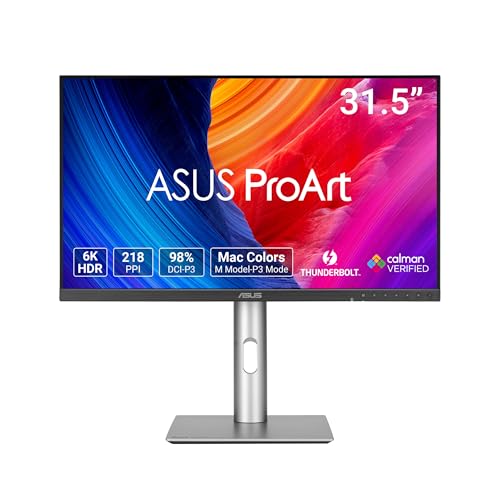
TL;DR: The Asus PA32QCV Thunderbolt delivers a stunning 31.5‑inch 6K IPS panel with 600 cd/m² brightness, 98% DCI‑P3 coverage and Thunderbolt 4 connectivity, but its premium $1,049 price and matte coating may deter casual users.
This ProArt display’s most eye‑catching spec is its native 6K resolution of 6016 × 3384 pixels on a 31.5‑inch screen, yielding 218 PPI and razor‑sharp detail. The IPS panel offers 10‑bit color depth, 100% sRGB, 98% DCI‑P3 and a Delta E < 2, while HDR10 and VESA DisplayHDR 600 push brightness up to 600 cd/m².
Compared with the other seven monitors in this roundup, the PA32QCV is larger than the 27‑inch and 24‑inch options and slightly lighter than the Asus PA329CRV, yet heavier than the compact Skyworth Portable Smart TV. Its 600 cd/m² brightness outshines most peers, and the 6K resolution dwarfs the 1080p or 4K panels found elsewhere. While many competitors rely on HDMI‑only connections, this model adds dual Thunderbolt 4 ports with 96 W power delivery and a built‑in KVM switch, giving it a connectivity edge.
Professional reviewers praise the monitor’s pixel‑perfect sharpness and color fidelity, noting that the Calman‑verified < 2 Delta E makes it reliable for color‑critical work. Everyday users echo the praise for detail but commonly mention that the aggressive matte coating creates hazy text, and the default sRGB mode feels cool, often requiring calibration. Without local dimming or backlight strobing, HDR contrast falls short of OLED or mini‑LED rivals.
Additional technical touches include an ambient‑light sensor that adjusts brightness automatically, a full range of ergonomic adjustments (tilt, swivel, pivot and 130 mm height travel), and a sturdy 100 × 100 mm VESA mount. The 8 mm thickness keeps the profile sleek despite the 9.3 kg (20.5 lb) chassis.
Pros
Cons
Best for: Professional creators who need 6K detail, precise color and strong connectivity, and are willing to invest in a premium display.
Avoid if: You prioritize out‑of‑the‑box gaming performance, deep black levels without local dimming, or a lower‑price solution that works without calibration.
TL;DR: At $228.99, LG’s 27UL550 earns a 4.5‑star rating from 689 reviewers, placing it near the bottom of our HDR LED display roundup.
LG offers the 27UL550 at $228.99, a price that sits in the lower‑mid range for HDR monitors. The unit carries a 4.5‑star rating from 689 reviews and is ranked at the bottom of the list of eight contenders.
Reviewers consistently praise the monitor’s factory‑calibrated colors and the HDR10 feature that adds extra punch to movies and photos. The inclusion of Radeon FreeSync and an ergonomic stand with tilt, height and pivot adjustments also receive positive notes. Common complaints focus on the lack of built‑in speakers, modest HDR brightness, a refresh rate that feels limited for fast‑paced gaming, a deep stand that consumes desk space, and the absence of USB‑C connectivity.
In context, the LG 27UL550 serves as a budget‑friendly entry point for anyone who wants reliable color accuracy and basic HDR without breaking the bank. Its lower ranking reflects the trade‑offs mentioned by users, but the price and its rating suggest it still delivers decent value for casual creators and light gamers.
Pros
Cons
Best for: Budget-conscious buyers seeking a reliable entry-level option
Breakdown
AOC Q27G3XMN
Pros
Cons
Xiaomi G27i-US 27-inch
Pros
LG 27UK650
Pros
Asus PA329CRV USB-C
Pros
Based on scoring data and product specs
Personalized picks
Best Overall Pick
AOC Q27G3XMN
Best OverallBest for: Budget-conscious buyers seeking a reliable entry-level option
Xiaomi G27i-US 27-inch
Best for: Shoppers on a tight budget who want the most for their money
$149.99-$150.00 vs winner
Skip LG 27UL550 if…
You have limited desk space or need portability
The AOC Q27G3XMN takes the top spot thanks to its Mini LED panel, a full 1000‑nit peak brightness and DisplayHDR 1000 support, plus a hefty 336 local‑dimming zones that keep highlights bright without crushing blacks. It also delivers a fast 180 Hz refresh over DisplayPort and a crisp 2560 × 1440 resolution, and it has a solid 4.4‑star rating from 730 reviewers.
The Xiaomi G27i‑US 27‑inch earns runner‑up honors for anyone building a tight‑budget 1080p gaming rig; its 165 Hz refresh rate, 1 ms GTG response and HDR10 support at 400 nits give smooth, punchy gameplay while staying under $150.
For shoppers with different wallets: the Xiaomi model remains the best budget pick, offering high‑speed IPS performance at a low price; the LG 27UK650 stands out as the most popular mid‑range choice, delivering a 4K experience for around $549; and the Asus PA32QCV Thunderbolt is the premium contender, targeting creators who need professional‑grade color fidelity and are willing to invest over $1,000.
Pick the AOC Q27G3XMN now for the most capable HDR LED display in this lineup.
The AOC Q27G3XMN is rated with a 1000‑nit peak brightness and DisplayHDR 1000 certification, which far exceeds the 400‑nit HDR brightness of the Xiaomi G27i‑US and the 450‑cd/m² peak of the LG 27UK650. Its 336 local‑dimming zones also help maintain contrast in bright environments.
No reviews yet — be the first to share your experience.
Please sign in to leave a review



