⚡ Quick Answer
Finding a display that can keep up with fast‑paced games is a tall order, so six high‑refresh monitors span a price range from $114.99 for the MSI MAG 245F X24 up to $608.90 for the Acer Nitro. The lineup divides into three tiers – budget‑friendly options (MSI and Xiaomi G24i), mid‑range choices (Xiaomi G27i‑US and AOC Q27G3XMN), and premium picks (Xiaomi G34WQi and Acer Nitro) – giving you a clear view of what’s available at each price point.
Among the contenders, the MSI MAG 245F X24 pushes a 240 Hz refresh rate and a 0.5 ms gray‑to‑gray response, while the Xiaomi G34WQi delivers a 34‑inch ultrawide VA panel with 180 Hz and 1 ms response time and holds a solid 4.4‑star rating from 520 reviewers. The AOC Q27G3XMN stands out with 1000 nits peak brightness and a 180 Hz refresh via DisplayPort, and the Acer Nitro packs a dual‑mode refresh engine offering 320 Hz at FHD and 160 Hz at 4K, though its rating sits at 3.2 stars. Below, each model’s strengths are outlined so you can decide which high‑refresh display fits your setup.

Xiaomi G34WQi 34-inch
It's ultra‑thin 9 mm bezel gives a near‑borderless view, delivering high‑value immersion.

MSI MAG 245F X24
Ideal for entry‑level gamers on a tight budget, it comes in at $114.99—about $184 less than the Xiaomi, making high refresh without breaking the bank.

AOC Q27G3XMN
Stands out with a 10.19‑in depth, giving a solid, stable build that many users appreciate, plus a strong review base of 730 voices.
Also considered
Score Analysis
Key score advantages vs. runner-up (MSI MAG 245F)
Price Range
Xiaomi G34WQi 34-inch
$298.99
MSI MAG 245F X24
$114.99
AOC Q27G3XMN
$299.99

Xiaomi G27i-US 27-inch
$149.99
Acer Nitro
$479.99
Xiaomi G24i 24-inch
$129.99
Spec Comparison
TL;DR: The Xiaomi G34WQi delivers a 34‑inch 1500R curved VA panel with 180 Hz refresh, 1 ms response, and 350 nits brightness, offering an immersive, smooth gaming experience at a mid‑range price.
The standout feature is its 34‑inch ultrawide screen with a 1500R curvature, paired with a 180 Hz maximum refresh rate and a 1 ms GTG response time. Combined with a VA panel that hits 4000:1 contrast and HDR400, the monitor promises deep blacks and a noticeable HDR boost over standard SDR content.
Compared with the other five monitors in this roundup, the G34WQi stands as the only ultrawide model and the largest at 34 inches, out‑sizing the 27‑inch AOC Q27G3XMN and the 31.5‑inch Acer Nitro. It weighs about 15.2 lb, which is slightly lighter than the AOC (≈15.6 lb) and on par with the Acer (≈15.2 lb), but noticeably heavier than the Xiaomi G27i‑US and G24i, which sit under 8 lb. Its 180 Hz refresh matches the AOC’s DP mode and the G24i’s 180 Hz, exceeds the G27i‑US’s 165 Hz, yet falls short of the MSI MAG 245F X24’s 240 Hz. Brightness at 350 nits tops the 250 nits of the G27i‑US and G24i, but stays well below the 1000‑nit peaks of the AOC and Acer.
User feedback repeatedly praises the silky‑smooth 180 Hz performance and the immersive curve, noting colors become vibrant after a quick saturation tweak. Professional reviewers highlight the factory‑calibrated ΔE < 2 and 95% DCI‑P3 coverage, calling the contrast “triple the dynamic range of any IPS panel.” The monitor also carries a TÜV Rheinland low‑blue‑light certification and RGB ambient lighting, while drawing 65 W at typical use (24 V ⎓ 2.71 A).
Pros
Cons
Best for: Budget‑conscious gamers who want an ultrawide, high‑refresh (180 Hz) experience with deep contrast and vivid colors.
Avoid if: You need built‑in speakers, extensive USB ports, or professional‑grade color accuracy for content creation.
“180+ FPS looks fantastic and really good”
TL;DR: The MSI MAG 245F X24 delivers a 23.8‑inch Full HD IPS display with a blistering 240 Hz refresh rate, 0.5 ms response, and HDR‑ready color coverage at an affordable $114.99 price.
This monitor’s headline spec is its 240 Hz refresh rate paired with a 0.5 ms gray‑to‑gray response time, both of which sit at the top of the entry‑level gaming segment. The Rapid IPS panel offers 87 % DCI‑P3, 85 % Adobe RGB and 112 % sRGB coverage, while HDR Ready and AMD FreeSync aim to keep motion smooth and colors vivid.
Compared with the five other displays in the roundup, the MAG 245F X24 is heavier than the 6.0‑lb Xiaomi G24i and the 7.94‑lb Xiaomi G27i‑US, but lighter than the 15.56‑lb AOC Q27G3XMN, the 15.21‑lb Xiaomi G34WQi and the 15.21‑lb Acer Nitro. Its 240 Hz refresh outpaces the 180 Hz (or 200 Hz) of the G24i, the 165 Hz of the G27i‑US, the 180 Hz/144 Hz of the AOC, and the 180 Hz max of the G34WQi, leaving only the Acer Nitro’s 320 Hz FHD mode faster. The 0.5 ms response also beats the 1 ms GTG response times of all peers. Brightness at 300 cd/m² sits above the 250 nits of the G24i and G27i‑US but below the 350 nits of the G34WQi and the 1000 nits of the AOC and Acer models.
Reviewers appreciate the ultra‑smooth motion for competitive shooters and racing sims, noting the combination of high refresh and rapid response as a clear advantage. However, users point out that the connectivity list only mentions HDMI and VGA, so it doesn't include a DisplayPort or USB hub, which hurts those who need more versatile inputs.
Pros
Cons
Best for: Competitive FPS, esports, and racing simulation gamers who need a high refresh rate and low response time.
Avoid if: You need higher resolution (QHD/4K), ultra‑high refresh rates above 300 Hz, or a wider array of connectivity options.
TL;DR: The AOC Q27G3XMN is a 27‑inch QHD Mini‑LED monitor that packs 336 local‑dimming zones, 1000 nits HDR1000 brightness and a 180 Hz DisplayPort refresh for fluid gaming at a solid $279.99.
What really sets this panel apart is its Mini‑LED backlight with 336 local dimming zones, delivering a static contrast ratio of 4000:1 and VESA DisplayHDR 1000 certification. Combined with 137.5% sRGB colour coverage and a 1 ms GtG response, the monitor can show deep blacks and vibrant colours while keeping motion blur to a minimum.
Compared with the other five contenders, the Q27G3XMN’s 1000‑nit peak brightness matches the Acer Nitro’s top‑end brightness but outshines the Xiaomi G34WQi (350 nits), Xiaomi G27i‑US (250 nits), Xiaomi G24i (250 nits) and MSI MAG 245F X24 (300 cd/m²). Its 180 Hz refresh via DisplayPort equals the Xiaomi G34WQi and G24i, and exceeds the G27i‑US’s 165 Hz, though the MSI model can push 240 Hz. At 15.56 lb, the AOC is heavier than the lightweight Xiaomi G27i‑US and MSI, yet comparable to the Acer Nitro and only slightly heavier than the Xiaomi G34WQi.
Users consistently praise the monitor’s strong HDR impact and the buttery‑smooth feel of high‑refresh gameplay, especially when paired with a PC that can drive the full 180 Hz over DisplayPort. Professional reviewers highlight the Mini‑LED implementation as a rare budget‑friendly HDR advantage. Common complaints focus on blooming from the local‑dimming zones, the HDMI ports cap at 144 Hz (limiting console performance), and the relatively hefty 15.56 lb chassis that can be a bit unwieldy on smaller desks. The stand offers 130 mm height adjustment, full‑range pivot (‑90° to +90°), tilt and swivel, and the unit meets Energy Class G with a typical 54 W draw.
Pros
Cons
Best for: Most users looking for a well‑reviewed, reliable mainstream option
Avoid if: You're shopping on a tight budget — it's priced at $279.99
“really competitively priced”
TL;DR: The Xiaomi G27i‑US delivers a 27‑inch Full HD Fast IPS panel with a 165 Hz refresh rate, 1 ms response, and solid color coverage at a budget‑friendly $149.99.
What really stands out is the 165 Hz refresh rate paired with a 1 ms GTG response time, which the manufacturer advertises as “up to 200 Hz” in fast‑motion scenarios. Combined with FreeSync Premium, the monitor promises tear‑free gameplay on compatible GPUs.
Compared with the other five entries, the G27i offers a larger 27‑inch screen than the 24‑inch Xiaomi G24i, though it's heavier than that model. It stays lighter than the MSI MAG 245F X24 and the bulkier AOC Q27G3XMN, but its 250‑nit brightness falls short of the MSI’s 300‑nit panel and the AOC’s 1000‑nit peak. The Xiaomi G34WQi and Acer Nitro both carry higher brightness levels and larger footprints, making the G27i a more compact, power‑efficient choice at 36 W.
Users consistently highlight the monitor’s buttery‑smooth 165 Hz gameplay and accurate colors, while appreciating eye‑care features like TÜV‑certified low‑blue‑light and flicker‑free operation. Common complaints focus on the Full HD resolution on a 27‑inch display, which can look less sharp than higher‑resolution rivals, and the modest 250‑nit brightness that may struggle in brightly lit rooms. The tilt‑only stand also limits ergonomic flexibility.
Technically, the panel covers 95% of the DCI‑P3 gamut and 99% of sRGB, supports HDR10 with a peak HDR brightness of 400 nits, and includes DC dimming and joystick controls for on‑screen adjustments. The monitor mounts to a 75 × 75 mm VESA bracket and offers a tilt range of –5° to +15°.
Pros
Cons
Best for: Budget‑conscious gamers who prioritize a high refresh rate and fast response time.
Avoid if: You need higher resolution, professional‑grade color accuracy, or extensive ergonomic adjustments.
“silky-smooth 165 Hz gameplay”
“high refresh rate of 165Hz and rapid 1ms response”
TL;DR: The Acer Nitro XV325QK V3 delivers a 31.5‑inch 4K IPS MiniLED panel with 1000 nits peak brightness, 160 Hz at 4K and 320 Hz at FHD, but its premium price and occasional input‑lag quirks may limit its appeal.
The standout feature is its VESA DisplayHDR 1000 certification, providing a peak brightness of 1000 nits on a MiniLED backlit IPS panel. Coupled with 1152 local dimming zones, the monitor can produce deep blacks and vivid highlights that reviewers praise for “strong HDR performance.” Color accuracy is also strong, with a Delta E < 2 and Adobe RGB 99 % coverage, making it suitable for content creators who need precise hues.
In the context of the six‑product roundup, the Nitro sits at the higher end of the price spectrum and weighs 15.21 pounds, making it comparable in heft to the Xiaomi G34WQi, lighter than the AOC Q27G3XMN, and heavier than the smaller Xiaomi G27i‑US, Xiaomi G24i, and MSI MAG 245F X24. Its 160 Hz refresh at native 4K is respectable, though a few peers push a slightly higher max refresh, while its 320 Hz FHD mode actually outpaces all other models, which top out at 240 Hz.
User sentiment highlights the monitor’s “tear‑free gaming via FreeSync” and the flexibility of Dual Frame Rate mode, which lets you switch between 160 Hz 4K and 320 Hz FHD for different game genres. Professional reviewers note the low input lag at high refresh rates and the strong HDR output, but they also point out noticeable lag spikes at 60 Hz and increased overshoot and motion blur when the refresh drops, which can bother low‑frame‑rate titles. The requirement of DSC for full‑speed 4K over DisplayPort adds a layer of complexity for some users.
Pros
Cons
Best for: Competitive PC gamers who want 4K detail for RPGs or simulations but also need ultra‑fast 320 Hz FHD for fast‑paced shooters.
Avoid if: You primarily game at 60 Hz and need consistently low input lag, or you prefer a simpler plug‑and‑play setup without DSC requirements.
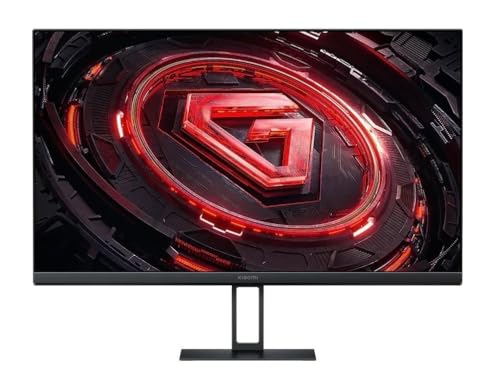
TL;DR: The Xiaomi G24i packs a 23.8‑inch IPS panel with a 180 Hz refresh rate, 1 ms response time and 99% sRGB coverage into a lightweight $129.99 package, but its 250‑nit brightness and limited ergonomics keep it in the budget corner.
The headline spec is the 180 Hz refresh rate paired with a 1 ms (GTG) response time, which Xiaomi markets as “ultra‑smooth” for fast‑paced games. The Fast IPS panel delivers 99% sRGB colour coverage and a contrast ratio of 1000:1, so colours stay vivid even at the high refresh speed.
Compared with the five other monitors in this roundup, the G24i is the lightest at 6.0 lb, while the MSI MAG 245F X24, Xiaomi G27i‑US, AOC Q27G3XMN, Xiaomi G34WQi and Acer Nitro all weigh well over 7 lb. Its 23.8‑inch screen also ranks as the smallest; the nearest rival, the Xiaomi G27i‑US, measures 27 inches. The G24i’s 180 Hz sits below MSI’s 240 Hz and Acer’s 320 Hz (FHD) but matches AOC’s 180 Hz DP mode. Brightness at 250 nits is lower than MSI’s 300 cd/m², AOC’s 1000 nits, Xiaomi G34WQi’s 350 nits and Acer’s 1000 nits, though it aligns with the Xiaomi G27i‑US’s 250 nits.
Professional reviewers note the monitor’s “high speed and visual quality” and praise the AMD FreeSync support for tearing‑free gameplay. However, user sentiment highlights two recurring drawbacks: the modest 250‑nit brightness can feel dim in well‑lit rooms, and the stand offers only a fixed tilt, lacking height or swivel adjustments. The 3.6/5 star rating from three reviews reflects these mixed feelings.
Beyond speed, the G24i includes basic HDR, DC‑dimming low‑blue‑light mode and a modest 36 W power draw (12 V ⎓ 3 A). It's straightforward with a single HDMI 2.0, a DisplayPort 1.4 and an audio out, keeping cable clutter low for compact desk setups.
Pros
Cons
Best for: Entry‑level buyers or those on a tight budget who want a high‑refresh‑rate monitor for esports‑style gaming.
Avoid if: You want the best value‑per‑dollar in its price range, or need higher brightness and more ergonomic adjustments for bright rooms or long‑hour work.
“exceptional speed and visual quality”
“vivid FHD imaging, 250 nits contrast from "blinding white to midnight black"”
Breakdown
Xiaomi G34WQi 34-inch
Pros
MSI MAG 245F X24
Pros
AOC Q27G3XMN
Pros
Cons
Xiaomi G27i-US 27-inch
Pros
Based on scoring data and product specs
Personalized picks
Best Overall Pick
Xiaomi G34WQi 34-inch
Best ValueBest for: Buyers willing to invest in a proven, high-quality option
MSI MAG 245F X24
Best for: Entry-level buyers or those on a tight budget
$114.99-$184.00 vs winner
Skip Xiaomi G24i 24-inch if…
You want the best value-per-dollar in its price range
The Xiaomi G34WQi 34‑inch clinches the top spot thanks to its ultra‑wide 21:9 panel, a manufacturer‑claimed 180 Hz maximum refresh rate and a solid 4.4‑star rating from 520 reviewers. At 350 nits brightness and a 95 % DCI‑P3 colour gamut it delivers vivid images, while its 15.21‑pound build feels sturdy for a curved VA screen.
The MSI MAG 245F X24 lands as the runner‑up, ideal if you need a lightning‑fast 240 Hz, 0.5 ms response 1080p monitor for competitive gaming on a tight budget. Its 23.8‑inch IPS panel and $114.99 price tag make high‑refresh performance accessible without sacrificing desk space.
For tighter wallets, the MSI MAG 245F X24 remains the best budget pick, offering the highest refresh at the lowest price. Mid‑range shoppers will appreciate the AOC Q27G3XMN as the most popular option at $279.99, balancing its 27‑inch size and performance. If premium features are a must, the Acer Nitro stands out as the top‑end choice at $608.90.
Grab the Xiaomi G34WQi now and enjoy ultra‑smooth 180 Hz gaming without breaking the bank.
The Xiaomi G34WQi provides a 34‑inch 21:9 panel with a 1500R curvature and a 180 Hz refresh rate, creating a wide field of view that fills peripheral vision. Its VA panel, HDR400 support, and both FreeSync Premium and G‑Sync compatibility add smooth, vibrant gameplay.
No reviews yet — be the first to share your experience.
Please sign in to leave a review



