⚡ Quick Answer
If you need a sleek LED display that can power your laptop over USB‑C, you’ve come to the right place. We’ve lined up 10 monitors that all support Power Delivery, so you can keep your desk tidy with a single cable. From the ultra‑portable ViewSonic VA1655 at $99.99 to the high‑end EIZO ColorEdge CG2700S at $1799.99, the list spans a wide price spectrum while keeping the core feature set consistent.
We split our roundup into three price tiers. The budget tier includes the ViewSonic portable screen, the BenQ PD2706QN and the Asus PA279CRV, all priced under $500 and rated around 4.3/5. Mid‑range options like the BenQ MA270U ($499.99) and Asus PA329CV ($500.99) deliver 90 W USB‑C power and brighter panels (up to 400 cd/m²). Premium picks such as the BenQ PD2730S, Asus PA27JCV and Asus PA32QCV bring 5K or 6K resolution, 90‑96 W PD and professional‑grade color coverage, with the BenQ PD2730S earning a 4.3/5 rating from 580 reviewers.
Below you’ll find a closer look at each tier, key specs to watch, and which scenarios each monitor shines in, so you can match the right display to your workflow.

BenQ PD2730S
Its 150 mm height adjustment lets you fine‑tune ergonomics, delivering strong value as a proven, high‑quality display.

Asus PA329CV USB-C
Mainstream users who need reliable USB‑C power will find the Asus PA329CV costs about $599 less than the BenQ, it's a solid mid‑range choice.

ViewSonic VA1655 15.6-inch
It offers a built‑in 3.5 mm headphone jack and a compact 15.6‑inch form, appealing to budget buyers who need a portable, entry‑level display.
Also considered
Score Analysis
Key score advantages vs. runner-up (Asus PA329CV USB-C)
Price Range
BenQ PD2730S
$1,099.99
Asus PA329CV USB-C
$569.00
ViewSonic VA1655 15.6-inch
$109.99

BenQ MA270U
$549.99

Asus PA27JCV USB-C
$788.02

Asus PA279CRV USB-C
$399.00

BenQ PD2706QN
$269.99
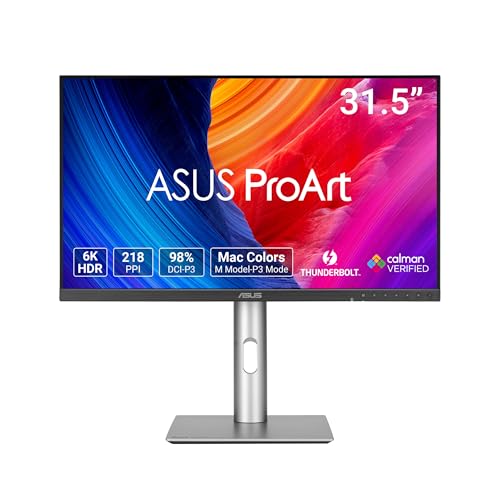
Asus PA32QCV Thunderbolt
$1,289.99

Lenovo ThinkVision P24h-10
$399.99

EIZO ColorEdge CG2700S
$1,499.99
Spec Comparison
TL;DR: The BenQ PD2730S delivers a crisp 5K 27‑inch IPS panel with 98 % DCI‑P3 coverage, 90 W USB‑C power delivery and factory calibration, but its 60 Hz refresh limits fast‑action use.
The standout spec is the 5120 × 2880 resolution on a 27‑inch screen, which translates to 218 PPI and a Retina‑like sharpness that creative professionals love. The panel is an IPS Nano Matte type, offering 400 nits of brightness, a 2000:1 contrast ratio and HDR10/VESA DisplayHDR 400 support. Thunderbolt 4 brings 90 W USB‑C Power Delivery, letting you power a laptop and drive the display with a single cable.
At 8.3 kg (17.5 pounds), the PD2730S is heavier than the 5.91 kg Asus PA27JCV but lighter than the roughly 9.3 kg Asus PA32QCV. Its 400‑nit brightness matches the Asus PA279CRV and outshines the 300‑nit Lenovo ThinkVision P24h‑10. The 90 W USB‑C PD equals the Asus PA329CV’s delivery, though it falls just short of the 96 W offered by the Asus PA27JCV.
Professional reviewers praise the monitor’s pixel‑level precision and factory‑calibrated ΔE ≤ 2 accuracy, noting the Nano Matte coating reduces glare in color‑critical environments. Users appreciate the built‑in KVM switch for toggling between two computers. The downsides that surface in feedback are the 60 Hz refresh rate—felt sluggish for gaming or fast video—and the modest 2 × 3 W speakers, which many consider too quiet for media consumption. HDR brightness is capped at 400 nits, which may disappoint HDR enthusiasts seeking higher peaks.
Pros
Cons
Best for: Buyers willing to invest in a proven, high‑quality option
Avoid if: You're on a tight budget or only need basic functionality
TL;DR: The Asus PA329CV offers a factory‑calibrated 32‑inch 4K IPS panel with 90 W USB‑C power delivery, solid ergonomics and bright colors, though its HDR peak's limited.
This monitor’s standout spec is its 32‑inch 3840 × 2160 IPS panel with 10‑bit color depth and a dynamic contrast ratio of 3000:1, delivering crisp detail and deep shades. It also supplies up to 90 W over USB‑C, enough to charge most laptops while you're working.
At $500.99 it sits just above the BenQ MA270U’s price point, but it’s noticeably heavier than the Lenovo ThinkVision P24h-10’s 12.54 pounds, weighing in at 27.78 pounds. Its 32‑inch screen is larger than the 27‑inch models found elsewhere in this roundup, and it provides 90 W USB‑C power—slightly less than the 96 W offered by the Asus PA27JCV.
Professional reviewers praise the PA329CV’s factory‑calibrated color accuracy (ΔE < 2) and its wide 100 % sRGB coverage, calling the image quality “vibrant” and “consistent.” Everyday users echo this, noting the “huge” 4K workspace for editing. Common complaints focus on the modest HDR peak of 400 cd/m², an aggressive anti‑glare coating that can appear shiny, a nine‑second wake‑up delay, and a slight wobble of the stand during typing.
Beyond color, the display includes an anti‑reflective coating, flicker‑free technology, low‑blue‑light certification, and Asus’s Trace Free motion‑blur reduction. The 5 ms response time and 60 Hz refresh rate keep motion smooth for typical creative work, while the ergonomic stand lets you adjust height, tilt, swivel and pivot to your comfort.
Pros
Cons
Best for: Entry‑to‑mid‑level photographers, videographers and graphic designers who need accurate colors on a spacious 4K screen.
Avoid if: You require true HDR performance, high‑refresh‑rate gaming, or a compact, highly portable monitor.
TL;DR: The ViewSonic VA1655 is a 15.6‑inch IPS monitor that weighs just 1.5 lb, offers 60 W USB‑C power delivery, and delivers Full‑HD clarity at a budget‑friendly price.
The VA1655’s standout spec is its ultra‑light 1.5‑pound chassis combined with an 18 mm profile, making it one of the most portable 15.6‑inch monitors on the market. Its anti‑glare IPS panel shows 1920 × 1080 resolution, 170° viewing angles, and a 7 ms response time, while the built‑in stand flips between portrait and landscape.
Compared with the larger peers in this roundup, the ViewSonic is dramatically lighter than the BenQ PD2706QN (9.1 lb) and the Asus PA279CRV (18.25 lb), and its 15.6‑inch screen is far smaller than the 27‑inch and 32‑inch models from BenQ, Asus, and Lenovo. Brightness also sits at 250 cd/m², which is lower than the 350‑400 nits typical of those competitors, so it’s best suited for indoor or low‑light environments.
User feedback repeatedly praises the monitor’s travel‑ready size, plug‑and‑play USB‑C connection, and the convenience of powering a laptop with its 60 W Power Delivery. Professional reviewers note the matte anti‑glare coating and flicker‑free operation as solid for office work, but they also point out noticeable brightness falloff off‑center and a basic color gamut that won’t satisfy demanding creative tasks. The device also includes a blue‑light filter, a dynamic contrast ratio of 50,000,000:1, and a backlight life of 15,000 hours, rounding out its value‑focused feature set.
Pros
Cons
Best for: Business travelers, remote workers, and digital nomads who need a lightweight, budget‑friendly secondary screen for everyday tasks.
Avoid if: You require high color accuracy or a bright display for creative work in well‑lit environments.
TL;DR: The BenQ MA270U offers a 27‑inch 4K Nano Matte panel with 500 nits brightness, P3‑wide color, and 90 W USB‑C Power Delivery, making it a solid Mac‑centric display at $499.99.
The standout spec is the 27‑inch 3840 × 2160 IPS LED Nano Matte screen, delivering 500 nits of brightness and a native P3 color gamut plus HDR support. Coupled with 90 W USB‑C Power Delivery (15 W for iPad/iPhone), a single cable can power a MacBook while sending 4K video and data.
In size, the monitor’s 24.0‑inch depth is just shy of the Asus PA279CRV’s 24.1‑inch depth, yet its 8.6‑inch height is far lower than that model’s 16.07‑inch height, giving it a slimmer profile on a desk. Compared with the Lenovo ThinkVision P24h‑10’s 261.75 mm depth, the MA270U appears noticeably deeper, but its adjustable stand and VESA‑mount options keep it flexible for different workspaces.
Everyday owners repeatedly highlight the plug‑and‑play experience with MacBook Pro and Air models, noting accurate colors and crisp 4K detail. Professional reviewers point out the integration via Display Pilot 2’s iDevice Color Sync and the BI+ Gen2 ambient‑light sensor that auto‑adjusts brightness. The built‑in speakers and a 5‑way OSD joystick add convenience without extra peripherals.
Pros
Cons
Best for: Most users seeking a balanced, mainstream option
Avoid if: You want the best value-per-dollar in its price range
TL;DR: The Asus PA27JCV delivers a razor‑sharp 5K 27‑inch IPS panel with factory‑calibrated colors and 96W USB‑C power delivery, but its 60 Hz refresh and 13‑lb weight keep it in a creator‑focused niche.
This monitor’s standout spec is its 5120 × 2880 resolution packed into a 27‑inch screen, giving a pixel density of 218 ppi and a 0.116 mm pixel pitch. The panel shines at 400 cd/m² typical brightness and peaks at 500 cd/m², while a contrast ratio of 1500:1 keeps blacks deep. A 5 ms (GTG) response time and 60 Hz refresh rate round out the core visual performance.
Compared with the other nine entries, the PA27JCV is lighter than the Asus PA329CV (which tips the scales at 27.78 pounds) and the Asus PA279CRV (18.25 pounds), yet heavier than the BenQ PD2706QN (9.1 pounds) and the ultra‑light ViewSonic VA1655 (1.5 pounds). Its 96W USB‑C Power Delivery exceeds the 90W offered by the PA329CV, and its 500 cd/m² peak brightness outshines the 400 cd/m² peak of the PA329CV, the 300 cd/m² of the Lenovo ThinkVision P24h-10, and the 250 cd/m² of the ViewSonic VA1655. The 27‑inch size matches the BenQ MA270U and the PA279CRV, while the 5K resolution is unique in this group.
Professional reviewers note the monitor’s factory‑calibrated color accuracy (ΔE < 2) and its 99% DCI‑P3 coverage, making it a solid choice for photo‑editing and video‑grading. Users appreciate the built‑in ProArt tools such as Chroma Tune, KVM switching, and Adaptive‑Sync, but several mention the fixed 60 Hz refresh feels limiting for fast‑moving content, and the 13‑pound (5.91 kg) chassis can be a hassle on smaller desks.
Pros
Cons
Best for: Professionals who need 5K resolution, precise color accuracy, and a USB‑C charging hub.
Avoid if: You prioritize high refresh rates for gaming or need a lightweight, budget‑friendly display.
TL;DR: The ASUS PA279CRV delivers a factory‑calibrated 27‑inch 4K IPS panel with 99 % DCI‑P3 coverage and 96 W USB‑C power delivery, but its 60 Hz refresh limits fast‑action work.
The standout spec is the 27‑inch 3840 × 2160 IPS display, Calman‑Verified at ΔE < 2, which delivers near‑perfect out‑of‑the‑box color accuracy. It covers 99 % of both Adobe RGB and DCI‑P3 gamuts and supports HDR10 with a peak brightness of 400 cd/m² and typical 350 cd/m². A 96 W USB‑C Power Delivery port lets you charge a laptop while delivering video, turning the monitor into a single‑cable dock.
Compared with the other nine monitors in this roundup, the PA279CRV weighs 18.25 lb, making it bulkier than the BenQ PD2706QN and Lenovo ThinkVision, yet lighter than the larger 32‑inch Asus PA329CV and the 31.5‑inch Asus PA32QCV. Its 400 cd/m² HDR peak matches the BenQ PD2706QN’s 400 nits, but the PA279CRV’s 60 Hz refresh rate is slower than that model’s 100 Hz. The dynamic contrast ratio of 3000:1 and static 1000:1 sit comfortably within the range of its peers.
Professional reviewers highlight the monitor’s out‑of‑the‑box color fidelity and the convenience of the 96 W USB‑C hub for creators who need a tidy workstation. Consumer feedback points to satisfaction with the accurate colors and ergonomic ErgoStand, which offers swivel, pivot, height and tilt adjustments. The same sources note the 60 Hz panel and HDR400 ceiling as drawbacks for fast‑motion editing or high‑dynamic‑range video work.
Additional technical touches include Adaptive‑Sync support, a cable‑lock slot for security, and 10 ProArt palette modes for quick color‑profile switching. The anti‑glare matte surface helps reduce reflections in bright rooms, while the 5 ms (GTG) response time keeps motion blur modest for everyday tasks.
Pros
Cons
Best for: Creative professionals such as photographers, video editors, and graphic designers who need precise color and a USB‑C docking solution.
Avoid if: You prioritize high refresh rates for gaming or need premium HDR performance.
“perfect for designers, video editors, and colorists due to Adobe certification and wide gamut.”
“high 4K resolution for sharp text and multitasking”
TL;DR: The BenQ PD2706QN delivers a 27‑inch QHD IPS panel with factory‑calibrated color, a 100 Hz refresh rate and 90 W USB‑C charging, all for $279.99.
This monitor’s standout spec is its 100 Hz refresh rate paired with a 5 ms response time, which is rare in the 27‑inch QHD segment. Combined with a peak brightness of 400 nits and factory‑calibrated Delta E ≤ 2 accuracy, it offers smooth motion and reliable color for design work.
Compared with the other nine displays in the roundup, the PD2706QN is lighter than the Asus PA279CRV (18.25 lb) and the Lenovo ThinkVision P24h‑10 (12.54 lb), while still packing a 90 W USB‑C Power Delivery port—more than most peers except the Asus PA27JCV, which lists 96 W. Its 100 Hz panel also outpaces the 60 Hz refresh rates of the Asus PA279CRV, Asus PA329CV, Asus PA27JCV, and the ViewSonic VA1655, giving it an edge for animation and video editing.
Professional reviewers highlight the monitor’s factory‑calibrated color and Pantone‑verified accuracy, and everyday users echo that sentiment, praising the precise sRGB and DCI‑P3 coverage for graphic design. Users frequently mention the built‑in KVM switch and DualView mode as productivity boosters for multi‑device setups. On the downside, users note the static contrast ratio of 1000:1 can leave blacks looking less deep than on higher‑contrast panels, and they consider the 3 W stereo speakers insufficient for serious audio work. Users also flag the maximum power draw of 200 W as it's relatively high for a monitor of this size.
Additional technical touches include HDR10 support, Uniformity Technology for even brightness across the screen, and ICCsync to keep color consistency when stacking multiple BenQ displays. The Nano Matte coating helps reduce glare in bright environments, and the ergonomic stand offers height, tilt, swivel and pivot adjustments.
Pros
Cons
Best for: Graphic designers, animators, CAD/CAM professionals, and MacBook users who need precise color and USB‑C charging in a compact 27‑inch package.
Avoid if: You prioritize the deepest blacks, high‑end audio, or the lowest possible power draw.
TL;DR: The ASUS PA32QCV Thunderbolt packs a 31.5‑inch 6K IPS panel (6016 × 3384) with 218 PPI, 600 cd/m² brightness and 96 W USB‑C PD, but its premium $1049 price and matte coating may deter budget‑focused or text‑heavy users.
The monitor’s headline spec is its native 6K resolution (6016 × 3384) delivering a crisp 218 PPI on a 31.5‑inch screen. Combined with a 600 cd/m² brightness, a 3000:1 contrast ratio and 10‑bit color depth, it offers the kind of detail and tonal range that professional photo and video editors crave.
At 20.5 pounds, the PA32QCV is heavier than the BenQ PD2730S (17.5 pounds) and noticeably heftier than the Asus PA27JCV (13.0 pounds). Its brightness of 600 cd/m² outshines the BenQ’s 400 nits, while it shares the same 218 PPI pixel density as that BenQ model. The monitor also matches the Asus PA27JCV’s 96 W Thunderbolt 4 power delivery, letting you power a laptop with a single cable.
Users consistently praise the razor‑sharp 6K detail and the factory‑calibrated color accuracy (Delta E < 2, 100 % sRGB and 98 % DCI‑P3). Professional reviewers highlight the strong ergonomics—tilt, swivel, pivot and height adjustments—and the built‑in KVM switch for multi‑device workflows. The main complaints focus on the aggressive matte coating that can make text look hazy and a cool sRGB mode that often needs user calibration. The lack of local dimming also means HDR contrast won’t match OLED or mini‑LED rivals.
Beyond the resolution, the panel supports HDR10 and VESA DisplayHDR 600, a 10‑bit IPS matrix, and an ambient‑light sensor that adjusts brightness automatically. The LuxPixel technology and M Model‑P3 preset mode cater to creators working with Mac‑based color workflows. With two Thunderbolt 4 ports (both offering 96 W PD and daisy‑chaining) and a USB hub, the monitor serves as a central hub for a modern workstation.
Pros
Cons
Best for: Professional photographers, videographers, graphic designers, and other creators who need 6K detail and precise color reproduction.
Avoid if: You have a tight budget, prioritize deep black levels for gaming, or need a display primarily for reading long documents.
TL;DR: The Lenovo ThinkVision P24h-10 delivers a 23.8‑inch QHD IPS panel with 99% sRGB coverage and 90 W USB‑C power delivery, but its 300 cd/m² brightness and lack of speakers may limit bright‑room use.
What really stands out is the 23.8‑inch QHD IPS display that shows 2560 × 1440 pixels and covers 99% of the sRGB color gamut. Factory calibration sets the panel, it carries a TUV Eye Comfort certification, and it delivers up to 90 W of power over a single USB‑C cable, letting you power a laptop while sending video and data.
At 12.54 pounds, the P24h-10 is lighter than the Asus PA279CRV (18.25 lb) and the Asus PA329CV (27.78 lb) but heavier than the BenQ PD2706QN (9.1 lb) and the ultra‑portable ViewSonic VA1655 (1.5 lb). Its 300 cd/m² brightness falls short of the 400 cd/m² HDR peak of the Asus PA279CRV and the 500 nits of the BenQ MA270U. USB‑C power delivery matches the 90 W the Asus PA329CV offers, yet it’s lower than the 96 W the Asus PA27JCV provides. The monitor’s pixel pitch of 0.2058 mm is larger than the 0.116 mm pitch of the Asus PA27JCV, meaning a slightly lower pixel density compared with that model.
Professional reviewers praise the “exquisite detail” and “vivid, accurate images” that stem from the 99% sRGB coverage and factory calibration. Users also appreciate the convenience of a single‑cable USB‑C setup and the ergonomic stand that offers tilt, swivel, pivot, and height adjustments. However, several reviewers note that the 300 cd/m² brightness can feel dim in very bright environments, and the absence of built‑in speakers or a USB hub means you’ll need separate audio solutions.
Pros
Cons
Best for: Professionals who need reliable color accuracy and a single‑cable USB‑C solution for productivity.
Avoid if: You require higher peak brightness, built‑in audio, or the absolute best value‑per‑dollar in this segment.
TL;DR: The EIZO ColorEdge CG2700S delivers 27‑inch IPS color precision with 99% Adobe RGB coverage, built‑in 16‑bit calibration and HDR, but its 19 ms response and 61 Hz refresh keep it niche for high‑speed work.
This 27‑inch monitor uses a 2560 × 1440 IPS panel that reaches 400 cd/m² brightness and a 1600:1 contrast ratio. Color‑gamut coverage hits 99% Adobe RGB and 98% DCI‑P3, while a built‑in 16‑bit 3D LUT sensor automates calibration without extra hardware.
At 14.11 pounds, the CG2700S is lighter than the BenQ PD2730S (17.5 pounds) but a touch heavier than the Asus PA27JCV (13.0 pounds). Its 109 ppi pixel density is lower than BenQ’s 218 ppi, and the 19 ms gray‑to‑gray response time is slower than the 5 ms response of both BenQ and Asus models. Brightness matches BenQ’s 400 cd/m², yet the refresh envelope of 23‑61 Hz falls short of the steady 60 Hz found on many peers.
Professional reviewers praise the monitor’s “uncompromising precision” for color‑critical tasks, noting the HDR support (HLG, PQ) and True Black technology as strong points for video post‑production. Everyday users appreciate the automatic calibration, but common complaints focus on the sluggish 19 ms response and the limited 61 Hz refresh, which can blur fast motion. Energy‑hungry studios may also notice the 187 W maximum power draw, though the unit can drop to ≤0.5 W in power‑save mode.
Additional technical highlights feature brightness stabilization, a digital uniformity equalizer, and a typical power consumption of 17 W. The USB‑C port carries DisplayPort Alt Mode and Power Delivery, and it's able to simplify cable management for compatible laptops.
Pros
Cons
Best for: Professional creators such as photographers, video editors, graphic designers, and digital cinema artists who need precise color reproduction and built‑in calibration.
Avoid if: You prioritize high refresh rates, low latency gaming, or a lower‑power, budget‑friendly solution.
Breakdown
BenQ PD2730S
Pros
Asus PA329CV USB-C
Pros
ViewSonic VA1655 15.6-inch
Pros
BenQ MA270U
Pros
Cons
Based on scoring data and product specs
Personalized picks
Best Overall Pick
BenQ PD2730S
Best ValueBest for: Buyers willing to invest in a proven, high-quality option
Asus PA329CV USB-C
Best for: Most users looking for a well-reviewed, reliable mainstream option
$569.00-$530.99 vs winner
Skip EIZO ColorEdge CG2700S if…
Reliability and user satisfaction are your top concerns
The BenQ PD2730S takes the top spot thanks to its 27‑inch 5K panel (5120 × 2880), a full‑range 98% P3 colour gamut and 1.07 billion colours, plus a 90 W USB‑C/Thunderbolt 4 power delivery that can charge a laptop while you work. It also carries a solid 4.3‑star rating from 580 reviewers and a three‑year manufacturer warranty, giving you confidence in both performance and support.
The Asus PA329CV USB‑C ranks as the runner‑up, ideal if you need a larger 32‑inch 4K screen for multitasking and still want a single‑cable solution. It delivers 90 W USB‑C power, hits a peak HDR brightness of 400 cd/m² and covers 100% sRGB, all backed by a 4.3‑star rating from 933 reviews.
For tighter budgets, the ViewSonic VA1655 15.6‑inch offers a compact, USB‑C‑powered option at just $99.99, perfect for small desks or secondary monitors. The mid‑range slot stays with the Asus PA329CV USB‑C, delivering a spacious 32‑inch canvas without breaking the bank at $500.99. If you crave premium colour fidelity, the EIZO ColorEdge CG2700S commands $1799.99 and targets professionals who need the highest calibration accuracy.
Pick the BenQ PD2730S now for the best value and performance.
Both the BenQ PD2730S and the Asus PA329CV USB‑C deliver up to 90 W of power, which is the top rating among the listed models. The Asus PA279CRV even pushes 96 W, but it’s a separate USB‑C port and a hub, while the BenQ’s 90 W comes via its Thunderbolt 4 connection.
No reviews yet — be the first to share your experience.
Please sign in to leave a review



