Choosing a Logitech mouse can feel overwhelming – the brand offers everything from bare‑bones wired sticks to feature‑rich wireless workhorses. This roundup evaluates 14 models, sorting them into three price tiers that match typical budgets. The budget lane includes the $7.99 B100 and the $14.99 M170, both solid for basic office tasks. Mid‑range options like the $27.99 M510 add ergonomic contours and a 24‑month battery life, while the premium tier – featuring the $69.99 Lift Vertical and the $49.99 M575S – brings ergonomic designs and advanced connectivity.
For multitask pros who juggle three computers, the $39.99 M720 Triathlon stands out with 8 buttons, hyper‑fast scrolling and a 24‑month battery on a single AA cell. If you need a quiet companion for shared spaces, the $19.99 M240 Silent cuts click noise by 90 % while still lasting 18 months. And for anyone craving an ergonomic lift, the vertical mouse’s 57° tilt promises wrist relief. The article breaks down each category and explains why these picks earned their spots.

Logitech M720 Triathlon
Its 24‑month battery life lets you go two years without swapping cells, delivering lasting convenience for heavy multitaskers.

Logitech M510
Ideal for home‑office users who need a comfortable grip, the M510 comes at $27.99—about $12 less than the M720—while still offering 24‑month battery life and solid performance.

Logitech B100
A wired, three‑button design with a 1.8 m cable sets the B100 apart, giving budget shoppers a plug‑and‑play mouse for just $7.99.
Also considered
Score Analysis
Key score advantages vs. runner-up (Logitech M510)
Price Range
Logitech M720 Triathlon
$36.99
Logitech M510
$27.99
Logitech B100
$7.99

Logitech M240 Silent
$11.50
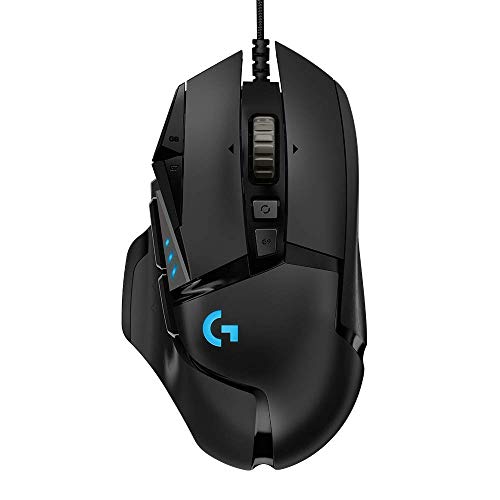
Logitech G502 HERO
$33.93

Logitech Lift Vertical Graphite
$59.99

Logitech M550 L
$24.99

Logitech M90
$10.27

Logitech M170 Blue Grey
$11.99

Logitech M575S
$39.99

Logitech M317
$14.99

Logitech M185 Black
$12.99
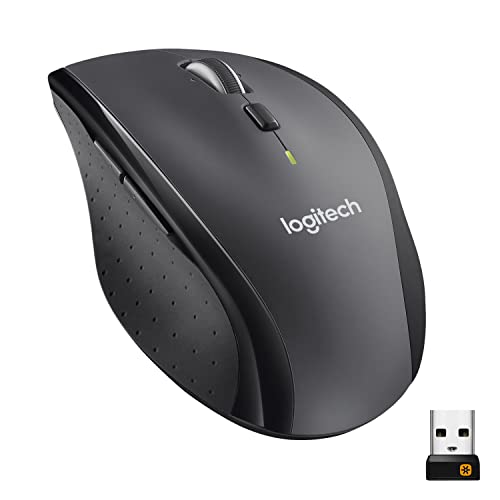
Logitech M705 Marathon
$29.99

Logitech G403 Hero
$49.99
Spec Comparison
TL;DR: The Logitech M720 Triathlon offers 8 buttons, 24‑month battery life, and seamless switching among three devices, all for $39.99, making it a solid all‑rounder for multitaskers.
This mouse combines Bluetooth Low Energy and a 2.4 GHz Unifying Receiver, letting you toggle between up to three computers with a single Easy‑Switch button. It houses eight programmable buttons, a tilt wheel for horizontal scrolling, and a wireless range of 10 meters. The built‑in LED warns you when the AA battery nears the end of its 24‑month lifespan.
At 0.2975 pounds (135 g), the M720 is heavier than the Logitech M550 L but considerably lighter than the ultra‑light G502 HERO. Its dimensions—45 mm depth, 115 mm height, and 74 mm width—place it in the midsize category, offering a comfortable palm rest without feeling bulky.
Professional reviewers note the mouse’s ultra‑precise optical sensor and the convenience of Logi Options+ customization, while everyday users love the long battery life and the tilt wheel’s usefulness for spreadsheet navigation. The fixed 1000 DPI resolution, however, draws criticism from gamers and designers who need higher precision, and some users report the hyper‑fast scroll mode can feel overly slippery.
Pros
Cons
Best for: Multitasking professionals who need reliable multi‑device switching and long battery life.
Avoid if: You require adjustable DPI, left‑handed ergonomics, or a budget‑only mouse.
“the best mouse I’ve ever owned”
TL;DR: The Logitech M510 offers a comfortable, contoured design, 24‑month battery life and up to seven programmable buttons for a solid wireless experience at a mid‑range price.
The standout spec is the two‑year battery life – the mouse runs for 24 months on the included AA cells, and a built‑in indicator lets you see remaining power at a glance. Its 1000 DPI laser sensor tracks reliably on most surfaces, while the tilt‑wheel adds side‑to‑side scrolling and zoom without needing a separate button.
Compared with its Logitech siblings, the M510 sits in the middle of the weight band at 0.28 lb, making it heavier than the ultra‑light M240 Silent (0.16 lb) but lighter than the M720 Triathlon and M705 Marathon (both 0.30 lb). It matches the M550 L’s 24‑month battery life and wireless range, and exceeds the M240’s 18‑month endurance, though it falls short of the M705’s three‑year claim. In terms of buttons, the M510 provides up to seven, outpacing the three‑button M240 Silent and M550 L, yet offering fewer than the eight‑button M720 Triathlon.
Users consistently praise the long battery life and the soft rubber side grips that keep their hand relaxed during long work sessions. Professional reviewers highlight the programmable back/forward buttons as a productivity boost, especially for office tasks that involve frequent navigation. On the downside, users often describe the scroll wheel as a bit stiff, and the lack of silent‑click technology makes it audible in quiet environments. Gamers note that the 1000 DPI laser isn’t suited for fast‑paced play, and left‑handed users may find the right‑handed shape limiting.
Pros
Cons
Best for: Home and office users seeking a balance of features and value
Avoid if: You want the best value‑per‑dollar in its price range
TL;DR: The Logitech B100 is a $7.99 wired USB mouse with a 800 DPI optical sensor, ambidextrous shape, and side‑to‑side scrolling, delivering solid plug‑and‑play performance for budget‑focused users.
The B100’s standout feature is its side‑to‑side scrolling plus zoom, paired with a fixed 800 DPI optical sensor that offers reliable cursor control for everyday tasks. It connects via a 1.8 m rubber‑coated USB‑A cable, giving you enough reach for most desk setups while staying firmly in place.
Compared with its peers, the B100 is a bit heavier than the Logitech M90, yet it provides the side‑to‑side scrolling that the M90 lacks. Its 1.8 m cable matches the M90’s 1800 mm length, and its price point sits below many of the other Logitech mice in this roundup, making it one of the most affordable options.
Users consistently praise the mouse for instant plug‑and‑play compatibility across Windows, macOS and Linux, as well as the ambidextrous shape that works for left‑handed users. Reviewers note the durability of the PTFE feet and the 1000 Hz polling rate, but several users have reported left‑click failures after months of use and describe the buttons as a bit stiff. Professional reviewers point out that the fixed 800 DPI also limits precision on high‑resolution monitors.
Pros
Cons
Best for: Budget-conscious buyers seeking a reliable entry-level option
Avoid if: You need high DPI, silent clicks, wireless freedom, or advanced customization features
“Plug it in and go”
“Well worth the money”
TL;DR: The Logitech M240 Silent offers 90% quieter clicks, 18‑month battery life, and Bluetooth connectivity in a compact, ambidextrous design for just $19.99.
What really sets the M240 Silent apart is its 90% click‑noise reduction, delivering a whisper‑quiet experience while still feeling like a normal mouse. It runs on a single AA battery that the manufacturer says can last up to 18 months, and it pairs via Bluetooth Low Energy with a reliable 10 m (33 ft) wireless range. The mouse has three buttons and a line‑by‑line scroll wheel, and its optical sensor supports a DPI range of 400–4000 with 100‑DPI increments.
Compared with the other Logitech mice in this roundup, the M240 Silent is lighter than the M317 (0.220 lb) while sharing the same three‑button layout as the M170 and M185. Its depth of 39 mm makes it noticeably slimmer than the M170’s 97.7 mm depth, and its compact 60 mm width puts it in the same size class as the M185. The recycled‑plastic content sits at 48%, which is lower than the 66% found in the M550 L but still a solid sustainability effort.
Reviewers consistently applaud the “remarkably effective” silent clicks and the months‑long battery endurance, noting that the mouse suits shared workspaces and quiet study areas. Users also like the dongle‑free Bluetooth setup, though a few mention occasional reconnection hiccups after a computer sleep cycle and note the scroll wheel can produce a faint ratchet sound. Power users frequently cite the lack of forward/back thumb buttons as a trade‑off.
Technically, the mouse offers a nominal DPI of 1000 with 100‑DPI steps, a service life of 5 million clicks, and an ambidextrous shape that fits both left‑ and right‑handed users. At 0.162701149356 lb (73.8 g), it’s easy to toss in a bag for travel, and the one‑year limited hardware warranty adds peace of mind.
Pros
Cons
Best for: Remote and hybrid workers, students, educators, and business professionals who need a quiet, portable mouse with long battery life.
Avoid if: You need forward/back thumb buttons, high‑precision gaming performance, or design work that demands higher DPI settings.
“Quiet – not a sound!”
“Connected in seconds with my MacBook Air”
TL;DR: The Logitech G502 HERO delivers a HERO 25K sensor with up to 25,600 DPI, 11 programmable mechanical buttons and adjustable weights for $33.93, making it a highly customizable wired gaming mouse.
The standout feature is the HERO 25K sensor, offering a DPI range of 100 – 25,600 and a 1,000 Hz (1 ms) polling rate, which reviewers say provides “zero smoothing, acceleration, or filtering.” It also sports 11 programmable mechanical buttons rated for 20 million clicks each, plus a mechanical tensioned scroll wheel with both ratcheted and free‑spin modes.
Compared with the other 13 mice in this roundup, the G502 HERO provides far more programmable inputs than the M550 L (3 buttons), M705 Marathon (7 total), M510 (3), M720 Triathlon (8), M240 Silent (3) and M575S (5). At 0.007936641432 lb (3.6 g), it’s dramatically lighter than every peer listed (weights range from 0.1627 lb to 0.4629 lb). Unlike the wireless models, it connects via a 2.10 m braided fiber cable, which some users note feels a bit stiff but ensures a stable 1 ms response.
Professional reviewers highlight the sensor’s precision and the depth of customization through Logitech G HUB, while everyday users love the crisp mechanical clicks and the turbo‑scroll feature for rapid scrolling. The base weight of 121 g can feel hefty for fast‑paced FPS titles, and the bulkier shape may not suit small hands. Still, the ability to add up to five 3.6 g weights (total +18 g) lets you fine‑tune the mouse to your preference.
Pros
Cons
Best for: MMO, MOBA, strategy and simulation gamers who value many programmable buttons and fine‑tuned weight customization.
Avoid if: You have small hands, prefer an ultra‑lightweight mouse under 80 g, or need a simple plug‑and‑play device without software.
TL;DR: The Logitech Lift Vertical Graphite delivers a 57° ergonomic tilt, dual‑mode wireless, and up to 24‑month battery life, but its $69.99 price tags it as a premium choice for comfort‑focused users.
This mouse’s most distinctive feature is its 57° vertical design, which reshapes the hand into a natural handshake position. At 0.2755778275 pounds (125 g) it feels light enough for extended desk work, while its compact 76.2 mm height and 86.36 mm width keep it unobtrusive on a crowded workspace.
Compared with other Logitech options in this roundup, the Lift is lighter than the G403 Hero (0.19 lb) but heavier than the ultra‑light G502 HERO. Its battery lasts up to 24 months, matching the M720 Triathlon and M550 L, and beating the M575S’s 18‑month claim. The mouse offers five total buttons, the same count as the M575S but fewer than the M720’s eight or the G502’s eleven. Wireless range sits at 10 m, identical to most peers, and the device can pair with up to four computers—more than the M575S’s single‑receiver setup.
Users consistently praise the Lift for easing wrist strain, noting the “quiet, whisper‑quiet clicks” and the comfort of the rubberized grip. Professional reviewers highlight the 57° angle as a significant reduction in forearm pronation and commend the Logi Bolt receiver’s 1 ms low‑latency performance. However, some users report occasional Bluetooth drops and mention that the compact size can feel cramped for larger hands. The mouse reaches a maximum DPI of 4,000, which suffices for office tasks but may fall short for gaming enthusiasts.
Under the hood, the Lift uses Logitech’s Pluto One optical sensor with a 400–4,000 DPI range and a 32‑bit ARM microprocessor. Connectivity is flexible: a Logi Bolt USB receiver and Bluetooth Low Energy both deliver a 7.5 ms report rate, while the wired USB mode reaches 1 ms. The chassis incorporates PCR plastic with 65‑85 % post‑consumer recycled content, aligning durability with sustainability.
Pros
Cons
Best for: Buyers willing to invest in a proven, high-quality option
Avoid if: You're shopping on a tight budget — it's priced at $69.99
“Life-changing for wrist pain”
TL;DR: The Logitech M550 L offers a large‑hand‑friendly shape, >90 % silent‑click technology and up to 24 months of AA‑battery life, all for $29.99.
What really stands out is the SilentTouch technology, which the manufacturer says cuts click noise by more than 90 % compared with standard mice. Coupled with a contoured, rubber‑gripped body that measures 118.6 mm deep, 119.4 mm high and 66.3 mm wide, the mouse feels solid yet light at 0.245154035344 pounds (111 g with battery).
Compared with its peers, the M550 L is lighter than the Marathon‑style M705 (0.2975 lb) and the multi‑device M720 (0.2975 lb), but heavier than the ultra‑light M240 Silent (0.1627 lb) and the budget M170 (0.1556 lb). It offers only three total buttons, fewer than the seven on the M705 and the eight on the M720, yet matches the M510’s 24‑month battery life while the M705 stretches to three years. Wireless range sits at a solid 10 m, the same as most competitors, and its price of $29.99 places it in the mid‑tier of the roundup.
User feedback repeatedly praises the ergonomic shape for reducing hand fatigue during long work sessions, and the whisper‑quiet clicks are a hit in shared offices. Professional reviewers also highlight the SmartWheel’s dual‑mode scrolling for precise line‑by‑line work and rapid free‑spin navigation. The most common complaints revolve around the lack of side or thumb buttons, the reliance on a replaceable AA cell rather than a rechargeable pack, and the size being too large for smaller hands or true left‑handed use.
Technically, the mouse uses an optical sensor with a DPI range from 400 to 4 000, giving enough precision for everyday tasks. It supports both Bluetooth Low Energy and a Logi Bolt 2.4 GHz receiver, ensuring a reliable 10 m connection. Sustainability notes include 66 % post‑consumer recycled plastic and carbon‑neutral manufacturing, and Logitech provides a one‑year limited hardware warranty.
Pros
Cons
Best for: Professionals with large hands who need ergonomic comfort, silent operation and long‑lasting battery life.
Avoid if: You’re left‑handed, need side buttons, or are on a tight budget — it’s priced at $29.99.
“Perfect size for my large hands — finally a mouse that doesn’t cramp my fingers.”
“The silent clicks are amazing — my coworkers don’t hear every click anymore.”
TL;DR: The Logitech M90 is a $10.27 wired mouse with a 1000 DPI optical sensor, ambidextrous shape, and 0.18‑lb weight, offering solid plug‑and‑play reliability for everyday use.
The M90 ships with a fixed 1000 DPI optical sensor and a 1800 mm USB‑A cable, so you can plug it into any compatible computer and start working instantly. At 0.18077905484 pounds (about 82 g) it feels light enough for long sessions yet sturdy enough to stay put on a desk. Its symmetrical, ambidextrous design accommodates both left‑ and right‑handed users, and the three‑button layout keeps the interface simple.
Compared with other Logitech mice in this roundup, the M90 sits in the middle of the weight range: it’s lighter than the B100 (0.24 lb) and the M317 (0.22 lb) but heavier than the M185 (0.166 lb) and the M170 (0.156 lb). Its 1800 mm cable matches the length of the B100, while the wireless models rely on battery power instead of a cord. Button count aligns with the rest of the lineup, all offering three standard buttons and no side buttons.
In practice, users praise the M90 for its comfortable grip and quiet clicks, noting that the plug‑and‑play setup eliminates any driver hassle. Professional reviewers highlight the high‑definition optical tracking with a red LED as a sign of Logitech’s manufacturing consistency. However, the ratchet‑style scroll wheel can feel stiff, and the fixed DPI means you can’t dial in extra precision for design or gaming tasks.
Pros
Cons
Best for: Budget‑conscious buyers seeking a reliable entry‑level option
Avoid if: You need adjustable DPI, side buttons, or a free‑spin scroll wheel for gaming or graphic‑design work
TL;DR: The Logitech M170 offers a 10 m wireless range, 12‑month battery life and a lightweight 70.5 g design for just $14.99, making it a solid entry‑level mouse for everyday tasks.
The standout spec is its 10 m wireless range combined with a 12‑month battery life on a single AA cell, meaning you can toss it into a backpack and forget about charging for months. It sports a symmetrical, ambidextrous shape, three buttons and a fixed 1000 dpi optical sensor, all packed into a compact 97.7 mm × 35.2 mm × 61.5 mm footprint that weighs only 0.155625 pounds (70.5 g).
Compared with the other Logitech mice in this roundup, the M170 is the lightest – it tips the scales at 0.155625 pounds versus 0.165625 pounds for the M185, 0.162701149356 pounds for the M240 Silent, 0.18077905484 pounds for the M90, 0.220462262 pounds for the M317 and 0.28 pounds for the M510. Its depth of 97.7 mm is longer than the M185 (39 mm), M317 (50 mm) and M240 Silent (39 mm), while its height of 35.2 mm is considerably shorter than those same models (90 mm, 99 mm and 99 mm respectively). The width of 61.5 mm is a touch wider than the M185 and M240 (both 60 mm) but still narrower than many full‑size options.
Everyday users praise the M170 for its “plug‑and‑play” simplicity across Windows, macOS, ChromeOS, Linux, iPadOS and Android, and they consistently note the reliable connection with minimal lag. Professional reviewers echo the reliability and commend the ambidextrous design for basic office work. On the flip side, the flat, wide shape can feel cramped for larger hands, and the fixed 1000 dpi resolution limits precision for design work. The click noise is audible, and the mouse lacks silent‑click technology found in the M240 Silent.
Beyond the basics, the mouse uses Logitech’s Advanced Optical Tracking and a 2D line‑by‑line scroll wheel. Logitech built it with 38% post‑consumer recycled plastic and gave it a carbon‑neutral certification, backed by a 1‑year limited hardware warranty.
Pros
Cons
Best for: Budget-conscious buyers seeking a reliable entry‑level option
Avoid if: You need advanced features or professional‑grade performance
“Users consistently report stable wireless performance.”
“The flat, wide shape uncomfortable over time.”
TL;DR: The Logitech ERGO M575S is a right‑handed wireless trackball mouse offering 10 m dual‑mode connectivity, 18‑month battery life, and an ergonomic shape that eases forearm strain, all for $49.99.
The standout feature is its thumb‑operated trackball combined with dual‑mode connectivity: you can pair via Bluetooth LE or the included Logi Bolt 2.4 GHz receiver, and the wireless range reaches 10 m. It runs on a single AA cell for up to 18 months and provides five programmable buttons, all housed in a compact 48.01 mm × 100.08 mm × 134.11 mm footprint.
Compared with the other Logitech options in this roundup, the M575S is heavier than the ultra‑light G403 Hero (0.19 lb vs 0.4629707502 lb) and also heavier than the M720 Triathlon (0.2975 lb). Its 10 m range matches the M720, Lift, and M550 models, but its 18‑month battery life is shorter than the 24‑month periods advertised for those peers and the three‑year claim on the M705 Marathon.
Reviewers consistently praise the ergonomic shape, noting a 25 % reduction in forearm muscle strain and quieter clicks that make long‑hour desk work more comfortable. The stationary trackball saves desk space, though several users mention a learning curve for thumb control and a bulkier feel for smaller hands. Professionals highlight the premium‑feel recycled plastic and the ability to customize DPI between 400 and 2000 via the Logi Options+ app, while the lack of a left‑handed version and reliance on a non‑rechargeable AA battery are common critiques.
Pros
Cons
Best for: Buyers willing to invest in a proven, high-quality option
Avoid if: You're shopping on a tight budget — it's priced at $49.99
TL;DR: The Logitech M317 offers a compact ambidextrous wireless mouse with a fixed 1000 DPI sensor, 12‑month battery life, and a 10 m range for just $14.99.
The standout spec of the M317 is its 12‑month battery life on a single AA cell, meaning you can set it and forget it for a full year. It also weighs 0.220462262 pounds (100 g) and measures 50 mm × 90 mm × 50 mm, making it easy to slip into a laptop bag or backpack.
Compared with the other mice in this roundup, the M317 is heavier than the ultra‑light M170 but lighter than the larger M510. Its wireless range of 10 m matches the M170, M185, and M240, while the M240 and M510 push the range a bit farther. It uses the same three‑button layout you’ll find on most of its peers, and the 12‑month battery life equals the M170 and M185 but falls short of the M240’s 18‑month and the M510’s 24‑month claims.
Everyday users praise the mouse for its plug‑and‑play simplicity and the way it stays connected without lag, especially on Chromebooks and Macs. Reviewers note the scroll wheel feels “basic” and the fixed 1000 DPI isn’t enough for gaming or design work, but they also commend the reliable optical sensor and the ambidextrous shape that fits both left‑ and right‑handed users. Professional reviewers highlight its solid build quality and the convenience of the pre‑installed AA battery.
Pros
Cons
Best for: Budget‑conscious buyers seeking a reliable entry‑level option
Avoid if: You need advanced features or professional‑grade performance
“Lasts forever on one battery.”
“Works perfectly with my Chromebook and MacBook.”
TL;DR: The Logitech M185 Black is a compact, ambidextrous 2.4 GHz wireless mouse that offers a 12‑month battery life, 10 m range and solid build quality for just $12.99.
The standout spec is its 12‑month battery life on a single AA alkaline cell, which means you can set it and forget it for a whole year without swapping batteries. It also ships with a nano USB receiver that sits inside the battery compartment, so you’re ready to plug in and use it straight out of the box. The mouse tracks at a fixed 1000 DPI using Logitech’s Advanced Optical Tracking, which is sufficient for everyday browsing and office tasks.
Compared with its peers, the M185 is lighter than the M317 (0.220462262 lb) but a touch heavier than the M170 (0.155625 lb) and the M240 Silent (0.162701149356 lb). Its depth of 39 mm is dramatically shallower than the M170’s 97.7 mm, while its height of 99 mm exceeds the M170’s 35.2 mm, giving it a slim‑profile footprint that still feels comfortable in hand. Like the M170 and M317, it shares a 10 m wireless range and a 12‑month battery life, and it matches their 1000 DPI resolution.
User feedback repeatedly praises the mouse’s plug‑and‑play simplicity and the longevity of its battery. Reviewers note the ambidextrous shape works well for left‑handed users, and professional reviewers list the solid build quality and tactile click feel as strengths. Common complaints focus on the scroll wheel’s light detents, the lack of a low‑battery LED indicator, and the basic plastic finish, which some find less premium than higher‑priced options.
Pros
Cons
Best for: Budget-conscious buyers seeking a reliable entry-level option
Avoid if: You need advanced features or professional‑grade performance
TL;DR: The Logitech M705 Marathon delivers three years of AA‑battery life, a 10‑meter 2.4 GHz link and a laser sensor, all wrapped in a right‑hand ergonomic shape for everyday productivity.
The standout spec is the three‑year battery life, which two AA alkaline cells power and a single LED signals. Pair that with a 10 meter wireless range and a 1000 dpi laser sensor that tracks on glass and polished surfaces, and you've got a mouse built to stay plugged in—well, into your hand—for months without a recharge.
At 0.2975 pounds, the M705 is heavier than the Logitech M550 L (0.245154035344 pounds) and a touch heavier than the M510 (0.28 pounds), but matches the weight of the M720 Triathlon (0.2975 pounds). Its seven total buttons, including five programmable ones and two thumb buttons, outnumber the three‑button layouts of the M550 L and the unspecified button count of the M510, giving you more on‑the‑fly control without needing extra software.
Reviewers consistently praise the marathon‑long battery life and the “hyper‑fast” metal scroll wheel that breezes through long documents. Professional outlets note the laser sensor’s reliability on tricky surfaces, while everyday users love not having to swap batteries every few months. The trade‑off is a fixed 1000 dpi setting and a 125 Hz polling rate, which many gamers and high‑resolution creatives flag as insufficient for fast‑paced or 4K work.
Technically, the mouse uses a laser sensor with a 125 Hz polling rate, a 3‑G core hyper‑fast scroll wheel with ratchet mode, and a compact Unifying receiver stored in the battery compartment (19 mm × 6 mm × 14 mm, 2 g). The right‑handed sculpted grip and tilt‑enabled scroll wheel add comfort and navigation flexibility for long office sessions.
Pros
Cons
Best for: Office professionals, frequent travelers, students, and remote workers who value long battery life and solid ergonomics.
Avoid if: You need high DPI, low‑latency gaming performance, left‑handed use, or a mouse optimized for 4K+ displays.
“I’ve used this mouse for over two years without changing batteries — incredible.”
“The scroll wheel flies through Excel sheets and PDFs.”
TL;DR: The Logitech G403 Hero delivers a HERO 25K sensor with up to 25,600 DPI, a lightweight 87 g ergonomic body and RGB lighting for $49.99, but its wired design and occasional cable issues keep it from being a universal winner.
The standout feature is the HERO 25K optical sensor, offering a DPI range from 100 to 25,600 and 400+ IPS tracking with a 40 g acceleration ceiling. Paired with a 1,000 Hz polling rate (1 ms response), the mouse promises pixel‑perfect accuracy for fast‑paced FPS or MOBA sessions.
Compared with the other 13 mice in this roundup, the G403 sits on the pricier side—its $49.99 list price exceeds the $33.93 price of the Logitech G502 HERO. At 0.19 lb it weighs considerably more than the G502 HERO’s feather‑light 0.0079 lb, yet lighter than the wireless M720 Triathlon at 0.2975 lb. It also offers fewer programmable buttons (6 total versus the G502 HERO’s 11) and lacks the wireless freedom that several peers provide.
User sentiment highlights the mouse’s precision and comfortable right‑handed shape, with many calling it the best wired mouse they own. Professional reviewers praise the HERO sensor as one of the best optical units available and note the ergonomic design as a strength for long sessions. On the flip side, some owners report inconsistent cable quality—rubber‑coated cables arrive despite the listed braided fiber description—and premature left‑click double‑clicking, which temper the otherwise strong reception.
Additional technical notes include a removable 10 g weight for fine‑tuning balance, two thumb‑accessible side buttons, and up to five user‑defined DPI shift profiles. The LIGHTSYNC RGB system provides 16.8 million colors across two lighting zones (logo and scroll wheel), and the mouse ships with a 2‑year limited hardware warranty.
Pros
Cons
Best for: Buyers willing to invest in a proven, high‑quality option
Avoid if: Reliability and user satisfaction are your top concerns
“Best wired mouse I’ve ever used”
“Fits my hand perfectly”
Breakdown
Logitech M720 Triathlon
Pros
Logitech M510
Pros
Cons
Logitech B100
Pros
Logitech M240 Silent
Pros
Based on scoring data and product specs
Personalized picks
Best Overall Pick
Logitech M720 Triathlon
Best OverallBest for: Buyers willing to invest in a proven, high-quality option
Logitech M510
Best for: Home and office users seeking a balance of features and value
$27.99-$9.00 vs winner
Skip Logitech G403 Hero if…
Reliability and user satisfaction are your top concerns
The Logitech M720 Triathlon wins the top award. It earned a 4.5 / 5 rating from 12,912 reviewers, ships for $39.99 and offers a 24‑month battery life that practically eliminates replacements. With eight programmable buttons, dual Bluetooth + Unifying Receiver connectivity and the ability to toggle between three devices at a press, it delivers flexibility that out‑matches the competition.
The runner‑up is the Logitech M510, perfect if you need a comfortable ergonomic mouse for long office sessions. It scores an even higher 4.6 / 5 from 34,532 reviews, features soft rubber side grips and a broad palm area, and also provides 24 months of battery life—all for $27.99.
For tighter budgets, the Logitech B100 is the go‑to choice at $7.99, giving you a simple, reliable plug‑and‑play mouse without extra frills. The M510 serves as a solid mid‑range option, balancing comfort and battery endurance for $27.99. If you’re willing to spend more for a premium vertical grip, the Lift Vertical Graphite sits at $69.99 and targets users who prefer an ergonomic, hand‑raised design.
Pick the M720 Triathlon today and enjoy smooth multi‑device control right out of the box.
The Logitech M720 Triathlon lets you pair up to three devices and switch with the Easy‑Switch button, supporting both Bluetooth and the Unifying Receiver. Its 8‑button layout and 24‑month battery life make it ideal for multi‑device workstations.
Please sign in to leave a review
No reviews yet. Be the first to review!
