⚡ Quick Answer
Low‑profile gaming keyboards promise a slimmer desk footprint without sacrificing the speed you need for fast‑paced play. In this roundup we examined eight options, from the $63 Keychron K3 Version 2 up to the $363.71 MSI Vigor GK50, covering a price spread of $63 – $363.71. Review scores range from a solid 4.0/5 on the Logitech G815 to a high‑scoring 4.9/5 on the Razer Ornata V3 TKL, so you’ll find something that matches both budget constraints and performance expectations.
Our selection spans three clear tiers. Budget‑friendly picks include the Razer Ornata V3 at $69.99, the Keychron K3 Version 2 at $63.00, and the ultra‑light Cooler Master SK620 at just 0.83 lb. Mid‑range choices such as the Alienware AW510K ($114.99) and the Razer Ornata V3 TKL ($105.32) add full‑size or tenkeyless layouts with premium RGB. Premium offerings—ASUS ROG Falchion RX, MSI Vigor GK50, and Logitech G815—bring features like the Falchion’s 430+ hour Bluetooth battery life and a 1000 Hz polling rate, or the GK50’s 1.5 mm pre‑travel for rapid actuation. In the sections that follow we’ll break down each model’s strengths, so you can pinpoint the keyboard that fits your setup and play style.

ASUS ROG Falchion RX
Its 1000 Hz RF polling rate ensures ultra‑responsive input, a key factor in earning the Best Overall title.
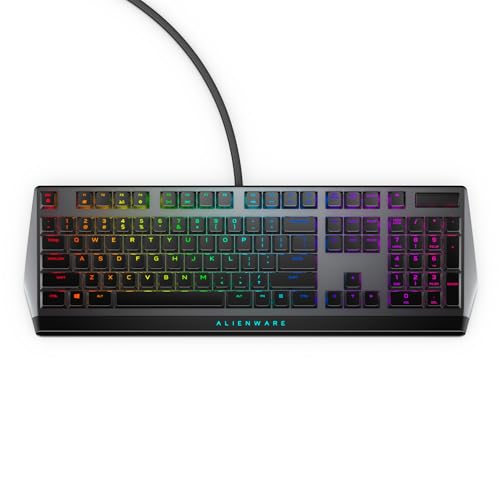
Alienware AW510K
Ideal for mainstream gamers who want a well‑reviewed keyboard, it's priced at $114.99—about $47 cheaper than the Best Overall model.

Razer Ornata V3
Stands out with a shallow 1.23 in height, delivering a true low‑profile feel that the taller ASUS and Alienware keyboards lack, while staying budget‑friendly.
Also considered
Score Analysis
Key score advantages vs. runner-up (Alienware AW510K)
Price Range
ASUS ROG Falchion RX
$144.49
Alienware AW510K
$109.99
Razer Ornata V3
$69.99

Keychron K3 Version 2
$84.00

Razer Ornata V3 TKL
$99.99

Cooler Master SK620
$101.41

MSI Vigor GK50
$363.71
Logitech G815
$140.00
Spec Comparison
TL;DR: The ASUS ROG Falchion RX is a premium 65% low‑profile keyboard with 1 mm actuation, 430+ hour battery life and 1000 Hz RF polling, but it carries a high price tag.
What really sets the Falchion RX apart is its ultra‑fast ROG RX low‑profile optical switches, which actuate at just 1 mm and travel 2.8 mm. Combined with a near‑zero debounce delay and a 1000 Hz RF polling rate, the keyboard promises snappy response for competitive play. The aluminum top plate adds a solid feel while keeping the overall weight to 595 g, making it easy to slip into a backpack.
In the context of the eight‑product roundup, the Falchion RX is heavier than the Cooler Master SK620 but lighter than the Logitech G815, which tips the scales at over 3 pounds. It also out‑weights the Razer Ornata V3 TKL (454 g) and sits just above the Keychron K3 (500 g). While many peers lack wireless capability, this model offers tri‑mode connectivity—Bluetooth 5.1 for up to three devices, a 2.4 GHz ROG SpeedNova link, and a wired USB‑2.0 option—giving it a versatility edge over wired‑only keyboards.
Professional reviewers praise the factory‑lubricated optical switches for being exceptionally fast and quiet, and everyday users echo that sentiment, highlighting the dual silicone foam layers that mute keystrokes. The long‑lasting 430+ hour battery (when RGB is off) and the per‑key RGB Aura Sync lighting add both practicality and flair. However, the single white color option and the absence of a dedicated function row are common complaints, and the $161.99 list price notes a barrier for budget‑focused buyers.
Pros
Cons
Best for: Portable gamers, laptop users and hybrid workers who need a lightweight, low‑profile keyboard with fast switches and reliable wireless options.
Avoid if: You're on a tight budget, need a full‑size layout with a function row, or want multiple color choices.
“Significant potential, well finished, tastes like a premium product... proprietary factory-lubricated optical switches... very fast... quiet keyboard, doesn't get loud.”
“Compact, super versatile, awesome RGB lighting... responsive switches and seamless device connectivity... great pick for gamers and tech fans.”
TL;DR: The Alienware AW510K offers a full‑size, low‑profile mechanical layout with Cherry MX Red switches, per‑key RGB and a lightweight 0.91 lb design, all for $114.99.
The standout spec is the Cherry MX Low‑Profile Red switch paired with a 0.91 lb chassis and a 2 m (2000 mm) wired USB cable, giving you a slim feel without sacrificing durability. Its per‑key RGB lighting supports 16.8 million colors, so you can customize every key.
At 0.91 lb, the AW510K is lighter than the Logitech G815 but a touch heavier than the Cooler Master SK620, which tips the scales at 0.83 lb. Its 2 m cable matches the length of the Razer Ornata V3 TKL, while the SK620’s 1.8 m cable is shorter, giving the Alienware a bit more reach.
Users consistently praise the keyboard’s slim profile, the quiet linear feel of the low‑profile switches, and the floating‑key design on a 5000 Series aluminum top plate that resists flex. Professional reviewers note the 35 % lower key height for faster actuation, and they highlight the vibrant per‑key RGB and the dedicated audio roller as strong media‑control features. The most common complaint is a louder‑than‑expected spacebar, and some note that the plastic chassis doesn’t feel as premium as full‑metal alternatives. The keyboard carries a 4.6/5‑star rating from 788 reviews and ships with a 1‑year limited warranty.
Additional technical details include a full‑size 105‑key layout, adjustable two‑level tilt legs, onboard memory for lighting and macro profiles, a USB passthrough port, and full N‑key rollover. The dimensions measure 18.4 × 6.1 × 1.2 in, making it compact enough for most desks while still offering a complete set of keys.
Pros
Cons
Best for: Gamers and power users who want a well‑reviewed, low‑profile mechanical keyboard with vibrant RGB and solid media controls.
Avoid if: You need wireless connectivity, prioritize an ultra‑premium metal feel, or require an ultra‑quiet typing experience.
TL;DR: The Razer Ornata V3 delivers a low‑profile, clicky Mecha‑Membrane feel, 8‑zone RGB and a magnetic wrist rest for $69.99, though its heavier build and longer key pre‑travel may not suit competitive gamers.
The keyboard’s most eye‑catching spec is its 17.46 in depth combined with a slim 1.23 in height, giving a compact footprint while keeping a full‑size layout. Weighing in at 3.1 lbs, it feels solid on a desk and the magnetic soft‑touch wrist rest adds ergonomic comfort for long sessions.
Compared with the other seven keyboards in this low‑profile roundup, the Ornata V3 is heavier than the 0.83‑lb Cooler Master SK620 and the 1.10231131‑lb Keychron K3, yet lighter than the 3.4‑lb Logitech G815. Its 5.68 in width is broader than the 103 mm width of the SK620 but narrower than the full‑size dimensions of the Logitech model. The keyboard also offers 8 RGB zones with 16.8 million colors, a feature that many peers either lack or list without detail.
Reviewers consistently praise the hybrid Mecha‑Membrane switches for their clicky feedback paired with a cushioned feel, and professionals note the magnetic wrist rest as a genuine ergonomic win. However, users frequently mention the long pre‑travel distance, which makes key presses feel less snappy, and the louder click can be distracting in quiet settings. Razer doesn’t market latency as a competitive advantage, so high‑level esports players may find it lacking.
Pros
Cons
Best for: Casual gamers, typists seeking ergonomic comfort, and hybrid work‑gaming setups that value a solid feel and vibrant lighting.
Avoid if: You need ultra‑low latency, a silent office keyboard, or a lightweight portable option.
“softer, satisfying clicky sound suitable for any gaming (e.g., Fortnite), customizable lighting, and overall gaming performance”
TL;DR: The Keychron K3 Version 2 offers an 84‑key low‑profile mechanical layout, 500 g aluminum‑top build and Bluetooth 5.1 connectivity at a budget‑friendly $63 price, earning a solid 4.4‑star rating.
The K3’s standout spec features a low‑profile mechanical Brown switch paired with a compact 75% (84‑key) layout, all housed in a chassis measuring 116 mm deep, 22 mm high and 306 mm wide. At just 500 g (1.10231131 lb), it feels light enough for desk‑side use without sacrificing stability.
Compared with the other seven keyboards, the K3 weighs considerably less than the Razer Ornata V3’s 3.1 lb frame, yet a bit more than the Cooler Master SK620’s 0.83 lb build. Its 116 mm depth measures shorter than the Ornata V3’s 17.46 in depth, and its 22 mm height sits well below the Ornata V3’s 1.23 in height, making it one of the slimmest options in the lineup.
Users consistently praise the solid aluminum top and the clean white backlight, noting that the keyboard feels premium for its price. A recurring comment notes the absence of dedicated media keys, which some gamers miss when looking for quick volume or playback controls.
Technical basics include Bluetooth 5.1 for wireless flexibility and a USB‑C wired mode, with full compatibility for both Mac and Windows platforms. The floating keycap design adds a distinctive look while keeping the typing experience low‑profile.
Pros
Cons
Best for: Budget-conscious buyers seeking a reliable entry-level option
Avoid if: You have limited desk space or need portability
TL;DR: The Razer Ornata V3 TKL offers a low‑profile tenkeyless design with clicky mecha‑membrane switches, 1000 Hz polling, and vibrant RGB, but its higher price and longer key travel may deter competitive gamers.
The keyboard measures 30.99 mm in height, 144.27 mm in depth, and 276.61 mm (≈1089 in) in width, while weighing 454 g. A 2000 mm braided fiber cable keeps the setup tidy, and the 1000 Hz polling rate promises fast signal transmission for gaming.
At 454 g, it's a touch heavier than the Alienware AW510K’s 413 g, yet still lighter than the Logitech G815’s 1542 g. Its cable length matches the AW510K’s 2000 mm, and the 1000 Hz polling rate mirrors that of the Cooler Master SK620 and ASUS ROG Falchion, placing it on par with the faster‑response peers.
Reviewers consistently praise the magnetic soft‑touch wrist rest and the low‑profile mecha‑membrane switches for a clicky yet cushioned feel, while the 16.8‑million‑color RGB across eight zones earns high marks for customization. Professional reviewers note that the longer pre‑travel distance can feel sluggish in fast‑paced games, and the input latency exceeds that of full mechanical keyboards, which may limit its appeal for esports athletes.
In practice, the keyboard’s UV‑coated keycaps resist fading, the adjustable height tilt adds ergonomic flexibility, and features like gaming mode, spill‑resistance, onboard memory, and programmable keys round out a solid feature set for everyday use.
Pros
Cons
Best for: Casual gamers, typists, and hybrid work‑gaming users who want ergonomic comfort and vibrant RGB without sacrificing a compact tenkeyless layout.
Avoid if: You need the best value‑per‑dollar in its price range or ultra‑low latency for competitive esports play.
“softer, satisfying clicky sound suitable for any gaming (e.g., Fortnite), customizable lighting, and overall gaming performance”
TL;DR: The Cooler Master SK620 is a 60% low‑profile mechanical keyboard that weighs just 0.83 lb, sports a 1.8 m detachable USB‑C cable and per‑key RGB, making it a compact, portable choice for gamers on a budget.
What really sets the SK620 apart is its ultra‑thin chassis – only 30.28 mm tall with the feet raised to 43.03 mm – and a featherlight 377 g (0.83 lb) build. The brushed‑aluminum frame feels solid despite the slim profile, and the included 1.8 m USB‑C cable gives you plenty of reach without adding bulk.
Compared with the other seven keyboards in this roundup, the SK620 is lighter than the Razer Ornata V3 TKL (454 g) and the ASUS ROG Falchion RX (595 g), but a bit heavier than the MSI Vigor GK50 (998 g) when you factor in the cable. Its 1.8 m cable is shorter than the 2 m (2000 mm) cable on the Razer Ornata V3 TKL, yet longer than the 1.8 m cable on the MSI Vigor GK50. Like the Razer Ornata V3 TKL, it shares a 1000 Hz polling rate, putting it on par with the fastest input response in the group.
Reviewers consistently praise the SK620’s “drool‑worthy aesthetic” and “practically nothing” feel, noting that the low‑profile Red switches deliver a precise, fast actuation that suits competitive play. Users also love the included carry bag and the 18‑selectable per‑key RGB zones, which add flair without sacrificing the keyboard’s minimal footprint. Consumer feedback highlights the 60% layout as a downside, forcing you to use Fn combos for arrows and media controls, which can slow workflow for some.
Pros
Cons
Best for: Gamers, e‑sports enthusiasts, and mobile professionals who need a lightweight, space‑saving keyboard with fast low‑profile switches and RGB lighting.
Avoid if: You require a full‑size layout with dedicated arrow/media keys, prefer wireless operation, or need a heavier chassis for a more solid typing feel.
“practically nothing”
TL;DR: The MSI Vigor GK50 packs Kailh low‑profile switches with a 50 g actuation force, per‑key RGB and a brushed‑aluminum frame, but its premium price may deter budget‑focused gamers.
Its standout feature is the Kailh low‑profile mechanical switches, delivering a 50 g actuation force, 1.5 mm pre‑travel and a total 3.0 mm travel distance, which reviewers say speeds up key presses and reduces hand fatigue. The keyboard measures 435 × 141 × 34 mm and weighs 998 g (2.2 lb), giving it a solid, desktop‑ready feel.
At 998 g, the GK50 is heavier than the ASUS ROG Falchion RX (595 g) and the Alienware AW510K (413 g), yet lighter than the Logitech G815 (1,542 g) and the Razer Ornata V3 (3.1 lb). Its 1.8 m cable matches the length of the Logitech G815 and Cooler Master SK620, but is shorter than the Razer Ornata V3 TKL’s 2,000 mm cable.
User feedback highlights the fast, clicky feel of the low‑profile switches and the extensive per‑key RGB customization (10 built‑in effects) that integrates with MSI’s Mystic Light. However, some reviewers note the ambiguous “hybrid 6‑key” N‑Key rollover claim and the reliance on Dragon Center software for lighting, which can feel limiting outside the MSI ecosystem. The keyboard receives a 4.7 / 5 rating from 462 reviews, underscoring strong satisfaction.
Pros
Cons
Best for: Competitive gamers and esports players who need rapid key actuation and reliable multi‑key input.
Avoid if: You need guaranteed full N‑Key rollover, macOS or Windows 11 support, or a lower‑priced keyboard.
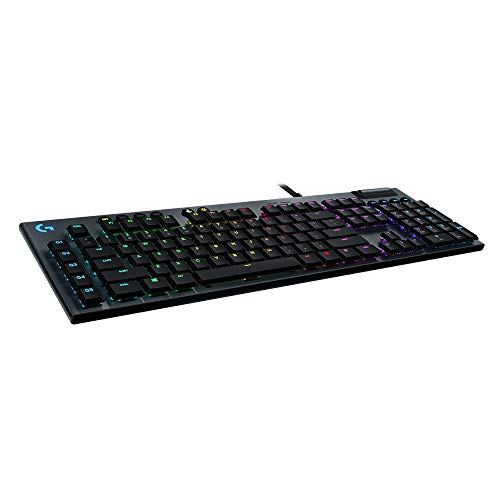
TL;DR: The Logitech G815 delivers low‑profile GL Clicky switches with a 1.5 mm actuation, per‑key RGB and a solid aluminum build, but its short travel and limited macro keys may deter heavy typists.
What really sets the G815 apart is its GL Clicky low‑profile mechanical switches, which trigger at just 1.5 mm and require a 45 g actuation force. Coupled with per‑key LIGHTSYNC RGB capable of 16.8 million colors and two lighting profiles, the board looks as fast as it feels.
Compared with the other seven keyboards in this roundup, the G815 feels heavier at 3.4 pounds and sports a longer 1800 mm cable, giving it a more stationary feel than many of its peers. It also offers a steel‑reinforced base and a 5052 aluminum alloy top case, while only providing five dedicated G‑keys for macros, which is fewer than some competitors that list full‑key programmability.
Professional reviewers praise the wired connection and the solid aluminum top for low latency and a premium feel, yet they note noticeable key wobble and a total travel of just 3.0 mm, which can make long typing sessions feel cramped. Users echo the appreciation for the built‑in media controls and volume wheel, but frequently mention chassis flex out of the box as a drawback.
Beyond the switches, the G815 measures 40.6 mm in height, 508 mm in length and 228.6 mm in width, fitting comfortably on most desks. It includes two USB ports—one for the keyboard itself and a passthrough for peripherals—plus a two‑year manufacturer warranty and Logitech G HUB software for customization.
Pros
Cons
Best for: Competitive gamers and streamers who value low‑latency wired performance, premium lighting and a sturdy build.
Avoid if: You need a quiet, ultra‑comfortable typing experience for long work sessions, or you’re on a tight budget.
Breakdown
ASUS ROG Falchion RX
Pros
Alienware AW510K
Pros
Razer Ornata V3
Pros
Keychron K3 Version 2
Pros
Based on scoring data and product specs
Personalized picks
Best Overall Pick
ASUS ROG Falchion RX
Best OverallBest for: Audiophiles and enthusiasts seeking premium sound quality and advanced features
Alienware AW510K
Best for: Most users looking for a well-reviewed, reliable mainstream option
$109.99-$34.50 vs winner
Skip Logitech G815 if…
You're on a tight budget or only need basic functionality
The ASUS ROG Falchion RX earns the top spot thanks to its ultra‑low 26.5 mm height, a compact 65% layout with 69 keys, and a massive 430+ hour battery life when the RGB is off. It also supports Bluetooth 5.1 for up to three devices and offers per‑key RGB Aura Sync, giving you both portability and premium lighting without sacrificing performance.
The Alienware AW510K is the runner‑up if you need a full‑size board with Cherry MX Low‑Profile Red switches, a solid metal top plate and adjustable tilt legs. Its 105‑key layout, per‑key RGB lighting, 50 million keystroke durability and onboard memory make it a reliable choice for gamers who want a traditional size with low‑profile feel.
For tighter budgets, the Keychron K3 Version 2 shines at $63.00, delivering a compact design that’s easy on the wallet. Mid‑range players can still opt for the Alienware AW510K at $114.99 for its full‑size Cherry MX low‑profile experience. If you crave premium features, the MSI Vigor GK50 at $363.71 offers a premium build and extensive customization.
Choose the ASUS ROG Falchion RX today and enjoy a low‑profile gaming keyboard that delivers high performance and flexibility.
The Falchion RX offers 430+ hours of battery life with RGB off, thanks to its low‑profile optical switches and efficient design. Its 26.5 mm height and 69‑key 65% layout keep it compact, while the aluminum top plate adds durability.
No reviews yet — be the first to share your experience.
Please sign in to leave a review



