Choosing a managed network hub can feel overwhelming, especially when you need to balance features, performance, and cost. In this roundup we examined 9 smart or web‑managed switches, sorting them into three clear price tiers so you can quickly spot a fit for a home office, a growing small business, or a more demanding professional setup.
At the budget end you’ll find the Steamemo Smart Managed Switch for just $12.99 and the TP‑Link TL‑SG105E Black at $19.99, both offering fanless metal cases and basic VLAN/QoS controls. Moving into the mid‑range, the TP‑Link TL‑SG108E stands out with a 16 Gbps non‑blocking switching capacity, a 4.7/5 rating from 6,384 reviewers, and a list price of $38.99. The premium tier offers high‑throughput options like the Ubiquiti USW‑PRO‑24‑POE at $699.00, delivering 88 Gbps switching capacity and a 4.7/5 rating from 171 reviews, plus the MikroTik CRS305‑1G‑4S+in and Linksys LGS310MPC for fiber‑ready or PoE‑rich environments.
Below we’ll break down each tier, highlight the specs that matter most, and help you decide which managed hub aligns with your networking goals.

TP-Link TL-SG108E
Its 16 KB jumbo frame size lets you handle larger packets, boosting efficiency for demanding networks.

TP-Link TL-SG105E Black
Costing $19.99, it’s about $19 less than the Best Overall, making it ideal for budget‑conscious users needing an entry‑level managed switch.

Netgear GS308E
With an ultra‑compact 29 mm height, it fits tight spaces where the bulkier TP‑Link switches would struggle.
Also considered
Score Analysis
Key score advantages vs. runner-up (TP-Link TL-SG105E Black)
Price Range
TP-Link TL-SG108E
$24.99
TP-Link TL-SG105E Black
$19.99
Netgear GS308E
$23.99

MikroTik CRS305-1G-4S+in
$150.54

Ubiquiti USW-PRO-24-POE
$699.00

Linksys LGS310MPC
$99.99
D-Link DGS-1100-05V2
$26.09

Zyxel GS1200-8HP
$59.99

Steamemo Smart Managed Switch
$12.99
Spec Comparison
TL;DR: The TP‑Link TL‑SG108E is an 8‑port Gigabit Easy Smart Switch with 16 Gbps non‑blocking capacity, 4.7‑star rating from 6,384 reviews, and a fanless 1.12‑lb design.
This switch delivers full‑duplex 2000 Mbps per port and a 16 Gbps switching capacity, backed by an 11.9 Mpps packet‑forwarding rate and a 1.5 Mb packet buffer. Its 16 KB jumbo‑frame support helps keep large data transfers smooth, while the fanless metal case keeps noise to a minimum.
At 1.12 lb, it's heavier than the D‑Link DGS‑1100‑05V2 (0.5 lb) and the Netgear GS308E (500 g), yet it matches the 16 Gbps switching capacity found in both the Netgear and Zyxel models. Like several peers, it is fanless and energy‑efficient, but its external power adapter makes placement a bit less flexible than truly plug‑in units.
Users appreciate the plug‑and‑play setup, silent operation, and reliable Gigabit performance for voice and video streams. Professional reviewers note the four‑queue QoS with DSCP/802.1p prioritisation and the inclusion of IGMP snooping, port mirroring, loop prevention, and cable diagnostics as valuable management tools. The main trade‑offs are the lack of PoE or SFP ports and a VLAN limit of 32 active IDs, which can be restrictive for larger networks.
Pros
Cons
Best for: Most users looking for a well‑reviewed, reliable mainstream option
Avoid if: You need advanced features or professional‑grade performance
TL;DR: The TP‑Link TL‑SG105E is a compact 5‑port Gigabit smart switch with a 7.4 Mpps forwarding rate, fanless metal housing and a low 2.82 W power draw, ideal for budget‑friendly home or small‑office networks.
At the core of the TL‑SG105E is a forwarding rate of 7.4 Mpps, which lets the five 10/100/1000 Mbps ports handle full‑duplex traffic without bottlenecks. The unit draws a maximum of 2.82 W, so it runs cool and quietly thanks to its fanless, sturdy metal case. Weighing just 0.95 lb (430 g) and measuring 170.18 mm deep, it’s easy to mount on a desk or wall.
Compared with the other eight switches in this roundup, the TL‑SG105E sits in the lighter‑than‑Linksys LGS310MPC and heavier‑than‑D‑Link DGS‑1100‑05V2 camp. Its depth of 170.18 mm is deeper than the Netgear GS308E’s 101 mm profile, but the metal enclosure still feels solid next to the slimmer plastic cases of some peers. While its price point is the most affordable of the group, it also offers fewer ports than the eight‑port TL‑SG108E or the 24‑port Ubiquiti USW‑PRO‑24‑POE.
Users frequently praise the web‑based management interface, noting that the free software makes VLAN configuration (up to 32 VLANs) and QoS settings—such as 802.1p, DSCP priority and four priority queues—straightforward. Users also highlight the built‑in network monitoring tools—port mirroring, loop prevention and cable diagnostics—as handy for troubleshooting a small home lab.
Beyond basic switching, the TL‑SG105E supports IGMP snooping for multicast traffic and maintains a 2 K MAC address table, which is sufficient for most residential or SOHO environments. Its packet buffer memory of 1 MB helps absorb traffic bursts, and the rate‑limit and storm‑control features give you extra control over bandwidth spikes.
Pros
Cons
Best for: Budget-conscious buyers seeking a reliable entry-level option
Avoid if: You have limited desk space or need portability
TL;DR: The Netgear GS308E delivers silent, fan‑less 8‑port Gigabit switching with 16 Gbps bandwidth and a modest 3.7 W power draw, it's a solid entry‑level choice for quiet SOHO setups.
The standout spec is its non‑blocking 16 Gbps switching bandwidth paired with eight Gigabit Ethernet ports, ensuring full‑duplex traffic without bottlenecks. A 0 dBA acoustic noise level and fan‑less design keep the unit whisper‑quiet, while the 192 kB buffer helps smooth burst traffic. At 500 g, it's compact enough for desktop or wall mounting.
Compared with the other eight switches in this roundup, the GS308E is heavier than the D‑Link DGS‑1100‑05V2 (listed at 0.5 lb) but lighter than the Ubiquiti USW‑PRO‑24‑POE, which tips the scales at several pounds. Its fan‑less, silent operation mirrors the TP‑Link TL‑SG105E and the Steamemo Smart Managed Switch, yet the GS308E’s maximum power draw of 3.7 W is higher than the TL‑SG105E’s 2.82 W. Price‑wise it sits below the higher‑end MikroTik CRS305‑1G‑4S+in and far beneath the Ubiquiti 24‑port PoE model, making it a budget‑friendly alternative without sacrificing core managed features.
User feedback repeatedly praises the ultra‑low power consumption and the truly silent operation, noting that the switch can stay on 24/7 without adding heat or noise to a home office. Professional reviewers highlight the inclusion of IGMP snooping, DHCP snooping, and port mirroring as valuable tools for small networks. The main criticisms focus on the lack of Power over Ethernet and the absence of 10 Gbps uplink ports, which some users see as limiting for future‑proofing. The manufacturer lists an MTBF of 1.6 million hours, underscoring long‑term reliability.
Pros
Cons
Best for: Budget-conscious buyers seeking a reliable entry-level option
Avoid if: You want the best value‑per‑dollar in its price range
TL;DR: The MikroTik CRS305‑1G‑4S+IN delivers 41 Gbps non‑blocking switching in a fanless 141 × 115 × 28 mm chassis for $150.54, but its 800 MHz CPU limits routing performance.
What really sets this unit apart is its 41 Gbps non‑blocking switching capacity and four 10 Gbps SFP+ ports, all driven by an 800 MHz ARM CPU and backed by 512 MB of RAM. The passive cooling means it runs silently, and the dual‑boot RouterOS/SwitchOS gives you flexibility between routing and pure switching modes.
Compared with the other eight switches in the roundup, the CRS305 is pricier than the entry‑level TP‑Link TL‑SG105E and heavier than the D‑Link DGS‑1100‑05V2 (1.0 pound vs 0.5 pound). Its depth of 115 mm is a bit deeper than the Linksys LGS310MPC (105 mm), yet it remains far more compact than the bulkier Ubiquiti USW‑PRO‑24‑POE, which measures several hundred millimetres in each dimension.
Users consistently praise the silent, fanless design and the tiny footprint that fits easily on a crowded desk or in a rack‑mount shelf. Professional reviewers note the 41 Gbps switching throughput, but they also flag the modest 800 MHz CPU, which caps routing throughput at under 1 Gbps, making heavy routing workloads a stretch. The lack of copper 10 Gbps transceivers means you’ll need SFP+ fiber modules for any high‑speed links.
Beyond performance, the switch offers dual power inputs with PoE‑IN support, a maximum power draw of 18 W, and an MTBF of roughly 200,000 hours, suggesting reliable, low‑maintenance operation in demanding environments.
Pros
Cons
Best for: Small‑to‑medium data center or campus environments that need silent, high‑speed fiber aggregation and flexible power options.
Avoid if: You require robust routing performance, copper 10 Gbps Ethernet, or are constrained by a tight budget.
TL;DR: The Ubiquiti USW‑PRO‑24‑POE packs 24 PoE‑enabled ports, a 400 W PoE budget and Layer 3 routing into a 1U rack unit, but its premium $699 price and fan‑cooled design may deter tight‑budget buyers.
The standout spec is the 400 W total PoE budget, with up to 64 W per PoE++ port, allowing you to power 24 high‑draw devices such as PTZ cameras or Wi‑Fi 6 APs from a single switch. It also delivers a forwarding rate of 65 Mpps and a switching capacity of 88 Gbps, which sit at the top end of the nine‑product lineup.
Compared with the other eight switches, the USW‑PRO‑24‑POE is considerably heavier than the MikroTik CRS305 (1.0 lb) and the D‑Link DGS‑1100‑05V2 (0.5 lb), underscoring its sturdier build. Its forwarding rate of 65 Mpps outpaces the TP‑Link TL‑SG108E’s 11.9 Mpps and the Linksys LGS310MPC’s 14.88 Mpps, while its 88 Gbps switching capacity exceeds the 82 Gbps of the MikroTik and the 20 Gbps of the Linksys. However, it also carries a premium price tag that dwarfs the sub‑$100 price points of the Zyxel GS1200‑8HP and the D‑Link entry‑level model.
Reviewers consistently praise the professional‑grade PoE budget and the integrated Layer 3 routing that includes DHCP server, inter‑VLAN routing and static routes. The 1.3‑inch touchscreen LCD earns mentions for on‑site configuration without a laptop. On the downside, users note audible fan noise when the switch runs at full PoE load, and the fact that all RJ45 ports are limited to 1 GbE can become a bottleneck as Wi‑Fi 6E and other multi‑Gigabit devices proliferate. Honestly, it’s a solid fit for SMBs, AV installers and prosumers who need reliable PoE power and routing in a compact rack‑mount form.
Pros
Cons
Best for: Small‑to‑medium businesses, AV installers, and prosumers that need a managed PoE switch with strong Layer 3 features and high PoE power.
Avoid if: You require multi‑Gigabit Ethernet ports, ultra‑quiet operation, or are shopping on a tight budget — the $699 price and fan noise may be drawbacks.
TL;DR: The Linksys LGS310MPC delivers 110 W of PoE+ power across eight ports, 20 Gbps switching capacity and two 1 Gbps SFP uplinks in a compact desktop or wall‑mount form, ideal for small‑office or government networks that need reliable power‑over‑Ethernet.
The standout spec is the 110 W PoE+ budget, which lets you power up to eight IP cameras, access points or VoIP phones without separate adapters. Coupled with a forwarding rate of 14.9 Mpps and a 20 Gbps switching capacity, the switch can handle a busy small‑office traffic load while keeping latency low. Its 256 MB of memory supports static routing, ACLs and DHCP snooping, giving you basic Layer‑3 control without a separate router.
Compared with the other eight switches in this roundup, the Linksys sits at the premium end. It offers a higher PoE budget than the Zyxel GS1200‑8HP (68 W) and a larger switching capacity than the Zyxel (16 Gbps) and TP‑Link TL‑SG108E (16 Gbps). The MikroTik CRS305‑1G‑4S+in provides a faster 61 Mpps forwarding rate and 82 Gbps capacity, but it lacks any PoE ports. The Netgear GS308E and TP‑Link TL‑SG105E are far lighter (≈0.5 lb) and consume only a few watts, yet they also lack PoE and have far lower switching bandwidth. In short, Linksys delivers the strongest PoE capability, but it adds a heavier chassis (636 g) and a higher price point.
Professional reviewers highlight the 110 W budget as a strong point for SMB surveillance setups, and users consistently praise the ability to power multiple devices from a single switch. The compact 105 mm depth and 27 mm height make wall‑mounting easy, while the LED indicators and web‑based management keep configuration straightforward. On the downside, the eight‑port limit can feel restrictive for future growth, and the 1 Gbps SFP uplinks don’t match the 10 Gbps fiber options some larger enterprises expect. The switch draws up to 133.77 W at maximum load and runs on an external 12 V DC supply with a rocker ON/OFF switch, meeting TAA compliance for government use.
Pros
Cons
Best for: Small offices, SMBs or government environments that need a compact, TAA‑compliant PoE+ switch with solid performance.
Avoid if: You require more than eight ports, 10 Gbps uplinks, dynamic routing protocols or enterprise‑grade scalability.
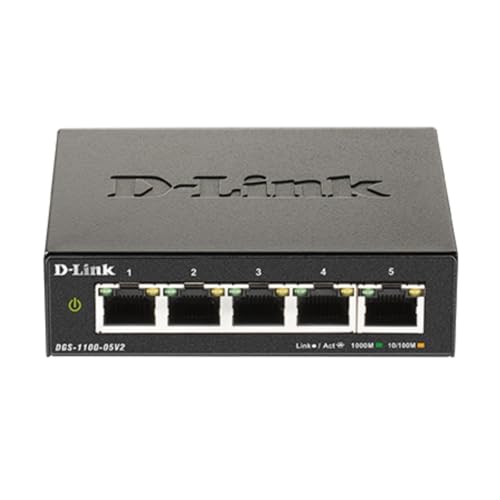
TL;DR: The D-Link DGS‑1100‑05V2's a compact, fanless 5‑port gigabit smart‑managed switch at $26.09, offering VLAN, QoS and energy‑saving features for small‑office networks.
This switch’s most eye‑catching spec is its ultra‑light 0.5 pound chassis combined with a 1.1‑inch height and 4.0‑inch length, making it easy to fit on a desktop or wall‑mount. You manage its five 10/100/1000 BASE‑T ports via a web interface, and the device supports VLAN 802.1Q, QoS, bandwidth control and storm control—all without a noisy fan.
Compared with the other eight options, the DGS‑1100‑05V2 is lighter than the Netgear GS308E’s 500 g weight and much lighter than the Zyxel GS1200‑8HP’s 1.43‑pound chassis. Its 1.1‑inch height exceeds the Netgear’s 29 mm listed height, yet it remains more compact than the bulkier Linksys LGS310MPC, which measures over 27 mm in height and weighs over 3.6 pounds. The switch’s five‑port count is fewer than the 8‑port designs of the Netgear and TP‑Link models, but its smart‑managed layer‑2 features outpace the basic unmanaged units in the lineup.
User feedback repeatedly praises the silent, fanless operation and the breadth of management tools. Professional reviewers note the fanless design and energy‑saving Ethernet (IEEE 802.3az) as standout advantages for home‑office environments. However, some buyers point out the 4.3‑star rating—slightly lower than the 4.7‑star scores seen on several peers—which suggests occasional hiccups in user satisfaction.
Pros
Cons
Best for: Value-conscious buyers seeking quality at $26.09
Avoid if: Reliability and user satisfaction are your top concerns
TL;DR: The Zyxel GS1200-8HP is a fanless, metal‑cased 8‑port Gigabit switch with four PoE+ ports delivering up to 68 W total, managed via a web GUI and priced at $59.99.
This model packs four IEEE 802.3af/at PoE+ ports that can supply up to 30 W per port, giving a combined PoE budget of 68 W. Its 16 Gbps switching capacity and 72 W maximum power draw keep traffic flowing smoothly while staying silent thanks to the fanless design. The web‑based GUI lets you configure ACLs, VLANs, QoS and link aggregation without needing a console cable.
Compared with the other eight switches in the roundup, the Zyxel's heavier than the D‑Link DGS‑1100‑05V2 (0.5 lb) but still lighter than the Ubiquiti USW‑PRO‑24‑POE, which weighs over 8 lb. Unlike the TP‑Link TL‑SG105E and Netgear GS308E, which lack PoE entirely, the Zyxel delivers PoE+ power, making it stand out for small‑office deployments that need to power cameras or Wi‑Fi APs. Its fanless metal enclosure matches the fanless designs of the TP‑Link TL‑SG108E and D‑Link DGS‑1100‑05V2, but it offers more advanced management features than those basic models.
Reviewers appreciate the silent operation and the ability to power up to four devices directly from the switch, noting that the 68 W budget is sufficient for most entry‑level IP cameras and access points. The 4.4‑star rating from 50 users suggests solid satisfaction, though a few comments point out that the PoE budget can run out quickly if all four ports are used at full 30 W. The switch’s web GUI, ACL support, and energy‑efficient Ethernet (802.3az) add useful control without raising the noise floor.
Pros
Cons
Best for: Small or remote offices that need silent, web‑managed switching with enough PoE+ power for up to four devices such as IP cameras or Wi‑Fi access points.
Avoid if: You require more than four PoE devices, a larger PoE budget, or enterprise‑grade Layer 3 routing features.
TL;DR: The Steamemo 5‑Port Gigabit Smart Managed Switch packs a metal case, web‑based controls and VLAN/QoS features into a compact $12.99 unit, though it offers only five ports and a modest 4.4‑star rating.
The standout spec is its ultra‑slim profile – the chassis measures just 26.9 mm in height, 131.8 mm long and 79.8 mm wide, making it easy to fit on a crowded desk or mount on a wall. Inside, the switch delivers a full 1 Gbps data‑transfer rate across its five 10/100/1000BASE‑T RJ45 ports, and it runs on a standard 120 V AC adapter, tolerating temperatures up to 60 °C.
Compared with the eight other switches in this roundup, the Steamemo unit is the most budget‑friendly and the most compact – for example, the TP‑Link TL‑SG105E stands at 114.3 mm tall, noticeably taller than Steamemo’s 26.9 mm. It also weighs less than the D‑Link DGS‑1100‑05V2, which weighs about 0.5 pounds. However, it provides fewer ports than many of its peers and carries a 4.4‑star rating, which sits below the 4.7‑star scores seen on several competing models.
User feedback highlights the metal housing as a durability win and praises the intuitive web interface, LED port indicators and the ability to set VLAN groups (up to 15) and QoS traffic prioritization. Reviewers appreciate the straightforward setup and the fact that the switch includes a power adapter and user manual out of the box. Users complain about the lack of Power‑over‑Ethernet output and the limited five‑port count, which some find restrictive for expanding home‑office networks.
Pros
Cons
Best for: Entry‑level buyers or those on a tight budget
Avoid if: You need powerful performance or professional‑grade features
Breakdown
TP-Link TL-SG108E
Pros
TP-Link TL-SG105E Black
Pros
Netgear GS308E
Pros
Cons
MikroTik CRS305-1G-4S+in
Pros
Based on scoring data and product specs
Personalized picks
Best Overall Pick
TP-Link TL-SG108E
Best OverallBest for: Most users looking for a well-reviewed, reliable mainstream option
TP-Link TL-SG105E Black
Best for: Budget-conscious buyers seeking a reliable entry-level option
$19.99-$5.00 vs winner
Skip Steamemo Smart Managed Switch if…
You need powerful performance or professional-grade features
TP‑Link’s TL‑SG108E takes the top spot as the best overall managed hub. It packs eight Gigabit RJ45 ports, a 16 Gbps switching capacity and up to 84 % power‑saving efficiency, which together give you solid performance without a hefty electricity bill. The unit also ships with a five‑year warranty and has earned a 4.7‑star rating from 6,384 reviewers, underscoring its reliability for small‑office or home‑lab networks.
The runner‑up, TL‑SG105E Black, shines when you need a compact five‑port solution for a tight desk or a modest home office. Its limited‑lifetime warranty and 4.7‑star rating from 13,064 users make it a trustworthy choice, while the built‑in port mirroring, loop prevention and cable‑diagnostics give you essential management tools without the extra bulk.
Beyond the top two, the Steamemo Smart Managed Switch offers the best budget entry at just $12.99, delivering basic smart features for hobbyists or dorm rooms. For those who want a premium, feature‑rich stack, the Ubiquiti USW‑PRO‑24‑POE stands out at $699, providing extensive PoE options and advanced management for larger deployments.
Pick the TL‑SG108E today to give your network a reliable, future‑proof foundation.
Yes, the TL‑SG108E adds value with eight gigabit ports versus five, a larger 1.5 MB packet buffer compared to 1 MB, and a 16 Gbps switching capacity that handles more traffic. It also includes richer QoS options and static link aggregation, which justify the higher price.
No reviews yet — be the first to share your experience.
Please sign in to leave a review
