⚡ Quick Answer
Choosing a mechanical keyboard can feel overwhelming, especially when you’ve got 11 options to compare. Our roundup spans the whole price spectrum – from budget-friendly models like the Cackbird Portable 60% Keyboard at $22.99 and the MageGee Portable 60% Mechanical Gaming Keyboard at $25.49, through mid-range choices such as the Royal Kludge RK61 White for $39.99 and the Redragon K745 PRO at $59.99, up to premium contenders like the Aula F99 Wireless priced at $68.25, the HyperX Alloy Origins 60 at $81.07, the Corsair K70 CORE at $84.99, and the Razer Huntsman Mini at $89.99.
All keyboards earned solid user approval, each hovering around a 4.6‑4.7 rating out of 5. For example, the Aula F99 Wireless not only carries a 4.6/5 rating from 2,795 reviews, but also features an 8000 mAh battery for extended wireless play. Meanwhile, the Razer Huntsman Mini’s 45 g linear optical switches deliver a rapid 1.5 mm actuation distance that many gamers love.
Below we’ll break down each model’s strengths, key specs, and ideal use cases so you can pinpoint the board that fits your desk, budget, and typing style.

Aula F99 Wireless
Its 8000 mAh battery gives marathon sessions without recharging.
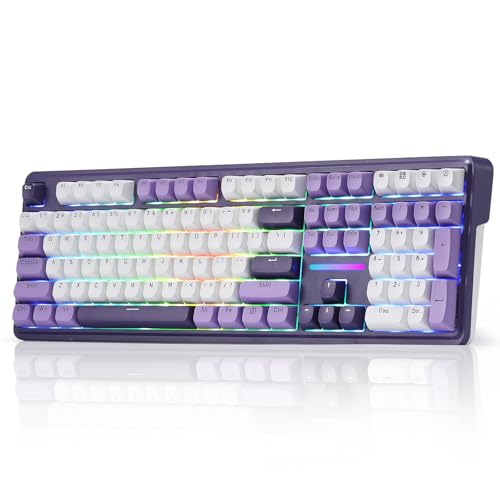
Redragon K745 PRO
Ideal for gamers on a budget, the Redragon K745 PRO delivers solid performance at $59.99, about $8.26 less than the Aula F99 Wireless.
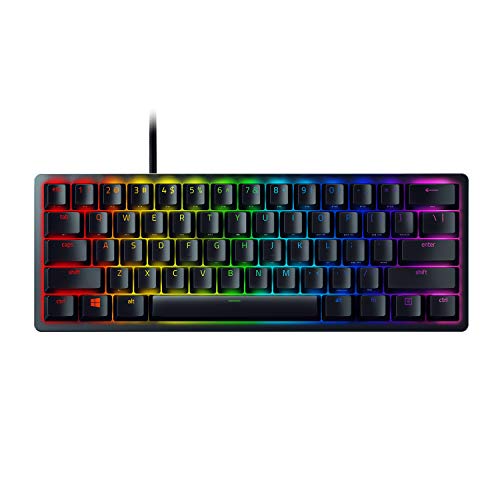
Razer Huntsman Mini
With a 1.5 mm actuation distance, the Razer Huntsman Mini provides ultra‑fast key response, a feature the wireless Aula and Redragon lack.
Also considered
Score Analysis
Key score advantages vs. runner-up (Redragon K745 PRO)
Price Range
Aula F99 Wireless
$68.99
Redragon K745 PRO
$59.99
Razer Huntsman Mini
$84.99

HyperX Alloy Origins 60
$69.99
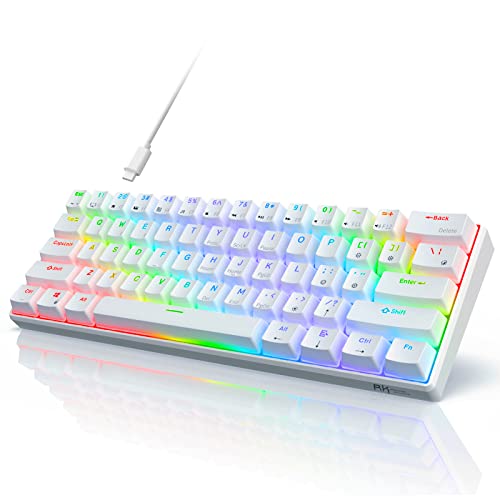
RK Royal Kludge RK61 Red
$49.99
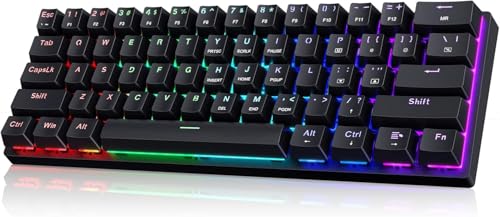
Cackbird Portable 60% Mechanical Keyboard
$22.99

Redragon Mechanical Gaming Keyboard
$25.49

MageGee 75% Mechanical Gaming Keyboard
$27.89

Corsair K70 CORE
$109.99

MageGee Portable 60% Mechanical Gaming Keyboard
$26.99
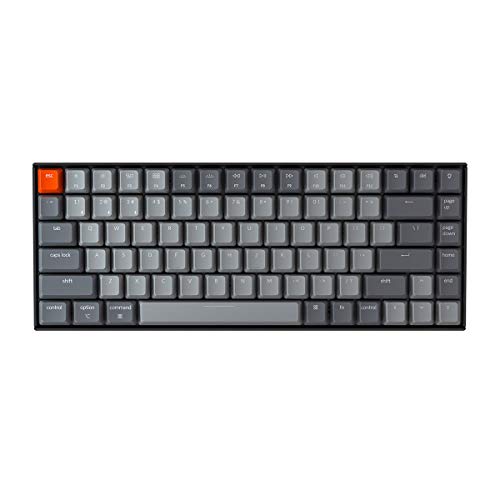
Keychron K2 75%
$63.99
Spec Comparison
TL;DR: The Aula F99 Wireless packs a 99‑key 98% layout, hot‑swappable Graywood linear switches and a massive 8000 mAh battery, but its 3.31‑lb weight makes it a desk‑bound choice at $68.25.
The standout spec is the 8000 mAh rechargeable battery, which dwarfs the 4000 mAh cells found in the Redragon K745 PRO and Keychron K2. Combined with Bluetooth 5.0, 2.4 GHz wireless and USB‑C wired modes, you can stay connected to up to five devices without hunting for a charger. The board also uses pre‑lubed Graywood linear switches with a 1.5 mm actuation distance and a 40 gf operating force, delivering a smooth, low‑fatigue feel for long typing or gaming sessions.
At 3.31 pounds, the Aula F99 is noticeably heavier than the Redragon K745 PRO (1.94 lb), the Keychron K2 (1.93 lb), and even the ultra‑light Razer Huntsman Mini (1.1 lb). Its 99‑key count and full‑size numpad set it apart from compact peers like the Royal Kludge RK61 (61 keys) and the HyperX Alloy Origins 60 (60% layout), giving you a more traditional workstation without sacrificing wireless flexibility.
Professional reviewers have praised the factory‑lubed Graywood switches for their smooth 40 g actuation and pleasant “clack” sound, noting the 60 million‑keystroke lifespan as a durability win. Community chatter highlights the long‑lasting battery as a major plus, while users cite the heft and audible linear clicks as trade‑offs for those who prefer a silent or portable setup.
Pros
Cons
Best for: Home and office users seeking a balance of features and value
Avoid if: You're shopping on a tight budget — it's priced at $68.25
TL;DR: The Redragon K745 PRO packs a full‑size layout, 40 g linear switches and a 4000 mAh battery into a gasket‑mounted, five‑layer dampened chassis for $59.99.
What really stands out is the gasket‑mounted construction combined with five layers of sound‑dampening foam, which professional reviewers say gives the board a “clean, quiet typing feel without creaks.” The board also ships with hot‑swappable Mint Mambo linear switches that need only 40 g of actuation force, delivering the silky response gamers love.
At 880 g (1.94 lb), the K745 PRO is lighter than the Aula F99 Wireless’s 3.31 lb chassis but heavier than the Royal Kludge RK61’s 560 g frame. Its 4000 mAh battery matches the Keychron K2’s capacity while offering a larger charge than the 8000 mAh battery of the Aula, positioning it in the mid‑range of power‑options across the lineup.
Users repeatedly highlight the “creamy” feel of the Mint Mambo switches and the vivid south‑facing RGB that spills around the case. Reviewers note the flip‑feet slip under aggressive typing, and some reviewers mention a slightly hollow tone from the spacebar despite the extensive foam. Professional reviewers also point out that the 2.4 GHz dongle delivers lag‑free wireless performance, making it a solid choice for competitive play.
Pros
Cons
Best for: Gaming enthusiasts and mechanical‑keyboard beginners who want a full‑size board with wireless freedom.
Avoid if: You’re shopping on a tight budget — it’s priced at $59.99.
“"silky creamy" typing sound”
TL;DR: The Razer Huntsman Mini packs Razer Linear Optical Switches Rapid with a 1.5 mm actuation distance, a 60% layout, a detachable 2 m USB‑C cable and a lightweight 498.9 g chassis.
The standout spec is the 1.5 mm actuation distance paired with 45 g linear optical switches, delivering the fastest key travel in a 60% form factor. At 498.9 g (1.1 pounds) and with a detachable 2 m USB‑C cable, the keyboard's built for portability without sacrificing durability, thanks to its aluminum construction and textured doubleshot PBT keycaps.
Compared with the other ten keyboards in this roundup, the Huntsman Mini is lighter than the Corsair K70 CORE (2.06 pounds) and the HyperX Alloy Origins 60 (1.72 pounds), yet it offers a far smaller footprint than those full‑size models. Its 2 m cable outstretches Corsair’s 1800 mm lead, and the 1.5 mm actuation distance is shorter than Corsair’s 1.9 mm, matching the Aula F99’s 1.5 mm. While the 45 g actuation force equals Corsair’s, it is higher than the 40 gf force of the Aula F99 and the 40 g force of the Redragon K745 PRO, giving a more solid feel for rapid presses.
Reviewers consistently praise the ultra‑compact layout for freeing up desk space and the rapid switches for competitive gaming, and Razer lists the “lightning‑fast actuation” as a feature of its portable package. Common complaints focus on the missing dedicated function row, numpad and arrow keys, which force reliance on an Fn layer, and the absence of a built‑in wrist rest or USB passthrough ports.
Additional technical details include a matte‑finished aluminum body, Razer Chroma RGB lighting with 16.8 million color options, macro support, up to five onboard profiles and Rapid Trigger Mode enabled. The keyboard ships with a 2‑year manufacturer warranty and works across Windows, macOS, Linux, PC and Mac.
Pros
Cons
Best for: Competitive gamers, esports players, and users with limited desk space who need a fast, portable keyboard.
Avoid if: You require a full‑size layout with dedicated function keys, a numpad, a wrist rest, or you’re working with a tight budget.
TL;DR: The HyperX Alloy Origins 60 packs an aircraft‑grade aluminum chassis, Aqua Tactile switches and vibrant RGB lighting into a compact 11.7‑in footprint for $81.07.
What really sets this board apart is the Aqua Tactile switch paired with a solid aluminum body. At 1.72 lb the keyboard feels sturdy without being a desk‑weight, and its 11.7 in length and 1.5 in height keep the profile low enough for tight desk setups. The double‑shot PBT keycaps add durability, while the RGB backlight offers radiant lighting effects that users often call “eye‑catching”.
Compared with the other ten keyboards in the roundup, the Alloy Origins 60 sits in the middle of the weight range – lighter than the Corsair K70 CORE (2.06 lb) and the Keychron K2 (1.93 lb) but heavier than the Royal Kludge RK61 (1.23 lb). Its 60% form factor makes it shorter than the Razer Huntsman Mini’s 293.3 mm depth, and it lacks the wireless battery capacity found in the Aula F99 Wireless (8 000 mAh) or the Redragon K745 PRO (4 000 mAh). In other words, you get a wired‑only experience that’s more compact than many full‑size rivals.
Reviewers consistently highlight the satisfying tactile feedback of the Aqua switches and the premium feel of the aluminum frame. Many note that the RGB lighting adds a fun visual touch without being overly bright. A common trade‑off is the reduced key count inherent to a 60% layout, which can require a learning curve for users accustomed to full‑size keyboards.
Pros
Cons
Best for: Buyers willing to invest in a proven, high‑quality option
Avoid if: You're on a tight budget or only need basic functionality
TL;DR: The Royal Kludge RK61 White offers a 61‑key 60% layout, hot‑swappable Linear Red switches and vibrant RGB lighting for $39.99, backed by a solid 4.6‑star rating from over 6 000 users.
What really stands out is the hot‑swappable design that supports both 3‑pin and 5‑pin switches, letting you change the Linear Red switches without soldering. At 40 mm tall, 292 mm long and 102 mm wide, the board keeps a compact footprint while still providing a full‑key rollover anti‑ghosting matrix across all 61 keys.
Compared with the other ten keyboards in this roundup, the RK61 is lighter than the MageGee 75% (880 g) and Redragon K745 PRO (880 g) but a bit taller than the MageGee 75% (35.6 mm) and Redragon models (36 mm). Its 292 mm length is noticeably shorter than the Redragon Mechanical Gaming Keyboard’s 435 mm length, placing it firmly in the portable‑friendly category. While many peers only offer wired USB connections, the RK61 adds a detachable Type‑C cable, a convenience the Cackbird Portable also shares, but the RK61 pairs it with richer lighting options (18 RGB modes plus 8 monochrome modes).
Reviewers consistently highlight the ease of swapping switches and the satisfying click of the Linear Red stems. Users also appreciate the bright, customizable backlighting that shines through the white case, noting that the software customization via RK ROYAL KLUDGE software makes tweaking profiles straightforward. The combination of a solid 4.6‑star rating and 6 443 reviews suggests a broad base of satisfied owners, especially for those seeking a budget‑friendly mechanical keyboard without sacrificing key‑feel or aesthetics.
Pros
Cons
Best for: Most users looking for a well‑reviewed, reliable mainstream option
Avoid if: You need advanced features or professional‑grade performance
“king of budget 60%”
“solid compact 60% wireless mechanical”
TL;DR: The Cackbird Portable 60% Keyboard offers a compact 61‑key layout, blue mechanical switches, full key rollover and 18 RGB effects at $22.99, making it a solid budget pick for gamers and typists.
The board packs 61 keys into a 60% form factor, measuring 12.2 in long, 5.43 in wide and 1.57 in tall. Its blue mechanical switches give a tactile, clicky feel, while the full‑key rollover lets every key register even when you press many at once. A detachable Type‑C cable and plug‑and‑play operation mean you can set it up without installing drivers.
At $22.99, the Cackbird is cheaper than the MageGee Portable 60% (priced at $25.49) and the Redragon Mechanical Gaming Keyboard (priced at $27.59). Size‑wise it’s a touch taller than MageGee’s 1.5 in height, slightly longer than its 12.1 in length, and noticeably wider than MageGee’s 3.9 in width. Compared with the Royal Kludge RK61, Cackbird shares a similar height (around 40 mm) but offers a longer 12.2 in chassis and a wider 5.43 in profile.
Users highlight the satisfying click of the blue switches and the variety of lighting options—18 rainbow effects, five brightness levels and five speed levels. Reviewers also appreciate the included keycap puller and the foldable kickstand for on‑the‑go use. Some users criticize the lack of wireless or hot‑swappable capability, preferring it for flexibility or quieter operation.
Pros
Cons
Best for: Budget-conscious buyers seeking a reliable entry-level option
Avoid if: You have limited desk space or need portability
TL;DR: The Redragon K671 delivers hot‑swappable linear red switches, full N‑key rollover and RGB lighting for $27.59, making it a solid entry‑level mechanical keyboard despite a modest 4.3‑star rating.
Its standout spec is its hot‑swappable Linear Red switches, letting you swap out switches without soldering, paired with double‑shot PBT keycaps that resist shine. The board measures 36 mm in height, 435 mm in length and 124 mm in width, gives you a full‑size footprint while staying compact enough for most desks.
Compared with the other ten keyboards, the Redragon sits at the lower end of the price spectrum and offers more multimedia keys (12) than the MageGee Portable 60% (which has a detachable USB cable but fewer dedicated media controls). It doesn't have the detachable cable of the MageGee 60% and the wireless options that the Redragon K745 PRO and Aula F99 provide, but its wired USB connection keeps latency minimal. Its 11 backlight modes and five brightness levels outshine the Royal Kludge RK61’s simpler lighting scheme.
User feedback highlights the value of the included spare keycaps and switches, and many reviewers appreciate the full N‑key rollover for gaming accuracy. However, the 4.3‑star average indicates some buyers have encountered inconsistent key feel, which drags the overall perception slightly below the top‑rated peers.
Pros
Cons
Best for: Budget-conscious buyers seeking a reliable entry-level option
Avoid if: Reliability and user satisfaction are your top concerns
TL;DR: For $29.99 the MageGee MK‑Star‑Blue offers a clicky 87‑key blue‑switch layout, 18 blue‑backlit modes and a handy volume/brightness knob in a compact 75% form factor.
The standout feature is its Blue mechanical switches, which deliver tactile, clicky feedback across all 87 keys, paired with a 2‑level adjustable foot and sound‑absorbing EVA foam for a quieter typing experience. A multifunction knob lets you mute or raise system volume while also dimming the blue backlight, and you can toggle through 18 lighting modes via Fn + ↑/↓. The keyboard measures 355.0 mm deep, 35.6 mm high and 128.0 mm wide, and weighs 880 g, giving it a solid feel without being overly bulky.
Compared with the Redragon Mechanical Gaming Keyboard, MageGee’s height (35.6 mm vs 36 mm) sits marginally lower, and its width (128.0 mm vs 124 mm) sits a touch wider, offering a slightly broader key spread. Against the MageGee Portable 60% model, the MK‑Star‑Blue sits shorter in height (35.6 mm vs about 38 mm) but sits considerably deeper (355 mm vs roughly 307 mm) and sits wider (128 mm vs about 99 mm), giving it a more expansive layout while still fitting on a modest desk. It also carries more keys (87 vs 68) and includes dedicated multimedia shortcuts that the compact peers lack.
Professional reviewers note the keyboard’s weighty aluminum plate and solid plastic machining as contributors to a premium feel at a budget price. Users repeatedly praise the bright blue lighting and the convenience of the volume/brightness knob, while many mention the stock stabilizers sounding a bit rattly out of the box—a tweak many are comfortable handling. The wired USB‑C connection (1.5–1.8 m cable) delivers reliable performance, though the right‑hand USB port can feel awkward for left‑handed setups.
Additional technical touches include full N‑Key rollover for 87 keys, 12 multimedia shortcuts, and compatibility with Windows 2000–11, Linux and macOS. The keyboard’s ABS double‑shot keycaps resist wear, and the two‑level feet let you tilt the board for longer sessions without strain.
Pros
Cons
Best for: Entry‑level buyers or those on a tight budget
Avoid if: Reliability and user satisfaction are your top concerns
TL;DR: The Corsair K70 CORE delivers a full‑size layout with smooth MLX Red linear switches, per‑key RGB and a detachable palm rest, but its bulk and $84.99 price may deter compact‑desk users.
The standout spec is the MLX Red linear mechanical switch paired with a 1.9 mm actuation distance and a light 45 g actuation force, which reviewers praise for fast, low‑resistance keypresses ideal for gaming. The keyboard also packs a 1000 Hz polling rate and full NKRO, ensuring every keystroke registers without ghosting.
In a lineup that includes the ultra‑light Razer Huntsman Mini (1.1 lb) and the heavier Aula F99 Wireless (3.3069 lb), the K70 CORE’s 2.0591175 pounds makes it heavier than most peers, though still lighter than the Aula. Its 1800 mm tangle‑free rubber cable matches the 2 m cable of the Razer model, offering ample reach without being unusually short.
User sentiment consistently notes the smooth linear switches and the quiet typing experience thanks to dual‑layer EVA foam dampening. Professional reviewers also highlight the aluminum top plate and the magnetic detachable soft‑touch palm rest as premium touches. However, reviewers frequently call the full‑size 104‑key layout (448 mm × 153 mm × 35.4 mm) bulky, and the 934 g weight'll feel hefty on smaller desks.
Pros
Cons
Best for: Gamers and creators who need a full‑size layout with full‑range lighting and a detachable palm rest, and who value smooth linear switches.
Avoid if: You need a compact or ultra‑light keyboard for a cramped workspace.
TL;DR: For $25.49, the MageGee Portable 60% Mechanical Keyboard offers a 68‑key blue‑switch layout, detachable USB cable and blue backlight in a 1.5 in‑high, 12.1 in‑long, 3.9 in‑wide package.
The standout spec is its ultra‑compact 60% design: 68 mechanical blue switches sit on a board only 1.5 in tall, 12.1 in long and 3.9 in wide. A detachable USB 2.0 cable and roughly 15 blue backlight modes round out the feature set, making it easy to slip into a backpack or laptop bag.
Compared with the other ten keyboards in the roundup, this MageGee lands on the smaller side. Its 1.5 in height is comparable to Redragon’s 36 mm height and just a hair shorter than the Cackbird’s 1.57 in. At 12.1 in length it’s essentially the same as the Cackbird’s 12.2 in, yet noticeably narrower than the Cackbird’s 5.43 in width and Royal Kludge’s 102 mm width. With 68 keys it tops the 61‑key RK61 and matches the full‑key count of many larger models, while staying well below the price tier of premium options.
User sentiment reflects solid approval: 10,723 reviewers have left a 4.3‑star average, indicating most buyers are happy with the portability and tactile feel of the blue switches. Some reviewers note the lower‑than‑average rating hints at occasional durability concerns, but the large review base suggests the keyboard delivers reliable performance for its price.
Pros
Cons
Best for: Budget-conscious buyers seeking a reliable entry-level option
Avoid if: You need advanced features or professional‑grade performance
TL;DR: The Keychron K2 75% delivers an 84‑key layout with a 4000 mAh battery, Bluetooth 5.2 and Gateron Brown switches, but its $79.99 price and 1.93 lb weight place it in the premium, less‑portable tier.
The standout spec is the 4000 mAh battery that promises up to 7 days of normal use or 72 hours of continuous typing, backed by Bluetooth 5.2 for low‑latency wireless work. Its adjustable typing angles of 5°, 9° and 13° let you fine‑tune wrist comfort, and the wired USB‑C connection runs at a 1000 Hz polling rate.
At 1.93 lb, the K2 is heavier than the Razer Huntsman Mini (1.1 lb) but lighter than the Aula F99 Wireless (3.31 lb). Its 4000 mAh capacity matches that of the Redragon K745 PRO, while the 1000 Hz wired polling mirrors the Corsair K70 CORE. Compared with the HyperX Alloy Origins 60 (1.72 lb) and the Royal Kludge RK61 (1.23 lb), the K2 sits toward the higher end of the weight range in this roundup.
Users consistently praise the smooth feel of the Gateron Brown switches and the durability of the double‑shot PBT keycaps, noting that the added IXPE, EPDM and PET acoustic foams quiet the typing experience. Professional reviewers highlight the plate‑mounted stabilizers for reduced wobble, but they also point out that the side‑mounted USB‑C port can be inconvenient and may require a right‑angle cable. Enthusiasts see the lack of hot‑swap capability as a common drawback for those who like to experiment with switches.
Pros
Cons
Best for: Buyers willing to invest in a proven, high‑quality option
Avoid if: You're shopping on a tight budget — it's priced at $79.99
“Excellent typing sound and feel from acoustic foams and stabilizers.”
Breakdown
Aula F99 Wireless
Pros
Cons
Redragon K745 PRO
Pros
Cons
Razer Huntsman Mini
Pros
HyperX Alloy Origins 60
Pros
Based on scoring data and product specs
Personalized picks
Best Overall Pick
Aula F99 Wireless
Best OverallBest for: Home and office users seeking a balance of features and value
Redragon K745 PRO
Best for: Most users looking for a well-reviewed, reliable mainstream option
$59.99-$9.00 vs winner
Skip Keychron K2 75% if…
You're shopping on a tight budget — it's priced at $79.99
The Aula F99 Wireless takes the top spot thanks to its 99‑key 98% layout, a hefty 8 000 mAh battery that keeps you typing for days, and a 4.6‑star rating from 2,795 reviewers. Its hot‑swappable linear Graywood switches come pre‑lubed, it sports a five‑layer gasket for quieter keystrokes, and the double‑shot PBT keycaps give a premium feel, all for $68.25.
Redragon’s K745 PRO lands as the runner‑up, ideal if you need a full‑size board with extra flexibility. It offers a 108‑key layout, hot‑swappable Mint Mambo linear switches, and even includes eight spare switches. The 4 000 mAh battery, Bluetooth 5.0 connectivity and five‑layer sound‑dampening make it a solid choice for gamers or creators who want a wired‑or‑wireless hybrid at $59.99.
For tighter budgets, the Cackbird Portable 60% Keyboard delivers a compact form factor at just $22.99, perfect for small desks or travel. If you’re willing to stretch a bit for premium features, the Razer Huntsman Mini at $89.99 brings high‑end optical switches and a sturdy build that appeals to performance‑focused users.
Pick the Aula F99 Wireless now and enjoy a versatile, high‑quality typing experience right out of the box.
The Redragon K745 PRO is the lightest option at 880 g and packs a 4000 mAh battery, making it easy to carry and still stay wireless for a full day. The Aula F99 Wireless offers a larger 8000 mAh battery and tri‑mode connectivity but weighs 1500 g, so it’s better for a stationary setup where longer battery life matters.
No reviews yet — be the first to share your experience.
Please sign in to leave a review



