One of the most eye‑opening facts from the review of 13 keyboards is that the budget‑friendly MageGee MKBox, priced at $26.99, earns a solid 4.3‑star rating from over 10,000 reviewers—outperforming several higher‑priced contenders on pure satisfaction. Meanwhile, the Razer Huntsman Mini Black tops the rating chart with 4.7 stars but carries a $89.99 price tag, showing that a higher rating doesn’t always mean a steeper cost.
The roundup spans three clear price tiers. The budget segment includes the MageGee MKBox, Redragon K671, and both RK61 models, all hovering around the $27‑$40 range. Mid‑range options like the Redragon K556 and K689 sit near $47‑$50, delivering extra features such as metal frames and gasket mounts. Premium picks—HyperX Alloy Origins 60 Aqua, Razer Huntsman Mini Black, Redragon K745 PRO, and Royal Kludge S108—range from $53.87 up to $59.99, offering premium builds, advanced switches, and extensive RGB customization.
Below is a breakdown of each keyboard’s strengths, key specifications such as actuation force and travel distance, and the users who’ll benefit most, so you can pinpoint the perfect fit for your setup.

HyperX Alloy Origins 60 Aqua
Its compact 38.1 mm height keeps the desk tidy while delivering full‑size performance.
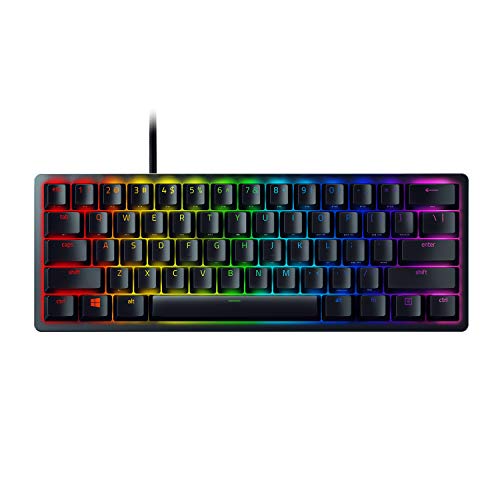
Razer Huntsman Mini Black
Ideal for competitive gamers who want a premium tenkeyless feel, even though it costs roughly $36 more than the Best Overall model.
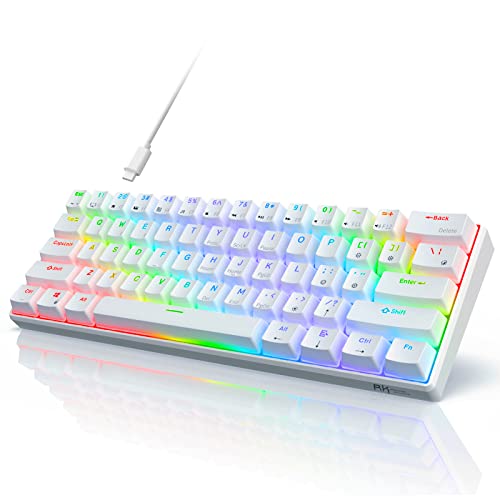
Royal Kludge RK61
Stands out with 8 monochrome and 18 RGB lighting modes, giving budget shoppers more visual customization than the pricier picks.
Also considered
Score Analysis
Key score advantages vs. runner-up (Razer Huntsman Mini)
Price Range
HyperX Alloy Origins 60 Aqua
$81.07
Razer Huntsman Mini Black
$89.99
Royal Kludge RK61
$39.99

Redragon K671
$27.59

Redragon K556
$46.99
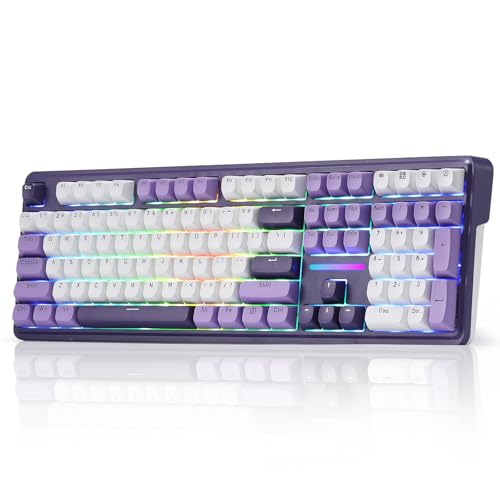
Redragon K745 PRO
$59.99

MageGee MKBox
$25.49

RK Royal Kludge RK61
$39.98

Redragon K689
$39.99

Royal Kludge S108
$47.99
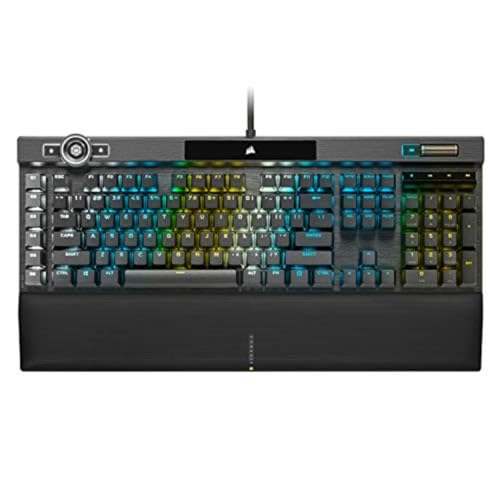
Corsair K100 RGB MX Speed
$249.99

MageGee MK-Star Blue
$29.99

Corsair K100 RGB OPX
$289.99
Spec Comparison
TL;DR: The HyperX Alloy Origins 60 Aqua packs an aircraft‑grade aluminum top plate, 45 g linear or tactile switches, and per‑key RGB into a sturdy 1.72 lb, 60% layout for $53.87.
The standout feature is its full‑size aircraft‑grade aluminum top plate, which reviewers say feels “tank‑like” and adds real rigidity to a compact board. Combined with HyperX Red linear or Aqua tactile switches that need only 45 g of force and actuate at 1.8 mm, the keyboard delivers a smooth, low‑noise experience. Its switches rate for 80 million keystrokes, and the per‑key RGB system offers 16,777,216 colors.
At 1.7196056436 pounds, the Alloy Origins 60 is lighter than the Royal Kludge S108 (2.2046 lb) but a touch heavier than the RK61 (1.2346 lb). Priced at $53.87, it sits comfortably in the mid‑range of 60% keyboards, offering more premium materials than many budget options while remaining affordable for most gamers.
Users love the solid feel and vivid lighting, noting that the detachable 1.8 m USB‑C cable and three adjustable tilt angles (3°, 7°, 11°) make set‑up easy on cramped desks. Professional reviewers highlight the rigid aluminum construction and fast actuation, though they warn that the 60% layout removes the function row and dedicated arrow keys, creating a learning curve. A recurring complaint is the ABS replacement spacebar, which can rattle and wear faster than the stock PBT caps.
Beyond the core specs, the board includes full N‑key rollover, 100 % anti‑ghosting, and you can save up to three onboard memory profiles with HyperX NGENUITY software. Media controls are accessible through an FN layer, and the 2‑year warranty adds peace of mind for frequent travelers or LAN‑event participants.
Pros
Cons
Best for: Gamers with limited desk space, LAN event attendees, mobile gamers, typists and programmers who prefer a compact, high‑quality keyboard.
Avoid if: You need a full‑size keyboard with dedicated function and media keys, or you’re on a tight budget.
“The aluminum body feels incredibly solid—no flex at all.”
“PBT keycaps are thick and don’t shine, even after months of use.”
TL;DR: The Razer Huntsman Mini Black delivers ultra‑fast 1.0 mm optical actuation, vibrant per‑key RGB and solid build at $89.99, but its plastic case and rattling stabilizers may deter users seeking a premium feel.
The standout spec is the 1.0 mm actuation point paired with ≈45 g linear optical switches (Gen2). That combination lets each keystroke register almost instantly; professional reviewers echo the claim and praise the “lightning‑fast” response. The keyboard also sports doubleshot PBT keycaps that resist shine and a detachable USB‑C cable that measures 1.8 m, giving you flexibility for cramped desk setups.
At $89.99, the Huntsman Mini sits above budget‑oriented 60% boards such as the Redragon K745 PRO, yet it’s lighter than competitors like the HyperX Alloy Origins 60 Aqua (1.7196 lb) and the Redragon K745 PRO (1.9401 lb). Its 1.1 lb weight makes it easy to transport for LAN trips, while the compact 11.56 in × 4.07 in footprint frees up valuable desk real‑estate.
User sentiment is largely positive: gamers love the 1.0 mm actuation point and the 16.8 million‑color Razer Chroma per‑key lighting. However, several reviews note that the plastic top case feels less premium than aluminum alternatives, and the proprietary stabilizers can produce a noticeable rattle on larger keys. A few owners also reported occasional defective switches out of the box, a common theme in consumer feedback.
Pros
Cons
Best for: Competitive gamers who need rapid actuation, a compact footprint and vibrant RGB, plus anyone who travels with their keyboard.
Avoid if: You prefer a heavier aluminum build, need dedicated arrow keys or a function row, or are looking for the cheapest 60% option.
“Perfect for gaming”
“The linear switches feel buttery and silent.”
TL;DR: The Royal Kludge RK61 packs hot‑swappable switches, RGB lighting with 18 modes, and dual wired‑wireless connectivity into a lightweight 60% chassis for just $39.99.
The standout feature of the RK61 is its hot‑swap PCB, which lets you swap 3‑pin or 5‑pin switches without soldering, paired with a vibrant RGB system offering 18 RGB modes and 8 monochrome modes. You also get Bluetooth 5.1 and a 2.4 GHz dongle, plus a detachable USB‑C cable, all powered by a 1450 mAh battery.
Compared with the other twelve keyboards in this roundup, the RK61 is on the lighter side at 1.2345886672 pounds (560 g), whereas the Redragon K689 weighs 1.9400679056 pounds and the Redragon K556 tops out at 2.20462262 pounds. It also lacks the built‑in tilt feet found on the K689, which offers a 2‑stage folding foot for ergonomic angle adjustment. The alternate RK61 model listed in the peer data is even lighter at 1.0582188576 pounds, but it shares the same compact dimensions of 289 mm × 103 mm × 39 mm. Several competitors ship with spare keycaps or switch pullers, while the RK61’s spec sheet doesn't list extra accessories.
Users consistently praise the hot‑swap capability and the keyboard’s compact 60% layout for freeing desk space, especially in small rooms or travel bags. The 4.6‑star rating from 6,431 reviewers highlights high satisfaction, though many note that the ABS double‑shot keycaps can develop shine over time and that stabilizers may feel a bit rattly. In practice, the 1450 mAh battery provides modest wireless endurance, which some reviewers find limiting for long gaming sessions.
Technical details reinforce its value: a 1000 Hz polling rate ensures responsive input, while the 2.0 mm actuation distance and 40 g operating force (Red switch) give a light, linear feel. Total travel is 4.0 mm, and the keyboard supports up to three Bluetooth‑paired devices, making it versatile for multi‑device setups.
Pros
Cons
Best for: Budget-conscious buyers seeking a reliable entry-level option
Avoid if: You want the best value‑per‑dollar in its price range
“10/10 recommend”
“isn’t gorilla-proof”
TL;DR: The Redragon K671 packs hot‑swappable linear Red switches, double‑shot PBT keycaps, and 11 RGB backlight modes into a full‑size board for just $27.59, offering solid value for budget‑focused gamers.
The standout feature is the hot‑swappable linear Red switches, which let you change switches without soldering, paired with double‑shot PBT keycaps that resist shine. The keyboard also offers 11 backlight modes, 5 brightness levels, and 5 light‑speed settings, all controllable through Redragon’s software.
Compared with peers, the K671 is heavier than the MageGee MKBox (800 g) and the RK61 (480 g), but it’s longer at 435 mm versus the MKBox’s 307.3 mm and the RK61’s 292 mm. Its height of 36 mm is slightly shorter than the MKBox’s 38.1 mm, while its width of 124 mm exceeds the MKBox’s 99.1 mm. Few competitors in this roundup list hot‑swap capability, making it a rare budget option with that flexibility.
User sentiment highlights the smooth feel of the linear Red switches and the durability of the PBT caps, while reviewers praise the full N‑key rollover for gaming accuracy. Common criticisms focus on the lack of per‑key RGB customization and a software interface that feels clunky. Professional reviewers note the high value of high‑end features at a sub‑$50 price point, though they flag occasional space‑bar wobble.
Additional technical notes include a 1800 mm USB‑C cable, full N‑key rollover, and a 24‑month warranty. The package comes with a USB cable, keycap remover, four spare Red switches, and two spare Red keycaps, ensuring you can start swapping right out of the box.
Pros
Cons
Best for: Budget-conscious buyers seeking a reliable entry-level option
Avoid if: Reliability and user satisfaction are your top concerns
TL;DR: The Redragon K556 offers a full‑size metal‑frame keyboard with hot‑swappable Outemu switches, vibrant RGB lighting, and a solid 4.6‑star rating for just $46.99.
The standout feature is its hot‑swappable switch design, backed by eight spare Outemu switches (two each of red, blue, brown, and black) that let you experiment without soldering. At a list price of $46.99, it lands squarely in the mid‑range tier while weighing 2.20462262 pounds, giving it a sturdy, desk‑stable feel.
Compared with its peers, the K556 shares the same weight as the Royal Kludge S108, yet it feels a bit heavier than the HyperX Alloy Origins 60 Aqua and the Royal Kludge RK61, both of which are under 2 pounds. It's priced similarly to the Royal Kludge S108 but sits below the HyperX model, making it a competitive option for budget‑conscious gamers.
Users consistently praise the keyboard’s “meaty” metal construction and the ease of swapping switches, noting that the build quality rivals more expensive units. Professional reviewers highlight the zero‑lag input and tactile feedback, while everyday owners love the 18 preset RGB modes despite the lack of per‑key customization. A few users complain that the front metal edge scratches desks and that the cable isn’t detachable, but most accept the trade‑offs for the price.
Beyond the hot‑swap system, the K556 delivers a full‑size 104‑key ANSI layout, double‑shot ABS keycaps with laser‑engraved legends, and Outemu Brown tactile switches as the default. The RGB backlight offers four brightness levels and 18 preset cycles, all controlled via Fn shortcuts without needing additional software.
Pros
Cons
Best for: Gamers and typists who want a well‑reviewed, durable mechanical keyboard with easy switch swapping at a mid‑range price.
Avoid if: You have limited desk space or need a highly portable, wireless solution.
“best keyboard I’ve ever owned”
TL;DR: The Redragon K745 PRO offers a full‑size, gasket‑mounted keyboard with hot‑swappable linear switches, 4000 mAh battery and vibrant RGB, all for $59.99 and a 4.6‑star rating.
This keyboard’s standout feature is its tri‑mode connectivity: you can switch between USB‑C wired, Bluetooth 5.0 and a 2.4 GHz dongle with a physical toggle. It also sports a gasket‑mounted PCB and a five‑layer sound‑dampening stack, while the pre‑lubed Mint Mambo linear switches need only 40 gf of actuation force and travel 2.0 mm (total travel 3.60 mm). The 4000 mAh Li‑Polymer battery and 16.8 million‑color South‑facing RGB lighting round out the spec sheet.
At 1.9400679056 pounds (880 g), the K745 PRO's heavier than the HyperX Alloy Origins 60 Aqua (1.7196056436 pounds) but lighter than the Royal Kludge S108 (2.20462262 pounds) and the Redragon K556 (2.20462262 pounds). Its 40 gf actuation force is lower than HyperX’s 45 g and far below Royal Kludge S108’s 60 gf, putting it in a comfortable range for everyday typing. The 2.0 mm travel matches the Royal Kludge RK61, while the total travel of 3.60 mm sits between HyperX’s 3.8 mm and RK61’s 4.0 mm.
Users consistently praise the vivid RGB spectrum and the quiet, smooth feel of the linear switches, noting that the hot‑swap sockets make upgrades painless. Professional reviewers highlight the premium feel of the gasket‑mount and the clean “thocky” sound out of the box. The most common complaints revolve around the flip‑feet, which many find flimsy, and a space‑bar that can sound hollow due to stabilizer rattle. The proprietary Redragon software also draws criticism for lacking open‑source support.
Beyond connectivity, the keyboard includes a USB‑C cable, a keycap and switch puller, a nano 2.4 GHz receiver with storage slot, and spare Mint Mambo switches. The PBT keycaps feature mixed‑color gamer‑style legends, and simple Fn shortcuts control the south‑facing LEDs. With a 1‑year warranty and a solid 4.6‑star rating from 2,046 reviewers, the K745 PRO balances feature depth with a mid‑range price point.
Pros
Cons
Best for: First‑time mechanical keyboard owners, students and office workers who want a full‑size board with wireless flexibility.
Avoid if: You need the lowest possible latency for competitive esports or prefer an open‑source firmware ecosystem.
TL;DR: At $26.99, the MageGee MK‑Box delivers a 68‑key 60% mechanical layout with an all‑metal top plate, detachable cable, and up to 15 preset backlight modes, making it a solid budget pick.
The MK‑Box packs a full‑size typing experience into a 12.1‑inch (307.3 mm) long chassis that weighs just 1.76 lb (800 g). Its 68‑key 60% layout includes arrow keys and function access, while the metal top plate adds a premium feel for a keyboard in this price range. Users can choose between tactile‑clicky blue switches (50–60 g actuation) or smoother linear red switches (~45 g), and the red variant even supports hot‑swapping.
Compared with other budget keyboards in this roundup, the MK‑Box is lighter than the Redragon K671 (939 g) and shorter than its 435 mm length, yet it offers more lighting options—~15 preset modes versus the K671’s 11. It's heavier than the RK61’s 480 g build, but its all‑metal construction feels sturdier than the plastic‑based RK61.
Reviewers consistently highlight the clicky feedback of the blue switches and the bright preset lighting as strong points for gaming and productivity. Professional reviewers note the adjustable kickstand and the gasket‑mounted design on red‑switch variants as improvements to ergonomics and acoustics. However, users also point out that the blue switches can be noisy in quiet settings, and the lack of RGB software customization limits personalization.
Pros
Cons
Best for: Budget‑conscious gamers, remote workers, or students who need a portable, durable mechanical keyboard without breaking the bank.
Avoid if: You require a silent typing experience, wireless/Bluetooth connectivity, or extensive RGB customization.
“Perfect size for gaming and work”
“Clicky sound is satisfying”
TL;DR: The RK Royal Kludge RK61 packs Bluetooth 5.0, a 2.4 GHz dongle, USB‑C wired mode, 13‑hour backlit battery life and hot‑swappable switches into a 1.06‑lb, 60% layout for under $40.
The RK61’s standout is its triple‑mode connectivity—Bluetooth 5.0, a 2.4 GHz dongle and a detachable USB‑C cable—plus a 1450 mAh battery that delivers about 13 hours of backlit use before needing a charge. At 1.0582188576 pounds (480 g) it feels light enough to move between desks, and the 8° tilt with an integrated wrist rest adds a modest ergonomic boost.
Compared with peers, the RK61 is notably lighter than the Redragon K689 (1.9400679056 lb) and the Royal Kludge S108 (2.20462262 lb), while matching the Royal Kludge RK61’s 39 mm height and 1450 mAh battery capacity. Its 50‑60 g operating force sits a bit higher than the Redragon K689’s 40 g red switches, which some users notice on longer typing sessions. The keyboard’s 18 dynamic RGB modes and 8 monochrome modes mirror the RGB offering of the Royal Kludge RK61, giving it a comparable lighting palette without extra cost.
Reviewers and everyday users alike praise the compact 292 mm × 102 mm × 39 mm footprint for freeing up desk space, and the hot‑swappable 3‑pin/5‑pin switch design earns praise for easy customization. Professional reviewers call the feature set “high value” for the price, noting that the full‑key remapping and macro support via RK’s software adds serious flexibility. On the flip side, the ABS plastic chassis feels “cheap‑feeling,” and the stock space‑bar stabilizers tend to rattle, a point echoed in multiple consumer comments. Bluetooth disconnections also occur, especially when the keyboard sits idle beyond the 3‑minute sleep timeout.
Pros
Cons
Best for: Budget-conscious buyers seeking a reliable entry-level option
Avoid if: You want the best value‑per‑dollar in its price range
“10/10 recommend”
“isn’t gorilla-proof”
TL;DR: The Redragon K689 offers a full‑size, gasket‑mounted layout with pre‑lubed linear switches, hot‑swap capability and per‑key RGB for $39.99, delivering a quiet, stable typing experience backed by a 4.6‑star rating.
The standout feature of the K689 is its gasket‑mounted PCB combined with three layers of foam (PO, IXPE, and bottom socket) plus a silicone gasket, which aims to dampen noise and add a cushioned feel. The keyboard measures 17.48028 in deep, 5.23621 in wide and only 1.45669 in tall, and it weighs 1.9400679056 lb, giving it a solid, desk‑friendly presence without being overly bulky.
Compared with the other twelve entries, the K689 sits in the mid‑weight range: it is heavier than the Royal Kludge RK61 models (which weigh around 1.06–1.23 lb) but lighter than the Redragon K556 and Royal Kludge S108, each tipping the scales at roughly 2.2 lb. In terms of price, it lands in the same bracket as the RK61, yet it packs more premium features such as a full‑size 108‑key layout, hot‑swappable sockets and a silicone gasket—specs that many of the compact or wireless peers lack.
User feedback repeatedly praises the buttery feel of the pre‑lubed Dragon Chant linear switches and the dramatic reduction in hollow key noises due to the multi‑layer foam stack. Professional reviewers echo this, noting that the gasket‑mounted design feels “premium” for a budget keyboard. Critics focus on the limited RGB software, which relies on FN‑key combos rather than a full‑featured UI, and on the lack of any wireless option.
Pros
Cons
Best for: Budget‑conscious buyers seeking a reliable entry‑level option
Avoid if: You want the best value‑per‑dollar in its price range
“Keys feel incredibly smooth and satisfying.”
“Great RGB lighting with 16 presets — makes the setup look cool.”
TL;DR: The Royal Kludge S108 delivers a vintage‑typewriter look, clicky blue mechanical switches and a massive 168 per‑key RGB library for $47.99, though its loud clicks and firmware quirks may deter quiet‑office users.
What really sets the S108 apart is its lighting depth: you can choose from 168 per‑key RGB effects plus 7 sidelight patterns, all programmable with FN+1 or FN+F11. Coupled with a full 108‑key rollover, every keystroke registers without ghosting, providing reliable performance for gaming marathons and long typing sessions.
Compared with the other keyboards in this roundup, the S108 matches the Redragon K556 in weight at 2.20462262 pounds, but it is heavier than the HyperX Alloy Origins 60 Aqua (about 1.72 pounds) and the RK61 models (around 1.23 pounds and 1.06 pounds). Its 1.8 m wired cable is the same length as HyperX’s, while many peers either lack a cable length spec or use shorter connections. In terms of lighting, the S108’s per‑key RGB library far exceeds the basic backlighting found on several competitors.
User sentiment highlights the keyboard’s “vintage typewriter” aesthetic, reinforced by round double‑color injection keycaps and an aluminum alloy frame with a matte finish. Reviewers praise the tactile click of the 60 gf ± 5 gf blue switches and the durability of a >50 million keystroke lifespan. However, a common complaint is that the firmware sometimes requires a wake‑up fix after boot, and reviewers describe the detachable ABS wrist rest as feeling cheap compared with higher‑end rests.
Pros
Cons
Best for: Typists who enjoy tactile clicky feedback, gamers seeking a unique retro‑styled centerpiece, and anyone who wants extensive per‑key RGB customization.
Avoid if: You need silent operation, a tight budget — it’s priced at $47.99 — or advanced macro software support.
“10/10 recommend”
“isn’t gorilla-proof”
TL;DR: At $249.99, the Corsair K100 RGB MX Speed earns a 4.4‑star rating, praised for its premium feel and deep customization but noted for its size, price and software complexity.
The Corsair K100 RGB MX Speed is a high‑end offering from the well‑known Corsair brand, costs $249.99 and holds a 4.4‑star rating from 4,575 reviewers in this 13‑product roundup. Its placement among the lineup reflects a strong brand reputation but a relatively high price point compared with many competitors.
Reviewers consistently highlight the keyboard’s solid aluminum construction, vibrant per‑key RGB lighting, and the extensive iCUE software that lets you program macros and lighting effects. Users love the detachable magnetic wrist rest and the dedicated macro keys that streamline streaming and gaming workflows. At the same time, many point out that the large footprint can dominate a desk, the price is steep for casual use, and the iCUE software can feel overwhelming or occasionally unstable.
Given only its price and rating, the K100 sits near the premium end of the selection. It appeals to enthusiasts who value build quality and customization, while budget‑focused buyers may look elsewhere. The high review count suggests a solid user base, but the mixed sentiment around size and complexity signals that it’s not a universal fit.
Pros
Cons
Best for: Buyers willing to invest in a proven, high‑quality option
“The magnetic wrist rest is one of the most comfortable available.”
“iCUE software can be complex and occasionally unstable.”
TL;DR: At $29.99 the MageGee MK‑Star Blue scores a solid 4.2‑star rating, praised for its clicky blue switches, sturdy metal top plate and compact design, though its static blue lighting and loud spacebar may bother quiet settings.
The MageGee MK‑Star Blue is a budget‑friendly mechanical keyboard priced at $29.99. It carries a 4.2‑star rating from 4,078 reviewers and lands near the bottom of the 13‑product lineup, ranking #12.
Reviewers consistently highlight the satisfying clicky feel of the blue switches, the solid feel of the metal top plate, and the convenience of plug‑and‑play use across major operating systems. They also appreciate the included extra keycaps and the compact layout that saves desk space. Common criticisms focus on the static blue backlight that doesn’t shift color, the noticeably loud spacebar, and the fixed USB‑A cable that limits cable‑management options.
Given its low price and decent rating, the keyboard slots in as an affordable entry point for gamers and typists who value tactile feedback and durability over premium lighting or detachable cables. It sits below the higher‑rated, slightly pricier competitors but still offers a respectable experience for its cost.
Pros
Cons
Best for: Entry-level buyers or those on a tight budget
TL;DR: The Corsair K100 RGB OPX costs $249.99, holds a 4.4‑star rating from 4,575 reviewers, receives praise for its speed and deep customization yet draws criticism for its size, noise and software complexity.
The Corsair K100 RGB OPX is Corsair’s flagship mechanical keyboard and sits at the top end of the price range in this 13‑product roundup. With a price of $249.99 and a solid 4.4‑out‑of‑5 rating based on 4,575 reviews, it scores lower than many of its peers but still lands in the upper‑mid tier of user satisfaction.
Users consistently highlight the keyboard’s ultra‑fast response and the breadth of iCUE customization, noting that the dedicated macro keys and rotary wheel add real value for gamers and streamers. At the same time, reviewers frequently mention the large footprint, the loud nature of the OPX switches, and a steep learning curve with the iCUE software as pain points. The non‑removable braided cable also limits portability, which many find inconvenient for smaller setups.
In the context of this lineup, the K100 RGB OPX offers a premium experience for those willing to pay a premium price. Its rating places it above budget‑oriented models but below some mid‑range options that score higher in user satisfaction. If you prioritize speed and extensive programmability above desk space and quiet operation, this keyboard fits the bill.
Pros
Cons
Best for: Buyers willing to invest in a proven, high‑quality option
“The magnetic wrist rest is one of the most comfortable available.”
“iCUE software can be complex and occasionally unstable.”
Breakdown
HyperX Alloy Origins 60 Aqua
Pros
Razer Huntsman Mini Black
Pros
Royal Kludge RK61
Pros
Cons
Redragon K671
Pros
Cons
Based on scoring data and product specs
Personalized picks
Best Overall Pick
HyperX Alloy Origins 60 Aqua
Best OverallBest for: Buyers willing to invest in a proven, high-quality option
Razer Huntsman Mini Black
Best for: Buyers willing to invest in a proven, high-quality option
$89.99+$8.92 vs winner
Skip Corsair K100 RGB OPX if…
You're on a tight budget or only need basic functionality
The HyperX Alloy Origins 60 Aqua takes the top spot thanks to its stellar 4.6 / 5 rating from 14,910 reviewers, 100 % anti‑ghosting with full N‑key rollover, and a switch lifespan rated at 80 million keystrokes. Its 45 g linear or tactile HyperX Aqua switches and per‑key RGB offering 16,777,216 colors round out a well‑balanced package for both gaming and typing.
The Razer Huntsman Mini Black lands as the runner‑up, ideal if you need ultra‑fast optical switches for competitive play. It features a 1.0 mm actuation point, Rapid Trigger mode for sub‑millisecond response, and five onboard memory profiles, and a lightweight 1.1 lb chassis houses detachable USB‑C connectivity.
For tighter budgets, the MageGee MKBox at $26.99 delivers core functionality at a pocket‑friendly price; the Redragon K556 at $46.99 provides reliable performance; and the Corsair K100 RGB OPX at $249.99 offers premium build quality and high‑end features for enthusiasts willing to invest.
Pick the HyperX Alloy Origins 60 Aqua today and enjoy a top‑rated mechanical keyboard that covers all your needs.
Yes. The HyperX retails for about $54, roughly $36 less than the Razer’s $90 price tag, while still offering full‑size RGB per‑key lighting, a detachable USB‑C cable and a solid 80 million‑stroke switch lifespan. For most gamers the lower cost gives it a clear value advantage.
Please sign in to leave a review
No reviews yet. Be the first to review!
