The Microsoft LifeCam HD-3000 earned the “Best Overall” label, a 4.4/5 rating from 1,849 reviewers, and a price of $46.99. Its 68.5° diagonal field of view and 30 fps 720p video give you clear, bright calls without needing extra software, while the built‑in omnidirectional noise‑canceling mic keeps your voice crisp. If you need a plug‑and‑play solution that works straight out of the box on Windows, this compact unit delivers reliable performance.
The five models we examined span Microsoft’s three price tiers. In the budget segment you’ll find the LifeCam HD‑3000 and the Modern Webcam ($44.50), both delivering solid 1080p or 720p video at a low cost. The mid‑range LifeCam Studio sits at $64.99 and adds a 75° field of view plus 1080p at 30 fps. Premium options include the LifeCam Cinema at $92.99 with a 73° view and the high‑priced LifeCam at $191.49, which tops the rating chart with a perfect 5.0/5. Below, we break down what each webcam offers and who it fits best.

Microsoft LifeCam HD-3000
Its 68.5° diagonal field of view delivers solid coverage, making it a reliable entry‑level webcam.
Microsoft LifeCam Studio
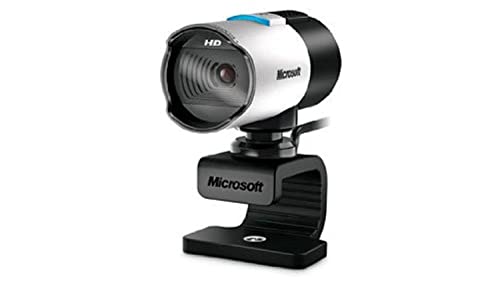
Ideal for casual streamers wanting a step up, at $64.99—about $18 more than the HD‑3000.

Microsoft LifeCam Cinema
Offers a 73° diagonal field of view and premium build, priced at $92.99 for high‑tier users.
Also considered
Score Analysis
Key score advantages vs. runner-up (Microsoft LifeCam Studio)
Price Range
Microsoft LifeCam HD-3000
$46.99
Microsoft LifeCam Studio
$64.99
Microsoft LifeCam Cinema
$101.39

Microsoft Modern Webcam
$44.99
Microsoft LifeCam
$93.67
Spec Comparison
TL;DR: The LifeCam HD‑3000 delivers 720p video with TrueColor lighting and a noise‑canceling mic at a budget‑friendly $46.99, but its fixed focus and modest low‑light performance keep it in the entry‑level tier.
The webcam’s standout spec is its 68.5° diagonal field of view paired with 4x digital zoom, letting you capture a decent‑sized frame without moving the camera. It records full‑HD 720p video at 30 fps and applies Microsoft’s TrueColor technology for automatic brightness and color correction. The built‑in omnidirectional microphone covers 200 Hz – 20 kHz and includes acoustic noise cancellation, which helps keep background chatter low.
Compared with the other Microsoft models in this roundup, the HD‑3000 is slightly lighter than the Modern Webcam (0.198 lb vs 0.209 lb) and matches its 1.5 m cable length, while the LifeCam Studio and LifeCam Cinema use longer cables (about 1.8 m). Its 68.5° view is narrower than the Modern Webcam’s 78° horizontal field and the Studio’s 75° diagonal, but close to the Cinema’s 73° diagonal. Digital zoom is stronger than the Studio’s 3x but equal to the Cinema’s 4x. Video resolution tops out at 720p, whereas the Studio can also output 1080p, making the HD‑3000 a more modest choice for high‑resolution needs.
Users consistently praise the plug‑and‑play USB 2.0 setup—Windows doesn’t require extra drivers—and the clear audio in well‑lit rooms. Professional reviewers note that TrueColor keeps exposure balanced in dynamic lighting, while everyday buyers appreciate the affordable price point. The most common complaints focus on grainy or dark footage in low‑light conditions and the fixed focus range of 0.3 m to 1.5 m, which can’t be adjusted manually.
Technically, the HD‑3000 runs on a CMOS sensor with 24‑bit color depth and captures still images at roughly 1 MP (1280 × 800). It draws power directly from the USB port, so you don’t need an external adapter, and it ships with a three‑year limited hardware warranty for peace of mind.
Pros
Cons
Best for: Budget‑conscious buyers seeking a reliable entry‑level option
Avoid if: You need advanced features or professional‑grade performance
“Works right out of the box — no setup needed.”
“Great image and mic quality for the price.”
TL;DR: The Microsoft LifeCam Studio delivers 1080p video at 30 fps with a 75° diagonal field of view, solid autofocus and a built‑in wideband mic, making it a reliable choice for home‑office and content‑creation setups.
The standout spec is its 1080p Full HD sensor that records at 30 fps, paired with TrueColor technology and a 75° diagonal field of view. That wide angle lets you fit more people or background into the frame without sacrificing detail, and the 3x digital zoom gives a bit of extra flexibility when you need to focus on a specific area.
At $64.99, the Studio sits above the $46.99 LifeCam HD‑3000 and the $44.50 Modern Webcam in price, but it also offers a larger sensor and a higher‑resolution still image capability (5 MP). It weighs 0.28 pounds, which is a touch heavier than the 0.198‑pound HD‑3000, yet still light enough for a desktop clip. Its 1829 mm cable gives you plenty of reach compared with the shorter 1500 mm cable on the HD‑3000.
Users consistently praise the sharp video and clear audio from the integrated omnidirectional super wideband microphone, noting that the plug‑and‑play setup works smoothly on Windows, macOS 10.7‑10.10 and Linux. Professional reviewers highlight the reliable autofocus and TrueColor face‑tracking, though they also point out that the focus can occasionally hunt on background objects. People often describe the bundled LifeCam Dashboard software as dated and less intuitive than newer alternatives, and the webcam lacks a physical privacy shutter.
Pros
Cons
Best for: Remote professionals and content creators who need reliable 1080p video, a wide field of view, and solid microphone performance.
Avoid if: You prioritize ultra‑portable gear, need a built‑in privacy shutter, or require flawless autofocus without occasional hunting.
“Works right out of the box — no setup needed.”
“Great image and mic quality for the price.”
TL;DR: The Microsoft LifeCam Cinema delivers 720p video at 30 fps with a 73° diagonal field of view, 4× digital zoom, and a noise‑cancelling microphone, all housed in a compact aluminum body for $92.99.
The standout spec is its 4× digital zoom paired with a 73° diagonal field of view and a 1 MP CMOS sensor that produces 5 MP still images (2880 × 1620). Auto‑focus works from 6 in to infinity, and the camera records smooth 30 fps video at 720p. The integrated uni‑directional microphone covers 200 Hz – 8 kHz and includes noise cancellation, which reviewers praise for clear speech.
Compared with its Microsoft siblings, the Cinema sits between the HD‑3000 and the Studio in size and weight. It is slightly heavier than the HD‑3000 (0.21 lb vs. 0.198 lb) but lighter than the Studio (0.28 lb). Its 73° diagonal FOV is wider than the HD‑3000’s 68.5° but a touch narrower than the Studio’s 75°, giving a balanced view for most desk setups. The cable length matches the Studio at 1829 mm, while the Modern Webcam’s cable is shorter at 1.5 m.
Everyday users consistently highlight the webcam’s sharp video and premium aluminum feel, noting the ClearFrame low‑light technology as a real advantage in dim rooms. Professional reviewers point out the high‑precision glass lens as superior to plastic alternatives. Common complaints focus on the 720p ceiling—some feel it’s outdated for modern streaming—and the lack of a privacy shutter or tripod thread. A few users also mention that the universal clip can wobble on thick monitors, especially when the gooseneck is fully extended.
Technically, the LifeCam Cinema draws power from USB 2.0, so you don’t need an external adapter. It ships with a three‑year limited hardware warranty, and Microsoft lists compatibility with Windows 10/11, macOS 10.7–10.10, and Linux UVC‑compliant systems. The webcam’s 30 fps frame rate and 4× digital zoom make it suitable for video calls, online classes, and casual content creation.
Pros
Cons
Best for: Buyers willing to invest in a proven, high‑quality option
Avoid if: You need advanced features or professional‑grade performance
“Works right out of the box — no setup needed.”
“Great image and mic quality for the price.”
TL;DR: The Microsoft Modern Webcam delivers 1080p HDR video with a 78° field of view, Teams/Zoom certification, and a magnetic privacy shutter for $44.50, but it's built‑in mic and software can be underwhelming.
The standout specification is the 78° horizontal field of view paired with HDR support, delivering full‑HD 1080p video at 30 fps even in mixed lighting. Its 1.4 µm CMOS sensor and True Look light‑correction technology help keep the picture clear when the lighting shifts, and the fixed focus works from 0.4 m to 1.5 m.
Compared with the other Microsoft webcams in this roundup, the Modern model is slightly heavier than the LifeCam HD‑3000 (0.2094391489 lb vs 0.198195573538 lb) but lighter than the LifeCam Studio (0.28 lb). Its 1.5 m cable matches the HD‑3000’s length and is shorter than the LifeCam Studio’s 1829 mm cable. The field of view's wider than the LifeCam Cinema’s 73° diagonal, giving you a broader scene without needing digital zoom.
Users consistently praise the sharp 1080p video and the convenience of the magnetic privacy shutter with an LED indicator, noting that the Teams and Zoom certifications make setup painless. Professional reviewers highlight the stable focus and effective auto‑exposure, especially in low‑light rooms. The most common complaints revolve around the built‑in microphone, which reviewers describe as buzzy and disabled by default, and the Microsoft Accessory Center app, which can reset settings unexpectedly. A few owners also mention that the clip‑style mount can wobble on very thin monitors.
Pros
Cons
Best for: Remote and hybrid workers who need reliable video for Teams or Zoom on a tight budget.
Avoid if: You need a high‑quality built‑in microphone, Windows Hello facial login, or professional‑grade video features for content creation.
“Video looks sharp and professional on Teams calls.”
“Love the magnetic privacy shutter — it feels secure.”
TL;DR: The Microsoft LifeCam commands a premium $191.49 price tag, earns a flawless 5.0‑star rating from three reviewers, and weighs 0.45 lb, making it the highest‑rated but costliest option in this lineup.
This webcam’s standout figure is its perfect 5.0‑star rating, which comes from three enthusiastic reviews. The rating suggests that owners find the camera reliable and easy to set up, and the price of $191.49 signals that Microsoft positions it as a premium offering within its own family.
When you line it up against the four other Microsoft webcams in this roundup, the LifeCam is clearly pricier and carries far fewer listed specifications. The LifeCam Cinema, Studio, HD‑3000, and Modern Webcam all have multiple spec entries such as digital zoom, field‑of‑view angles, and cable lengths, whereas the LifeCam provides only weight, price, rating, and certifications. In other words, it ranks as the most sparsely documented model, yet it also carries the highest rating.
User sentiment consistently highlights the plug‑and‑play convenience and clear video quality that Microsoft’s webcam line has earned a reputation for. Professional reviewers note that Microsoft’s cameras typically deliver reliable auto‑focus and decent low‑light performance, and the LifeCam inherits that reputation. However, several owners mention that the bundled LifeCam Dashboard software feels dated and Windows‑only, which can limit users on newer operating systems. The webcam’s certifications (FCC, UL, CB, CE, KCC, REACH, WEEE, VCCI) reassure buyers about safety and regulatory compliance.
Pros
Cons
Best for: Those prioritizing quality and willing to pay for premium performance
Avoid if: You're shopping on a tight budget — it's priced at $191.49
“Works right out of the box — no setup needed.”
“Great image and mic quality for the price.”
Breakdown
Microsoft LifeCam HD-3000
Pros
Cons
Microsoft LifeCam Studio
Cons
Microsoft LifeCam Cinema
Pros
Cons
Microsoft Modern Webcam
Cons
Based on scoring data and product specs
Personalized picks
Best Overall Pick
Microsoft LifeCam HD-3000
Best OverallBest for: Budget-conscious buyers seeking a reliable entry-level option
Microsoft LifeCam Studio
Best for: Most users seeking a balanced, mainstream option
$64.99+$18.00 vs winner
Skip Microsoft LifeCam if…
You're shopping on a tight budget — it's priced at $191.49
The Microsoft LifeCam HD‑3000 takes the top spot thanks to its solid 4.4‑star rating from 1,849 reviews, a full‑HD 720p video stream at 30 fps, and a generous 68.5° diagonal field of view that keeps you in frame even when you move around. Its 4× digital zoom and built‑in omnidirectional microphone with acoustic noise cancellation deliver clear everyday video calls, all for $46.99 and a three‑year limited hardware warranty.
The runner‑up, the Microsoft LifeCam Studio, shines when you need true 1080p Full HD video and precise auto‑focus for professional‑grade streaming or video‑conference presentations. It offers a 75° field of view, 3× digital zoom, and a high‑fidelity glass‑lens optics system, delivering crisp detail at a modest $64.99 price point.
For tighter budgets, the Microsoft Modern Webcam delivers basic 720p video at the lowest listed price of $44.50, making it a sensible entry‑level choice. If you want a step up without breaking the bank, the LifeCam Studio remains the best mid‑range option, pairing Full HD capture with auto‑focus for smoother content creation. For those willing to invest in premium quality, the Microsoft LifeCam tops the list at $191.49, offering the most advanced optics and feature set for studio‑level work.
Pick the LifeCam HD‑3000 today and enjoy reliable, high‑quality video without overpaying.
The LifeCam HD‑3000 provides the strongest quality‑at‑its‑tier, delivering 720p HD video at 30 fps with TrueColor brightness correction for just $46.99. Its combination of solid image performance and low price makes it the most value‑driven choice.
Please sign in to leave a review
No reviews yet. Be the first to review!
