Our top pick is the Asus VG249QL3A, which delivers a 23.8‑inch Full HD Fast IPS panel, a 180 Hz refresh rate and a 1 ms (GTG) response time—all for $119.00 (list $169.00). With a 4.5/5 rating from 9,279 reviewers and built‑in FreeSync Premium plus G‑SYNC compatibility, it's ultra‑smooth motion and low input lag without breaking the bank.
The review covered 11 monitors that span three price tiers. The budget tier includes the Asus VG249QL3A, Sansui ES‑G24C1L, MSI PRO MP273L and BenQ GW2790C, all are priced under $120. Mid‑range options are the AOC 27G4H and Acer Nitro 27‑inch, while the premium tier features the Gigabyte GS27FC, LG 32GS60QC‑B, InnoView 27‑inch 4K Portable Monitor and LG 34G600A‑B, with prices ranging up to $386.90.
Below, the breakdown of each tier spotlights the standout features and helps match a high‑refresh‑rate monitor to gaming or productivity needs.

Asus VG249QL3A
Offers a DisplayPort 1.2 and dual HDMI 2.0 inputs, giving flexible connectivity for a budget‑friendly setup.

Sansui ES-G24C1L
Ideal for gamers on a tight budget who need a 3.5 mm audio jack and DisplayPort 1.4, and it’s about $29 cheaper than the Asus.

LG 34G600A-B
Features a deep‑stand depth of 249.1 mm, allowing a larger 34‑inch panel that the other picks don’t offer, which justifies its premium price.
Also considered
Score Analysis
Key score advantages vs. runner-up (Sansui ES-G24C1L)
Price Range
Asus VG249QL3A
$157.99
Sansui ES-G24C1L
$89.99
LG 34G600A-B
$387.08

LG 32GS60QC-B
$248.31

BenQ GW2790C
$139.99

AOC 27G4H
$139.99
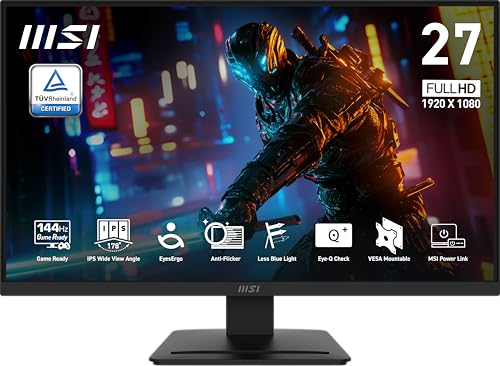
MSI PRO MP273L
$92.95

Acer Nitro 27-inch
$139.99
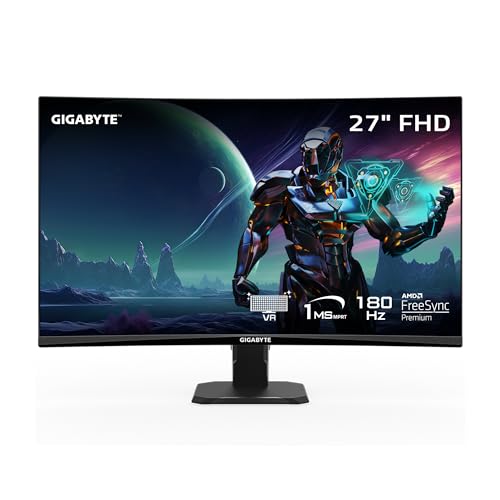
Gigabyte GS27FC
$159.99

InnoView 27-inch 4K Portable Monitor
$399.99

Sansui 27-inch
$149.99
Spec Comparison
TL;DR: The ASUS VG249QL3A delivers a blistering 180 Hz refresh rate and 1 ms GTG response on a 24‑inch Fast IPS panel, all for a budget‑friendly $119 price.
This monitor’s standout spec is its 180 Hz refresh rate paired with a 1 ms GTG response time, which ASUS markets as ideal for competitive gaming. The Fast IPS panel also offers 99% sRGB coverage and a typical brightness of 350 cd/m², giving vivid colors without sacrificing speed.
Compared with the other ten entries, the VG249QL3A is lighter than the AOC 27G4H and slimmer than the Acer Nitro 27‑inch, yet it’s heavier than the Sansui ES‑G24C1L. It also provides more connectivity options than the BenQ GW2790C, which includes a USB‑C port that the ASUS model lacks.
Users consistently praise the buttery‑smooth gameplay and the fully adjustable stand—height, tilt, swivel, and pivot—while noting that the built‑in 2 W × 2 speakers sound tinny. Professional reviewers highlight the ELMB technology for cutting motion blur and the dual adaptive‑sync support (FreeSync Premium and G‑Sync compatible) as good value at this price point.
Pros
Cons
Best for: Competitive gamers and esports enthusiasts who want ultra‑high refresh rates without breaking the bank.
Avoid if: You need higher resolutions (1440p/4K), true HDR support, or high‑fidelity built‑in audio.
“Incredibly smooth and responsive — perfect for FPS games.”
“The height and pivot adjustments are a game-changer for my dual-monitor setup.”
TL;DR: The Sansui ES‑G24C1L delivers a 24‑inch VA panel with 160 Hz refresh, 1 ms response and 1500R curvature at a budget‑friendly $89.98, though it lacks built‑in speakers and has modest color accuracy.
The standout spec is the 160 Hz refresh rate paired with a 1 ms MPRT response time, which promises fluid motion on its 24‑inch VA screen. Its 1500R curvature and 3000:1 contrast ratio help create an immersive gaming feel, while HDR10 support and 110% sRGB coverage boost color range.
At $89.98, this monitor undercuts the price points of most peers in the roundup. It also weighs about 7.7 lb, making it noticeably lighter than the MSI PRO MP273L (13.0 lb) and lighter than the Asus VG249QL3A (≈11.9 lb). Its 395 mm height is shorter than the Asus VG249QL3A’s 525 mm stand height, and the 24‑inch panel is smaller than the 27‑inch displays used by the AOC 27G4H, BenQ GW2790C, Acer Nitro 27‑inch and Gigabyte GS27FC.
Reviewers repeatedly praise the smooth gameplay that the high refresh rate and FreeSync deliver, calling the motion handling “excellent” for the price. Professional reviewers note the deep blacks from the 3000:1 contrast ratio, but they also flag inconsistent color accuracy—around a 65 % rating—as a drawback for any creative work. Users also point out the plastic stand can feel a bit wobbly and the lack of built‑in speakers means you’ll need external audio.
Beyond gaming, the monitor offers a matte anti‑glare finish, 300 nits brightness, a 75 mm × 75 mm VESA mount, and tilt adjustment from –5° to +15°. Connectivity includes a single HDMI 2.0 port, a DisplayPort 1.4, and a 3.5 mm audio jack, plus an HDMI cable and external power adapter in the box.
Pros
Cons
Best for: Budget-conscious gamers who want a high‑refresh, low‑motion monitor without breaking the bank.
Avoid if: You need accurate color reproduction, high‑quality built‑in audio, or a sturdier stand for intensive use.
“The smooth gameplay enabled by the high refresh rate and low input lag.”
“The lack of built-in speakers (on ES‑G24C1L) or poor audio quality (on ES‑G24C1) is a frequent drawback.”
TL;DR: The LG 34G600A-B offers a 34‑inch 160 Hz ultrawide VA panel with HDR10, deep 4000:1 contrast and adaptive‑sync, but its premium $386.90 price and modest speakers may deter budget shoppers.
This monitor’s headline spec is a 34‑inch 1800R curved VA LCD that runs at 160 Hz refresh, supports HDR10, and delivers a typical contrast ratio of 4000:1. The panel covers 99% of the sRGB gamut and packs 110 PPI pixel density, while the response time sits at 5 ms (GtG) with a 1 ms motion blur reduction mode.
Compared with the other ten entries, the LG is noticeably heavier at 22.0 lb, out‑weighing the InnoView portable (≈12.54 lb) and the Gigabyte GS27FC (≈9.98 lb). Its stand‑up depth of 249.1 mm is deeper than the LG 32GS60QC‑B’s 226.5 mm and the AOC 27G4H’s 227.6 mm, while the 809 mm width makes it the widest among the listed peers. Refresh‑rate-wise, its 160 Hz sits between the InnoView’s 120 Hz UHD mode and its 288 Hz FHD mode, offering a balanced high‑speed experience without reaching the extreme 288 Hz ceiling. Brightness is modest at a typical 300 cd/m², which is lower than the InnoView’s 500 cd/m², but still adequate for most indoor gaming setups.
Reviewers repeatedly praise the monitor’s immersive ultrawide field of view and the buttery‑smooth feel of the 160 Hz panel, especially when paired with FreeSync Premium or G‑SYNC compatibility. Professional reviewers note the VA panel’s deep blacks and the 1800R curvature that “offers immersion without excessive distortion.” On the downside, users mention that the built‑in 2 × 5 W MaxxAudio speakers feel thin, the default color calibration can appear warm or oversaturated, and the lack of any USB hub limits peripheral connectivity. Reviewers say the visual experience is strong, but audio and color‑critical work may fall short of expectations.
Pros
Cons
Best for: Buyers willing to invest in a proven, high-quality option
Avoid if: You're shopping on a tight budget — it's priced at $386.90
“Best Ultra Wide Curved Monitor”
TL;DR: The LG 32GS60QC‑B delivers a 31.5‑inch 1000R curved QHD panel with a 180 Hz refresh rate, 1 ms GTG response, and strong contrast, but its VA panel can show ghosting in fast scenes.
The standout spec combines a steep 1000R curvature with a 180 Hz refresh rate and AMD FreeSync Premium. At 31.5 inches the screen fills a wide field of view, while the VA panel offers a 3000:1 typical contrast ratio and 99% sRGB coverage for vivid colors.
Compared with the other ten monitors, the LG is larger than the 27‑inch Sansui and AOC models and heavier than the Sansui curved version (3500 g) but similar in weight to the Gigabyte GS27FC (9.98 pounds). Its 180 Hz capability matches the Sansui’s DisplayPort rate, yet the LG adds a deeper contrast ratio and a higher‑resolution 2560 × 1440 panel that the smaller competitors lack.
Reviewers praise the immersive curve and the deep blacks that the 3000:1 contrast delivers, especially in single‑player RPGs. However, many note visible ghosting and occasional overshoot in the “Faster” overdrive mode, and the VRR implementation can cause flicker. The stand only tilts from –5° to +15°, so height adjustment isn’t available.
Pros
Cons
Best for: Casual and mid‑core gamers who value immersion and visual depth, especially for single‑player RPGs.
Avoid if: You need a height‑adjustable stand or require pixel‑perfect motion clarity for competitive esports.
TL;DR: The BenQ GW2790C delivers a 27‑inch IPS panel with 144 Hz refresh, 99% sRGB coverage and strong eye‑care features, all at a modest $139.99 price point.
The standout specification is its 144 Hz refresh rate paired with a 5 ms response time, which makes cursor movement and scrolling feel exceptionally smooth on a 27‑inch Full HD IPS screen. Brightness sits at 300 cd/m² and the contrast ratio is 1500:1, while the panel covers 99% of the sRGB gamut, offering vivid colors for everyday work and casual gaming.
Compared with the other ten monitors in this roundup, the GW2790C is lighter than the AOC 27G4H (13.5 lb vs 18 lb) and slimmer than both the AOC (207 mm vs 240 mm depth with stand) and the Acer Nitro (207 mm vs 263 mm). It also provides a USB‑C port with DisplayPort Alt Mode, a connectivity option that many peers, such as the AOC and Acer models, do not list.
Reviewers consistently praise the monitor’s eye‑care suite—Flicker‑Free, Low Blue Light and the Visual Optimizer—citing reduced eye strain during long work sessions. The 144 Hz panel also delivers buttery‑smooth scrolling. Common complaints focus on the lack of height adjustment, the USB‑C port’s inability to deliver Power Delivery, and the modest 2 W × 2 built‑in speakers.
Additional technical details include an ENERGY STAR rating of 8.0, a TÜV‑certified 4‑Star eye‑comfort rating, and a tilt range of –5° to +20°. The stand supports a 100 × 100 mm VESA mount, letting you switch to a wall‑mount or ergonomic arm if you need more adjustability.
Pros
Cons
Best for: Remote and hybrid workers needing long‑hour eye comfort, office professionals handling documents and light gaming.
Avoid if: You're shopping on a tight budget — it's priced at $139.99
“A productivity monitor with a gamer’s heart”
“Best-in-class eye care”
TL;DR: The AOC 27G4H delivers a blister‑fast 200 Hz refresh and 0.3 ms MPRT response on a 27‑inch Fast IPS panel, backed by excellent color accuracy and a 3‑year warranty.
What really sets this monitor apart is its 200 Hz refresh rate paired with a 1 ms GTG response and a 0.3 ms MPRT response time, which reviewers say makes fast‑paced games feel buttery smooth. The Fast IPS panel offers a color accuracy of <2 ΔE, 120–121% sRGB coverage, 92% DCI‑P3, and HDR10 support, while Adaptive Sync works with both AMD FreeSync Premium and NVIDIA G‑Sync Compatible graphics cards.
At 18.0007436923 pounds, it’s heavier than the BenQ GW2790C (13.5 lb), Acer Nitro (13.78109599762 lb), Gigabyte GS27FC (9.98 lb), Asus VG249QL3A (11.904962148 lb) and MSI PRO MP273L (13.0 lb). Its 227.6 mm depth (240.0 mm with stand) exceeds the BenQ’s 207 mm, Gigabyte’s 208 mm, Asus’s 208 mm and MSI’s 201 mm, while only the Acer’s 263 mm stand‑depth surpasses it. The 528.6 mm height also out‑sizes the BenQ’s 450 mm and Acer’s 457 mm, giving you a larger physical presence on the desk.
User sentiment highlights the ultra‑smooth gameplay and the ease of adjusting height (130 mm), tilt, swivel and pivot, which many call “ergonomic freedom”. The monitor’s glossy finish draws praise for its vivid look, yet several users note reflections in bright rooms. Common complaints focus on the lack of built‑in speakers, the Full HD (1920 × 1080) resolution on a 27‑inch screen leading to lower pixel density, and the single HDMI 2.0 port limiting multi‑monitor setups.
Technically, the panel delivers 300 cd/m² brightness, a static contrast ratio of 1000:1 and a staggering 80,000,000:1 dynamic contrast ratio, though HDR10 impact is modest due to the 300 cd/m² peak brightness. The 0.3114 mm pixel pitch contributes to the overall image clarity, and the monitor consumes just 23.0 W typical power, meeting CE, FCC and RoHS certifications.
Pros
Cons
Best for: Competitive gamers who need ultra‑smooth motion without breaking the bank.
Avoid if: You need a bright, glare‑free display for a well‑lit workspace or require higher resolution for professional content creation.
“perfect price and quality. can't beat this deal.”
TL;DR: The MSI PRO MP273L offers a 27‑inch IPS panel with a 144 Hz refresh rate, AMD FreeSync and eye‑care features at a budget‑friendly $92.95, though its stand lacks height and swivel adjustments.
This monitor’s headline spec is the 144 Hz refresh rate paired with a 4 ms GTG response time, which makes fast‑moving content feel fluid. The IPS panel delivers 102% sRGB coverage and a 250 cd/m² brightness level, while the anti‑glare coating keeps reflections down in bright rooms. MSI’s EyesErgo suite—anti‑flicker, low blue light and TÜV Rheinland certification—helps reduce eye strain during long sessions.
Compared with the other ten monitors in the roundup, the PRO MP273L sits in the middle of the weight range: it’s heavier than the Sansui ES‑G24C1L (about 7.7 lb) but lighter than the AOC 27G4H (around 18 lb). Its 201 mm depth with the stand is slimmer than the Asus VG249QL3A’s 208 mm, and its 437.52 mm height with the stand is lower than the Asus (525 mm) and AOC (528.6 mm) models. The 100 × 100 mm VESA mount is larger than the Sansui’s 75 × 75 mm pattern, giving you more flexibility for wall mounting. However, the MSI only provides a single HDMI 2.0 port and a VGA port, whereas some peers like the Asus include two HDMI inputs and a DisplayPort.
Reviewers consistently praise the smooth motion from the 144 Hz panel and the color consistency of the IPS screen, noting that the monitor feels “sharp” for everyday work and casual gaming. Reviewers frequently mention the eye‑care features as a genuine comfort boost during marathon spreadsheets or streaming sessions. On the downside, the fixed‑tilt stand (‑5° to +20°) lacks height, swivel or pivot adjustments, which users who need ergonomic flexibility find limiting. The external 12 V DC/2.5 A power adapter also adds a bit of clutter compared with monitors that use an internal supply, and there are no built‑in speakers, so you’ll need external audio.
Pros
Cons
Best for: Hybrid work‑gaming users who need a budget‑friendly monitor with high refresh rates and eye‑care features.
Avoid if: You need extensive ergonomic adjustments, built‑in audio, or a premium‑grade design.
TL;DR: The Acer Nitro 27‑inch offers a blistering 280 Hz refresh rate, 1 ms VRB response and a 1500R curve for smooth, immersive gaming at a $139.99 price point.
The monitor’s headline spec is its “Up to 280 Hz” refresh rate paired with a 1 ms VRB response time, which professional reviewers call a standout for competitive play. Its 1500R curvature (1500 mm radius) creates a wrap‑around feel without the distortion you sometimes see on tighter curves.
At 13.78 lbs, the Nitro is lighter than the AOC 27G4H (about 18 lbs) but roughly on par with the MSI PRO MP273L (13 lbs). Its depth with stand measures 10.37 in, a touch deeper than the AOC’s 9.45 in (240 mm) and the Asus VG249QL3A’s 8.20 in (208 mm). Height with stand is 18 in, shorter than the AOC’s 20.8 in (528 mm) but taller than the BenQ GW2790C’s 17.7 in (450 mm). The Nitro also includes two HDMI 2.0 ports and a DisplayPort 1.4, matching the connectivity of many peers while offering built‑in 2 × 2 W speakers.
User sentiment repeatedly praises the ultra‑smooth motion and the zero‑frame bezel, which makes multi‑monitor setups feel seamless. The most common complaints focus on the 1920 × 1080 resolution on a 27‑inch screen, leading to blurry text, and the modest 250 cd/m² brightness that limits HDR10 impact. Reviewers also note the VA panel’s strong contrast (100,000,000:1 dynamic) but caution about color shift at extreme viewing angles.
Beyond speed, the Nitro’s VA panel delivers deep blacks and a 100,000,000:1 dynamic contrast ratio, while the 81.59 PPI pixel density and 0.311 mm pixel pitch explain the lower sharpness compared with higher‑resolution rivals. Ergonomically, you get up to 100 mm of height adjustment, ±15° swivel and a –5° to +20° tilt range, plus a 75 × 75 mm VESA mount for flexible placement.
Pros
Cons
Best for: Budget-conscious buyers seeking a reliable entry-level option
Avoid if: You're shopping on a tight budget — it's priced at $139.99
“Incredibly smooth gameplay — perfect for CS2 and Apex Legends.”
“The curve makes a huge difference in immersion.”
TL;DR: The Gigabyte GS27FC offers a 27‑inch VA panel with a native 180 Hz refresh rate, 1 ms MPRT response, and a 4000:1 contrast ratio, all for $159.99.
The standout spec is its 180 Hz native refresh rate, paired with a 1 ms MPRT response time, which lets fast‑paced titles run exceptionally smooth.
In the context of this roundup, the GS27FC is lighter than the AOC 27G4H (which weighs about 18 pounds) and also lighter than the MSI PRO MP273L (around 13 pounds). While many competitors include height, swivel or pivot adjustments, this model sticks to a fixed tilt range of –5° to +20° only, so it offers fewer ergonomic options than some peers.
Users consistently highlight the monitor’s plug‑and‑play simplicity, aggressive price‑to‑performance ratio, and the immersive 1500R curvature. Professional reviewers note the excellent contrast and low input lag, but they also point out the weak overdrive that can leave faint white trailing and the Aim Stabilizer backlight strobe, which reduces brightness by roughly 20 % and may produce phasing artifacts. The panel covers 108% of the sRGB gamut, supports HDR10, and shines with a brightness of 250 cd/m², though bright‑room use may feel limited.
Pros
Cons
Best for: Budget‑focused gamers and competitive FPS players who need low input lag and high refresh rates.
Avoid if: You need extensive ergonomic adjustments, bright‑room visibility, or professional‑grade color gamut coverage.
“Plug and play”
“Great price for a person on a budget with great features”
TL;DR: The InnoView 27‑inch 4K Portable Monitor delivers a rare 4K @ 120 Hz / FHD @ 288 Hz dual‑mode experience with 500 nits brightness, but its ~12.5 lb weight and premium price keep it out of the truly travel‑light category.
This monitor’s standout feature is the dual‑mode refresh capability: it runs a full 4K UHD panel at 120 Hz and switches to a Full HD mode at an eye‑watering 288 Hz. Coupled with an IPS LED panel, a matte surface, and 500 nits of brightness, the screen stays vivid even in bright rooms. The 27‑inch diagonal gives plenty of real‑estate for both gaming and content creation, while an 8 ms response time keeps motion blur in check.
At 12.53989346256 pounds (5688 g), the InnoView weighs more than the Gigabyte GS27FC’s 9.98 pounds but less than the LG 34G600A‑B’s 22.0 pounds and the AOC 27G4H’s 18.0007436923 pounds. Its 500 nits brightness outshines peers such as the LG 34G600A‑B, which lists a typical 300 cd/m², and the Gigabyte GS27FC’s 250 cd/m². While the weight places it in the mid‑range of this lineup, the higher luminance and dual‑refresh rates give it a performance edge over many competitors.
Reviewers consistently praise the monitor’s “dual‑mode innovation” and its professional‑grade colour accuracy, which includes 100 % sRGB coverage and HDR10 support. AMD FreeSync further smooths gameplay, and the single HDMI 2.0+ port together with two full‑function USB‑C ports make cable management simple. On the downside, users note that the built‑in dual speakers sound tinny, the on‑screen display buttons sit hard to reach, and the lack of an internal battery means you’ve got to stay plugged in. Professional reviewers also flag the OSD ergonomics as a minor annoyance.
Pros
Cons
Best for: Competitive gamers chasing ultra‑high refresh rates and creators who need accurate 4K colour reproduction.
Avoid if: You travel frequently, need a lightweight companion, or are looking for a budget‑friendly portable display.
“The speakers are tinny and underpowered.”
“OSD buttons are small and located on the underside, making them hard to access.”
TL;DR: The Sansui 27‑inch monitor delivers up to 180 Hz refresh, 1 ms IPS response and a wide‑gamut Fast IPS panel for smooth, colorful gaming at a $199.99 price point.
What really stands out is the 180 Hz refresh rate available through DisplayPort, paired with a 1 ms (OD) response time on a Fast IPS panel. The screen covers 93–95% of the DCI‑P3 colour space and 120–130% of sRGB, so you’ll see vivid hues straight out of the box. HDR10 support is included, though the peak brightness of 300–400 nits caps its impact.
Compared with the other ten monitors in this roundup, the Sansui is lighter than the curved‑only models of the Gigabyte GS27FC and Asus VG249QL3A, while its flat version (5060 g) still undercuts the heft of the LG 32GS60QC‑B, BenQ GW2790C and Acer Nitro 27‑inch. Its ergonomic stand offers a 0–130 mm height range, full‑tilt, swivel and pivot, which is far more adjustable than LG’s tilt‑only design and rivals the flexibility of the Gigabyte model.
Reviewers consistently praise the monitor’s buttery‑smooth motion in fast shooters and the accurate colour reproduction across the panel. Professional reviewers note the solid out‑of‑box calibration and the usefulness of the Game Assistant overlay (crosshair, FPS counter, mode presets). On the downside, users flag the built‑in 2 W × 2 stereo speakers as under‑powered, and 300–400 nits peak brightness limits HDR10 impact. The variety of SKUs—flat versus curved, 144 Hz HDMI versus 180 Hz DisplayPort—has also caused some buyer confusion.
Pros
Cons
Best for: Competitive gamers who want a high refresh rate and low response time without paying premium‑brand prices.
“Colors pop beautifully”
“Smooth as butter in FPS games”
Breakdown
Asus VG249QL3A
Pros
Sansui ES-G24C1L
Pros
LG 34G600A-B
Pros
Cons
LG 32GS60QC-B
Pros
Based on scoring data and product specs
Personalized picks
Best Overall Pick
Asus VG249QL3A
Best Budget PickBest for: Budget-conscious buyers seeking a reliable entry-level option
Sansui ES-G24C1L
Best for: Budget-conscious buyers seeking a reliable entry-level option
$89.99-$68.00 vs winner
Skip InnoView 27-inch 4K Portable Monitor if…
You're on a tight budget or only need basic functionality
We’re naming the Asus VG249QL3A the clear winner of our high‑refresh‑rate monitor roundup. It delivers a blistering 180 Hz refresh rate and a 1 ms GTG response time, which together keep motion smooth and ghosting at bay. The panel covers 99 % of the sRGB colour space and shines at 350 cd/m², giving vibrant images that stay true to life. With a 4.5‑star rating from 9,279 reviewers, it also earns strong user approval.
The Sansui ES‑G24C1L takes the runner‑up spot, especially if you need a curved VA screen for immersive single‑player or cinematic gaming. Its 1500R curvature and 3000:1 contrast ratio deepen blacks, while HDR10 support and a 110 % sRGB gamut boost colour richness. The 160 Hz refresh rate and 1 ms MPRT response keep fast action clear, and a 4.4‑star rating from 3,389 reviewers confirms solid satisfaction at a budget‑friendly $89.98.
For those looking beyond the top pick, the BenQ GW2790C serves as a reliable mid‑range option that balances style and value, while the LG 34G600A‑B offers a premium ultra‑wide experience for users who want extra screen real‑estate and higher‑end features.
Grab the Asus VG249QL3A now and enjoy high‑refresh gaming without breaking the bank.
The Asus VG249QL3A’s 24‑inch footprint (overall width about 542 mm) and its thin stand (depth ≈ 62 mm without stand) make it a tight‑fit for small desks, while still delivering a 180 Hz IPS panel. The Sansui ES‑G24C1L is also 24 inches but its curved 1500R screen adds a bit of depth, so the Asus generally wins on space efficiency.
Please sign in to leave a review
No reviews yet. Be the first to review!
