The Redragon M612 PRO jumps out as the top pick among 12 multi‑device dual‑mode mice. It balances a $36.99 price tag with a solid 4.6/5 rating from 9,580 reviewers, a lightweight 0.881849048 pounds feel, and up to 200 hours of battery life when the RGB is off. Nine programmable buttons and tri‑mode connectivity (wired, 2.4 GHz, Bluetooth 5.0) give gamers and productivity users a lot of flexibility without breaking the bank.
Our roundup spans the full price spectrum: budget‑friendly options like the Peibo Bluetooth Mouse ($11.96) and Tecknet TK‑MS317 sit under $20, mid‑range choices such as the Dell Mobile Pro Wireless Mouse ($34.99) and the Redragon M612 PRO sit in the $30‑$40 range, and premium models—including the Razer Basilisk V3 X ($48.99), Logitech M575S ($49.99), Microsoft Surface Mobile Mouse ($59.99) and Logitech G705 ($79.99)—offer longer battery runs, higher DPI sensors, or ergonomic designs.
Below you’ll find the detailed look at each mouse, so you can match the right blend of features, price and performance to your workflow.

Redragon M612 PRO
Its 1000 mAh battery delivers up to 200 hours of use with RGB off, giving you long‑lasting performance without frequent charging.

Razer Basilisk V3 X
Razer Basilisk V3 X targets audiophiles and enthusiasts, offering premium sound‑enhanced clicks, and at $48.99 it sits about $12 above the Redragon M612 PRO.

Peibo Bluetooth Mouse
The auto‑sleep after 8 minutes conserves power, a feature the higher‑priced rivals lack, making it ideal for occasional, on‑the‑go use.
Also considered
Score Analysis
Key score advantages vs. runner-up (Razer Basilisk V3)
Price Range
Redragon M612 PRO
$36.99
Razer Basilisk V3 X
$48.99
Peibo Bluetooth Mouse
$11.96

Logitech G705
$79.99

Tecknet TK-MS317
$20.99

Logitech M575S
$39.99

Microsoft Surface Mobile Mouse
$59.99

Rapique Bluetooth Wireless Mouse
$15.19
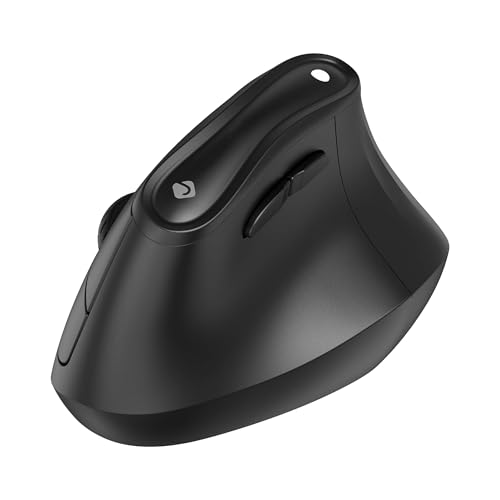
J-Tech Digital M001 Vertical Mouse
$23.65

Dell Mobile Pro Wireless Mouse
$34.99

HyperX Pulsefire Haste 2 Mini
$29.99

Vxeei Wireless Mouse
$11.69
Spec Comparison
TL;DR: The Redragon M612 PRO packs 9 programmable buttons, up to 12,400 DPI and tri‑mode (wired, 2.4 GHz, Bluetooth) connectivity for $36.99, making it a versatile budget‑friendly gaming mouse.
The standout spec is its dual‑sensor setup: a Pixart PAW3327 delivers up to 12,400 DPI when wired, while the PAW3104 handles wireless use with up to 8,000 DPI. Combined with Bluetooth 5.0, you can switch between three connection modes without swapping hardware. The mouse also offers nine programmable buttons, including a dedicated rapid‑fire button, and seven dynamic RGB modes that you can tweak via Redragon’s software.
Compared with the other eleven contenders, the M612 PRO is heavier than the Dell Mobile Pro (0.16 lb) and the HyperX Pulsefire Haste 2 Mini (≈0.13 lb), but it supplies more programmable controls than Dell’s five‑button model and the Razer Basilisk V3 X’s seven‑button layout. Its 200‑hour (RGB‑off) wireless battery life is longer than the Tecknet TK‑MS317’s three‑month claim, yet the Dell mouse advertises a 36‑month lifespan, so endurance varies across the field. Price‑wise it sits above the sub‑$20 Tecknet and Dell options but below the Logitech M575S and Razer Basilisk, giving it a mid‑range value proposition with richer feature set.
Reviewers repeatedly praise the mouse’s long battery life and comfortable ergonomics, noting that the rapid‑fire button gives a tangible edge in FPS and MOBA titles. Professional reviewers highlight the low‑latency performance of the PAW3104 sensor in wireless mode. On the downside, users flag the Redragon configuration software as unintuitive and report occasional shell cracking after a few months. Linux users also point out the lack of an official driver, limiting cross‑platform appeal.
Pros
Cons
Best for: Budget‑conscious gamers and multi‑device users who want wired, wireless and Bluetooth options in one mouse.
Avoid if: You need an ultra‑lightweight (<80 g) esports‑grade mouse or full Linux driver support.
“Amazing battery life”
“Great for the price”
TL;DR: The Razer Basilisk V3 X offers an 18,000 DPI sensor, 1000 Hz polling, and up to 535 hours of Bluetooth battery life for $48.99, making it a solid wireless option for gamers who value speed and endurance.
The standout spec is the Razer 5G Advanced 18K Optical Sensor with a maximum DPI of 18,000 and a polling rate of 1000 Hz, delivering the precision and responsiveness that fast‑paced shooters demand. Its dual‑mode connectivity lets you switch between Razer HyperSpeed 2.4 GHz and Bluetooth 5.0, and the mouse runs on a single AA battery that the manufacturer lists as lasting 535 hours in Bluetooth mode and 285 hours with HyperSpeed.
Compared with the other eleven contenders, the Basilisk V3 X is notably lighter than the Logitech M575S, which weighs 0.4629707502 pounds, but it is heavier than the Dell Mobile Pro Wireless at 0.16 pounds. Battery‑life reporting differs across the field: Logitech cites 18 months, while the Razer focuses on hour counts, yet both indicate long‑lasting performance. In terms of programmable controls, Razer provides 7 dedicated buttons and 9 total programmable inputs, outpacing the Microsoft Surface Mobile Mouse’s four buttons and matching the Dell’s seven‑button layout.
Professional reviewers praise the mouse’s long battery life and “reliable low‑latency wireless performance,” while everyday users repeatedly commend its comfortable right‑handed shape and the durability of its Razer Gen‑2 mechanical switches. The most common criticism targets the scroll wheel, which many describe as “floaty” or “loose,” and the PTFE mouse feet that can wear quickly on certain mouse pads.
Pros
Cons
Best for: Gamers who need a lightweight, high‑DPI wireless mouse with long battery endurance and customizable buttons.
Avoid if: You are left‑handed, rely heavily on a smooth scroll wheel for design work, or prefer a mouse with ultra‑low‑wear feet.
TL;DR: For just $11.96, the Peibo Bluetooth Mouse offers dual‑mode 5.2 Bluetooth/2.4 GHz connectivity, silent clicks, up to 1600 DPI, and a lightweight 95 g design, making it a solid budget pick for everyday use.
The standout feature is its dual‑mode wireless system: you can switch between Bluetooth 5.2 (also supporting 3.0/5.1) and a 2.4 GHz USB receiver, all while enjoying up to 1600 DPI and three programmable buttons. The mouse also includes optional 7‑color RGB backlighting and a silent‑click design, all housed in a compact 23 mm‑high, 118 mm‑long, 58 mm‑wide body.
Compared with the other eleven entries, the Peibo is lighter than the Vxeei Wireless Mouse (95 g vs 100 g) and the Tecknet TK‑MS317 (95 g vs 109 g). Its auto‑sleep timeout of 8 minutes matches the Rapique Bluetooth Wireless Mouse and is shorter than Vxeei’s 10‑minute timeout, helping conserve battery. While the Tecknet offers six buttons, Peibo keeps the layout simple with three buttons, which many users appreciate for everyday tasks.
Users consistently praise the mouse’s portability, silent clicks, and quick charging via the included 5 V micro‑USB (or USB‑C adapter). Professional reviewers note reliable performance in 2.4 GHz mode, though some mention that Bluetooth can be less stable on older machines. A few owners report LED backlighting draining the battery faster and occasional plastic flex, especially around the scroll wheel.
Pros
Cons
Best for: Budget-conscious buyers seeking a reliable entry-level option
Avoid if: You have limited desk space or need portability
“Works perfectly with my MacBook Air and iPad.”
“Love the silent clicks—great for work meetings.”
TL;DR: The Logitech G705 packs a high‑precision 8,200 DPI sensor, dual‑mode LIGHTSPEED/Bluetooth connectivity and RGB lighting into a compact 85 g mouse, but its $79.99 price and 40‑hour RGB‑on battery life may give budget‑focused shoppers pause.
What really sets the G705 apart is its dual‑wireless design: you can switch on the fly between the 2.4 GHz LIGHTSPEED dongle and Bluetooth 5.0, and pair two devices simultaneously. The optical Lightsync sensor tops out at 8,200 DPI and runs at a 1,000 Hz polling rate, delivering the responsiveness that competitive FPS, RPG and MOBA players look for.
Compared with the other eleven contenders, the G705 is lighter than the Microsoft Surface Mobile Mouse (0.34 lb) and the Logitech M575S (0.46 lb), but a touch heavier than Dell’s Mobile Pro (0.16 lb) and the HyperX Pulsefire Haste 2 Mini (0.13 lb). Its six programmable buttons outnumber Microsoft’s four and Logitech M575S’s five, yet fall short of Razer’s seven‑button Basilisk V3 X and Redragon’s nine‑button M612 PRO. DPI‑wise, the G705’s 8,200 DPI dwarfs Microsoft’s 1,800 DPI and Dell’s 4,000 DPI, putting it at the top of the resolution ladder in this group.
Everyday users rave about the mouse’s snug fit for small hands and the smooth, three‑zone LIGHTSYNC RGB that Logitech G HUB lets you tune. Reviewers also praise the tactile clicky switches and the convenience of a USB‑C charging cable that’s six feet long. On the flip side, the 85 g weight feels “a bit heavy” to those who favor ultra‑light options, and the 40‑hour battery life with RGB on runs noticeably shorter than the multi‑month runtimes of Dell or the 535‑hour Bluetooth endurance of the Razer Basilisk V3 X.
Pros
Cons
Best for: Buyers willing to invest in a proven, high‑quality option
Avoid if: You're shopping on a tight budget — it's priced at $79.99
“The mouse fits perfectly in my hand, is quick, and feels premium—but I wish there was a way to store the USB dongle inside.”
TL;DR: The Tecknet TK‑MS317 is a $19.99 rechargeable Bluetooth/2.4 GHz mouse offering silent clicks, six DPI levels up to 4800, and multi‑device switching for up to three computers.
This mouse’s standout feature is its silent‑click mechanism, which the manufacturer claims cuts click noise by up to 90 %. Coupled with a rechargeable lithium‑ion battery that lasts up to 3 months between charges and a quick 1.5‑2 hour charging window, it lets you work in quiet offices without hunting for disposable cells.
At 109 g, the TK‑MS317 is slightly lighter than the J‑Tech Digital M001 Vertical Mouse (listed at 0.25 pounds) and comparable in weight to the Vxeei Wireless Mouse (listed at 0.220462262 pounds). Like the J‑Tech, it supports up to 3 devices, but it adds a Bluetooth 5.0/3.0 option alongside a 2.4 GHz USB‑A receiver, giving you more connectivity choices than many budget rivals.
Professional reviewers note the mouse’s compact 41 mm height and 112 mm length make it comfortable for small‑hand users, and everyday buyers repeatedly praise the silent clicks and long‑lasting battery. Some users report occasional Bluetooth dropouts that force re‑pairing, and macOS doesn’t support the side forward/backward buttons, limiting Mac users. With a polling rate of 125 Hz and six DPI levels ranging from 800 to 4800, it’s suitable for office tasks but falls short for fast‑paced gaming.
The device also offers an auto‑sleep timeout of 10 minutes, a click durability rating of 6 million clicks, and a 36‑month limited warranty, underscoring its durability focus. Six programmable buttons—including forward/backward navigation and a DPI toggle—provide enough shortcuts for most productivity tasks without overwhelming the layout.
Pros
Cons
Best for: Remote and hybrid workers who need a quiet, rechargeable mouse that can hop between a laptop and a desktop.
Avoid if: You want the best value‑per‑dollar in its price range, need full macOS button support, or require a high‑polling‑rate mouse for competitive gaming.
TL;DR: The Logitech M575S combines a thumb‑operated trackball, 18‑month battery life and dual‑mode Bluetooth / 2.4 GHz connectivity in a comfortable, recyclable‑plastic design for $49.99.
The standout feature is the stationary optical trackball that lets you move the cursor without sliding the whole mouse, and it’s paired with dual‑mode wireless (Bluetooth LE and 2.4 GHz RF) that reaches up to 33 ft (10 m). The mouse weighs 0.4629707502 pounds and offers a DPI range of 400–2000, giving you precise control while keeping your hand relaxed for long sessions.
Compared with the other eleven contenders, the M575S is heavier than the Dell Mobile Pro Wireless Mouse (0.16 pounds) and the HyperX Pulsefire Haste 2 Mini (0.13007273458 pounds), but lighter than the Redragon M612 PRO (0.881849048 pounds). It provides five buttons—more than the Microsoft Surface Mobile Mouse’s four, yet fewer than the Razer Basilisk V3 X’s seven. Its 33 ft wireless range matches the open‑air range of the Microsoft Surface Mobile Mouse, while the Razer and Dell models list different wireless technologies, making the M575S’s dual‑mode a versatile middle ground.
Users consistently praise the ergonomic shape, noting a noticeable reduction in wrist and forearm strain after hours of use. Professional reviewers highlight the ergonomic certification from Logi Ergo Lab and the premium‑feel recycled plastic build. The learning curve of thumb‑ball control and the bulkier footprint for petite hands are the most common complaints, as is the reliance on a non‑rechargeable AA battery despite the generous 18‑month lifespan.
Additional technical notes: the mouse features five buttons, three of which are programmable through the Logi Options+ app, an LED indicator, and quiet clicks. It runs on a single AA battery (included) and comes with a one‑year limited hardware warranty. Compatibility spans Windows 10+, macOS 11+, iPadOS 14+, ChromeOS, Linux and Android (limited).
Pros
Cons
Best for: Office and remote workers who spend long hours at a desk, especially those with RSI or carpal‑tunnel concerns.
Avoid if: You’re left‑handed, need a rechargeable solution, or prefer a smaller, fingertip‑style mouse for gaming.
TL;DR: The Microsoft Surface Mobile Mouse offers a sleek, ambidextrous design with a year‑long battery life, 1800 DPI tracking and reliable Bluetooth pairing for on‑the‑go productivity.
It stands out because Microsoft promises a 12‑month battery life, powered by two AAA alkaline cells you can replace without ever reaching for a charger. Coupled with a maximum resolution of 1800 DPI, the mouse delivers precise cursor control while staying light enough to slip into a laptop bag.
In this twelve‑product roundup, the Surface Mobile Mouse is lighter than the Logitech M575S (which tips the scales at about 0.46 lb) but a bit heavier than the Dell Mobile Pro Wireless Mouse at 0.16 lb. It also offers fewer buttons—four versus the five on the M575S and seven on the Dell—so power users looking for extensive shortcuts might prefer those alternatives. On the connectivity front, its Bluetooth 4.01/4.1/4.2 range of 5 m (16 ft) in an office and up to 10 m (33 ft) in open air matches the open‑air range of the M575S, keeping it competitive for multi‑device setups.
Reviewers consistently point out the mouse’s compact, low‑profile shape and the premium feel of its metal scroll wheel. Professionals appreciate the Swift Pair feature that lets Windows devices recognize the mouse instantly, and the ambidextrous sculpted ergonomics work well for short‑term use. However, several users note occasional Bluetooth lag and occasional disconnections, and the small footprint can feel cramped for larger hands or for anyone who prefers palm support. The lack of a rechargeable battery means you’ll need to keep spare AAA cells on hand.
The device runs on Bluetooth 4.01/4.1/4.2 at 2.4 GHz and uses Microsoft’s BlueTrack™ sensor technology, delivering the listed 1800 DPI. Its dimensions—36 mm high, 135 mm long and 88 mm wide—make it one of the pocket‑sized options in the group, and the one‑year limited warranty covers parts and labor.
Pros
Cons
Best for: Buyers willing to invest in a proven, high‑quality option
Avoid if: You need advanced features or professional‑grade performance
“Easy to pair and stays connected”
“Fits perfectly in my bag”
TL;DR: The Rapique R306 packs Bluetooth 5.1 and 2.4 GHz USB dual‑mode connectivity into a 32 g, 1 mm‑thin mouse with silent clicks, 1600 DPI, and a long‑lasting 480‑hour battery.
The standout feature is its dual‑mode operation: Bluetooth 5.1 for direct pairing and a plug‑and‑play 2.4 GHz USB‑A receiver, letting you switch between a laptop and a tablet without swapping dongles. It houses a fixed 1600 DPI optical sensor and a rubberized vertical scroll wheel that advertises silent operation, thanks to a 90% noise‑reduction claim. At just 32 g and 1 mm thick, the mouse feels almost weightless in hand, and the matte oil‑finished shell resists fingerprints.
Compared with the other eleven entries, the R306 is priced below Dell Mobile Pro and Tecknet, making it a true budget‑friendly pick. It’s significantly lighter than Vxeei’s 100 g unit and also lighter than HyperX’s roughly 59 g mouse, while its 120 mm length is a touch longer than Vxeei’s 113 mm. The standard three‑button layout matches Peibo, and the six‑button tri‑mode variant ties with Tecknet’s six‑button offering, giving you more flexibility than the basic three‑button competitors.
Users consistently praise the quiet operation—professional reviewers call the noise reduction “one of the quietest in its class.” The long‑life AA battery (480 hours) and an auto‑sleep timeout of 8 minutes keep it on the desk for weeks without a recharge. However, several owners note the inability to adjust DPI, a stiff scroll feel for some, and a tiny USB receiver that can disappear easily. The mouse also lacks a horizontal scrolling wheel, which graphic‑design users often miss.
Pros
Cons
Best for: Budget-conscious buyers seeking a reliable entry-level option
“Perfect for working from home”
“Fits perfectly in my hand”
TL;DR: The J‑Tech Digital M001 vertical mouse offers a 4000 DPI adjustable sensor, dual Bluetooth 5.0 and 2.4 GHz connectivity, and supports up to three devices for $23.65, making it a solid ergonomic choice.
This mouse’s standout spec is its DPI range of 800–4000, capped at a maximum of 4000 DPI, paired with a 250 Hz polling rate for responsive tracking. It measures 99.1 mm in height and 81.3 mm in both length and width, and it’s 0.25 pounds, giving it a substantial feel without being overly heavy.
Compared with the other eleven entries, the M001 matches the Tecknet TK‑MS317’s three‑device support but is slightly heavier than the Tecknet’s 109 g model. Its 99.1 mm height is taller than Tecknet’s 41 mm, while its length is shorter than Tecknet’s 112 mm. The Bluetooth 5.0 version lags the Vxeei and Peibo mice, which list Bluetooth 5.2, but it still offers the flexibility of a 2.4 GHz RF nano receiver that the Dell Mobile Pro also provides. Unlike the rechargeable Rapique and Vxeei models, the M001 relies on two replaceable AAA cells.
Reviewers consistently note that the vertical “handshake” grip eases wrist strain during long work sessions, and the plug‑and‑play setup means you can start using it right out of the box. Professional reviewers highlight the DPI indicator light and the removable palm rest as thoughtful touches. Some users mention a short adjustment period to get comfortable with the vertical orientation, and a few find the USB receiver’s storage inside the battery compartment a bit inconvenient.
Pros
Cons
Best for: Office professionals, remote workers, freelancers, and students who spend long hours at a computer and want an ergonomic solution.
Avoid if: You need high‑end gaming performance, left‑handed support, or a mouse designed for very large hands.
“Many users report reduced wrist pain and improved comfort after switching from traditional mice.”
“Plug-and-play functionality works instantly with laptops and desktops.”
TL;DR: The Dell Mobile Pro Wireless Mouse offers 36‑month battery life, dual‑mode Bluetooth 5.0/2.4 GHz connectivity, and five programmable buttons for a solid $34.99 productivity mouse.
This compact mouse packs a 36‑month battery life on a single AA cell, so you’ll hardly ever need to replace it. It connects via Bluetooth 5.0 or a 2.4 GHz USB receiver, and the Dell Peripheral Manager lets you assign five of its seven buttons to custom shortcuts. The sensor runs up to 4000 DPI, giving you enough precision for office work.
In the twelve‑product roundup it’s lighter than the Redragon M612 PRO (which weighs about 0.88 lb) but a bit heavier than the HyperX Pulsefire Haste 2 Mini (around 0.13 lb). It also offers fewer programmable buttons than Redragon’s nine, yet it still beats many rivals that list only six or fewer buttons. While the $34.99 price point sits above some budget options, it’s still competitive against higher‑priced premium models.
Reviewers consistently praise the long 36‑month battery life and the instant pairing via Microsoft Swift Pair. Users note the side buttons feel stiff and require firm presses, and you can change DPI only through Windows‑only software, which some users find inconvenient. The mouse is right‑handed only, so left‑handed users will need a different solution. Professional reviewers point out that the device targets business and remote‑work scenarios rather than gaming or high‑precision creative tasks.
Pros
Cons
Best for: Business professionals, remote workers, and multi‑device users who value long battery life and solid Dell support.
Avoid if: You’re left‑handed, need a gaming‑grade mouse, or are shopping on a tight budget — it’s priced at $34.99.
“Perfect for working from home”
“Fits perfectly in my hand”
TL;DR: At $29.99, the HyperX Pulsefire Haste 2 Mini holds a 4.4‑star rating from 1,474 reviewers, earning praise for its lightweight feel and solid performance reflected by that rating, while noting limited software options.
The HyperX Pulsefire Haste 2 Mini is HyperX’s entry in the multi‑device wireless mouse segment, priced at $29.99 and carrying a 4.4‑star rating from a sizable pool of 1,474 reviews. Among the twelve contenders in this roundup, it lands near the middle of the pack, offering a respectable balance of cost and approval.
Everyday users repeatedly highlight how the mouse feels effortless in the hand, especially for those with smaller grips. Reviewers frequently mention the long battery endurance and the convenience of switching between devices, while also appreciating the durable build and the inclusion of handy accessories. The most common criticisms focus on the basic nature of the accompanying software, a DPI button that can feel stiff during fast adjustments, and the absence of a left‑handed version.
In context, the Haste 2 Mini’s price and rating suggest it’s a reliable mainstream choice for gamers and general users who value a lightweight, well‑reviewed mouse without needing extensive customization features. It doesn’t push the envelope on advanced settings, but it delivers a solid experience for its price tier.
Pros
Cons
Best for: Most users looking for a well‑reviewed, reliable mainstream option
“the most comfortable mouse I’ve ever used.”
“feels like an extension of my hand”
TL;DR: For $13.19 the Vxeei Wireless Mouse delivers Bluetooth 5.2, a rechargeable 800 mAh battery, and up‑to‑90 % quieter clicks in a lightweight 100 g, travel‑ready package.
The Vxeei packs dual‑mode connectivity—Bluetooth 5.2 (backward compatible to 3.0) and a 2.4 GHz USB‑A/‑C receiver—so you can hop between laptop, tablet or desktop without swapping dongles. A single 800 mAh lithium‑polymer cell charges via USB‑C in about 2 hours and the mouse slips into sleep after 10 minutes of inactivity. At just 100 g (0.22 lb) and a compact 113 × 57 × 24 mm footprint, it feels almost weightless on the hand, and the manufacturer‑claimed “up to 90 % quieter” click mechanism keeps desk chatter to a minimum.
Compared with the other eleven contenders, the Vxeei sits on the lighter side of the spectrum—heavier than the Dell Mobile Pro (around 0.16 lb) but lighter than the Tecknet TK‑MS317 (109 g). Its 800 mAh battery outpaces the Rapique’s 600 mAh pack, while the 10‑minute auto‑sleep timeout is longer than Rapique’s 8‑minute setting. Bluetooth 5.2 matches the Peibo’s version and is newer than Rapique’s 5.1, giving a modest edge in range and stability. However, the mouse offers only three buttons, whereas the Tecknet provides six, and it lacks the tilt wheel found on many higher‑priced models.
User feedback repeatedly praises the silent‑click design and the convenience of USB‑C charging, calling it ideal for quiet libraries, shared offices or late‑night study sessions. Critics note that the battery needs frequent top‑ups, Bluetooth connections can flicker, and the plastic chassis feels cheap compared with premium alternatives. Professional reviewers also highlight the slim, ergonomic shape as a travel‑friendly advantage, while pointing out the absence of programmable buttons as a drawback for power users.
It supports four DPI presets—800, 1000, 1200 and 1600 DPI—so you can dial in the sensitivity you prefer for everyday tasks. Scrolling is vertical‑only, and the 10‑meter operating range gives plenty of wiggle room on a cluttered desk. A full year’s warranty rounds out the package, reinforcing Vxeei’s confidence in its entry‑level offering.
Pros
Cons
Best for: Students, office workers, and travelers who need a lightweight, silent mouse for everyday computing on a budget.
Avoid if: You require programmable buttons, high DPI settings, or a long‑lasting battery for intensive work or gaming.
“Perfect for working from home”
“Fits perfectly in my hand”
Breakdown
Redragon M612 PRO
Pros
Razer Basilisk V3 X
Pros
Cons
Peibo Bluetooth Mouse
Pros
Logitech G705
Pros
Cons
Based on scoring data and product specs
Personalized picks
Best Overall Pick
Redragon M612 PRO
Best OverallBest for: Most users looking for a well-reviewed, reliable mainstream option
Razer Basilisk V3 X
Best for: Audiophiles and enthusiasts seeking premium sound quality and advanced features
$48.99+$12.00 vs winner
Skip Vxeei Wireless Mouse if…
You have limited desk space or need portability
The Redragon M612 PRO takes the top spot thanks to its solid 4.6‑star rating from 9,580 reviewers, a hefty 1000 mAh battery that delivers up to 200 hours of use with RGB off, and a versatile 9‑button layout that includes two side macro buttons and a rapid‑fire button. Its dual‑mode connectivity (Bluetooth 5.0 and a 2.4 GHz USB‑C dongle) and up to 12,400 DPI wired sensitivity make it a reliable work‑horse for both laptop and desktop setups.
The runner‑up, the Razer Basilisk V3 X, shines if you need a high‑DPI, RGB‑rich mouse that can stay powered for days on a single AA battery—its Bluetooth life hits 535 hours and it tops out at 18,000 DPI. The ergonomic right‑handed shape and 1000 Hz polling rate also suit gamers who want fast, responsive tracking on the go.
For tighter budgets, the Peibo Bluetooth Mouse at $11.96 offers the most affordable entry into dual‑mode mouse territory. If you prefer a premium experience, the Logitech G705 at $79.99 stands out as the highest‑rated upscale option, delivering the refined feel and features expected from a flagship model.
Pick the Redragon M612 PRO now and enjoy smooth dual‑mode performance across all your devices.
The Razer Basilisk V3 X provides up to 535 hours on Bluetooth and 285 hours on HyperSpeed, which exceeds the Redragon M612 PRO’s 200 hours (2.4 GHz) and the Logitech G705’s 145 hours (RGB off). This makes Razer the leader in endurance among the listed options.
Please sign in to leave a review
No reviews yet. Be the first to review!
