⚡ Quick Answer
We’ve lined up 11 pen‑display graphics tablets to cover a wide range of creative needs. From the ultra‑portable VEIKK VK1200 at $142.49, up through the mid‑range Huion Kamvas 13 priced at $229.00, and on to the premium XP‑Pen Magic Drawing Pad at $429.99, the selection spans the three price tiers defined in our guide. Each model brings its own mix of screen size, brightness and stylus performance, so you can find a fit whether you’re sketching on a couch, setting up a home studio, or traveling between client sites.
Among the crowd, the XP‑Pen Magic Drawing Pad offers a 12.2‑inch IPS screen that reaches 360 nits and a battery‑free stylus with 16,384 pressure levels, while its 13‑hour battery life keeps you drawing on the go. The Wacom Cintiq 16, with a 4.6‑star rating from 3,129 reviewers, provides a 15.6‑inch display for desktop work. In the budget camp, the VEIKK VK1200’s 11.6‑inch panel and 201‑nit brightness keep the price low without sacrificing basic functionality. Below, we break down each model’s strengths so you can match a pen display to your workflow.

XP-Pen Magic Drawing Pad
Its 8000 mAh battery delivers up to 13 hours of uninterrupted drawing, keeping you powered through long creative sessions.

Huion Kamvas 13
Ideal for students or hobbyists on a tighter budget, it costs $229, roughly $200 less than the XP-Pen Magic Drawing Pad.

XP-Pen Artist 22 2nd
With a 538 mm height, the XP-Pen Artist 22 2nd offers a larger drawing surface, setting it apart from the more compact Magic Drawing Pad and Kamvas 13.
Also considered
Score Analysis
Key score advantages vs. runner-up (Huion Kamvas 13)
Price Range
XP-Pen Magic Drawing Pad
$449.99
Huion Kamvas 13
$229.00
XP-Pen Artist 22 2nd
$459.99

Wacom Cintiq 16
$429.99
Huion Kamvas 22
$449.00

XP-Pen Artist13.3 Pro
$209.99

GAOMON PD1161
$159.99

Huion KAMVAS 16
$339.00

VEIKK VK1200
$142.49

XP-Pen Artist12
$159.99

Huion Kamvas 24 Plus
$599.00
Spec Comparison
TL;DR: The XP‑Pen Magic Drawing Pad packs a 12.2‑inch 2160 × 1440 IPS screen, 360 nits brightness and a battery‑free 16,384‑level stylus into a 599 g, 6.9 mm‑thin tablet with 13‑hour battery life.
The standout feature is its 12.2‑inch IPS display that delivers 2160 × 1440 resolution, 109 % sRGB coverage and 360 nits of brightness, giving a vivid canvas on a compact panel.
At 1.30 lb (599 g), it’s far lighter than the Huion Kamvas 22 (8.6 lb) and the XP‑Pen Artist 22 2nd (≈11 lb), yet also lighter than the Huion Kamvas 13 (1.96 lb) and the Wacom Cintiq 16 (≈4.19 lb). Its 12.2‑inch screen is smaller than the 21.5‑inch panels of the Kamvas 22 and Artist 22, but comparable to the 13.3‑inch Kamvas 13, offering a sweet spot for on‑the‑go work. Brightness at 360 nits outshines the 250‑nit Kamvas 22 and the 220‑nit Kamvas 13, while the 60 Hz refresh rate matches the Kamvas 13’s rate.
Reviewers love the tablet’s portability – the 6.9 mm thickness and sub‑kilogram weight make it easy to slip into a backpack. Users also appreciate the battery‑free EMR stylus with 16,384 pressure levels and 60° tilt, plus a 13‑hour battery that lets you draw all day. Professional reviewers note occasional tilt‑recognition quirks (±0.5 mm center accuracy, ±1.5 mm edge) and the modest 60 Hz refresh and 360 nits brightness in bright environments. The mid‑range MT8771 octa‑core processor may feel sluggish with heavy creative software.
Beyond the screen, the Magic Drawing Pad runs Android 14, offers 256 GB internal storage, 8 GB RAM and a microSD slot that expands up to 1 TB. It includes a 4‑speaker immersive audio system, 8 MP front and 13 MP rear cameras, and a suite of accessories like a glove, nib extractor and protective case, all support a standalone creative workflow.
Pros
Cons
Best for: Mobile artists, illustrators, hobbyists, and students who need a portable, standalone drawing device.
Avoid if: You need advanced features or professional‑grade performance.
TL;DR: The Huion Kamvas 13 offers a 13.3‑inch full‑laminated IPS display, 16,384‑level battery‑free stylus and lightweight 1.96 lb chassis for portable, beginner‑friendly drawing at $229.00.
What really stands out is the PenTech 4.0 PW600L stylus, which delivers 16,384 pressure levels and ±60° tilt on a 13.3‑inch IPS panel that shines at 220 nit brightness and 166 ppi pixel density. Huion fully laminates the screen with anti‑glare etched glass, keeping parallax to a minimum and color accuracy around ΔE < 1.5.
At 1.96 pounds, the Kamvas 13 is considerably lighter than the XP‑Pen Artist13.3 Pro at 4.41 pounds and lighter than the Huion KAMVAS 16’s 2.78 pounds, while only a shade heavier than the VEIKK VK1200’s 1.78 pounds. Its 13.3‑inch size matches the Artist13.3 Pro but exceeds the 11.6‑inch panels of the XP‑Pen Artist12, GAOMON PD1161 and VEIKK VK1200. Its pressure sensitivity doubles the 8,192 levels found in the Artist13.3 Pro and Artist12, and its 220 nit brightness tops the VEIKK’s 201 nits, though it remains modest for very bright rooms.
Reviewers consistently praise the pen’s responsiveness and the tablet’s built‑in dials and five express keys, calling the combination “the perfect sweet spot for portability.” Early users love the lightweight feel and the color‑rich display, but many note that the 1920 × 1080 FHD resolution can feel basic for detailed artwork and that the 220 nit brightness may struggle in well‑lit environments. Professional reviewers also point out the lack of an integrated stand, meaning you’ll need a separate accessory for ergonomic use.
Pros
Cons
Best for: Beginners, students and mobile artists who want a well‑reviewed, lightweight pen display with professional‑grade stylus performance.
Avoid if: You need a high‑resolution (QHD+) screen or a brighter display for very well‑lit workspaces.
TL;DR: The XP‑Pen Artist 22 (2nd Gen) packs a 21.5‑inch IPS panel, 8192 pressure levels and 60° tilt into a solid 5 kg desktop tablet that scores 4.6 stars from over 1,600 reviewers.
The standout spec is the 21.5‑inch IPS display delivering 250 cd/m² brightness and an 86 % NTSC color gamut, while the 1920 × 1080 panel offers a full‑HD canvas for detailed work. Artists also benefit from 8192 pressure levels and a 60° tilt range, giving a natural brush feel.
At roughly 5 kg, the Artist 22 is heavier than the Huion KAMVAS 16 (2.78 lb) and the XP‑Pen Artist 13.3 Pro (4.41 lb) but lighter than the Huion Kamvas 22 (8.6 lb). Its 21.5‑inch screen outpaces the 15.6‑inch KAMVAS 16 and the 13.3‑inch models, providing far more drawing real‑estate. Price‑wise it sits above the budget‑oriented KAMVAS 16, reflecting its larger panel and added features.
Reviewers consistently praise the generous screen and the tablet’s stable, fan‑less operation, noting that the VESA‑mount option makes it feel studio‑ready. However, many users call out the Full‑HD resolution as a limiting factor, describing pixelation when zooming on large canvases. The stylus also draws criticism for lacking an eraser tip and having a thin grip that can feel uncomfortable during long sessions. The 5 kg weight gives stability but makes lap use cumbersome.
Technical details reinforce its precision: a report rate of ≥220 RPS and accuracy of ±0.5 mm at the center (±1.5 mm at the corners) ensure responsive lines. The 10 mm reading height, 8 ms response time, 800:1 contrast ratio and 178° viewing angle round out a well‑specified drawing surface.
Pros
Cons
Best for: Most users looking for a well‑reviewed, reliable mainstream option
Avoid if: You're shopping on a tight budget — it's priced at $349.99
TL;DR: The Wacom Cintiq 16 offers a 15.6‑inch Full HD, 8192‑level pressure pen display with solid build quality, but its $599.95 price and fixed 3‑in‑1 cable make it a premium choice for hobbyists and students.
The standout spec is the Pro Pen 2, which delivers 8192 pressure levels and ±60° tilt, giving you fine‑grained control on the 15.6 in Full HD IPS panel. The display’s typical brightness of 210 cd/m² (up to 250 cd/m² max) and 1000:1 contrast ratio provide a clear, anti‑glare workspace for most indoor lighting.
Compared with the other ten entries, the Cintiq 16 is lighter than the Huion Kamvas 24 Plus (≈19.55 lb) but heavier than the Huion KAMVAS 16 (≈2.78 lb) and the XP‑Pen Magic Drawing Pad (≈1.30 lb). Its 1.8 m cable is longer than the short, fixed cables on some competitors, yet reviewers note that the single 3‑in‑1 connector can feel cumbersome during setup.
Professional reviewers praise the pen’s paper‑like feel and zero‑lag drawing experience, while everyday users appreciate the solid build and straightforward foldable legs. Common complaints focus on the initial connection steps and the fact that the Cintiq 16 requires an external computer, making it a hurdle for those seeking a standalone tablet.
Pros
Cons
Best for: Buyers willing to invest in a proven, high‑quality option
Avoid if: You need advanced features or professional‑grade performance
“Difficult to set up”
“Ideal for beginners needing a reliable entry-level pen display”
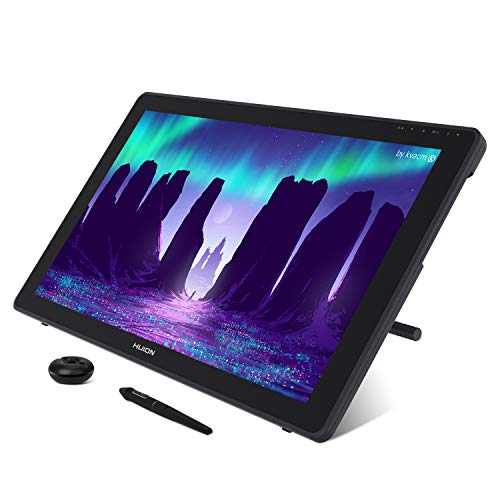
TL;DR: The Huion Kamvas 22 packs a 21.5‑inch IPS display with 120% sRGB coverage, 8192 pressure levels and a battery‑free stylus for $448, making it a solid mid‑range pen display for hobbyists and students.
The standout feature is the 21.5‑inch Full HD IPS panel that delivers 250 cd/m² brightness, 1200:1 contrast and a 178° viewing angle, while covering 120% of the sRGB gamut. Combined with 8192 pressure‑sensitivity levels, 5080 LPI stylus resolution and ±60° tilt, the tablet offers a responsive drawing experience without needing a battery‑powered pen.
Compared with the other ten entries, the Kamvas 22 is heavier than the ultra‑light XP‑Pen Magic Drawing Pad (about 1.3 lb) but lighter than Huion’s own Kamvas 24 Plus, which weighs over 19 lb. It's also pricier than the XP‑Pen Artist 22 2nd, yet it provides a larger working area (476.64 mm × 268.11 mm) than the Artist 22’s 332 mm × 538 mm footprint. In contrast to the Wacom Cintiq 16’s 210 cd/m² brightness, the Kamvas 22’s 250 cd/m² gives a brighter canvas for bright‑room work.
Everyday users praise the color fidelity and the convenience of the battery‑free PW517 stylus, noting that the tablet “just works” out of the box via USB‑C. Professional reviewers, however, point out that the 1080p resolution on a 21.5‑inch screen can look less sharp than higher‑resolution competitors, and the 120% sRGB gamut falls short of the wider gamuts found in premium models. The 14 ms response time and low standby draw (≤0.3 W) keep the device snappy and energy‑efficient.
Pros
Cons
Best for: Buyers willing to invest in a proven, high-quality option
Avoid if: You need advanced features or professional‑grade performance
TL;DR: The XP‑Pen Artist 13.3 Pro offers a 13.3‑inch full‑laminated screen, 8192 pressure levels and an adjustable stand for $209.99, but its weight and price make it a solid entry‑level choice rather than a premium bargain.
A full‑laminated 13.3‑inch display stands out, delivering a crisp 1920 × 1080 image with a 178° viewing angle and a 60° tilt range. Paired with 8192 pressure‑sensitive levels and a red dial, the tablet feels responsive for sketching, illustration and light 3D work.
At 4.41 pounds (2000 g) the Artist 13.3 Pro is noticeably heavier than the Huion Kamvas 13 at 1.96 pounds, yet lighter than the larger XP‑Pen Artist 22 2nd, which tips the scales at 5 kg. Its 390.4 mm width also outpaces the VEIKK VK1200’s 190 mm width, giving you a broader drawing surface without the bulk of a 15‑inch model like the Huion KAMVAS 16.
Reviewers consistently highlight the tablet’s smooth pen feel and the convenience of eight shortcut keys, while noting that the price feels a bit steep for a budget‑tier device. The adjustable stand and full‑laminated panel receive frequent praise, but some users note that competitors in the same price range offer lighter builds or more shortcut keys.
Beyond the display, the tablet covers 88% NTSC, Adobe RGB ≥ 91% and sRGB ≥ 123%, providing that colour coverage for most creative apps. It supports Windows 7+, macOS 10.10+, Chrome OS 88+ and Linux, and works with Photoshop, Illustrator, SAI, Blender 3D, ArtRage 5 and openCanvas.
Pros
Cons
Best for: Budget-conscious buyers seeking a reliable entry-level option
Avoid if: You need advanced features or professional‑grade performance
TL;DR: The GAOMON PD1161 offers an 11.6‑inch Full HD IPS display, 8192‑level battery‑free stylus, and lightweight 1.9 lb design for budget‑friendly creators, though it lacks a built‑in stand and has modest color gamut.
The tablet’s 11.6‑inch IPS panel delivers a crisp 1920 × 1080 resolution, 220 cd/m² brightness and an anti‑glare coating, while the AP50 pen provides 8192 pressure levels, ±60° tilt and a 16 g tip weight. The pen achieves ±0.5 mm accuracy in the centre and up to ±3 mm at the corners, with a report rate of ≥266 PPS.
At 1.9 lb (866 g) the PD1161 is lighter than the XP‑Pen Artist13.3 Pro’s 4.41 lb build, yet only a shade heavier than the VEIKK VK1200’s 1.78 lb chassis. Its 11.6‑inch screen matches the VK1200 and XP‑Pen Artist12, but is smaller than the 13.3‑inch models from XP‑Pen and Huion, and far smaller than the 21.5‑inch XP‑Pen Artist 22 2nd. Unlike the Artist13.3 Pro, which includes an adjustable stand, the PD1161 doesn’t include a built‑in stand, so users must supply their own prop. The stylus also weighs 16 g, a bit heavier than the VK1200’s 11 g pen but still lighter than the Artist 22’s 13.2 g tip.
Reviewers consistently praise the tablet’s portability and the convenience of a battery‑free pen, noting that the eight customizable shortcut keys speed up common commands. Professional feedback points to the clear HD IPS view and responsive pen, while criticism focuses on the missing ergonomic stand, the limited 72 % NTSC color gamut and modest 220 cd/m² brightness, and the edge‑accuracy deviation of up to ±3 mm for precision work.
Pros
Cons
Best for: Budget-conscious buyers seeking a reliable entry-level option
Avoid if: You need advanced features or professional‑grade performance
“Cheap drawing tablet with a screen”
“Responsive battery‑free pen makes drawing feel natural”
TL;DR: The Huion Kamvas 16 offers a 15.6‑inch Full HD display, 8192‑level pressure sensitivity, and a feather‑light 2.78‑lb body, making it a solid mid‑range choice for mobile artists.
The standout dimension of the Kamvas 16 is its 15.6‑inch screen, which Huion houses in an ultra‑slim 12 mm chassis, and the whole unit weighs just 2.78 pounds (1260 g). Its 1920 × 1080 resolution paired with 5080 LPI pen resolution and 120% sRGB color gamut gives a crisp, vibrant drawing surface while staying easy to carry.
In the lineup, the Kamvas 16 sits between the compact 13‑inch models and the larger 22‑inch tablets. It weighs less than the XP‑Pen Artist 22 2nd, which tips the scales at 5 kg, and less than the Artist13.3 Pro at 2000 g, but it weighs a bit more than the Huion Kamvas 13 at 1.96 pounds. Its 12 mm thickness exceeds the XP‑Pen Artist12’s 8 mm profile, yet remains slimmer than many bulkier displays. Screen‑size wise, it outpaces the 11.6‑inch Artist12 and GAOMON PD1161, while staying more portable than the 21.5‑inch Artist 22.
Reviewers praise the full‑laminated anti‑glare screen for reducing parallax and highlight the 10 programmable keys as a workflow boost. The 8192 pressure levels and ±60° tilt give precise control, though some users note that the Full HD resolution limits fine detail compared with newer 2.5K or 4K panels. The device draws just 10 W of power and drops to 0.3 W on standby, and reviewers find that efficient for a desk‑bound setup.
Pros
Cons
Best for: Most users looking for a well‑reviewed, reliable mainstream option
Avoid if: You need advanced features or professional‑grade performance
TL;DR: The VEIKK VK1200 packs an 11.6‑inch full‑laminated IPS display, 5080 LPI resolution and 8192‑level pressure pen into a 1.78‑pound metal body, making it a portable entry‑level drawing tablet.
The tablet’s 5080 LPI line‑density paired with a 201‑nit IPS panel delivers a crisp 1920 × 1080 image on an 11.6‑inch screen. The battery‑free P05 stylus offers 8192 pressure levels and ±60° tilt, while the anti‑glare glass and full lamination keep parallax low for comfortable drawing.
Compared with its peers, the VK1200 is lighter than the GAOMON PD1161 (809 g vs 866 g) and the XP‑Pen Artist12 (809 g vs 907 g), yet it shares the same 11.6‑inch footprint. It also matches the 8192‑level pressure of the XP‑Pen Artist12, while offering a comparable tilt range to the larger XP‑Pen Artist13.3 Pro, which lists a 60° tilt angle. Heavier, larger models like the Huion KAMVAS 16 (about 2.78 pounds) and the XP‑Pen Artist 22 2nd (around 5 kg) provide bigger canvases, but the VK1200’s slim 12 mm profile and metal chassis keep it travel‑friendly.
Many users praise the tablet’s lightweight, metal build and the smooth feel of the P05 pen, noting that it slides easily into a backpack for on‑the‑go sketching. Professional reviewers highlight the low‑parallax experience from the full‑lamination and the reliable 290 PPS report rate. The most common drawback is the modest working area, which can feel cramped for detailed artwork, and some buyers point out that the 72% NTSC color gamut may fall short for color‑critical tasks. The lack of a built‑in stand also means you’ll need a separate accessory if you prefer an angled setup.
Pros
Cons
Best for: Budget‑conscious buyers seeking a reliable entry‑level option
Avoid if: You need advanced features or professional‑grade performance
TL;DR: The XP‑Pen Artist 12 delivers an 11.6‑inch IPS display, 8192‑level battery‑free stylus and ultra‑thin 8 mm chassis at a modest price, ideal for portable creators.
What really stands out is the 8192‑level pressure sensitivity paired with a battery‑free electromagnetic stylus, letting you draw without worrying about charging. The tablet’s slim 8 mm height and lightweight 907 g (≈2.00 lb) build make it easy to slip into a laptop bag.
Compared with the other ten entries, the Artist 12 sits in the middle of the weight range – a touch heavier than the VEIKK VK1200 but only marginally so against the GAOMON PD1161. Its 11.6‑inch screen matches the PD1161 and VK1200, while offering more shortcut keys (6) than many competitors.
Users consistently praise its portability and solid construction, noting the short cable's a minor annoyance. Reviewers also point out the modest brightness and a 72 % NTSC color gamut, which limits color accuracy for demanding work. The IPS panel still provides full 100 % sRGB coverage, and the 5080 LPI reading resolution ensures crisp lines.
Pros
Cons
Best for: Budget‑conscious buyers seeking a reliable entry‑level option
Avoid if: You need advanced features or professional‑grade performance
TL;DR: The Huion Kamvas 24 Plus packs a 23.8‑inch QHD, full‑lamination screen and a battery‑free PW517 pen into a 19.55‑lb workstation that’s large and color‑accurate but costs $599 and stops short of true 4K resolution.
The standout spec is the 23.8‑inch QHD panel with a 2560 × 1440 resolution, 123 PPI pixel density and 5080 LPI line count. The anti‑glare etched glass is fully laminated, which professional reviewers say cuts parallax and feels natural under the stylus. Brightness hits 220 cd/m², enough for most indoor lighting conditions.
At 19.55 lb, the Kamvas 24 Plus is considerably heavier than the Wacom Cintiq 16 (≈4.19 lb) and the Huion Kamvas 22 (≈8.6 lb). Its 23.8‑in screen also dwarfs the Cintiq 16’s 15.6‑in display and the Kamvas 22’s 21.5‑in panel, giving artists a larger drawing canvas. Brightness sits between the Cintiq’s 210 cd/m² and the Kamvas 22’s 250 cd/m², while the 220 RPS pen report rate and 60° tilt angle provide responsive, angled strokes.
Users praise the all‑in‑one nature of the tablet: the included stand, USB‑C cable and VESA compatibility make setup simple, and the battery‑free PW517 pen delivers 8192 pressure levels and 60° tilt without worrying about charging. However, many note the 2.5K resolution feels “not true 4K” when you place it beside higher‑resolution monitors, and the lack of on‑screen shortcut keys can slow workflow for power users. The 4.3‑star rating from 1,107 reviews reflects generally positive sentiment but also highlights the resolution disappointment.
Technical enthusiasts will appreciate the 604 mm depth, 21 mm thin profile and 358 mm width, which keep the device relatively slim despite its size. The IPS panel with 89°/89° viewing angles and 1200:1 contrast ratio ensures consistent colors across the screen, while the quantum‑dot technology boosts color gamut to 140 % sRGB and 97 % NTSC.
Pros
Cons
Best for: Buyers willing to invest in a proven, high-quality option
Avoid if: Reliability and user satisfaction are your top concerns
Breakdown
XP-Pen Magic Drawing Pad
Pros
Huion Kamvas 13
Pros
XP-Pen Artist 22 2nd
Pros
Cons
Wacom Cintiq 16
Pros
Cons
Based on scoring data and product specs
Personalized picks
Best Overall Pick
XP-Pen Magic Drawing Pad
Best ValueBest for: Buyers willing to invest in a proven, high-quality option
Huion Kamvas 13
Best for: Most users looking for a well-reviewed, reliable mainstream option
$229.00-$220.99 vs winner
Skip Huion Kamvas 24 Plus if…
Reliability and user satisfaction are your top concerns
The XP‑Pen Magic Drawing Pad takes the top spot with its all‑in‑one Android 14 tablet design, a crisp 12.2‑inch IPS screen at 2160 × 1440 resolution and a bright 360‑nit display. Its EMR battery‑free stylus offers 16,384 pressure levels and 60° tilt, while the 8 g pen feels featherlight. At $429.99 it also includes a 13‑hour battery, 8 000 mAh capacity and a full 1‑year warranty, offering premium features at a non‑premium price.
The Huion Kamvas 13 lands as the runner‑up, ideal if you need a compact, color‑accurate drawing surface for a desktop setup. Its 13.3‑inch laminated IPS panel delivers 99% sRGB coverage and 220 nit brightness, and the PW600L battery‑free pen matches the Magic’s 16,384 pressure levels with ±60° tilt. Priced at $229.00, it provides a solid balance of performance and affordability for artists who work primarily at a desk.
For tighter budgets, the VEIKK VK1200 offers a functional entry point at $142.49. The Huion Kamvas 13 also serves as a solid mid‑range tablet at $229.00. For a premium desktop experience, the Wacom Cintiq 16 delivers professional‑grade performance at $599.95.
Pick the XP‑Pen Magic Drawing Pad today and you'll get the most value for your creative workflow.
The XP‑Pen Magic Drawing Pad is designed for mobile use with an 8000 mAh battery that delivers about 13 hours of operation, built‑in speakers, front and rear cameras, and a full Android 14 OS, so you can draw without a computer or external power. Competing models like the Huion Kamvas 13 require a constant connection to a PC or laptop.
No reviews yet — be the first to share your experience.
Please sign in to leave a review



