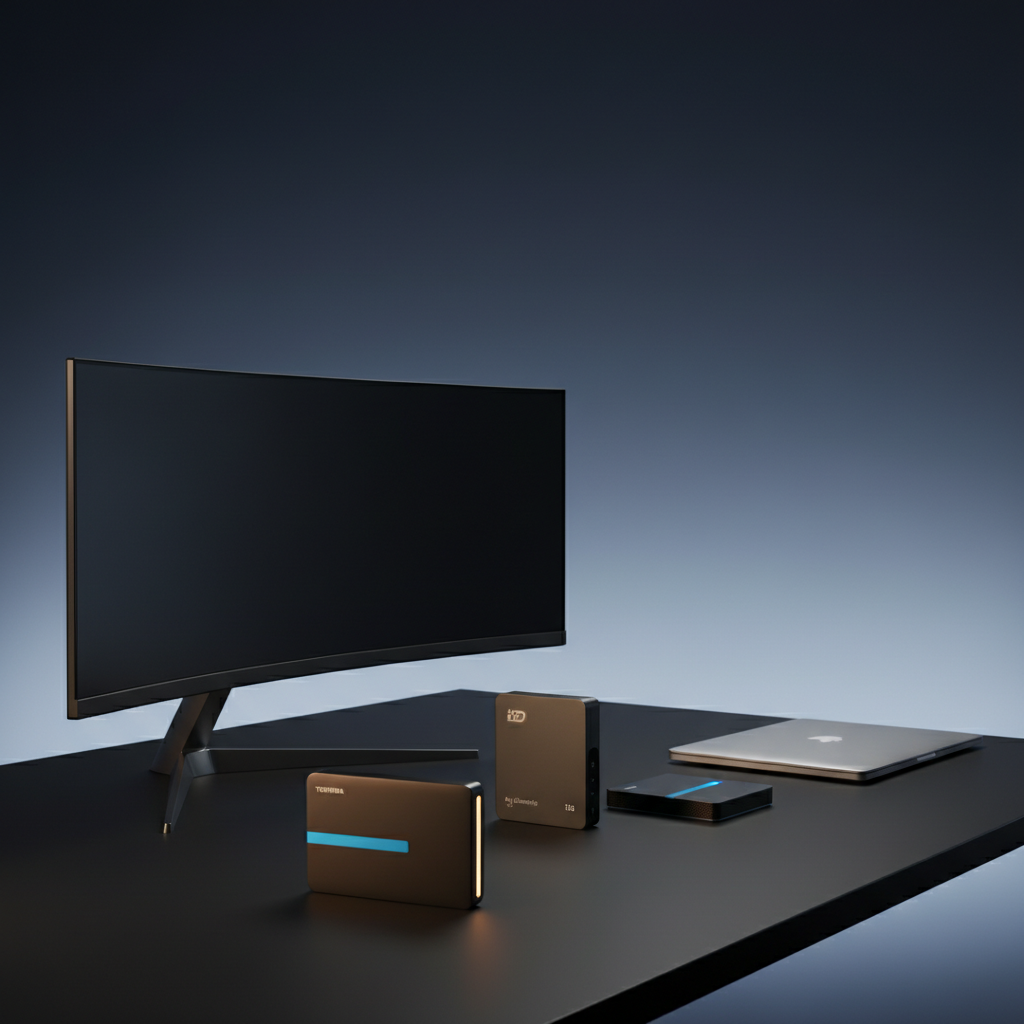
Our top pick is the Toshiba Canvio Advance 2TB (HDTCA20XR3AA). At $90.72 it undercuts many rivals while delivering a solid 4.6‑star rating from over 41,000 reviewers. Weighing just 0.33 lb and packing a slim 14 mm profile, it’s a genuinely portable solution for Windows users who want built‑in backup software without hauling a bulky brick.
The roundup covers 14 drives across three price tiers. Budget‑friendly options include the Toshiba Canvio Advance 1TB ($74.79), ADATA HD710 Pro 1TB ($89.11) and Transcend StoreJet 25M3G 1TB ($64.98). Mid‑range picks such as the ADATA HV620S 1TB ($112.67) and Transcend 2TB Rugged ($119.99) add a bit more capacity or ruggedness. Premium choices like the WD Elements 6TB ($159.99) and WD My Passport 5TB ($159.95) provide 6 TB and 5 TB of storage for users willing to spend a little more.
Below you’ll find a breakdown of each model by performance, durability and value, so you can match the drive to your own workflow and travel habits.
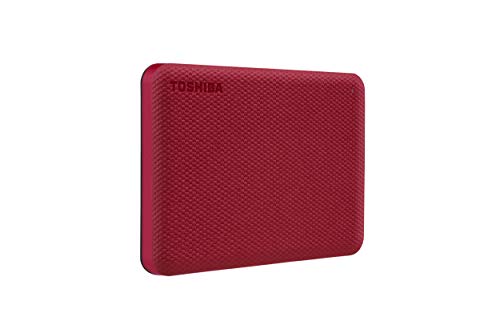
Toshiba Canvio Advance 2TB HDTCA20XR3AA
Its slim 14 mm height makes it easy to slip into any bag, delivering reliable, well‑reviewed storage in a truly portable package.

WD Elements 6TB
Ideal for power users needing massive 6 TB capacity; at $159.99 it’s about $69 more than the Best Overall, offering proven brand confidence for larger libraries.

WD My Passport 5TB
At 19.05 mm thick, it accommodates extra features like password protection, setting it apart from the slimmer Toshiba and larger‑capacity WD Elements.
Also considered
Score Analysis
Key score advantages vs. runner-up (WD Elements 6TB)
Price Range
Toshiba Canvio Advance 2TB HDTCA20XR3AA
$90.72
WD Elements 6TB
$174.99
WD My Passport 5TB
$159.95

ADATA HV620S 1TB Black
$112.67

Toshiba Canvio Basics 2TB HDTB420XK3AA
$155.08
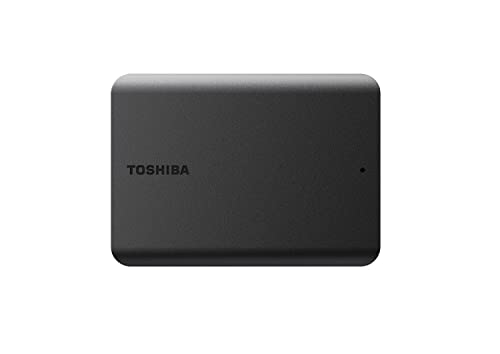
Toshiba Canvio Basics 4TB HDTB540XK3CA
$145.00
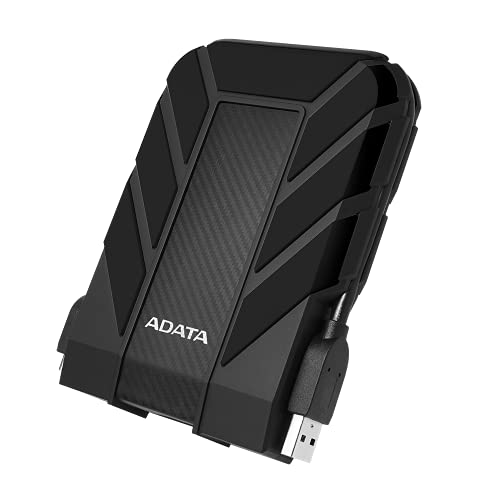
ADATA HD710 Pro 1TB AHD710P-1TU31-CBK
$121.40

Transcend 2TB Rugged HDD
$119.99
Toshiba Canvio Advance 1TB HDTCA10XR3AA
$75.41
Transcend StoreJet 25M3G 1TB
$99.99

WD My Passport 1TB Black
$84.99

ADATA HD710 Pro 2TB AHD710P-2TU31-CBK
$110.00

ADATA HD710 Pro 1TB AHD710P-1TU31-CBL
$92.55

Transcend StoreJet 1TB USB 3.1
$99.99
Spec Comparison
TL;DR: At $90.72, the Toshiba Canvio Advance 2 TB offers a slim 14 mm, 0.33 lb design with USB 3.2 Gen 1 speeds, making it a well‑reviewed, budget‑friendly portable drive for everyday backups.
The drive packs 2 TB of storage into a 14 mm thick, 0.33 pound plastic shell, and it connects via USB 3.2 Gen 1 (USB 3.0) with a theoretical max transfer rate of 5.0 Gbit/s (≈625 MB/s). Manufacturer lists large‑file write performance at 122 MB/s, while mixed‑small‑file writes reach about 85 MB/s, and the peak write speed hits 141 MB/s.
Compared with the other 13 entries, it is lighter than the ADATA HD710 Pro 1TB (0.6 pounds) and matches the weight of the Toshiba Canvio Advance 1TB (0.33 pounds). Its 14 mm thickness is slimmer than ADATA’s 21.5 mm but a touch thicker than the WD My Passport’s 11.18 mm. The included 45 cm micro‑USB cable's shorter length limits placement flexibility for many users.
Reviewers consistently praise the large capacity, quiet 5400 RPM operation, and the Windows‑only backup and password software that manufacturers pre‑install. Common complaints focus on the short micro‑USB cable, the lack of a USB‑C port, and the plastic enclosure’s tendency to slide on smooth surfaces without rubber feet. Professional reviewers highlight the solid price‑to‑storage ratio and the textured finish that makes the drive feel secure in hand.
Pros
Cons
Best for: Most users looking for a well‑reviewed, reliable mainstream option
Avoid if: You need advanced features or professional‑grade performance
“excellent product, excellent price”
“a sturdy portable drive slimmer, if not more advanced, than older models”
TL;DR: The WD Elements 6TB delivers the biggest portable HDD capacity in the roundup at a $159.99 price, with plug‑and‑play Windows support, a lightweight 44.8 g body, and a 2‑year warranty.
What really sets this drive apart is its 6 TB of storage – the highest capacity among the fourteen contenders – packed into a 2.5‑inch enclosure that weighs just 0.0988 lb (44.8 g). The drive runs at 5400 RPM and offers a real‑world sustained transfer speed of 110–130 MB/s via a USB 3.2 Gen 1 (Micro‑USB 3.0) interface, while still being bus‑powered so you'll never need an external brick.
Compared with peers, the Elements is lighter than the WD My Passport 5TB (209.8 g) and slimmer than many Toshiba Canvio Basics models, making it one of the most portable options. Its $159.99 price places it toward the premium end of the HDD segment, but the cost per terabyte is lower than most competitors, giving it strong value despite the higher upfront cost.
Users often highlight the drive’s straightforward plug‑and‑play setup on Windows and the durability of its ≥50% recycled‑plastic enclosure. Professional reviewers note the high value per terabyte and the solid two‑year warranty. The main criticisms revolve around the mechanical nature of the HDD – the 110–130 MB/s speed is slower than SSDs – and the fixed Micro‑USB cable, which some users report can wear over time.
Pros
Cons
Best for: Home users, students, and professionals who need affordable, high‑capacity backup for photos, videos, and documents.
Avoid if: You require high‑speed editing, gaming storage, or built‑in encryption, or if you’re shopping on a tight budget — it’s priced at $159.99.
TL;DR: The WD My Passport 5TB packs a massive 5 TB of storage into a slim, bus‑powered case, adds hardware AES‑256 encryption, but relies on an older Micro‑USB connector.
At 5 TB of capacity, the My Passport offers one of the largest portable HDD sizes in this roundup, letting you stash a full media library or extensive project archive without needing multiple drives. It runs on a 2.5‑inch mechanical HDD spinning at 5400 RPM and can theoretically move data at up to 5 Gbps through its Micro‑USB 3.2 Gen 1 (USB 3.0) interface. The drive measures just 19.05 mm high, 107.19 mm long and 74.93 mm wide, and weighs 0.4625 pounds (209.8 g), making it easy to slip into a laptop bag.
Compared with the other 13 contenders, the My Passport sits in the mid‑range for weight: it’s heavier than the 0.0988‑lb WD Elements 6TB and the 0.33‑lb Toshiba Canvio Basics 2TB, yet lighter than the 0.595‑lb ADATA HD710 Pro. In terms of capacity, its 5 TB sits above the 2‑TB and 4‑TB models from Toshiba and ADATA, but below the 6 TB WD Elements. The Micro‑USB connector matches the WD Elements but is older than the USB‑C ports that appear on newer drives outside this list.
User sentiment highlights the drive’s reliability and the peace of mind that comes from built‑in hardware AES‑256 encryption and password protection. Reviewers appreciate the bundled WD Discovery and WD Security software that automate backups and monitor drive health. However, many note that the Micro‑USB port feels dated and that real‑world write speeds can lag behind competitors, especially with many small files. The plastic casing lacks rubber feet, so the drive can slide on smooth surfaces; consumers frequently mention this.
Beyond the core specs, the My Passport ships with a Micro‑USB‑to‑USB‑A cable, a three‑year limited warranty, and a default NTFS file system that you can reformat to exFAT or HFS+. It operates comfortably between 41 °F and 95 °F (5 °C‑35 °C) and draws power directly from the USB port, eliminating the need for an external power brick.
Pros
Cons
Best for: Buyers willing to invest in a proven, high‑quality option
Avoid if: You need ultra‑fast transfer speeds or a rugged, shock‑resistant drive
TL;DR: The ADATA HV620S 1TB Black packs a full terabyte into an ultra‑slim 11.5 mm, 152 g shell, delivering 90 MB/s USB 3.1 speeds and a 4.8‑star rating for everyday portability.
What really sets this drive apart is its wafer‑thin profile—just 11.5 mm thick—and feather‑light 152 g weight, making it one of the most pocket‑friendly 2.5″ HDDs on the market. It offers 1 TB of storage through a USB 3.1 Gen 1 (USB 3.2 Gen 1) interface that tops out at 90 MB/s, and the bus powers it directly, so you don’t need an external adapter.
Compared with the other contenders, the HV620S is dramatically slimmer than the ADATA HD710 Pro’s 133.3 mm height and lighter than the Transcend StoreJet’s 0.5 lb (226.8 g) weight. It also weighs less than the HD710 Pro’s 0.595 lb (270 g) version. However, its maximum transfer rate of 90 MB/s is lower than the 5 Gbps (≈625 MB/s) advertised by several peers, and it lacks the ruggedized casings found on the Transcend Rugged HDD and the HD710 Pro series.
Reviewers consistently praise the drive’s sleek glossy black finish and the bright cold‑blue LED that signals activity. Users love how easy it is to slip into a laptop bag, and the 4.8‑star rating from 5,705 reviews reflects broad satisfaction with its reliability. The most common complaints focus on the fingerprint‑prone surface and the fact that software handles encryption rather than built‑in hardware, which some power users consider a trade‑off.
Technically, the HV620S spins at 5400 RPM and supports 256‑bit AES encryption via software, operating safely between 5 °C and 50 °C. A three‑year warranty backs the drive, and the raised lip around the chassis helps protect the surface during everyday handling.
Pros
Cons
Best for: Students, professionals, photographers, gamers, and travelers who need a compact, well‑reviewed mainstream external HDD.
Avoid if: You require rugged, shock‑proof storage, high‑speed SSD performance, or built‑in hardware encryption.
“Fits easily in pockets or laptop bags”
TL;DR: The Toshiba Canvio Basics 2TB offers 2 TB of portable storage in a 0.33‑lb, 14 mm‑thin package, backed by a 4.7‑star rating from over 70 k reviewers for $162.70.
The drive’s standout spec is its compact size – just 14 mm tall, 109 mm long and 78 mm wide – making it one of the slimmest options in this 14‑product roundup. At 0.33 pounds (149 g), it’s also featherlight in the hand, lighter than the WD My Passport 5TB, which weighs about 0.46 pounds.
When stacked against its peers, the Canvio Basics sits in the middle of the price band but offers a solid 2 TB capacity, more than the ADATA HV620S 1TB and comparable to the Transcend 2TB Rugged HDD. Its height is shorter than the WD Elements 6TB’s 1.8 in (45.72 mm) profile, and its weight is lower than the rugged Transcend’s 0.41 pounds, giving it a clear portability edge.
Users repeatedly praise the drive’s plug‑and‑play convenience and its reliable sequential performance of up to 117 MB/s read and 114 MB/s write, which is fast enough for game console backups and media libraries. Professional reviewers note the “high value for money” thanks to the low cost per gigabyte and the sturdy 1‑year limited warranty. On the downside, the same reviews flag sluggish random‑write speeds around 5.73 MB/s and the lack of a protective carry case, which may concern on‑the‑go users.
Pros
Cons
Best for: Budget‑conscious students, casual gamers, and home users who need reliable 2 TB storage without extra frills.
Avoid if: You require high‑speed random access for video editing, need a rugged design for travel, or prefer a longer warranty period.
“excellent product, excellent price”
“a sturdy portable drive slimmer, if not more advanced, than older models”
TL;DR: The Toshiba Canvio Basics 4TB offers a roomy 4 TB of portable storage, USB‑3.0 plug‑and‑play convenience, and a compact 0.48‑lb design, though its write speeds can lag on large transfers.
At the heart of this drive is a 4 TB capacity housed in a 2.5‑inch form factor, letting you stash a massive photo library or game library without a desktop. The drive connects via a USB 3.2 Gen 1 (USB 3.0) A‑to‑Micro‑B cable that’s 50 cm long, and it can theoretically push up to 5.0 Gbit/s. In benchmark terms you’ll see about 105.6 MB/s sequential reads and 99.4 MB/s sequential writes, with CrystalDiskMark numbers of 139 MB/s read and 153.4 MB/s write.
When you line it up against the other 13 entries, the Canvio Basics sits a touch heavier than the WD My Passport 5TB (0.48 lb vs 0.46 lb) but shares a similar slim profile—its 19.5 mm height is practically the same as the Passport’s 19.05 mm. It’s slimmer than the Transcend Rugged 2TB (18.8 mm) and narrower than the ADATA HD710 Pro 2TB (82.3 mm width). Capacity‑wise it trails the WD Elements 6TB and the WD My Passport 5TB, yet it outpaces the Toshiba Canvio Basics 2TB and the ADATA HV620S 1TB. Feature‑wise it lacks UASP support that some newer drives include, and it doesn’t bundle backup software like the WD My Passport does.
Reviewers praise the drive’s “plug‑and‑play” simplicity and its matte‑finish enclosure that feels solid for a portable HDD. Users love the console compatibility—PS4, PS5, Xbox One and Series X/S work straight out of the box—so gamers can add extra storage on the couch. The main gripe is the slowdown during sustained writes, a symptom many attribute to the suspected SMR technology inside. Professional reviewers also note the flat Micro‑B connector can feel less robust than a USB‑C port.
Pros
Cons
Best for: Casual users, console gamers, and anyone who wants a reliable, high‑capacity backup drive without fuss.
Avoid if: You need fast sustained write speeds for video editing, rely on built‑in encryption, or prefer a USB‑C connection.
“excellent product, excellent price”
“a sturdy portable drive slimmer, if not more advanced, than older models”
TL;DR: The ADATA HD710 Pro 1TB packs a rugged IP68 waterproof rating, 1.5 m drop resistance, and a 3‑year warranty into a 0.6‑lb, 1‑TB drive for under $90.
This drive’s standout spec is its IP68 certification – it can survive a 2 m submersion for 60 minutes and resist dust completely, while the MIL‑STD‑810G‑grade shock system protects it from drops up to 1.5 m. The triple‑layer construction and auto‑pause technology pause data transfer the moment an impact is sensed, then resume when the drive is stable again.
Compared with the other 13 entries, the HD710 Pro is heavier than ultra‑light options like the WD My Passport 1TB Black, yet its rugged features give it a unique position that slimmer competitors such as the Toshiba Canvio Advance lack. While many peers focus on thinness or low weight, this model prioritises durability without sacrificing a standard 2.5‑inch SATA form factor.
Users consistently praise the drive’s “built‑to‑survive” feel, noting that it endures drops and harsh outdoor conditions without hiccups. Professional reviewers echo this sentiment, highlighting the intelligent shock sensor and cable‑management groove as practical touches. The trade‑off is speed: with a USB 3.2 Gen 1 interface offering a theoretical 5 Gbps (625 MB/s) ceiling, real‑world HDD performance remains lower than SSD alternatives, which some users find limiting for large video files.
Additional context includes a 1‑TB capacity that fits most backup needs, a 5 V 900 mA power draw, and a 3‑year limited warranty that adds confidence for long‑term use. The drive ships with a USB 3.1 Gen 1 cable and a quick‑start guide, and it works with Windows 7‑11, macOS 10.6+ (after reformatting), and Linux kernels 2.6+. Its dimensions – 133.3 mm × 98.5 mm × 21.5 mm – keep it portable enough for a backpack while still feeling substantial in hand.
Pros
Cons
Best for: Budget-conscious buyers seeking a reliable entry-level option
Avoid if: You have limited desk space or need portability
“Still working perfectly after being dropped multiple times.”
“Looks and feels very sturdy. Great for outdoor use.”
TL;DR: The Transcend 2TB Rugged HDD offers MIL‑STD‑810G shock protection, USB 3.1 Gen 1 speeds up to 5 Gbps, and 256‑bit AES encryption in a compact 0.41‑lb, 2‑TB package for $119.99.
What really sets this drive apart is its military‑grade durability: it meets MIL‑STD‑810G certification and can survive 10,000 plug‑unplug cycles, while the built‑in one‑touch backup button makes securing data fast and simple. At 0.41 pounds (186 g) and only 18.8 mm thick, it stays slim enough for a laptop bag yet tough enough for field work.
Compared with the other 13 contenders, the Transcend is heavier than the ADATA HV620S 1TB, which weighs 0.33510263824Pounds, but lighter than the ADATA HD710 Pro 2TB at 0.5952481074Pounds. It also carries a three‑year limited warranty, matching the ADATA HD710 Pro’s warranty while offering more capacity than the 1‑TB models in the lineup.
Users consistently praise the rugged casing and the ease of the one‑touch backup button, noting that the drive feels “built like a tank” and that the included Transcend Elite software simplifies encryption. Professional reviewers highlight the 256‑bit AES encryption and the reliable USB 3.1 Gen 1 interface, though they note the micro‑USB connector feels dated in 2026.
In practice, the USB 3.1 Gen 1 (up to 5 Gbps) connection delivers the fastest transfer speeds available among the HDDs here, and the 2 TB capacity gives ample room for high‑resolution photos, video clips, and project archives. The drive’s 5 V DC bus‑powered design means you won’t need an external power brick.
Pros
Cons
Best for: Travelers, field workers, and students who need a durable, secure 2 TB backup solution.
Avoid if: You require ultra‑fast SSD performance or a USB‑C‑only connection.
“Great deal for 2 TB external storage”
“Showed up quick, and it’s a great product. Highly recommended.”
TL;DR: The Toshiba Canvio Advance 1TB packs a full terabyte of storage into a 0.33‑pound, 14 mm‑thin plastic shell, offering USB 3.2 Gen 1 speeds and Windows‑only backup tools at a budget‑friendly price.
The drive’s standout spec is its 5.0 Gbit/s (≈625 MB/s) USB 3.2 Gen 1 interface, which, combined with an 8 MB cache, yields real‑world transfer rates of 100–130 MB/s despite the 5400 RPM spindle. At just 149 g (0.33 pounds) and measuring 109 mm × 78 mm × 14 mm, it’s one of the most portable 2.5‑inch HDDs in this lineup. A 2‑year limited manufacturer warranty rounds out the core offering.
Compared with its peers, the Canvio Advance is lighter than the Transcend StoreJet 25M3G (0.4 pounds) but a touch heavier than the WD My Passport (0.26 pounds). Its 14 mm height matches the Toshiba Canvio Advance 2TB model, while the Transcend StoreJet 1TB sits at 18.8 mm, making the Canvio Advance slimmer than many competitors. The USB‑Micro‑B connector is bus‑powered, so you won’t need an external brick, a convenience the ADATA HD710 Pro also shares, though the latter adds rugged features the Canvio lacks.
Reviewers consistently praise the drive’s plug‑and‑play simplicity and the ease of backing up photos, videos, and PlayStation game data. Professional reviewers note the “very fast for a portable HDD” performance and the cool running temperature. The main complaints revolve around the Windows‑only backup and encryption software, the lack of hardware‑level security, and a plastic enclosure that feels less rugged than metal‑cased rivals. Some users also mention the Micro‑B connector’s fragility, which can be a nuisance when swapping cables.
Under the hood, the 2.5‑inch 5400 RPM drive uses an 8 MB cache and supports NTFS out of the box, meaning macOS users will need to reformat or rely on third‑party drivers. The included USB‑A to Micro‑B cable draws up to 900 mA, keeping the drive fully powered from any standard USB port. Toshiba’s free Storage Backup and Security software provide basic Windows‑centric protection, but power users seeking 256‑bit hardware encryption will need to look elsewhere.
Pros
Cons
Best for: Budget-conscious buyers seeking a reliable entry-level option
Avoid if: Reliability and user satisfaction are your top concerns
“excellent product, excellent price”
“a sturdy portable drive slimmer, if not more advanced, than older models”
TL;DR: The Transcend StoreJet 25M3G 1TB offers rugged, water‑resistant protection, 1 TB capacity and a one‑touch backup button at a budget‑friendly $64.98 price.
The drive packs a full 1 TB of storage into a compact 25.4 mm × 129.5 mm × 80.8 mm chassis that weighs just 0.4 Pounds, and Transcend built it around a three‑stage MIL‑STD‑810G shock system and a sealed water‑resistant casing. A 5400 RPM spindle paired with an 8 MB cache delivers the theoretical 625 MB/s (5 Gbps) transfer ceiling, while 256‑bit AES hardware encryption secures your files through the included Transcend Elite software.
At $64.98 it lands on the lower end of the price spectrum in this 14‑product roundup, making it cheaper than many of its peers. Its military‑grade drop protection adds a bit of heft compared with the lightest models, yet it remains comfortably portable for on‑the‑go work. The micro‑USB‑to‑USB‑A cable comes included, but it’s a legacy connector that newer USB‑C‑only drives have moved away from.
Reviewers consistently praise the drive’s durability—field professionals love the ability to survive drops and exposure to rain—while the one‑touch auto‑backup button highlights a rare convenience. On the flip side, users note slower real‑world speeds compared with SSD alternatives and mention that the software‑only encryption lacks a physical toggle.
Professional reviewers echo the ruggedness praise and point out that the legacy micro‑USB port feels dated in 2026.
Pros
Cons
Best for: Field professionals such as photographers, videographers, and journalists who need a drop‑proof, water‑resistant 1 TB drive on a budget.
Avoid if: You prioritize the fastest possible transfer speeds or require a modern USB‑C connection.
“Survived multiple drops from desk height — still works perfectly.”
“Great for fieldwork — I use it for photo backups and it’s held up in rain and dust.”
TL;DR: The WD My Passport 1TB Black packs 1 TB of storage, 256‑bit AES hardware encryption and a 5 Gbps USB‑C‑compatible interface into a 0.26‑pound, ultra‑slim shell for budget‑friendly portability.
What really stands out is the built‑in 256‑bit AES hardware encryption paired with password protection, giving you solid data security without extra software. At 1 TB of capacity the drive offers ample room for documents, photos and media, and its USB 3.2 Gen 1 (USB 3.0/3.1 Gen 1) connector promises up to 5 Gbps theoretical transfer rates.
In the context of the 13 other drives, the My Passport is notably lighter at 0.26 pounds compared with the ADATA HD710 Pro’s 0.595 pounds and the Transcend StoreJet’s 0.5 pounds. Its height of 11.18 mm (0.44 in) also makes it slimmer than ADATA’s 21.5 mm, Toshiba’s 14 mm and Transcend’s 18.8 mm, while its dimensions (4.22 in × 2.95 in × 0.44 in) keep it among the most pocket‑friendly options.
Everyday users appreciate the compact form factor and the “plug‑and‑play” experience on Windows, often noting the respectable actual transfer speeds of 80.04 MB/s on macOS and 72.55 MB/s on Windows. Reviewers also praise the strong security features. On the flip side, users report that the plastic housing scratches easily, the drive lacks any shock, water or dust protection, and users see the Micro‑B USB connector as an older, less durable choice.
Technically, the drive is bus‑powered via USB, runs at 5400 RPM, and comes with a three‑year limited manufacturer warranty. The included SuperSpeed USB‑A to Micro‑B cable (5 Gbps) and a USB‑A to USB‑C adapter add flexibility for modern laptops.
Pros
Cons
Best for: Students, professionals and travelers who need a lightweight, affordable backup drive with strong encryption.
Avoid if: You require rugged, shock‑ or water‑proof protection or high‑speed performance for tasks like 4K video editing.
TL;DR: With a rugged IP68 rating, MIL‑STD‑810G shock resistance, 2 TB capacity and 5 Gbps USB 3.2 Gen 1 speed, the ADATA HD710 Pro 2TB offers durable storage at $110, though it feels heavier than many portable drives.
The standout feature is its IP68 dust‑tight and submersible rating, allowing it to survive 2 m of water for 60 minutes, while MIL‑STD‑810G certification guarantees drop resistance from 1.5 m. It packs 2 TB of space in a 133.3 mm × 98.5 mm × 26.7 mm chassis that weighs 0.5952481074 pounds, and it delivers a maximum data transfer rate of 5 Gbps over USB 3.2 Gen 1.
Compared with the other 13 drives in the roundup, the HD710 Pro is heavier than the ADATA HV620S (0.33510263824 pounds) and the Toshiba Canvio Advance (0.33 pounds), but only slightly lighter than the 1 TB HD710 Pro model (0.6 pounds). Its height of 133.3 mm dwarfs the HV620S’s 11.5 mm profile and the Transcend StoreJet’s 18.8 mm height, placing it among the bulkier options. Transfer‑speed wise, it matches the 5 Gbps rates of the Transcend StoreJet, Transcend 2 TB Rugged, and Toshiba Canvio, while outpacing the HV620S’s 90 MB/s ceiling.
Professional reviewers repeatedly praise the triple‑layered silicone shell and vibration sensor for protecting data during shocks, and everyday users echo the ruggedness approval. Common complaints focus on the drive’s heft and bulk, the finicky USB cover that can affect the waterproof seal, and the need to reformat for macOS. Speed enthusiasts note that 5 Gbps is adequate but not class‑leading for demanding workflows.
The HD710 Pro uses a USB 3.2 Gen 1 (formerly USB 3.1 Gen 1) interface, backward compatible with USB 2.0’s 480 Mbps rate, and draws 900 mA at 5 V. A three‑year warranty backs the unit, and it ships with a USB 3.2 Gen 1 cable that includes a storage groove for the cable itself.
Pros
Cons
Best for: Outdoor adventurers, field photographers, and anyone needing a rugged drive that can survive harsh conditions.
Avoid if: You prioritize ultra‑lightweight portability or need the fastest possible transfer speeds.
“Still working perfectly after being dropped multiple times.”
“Looks and feels very sturdy. Great for outdoor use.”
TL;DR: The ADATA HD710 Pro 1TB is a rugged, IP68+ external drive with 1.5 m drop resistance and 2 m waterproof protection, but its bulk and average speeds make it better for field work than high‑speed editing.
What really sets this drive apart is its military‑grade durability: it survives a 1.5 meter drop, endures immersion up to 2 meters for 60 minutes, and carries an IP68+ dust‑proof rating. All that protection lives inside a 2.5‑inch chassis that holds a 1 TB platter spinning at 5400 RPM and connects via USB 3.2 Gen 1.
Compared with the other 13 contenders, the HD710 Pro is noticeably heavier than the WD My Passport (0.26 pounds) and the Toshiba Canvio Advance models (around 0.33 pounds). Its 21.5 mm thickness also exceeds the 11.18 mm profile of the WD drive and the 14 mm thickness of the Toshiba units, making it the bulkier option in the lineup. However, none of the peers list an IP rating, so the HD710 Pro’s waterproof and dust‑proof credentials are unique among the group.
Everyday users rave about the drive’s toughness, noting that the built‑in shock sensor that pauses operation during impact saves data when the unit is knocked around on a job site. Professional reviewers echo this, calling the triple‑layered protective construction “notable.” The trade‑off is an average data‑transfer performance that falls short for large‑file workflows, and some owners report the one‑touch USB port cover can become stiff over time.
Beyond its rugged shell, the drive is bus‑powered, so you won’t need an external adapter, and the integrated cable groove helps keep the USB cable tidy when you’re on the move. A two‑year limited warranty backs the hardware, and the blue‑tinted enclosure makes it easy to spot in a crowded bag.
Pros
Cons
Best for: Outdoor adventurers, field engineers, and journalists who need a drive that can survive drops, dust, and water.
Avoid if: You require high‑speed transfers for video editing or need the smallest, lightest portable drive.
“Still working perfectly after being dropped multiple times.”
“Looks and feels very sturdy. Great for outdoor use.”
TL;DR: The Transcend StoreJet 1 TB USB 3.1 offers MIL‑STD‑810G drop protection, 256‑bit hardware encryption and a one‑touch backup button in a compact 0.5 lb, 5‑ft‑drop‑resistant package.
The drive’s standout feature is its 256‑bit AES hardware encryption, which protects your data without taxing the host computer. It also meets MIL‑STD‑810G standards, surviving drops from 1.52 meters (5 ft) thanks to a three‑stage shock‑absorption system. At just 0.5 lb and measuring 5.10 in × 3.24 in × 0.74 in, it’s small enough to slip into a camera bag while still offering a full terabyte of storage.
Compared with the other 13 drives in this roundup, the StoreJet is lighter than the ADATA HD710 Pro 2 TB (≈0.595 lb) but heavier than the ADATA HV620S (≈0.335 lb) and the Toshiba Canvio Advance (≈0.33 lb). Its 1.52 m drop rating matches the 1.5 m drop resistance that ADATA HD710 Pro models list, placing it solidly among the most rugged options. Unlike some newer rivals, it uses a Micro‑USB 3.0‑to‑USB‑A cable rather than USB‑C, which can limit direct connection to the latest laptops.
Professional reviewers praise the drive’s durability and the convenience of the one‑touch backup button, while everyday users often highlight that the drive “just keeps working” after accidental drops. The included Transcend Elite software draws mixed reactions; many note it can feel clunky and occasionally display Chinese‑language prompts. Performance-wise, the 5400 RPM spindle delivers sequential read speeds around 113 MB/s and write speeds near 114 MB/s, which aligns with the USB 3.1 Gen 1 theoretical maximum of 5.0 Gbps but falls short of SSD‑level speeds.
Pros
Cons
Best for: Field professionals such as journalists, photographers, or engineers who need a drop‑proof, encrypted backup that fits in a small bag.
Avoid if: You need high‑speed SSD performance, USB‑C connectivity, or a smoother software experience.
“Survived multiple drops from desk height — still works perfectly.”
“Great for fieldwork — I use it for photo backups and it’s held up in rain and dust.”
Breakdown
Toshiba Canvio Advance 2TB HDTCA20XR3AA
Pros
WD Elements 6TB
Cons
WD My Passport 5TB
Cons
ADATA HV620S 1TB Black
Pros
Cons
Based on scoring data and product specs
Personalized picks
Best Overall Pick
Toshiba Canvio Advance 2TB HDTCA20XR3AA
Best OverallBest for: Most users looking for a well-reviewed, reliable mainstream option
WD Elements 6TB
Best for: Buyers willing to invest in a proven, high-quality option
$174.99+$84.27 vs winner
Skip Transcend StoreJet 1TB USB 3.1 if…
You need advanced features or professional-grade performance
Toshiba Canvio Advance 2TB HDTCA20XR3AA takes the top spot with a solid 4.6 / 5 rating from 41,102 reviewers, a lightweight 0.33 pound body, and a max transfer rate of 5.0 Gbit/s (≈625 MB/s) for large files. At $90.72 it also undercuts many larger‑capacity rivals while still offering USB 3.2 Gen 1 connectivity and a two‑year limited warranty.
The runner‑up, WD Elements 6TB, shines when you need massive portable storage – ideal for a travelling photographer or a media‑hoarder who wants all their movies on a single drive. It packs 6 TB into an ultra‑light 0.0988 lb chassis, is bus‑powered via USB 3.2 Gen 1, and retails for $159.99.
For tighter budgets, the Transcend StoreJet 25M3G 1TB delivers reliable performance at just $64.98, making it an entry‑level choice at $64.98. If you prefer a premium feel, the Toshiba Canvio Basics 2TB HDTB420XK3AA offers a sturdier build and higher capacity for $162.70, catering to users who want extra space without sacrificing durability.
Pick the Toshiba Canvio Advance 2TB today and enjoy fast, dependable storage without breaking the bank.
The Toshiba Canvio Advance 2TB lists console compatibility with Xbox One and PlayStation 4 after formatting and uses a USB 3.2 Gen 1 (USB 3.0) Micro‑B connection, making it a straightforward plug‑and‑play choice. The WD Elements 6TB also works with modern consoles via its USB 3.2 Gen 1 interface, but the Toshiba model is lighter (150 g vs 44.8 g) and priced lower.
Please sign in to leave a review
No reviews yet. Be the first to review!
