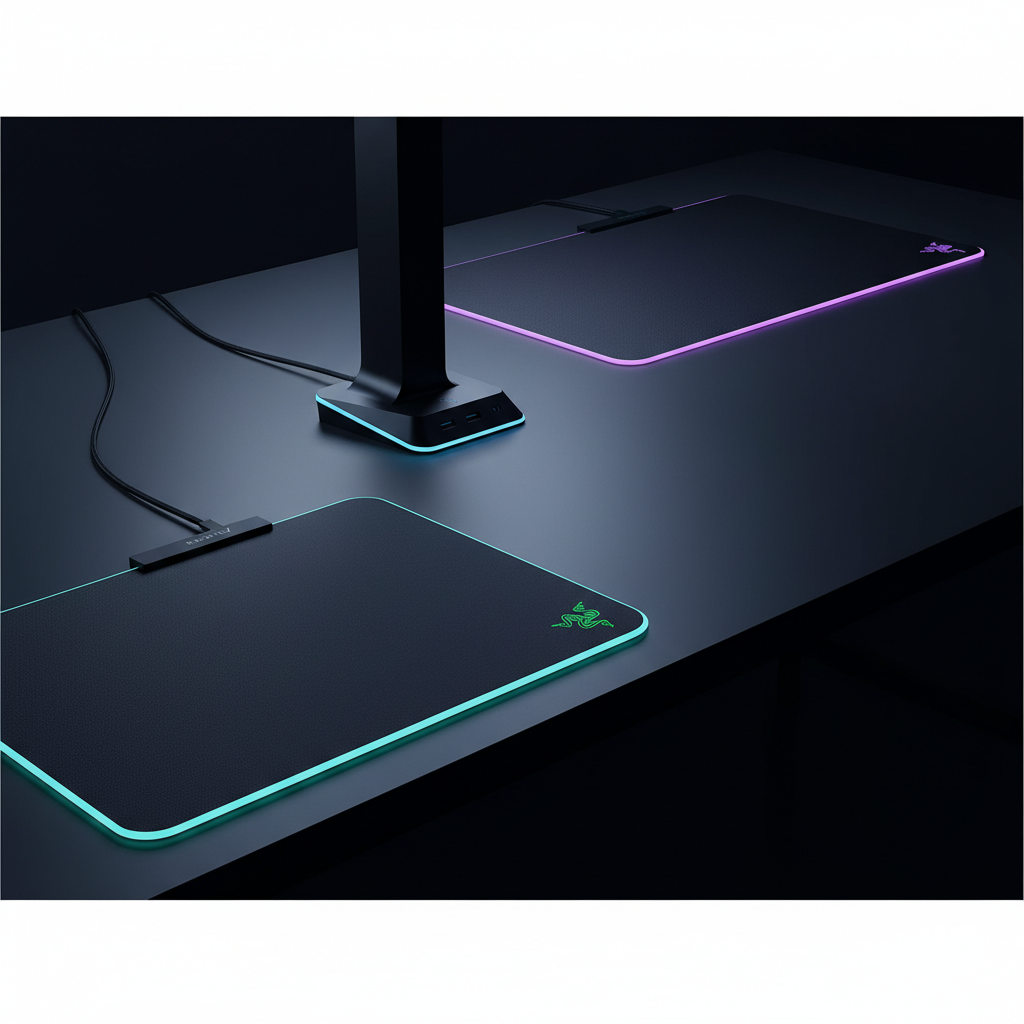
If you want the most eye‑catching, performance‑driven lighting on a mouse pad, the Razer Firefly Hard V2 takes the top spot. At $49.99 it packs 19 edge‑lit zones, 16.8 million colors and an ultra‑thin 3.5 mm acrylic surface that glides smoothly for FPS and MOBA play. Its 4.7/5 rating from 5,689 reviewers shows the community appreciates the bright, customizable Chroma sync and the anti‑slip rubber base.
The roundup compares six Razer‑focused options across three price tiers. The budget tier offers the Firefly Hard V2 and the Goliathus Extended Chroma, both under $60 and sporting the same 16.8 million‑color palette. Mid‑range picks are the Base Station V2 ($69.99) with eight‑zone lighting and a built‑in DAC, plus the Govee Neon Rope 10ft at $74.99. Premium choices include the Firefly V2 Pro ($99.00) with 15 individually addressable zones and the XL Strider Chroma ($129.99) that blends a hybrid surface with 19 zones. Below we’ll break down each model’s lighting zones, build quality and ecosystem integration so you can decide which glow fits your battlestation.

Razer Firefly Hard V2
Its compact 355 mm length fits tight desk spaces while delivering full Razer Chroma lighting.

Razer Base Station V2
Ideal for gamers needing a built‑in headset stand and cable management, and it’s $20 more than the Firefly Hard V2.

Razer Strider Chroma
Measuring 900 mm, it covers expansive desk layouts, offering a continuous light strip the shorter Firefly and Base Station can’t match.
Also considered
Score Analysis
Key score advantages vs. runner-up (Razer Base Station)
Price Range
Razer Firefly Hard V2
$49.80
Razer Base Station V2
$69.99
Razer Strider Chroma
$129.99
Razer Goliathus Extended Chroma
$57.69

Razer Firefly V2 Pro
$99.00

Govee Neon Rope 10ft
$74.99
Spec Comparison
TL;DR: The Razer Firefly Hard V2 offers a thin 3.5 mm hard acrylic surface, 19 edge‑lit Chroma zones, and 16.8 million colors at a $49.99 price, earning 4.7‑star praise from 5,689 reviewers.
The standout spec is its 19 edge‑lit lighting zones that can display any of the 16.8 million Razer Chroma colors, all on a ultra‑thin 3.5 mm micro‑textured acrylic surface. The pad measures 355 mm in length, 275 mm in width, and weighs just 25.5 g, so it's one of the lightest hard pads on the market.
Compared with the other five entries, the Firefly Hard V2 is lighter than the Razer Goliathus Extended Chroma (which weighs 1.23 pounds) and thinner than the Razer Strider Chroma’s 4 mm profile. It also provides more lighting zones than the Razer Base Station V2’s 8 zones and the Firefly V2 Pro’s 15 zones, while matching the Strider’s 19 zones. Unlike the Pro version, this model has zero integrated USB ports, so it lacks a built‑in pass‑through.
Professional reviewers note the pad’s “high‑quality micro‑textured acrylic surface for precise tracking” and praise its “brightest RGB mouse mat at launch.” Everyday users echo the buttery glide and easy‑clean nature, but several mention that the edge‑only lighting can feel uneven and that the hard surface may feel cold to the touch.
Pros
Cons
Best for: RGB enthusiasts and Razer ecosystem owners who want a thin, high‑precision hard pad with edge‑lit lighting.
Avoid if: You prefer a soft cloth pad, need full‑surface illumination, or require an integrated USB pass‑through.
TL;DR: The Razer Base Station V2 offers a sturdy aluminum stand, built‑in DAC with 7.1 surround, and 8‑zone Chroma RGB for $69.99, earning a 4.7‑star rating from over 8 000 reviewers.
The standout feature is its integrated audio hub: a 1 × 3.5 mm combo jack with a built‑in DAC and 7.1 surround sound support via Razer Synapse 3, all housed in an all‑aluminum stand that measures 278 mm tall. The chassis also shines with 8 lighting zones and 16.8 million color options, letting you sync the look of your desk to any game.
Compared with the other five entries, the Base Station V2 is lighter than the Govee Neon Rope’s 2.1 pounds and comparable to the Razer Goliathus Extended Chroma’s 1.23 pounds, yet it is considerably heavier than the ultra‑light Firefly Hard V2, which lists a weight of just 25.5 g. In terms of lighting, its 8 zones are fewer than the Firefly Hard V2’s 19 zones, the Firefly V2 Pro’s 15 zones, and the Strider Chroma’s 19 zones, but it still provides full RGB customization unlike the Goliathus, which lists no lighting zones. Color depth matches the 16.8 million‑color palette of other Razer gear and exceeds the Govee Neon Rope’s 16 million colors.
In practice, users love the premium feel of the aluminum construction and the clarity added by the built‑in DAC, which yields a 4.7‑star average from 8,420 reviews. Professional reviewers highlight the practical design and the flexibility of the 1.8 m USB‑3.1 cable. The main trade‑off is the reliance on Razer Synapse 3 for full RGB control and the lack of a dedicated headset charger, which console‑only gamers may find limiting.
Pros
Cons
Best for: PC gamers and streamers who already use Razer accessories and want a sturdy stand with high‑quality audio and Chroma lighting.
Avoid if: You need a built‑in charger or prefer a plug‑and‑play solution without installing Synapse.
TL;DR: The Razer Strider Chroma offers a 900 mm hybrid‑surface mouse mat with 19‑zone RGB, 16.8 million colors and solid build quality, but its premium $129.99 price and large footprint suit gamers who prioritize lighting and performance.
The standout feature is its 19 individually addressable RGB zones lighting up across a 16.8 million‑color palette, all controlled via Razer Synapse 3 over a USB Type‑A connection. Its hybrid surface blends a soft polyester top with a hard rubber base, measuring 900 mm long, 370 mm wide and just 4 mm thick, and it weighs 2.65 Pounds (1201 g). You can clean the flat, warp‑resistant, water‑resistant mat with a simple cloth.
Compared with the other five entries, the Strider Chroma is the longest mat (900 mm vs. 278 mm on the Firefly V2 Pro and 355 mm on the Firefly Hard V2) and noticeably heavier than the Firefly V2 Pro (2.07 lb), Govee Neon Rope (2.1 lb), Base Station V2 (1.0 lb) and Goliathus Extended (1.23 lb). It also offers more lighting zones than the Firefly V2 Pro’s 15 zones and the Base Station V2’s 8 zones, matching the Firefly Hard V2’s 19 zones while delivering a full‑size gaming surface that the smaller Govee Neon Rope (10 ft strip) cannot provide.
Reviewers consistently praise the balanced glide from the hybrid surface and the eye‑catching edge lighting, noting that the seamless edges eliminate tracking hiccups. Professional reviewers highlight the “high build quality and flatness,” while everyday users appreciate the durability and anti‑slip rubber base. The most common critique notes that the RGB effect concentrates along the edges rather than covering the entire surface, and the non‑detachable USB cable limits placement options.
Pros
Cons
Best for: Buyers willing to invest in a proven, high‑quality option
Avoid if: You're on a tight budget or only need basic functionality
“It’s so cool, it’s so smooth, just awesome.”
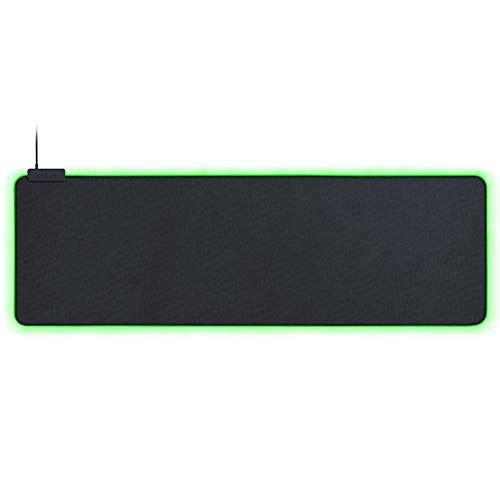
TL;DR: The Razer Goliathus Extended Chroma delivers a 919 mm‑long, 294 mm‑wide micro‑textured cloth surface with 16.8 million‑color RGB lighting, but it ties up a dedicated USB port and has a non‑detachable cable.
At 919 mm in length, 294 mm in width, and just 2.8 mm thick, the Goliathus Extended Chroma is one of the largest mousepads in this lineup, giving you plenty of room for sweeping motions. Its edge‑lit electroluminescent (EL) wire supports 16.8 million colors and multiple effects such as static, breathing, spectrum cycling, reactive, wave, and game‑integrated dynamic lighting, all powered via a USB 2.0 connection.
Compared with its peers, the Goliathus beats the Razer Firefly Hard V2’s 355 mm length and the Firefly V2 Pro’s 278 mm length, while remaining lighter than the Strider Chroma’s 2.65 pounds. It also lacks the integrated USB ports of the Base Station V2 and the detachable cable of the Firefly V2 Pro, meaning you’ll need a free USB port solely for lighting. The pad doesn’t list lighting zones, whereas the Firefly Hard V2 and Strider Chroma each offer 19 zones and the Base Station V2 provides 8 zones.
Users consistently award it 4.7 / 5 stars across 9,535 reviews, praising the smooth yet controlled micro‑textured cloth surface for precise tracking at any DPI and the vibrant Chroma lighting that syncs with other Razer gear. Professional reviewers note the stitched EL wire prevents fraying and the built‑in cable catch adds a tidy finish. Common complaints focus on the dedicated USB port that reduces port availability, the non‑detachable cable that hampers cable management, and the relatively narrow 294 mm width for full elbow support.
Technical details include a non‑slip natural‑foam rubber base, a rollable design for easy storage, and configuration through Razer Synapse 3 (Beta). The pad’s weight of 1.23 pounds (558 g) keeps it stable during intense gaming sessions without feeling overly heavy.
Pros
Cons
Best for: Razer ecosystem owners, FPS and competitive gamers who want a large, responsive pad with customizable Chroma lighting.
Avoid if: You need a wider surface for full arm support, have scarce USB ports, or prefer a detachable cable.
TL;DR: The Razer Firefly V2 Pro offers a full‑surface, 15‑zone RGB mat with a low‑friction hard finish, but its $99.00 price and large size suit only those who prioritize premium lighting.
What really sets the Firefly V2 Pro apart is its edge‑to‑edge illumination across 15 individually addressable zones, paired with 16.8 million color options. The frosted, pebbled surface is micro‑textured for a smooth glide, and a detachable USB‑C cable powers the mat while a built‑in USB‑A pass‑through adds convenient connectivity.
Compared with the other five entries, the Firefly V2 Pro sits in the middle of the weight range—heavier than the 1.0‑pound Razer Base Station V2 and the 1.23‑pound Razer Goliathus Extended Chroma, but lighter than the 2.65‑pound Razer Strider Chroma and the 2.1‑pound Govee Neon Rope. Its 15 lighting zones outnumber the Base Station’s 8 zones yet fall short of the Strider’s 19 zones and the Firefly Hard V2’s 19 zones. All of the competitors share the same 16.8 million‑color palette, so the Pro’s advantage lies in zone granularity and the detachable power cable.
User sentiment consistently praises the vivid, customizable lighting and the buttery mouse movement the hard surface provides. Professional reviewers highlight the “top‑notch hard surface” and the practicality of the USB pass‑through. On the flip side, buyers note the $99.00 price tag and the mat’s 278 mm (10.95 in) length by 360 mm (14.17 in) width can dominate smaller desks. Windows‑only software limits some macOS users.
Pros
Cons
Best for: Those prioritizing quality and willing to pay for premium performance
Avoid if: You're shopping on a tight budget — it's priced at $99.00
TL;DR: The Govee Neon Rope 10‑ft RGBIC strip offers 42 independently controllable segments, 84 LEDs per meter, and Razer Chroma sync for a vibrant, customizable gaming ambience at $74.99.
The standout spec is its 42 controllable RGBIC segments spread over a 10 ft (3048 mm) silicone rope, each segment driven by 84 LEDs per meter for smooth, gap‑free color transitions. The strip supports 16 million colors via the Govee Home app and runs on a 24 V, 36 W DC power source, weighing 2.1 lb (953 g). You'll trim it between 7.03 ft and the full 10 ft length at any of the 12 marked cut points, letting you fit tight desk corners without sacrificing brightness.
Compared with the other five Razer‑compatible options, the Govee rope is the only flexible lighting solution; the rest are rigid accessories like base stations or mousepads. Its 42 segments outnumber the 8 zones of the Razer Base Station V2 and the 15‑zone Firefly V2 Pro, and far exceed the 19‑zone Firefly Hard V2 and Strider Chroma. While its 16 million‑color palette marginally trails the 16.8 million colors listed for those Razer products, the higher segment count gives you far more granular control. At 2.1 lb the rope weighs more than the Base Station V2 (1.0 lb) and the Goliathus pad (1.23 lb) but is comparable to the Firefly V2 Pro (2.07 lb) and lighter than the Strider Chroma (2.65 lb).
User feedback highlights the rope’s vivid lighting and straightforward app setup, with many praising the music‑sync mode and seamless Razer Chroma integration. Professional reviewers note the “studio‑grade visual quality” that diffusion‑enhanced silicone provides. Common complaints revolve around the need for a separate Govee AI Gaming Sync Box to unlock full game‑sync features, occasional drops on 2.4 GHz Wi‑Fi, and the precision required when cutting the strip to length.
Pros
Cons
Best for: Gamers building high‑end battlestations and streamers who want professional‑grade, highly customizable ambient lighting with Razer Chroma integration.
Avoid if: You need 5 GHz Wi‑Fi connectivity, plan to use the lights outdoors, or prefer a fully integrated sync solution without purchasing additional hardware.
Breakdown
Razer Firefly Hard V2
Pros
Razer Base Station V2
Pros
Razer Strider Chroma
Pros
Razer Goliathus Extended Chroma
Pros
Cons
Based on scoring data and product specs
Personalized picks
Best Overall Pick
Razer Firefly Hard V2
Best OverallBest for: Budget-conscious buyers seeking a reliable entry-level option
Razer Base Station V2
Best for: Most users looking for a well-reviewed, reliable mainstream option
$69.99+$20.19 vs winner
Skip Govee Neon Rope 10ft if…
Reliability and user satisfaction are your top concerns
Razer Firefly Hard V2 takes the top spot as the best Razer Chroma lighting solution, thanks to its razor‑thin 3.5 mm profile, a lightweight 25.5 g build, and a massive 16.8 million‑color palette spread across 19 edge‑lit zones. Its 4.7‑star rating from 5,689 reviews shows users love the vibrant spectrum cycling effect, and at $49.99 it’s delivering premium Chroma flair without breaking the bank.
The runner‑up, Razer Base Station V2, shines when you need a hub for headset audio and peripherals. It packs a built‑in DAC with 7.1‑surround support, two USB 3.1 Type‑A ports, and 8 Chroma zones, making it ideal for a compact gaming desk where you want both lighting and functional connectivity. Its 4.7‑star rating from 8,420 reviews backs up the claim.
If you prefer a mid‑range option, the Razer Base Station V2 offers a solid all‑in‑one station at $69.99. The premium option is the Razer Strider Chroma at $129.99, which earns the “highest‑rated” label among the premium tier for offering the most extensive Chroma customization.
Grab the Firefly Hard V2 today and give your setup instant, eye‑catching color.
The Razer Firefly Hard V2 provides 19 edge‑lit zones and supports 16.8 million colors, all for $49.99. No other item in the roundup offers that many zones at a lower cost, making it the best value for extensive lighting.
Please sign in to leave a review
No reviews yet. Be the first to review!
