
If you’re hunting for a Razer mouse that fits your play style and wallet, we’ve narrowed the field to 10 options, spanning from the $30.00 DeathAdder Essential up to the $224.99 Naga Pro. The DeathAdder Essential leads the budget tier with a 4.6/5 rating from 35,691 reviewers, a 6400 DPI optical sensor and five programmable buttons, making it a solid entry point for beginners and casual FPS fans. The list also includes the ultra‑light Cobra, the travel‑ready Orochi V2 and the wired Basilisk V3, all priced around $30–$38.
The mid‑range segment offers the Basilisk V3 X and Viper V3, both under $70 and featuring long battery lives – 535 hours on Bluetooth for the Basilisk and up to 280 hours at 1000 Hz for the Viper – plus six to seven programmable buttons for RPG or MOBA titles. Premium picks such as the Naga Pro, Viper V3 Pro and Basilisk V3 Pro 30K DPI bring modular side plates, up to 20 programmable buttons and wireless polling up to 8,000 Hz, catering to MMO power users and competitive esports athletes.
Below we break down each model’s strengths, so you can match a mouse to your grip, game genre and budget.

Razer Deathadder Essential
It's 10 million‑click lifespan ensures durability that backs up the low $30 price and strong 4.6‑star rating.

Razer Naga Pro
Ideal for power users who need customizable side buttons, the Naga Pro commands a premium at $224.99—roughly $195 more than the Deathadder Essential.

Razer Viper V3 Wireless
The Viper V3 stands out with up to 280 hours of battery at 1000 Hz, delivering marathon sessions at $59.99—more endurance than the Deathadder and far cheaper than the Naga Pro.
Also considered
Score Analysis
Key score advantages vs. runner-up (Razer Naga Pro)
Price Range
Razer Deathadder Essential
$30.00
Razer Naga Pro
$224.99
Razer Viper V3 Wireless
$59.99

Razer Basilisk V3 X
$48.99

Razer Orochi V2 Mobile Black
$27.99

Razer Basilisk V3
$36.95

Razer Viper V3 Pro
$119.99

Razer Cobra
$30.99
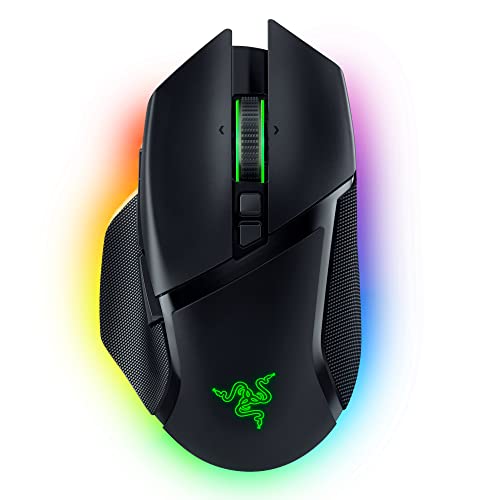
Razer Basilisk V3 Pro
$89.00

Razer Naga V2 Wireless
$64.99
Spec Comparison
TL;DR: The Razer DeathAdder Essential delivers a classic ergonomic shape, a 6400 DPI optical sensor and five programmable buttons for just $30, earning a 4.6‑star rating from over 35 k reviewers.
At the heart of the DeathAdder Essential sits a 6400 DPI optical sensor with five DPI stages (400 – 800 – 1600 – 3200 – 6400) and five programmable buttons. Razer Mechanical mouse switches rate for 10 million clicks, and the 1000 Hz polling rate promises a 1 ms response time. The mouse weighs 96 g (0.2116 lb) and connects via a standard 1800 mm braided USB‑A cable.
Weighing 0.2116 lb, it's heavier than the ultra‑light Viper V3 Pro (0.119 lb) but lighter than the Basilisk V3 (0.2225 lb). Priced at $30, it sits just below the Cobra’s $30.99 and well under the Basilisk V3’s $37.99, making it one of the most affordable wired options in this group. While it offers five programmable buttons, the Cobra and Viper V3 provide six, and the Basilisk V3 X even seven, so power‑users may find fewer controls here. Its braided cable is standard, whereas the wireless peers such as the Orochi V2 and Viper V3 rely on battery life rather than a cable.
Professional reviewers highlight the mouse’s comfort during marathon sessions and the durability of its mechanical switches. Everyday users repeatedly mention the ergonomic right‑handed shape, crisp click feel and the straightforward Synapse 3 (Beta) setup. The most common complaints focus on the lack of onboard memory, a single‑color LED that limits visual customization, and the relatively stiff braided cable that can feel draggy during fast movements.
The device supports five DPI stages, 220 IPS tracking and 30 G acceleration—specs that meet expectations for a budget‑tier mouse. It runs on Windows 7 64‑bit or higher, syncs via USB‑A and uses Razer Synapse 3 (Beta) for profile management, though the PC stores profiles only.
Pros
Cons
Best for: Budget-conscious buyers seeking a reliable entry-level option
Avoid if: You have limited desk space or need portability
“Comfortable for 8+ hour gaming sessions — my hand doesn’t cramp”
“Buttons are crisp and responsive — feels like it will last forever”
TL;DR: The Razer Naga Pro packs a modular 12‑button side plate, a 20,000 DPI Focus+ sensor and up to 150 hours of Bluetooth life, but its 0.257‑lb weight and $224.99 price put it in the premium tier.
The standout feature is the interchangeable magnetic side plates – you can swap a 12‑button plate with 20 programmable inputs (19 + 1), a 6‑button plate with 15 (14 + 1) or a 2‑button plate with 11 (10 + 1). Coupled with the Razer Focus+ optical sensor that reaches 20,000 DPI and 99.6 % resolution accuracy, the mouse delivers top‑tier precision for MMO, MOBA and mixed‑genre play.
At 0.257 pounds (117 g) the Naga Pro is heavier than the Viper V3 Pro (≈0.119 lb), Viper V3 (≈0.181 lb), Orochi V2 (≈0.13 lb) and Cobra (≈0.128 lb), yet lighter than the Basilisk V3 Pro (≈0.24 lb) and Basilisk V3 X (≈0.243 lb). Its Bluetooth battery life of 150 hours and HyperSpeed life of 100 hours provide solid endurance, though the Basilisk V3 X lists longer Bluetooth (535 h) and HyperSpeed (285 h) runtimes. The 1.8 m charging cable is a convenient length for desk setups.
Professional reviewers praise the modular side plates and the sensor’s tracking speed of 650 IPS, while everyday users love the long battery life and the tactile scroll wheel. The flat, shallow shape, however, critics repeatedly call out for limited palm support, and several users report Bluetooth pairing glitches on Windows. The mouse’s 70 million‑click optical switches and 0.2 ms response time keep input crisp, and the Razer Chroma RGB with 16.8 million colors adds a visual flourish. Five on‑board memory profiles let you store settings without software.
Pros
Cons
Best for: Those prioritizing quality and willing to pay for premium performance
Avoid if: You're shopping on a tight budget — it's priced at $224.99
“"the perfect mouse" for palm grip”
TL;DR: The Razer Viper V3 delivers a 30,000‑DPI Focus Pro sensor, 280‑hour AA‑battery life and 6 programmable buttons in an 82 g wireless mouse, though it lacks RGB and has a finicky scroll wheel.
At the heart of the Viper V3 sits Razer’s Focus Pro 30K optical sensor, offering a maximum DPI of 30,000 and a tracking speed of up to 750 IPS. The mouse can poll at 4000 Hz (max 8000 Hz) and delivers a click latency of 1.4 ms. Weighing 82 g with its AA battery, it stays light enough for claw or fingertip grips, while the battery can last up to 280 hours when running at the standard 1000 Hz polling rate.
Compared with other Razer offerings in this roundup, the Viper V3 is lighter than the Razer Naga V2 (0.209375pounds) and the Basilisk V3 (0.2225pounds), but heavier than the Viper V3 Pro (0.11904962148pounds) and the Cobra (0.1275Pounds). Its six programmable buttons fall short of the Basilisk V3 X’s seven, though its 280‑hour battery life is only a few hours shy of that model’s 285‑hour hyper‑speed endurance. The Orochi V2 is lighter at 0.13pounds, yet its listed battery life of 425 hours exceeds the Viper V3’s, highlighting a trade‑off between weight and endurance.
User reviews repeatedly praise the mouse’s 280‑hour battery life and the precision of the Focus Pro sensor, especially for competitive claw‑grip play. Professional reviewers note the smooth soft‑touch finish and the sensor’s flawless tracking, but they also point out that the 82 g weight feels on the heavier side for a mouse marketed as lightweight. A recurring complaint is an unreliable scroll wheel, and several users miss the absence of RGB lighting.
Additional specs include an adjustable lift‑off distance greater than 1.2 mm, a maximum acceleration of 70 G, and mechanical Gen‑2 switches rated for 60 million clicks. The mouse features an LED DPI indicator, virgin‑grade PTFE feet, on‑board memory for a single profile, and requires Razer Synapse for customization. It operates on a single AA battery and doesn’t support wired charging.
Pros
Cons
Best for: Competitive esports players needing low‑latency wireless performance and long battery life.
Avoid if: You need smooth scrolling, RGB customization, or a rechargeable battery solution.
“Exceptionally long battery life (280 hours at 1000 Hz)”
“Scroll wheel issues reported: Multiple users and reviewers cite inconsistent scrolling (registering up instead of down or vice versa)”
TL;DR: The Razer Basilisk V3 X offers 535 hours of Bluetooth battery life, a 18,000 DPI sensor and 7 programmable buttons for $48.99, making it a solid mid‑range wireless mouse with strong performance and a few ergonomic quirks.
The standout spec is its battery endurance: up to 535 hours on Bluetooth and 285 hours using Razer HyperSpeed 2.4 GHz. Coupled with a 1000 Hz polling rate, the 18,000 DPI Razer 5G Advanced optical sensor delivers responsive tracking for fast‑paced shooters and MOBA titles. The mouse also packs 7 programmable buttons and a total of 9 programmable controls, giving you plenty of on‑the‑fly customization without sacrificing the right‑handed ergonomic shape.
Compared with the other nine Razer models in this roundup, the V3 X sits a touch heavier at 0.2425084882Pounds (110 g) than the Viper V3, Orochi V2, Cobra and Deathadder Essential, but it’s on par with the Basilisk V3 Pro. It also offers more programmable buttons than the Viper V3 (6) and Deathadder Essential (5), while its Bluetooth life of 535 hours trails only the Orochi V2’s 950 hours, and its HyperSpeed endurance is comparable to the Viper V3’s 280‑hour claim. In short, it balances weight and feature density better than many of its peers.
Users consistently praise the comfort of the thumb rest and the reliability of the low‑latency HyperSpeed connection. Professional reviewers highlight the long battery life and the “durable Razer Gen‑2 mechanical switches” that rate for 60 million clicks. The main complaints focus on a scroll wheel that feels floaty or loose and PTFE mouse feet that wear quickly on some mouse pads. Note those issues if precise scrolling is critical for your workflow.
Pros
Cons
Best for: Gamers who want wireless freedom, long battery life and plenty of programmable buttons, especially in FPS, MOBA or RPG titles.
Avoid if: You are left‑handed, need ultra‑precise scroll‑wheel control for design work, or prioritize the lightest possible mouse.
TL;DR: The Razer Orochi V2 delivers ultra‑lightweight wireless gaming with a 0.13‑lb body, up to 950 hours of Bluetooth battery life, and a high‑end 18,000 DPI sensor at a budget price.
The standout spec is its battery endurance: the Bluetooth mode can run for 950 hours on a single AA cell, while the 2.4 GHz HyperSpeed mode lasts 425 hours. Combined with a feather‑light 0.13 pounds and a compact 108 mm length, the mouse feels almost weightless in the hand, so it's ideal for on‑the‑go gaming sessions.
Compared with the other nine Razer entries, the Orochi V2 is lighter than the Deathadder Essential (over 0.21 pounds) and the Basilisk V3 (around 0.22 pounds), and only marginally heavier than the Cobra (0.1275 pounds). Its six programmable buttons edge out the Deathadder Essential’s five, though it falls short of the Basilisk V3 X’s seven. DPI-wise, the 18,000 DPI sensor tops the Deathadder Essential’s 6,400 DPI, giving it a clear advantage for high‑precision play.
Professional reviewers praise the mouse’s portability and the “months‑long” battery life that lets travelers forget about recharging. Everyday users echo this, calling it perfect for small‑handed gamers who value a lightweight profile. The main criticisms focus on the tiny chassis, which larger hands find cramped, the reliance on replaceable AA/AAA cells instead of a built‑in rechargeable pack, and the absence of RGB lighting that many gamers expect from Razer.
Pros
Cons
Best for: Mobile gamers, remote workers, students, and anyone with small to average hands who need a lightweight, long‑lasting wireless mouse.
Avoid if: You have medium to large hands, need a rechargeable battery, or prioritize RGB lighting.
TL;DR: At $37.99 the Razer Basilisk V3 earns a 4.6‑star rating from over nine thousand reviewers, praised for comfort and customization but noted for a floaty scroll wheel and occasional build quirks.
The Basilisk V3 carries the Razer name and lands in the middle of our ten‑product lineup, ranked sixth in price and rating. Its $37.99 price point places it squarely in the budget‑friendly tier for Razer’s wired gaming mice, and the 4.6‑star score from 9,612 reviews signals solid general approval.
Buyers consistently highlight the mouse’s ergonomic shape and textured finish, saying it feels comfortable during long sessions. Reviewers also love the abundance of programmable buttons and the vibrant RGB lighting that can be tailored to match a setup. On the downside, many note that the scroll wheel can feel floaty and may roll back after stopping, and the DPI clutch is positioned farther forward than some users prefer. A handful of owners report premature button failures and find the Razer Synapse software a bit heavy‑handed.
Given its price and rating, the Basilisk V3 serves as a solid mid‑range option in Razer’s catalog. While it lacks publicly detailed specifications, the strong community feedback suggests it delivers the comfort and customization expected from the brand, though potential buyers should be aware of the reported scroll‑wheel and durability concerns.
Pros
Cons
Best for: Budget-conscious buyers seeking a reliable entry-level option
TL;DR: At $129.89, the Razer Viper V3 Pro earns a 4.6‑star rating from nearly two thousand reviewers, praised for its featherlight feel and speed but noted for its premium cost and limited battery life at max performance.
Razer’s Viper V3 Pro sits at the higher end of the brand’s mouse lineup, carrying a price tag of $129.89 and a solid 4.6‑star rating based on 1,906 reviews. Among ten competitors in this roundup, it lands in the upper tier thanks to its strong user approval.
Customers repeatedly highlight how effortless the mouse feels in hand, describing it as almost weightless and perfect for fast‑paced shooters. The wireless responsiveness draws particular praise, with many saying it gives a noticeable edge in competitive play. On the downside, users point out the steep price and a drop in battery endurance when the mouse is pushed to its highest performance settings. Critics say the bottom‑mounted DPI button is hard to reach, and fans of visual flair note the lack of RGB lighting.
The Viper V3 Pro positions itself as a premium choice for gamers who prioritize speed and precision over aesthetic extras. Its high rating and price show it’s aimed at serious players willing to pay for top‑tier performance, while more budget‑focused shoppers may look to lighter‑priced Razer options.
Pros
Cons
Best for: Buyers willing to invest in a proven, high-quality option
“Exceptionally long battery life (280 hours at 1000 Hz)”
“Scroll wheel issues reported: Multiple users and reviewers cite inconsistent scrolling (registering up instead of down or vice versa)”
TL;DR: At $30.99, the Razer Cobra earns a 4.6‑star rating from 1,820 reviewers, who praise its feather‑light feel, fast clicks and vivid RGB while noting the lack of left‑handed support.
Razer’s Cobra lands at the low‑end of the price spectrum at $30.99, carries a strong 4.6‑star rating from 1,820 users and ranks eighth out of ten Razer gaming mice in this roundup. Its price point places it firmly in the budget‑friendly tier, making it an attractive option for gamers who want a recognizable brand without a premium spend.
Reviewers consistently highlight how the mouse feels almost weightless, which they say reduces fatigue during long sessions. Reviewers describe the optical switches as swift and durable, and the customizable Chroma lighting draws praise for adding visual flair to any setup. Common compliments also mention comfort across claw, fingertip and palm grips. On the downside, users note the absence of a left‑handed version, the limitation to a single onboard memory slot and the fact that it only connects via a wired USB‑A cable, which can be a drawback for those seeking wireless freedom.
In context, the Cobra’s high rating and low price suggest it delivers solid satisfaction for its cost. While it doesn’t offer the feature depth of higher‑priced Razer models, it provides a reliable entry point for gamers who prioritize lightness, durability and RGB aesthetics without breaking the bank.
Pros
Cons
Best for: Budget-conscious buyers seeking a reliable entry-level option
“I love it.”
“Works great”
TL;DR: At $89, the Razer Basilisk V3 Pro pulls a solid 4.3‑star rating from over 1,500 reviewers, who love its comfort and customization but note its heft.
The Razer Basilisk V3 Pro is Razer’s premium wireless mouse; Razer positions it near the lower end of our ten‑product lineup, priced at $89 and carrying a 4.3‑star rating from 1,505 reviews. Its brand pedigree gives it a reputation for quality, even though detailed specs are scarce in our data.
Reviewers consistently highlight the mouse’s ergonomic feel and the versatility of its scroll wheel, calling it a standout for long gaming or work sessions. Users also appreciate the long battery life and the depth of on‑the‑fly customization. Common criticisms focus on the mouse feeling heavier than ultra‑light competitors, the absence of a charging puck in the box, and limited customization options on macOS.
Based purely on price and rating, the Basilisk V3 Pro sits as a respectable mid‑range choice: it isn’t the cheapest option, but it outperforms several lower‑rated rivals and offers a solid Razer experience for its cost.
Pros
Cons
Best for: Buyers willing to invest in a proven, high-quality option
TL;DR: The Razer Naga V2 costs $64.99, holds a 4.1‑star rating from 1,860 reviewers, and is praised for its extensive button layout and long battery life, though some users note software quirks.
The Razer Naga V2 is Razer’s wireless mouse aimed at gamers who need a lot of hotkeys. Priced at $64.99, it lands near the middle of the ten‑product roundup and carries a 4.1‑star rating based on 1,860 reviews, making it the lowest‑rated option in the list.
Reviewers consistently highlight the mouse’s generous number of programmable buttons and its ability to stay powered for many hours, which many users appreciate for marathon gaming sessions. On the downside, a recurring theme is frustration with the Razer Synapse software, which some find unstable, and occasional wireless dropouts that interrupt gameplay.
Within the Razer lineup, the Naga V2 sits at a higher price point than entry‑level models like the Deathadder Essential, yet it doesn’t reach the premium tier of the Basilisk Pro series. Its rating suggests it delivers decent value for a feature‑rich mouse, but the mixed feedback indicates it may not satisfy everyone looking for a flawless wireless experience.
Pros
Cons
Best for: Those prioritizing quality and willing to pay for premium performance
“"the perfect mouse" for palm grip”
Breakdown
Razer Deathadder Essential
Pros
Razer Naga Pro
Cons
Razer Viper V3 Wireless
Pros
Cons
Razer Basilisk V3 X
Pros
Based on scoring data and product specs
Personalized picks
Best Overall Pick
Razer Deathadder Essential
Best OverallBest for: Budget-conscious buyers seeking a reliable entry-level option
Razer Naga Pro
Best for: Those prioritizing quality and willing to pay for premium performance
$224.99+$194.99 vs winner
Skip Razer Naga V2 Wireless if…
You have limited desk space or need portability
Razer’s Deathadder Essential takes the top spot thanks to its solid 4.6‑star rating from 35,691 reviewers, a lightweight 96 g chassis and a reliable 1000 Hz polling rate. Its 6400 DPI optical sensor and five programmable buttons give you enough precision and customization for most game genres, while the 10‑million‑click lifespan keeps the switches reliable without breaking the bank at $30.00.
The runner‑up is the Naga Pro, perfect if you need a highly customizable, wireless mouse for MMOs or creator workflows. It packs up to 20 programmable buttons, a 20,000 DPI Focus+ sensor and up to 150 hours of Bluetooth battery life, plus wireless charging and a 2‑year warranty for peace of mind.
For those on a tighter budget, the Viper V3 at $59.99 offers a balanced mix of performance and price, delivering a responsive sensor and ergonomic design without the premium cost. If you’re willing to spend more for top‑tier features, the Naga Pro continues as the top premium choice, delivering extensive button mapping and high‑end specs for power users.
Pick the Deathadder Essential for everyday gaming excellence, and you’ll be ready to dominate without overpaying.
The Razer Deathadder Essential stands out as the best value, priced at $30.00 and featuring 5 programmable buttons, a 6400 DPI optical sensor, and a 1000 Hz polling rate. Its lightweight 96 g design and 10 million‑click lifespan make it a solid choice for gamers on a tight budget.
Please sign in to leave a review
No reviews yet. Be the first to review!
