Choosing the right RGB gaming mouse can feel overwhelming, especially when you’ve got 15 options on the table. The Glorious Model O leads the pack with a 4.7/5 rating from 42,226 reviews and a listed price of $49.99, while the budget‑friendly Seenda RGB Wired Mouse comes in at $12.99. Across the field you’ll see everything from the adjustable‑weight Logitech G502 HERO at $35.99 to the premium Corsair NIGHTSABRE RGB Wireless, which costs $89.94.
We’ve grouped the lineup into three price tiers so you can narrow the search quickly. Budget picks—Seenda, Redragon M612‑RGB, Redragon M602 and Lenovo M210 RGB—all sit under $20 and still pack solid click durability and RGB flair. Mid‑range contenders Redragon M690 PRO and Redragon M602‑KS hover around $25‑$30, offering wireless options or extra programmable buttons. Premium choices—including the Glorious Model O, Logitech G502 HERO, Redragon M612 PRO and Corsair NIGHTSABRE—bring high‑end sensors, customizable weights and premium build quality at $35‑$90.
Below we’ll break down each model’s strengths, so you can match the mouse to your grip, game genre and budget.

Glorious Model O
Offers 6 programmable buttons and a 20 million click switch rating, delivering precise control for demanding gamers.

Logitech G502 HERO
Ideal for gamers who want a feature‑rich mouse with 11 programmable buttons, and it comes $14 cheaper than the Glorious Model O.

Seenda RGB Wired Mouse
Stands out with a 1524 mm cable and a 3 million click durability at just $12.99, giving RGB lighting on a truly entry‑level budget.
Also considered
Score Analysis
Key score advantages vs. runner-up (Logitech G502 HERO)
Price Range
Glorious Model O
$49.99
Logitech G502 HERO
$35.99
Seenda RGB Wired Mouse
$12.99

Redragon M612 PRO
$36.99
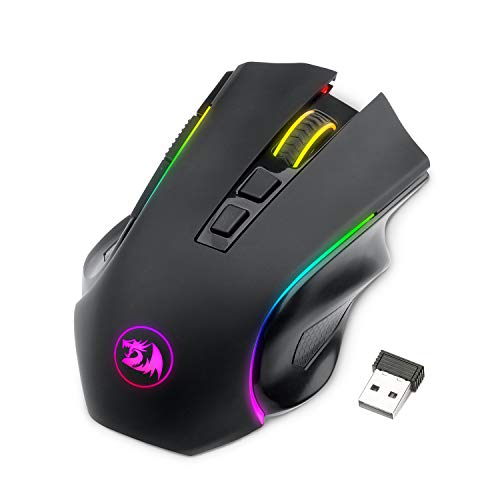
Redragon M602-KS
$29.99

Redragon M612-RGB
$16.99

Lenovo M210 RGB
$15.99

Corsair NIGHTSABRE RGB Wireless
$89.94

Redragon M602
$16.99

Redragon M690 PRO
$24.99

Redragon M908
$24.29

Redragon M801
$25.49

Redragon M910-KS
$30.99

Razer Basilisk V3
$36.95

Roccat Kone Pro
$69.05
Spec Comparison
TL;DR: The Glorious Model O delivers ultra‑light 67 g performance with a 12,000 DPI Pixart sensor, 1000 Hz polling and six programmable buttons, ideal for fast‑paced competitive play.
The standout spec features a feather‑light 67 g chassis made of honeycomb‑shell polycarbonate, paired with a 50 G acceleration rating and a lift‑off distance of <0.7 mm. Those numbers let you flick across the screen with minimal effort, while the 12,000 DPI maximum DPI and 220 IPS tracking speed keep every movement precise.
Compared with the other 14 entries, the Model O is lighter than the Razer Basilisk V3 (0.2225 lb) and considerably lighter than the Redragon M602‑KS (0.4409 lb), though a shade heavier than the Roccat Kone Pro (0.14 lb). Its 1.8 m paracord cable matches the length found on the Redragon M612 PRO, but it offers fewer programmable buttons—six versus nine on the Redragon M612 PRO and eleven on the Logitech G502 HERO—so you’ll have to prioritize which commands you bind.
Reviewers consistently praise the mouse’s “feather‑light feel” and “smooth glide,” noting that the lightweight design reduces hand fatigue during marathon sessions. Professional reviewers highlight the Pixart PMW3360 sensor as “flagship‑level performance at a mid‑range price.” The honeycomb shell, however, tends to collect dust, and owners of the matte white finish report gradual yellowing over time. The lack of onboard memory means you’ll need to configure profiles on each PC, a point often mentioned by power users.
Pros
Cons
Best for: Competitive FPS, MOBA and Minecraft players who prioritize speed, precision and a feather‑light feel.
Avoid if: You have very large hands, need built‑in profile storage, or dislike the maintenance demands of a honeycomb shell.
TL;DR: The Logitech G502 HERO packs a 25,600 DPI HERO sensor, 11 programmable buttons and a tunable weight system into a 0.27‑lb wired mouse for $35.99.
The standout spec is the HERO 25K optical sensor, delivering a DPI range of 100 – 25,600 and acceleration greater than 40 G, while the 1000 Hz polling rate ensures sub‑millisecond response. You also get 11 programmable buttons, a dual‑mode scroll wheel and an adjustable weight system of five 3.6 g inserts, letting you fine‑tune the 0.27‑pound mouse to your hand.
At 0.27 pounds, the G502 HERO is lighter than the Redragon M612 PRO, M602‑KS, M801 and M908, yet a touch heavier than the Razer Basilisk V3. Its 7 ft (2.1 m) braided cable is longer than the 1.8‑1.83 m cables found on most Redragon models, giving you extra reach on a desk. Priced at $35.99, it sits above many entry‑level options in this roundup, but the feature set justifies the premium.
Professional reviewers highlight the HERO sensor’s sub‑micron tracking accuracy and the dual‑mode scroll wheel’s usefulness for both gaming and productivity. Everyday users repeatedly mention the mouse’s solid build, the comfort of its ergonomic shape during marathon sessions, and the satisfaction of customizing lighting through LIGHTSYNC’s 16.8 million colors. The most common complaints revolve around the Logitech G HUB software feeling bloated and the mouse’s large footprint being a challenge for smaller hands, while the braided cable can feel a bit stiff.
The LIGHTSYNC system offers a single RGB zone on the scroll wheel and logo, supporting 16.8 million colors that sync with games, audio or screen content. Onboard memory stores five profiles, so you can switch setups without the software. PTFE feet glide over 250 km on a Logitech G240 pad, and the mechanical switches survive more than 50 million clicks, promising durability for heavy use.
Pros
Cons
Best for: Most users looking for a well‑reviewed, reliable mainstream option
Avoid if: You're shopping on a tight budget — it's priced at $35.99
“Just an ordinary mouse, not worth the money. Useless software, plastic USB cable (not braided).”
TL;DR: The Seenda RGB Wired Mouse delivers 1600 DPI optical tracking, 3.9 ms click latency, and quiet <40 dB clicks at a budget‑friendly $12.99, making it a solid entry‑level choice for everyday use.
The mouse’s most eye‑catching spec is its 3.9 ms click latency paired with a 1000 Hz polling rate, which translates to snappy response for casual gaming or office work. It sports a 1600 DPI PixArt A3050 sensor, five buttons, and an ambidextrous shape that fits both small and large hands. Weighing 109 g (stock) and featuring a removable 20 g weight, it stays light enough for extended use without feeling flimsy.
Compared with the other fourteen contenders, the Seenda is lighter than the Redragon M602 (131.5 g) and the Redragon M612‑RGB (125.9 g), yet heavier than the Lenovo M210 (81.6 g). Its 1524 mm cable is shorter than the 1.8 m cables found on most peers, reducing desk clutter. The mouse offers four RGB lighting modes, which is fewer than the seven modes on the Redragon M602 and Lenovo M210, but still provides visual flair at a lower price point. With only five buttons, it has fewer programmable inputs than the Redragon M612‑RGB’s eleven‑button layout, making it simpler for users who don’t need extensive macro support.
Reviewers consistently praise the plug‑and‑play convenience—no drivers required—and the quiet operation, noting clicks stay under <40 dB. The mint‑green hue and RGB ring add a touch of personality that many budget buyers appreciate. However, several users mention a loose scroll wheel, uneven button feel, and a thick, stiff cable that can drag on smooth surfaces. Professional reviewers also point out that the A3050 sensor can be inconsistent on certain textures and that the Kailh Red Core encoder lacks tactile feedback. Manufacturers haven’t listed acceleration data, so you’ll need to rely on the 1600 DPI figure and user reports for performance expectations.
Pros
Cons
Best for: Budget‑conscious buyers seeking a reliable entry‑level option
“Works perfectly right out of the box — no setup needed.”
“Love the RGB lights — looks great on my desk.”
TL;DR: The Redragon M612 PRO delivers tri‑mode wired, 2.4 GHz and Bluetooth connectivity, 9 programmable buttons, up to 12,400 DPI, and a 200‑hour battery life at a $36.99 price point.
The standout feature is its three‑mode connectivity: a USB‑C wired link, a 2.4 GHz dongle, and Bluetooth 5.0. It packs 9 programmable buttons, a rapid‑fire side button, and a Pixart PAW3327 sensor delivering up to 12,400 DPI when wired. Acceleration reaches 30G on the wired side and 15G wireless, while you can adjust the polling rate between 125 Hz and 1000 Hz.
At 0.881849048 lb, the M612 PRO is noticeably heavier than the Logitech G502 HERO (0.27 lb) and the Razer Basilisk V3 (0.2225 lb), and also heavier than the other Redragon models listed. It offers 9 programmable buttons—fewer than Logitech’s 11 but more than the 7 on the Redragon M602‑KS. Its 200‑hour RGB‑off battery life dwarfs the 70‑hour figures of the Redragon M910‑KS and M602‑KS, though the wired acceleration of 30G trails Logitech’s >40 G.
Reviewers praise the low‑latency Pixart PAW3104 sensor in wireless mode and love the 200‑hour battery life, comfortable ergonomics, and 7 dynamic RGB modes. The software, however, many find unintuitive, and some users report shell cracking after a few months. Linux users note the lack of an official driver, limiting cross‑platform appeal.
Pros
Cons
Best for: Budget‑conscious gamers who want wired, wireless, and Bluetooth flexibility with solid DPI and macro options.
Avoid if: You need an ultra‑lightweight esports mouse, rely on Linux drivers, or can't tolerate a clunky software interface.
“Amazing battery life”
“Great for the price”
TL;DR: The Redragon M602‑KS delivers a 4000 FPS frame rate, 7 programmable buttons and 9 RGB modes at a $29.99 price, making it a solid mid‑range wireless mouse for most gamers.
The standout spec is its 4000 FPS max frame rate paired with a 10 G acceleration, giving you snappy cursor response for fast‑paced titles. You also get 7 programmable buttons and 5 onboard memory profiles, so you can store your favorite macro setups directly on the mouse.
At 0.440924524 pounds, the M602‑KS is heavier than the Redragon M910‑KS (0.2976240537 pounds) and the M801 (0.3417165061 pounds), but it’s still lighter than the larger M612 PRO (0.881849048 pounds). Its 1800 mm cable matches most rivals, though it’s a touch shorter than the M801’s 1.83 m cable. With 7 programmable buttons, it falls short of the M801’s 9 and the M690 PRO’s 8, yet it still offers more customization than many entry‑level mice.
Users consistently praise the right‑handed ergonomic shape for comfortable marathon sessions, and the vibrant RGB lighting cycles through 9 modes without a hitch. Professional reviewers note the Redragon driver lets you tweak DPI, polling rate and lighting, though they point out the hardware DPI steps stop at 7200 DPI, limiting ultra‑fine adjustments. The mouse’s plastic build feels less premium than higher‑end models, and it excludes left‑handed gamers.
The battery sleeps after just 1 minute of inactivity and can last up to 70 hours with RGB off (35 hours with RGB on), so you won’t be tethered to a charger during long playthroughs. A 10 million‑click switch lifespan and a 15 g adjustable weight kit give you durability and a bit of tuning freedom, while the optical sensor and selectable polling rates from 125 Hz up to 1000 Hz keep tracking reliable.
Pros
Cons
Best for: Most users looking for a well‑reviewed, reliable mainstream option
Avoid if: You need advanced features or professional‑grade performance
“An ideal gaming mouse for those who want a cheaper mouse with ergonomic design and customizable settings.”
“comfortable for long sessions”
TL;DR: The Redragon M612‑RGB delivers an 8000 DPI optical sensor, 11 programmable buttons, and 3‑zone RGB lighting for $16.99, earning a 4.6‑star rating from 10,643 reviewers.
The M612‑RGB weighs 0.27778245012 pounds (125.9 g) and sits on a frosted matte shell with rubberized side grips. Its Pixart optical sensor tops out at 8000 DPI, while the 1000 Hz polling rate and 1 ms response time promise snappy input. You get five dynamic backlight modes across three RGB zones, plus a dedicated rapid‑fire button and two side macro buttons, all wrapped in an 11‑button fully programmable layout.
Compared with its siblings, the M612 is lighter than the M908 (0.3858 lb), M690 PRO (0.3307 lb) and M801 (0.3417 lb), yet only a shade lighter than the Redragon M602’s 0.29 lb. It also offers more buttons than the M602’s eight‑button scheme and matches the Lenovo M210 RGB’s 8000 DPI ceiling. The 1.8 m braided‑fiber cable matches the M602’s length, and its 1000 Hz polling mirrors that of the Seenda RGB Wired Mouse. In short, it packs a higher button count and comparable DPI while staying on the lighter side of the lineup.
Reviewers consistently applaud the mouse’s comfort and the depth of button customization, noting the sensor feels precise even in fast‑paced shooters. Professional reviewers highlight the value of its high‑end specs at a budget price. On the flip side, many users describe the accompanying software as unintuitive and cite occasional chassis cracks after a few months of use. The lack of a wireless option also appears as a frequent drawback for those who prefer cable‑free setups.
Beyond the headline specs, the M612 features a 10 million‑click switch durability rating, DPI adjustment that can be set independently on the X and Y axes, and macro programming via Redragon’s software suite. Media controls and profile switching round out its feature set, making it a well‑equipped choice for extended gaming sessions.
Pros
Cons
Best for: Budget‑conscious buyers seeking a reliable entry‑level option
Avoid if: You are left‑handed, need an ultra‑light mouse, or require a wireless solution
“Amazing battery life”
“Great for the price”
TL;DR: The Lenovo M210 RGB delivers a Pixart PAW3333 sensor, up to 8000 DPI and 1000 Hz polling in a 0.18‑lb, ambidextrous shell for just $19.99.
The standout spec is the high‑end Pixart PAW3333 optical sensor paired with a maximum DPI of 8000 and a 1000 Hz polling rate, which together promise smooth, low‑latency tracking. The mouse also offers 35 G acceleration and 20 million click durability, all packed into a lightweight 81.6 g (0.18 pounds) frame.
Compared with the other 14 entries, the M210 weighs noticeably less than the Redragon M602 (0.29 pounds) and the Redragon M612‑RGB (approximately 0.278 pounds). Its 1.8 m braided cable matches those Redragon models, but it lacks the extra side macro buttons that the M612‑RGB’s 11‑button layout includes. The M210’s seven programmable buttons sit between the Redragon M602’s seven (some listings note nine) and the M690 PRO’s eight, giving it solid but not maximal configurability.
User feedback highlights the mouse’s featherlight feel and the plug‑and‑play reliability of the PAW3333 sensor, with many reviewers praising the durability of the braided cable. Professional reviewers also note the sensor’s performance is rare at this price tier. On the downside, customers repeatedly mention that the RGB lighting offers only seven preset modes and can't be customized, and the lack of software prevents button remapping. Some users find the side buttons a bit stiff, and the DPI steps stop at four functional levels despite the “5 levels” label.
Pros
Cons
Best for: Budget-conscious buyers seeking a reliable entry-level option
Avoid if: You have limited desk space or need portability
“Great feel for the price”
“Lights look amazing with 3 zones”
TL;DR: The Corsair NIGHTSABRE RGB Wireless offers a 26,000 DPI sensor, 11 programmable buttons, and up to 100 hours of Bluetooth battery life for $89.94, making it a high‑performance yet pricey option for serious gamers.
The standout specification is the CORSAIR MARKSMAN Optical Sensor with a native 26,000 DPI range and 1 DPI step adjustments, delivering pinpoint accuracy for fast‑paced shooters. It pairs with up to 50G acceleration and a hyper‑polling rate of 2,000 Hz, ensuring ultra‑low latency whether you’re on SLIPSTREAM wireless or Bluetooth.
At 0.22 pounds, the NIGHTSABRE sits heavier than the Roccat Kone Pro (0.14 pounds) and the Glorious Model O (0.147 pounds) but lighter than the Redragon M612 PRO (0.88 pounds) and the Redragon M910‑KS (0.30 pounds). Its 11 programmable buttons match the Logitech G502 HERO’s button count while exceeding the Glorious Model O’s six buttons, giving you more on‑the‑fly control than many peers.
Reviewers consistently praise the mouse’s premium build, the sub‑1 ms latency of SLIPSTREAM, and the 15‑minute fast charge that delivers 20 hours of use. However, users note that the front and side RGB zones become hard to see during intense play, and battery life drops noticeably when running at the full 2,000 Hz poll rate with RGB lit.
Beyond performance, the mouse features seven individually addressable RGB zones fully customizable via iCUE, five onboard memory profiles, and six virgin‑grade PTFE gliding feet for smooth tracking on most surfaces. The 1.8 m USB‑C to USB‑A cable provides a wired fallback, and the built‑in lithium‑polymer battery offers 100 hours of Bluetooth use (backlight off) or 65 hours in SLIPSTREAM mode.
Pros
Cons
Best for: FPS, MOBA, and Battle Royale gamers who need high precision, ultra‑low latency, and extensive RGB customization.
Avoid if: You are left‑handed, have a small hand for claw or fingertip grips, or prefer a minimalist, weight‑adjustable mouse.
“Fast and responsive in fast-paced shooters.”
“Battery lasts forever, and charging is super quick.”
TL;DR: The Redragon M602 offers a 1.8 m braided cable, 7‑button layout, 7 RGB modes and a 10 G acceleration sensor for $16.99, making it a solid budget pick for right‑handed gamers.
The mouse’s most eye‑catching spec is its 7 preset RGB lighting modes that you can tweak via Redragon’s software, plus a 1.8 m braided‑fiber cable with a gold‑plated USB connector for a tidy desk setup. At 0.29 pounds (131.5 g) it feels solid, and the optical sensor delivers a DPI range from 250 – 8000 with preset steps of 800, 1200, 1600, 2400 and 7200. You also get 5 onboard memory profiles, 7 programmable buttons and adjustable polling rates from 125 Hz up to 1000 Hz.
Compared with the other 14 contenders, the M602 sits at the lower end of the price spectrum and is heavier than the ultra‑light Lenovo M210 RGB, which weighs 0.18 pounds, but it’s only a shade heavier than the Redragon M612‑RGB at 0.277… pounds. Its cable length matches the M612‑RGB’s 1.8 m, while many rivals list shorter cables. The button count of 7 sits between the 8‑button Redragon M801 and the 11‑button M612‑RGB, giving you enough controls without overwhelming the layout.
Professional reviewers praise the ergonomic right‑hand shape with a thumb rest and the premium‑feeling PTFE feet, noting that the comfort level rivals more expensive models. Users echo this sentiment, highlighting the solid build and vibrant lighting as standout points for a sub‑$20 mouse. The most common complaints revolve around the mouse’s heft—some find the 130‑150 g range a bit heavy for fast‑paced shooters—and the Redragon software, which tends to auto‑launch on boot and can feel intrusive. A few owners also report occasional scroll‑wheel or middle‑click failures after months of use.
Technically, the M602’s optical sensor paired with a configurable polling rate (125 – 1000 Hz) and 10 G acceleration gives responsive tracking for most gaming scenarios. While the DPI steps come preset rather than continuously adjustable, they cover the typical 1080p gaming range comfortably. The built‑in weight‑tuning mechanism lets you fine‑tune the feel without adding external weights, a feature rarely seen at this price point.
Pros
Cons
Best for: Budget‑conscious buyers seeking a reliable entry‑level option
Avoid if: You need advanced features or professional‑grade performance
“very comfortable”
“fantastic”
TL;DR: The Redragon M690 PRO offers 8 programmable buttons, 1000 Hz polling, and up to 87 hours of eco‑mode battery life at a $24.99 price, making it a solid entry‑level wireless gaming mouse.
The standout spec is its 1000 Hz polling rate, which stays constant whether you’re wired via the detachable USB‑C cable or on 2.4 GHz wireless. It packs eight programmable buttons, a dedicated rapid‑fire button, and two side macro buttons, a PAW3104 optical sensor drives them and reaches a maximum of 8000 DPI. The mouse weighs 150 g (0.330693393 pounds) and can run for 87 hours in Eco‑Mode, where RGB is disabled and the unit auto‑sleeps after one minute of inactivity.
Compared with other Redragon models in this roundup, the M690 PRO is lighter than the M908, which tips the scales at about 0.386 pounds, but it is heavier than the Lenovo M210 RGB’s 0.18 pounds. It offers one fewer programmable button than the M801’s nine, yet it outlasts the M801’s 70‑hour battery life when RGB is off. Its 10‑meter wireless range matches the M801 and M602‑KS, placing it solidly in the middle of the pack for connectivity reach.
Users consistently praise the long battery life and the solid, comfortable feel of the chassis, especially the handy rapid‑fire button for shooters. Professional reviewers highlight the 1000 Hz polling and the accurate PAW3104 sensor as strong points for competitive play. The main pain point is the Redragon software, which many describe as clunky and unintuitive, and many note that the side macro buttons have limited functionality on macOS.
Technically, the mouse offers five DPI levels (500, 1000, 2000, 3000, 8000) and a wired‑mode acceleration of 30 G, with a maximum speed of 40 ips. Eco‑Mode not only extends battery life but also turns off the customizable RGB lighting, helping users conserve power when they don’t need the visual flair.
Pros
Cons
Best for: Budget-conscious buyers seeking a reliable entry-level option
Avoid if: You want the best value‑per‑dollar in its price range
“smooth and responsive experience”
“pro‑grade features at a budget price”
TL;DR: The Redragon M908 Impact offers 18 programmable buttons, a 12,400 DPI Pixart sensor, and adjustable weight for under $25, making it a solid budget MMO mouse with strong customization.
The standout feature of the M908 is its massive button array: 18 total programmable buttons (7 main/top + 12 side) let you map every MMO skill or macro without reaching for the keyboard. The mouse weighs 0.3858089585 pounds out of the box, and you can add up to eight 2.4 g removable weights, pushing the maximum to 196.2 g for a personalized heft.
Compared with its Redragon siblings, the M908 weighs more. It tips the scales above the M690 PRO (0.330693393 pounds) and the M801 (0.3417165061 pounds), yet it’s lighter than the M602‑KS (0.440924524 pounds). In terms of button count, it dwarfs the M690 PRO’s 8 programmable buttons and the M801’s 9, giving you more hotkeys than most budget alternatives.
Users consistently praise the mouse’s button layout and the reliability of its Pixart PMW3327 optical sensor, noting smooth tracking up to 200 IPS and 30 G acceleration. However, the aggressive right‑handed shape and the bulk of up to 196.2 g draw criticism from players with smaller hands or those who prefer a lightweight FPS mouse. Professional reviewers also point out that the Redragon Zone software can be unstable, occasionally dropping macro saves or misrepresenting RGB colors.
Technical highlights include a DPI range of 100–12,400 with ±100 DPI increments, four polling‑rate options (125 – 1000 Hz), and Omron mechanical switches rated for 20 million clicks. The braided‑fiber 1.8 m cable with a gold‑plated USB connector ensures a sturdy connection, while the RGB engine offers 16.8 million colors across static, breathing, and wave modes.
Pros
Cons
Best for: MMO and RPG gamers with medium to large hands who need a budget‑friendly mouse packed with programmable buttons.
Avoid if: You prioritize a lightweight FPS mouse, have small hands, or need flawless software for macro management.
TL;DR: The Redragon M801 packs a 16000 DPI sensor, 9 programmable buttons and 70‑hour RGB‑off battery life into a lightweight 0.34‑lb chassis for under $30.
The standout spec is the 16000 DPI maximum resolution paired with a 1000 Hz polling rate, delivering the kind of pinpoint control that professional reviewers call “pinpoint accuracy” thanks to its Avago laser/optical sensor. The mouse also offers 9 programmable buttons and 5 onboard memory profiles, letting you store complex MMO macros without a PC.
At 0.3417165061 pounds, it's lighter than the Redragon M908 but a touch heavier than the Redragon M690 PRO and the Lenovo M210 RGB, placing it in the middle of the weight spectrum for this lineup. Its 1.83 m braided‑fiber cable matches the length of the M908 and M602‑KS, while the 70‑hour RGB‑off battery life mirrors the M602‑KS and far exceeds many wired rivals. Compared with the M910‑KS and M602, the M801 offers more programmable buttons (9 vs. 7/8) and a higher DPI ceiling.
User sentiment consistently praises the ergonomic shape, the depth of the RGB palette (over 16 million colors, 10 brightness levels, 8 effects) and the durability of the Omron micro switches rated for 20 million clicks. However, several reviewers flag the Redragon software as clunky and note limited macOS support, while a minority mention occasional DPI step jumps when switching settings. These real‑world observations line up with the “software can be clunky” and “inconsistent DPI switching” points from aggregated feedback.
Pros
Cons
Best for: Budget‑conscious MMO and RPG gamers who want high DPI, plenty of programmable buttons and customizable RGB without breaking the bank.
Avoid if: You need an ultra‑lightweight (<80 g) esports mouse, full macOS software support, or rock‑solid DPI consistency for competitive shooters.
“Users frequently commend the comfort during extended use, especially for large hands”
TL;DR: The Redragon M910‑KS offers 8000 DPI, tri‑mode (2.4 GHz, Bluetooth, USB‑C) connectivity and up to 70 hours of battery life for $30.99, making it a solid mid‑range wireless gaming mouse.
The standout spec is its 8000 DPI optical sensor paired with five selectable DPI levels and adjustable polling rates from 125 Hz up to 1000 Hz, giving you precise control in fast‑paced shooters. It also packs 16.8 million RGB colors and nine lighting effects, all controllable via a Windows‑only driver.
At 0.2976240537 pounds, the M910‑KS is lighter than the Redragon M602‑KS (0.440924524 pounds) but a touch heavier than the Logitech G502 HERO (0.27 pounds). Its 1.8 m USB‑C cable matches the M602‑KS length and is only marginally shorter than the Redragon M801’s 1.83 m cable. Battery life of 70 hours with RGB off (35 hours with RGB on) mirrors the M602‑KS and M801, and the 10 m wireless range is identical to those models as well as the Redragon M690 PRO. Programmable button count (7‑9) sits between the M602‑KS’s seven and the M801’s nine, while both share nine RGB lighting modes.
Reviewers consistently praise the mouse’s versatile connectivity—having both 2.4 GHz wireless and Bluetooth at this price isn’t common. The ergonomic right‑handed shape with textured grips feels comfortable during long sessions, and the 20 G acceleration plus a 20 million‑click switch lifespan add durability. However, users note that the RGB can flicker in video recordings, the USB‑C cable feels stiff, and macOS users miss full software support for lighting and macros.
Pros
Cons
Best for: Gamers who want wireless flexibility, solid battery life, and a comfortable ergonomic mouse without breaking the bank.
Avoid if: You need full macOS customization, ultra‑lightweight esports performance, or advanced RGB syncing features.
“Best gaming mouse for the price — smooth, responsive, and the RGB looks amazing.”
“Love the Bluetooth mode for work and 2.4G for gaming — seamless switching.”
TL;DR: At $37.99 the Razer Basilisk V3 earns a 4.6‑star rating from over 9,600 reviewers, praised for comfort and RGB but noted for a floaty scroll wheel.
The Razer Basilisk V3 lands near the lower end of the 15‑product “Best RGB Gaming Mice” roundup, ranking at #14. Its price of $37.99 puts it in the budget‑friendly tier, while the 4.6‑out of 5 rating shows strong approval from a large community of 9,612 reviewers.
Users consistently highlight the mouse’s ergonomic shape, textured finish and vibrant RGB lighting as major pluses. Reviewers also appreciate the abundance of programmable buttons and the ability to customize lighting across many zones. On the downside, many mention a scroll wheel that feels “floaty” and can roll back, a DPI clutch placed far forward for smaller hands, and occasional build‑quality hiccups such as premature button failures. Many call the Razer Synapse software bloated and complex.
Because detailed technical specs aren’t published for this model, buyers have to rely on price, rating and the qualitative feedback above to decide if it fits their needs. Compared with other entries, it offers a solid brand reputation and good user sentiment despite sitting near the bottom of the list based purely on rating and price.
Pros
Cons
Best for: Buyers willing to invest in a proven, high‑quality option
TL;DR: The Roccat Kone Pro costs $69.05, carries a 4.4‑star rating from 15,310 reviews, and lands at the bottom of our 15‑item list, praised for its light feel, though some note a few durability quirks.
Roccat’s Kone Pro sits at a mid‑to‑high price point of $69.05 and earned a 4.4‑star rating from a large pool of 15,310 reviewers, placing it last among the fifteen mice we evaluated. The brand is well‑known for targeting competitive gamers, and this model follows that tradition.
Users repeatedly highlight the mouse’s feather‑light sensation, smooth braided cable, and vibrant AIMO RGB lighting as standout qualities. Many also appreciate the solid build and the ability to customize buttons through Roccat’s software. On the flip side, a handful of owners mention occasional double‑click or ghost‑click problems, and several note the absence of a dedicated DPI button, which forces them to rely on software shortcuts. Players with smaller hands find the mouse’s width a point of contention.
Because detailed technical specs aren’t publicly listed, it’s hard to compare exact performance numbers with the competition. Nonetheless, the price and rating suggest it offers a respectable experience for gamers who value a lightweight feel and strong brand support, even if it trails behind higher‑rated alternatives.
Pros
Cons
Best for: Buyers willing to invest in a proven, high‑quality option
“dream mouse for FPS gamers”
“without flaw”
Breakdown
Glorious Model O
Pros
Logitech G502 HERO
Pros
Cons
Seenda RGB Wired Mouse
Pros
Redragon M612 PRO
Pros
Based on scoring data and product specs
Personalized picks
Best Overall Pick
Glorious Model O
Best OverallBest for: Audiophiles and enthusiasts seeking premium sound quality and advanced features
Logitech G502 HERO
Best for: Most users looking for a well-reviewed, reliable mainstream option
$35.99-$14.00 vs winner
Skip Roccat Kone Pro if…
Reliability and user satisfaction are your top concerns
The Glorious Model O takes the top spot as the best overall RGB gaming mouse. Its ultra‑light 0.14770971554 Pounds (67 g) honeycomb‑shell design makes fast movements effortless, while the Pixart PMW3360 sensor delivers up to 12,000 DPI and a 1000 Hz polling rate for buttery‑smooth tracking. It also packs six programmable Omron mechanical buttons and full‑range RGB lighting, and has a solid 4.7‑star rating from 42,226 reviewers.
The Logitech G502 HERO lands as the runner‑up, perfect if you need a highly customizable mouse for complex games or productivity. It offers 11 programmable buttons, a dedicated DPI‑shift button, and an adjustable weight system of five 3.6 g inserts (total 18 g) so you can fine‑tune the feel. With a HERO 25K sensor that reaches 25,600 DPI and LIGHTSYNC RGB (16.8 million colors), it covers every lighting and precision demand.
For tight budgets, the Seenda RGB Wired Mouse at $12.99 gives you basic RGB flair without breaking the bank. If you’re looking for a solid mid‑range pick, the Logitech G502 HERO at $35.99 provides the extra buttons and weight tuning that serious gamers appreciate. And for those willing to splurge, the Corsair NIGHTSABRE RGB Wireless at $89.94 delivers premium wireless performance with high‑end RGB effects.
Pick the Glorious Model O today and level up your gaming setup with speed, precision, and style.
The Glorious Model O weighs just 67 g, making it one of the lightest options, while the Logitech G502 HERO is about 121 g (139 g with all weights installed). For a low‑profile, ultra‑light feel on a cramped workspace, the Model O is the better fit.
Please sign in to leave a review
No reviews yet. Be the first to review!
