⚡ Quick Answer
We’ve lined up 7 Samsung gaming monitors, spanning the full price spectrum from the $116.99 Samsung CF396 to the premium $1249.00 Samsung Odyssey OLED. The list is split into three clear tiers: budget options (CF396, LC27F390, S39C), a mid‑range pick (Odyssey G55C), and premium models (Odyssey G5, Odyssey OLED). The OLED’s eye‑popping 240 Hz refresh rate and 0.03 ms response time sit at the high end, while the G50D delivers a solid 180 Hz and a 1 ms IPS panel for under $300. Even the most affordable CF396 holds a strong 4.6/5 rating from 11,270 reviewers, demonstrating Samsung covers a wide range of needs without sacrificing basic quality.
Comparing these monitors reveals key specs that matter in a gaming setup: refresh rates from 60 Hz up to 240 Hz, response times as low as 0.03 ms, and brightness levels ranging between 200 cd/m² and 350 nits. Review counts also vary, with the premium G5 earning 2,485 reviews at a 4.2/5 score, while the budget LC27F390 gathers 204 reviews at 4.7/5. In the sections that follow, we’ll break down each tier’s strengths, so you can match a monitor to your play style, desk space, and budget.

Samsung Odyssey G50D 32-inch
Its shallow 10.4‑in depth keeps the setup tight on a desk, delivering strong value without sacrificing screen size.

Samsung Odyssey OLED
Audiophiles and enthusiasts who crave premium sound and OLED features will find it priced at $1249—about $958 more than the Best Value.

Samsung Odyssey G55C
With a 200 cd/m² minimum and 300 cd/m² typical brightness, it offers a brighter experience than the G50D while staying in a mid‑range price tier.
Also considered
Score Analysis
Key score advantages vs. runner-up (Samsung Odyssey OLED)
Price Range
Samsung Odyssey G50D 32-inch
$429.99
Samsung Odyssey OLED
$899.99
Samsung Odyssey G55C
$229.99
Samsung CF396
$136.39

Samsung Odyssey G5 34-inch
$299.99

Samsung LC27F390
$199.99
Samsung S39C
$199.99
Spec Comparison
TL;DR: The Samsung Odyssey G50D delivers a 32‑inch QHD IPS panel with 180 Hz refresh, 1 ms response, and 350 nits brightness, all for $291.44, making it a strong value for competitive gamers.
At the heart of the G50D is a 32‑inch Fast IPS screen that pushes 2560 × 1440 resolution at a rapid 180 Hz refresh rate. Samsung lists a 1 ms (GtG) response time, which professional reviewers note helps keep input lag to a minimum during fast‑paced titles. The panel reaches 350 nits of brightness and covers 99% of the sRGB gamut, while the 178° horizontal and vertical viewing angles keep colors consistent from side‑to‑side.
Compared with the other six Odyssey models, the G50D is heavier than the G55C (which weighs 11.5 pounds) and the G5 (12.3 pounds), but still lighter than the OLED variant that tips the scales at 27.8 pounds. Its 180 Hz refresh outpaces the G55C’s 165 Hz, giving it an edge for frame‑rate‑hungry esports sessions. While the G55C lists a 200 cd/m² minimum brightness, the G50D’s 350 nits provide a noticeably brighter picture on well‑lit desks.
User feedback repeatedly praises the ultra‑smooth gameplay and vibrant color reproduction, echoing the expert notes on its low input lag and wide viewing angles. The main criticism centers on the static 1000:1 contrast ratio, which reviewers say produces grayish blacks and limits dark‑room immersion. Reviewers describe the DisplayHDR 400 implementation as modest, offering only a subtle HDR boost compared with higher‑tier HDR solutions.
Beyond the core display, the monitor packs a suite of gamer‑focused features: FreeSync Premium and G‑Sync compatibility eliminate tearing, while the Black Equalizer, Eye Saver Mode, and Low Input Lag toggles let you fine‑tune the experience. The stand offers swivel, tilt, and height adjustments, so you can dial in a comfortable setup without needing a separate mount.
Pros
Cons
Best for: Competitive gamers and esports enthusiasts who prioritize high refresh rates and fast response times.
Avoid if: You need deep black levels, premium HDR performance, 4K resolution, or a ultra‑light desktop footprint.
TL;DR: The Samsung Odyssey OLED offers a massive 49‑inch 32:9 curved OLED display with 240 Hz refresh, 0.03 ms response and 1,000,000:1 contrast, but its $1249 price and 27.8‑lb weight limit placement options.
The Odyssey OLED’s standout feature is its 49‑inch screen with a 32:9 aspect ratio and a 5120 × 1440 resolution, delivering a truly panoramic view. Samsung lists a 240 Hz refresh rate, a blister‑fast 0.03 ms response time, and a static contrast ratio of 1,000,000:1, all of which a QD‑OLED panel drives.
Compared with the other six Odyssey models in this roundup, the OLED is far larger than the 32‑inch G5, G50D and G55C, and the 27‑inch S39C, LC27F390, and 23.5‑inch CF396. Its 240 Hz refresh outpaces the 180 Hz of the G50D and the 165 Hz of the G55C, while the 0.03 ms response dwarfs the 1 ms response of those same models. At 27.8 lb, it is heavier than the G5 (12.3 lb), G55C (11.5 lb), S39C (11.2 lb), LC27F390 (13.0 lb), and CF396 (6.83 lb), and even the G50D’s 16.3 lb.
Reviewers frequently praise the OLED’s immersive field of view and the depth of its blacks, noting that the VESA DisplayHDR True Black 400 and HDR10+ support make bright scenes pop. However, the 220 W maximum power draw and the monitor’s substantial weight are cited as drawbacks, especially for users with limited desk space. The built‑in 5 W × 2 speakers are modest, so many gamers pair the unit with external audio.
Pros
Cons
Best for: Immersive gamers and creators who want a panoramic 32:9 field of view with top‑tier OLED performance.
Avoid if: You have limited desk space, a tight budget, or need low power consumption.
TL;DR: The Samsung Odyssey G55C offers a 32‑inch curved VA panel with 165 Hz refresh, 1 ms response and solid brightness at a mid‑range price.
The standout spec is its 165 Hz refresh rate paired with a 1 ms MPRT response, which promises ultra‑smooth motion on the 32‑inch screen. Brightness peaks at a typical 300 cd/m², giving enough luminance for most gaming rooms while keeping power draw to 59 W.
The G55C weighs less than the G50D’s 16.3 lb and the G5’s 12.3 lb, yet still outweighs the compact CF396 at 6.83 lb. Its 165 Hz panel sits just below the G50D’s 180 Hz refresh, but it outpaces the S39C’s 75 Hz and the LC27F390’s 60 Hz. The package weighs 7.5 kg, comparable to the G5’s bulk, making it manageable for most desk setups.
Reviewers consistently praise the large curved display for its immersive feel and credit the high refresh rate and low input lag for fluid gameplay. Users note the stand only tilts ‑2° to 18°, lacking height, swivel or pivot adjustments, limiting ergonomic flexibility. The external power brick and rear‑facing ports also make cable routing less tidy, and the 300 cd/m² typical brightness can feel modest when trying to fully exploit HDR content in bright environments.
Pros
Cons
Best for: Budget‑conscious gamers who want a well‑reviewed, large curved monitor with high refresh rates and fast response.
Avoid if: You need extensive ergonomic adjustments, a very bright HDR‑focused panel, or a highly portable setup.
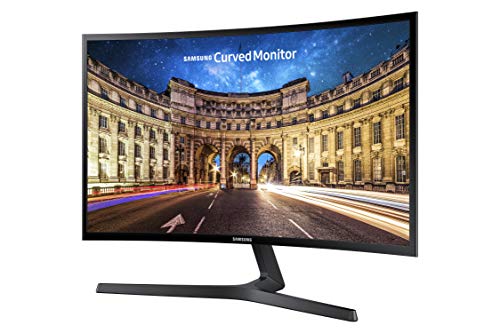
TL;DR: The Samsung CF396 delivers a 23.5‑inch 1800R curved VA panel with 3000:1 contrast, AMD FreeSync and eye‑comfort features at a budget‑friendly $116.99, though its 60 Hz refresh limits high‑speed gaming.
The monitor’s most eye‑catching spec is its 1800R curvature paired with a VA panel that features a 3000:1 static contrast ratio, giving deep blacks and vivid colors on a 23.5‑inch screen. At just 6.83 lb, it’s one of the lighter options in the lineup, making desk rearrangements effortless.
Compared with the six other Samsung models in this roundup, the CF396 is noticeably smaller and lighter. The S39C and LC27F390 both carry 27‑inch panels and weigh over 11 lb, while the Odyssey G55C, G50D, G5 and Odyssey OLED range from 32‑inch screens and weigh between 11.5 lb and 27.8 lb. Refresh‑rate wise, the CF396’s 60 Hz sits below the S39C’s 75 Hz and far beneath the 165‑180 Hz of the Odyssey G55C and G50D, as well as the 240 Hz of the Odyssey OLED. Its typical brightness of 250 cd/m² matches the S39C, but it lacks the higher brightness figures of the higher‑tier models.
Professional reviewers note the monitor’s deep blacks and low input lag, while everyday users praise the AMD FreeSync range of 48‑72 Hz for smooth, tear‑free casual gaming. Many users cite eye‑comfort features like Flicker‑Free and Eye Saver Mode for reducing fatigue during long sessions. Many point out the fixed 60 Hz refresh rate and the lack of height adjustment or swivel, which can feel limiting for competitive or office use.
Pros
Cons
Best for: Budget‑conscious buyers seeking a reliable entry‑level option
Avoid if: You need advanced features or professional‑grade performance
TL;DR: The Samsung Odyssey G5 delivers a 34‑inch 1000R curved VA panel with 165 Hz refresh, 1 ms response and AMD FreeSync, but its limited tilt stand and modest 250 cd/m² brightness may deter color‑critical users.
The standout feature is its 34‑inch ultra‑wide screen that wraps around a 1000R curvature, paired with a VA panel that offers a 2500:1 contrast ratio and HDR10 support. A 165 Hz refresh rate together with a 1 ms response time and AMD FreeSync Premium aim to keep motion smooth and tearing low.
Compared with the other six Odyssey models, the G5 sits in the middle of the performance band: it matches the G55C’s 165 Hz refresh but trails the G50D’s 180 Hz and the OLED’s 240 Hz. Its 250 cd/m² brightness is on par with the S39C and LC27F390, yet lower than the G50D’s 350‑nit panel. At 12.3 pounds, it’s lighter than the G50D (16.3 lb) and the OLED (27.8 lb) but a bit heavier than the G55C (11.5 lb) and the S39C (11.2 lb).
Reviewers love the immersive curve and the fluid gameplay the high refresh and fast response deliver. However, many note the stand’s limited tilt range of –2° to 18° and the occasional input‑lag feel in certain modes. The monitor also includes eye‑care tools such as Low Blue Light, Flicker‑Free and a Low Input Lag mode, which users appreciate during long sessions.
Pros
Cons
Best for: Competitive and casual gamers who want an ultra‑wide, high‑refresh display with strong contrast.
Avoid if: You need professional‑grade color accuracy or extensive ergonomic adjustments.
TL;DR: The Samsung LC27F390 offers a 27‑inch 1800R curved VA panel with 3000:1 contrast, AMD FreeSync and a solid 4.7‑star rating for $199.99, making it a budget‑friendly option for casual gaming and media.
The monitor’s most eye‑catching spec is its 1800 mm curvature radius, which creates a gentle wrap around a 27‑inch screen and helps deliver deep blacks that professional reviewers praise, thanks to its 3000:1 static contrast ratio. With a 4 ms response time and 60 Hz refresh, it’s built for smooth casual play rather than high‑speed competitive titles.
Compared with the other six Samsung models in this roundup, the LC27F390 sits in the middle of the weight range: it’s heavier than the CF396 (6.83 lb) and the S39C (11.2 lb) but lighter than the Odyssey OLED (27.8 lb). Its depth with stand (247.7 mm) is roughly the same as the S39C’s 9.8‑inch depth, while its height with stand (462.5 mm) matches the S39C’s 18.0‑inch height. Refresh‑rate‑wise, it lags behind the S39C’s 75 Hz and the Odyssey G55C’s 165 Hz, positioning it as a more modest performer.
User sentiment highlights the immersive feel of the curvature and the deep black levels, with many reviewers noting the monitor’s “excellent contrast” and “good value” for the price. However, reviewers repeatedly call out the 1080p resolution on a 27‑inch panel for producing blurry text, and they view the 60 Hz panel as limiting fast‑paced games. The inclusion of AMD FreeSync, Eye Saver Mode and Flicker‑Free technology helps reduce tearing and eye strain during longer sessions.
Pros
Cons
Best for: Entry-level buyers or those on a tight budget
Avoid if: You need advanced features or professional‑grade performance
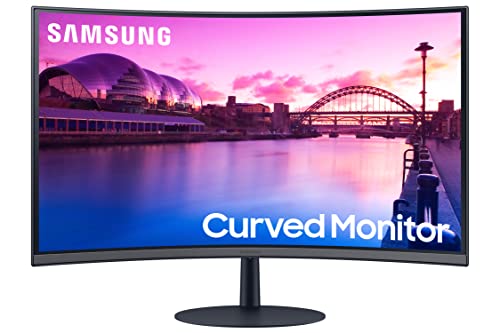
TL;DR: The Samsung S39C offers a 27‑inch 1000R curved VA panel with 75 Hz refresh, AMD FreeSync and built‑in speakers at a budget‑friendly $199.99 price.
The standout feature is its 1000R curvature that wraps around a 27‑inch VA screen, delivering a more immersive field of view than flat panels.
The monitor runs at a 75 Hz refresh rate and a 4 ms (GtG) response time, which together provide a smooth experience for casual gaming.
At 11.2 pounds, it is lighter than the Samsung LC27F390 (13.0 pounds) and comparable in size, while the Odyssey G55C pushes a 165 Hz refresh rate and weighs 11.5 pounds. The CF396 is noticeably lighter at 6.83 pounds but has a smaller 23.5‑inch screen. Compared with the Odyssey G50D’s 180 Hz panel, the S39C’s 75 Hz is modest, yet it still outperforms the Odyssey G5’s 60 Hz baseline.
User feedback highlights the curve’s ability to reduce eye strain and make media feel deeper, and many appreciate the smooth 75 Hz FreeSync experience. However, reviewers note that the 1080p resolution on a 27‑inch display can look soft up close, and reviewers often describe the built‑in 5 W speakers as thin on bass. The tilt‑only stand also limits ergonomic adjustments.
Technically, the monitor delivers a 3000:1 static contrast ratio and 250 cd/m² brightness, paired with a 16.7‑million‑color VA panel and 178°/178° viewing angles. It supports AMD FreeSync, Eye Saver Mode, Flicker‑Free technology, and a Game Mode, while the 3‑sided borderless design and fabric‑textured back add a sleek look. Connectivity includes HDMI, DisplayPort and a 3.5 mm audio jack.
Pros
Cons
Best for: Budget‑conscious buyers seeking a reliable entry‑level option
Avoid if: You need advanced features or professional‑grade performance
Breakdown
Samsung Odyssey G50D 32-inch
Pros
Samsung Odyssey OLED
Pros
Cons
Samsung Odyssey G55C
Pros
Samsung CF396
Pros
Based on scoring data and product specs
Personalized picks
Best Overall Pick
Samsung Odyssey G50D 32-inch
Best ValueBest for: Buyers willing to invest in a proven, high-quality option
Samsung Odyssey OLED
Best for: Audiophiles and enthusiasts seeking premium sound quality and advanced features
$899.99+$470.00 vs winner
Skip Samsung S39C if…
You need advanced features or professional-grade performance
Samsung’s Odyssey G50D takes the top spot as the best Samsung gaming monitor, thanks to its 32‑inch QHD panel, a brisk 180 Hz refresh rate and a lightning‑fast 1 ms (GtG) response time—all for a list price of $291.44. The monitor also earns a solid 4.5‑star rating from 733 reviewers, and its 350‑nit brightness combined with FreeSync Premium and G‑Sync Compatibility keeps motion smooth and ghosting minimal.
The runner‑up is the Odyssey OLED, which shines when you crave an ultra‑wide, cinematic gaming experience. Its 49‑inch 32:9 OLED screen delivers a staggering 1,000,000:1 contrast ratio, 99 % DCI‑P3 color gamut and a blistering 240 Hz refresh rate, making it ideal for immersive simulators or high‑end esports titles.
For tighter budgets, the Samsung CF396 at $116.99 offers an entry‑level option that still provides decent visual performance. If you want a step up without stretching to OLED, the Odyssey G55C at $279.49 balances price and features nicely. And for those willing to invest in premium visuals, the Odyssey OLED remains the top choice with its OLED panel and 3‑year warranty.
Pick the Odyssey G50D today for the best value and performance in Samsung’s gaming lineup.
The Samsung Odyssey G50D, priced at $291.44, delivers a 180 Hz refresh rate, 1 ms response time, and HDR 400 support, making it a strong value proposition. Its combination of FreeSync Premium, G‑Sync compatibility and an adjustable stand provides most of the high‑end features at a fraction of the cost.
No reviews yet — be the first to share your experience.
Please sign in to leave a review



