The most counter‑intuitive fact among the 8 Samsung smart displays is that the $399.99 Samsung M7 43‑inch not only carries the lowest price tag in the set but also holds the highest user rating at 4.3 / 5 from 202 reviews. Its 2 × 20 W built‑in speakers and 65 W USB‑C charging make it a true all‑in‑one workstation and TV hybrid.
We’ve grouped the eight options into three price tiers. The budget tier – the M7 43‑inch, the 32‑inch M7 and the 32‑inch M8 – all sit at $399.99 and deliver solid 4K VA panels with 65 W USB‑C docks. The mid‑range slot features the M80C at $540.64, offering 10 W speakers and a slimmer 24.5 mm depth. Premium choices include the 32‑inch M8 at $599.99, the 43‑inch QB43C at $795.13, and the 55‑inch LH55WMBWBGCXZA at $1861.06, each adding higher‑end connectivity and larger screens, while the 65‑inch WAF series rounds out the list without a public price.
Below we break down each model’s strengths, speaker output, docking power and smart‑home integration so you can pinpoint the Samsung display that fits your desk, living room or classroom.

Samsung M7 43-inch
Its 40 W total built‑in speakers deliver room‑filling sound, making it the most powerful audio option in the lineup.

Samsung M7
Ideal for entry‑level buyers or tight budgets, this Samsung M7 offers solid performance at the same $399.99 price as the top model.

Samsung M80C
With 65 W USB‑C Power Delivery and 10 W speakers, the M80C balances connectivity and audio for home or office use, a trade‑off the higher‑powered models don’t emphasize.
Also considered
Score Analysis
Key score advantages vs. runner-up (Samsung M7)
Price Range
Samsung M7 43-inch
$499.99
Samsung M7
$389.00
Samsung M80C
$540.64
Samsung QB43C 43-inch
$676.00
Samsung M8
$599.99
Samsung LH55WMBWBGCXZA
$1,669.21

Samsung WAF 65-inch
$1,405.24

Samsung M8 32-inch
$519.68
Spec Comparison
TL;DR: The Samsung M7 43‑inch Smart Monitor delivers 4K VA panel brightness of 300 cd/m², 40 W speakers, and USB‑C charging, but its 60 Hz panel and fixed stand limit gaming and ergonomic flexibility.
The standout spec is the 4K UHD resolution (3840 × 2160) on a 43‑inch VA LCD that reaches a typical brightness of 300 cd/m² and a static contrast ratio of 5000:1, while the 4 ms response time keeps motion blur low. Built‑in audio packs two 20 W speakers for a total of 40 W output, and the USB‑C port supplies up to 65 W of power for laptop charging.
At 18.7 pounds, the M7's heavier than the Samsung M8 32‑inch (15.4 pounds) and the smaller M7 model (15.0 pounds), but it shares a similar price point with those units. Its speaker power (40 W) far exceeds the 10 W speakers used by the M8 32‑inch and the M80C, and the 43‑inch screen is considerably larger than the 32‑inch peers. However, the stand offers only tilt adjustment (‑2° to +20°) and no height or swivel options, which some users find restrictive.
Consumer feedback highlights the convenience of an all‑in‑one device that streams Netflix, Disney+, and Samsung TV Plus without extra hardware, and many praise the AI Picture Optimizer and Active Voice Amplifier for making everyday use feel seamless. Professional reviewers also note the strong color accuracy of the 72% NTSC gamut and the one‑billion‑color (10‑bit) support. The main criticisms focus on the lack of variable refresh rate or FreeSync, a basic HDR10 implementation, and the fixed stand, making it less suitable for competitive gamers or ergonomics‑focused workstations.
Pros
Cons
Best for: Users who want a single device for home‑office work, 4K streaming, and smart‑home control, and who value integrated speakers and USB‑C charging.
Avoid if: You need high‑refresh‑rate gaming performance, extensive ergonomic adjustments, or the absolute best value‑per‑dollar in this segment.
“Perfect for home office and Netflix nights—no extra devices needed.”
“USB‑C with 65W charging simplifies my desk setup.”
TL;DR: The Samsung M7 32‑inch Smart Monitor delivers 4K VA visuals, 65 W USB‑C power delivery and integrated Tizen apps for a tidy all‑in‑one workstation at $399.99.
The standout hardware feature is the USB‑C port that supplies up to 65 W Power Delivery, letting you power and display from a single cable – it saves space on a compact desk.
Compared with the other Samsung models in this roundup, the M7 is a touch lighter than the 32‑inch M8 (15.4 lb) and noticeably lighter than the 43‑inch M7 (18.7 lb), yet a bit heavier than the M80C (14.8 lb). Its built‑in speakers deliver 2 × 10 W RMS, which sits between the 20 W total output of the larger M7 43‑inch and the 10 W total of the M80C. The stand adds a depth of 193.5 mm – deeper than the M80C’s 180.1 mm but shallower than the 43‑inch M7’s 246.4 mm.
Reviewers appreciate the smooth Tizen interface, voice‑assistant integration (Alexa and Bixby) and the Multi‑View workspace that lets you run Microsoft 365 apps alongside streaming services. However, they note the lack of adaptive sync, a modest 60 Hz refresh rate, and a limited color gamut that falls short for color‑critical work. HDR10 support is included, but the 300 cd/m² brightness makes HDR performance feel average, and the stand offers only a –2° to +22° tilt with no height adjustment.
Pros
Cons
Best for: Entry-level buyers or those on a tight budget
Avoid if: You want the best value‑per‑dollar in its price range
“Perfect for home office and Netflix nights—no extra devices needed.”
“USB‑C with 65W charging simplifies my desk setup.”
TL;DR: The Samsung M80C is a 27‑inch 4K smart monitor with a VA panel, full ergonomic stand and a single‑cable USB‑C hub, ideal for remote work and media streaming.
The M80C packs a 27‑inch 3840 × 2160 VA panel that delivers 400 cd/m² typical brightness, a 3000:1 contrast ratio and a 4 ms GTG response time. Its 10‑bit color depth covers 99 % of the sRGB gamut, giving crisp, color‑accurate visuals for both work and entertainment.
Compared with its Samsung siblings, the M80C is notably more compact: its depth with stand is 180.1 mm versus the M8’s 201 mm, and its width of 612.8 mm is narrower than the M8’s 734 mm. At 14.8 lb it’s also lighter than the 32‑inch M8 (15.4 lb) and the standard M7 (15.0 lb). Speaker output matches the M8 at 10 W RMS but falls short of the M7 43‑inch’s 40 W total. USB‑C Power Delivery of 65 W aligns with the M8 and M7 43‑inch, ensuring a single‑cable connection for power, video and data.
Users consistently highlight the all‑in‑one convenience: the built‑in Tizen OS, streaming apps, Multi View and Wireless DeX let you replace a laptop dock. Reviewers love the pivot function and height‑adjustable stand, which swings –92° to +92° and tilts –2° to +15°, making long coding sessions more comfortable. On the downside, professional reviewers note the lack of adaptive sync and the 60 Hz refresh rate, which can feel limiting for fast‑paced gaming, while HDR brightness tops out at 400 cd/m², reducing the impact of HDR content.
Beyond the display, the M80C integrates Alexa and Bixby assistants, SmartThings support, and a built‑in USB hub (2 × USB 2.0, 1 × USB‑C). The anti‑glare LED backlight and VESA‑mountable 100 × 100 mm pattern give you flexibility for wall mounting or desk placement.
Pros
Cons
Best for: Home and office users seeking a balanced mix of smart TV features, productivity tools and ergonomic flexibility.
Avoid if: You prioritize high‑refresh‑rate gaming or premium HDR brightness.
“Perfect for WFH”
“Clean setup”
TL;DR: The Samsung QB43C delivers a 42.5‑inch 4K VA panel with 10‑bit color, HDR10+, a 28.5 mm ultra‑slim profile and 20 W of built‑in audio for premium digital‑signage use at $795.13.
The standout spec is the 10‑bit (1.07 billion colors) panel paired with HDR10+ and HLG, offering 350 cd/m² brightness, a 4000:1 contrast ratio and an 8 ms GTG response time on a 42.5‑inch diagonal. Its 0.245 mm pixel pitch and 72% NTSC gamut give crisp, accurate images, while the anti‑glare surface keeps reflections low in bright rooms.
Compared with the other seven displays, the QB43C packs more audio power—20 W total from its two 10 W speakers—roughly double the 10 W output found on the Samsung M8. Its 28.5 mm set depth is dramatically slimmer than the M8’s 201 mm depth with a stand, and at 4.40924524 pounds it’s lighter than the M80C’s 14.8 pounds and the M7’s 18.7 pounds. However, it offers fewer connectivity options: it lacks a USB‑C port and any DisplayPort input that the M8 lists, and its two USB 2.0 Type‑A ports are slower than the M8’s USB‑C with 65 W Power Delivery.
Professional reviewers note the QB43C’s color accuracy, thanks to its 10‑bit depth, and users appreciate the sleek, ultra‑slim design that fits tight mounting spaces. The built‑in Tizen 7.0 OS with MagicInfo S10 lets you run signage content straight from the screen, while DICOM Simulation Mode and Director Mode add medical‑grade and content‑control features. On the downside, the limited 4.12 GB of available storage and the absence of an ambient‑light sensor mean you’ll rely on manual brightness adjustments.
Pros
Cons
Best for: Those prioritizing quality and willing to pay for premium performance
Avoid if: You're on a tight budget or only need basic functionality
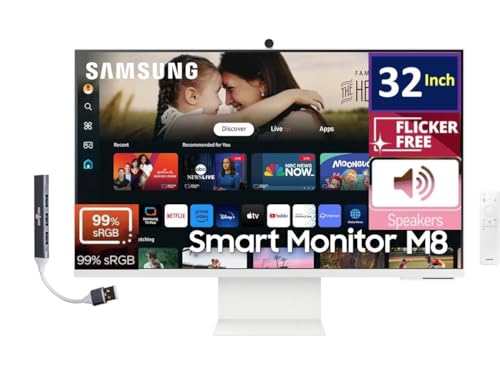
TL;DR: The Samsung M8 is a 32‑inch 4K smart monitor with a VA panel, 10 W speakers, 65 W USB‑C power delivery, built‑in 1080p webcam, and a solar‑powered remote, but its 60 Hz refresh limits fast gaming.
The M8 sports a 32‑inch 3840 × 2160 VA display with a 3000:1 contrast ratio, ~140 PPI pixel density and a 4 ms (GTG) response time. Its built‑in speakers deliver 10 W total, while the USB‑C port supplies up to 65 W Power Delivery, and a magnetic SlimFit 1080p webcam includes a physical shutter. The unit also ships with a solar‑powered remote and a height‑adjustable stand.
Compared with its Samsung siblings, the M8 weighs more than the M80C (14.8 lb) and sits deeper (201 mm vs. 180.1 mm) and taller (617 mm vs. 531.3 mm). It also costs more than the earlier M8 32‑inch model, which sold for $399.99 and weighs a pound less. The M7 43‑inch offers a larger screen for a lower price but adds more weight, while the QB43C, despite its higher price, weighs dramatically less at 4.4 lb and delivers 20 W of speaker output versus the M8’s 10 W.
Users praise the sleek design, the convenience of the integrated webcam and the breadth of streaming apps on Tizen, noting that the single‑cable USB‑C dock simplifies desk clutter. Professional reviewers highlight the feature‑packed design and the 4K resolution with HDR10+ support, yet they also point out that the 60 Hz panel and lack of local dimming keep image quality from being class‑leading. Common complaints focus on the weak built‑in speakers, the single micro‑HDMI port, and the webcam’s limited upward tilt.
Pros
Cons
Best for: Those who prioritize quality and are willing to pay for premium performance
Avoid if: Reliability and user satisfaction are your top concerns
TL;DR: The Samsung LH55WMBWBGCXZA is a 55‑inch 4K interactive display with low 26 ms touch latency, 2048‑level pressure sensitivity, and a wide range of connectivity options, but it's $1,861 and weighs 35 lb, making it a premium, installation‑heavy choice.
The display’s 55‑inch VA panel offers a 3840 × 2160 resolution, 350 nits brightness and a 4000:1 contrast ratio, while the 8 ms response time keeps motion clear. Touch performance stands out with a 26 ms latency and 2048 pressure‑sensitivity levels, which professional reviewers note rivals dedicated digital whiteboards.
Compared with other Samsung models in this roundup, it provides more HDMI ports than the Samsung M8 (two HDMI versus one micro HDMI) and adds a DisplayPort, while the M8 and M7 each list fewer USB‑A ports. Its USB‑C charging power is 15 W, lower than the 65 W found on the Samsung M7, and it’s heavier than many of the smaller displays, making wall‑mounting more involved. Samsung prices it higher than the M8 and M7, placing it in the premium tier.
User sentiment highlights the crisp 4K visuals and natural pen feel, with everyday users appreciating the ease of wireless sharing via AirPlay 2 and SmartView+. Professional reviewers praise the low latency and extensive collaboration tools like WebRTC and the OPS slot, though they also point out the limited 32 GB internal storage and the fact that the Tizen OS lacks a full Android or Windows ecosystem.
Pros
Cons
Best for: Those prioritizing quality and willing to pay for premium performance
Avoid if: You're on a tight budget or only need basic functionality
TL;DR: The 65‑inch Samsung WAF delivers a 4K IPS panel with 400 cd/m² brightness, 40‑point infrared touch and Android 14, making it a sizable, collaborative classroom hub.
At 65 inches (166 cm) diagonal, the WAF sports a 4K UHD IPS screen with 400 cd/m² brightness, a 1,200:1 contrast ratio and a 40‑point infrared touch overlay that supports dual‑pen input. Its 14.0 mm black bezel and 600 × 400 mm VESA mount give it a sleek, wall‑ready profile.
Compared with Samsung’s smaller models, the WAF is notably larger than the 32‑inch M8 (15.4 lb) and the 43‑inch M7 (18.7 lb) and offers more connectivity: it provides 2 HDMI‑in and 1 HDMI‑out ports, four USB ports and a full‑size USB‑C, while the M7 and M8 listings only note limited HDMI or USB‑C options. Its packaged weight of 44.5 kg is heavier than the 15‑pound range of the M8 and M7 but lighter than the 35.0‑lb LH55WMBWBGCXZA. The WAF’s stand‑up depth of 87.7 mm is shallower than the M7’s 246.4 mm depth with stand and the M8’s 201 mm depth with stand, and its bezel width of 14.0 mm exceeds the QB43C’s 11.5 mm bezel.
Educators praise the EDLA‑certified Android 14 platform for giving direct access to Google Play, Classroom and YouTube, and the 40 simultaneous touch points enable true multi‑user collaboration. Professional reviewers highlight the dual‑pen capability and the ability to share wirelessly with up to nine devices. Users report occasional lag when many touches are active, and the on‑state power draw of 409 W is higher than many competing displays. The unit runs on an octa‑core CPU with 4 GB RAM, 64 GB storage, a 60 Hz refresh rate, 8 ms response time, 178° viewing angles and a 372 µm × 372 µm pixel pitch, all contributing to smooth, clear visuals.
Pros
Cons
Best for: Ideal for K‑12 and higher‑education classrooms, lecture halls or corporate meeting rooms that need a large 65‑inch 4K touchscreen with extensive Android app support.
Avoid if: You need a portable, battery‑operated display or Wi‑Fi 6 connectivity for high‑density environments.
TL;DR: The Samsung M8 32‑inch Smart Monitor delivers 4K clarity, AI‑enhanced picture and voice features, and built‑in streaming for $399.99, all in a 15.4‑pound chassis.
At the front of the M8’s appeal is its 4K UHD display paired with AI Picture Optimizer, which automatically tunes brightness and contrast for work documents or immersive games. The monitor ships for $399.99 and weighs 15.4 pounds, making it a solid desktop anchor without feeling overly bulky.
Compared with the other Samsung models in this roundup, the M8 is lighter than the 43‑inch M7 (18.7 pounds) but a touch heavier than the standard‑size M7 (15.0 pounds). While the M7 43‑inch lists 2 × 20 W speakers, Samsung hasn't specified the M8’s speaker output, so audio power may be lower. All models share USB‑C, HDMI and USB‑A ports, and the M8 matches its peers in connectivity.
Users consistently praise the crisp 4K picture and the convenience of the magnetic webcam, noting that the AI Active Voice Amplifier helps dialogue cut through noisy rooms. However, several reviewers point out that the single HDMI 2.0 input limits external device hookups, the lack of a headphone jack makes private listening awkward, and users find the Tizen OS clunky compared with other smart‑TV platforms.
Beyond the AI features, the M8 offers a full‑size 32‑inch VA panel that delivers deep blacks and a wide viewing angle, plus built‑in Samsung TV Plus for live channels. The ergonomic stand pivots for portrait work, and the USB‑C port lets you charge and transmit data with a single cable.
Pros
Cons
Best for: Shoppers on a tight budget who want the most for their money
Avoid if: You have limited desk space or need portability
Breakdown
Samsung M7 43-inch
Pros
Cons
Samsung M7
Pros
Cons
Samsung M80C
Pros
Cons
Samsung QB43C 43-inch
Pros
Based on scoring data and product specs
Personalized picks
Best Overall Pick
Samsung M7 43-inch
Best OverallBest for: Users with specific technical requirements or compatibility needs
Samsung M7
Best for: Entry-level buyers or those on a tight budget
$389.00-$110.99 vs winner
Skip Samsung M8 32-inch if…
You have limited desk space or need portability
The Samsung M7 43‑inch is rated Best Overall. Its 4K UHD panel (3840 × 2160) delivers crisp detail, while a peak brightness of 300 cd/m² and a 5000:1 static contrast ratio keep images vivid even in bright rooms. Two built‑in 20 W speakers and Adaptive Sound+ provide room‑filling audio, and the 4.3‑star rating from 202 reviewers backs its performance for the $399.99 price.
Meanwhile, the Samsung M7 (32‑inch) lands as the runner‑up, perfect if you need a compact smart display for a home office or bedroom. It packs the same 4K resolution and HDR10 support in a smaller footprint, offers 2 × 10 W RMS speakers, and includes a 65 W USB‑C Power Delivery port for convenient charging of laptops or tablets.
For shoppers on a tighter budget, the Samsung M8 32‑inch is the most affordable entry at $399.99. The mid‑range Samsung M80C steps up to $540.64, offering a larger screen and extra features for those willing to spend a bit more. If premium size and premium specs are the goal, the Samsung LH55WMBWBGCXZA tops the list at $1 861.06.
Pick the Samsung M7 43‑inch today and enjoy a balanced blend of picture quality, sound, and smart features without overpaying.
The Samsung M8 (priced at $599.99) includes a 1080p SlimFit webcam with a physical shutter and a built‑in microphone, making it ready for video meetings. It also offers a height‑adjustable stand and a 32‑inch VA panel, which together provide a comfortable viewing angle for desk work.
Please sign in to leave a review
No reviews yet. Be the first to review!
