⚡ Quick Answer
Smart deadbolt locks have moved from niche gadgets to everyday front‑door solutions. In our roundup we compare 11 models that span three price tiers – budget picks like the Veise VE012W and Teeho TE012W, mid‑range options such as the Philips Smart Lock, and premium contenders including the eufy Smart Lock S230 and Philips Wi‑Fi Smart Lock. Prices stretch from $49.98 for the Veise to $186.48 for the Philips Wi‑Fi model, so you have choices no matter how much you want to spend.
The eufy S230 lands at $159.99 with a 4.3‑star rating from nearly 2,000 reviewers, and it packs a blend of features for its price. It supports fingerprint, keypad, mobile‑app and physical‑key entry, auto‑locks, and carries an IP65 rating that guards against rain and dust. Security‑focused specs include BHMA certification, AES‑128‑bit encryption, a tamper alarm, and an emergency power port, while Alexa and Google Assistant integration let you lock or unlock by voice. It also tolerates temperatures from –30 °C to 70 °C, making it suitable for most climates.
We'll break down how each lock performs across its price tier, weighing factors like installation time, battery longevity and biometric capacity. By the end you’ll know which model aligns with door type, ecosystem and security priorities.

eufy Smart Lock S230
Its 10000 mAh battery capacity ensures long‑term power, complementing its proven brand confidence and feature set.

Teeho TE012W
Ideal for budget‑conscious renters, the Teeho TE012W delivers essential smart features at $55.99—about $104 less than the Best Overall eufy model.

Wyze Bolt v2
Stands out with a 50‑code access capacity, offering flexible user codes while staying under $80, a middle ground between the premium eufy and budget Teeho.
Also considered
TL;DR: The eufy Smart Lock S230 offers fingerprint entry in 0.3 seconds, IP65 weatherproofing, and a 10‑15 minute install, delivering strong security and smart‑home integration at a mid‑range price.
The lock’s fingerprint sensor reacts in just 0.3 seconds and the whole unit unlocks within 1 second, making entry feel instant. It’s built from zinc alloy and stainless steel, weighs 3.64 lb, and houses a 10 000 mAh rechargeable battery that powers the lock for up to 12 months of typical use.
Compared with other options in this roundup, the S230 sits toward the premium end: it’s heavier than the Wyze Palm Lock (around 1.9 lb) but a touch lighter than the eufy FamiLock E34 (about 3.70 lb). Its price point is higher than the Wyze Palm Lock and the Philips Smart Lock, yet it offers more durability cycles (250 000) than many competitors that list fewer specs.
Reviewers consistently praise the ultra‑fast fingerprint recognition and the intuitive eufy Security app for remote management. Professional reviewers note the solid BHMA certification and the IP65 rating as strong safeguards against wear and weather. On the downside, users report occasional hiccups with the lock’s 2.4 GHz‑only Wi‑Fi requirement and a battery life that can fall short of the advertised 12‑month span. Rental hosts also mention the lack of native Airbnb integration.
The lock supports Alexa and Google Assistant, features an auto‑lock sensor, a tamper alarm, and an emergency micro‑USB charging port. With a daily usage capacity of 10 uses per day and AES 128‑bit encryption, it balances convenience with robust local security.
Pros
Cons
Best for: Buyers willing to invest in a proven, high‑quality option — the eufy Smart Lock S230 offers Installation Time: 10‑15 minutes
Avoid if: Reliability and user satisfaction are your top concerns
TL;DR: The Wyze Palm Lock offers palm‑vein biometric entry, 50 guest codes, and a 20‑minute DIY install for $129.98, delivering strong security and Wyze ecosystem integration at a mid‑range price.
The standout feature is its palm‑vein recognition, a contactless biometric method that professional reviewers call harder to spoof than fingerprint sensors. The lock weighs 1.9 pounds and fits most standard US doors, while the external assembly measures 156 × 73.5 × 32.5 mm. Installation is DIY‑friendly, taking about 20 minutes with just a screwdriver.
Compared with the other ten locks, the Wyze Palm Lock is lighter than the eufy Smart Lock S230, which tips the scales at roughly 3.64 pounds. Its 20‑minute install is a bit longer than the S230’s 10‑15‑minute setup, but similar to the Wyze Bolt v2’s 15‑minute claim. The IP53 rating provides basic weather resistance, though it falls short of the eufy FamiLock E34’s IP65 rating. Guest‑code capacity matches the Wyze Bolt v2 at 50 codes, and the lock is priced higher than the eufy C33 while remaining below the premium‑priced eufy S230.
User sentiment highlights the convenience of contactless entry and the peace of mind from BHMA3 certification, which signals rigorous testing against slams, twists, and splashes. Reviewers also appreciate the dual‑battery system: a main removable pack lasting about six months and a backup that sustains operation for two weeks. However, several owners note that the USB‑C emergency charging cable is not included, meaning you’ll need to source a cable separately.
Beyond the biometric scanner, the lock incorporates a built‑in gyroscope for auto‑lock detection, millimeter‑wave radar that only powers on when presence is detected, and anti‑peep protection for PIN entry. It connects via Wi‑Fi, works with Alexa and Google Assistant, and integrates seamlessly with Wyze video doorbells and other Wyze ecosystem devices.
Pros
Cons
Best for: Those prioritizing quality and willing to pay for premium performance — the Wyze Palm Lock offers Installation Time: 20 minutes
Avoid if: You need advanced features or professional‑grade performance
TL;DR: The Tapo DL100 delivers a backlit keypad, 200 access codes and up to 10‑month battery life for just $55.99, making it a solid budget smart deadbolt.
The standout spec is the ability to store up to 200 custom access codes, far exceeding the 100‑code limits seen on peers like the Veise VE012W and Philips Smart Lock. Its backlit tactile keypad, USB‑C emergency power port and built‑in activity log add layers of convenience and security without raising the price.
At 1.51 lb, the DL100 is lighter than the Teeho TE012W (over 2 lb) and the IBLOG Smart Deadbolt (around 2.26 lb), yet only slightly heavier than the Philips model (1.4 lb). It also undercuts many rivals on price, landing firmly in the budget tier while still offering Wi‑Fi, Bluetooth and voice‑assistant integration—features that pricier units often reserve for higher tiers.
Reviewers consistently praise the lock’s “multiple unlock methods” and the inclusion of 2 backup keys, noting that the keypad’s PIN masking and backlit keys make night‑time entry painless. Professional reviewers highlight the AES encryption and BHMA Grade 3 certification as strong security credentials. Users do point out that the lack of fingerprint recognition—available on the Veise model—means you’ll rely on codes or voice commands, and the AA‑battery design requires periodic replacement rather than a built‑in rechargeable pack.
Technical extras include an IP54 rating for exterior protection, automatic locking after failed attempts, and seamless integration with Alexa, Google Home and Samsung SmartThings. Battery life stretches to up to 10 months in Bluetooth mode and 7 months in Wi‑Fi mode, which is respectable for a non‑rechargeable solution.
Pros
Cons
Best for: Shoppers on a tight budget who want the most for their money — the Tapo DL100 offers Backup Keys: 2 included
TL;DR: The eufy Smart Lock C33 costs $99.99, offers integrated Wi‑Fi, adaptive fingerprint access, and an 8‑12‑month AA‑battery life in a compact 5.12‑inch‑high deadbolt.
What sets the C33 apart is its built‑in Wi‑Fi that lets you lock or unlock the door from the eufy app without a separate bridge, plus a fingerprint sensor that learns the grip of each user for one‑handed entry. Its dimensions—7.24 inches long, 6.06 inches wide, and 5.12 inches high—give it a solid presence while still fitting most standard doors.
At $99.99, the C33 sits above the Wyze Bolt v2 ($79.98) and Philips Smart Lock ($74.99) but under the Wyze Palm Lock ($129.98), positioning it in the mid‑range price tier. Compared with the IBLOG Smart Deadbolt, the C33 is shorter (5.12 inches vs ≈6.29 inches) yet noticeably wider (6.06 inches vs ≈1.85 inches), giving it a broader surface for the back‑lit anti‑peeping keypad. Its 15‑minute, no‑drill installation matches the quick setup of several peers while offering a more comprehensive Wi‑Fi connection.
Users consistently praise the adaptive fingerprint system for quick, reliable entry and love the privacy mode that blocks exterior access with a red light. Professional reviewers note the seamless app experience and the convenience of remote control, but they also point out that the BHMA Grade 3 rating falls short of the higher security standards found in premium locks. The reliance on eight AA alkaline batteries means you’ll need to replace them roughly once a year, and some owners report occasional keypad lag in low light. The lock does not support Matter or Apple Home, which may limit future smart‑home expansion.
Pros
Cons
Best for: Families, renters, Airbnb hosts, and small businesses that want a keyless deadbolt with Wi‑Fi control and adaptive fingerprint convenience – the lock measures Height: 5.12 inches.
Avoid if: You require the highest security rating (Grade 1) or integrated video doorbell functionality.
TL;DR: The Wyze Bolt v2 packs an AI‑learning fingerprint scanner, 0.3‑0.5 s unlock time and built‑in Wi‑Fi for $79.98, delivering solid security and quick setup without a hub.
The standout feature is the AI self‑learning fingerprint scanner, which adapts to cold or sweaty hands and unlocks in 0.3‑0.5 seconds. It also stores up to 50 access codes, offers hardware encryption, and carries a BHMA Grade 2 security certification.
Compared with other locks in this roundup, the Wyze Bolt v2 is heavier than the Philips Smart Lock (1.4 lb) and the Veise VE012W (1.68 lb), but lighter than the IBLOG Smart Deadbolt (2.26 lb). Its 8‑month battery life matches the eufy Smart Lock C33’s 8‑12 month range, while the lock’s built‑in Wi‑Fi removes the need for an external hub that some peers require.
Users consistently praise the reliable fingerprint entry and the 15‑minute installation, noting that the tempered‑glass keypad’s anti‑peep and anti‑glare surface feels durable. The main complaint is the auto‑lock timer’s lack of door‑closed detection, which can engage on an open door. Additionally, the lock runs on eight AA batteries, a higher count than models that use four.
The unit measures 156.5 mm × 72 mm × 17.3 mm (external) and weighs 1134 g (2.5 lb). It supports Bluetooth 5.3, has a 16 ft setup range, and meets an IP53 rating for splash resistance, making it suitable for most exterior doors.
Pros
Cons
Best for: Value-conscious buyers seeking quality at $79.98 — the Wyze Bolt v2 offers Installation Time: 15 minutes
Avoid if: You need advanced features or professional‑grade performance, such as 5 GHz Wi‑Fi or auto‑lock with door‑closed detection
TL;DR: The eufy FamiLock E34 uses 99.9% accurate palm‑vein recognition that unlocks in 0.6 seconds, packs a 10 000 mAh battery, and earns a Grade 1 security rating for $179.98.
The standout feature is its palm‑vein biometric system, which the manufacturer claims delivers 99.9% accuracy and opens the door in just 0.6 seconds. That speed and reliability make it feel futuristic compared with the more common fingerprint or keypad methods found on many smart deadbolts.
In size it’s notably more compact than the Philips Wi‑Fi Smart Lock, whose height is listed at 4.4 inches versus the FamiLock’s 41.5 mm and length of 167.9 mm versus 12.87 inches. It’s also heavier than the Wyze Palm Lock’s 1.9 lb, yet about the same weight as the eufy Smart Lock S230 at roughly 3.7 lb. The IP65 rating gives it better water and dust protection than the Wyze Palm Lock’s IP53, and its 10 000 mAh primary battery outpaces peers that list smaller or no capacity.
Users repeatedly praise the convenience of a quick, contact‑less unlock and the peace of mind from a long‑lasting battery—5760 hours of operation according to the specs. Professional reviewers note the dual‑power design (10 000 mAh primary plus a 750 mAh backup) as a strong safety net during outages. However, several reviewers mention that the palm‑vein scanner works only for unlocking, not for locking, and that the 50‑user storage limit can feel restrictive for larger households.
Beyond biometrics, the lock supports auto‑lock, Bluetooth, built‑in Wi‑Fi, and Matter over Thread, letting you control it via Apple Home, Google Home, Alexa, or SmartThings without a separate gateway. It carries an ANSI/BHMA Grade 1 security rating and offers a physical key fallback, satisfying both tech‑savvy and traditional security expectations.
Pros
Cons
Best for: Those prioritizing quality and willing to pay for premium performance — the eufy FamiLock E34 offers IP Rating: IP65
Avoid if: You're on a tight budget or only need basic functionality, or you require biometric locking in addition to unlocking
TL;DR: The Teeho TE012W smart deadbolt packs hub‑free 2.4 GHz Wi‑Fi, a 0.3‑second fingerprint scan for 20 users, and a 365‑day battery life, all for $55.99.
The lock’s standout feature is its built‑in Wi‑Fi that works directly with the KK Home App, so you won’t need a separate hub. It also supports five unlock methods—fingerprint, app, keypad, physical key, and voice—plus a 0.3‑second fingerprint recognition time for up to 20 users. Battery life is rated for 365 days, and the default auto‑lock engages after 30 seconds.
At about 2.03 pounds, the TE012W is heavier than the Tapo DL100 (1.51 pounds) and the Veise VE012W (1.68 pounds), yet lighter than the IBLOG Smart Deadbolt (2.26 pounds). Its adjustable backset of 60‑70 mm matches the range offered by the Wyze Bolt v2, and the lock’s depth of 130 mm fits standard door preparations. Like the Tapo DL100, it includes two backup keys, but it supports up to 100 passcodes compared with the Tapo’s 200‑code limit.
Professional reviewers praise the fast fingerprint scan and the long‑lasting 365‑day battery, noting that the lock’s IP55 rating and AES‑128 encryption give it solid weather resistance and data security. Users appreciate the silent mode for night‑time entry and the anti‑peeping keypad that hides entered digits. The main complaints revolve around the requirement for eight AA batteries (not supplied) and the restriction to 2.4 GHz Wi‑Fi, which can be a drawback for homes that rely on 5 GHz networks. The BHMA Grade 3 certification also signals that the lock is intended for residential use rather than commercial settings.
The TE012W’s aluminum‑alloy body, backlit keypad, and away mode round out a feature set that feels premium for its price tier. With AES‑128 encryption, IP55 weather resistance, and tamper alarm support, it offers a balanced mix of security and convenience without the need for extra bridges or hubs.
Pros
Cons
Best for: Entry‑level buyers or those on a tight budget — the Teeho TE012W offers Battery Life: 365 days
Avoid if: You need powerful performance or professional‑grade features
TL;DR: At $49.98, the Veise VE012W smart deadbolt packs built‑in Wi‑Fi, 0.2‑second fingerprint access and IP55 weather resistance, delivering solid security for budget‑focused homeowners.
The lock’s most eye‑catching spec is its hub‑free Wi‑Fi connectivity, which lets you lock or unlock from the Veise app without an extra bridge. Its 20‑fingerprint capacity works in just 0.2 seconds, and the unit meets an IP55 rating, so rain or dust won’t stop it. At 1.68 lbs the deadbolt measures 3.0 inches deep, 5.1 inches high and 1.3 inches wide, fitting standard door preparations.
Compared with the other ten models, the Veise sits in the middle of the weight range—lighter than the Teeho TE012W (about 2.03 lbs) and the IBLOG Smart Deadbolt (2.26 lbs) but a touch heavier than the Tapo DL100’s 1.51 lbs. Like Tapo and Teeho, it includes two backup keys. Its fingerprint capacity of 20 is lower than IBLOG’s 100‑fingerprint limit and Philips’s 50‑Palm‑ID slots, so power users may prefer those rivals.
Reviewers consistently applaud the quick fingerprint scanner and the convenience of remote app control. Professional reviewers note the convenience of built‑in Wi‑Fi and the breadth of access options, but they also point out that the lock requires eight AA batteries, which aren’t supplied, and that the documentation doesn’t spell out maximum PIN or fingerprint limits beyond the listed 20 and 100 entries. Installation is described as straightforward as long as you double‑check the electronic pairing steps.
The lock carries a BHMA/ANSI Grade 3 certification and operates from –4 °F to 131 °F (‑20 °C to 55 °C), making it suitable for most climates. An anti‑peeping keypad and auto‑lock feature add extra peace of mind, while Alexa and Google Assistant compatibility let you lock doors with voice commands.
Pros
Cons
Best for: Entry-level buyers or those on a tight budget — the Veise VE012W offers Fingerprint Capacity: 20
Avoid if: You need powerful performance or professional‑grade features
“does it all”
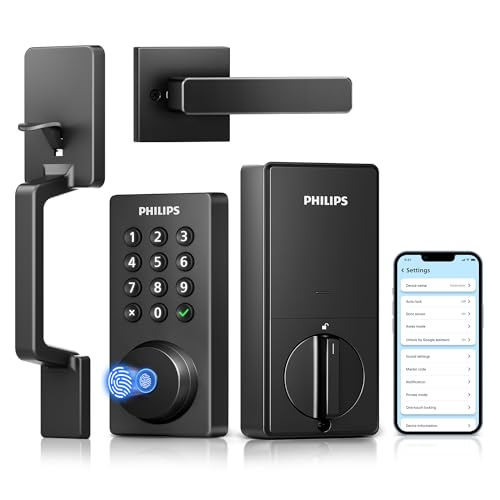
TL;DR: The Philips Smart Lock costs $74.99, weighs 1.4 Pounds, and offers Wi‑Fi, Bluetooth, and palm‑vein entry for up to 50 users with an auto‑lock window of 10‑180 seconds.
The lock’s standout feature is its palm‑vein recognition, which lets up to 50 users unlock the door without touching a keypad. It also includes built‑in Wi‑Fi, so you can manage access from the Philips Home Access app without a separate hub, and an adjustable auto‑lock range of 10‑180 seconds. At 1.4 Pounds and a door‑bore size of 2‑1/8 Inches, the unit feels solid yet fits standard deadbolt cutouts.
Compared with the other ten locks in this roundup, the Philips model sits in the mid‑price range and is lighter than the IBLOG Smart Deadbolt (which weighs over 2 Pounds) but a bit heavier than the Tapo DL100 (around 1.5 Pounds). Its biometric capacity of 50 IDs exceeds Veise’s 20‑fingerprint limit, though it falls short of IBLOG’s 100‑fingerprint capacity. Like the Wyze Bolt v2, it supports Bluetooth, but only the Philips lock offers a built‑in doorbell with auto‑illumination.
Professional reviewers note the seamless remote‑control experience and praise the advanced palm‑vein technology for adding a layer of security beyond traditional PINs. Users appreciate real‑time notifications and the convenience of a physical keypad plus voice‑assistant support via Alexa or Google. The most common drawback mentioned is the reliance on eight AA batteries with no emergency USB power option, and some households find the 50‑user biometric limit restrictive.
Pros
Cons
Best for: Value-conscious buyers seeking quality at $74.99 — the Philips Smart Lock offers Door Bore Size: 2-1/8 Inches
Avoid if: you need emergency USB power or require capacity for more than 50 biometric IDs
TL;DR: The Philips Wi‑Fi Smart Lock blends built‑in Wi‑Fi, fast 0.3‑second fingerprint entry and voice‑assistant support into a sizable deadbolt, though it carries a premium $186.48 price tag.
What really stands out is the lock’s hub‑free Wi‑Fi. It connects directly to your home network on 2.4 GHz, letting the Philips Home Access app control the deadbolt from anywhere without an extra bridge. Pair that with a fingerprint scanner that reads a print in 0.3 seconds with a 99% success rate, and you have a lock that feels both swift and secure.
In our 11‑product roundup, the Philips model sits on the higher end of the price spectrum, making it pricier than many of the alternatives such as the compact Wyze Bolt v2, which is notably smaller in width and length. Its dimensions—12.91 inches wide and 12.87 inches long—give it a more substantial presence on the door compared with the slimmer profiles of several peers. While the eufy Smart Lock S230 tops our rankings for delivering premium security and value, the Philips lock leans into a larger form factor and built‑in Wi‑Fi as its differentiators.
Reviewers appreciate the convenience of app‑based sharing and the ability to unlock by voice through Amazon Alexa or Google Assistant. Professional observers highlight the AES128 encryption and local data storage as solid security foundations, yet they note the ANSI/BHMA Grade 3 rating is only basic for residential use. Users also flag the reliance on eight AA batteries without an emergency power backup, which can be a concern for households that don’t monitor battery health closely. The lock stores up to 20 fingerprints and 100 user PINs, which works well for small families but may feel limiting for larger homes.
Additional technical touches include an IP53 waterproof rating, auto‑lock timing that can be set between 10 and 180 seconds, and alarms for low battery, wrong entry attempts, and jam detection. The lock supports both manual and “Away” security modes, giving you flexibility in how you protect your entry point.
Pros
Cons
Best for: Those prioritizing quality and willing to pay for premium performance — the Philips Wi‑Fi Smart Lock offers Fingerprint Capacity: 20
Avoid if: You're shopping on a tight budget — it's priced at $186.48
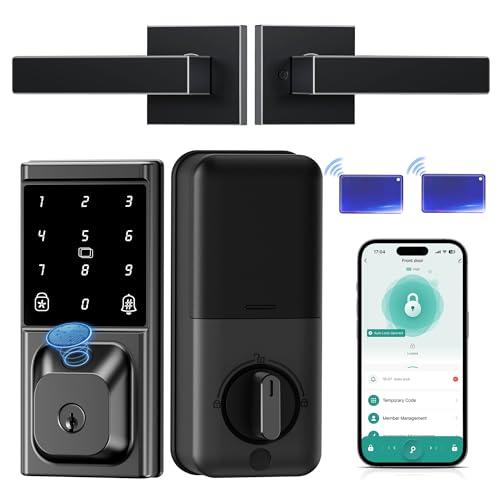
TL;DR: The IBLOG Smart Deadbolt offers 100‑fingerprint slots, 0.3‑second recognition, five unlock methods and IP54 protection at $69.99, earning a perfect 5‑star rating from 28 reviewers.
One of the lock’s standout specs is its fingerprint capacity: it stores up to 100 fingerprints and reads each in just 0.3 seconds, making quick, keyless entry practical for families or shared households. The unit also features anti‑peep technology and an anti‑pry alarm, adding layers of security beyond the standard deadbolt.
At 2.26 pounds, the IBLOG unit is heavier than the Philips Smart Lock (1.4 lb), the Tapo DL100 (1.51 lb), and the Veise VE012W (1.68 lb), and also exceeds the Teeho TE012W’s 2.03 lb. Its 100‑fingerprint slots outnumber the Veise’s 20‑fingerprint capacity, and its Bluetooth range of 8–10 m provides reliable nearby control without a built‑in gateway. Priced at $69.99, it undercuts the eufy Smart Lock C33’s $99.99 price, positioning it firmly in the budget tier.
Customers appreciate the keyless entry and the two lever handles that come with the package, noting that the lock feels solid and the fingerprint response is snappy. Professional reviewers highlight the convenience of five unlocking methods and the sleek grey‑black finish. The lock carries an 18‑month warranty, a 30‑day money‑back guarantee, and lifetime after‑sales support, which adds confidence for first‑time smart‑lock buyers.
The lock meets an IP54 rating, guarding against dust and splashes, and includes auto‑lock timing that you can set anywhere between 1 and 180 seconds. You can choose from privacy, silent, passage or one‑touch lock modes, and the automatic door‑swing detection works for both left‑ and right‑hand doors, making installation straightforward with its no‑drill design.
Pros
Cons
Best for: Entry-level buyers or those on a tight budget — the IBLOG Smart Deadbolt offers Fingerprint Capacity: 100
Avoid if: You want the best value-per-dollar in its price range
Breakdown
eufy Smart Lock S230
Pros
Cons
Teeho TE012W
Pros
Wyze Bolt v2
Pros
IBLOG Smart Deadbolt
Pros
Cons
Based on scoring data and product specs
Personalized picks
Best Overall Pick
eufy Smart Lock S230
Best OverallBest for: Buyers willing to invest in a proven, high-quality option — the eufy Smart Lock S230 offers Installation Time: 10-15 minutes
Teeho TE012W
Best for: Entry-level buyers or those on a tight budget — the Teeho TE012W offers Battery Life: 365 days
$55.99-$94.00 vs winner
Skip eufy FamiLock E34 if…
You're on a tight budget or only need basic functionality
We’re naming the eufy Smart Lock S230 the clear winner. It earns top marks thanks to its IP65 weatherproof rating, BHMA certification and AES 128‑bit encryption, which together give solid, industry‑standard protection. The lock also offers four access methods—fingerprint, keypad, mobile app and a physical key—so you can choose the most convenient way to get in, and its 8 640‑hour (12‑month) rechargeable battery means you won’t be swapping cells every few weeks.
The runner‑up is the Teeho TE012W, a great pick if you need a lock that pairs easily with a smartphone app and a backlit keypad for night‑time entry. It supports Alexa and Google Assistant, includes Bluetooth for hub‑free connectivity, and its IP55 rating keeps it safe from the elements. With true auto‑lock, AES‑128 encryption and capacity for 20 fingerprint users, it balances convenience and security at a modest price.
For shoppers on a tighter budget, the Veise VE012W delivers reliable basic functionality at the lowest price point. If you’re looking for a solid mid‑range option, the Wyze Bolt v2 offers a good mix of features without breaking the bank. And for those willing to invest in premium tech, the Philips Wi‑Fi Smart Lock provides high‑end connectivity and design for the most demanding smart‑home setups.
Pick the eufy Smart Lock S230 today and lock your home with confidence.
The S230 brings a higher IP rating of IP65 versus the TE012W’s IP55, a BHMA Certified security grade compared with the TE012W’s BHMA Grade 3, and it includes an emergency power port while the TE012W does not. Those premium features justify the $159.99 price tag over the TE012W’s $55.99.
No reviews yet — be the first to share your experience.
Please sign in to leave a review