⚡ Quick Answer
Smart displays with adjustable ergonomic stands serve as the hub of many home‑office and media setups. To help you navigate the market, we compared 5 models that span three price tiers, from budget‑friendly to premium offerings, each blending a monitor’s productivity with built‑in streaming apps.
On the budget side, the Acer CS242Y retails for $159.99 and the LG 27U511SA for $166.99, both featuring webOS and adjustable stands that let you fine‑tune height and tilt. Moving up, the KTC A32Q8 sits at $239.99, delivering a 31.5‑inch 4K panel and 65 W USB‑C power delivery for laptop docking. The premium tier includes LG’s 27U730SA at $299.99, features a 27‑inch 4K UHD IPS screen, 350 cd/m² brightness, and a 4.2/5 rating from 86 reviewers, while Samsung’s M8 commands $599.99 and offers HDR10+ support.
Ratings range from 3.7 to 4.2 stars, and each unit brings a different balance of size, resolution, and connectivity. In the sections that follow, we’ll break down how those trade‑offs play out for specific use cases.

LG 27U730SA
Its 65W USB‑C Power Delivery lets you power laptops directly, a key feature for a 27‑inch display.

LG 27U511SA
Ideal for budget‑conscious shoppers, this 27‑inch model comes in at $166.99—about $133 less than the top‑rated LG 27U730SA.

KTC A32Q8
It features built‑in 2 W speakers per channel, offering audio without extra hardware—a perk the other two lack.
Also considered
Score Analysis
Key score advantages vs. runner-up (LG 27U511SA)
Price Range
LG 27U730SA
$347.10
LG 27U511SA
$199.99
KTC A32Q8
$239.99

Acer CS242Y
$159.99
Samsung M8 M80D
$599.99
Spec Comparison
TL;DR: The LG 27U730SA offers a 27‑inch 4K IPS panel with 350 cd/m² brightness, 65 W USB‑C power delivery and an iF Design Award‑winning ergonomic stand for work and streaming.
The standout feature is the USB‑C single‑cable connection that delivers up to 65 W of power while carrying video and data, letting you power a laptop and display a 3840×2160 image over one cord. Coupled with a 27‑inch IPS screen, HDR10 support and a 1000:1 static contrast ratio, the monitor feels like a compact smart TV for a home office.
At 15.65 pounds, it’s lighter than the KTC A32Q8 (17.0 pounds) but heavier than the Acer CS242Y (5.73 pounds). Its depth of 210.82 mm is far shallower than KTC’s 60.0 in depth, and its width of 612.94 mm is narrower than KTC’s 45.0 in width. Brightness at 350 cd/m² outshines KTC’s 250 cd/m² and Acer’s 250 nits, while the 60 Hz refresh rate matches KTC’s but is lower than the 100 Hz rate of the LG 27U511SA. The monitor offers only two HDMI ports, and it doesn't include adaptive‑sync features, which restrict high‑performance use.
Reviewers appreciate the iF Design Award, noting the monitor’s sleek three‑side borderless look and the flexible stand that swivels, pivots and tilts. However, users frequently mention that the 350 cd/m² peak brightness can feel dim in very bright rooms, and the 60 Hz/5 ms panel isn’t suited for fast‑motion gaming. Professional commentary also points out the absence of gaming‑focused specs such as high refresh rates or adaptive sync.
Beyond the display, the LG 27U730SA runs webOS with built‑in apps like Netflix, Prime Video and Disney+, and supports AirPlay 2 and Bluetooth. Dynamic Tone Mapping AI automatically optimizes HDR content, while automatic light detection adjusts brightness in real time. The Magic Remote and ThinQ Home Dashboard let you control smart‑home functions directly from the screen.
Pros
Cons
Best for: Those prioritizing quality and willing to pay for premium performance
Avoid if: You need advanced features or professional‑grade performance
TL;DR: The LG 27U511SA is a 27‑inch Full HD IPS smart monitor with a 100 Hz panel, built‑in 5 W speakers, and webOS, offering decent performance for streaming and casual work at a budget price.
This model packs a 27‑inch IPS screen that delivers 1920 × 1080 resolution and a 100 Hz refresh rate, which professional reviewers note makes motion look noticeably smoother than typical 60 Hz panels. The panel’s contrast ratio of 1300:1 and 178° viewing angles help keep colors consistent across the room, while the integrated dual 5 W speakers provide audible sound without needing external audio gear.
Compared with the other four contenders, the LG weighs 12.3 pounds, making it heavier than the Acer CS242Y (5.73 pounds) but lighter than the KTC A32Q8 (17.0 pounds) and the LG 27U730SA (15.65 pounds). Its typical brightness of 250 nits matches the Acer’s 250‑nit panel, yet falls short of the LG 27U730SA’s 350 cd/m², so it may feel dimmer in very bright rooms. The monitor offers two HDMI ports and two USB‑A ports, a feature set that rivals the competition while keeping the design simple.
User feedback highlights the 100 Hz refresh and the webOS “MyView Smart Monitor” interface as strong points for streaming services and remote‑work tasks. However, several reviewers point out that the Full HD resolution on a 27‑inch display can look less sharp for detailed work, and the 250‑nit typical brightness is low for well‑lit environments. The stand only tilts, so users seeking full height adjustment will need a separate VESA mount (100 × 100 mm) to achieve a more ergonomic setup.
Pros
Cons
Best for: Casual users who want an all‑in‑one smart display for streaming, video calls, and light productivity without breaking the bank.
Avoid if: You need high‑resolution (4K) detail, very bright room performance, or extensive ergonomic adjustments such as height and swivel.
TL;DR: The KTC A32Q8 offers a 31.5‑inch 4K VA screen with 3000:1 contrast, Google TV 11, and 65 W USB‑C charging, but its 2 W speakers and 60 Hz refresh limit gaming.
The monitor packs a 3840 × 2160 VA panel that delivers 250 cd/m² brightness, 83.3% DCI‑P3 colour gamut and a static contrast ratio of 3000:1. HDR10, HLG and AV1 support the panel, and the built‑in Google TV 11 OS brings Netflix and voice control via “Hey Google” without extra hardware.
At 17.0 lb and 60.0 in deep, it's heavier and far deeper than the LG 27U730SA (15.65 lb, 210.82 mm depth) and the Acer CS242Y (5.73 lb, 9.65 in depth). Its 45.0 in width also exceeds the 612.94 mm width of the LG 27U730SA. Brightness is lower than the LG 27U730SA’s 350 cd/m², matching the 250 cd/m² of the Acer CS242Y. The 2 W per‑speaker output is weaker than the Acer’s 3 W speakers, while the 60 Hz refresh rate matches the LG 27U730SA but falls short of the LG 27U511SA’s 100 Hz panel.
Reviewers praise the sharp 4K image, deep blacks from the high contrast ratio and the convenience of Google TV’s built‑in apps. Professional reviewers note the solid docking capability via the USB‑C port delivering up to 65 W power. Common complaints focus on the under‑powered speakers, occasional dead‑pixel sightings and the 60 Hz refresh ceiling that feels sluggish in fast‑action games. The unit also includes Wi‑Fi 6, Bluetooth 5.2 and Adaptive‑Sync 48‑60 Hz VRR for smoother playback when supported.
Pros
Cons
Best for: Most users seeking a balanced, mainstream option
Avoid if: Reliability and user satisfaction are your top concerns
“Works as advertised”
“One of the most affordable 32″ 4K displays”
TL;DR: The Acer CS242Y is a 23.8‑inch IPS smart display with 99% sRGB coverage, a fully adjustable stand, three HDMI ports, and built‑in streaming apps, all for $159.99.
Its ergonomic stand stands out: you can raise the screen up to 6.5 in, swivel, pivot, and tilt from –5° to 35°, letting you find a comfortable viewing angle without a separate mount. At just 5.73 pounds, the monitor is light enough to move around a home office easily.
Compared with the other four contenders, the CS242Y weighs the least—significantly lighter than the LG 27U511SA (12.3 pounds), KTC A32Q8 (17.0 pounds) and LG 27U730SA (15.65 pounds). Its 250 nits brightness matches the LG 27U511SA and KTC A32Q8, but falls short of the LG 27U730SA’s 350 cd/m². The 60 Hz refresh rate is lower than the LG 27U511SA’s 100 Hz, though it lines up with the KTC and LG 27U730SA models. With three HDMI ports, it offers more wired connectivity than the peers, which don’t list a HDMI count.
Users appreciate the built‑in Netflix and YouTube apps and the smooth webOS interface, calling the all‑in‑one design a convenience boost for remote work. Professional reviewers highlight the vibrant IPS panel and accurate 99% sRGB color coverage, while everyday owners note the screen’s anti‑glare surface and the ease of adjusting the stand. Most common complaints cite the modest 250 nits brightness in bright rooms and the 60 Hz/14 ms combo that limits fast‑paced gaming.
Additional technical notes list a 1000:1 contrast ratio, 178° viewing angles, a 6‑axis color‑adjustment suite (Super Sharpness, Flicker‑free, Bluelight Shield Pro, Low Dimming, ComfyView, Dark/Black Boost), 3 W speaker output, off‑mode power draw of 0.3 W, standby power of 0.5 W, and a construction that uses 85% post‑consumer recycled plastics.
Pros
Cons
Best for: Entry-level buyers or those on a tight budget
Avoid if: Competitive gamers, users needing high brightness for very bright environments, or anyone requiring HDR support
“versatile upgrade for smart homes with stunning visuals”
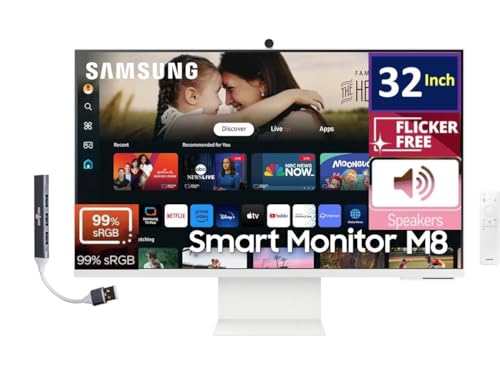
TL;DR: The Samsung M8 M80D offers a 32‑inch 4K HDR10+ panel, built‑in smart TV apps and a 5 Gbps USB‑C dock, but its $599.99 price and modest 400 cd/m² brightness keep it niche.
The standout feature of the M8 is its 32‑inch 4K UHD screen paired with HDR10+ and 99% sRGB coverage, delivering sharp, colour‑accurate images for media creation and streaming. Samsung also bundles a Docztorm Dock that supports up to 5 Gbps over USB‑C, turning the monitor into a single‑cable workstation.
At $599.99, the M8 sits at the top of the price range, making it pricier than the LG, KTC, Acer and other contenders in this roundup. It weighs about 15.9 lb, which is comparable to the LG 27U730SA’s 15.65 lb but lighter than the KTC A32Q8’s 17.0 lb and substantially heavier than the Acer CS242Y’s 5.73 lb. While the M8 lists fewer hardware specs than its peers, its integrated smart‑TV platform adds functionality that many competitors lack.
Consumer feedback highlights the convenience of built‑in streaming apps and the USB‑C docking capability, yet reviewers repeatedly note the limited stand ergonomics and the single HDMI port as drawbacks. Professional reviewers also point out that the typical 400 cd/m² brightness can struggle in very bright rooms, and the 60 Hz refresh rate caps gaming performance.
Beyond the screen, the monitor supports Wi‑Fi 5, Bluetooth 5.2 and a 100 mm × 100 mm VESA mount, giving you flexibility for wall‑mounting or a separate stand. The unit’s weight with stand measures 7.2 kg (15.9 lb), confirming a solid build that feels stable on a desk.
Pros
Cons
Best for: Hybrid home‑office and streaming enthusiasts who want a compact 4K display with smart TV capabilities.
Avoid if: You need high‑refresh‑rate gaming, extensive connectivity like DisplayPort, or a tighter budget.
Breakdown
LG 27U730SA
Pros
LG 27U511SA
Pros
KTC A32Q8
Pros
Cons
Acer CS242Y
Pros
Cons
Based on scoring data and product specs
Personalized picks
Best Overall Pick
LG 27U730SA
Best ValueBest for: Those prioritizing quality and willing to pay for premium performance
LG 27U511SA
Best for: Shoppers on a tight budget who want the most for their money
$199.99-$147.11 vs winner
Skip Samsung M8 M80D if…
You're on a tight budget or only need basic functionality
LG 27U730SA leads with its 27‑inch 4K UHD panel (3840 × 2160 px), 350 cd/m² brightness and up to 90% DCI‑P3 colour coverage, plus HDR10 support. The stand offers height, tilt, swivel and pivot adjustments, and the USB‑C port delivers 65 W power‑delivery for a single‑cable laptop setup. At $299.99 it also earns a solid 4.2 / 5 rating from 86 reviewers.
The runner‑up, LG 27U511SA, shines when you need an affordable Full HD smart monitor for everyday browsing and streaming. It retails for $166.99, carries a 3.9 / 5 rating from 206 reviews, and sports a 27‑inch 1920 × 1080 IPS panel with a 100 Hz refresh rate. Its tilt‑only adjustment keeps the setup simple and budget‑friendly.
For tighter budgets, the Acer CS242Y at $159.99 offers the lowest entry price. If you’d like a step up without breaking the bank, the KTC A32Q8 at $239.99 balances cost and feature set—it's a solid mid‑range choice. And for a premium experience, the Samsung M8 M80D at $599.99 delivers top‑tier specs for those willing to invest more.
Pick the LG 27U730SA today and you’ll enjoy a truly ergonomic, high‑resolution smart display.
The LG 27U730SA provides height adjustment, pivot, swivel and tilt, covering every major ergonomic need. By contrast, the Acer CS242Y offers height adjustment, pivot and swivel but a more limited tilt range, and the LG 27U511SA only tilts.
No reviews yet — be the first to share your experience.
Please sign in to leave a review



